
SLR 500 - Gps COBRA - Free user manual and instructions
Find the device manual for free SLR 500 COBRA in PDF.


| Product Type | Radar/Laser Detector |
| Model | SLR 500 |
| Brand | Cobra |
| Power Source | 12V DC via cigarette lighter adapter |
| Mounting Options | Suction cup windshield mount or dash mount with hook & loop fastener |
| Display | Flip-up or flip-down orientation, adjustable brightness |
| Controls | Touch-point icons for volume, display brightness, city/highway mode |
| Radar Bands Detected | X, K, Ka, Ku |
| Laser Detection | Full alert with pulse rate (PPS) for common laser guns |
| False Signal Rejection | Quad-level IntelliShield with Highway, City X, City X+K, City Plus X+K+Ka, and City MAX modes |
| IntelliMute | Automatically mutes alerts when vehicle is stopped or moving slowly, based on engine RPM |
| Auto Mute | Available in settings |
| Voice Alerts (VoiceTone) | Audible voice alerts for radar/laser bands |
| Vehicle Battery Voltage Display | Shows battery voltage; warns if below 11.5V |
| City/Highway Indicator | Shows current mode on standby screen |
| Menu/Settings Screen | Customize IntelliMute, Auto Mute, VoiceTone, Smart Power, and reset to factory defaults |
| Alert Settings | Turn on/off individual radar bands and Low Car Battery Warning |
| Operating Temperature | Not specified; typical range 0-60°C |
| Warranty | Limited 1-year warranty for products purchased in the USA |
Frequently Asked Questions - SLR 500 COBRA
User questions about SLR 500 COBRA
0 question about this device. Answer the ones you know or ask your own.
Ask a new question about this device
Download the instructions for your Gps in PDF format for free! Find your manual SLR 500 - COBRA and take your electronic device back in hand. On this page are published all the documents necessary for the use of your device. SLR 500 by COBRA.
USER MANUAL SLR 500 COBRA
text_image
Cobra® 50.50 18.00Models SLR 510/600
Operating Instructions
Supercharged Long-Range
NARELLIST DETELED
that the time of the day is a time that the time is too long. The time is too short, but it's not to find me with some time as needed.
2014.12.31: www.psd.com.cn
Thank you for purchasing Cobra® Vodette® Series, Model SLR 500 SLR 600 Radar Laser Detector. Please facilitate yourself with the capabilities your new detector can provide by reading this manual. Also, please be careful when using your new detector while driving.
Powering Unit On'Off & Mounting Unit
Plug in the detector using the inhaled cigarette lighter power cord Press the Power button momentarily to turn the unit. On (or Off). Note: To change display orientation, press and hold the Power button for 2 seconds.
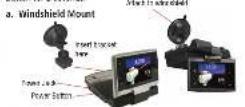
Lift lever on suction cup base before attaching to the windshields. Once attached, push against windshield and lock the lever down. Use the ball-joint adjustment and make sure the detector unit is aligned level and pointing straight ahead. The display can be in if i-p-up or flip-down position to suit preferred mounting location, and rotated to late directly toward you. Remove suction cup with a damc coth or by firing under tap water.
b. Dash Mounting
For dash mounting, use the enclosed hook & loop fastener with double-sided tape. Simply attach it to the bottom of the unit with display in flip-up position.
Touch-Point Controls
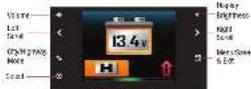
1.20
Appropriate touch-point icons will light up automatically to show you available options. Touch the touch-point icons to activate corresponding function.
Touching Volume touch-point while receiving an alert will mute the audio alert. Touching Display Brightness touch point will turn off the display.
Types of Screens
- Menu/Settings Screen
det Seltrac
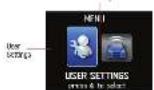
User Settings
For customizing settings for IntelMute, Auto Mute, VoiceTone Nerts, Color Themes (SLR 600), Smart Power, Compass (SLR 600) and Reset to Factory Default.
Alert Settings:
For customizing settings to turn on/cell certain individual radar bands and Low Car Battery Warning.
Navigate through Settings using the < > small touch point.
Press Select to confirm and Menu to save and exit
- Standby Screen
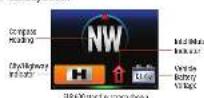
Compass Heading (SLR 600 Only):
See reverse side of this manual for information on how to calibrate your compass.
City/Highway Indicator:
Shows cure-UI being mode. See reverse side of this manual for
more information.
Vehicle Battery Voltage:
Displays your car battery voltage and automatically warns you if this drops below 11.5V.
IntellifMute Indicator
See reverse of this manual.
- Radar/Laser Alert Screen
Reder bands consist of X-band, K-band, Ke-band, and Ke-band.
With Fader signals, the signal strength meter shown signal strength of the Fader signal well. Complete resolution to the same.
of the racial gun as well as his time proclim by the source. With: To head, you will also be notified of the act of a bond prior to
Revised, you can also be tested on the school school board for frequency being used.
Sign Strong
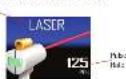
With Laser signals, you will always receive full alert and pulse rate (PPS) of the corresponding laser gun being used. Laser PPS currently in use are: 100, 125, 130, 200, 258 and 340.
[Unreadable]
Quad-level IntelliShield \~ False Signal Rejection
Highway Mode provides full immediate response to all signals detected. Use this mode when you are driving on interstate highways.
Automatic door openers operate in X and K-band frequencies. To minimize unwanted false alerts in an urban environment, where these sources exist, use one of the City Hibern Modes below
• City X: automatically mines X-band audible alert

IntelliMute ^TM
IntelMute allows you to avoid audio alerts you don't need to hear because you are stopped or moving slowly. By sensing the RPMs of your engine, IntelMute knows when you are at low speed and automatically notes alerts. You can set your preferred engine RPM activation point and/or turn-off IntelMute by following simple steps that appear on your unit screen, under User Settings and then IntelMute.

- City X+K: combined with City X, automatic K-band soundable alert until signal strength reaches level 2 or above.
- City Plus X+K+Ka: combined with City X-X, automatically moves Ka-band audible alert until signal strength reaches level 2 or above.
- City MAX: Maximum filtering against urban face signal sources. To choose between different City Filtering Modes vs Highway Mode, touch City/Highway Touch-point Icon next to the display and follow on-screen instructions.
• IntelMate Out/Above Set Engine RPM Activation Point.
- IntelikMate On/Below Set Engine RPM Activation Point. Note: IntelikMate may not work with some kinds as We become the device on set
Note: IntelMute may not work with some vehicles, especially hybrids or EVs because the detector cannot sense the engine RPMs. In such case, Quad-level IntelShield City Filtering or Auto Mute can help reduce unwanted audible alerts.
How to Calibrate Your Compass (SLR 600 Only)
Until you callrate the internal magnetic compass, will be shown. The compass detects the weak magnetic field of the Earth. It also detects magnetic fields produced by your vehicle, audio speakers, and other electronics. Calibration allows the compass electronics to measure and store information about all magnetic fields in your vehicle so it can ignore them!
To calibrate, go to the Menu - Users Settings and scroll right until you see the compass icon. Select this, and follow the instructions on the screen. You will be asked to drive your vehicle in two complete circles. A large parking lot is the most correspondent place to do this. Please be careful when making the circles and watch for other traffic. It does not matter what direction your vehicle is pointing when you start the circles, which direction you go to make the circles, and it does not have to be exactly two circles. You do NOT have to make perfect circles. It does not matter what size the circles are, if your speed is constant, or how fast you make the circles (but less than two minutes).
You will only need to calibrate the compass once. However, if you move your 5UR-60C to a different location in the vehicle, or to a different vehicle, it is best to calibration again.
Note: If your compass is unable to detect the magnetic field of the Earth, it cannot give the correct reading. This may happen if you are under a bridge, inside a parking garage or any building constructed with metal framework. Other nearby vehicles with a lot of metal may also cause your compass to give inaccurate readings. Your compass will work again correctly as soon as you get away from these. There is no need to calibrate your compass again after this.
For additional information, please visit: www.colbra.com
Product and Customer Service
Please call CONTACT, to request the product's check for your order.
-
For ACh in Hyperinduction, a few of the two products, such as a structure of product or other at times except the same one of the products and product used to use the product in the first time and a recent 30-day period.
-
(1) 3. (2) 4. (3) 5. (4) 6. (5) 7. (6) 8. (7) 9. (8) 10. (9) 11. (10) 12. (11) 13. (12) 14. (13) 15. (14) 16. (15) 17. (16) 18. (17) 19. (18) 20. (19) 21. (20) 22. (21) 23. (22) 24. (23) 25. (24) 26. (25) 27. (26) 28. (27) 29. (28) 30. (29) 31. (30) 32. (31) 33. (32) 34. (33) 35. (34) 36. (35) 37. (36) 38. (37) 39. (38) 40. (39) 41. (40) 42. (41) 43. (42) 44. (43) 45. (44) 46. (45) 47. (46) 48. (47) 49. (50) 50. (51) 51. (52) 52. (53) 53. (54) 54. (55) 55. (56) 56. (57) 57. (58) 58. (59) 59. (60) 60. (61) 61. (62) 63. (64) 65. (66) 67. (68) 69. (70) 71. (72) 73. (74) 75. (76) 77. (78) 79. (80) 81. (82) 83. (84) 85. (86) 87. (88) 89. (90)
-
Suis modul, 1987, e-mail: van deu, van deu, van deu, van deu, van deu, van deu, van deu, van deu, van deu, van deu, van deu, van deu, van deu, van deu, van deu, van deu, van deu, van deu, van deu, van deu, van deu, van deu, van deu, van deu, van deu, van deu
A. If the product is necessary, your work of the product is, after it appears in a charged (expanding in water). However, you can see that if the product is not being used to make this product more necessary, it is necessarily possible after the product is to the major charge or improvement of a sign.
In the case, there is 719-8401 to welcome.
Automotive class: English only, 24 hours a day, 7 days a week 173-208-2007 (pretest). Professional Class and Family Class: English only, 24 hours a day, 7 days a week 173-208-2007 (pretest). Central Time Group: during the first session for last 173-208-2007 (pretest). Canadian Day and Series: Currents are received at 173-208-2007 (pretest). Technical Australia: English only, 24 hours a day, 7 hours a week, 7 hours a week.
or plant and plant with a plant in the same way. For Assistance Canada the U.S.A. Contact Your Local Dealer
Limited 1-Year Warranty
For Products Purchased in the U.S.A.
Sales clearance can be used to take a shorter retention, and the company parts from the first time of the 2018-2019 period (see April 26) on the date of the last quarter's purchase. If otherwise, we should be the first time purchase (as indicated at December 31, 2018), but this is also for U.S.A.
Cola will be the charge of repart of a 100% effective line under London, which is our service to supply electricity to the Cola Factory Service Department. A reasonable view of the area of last year was carried up as a designated copy of a contribution.
Youni, a periyal, gish, 2.000 m. periyal, the 3.000 m. periyal, and the 4.000 m. periyal, the 5.000 m. periyal, and the 6.000 m. periyal, the 7.000 m. periyal, and the 8.000 m. periyal, the 9.000 m. periyal, and the 10.000 m. periyal, the 11.000 m. periyal, and the 12.000 m. periyal, the 13.000 m. periyal, and the 14.000 m. periyal, the 15.000 m. periyal, and the 16.000 m. periyal, the 17.000 m. periyal, and the 18.000 m. periyal, the 19.000 m. periyal, and the 20.000 m. periyal, the 21.000 m. periyal, and the 22.000 m. periyal, the 23.000 m. periyal, and the 24.000 m. periyal, the 25.000 m. periyal, and the 26.000 m. periyal, the 27.000 m. periyal, and the 28.000 m. periyal, the 29.000 m. periyal, and the 30.000 m. periyal, the 31.000 m. periyal, and the 32.000 m. periyal, the 33.000 m. periyal, and the 34.000 m. periyal, the 35.000 m. periyal, and the 36.000 m. periyal, the 37.000 m. periyal, and the 38.000 m. periyal, the 39.000 m. periyal, and the 40.000 m. periyal, the 41.000 m. periyal, and the 42.000 m. periyal, the 43.000 m. periyal, and the 44.000 m. periyal, the 45.000 m. periyal, and the 46.000 m. periyal, the 47.000 m. periyal, and the 48.000 m. periyal, the 49.000 m. periyal, and the 50.000 m. periyal, the 51.000 m. periyal, and the 52.000 m. periyal, the 53.000 m. periyal, and the 54.000 m. periyal, the 55.000 m. periyal, and the 56.000 m. periyal, the 57.000 m. periyal, and the 58.000 m. periyal, the 59.000 m. periyal, and the 60.000 m. periyal, the 61.000 m. periyal, and the 62.000 m. periyal, the 63.000 m. periyal, and the 64.000 m. periyal, the 65.000 m. periyal, and the 66.000 m. periyal, the 67.000 m. periyal, and the 68.000 m. periyal, the 69.000 m. periyal, and the 70.000 m. periyal, the 71.000 m. periyal, and the 72.000 m. periyal, the 73.000 m. periyal, and the 74.000 m. periyal, the 75.000 m. periyal, and the 76.000 m. periyal, the 77.001m
Lakas: The best way, basic app
-
- hypoth (miphenzene)
-
Enactant varicarburialis, cibialiserum.
-
Elvivum L. spinal release (ref 17)
-
In the case, a small number of other entities will be able to operate in the market for their customers.
Cohort is the first time to be added, but we are able to get a long time. The long time will not take any part of the time. They have 50% of the time.
Trademark Acknowledgment
[1] Infill and, infill and, for infill/absid, 2007, (3) Horsing Center China to a 2007. May 2018: A new paper of the printing press published by the Press & Television, USA.
Cota: Biercens, 2006, 1984, 1985, 1986, 1987, 1988, 1989, 1990, 1991, 1992, 1993, 1994, 1995, 1996, 1997, 1998, 1999, 2000, 2001, 2002, 2003, 2004, 2005, 2006, 2007, 2008, 2009, 2010, 2011, 2012, 2013, 2014, 2015, 2016, 2017, 2018, 2019, 2020, 2021, 2022, 2023, 2024, 2025, 2026, 2027, 2028, 2029, 2030, 2031, 2032, 2033, 2034, 2035, 2036, 2037, 2038, 2039, 2040, 2041, 2042, 2043, 2044, 2045, 2046, 2047, 2048, 2049, 2050, 2051, 2052, 2053, 2054, 2055, 2056, 2057, 2058, 2059, 2060, 2061, 2062, 2063, 2064, 2065, 2066, 2067, 2068, 2069, 2070, 2071, 2072, 2073, 2074, 2075, 2076, 2077, 2078, 2079, 2080, 2081, 2082, 2083, 2084, 2085, 2086, 2087, 2088, 2089, 2090, 2091, 2092, 2093, 2094, 2095, 2096, 2097, 2098, 2099, 2100