
Silence CM 5510 - Coffee maker MIELE - Free user manual and instructions
Find the device manual for free Silence CM 5510 MIELE in PDF.


| Type | Coffee machine |
| Model | Miele Silence CM 5510 |
| Dimensions (W x H x D) | 241 x 360 x 460 mm |
| Net weight | 9.48 kg |
| Electrical connection | 220-240 V, 50 Hz, 10 A fuse |
| Pump pressure | Max. 15 bar |
| Water container capacity | 1.3 L |
| Bean container capacity | 200 g |
| Waste container capacity | Max. 6 portions of coffee grounds |
| Central spout height adjustment | 80–135 mm |
| Grinder | Steel conical grinder, 5 settings |
| Ground coffee max per portion | 12 g |
| Drink options | Espresso, coffee, cappuccino, latte macchiato, long coffee, Caffè Latte, hot milk, milk froth, hot water, coffee pot (up to 6 cups) |
| Additional functions | 2 portions, ground coffee use, profiles (CM 5410/5510/5710), programmable portion size, pre-brewing, brew temperature, Eco mode, timer (15 min – 9 h), system lock, demo mode |
| Cleaning intervals | Daily: water container, waste container, drip tray; Weekly: central spout, brew unit, milk pipework; Monthly: bean container, water filter; As prompted: degrease and descale |
| Descaling | With Miele descaling tablets, approx. 15 min |
| Degreasing brew unit | With Miele cleaning tablets, approx. 15 min, after 200 portions |
| Milk pipework cleaning | Manual or with maintenance program using Miele cleaning agent (approx. 10 min) |
| Safety features | Automatic shut-off, child lock (system lock), hot surface warnings, overheat protection |
| Warranty | 2 years (UK), contact Miele |
| Repairs and spare parts | Only by Miele authorised service technicians, genuine Miele spare parts |
| Energy consumption standby | < 0.5 W |
Frequently Asked Questions - Silence CM 5510 MIELE
User questions about Silence CM 5510 MIELE
0 question about this device. Answer the ones you know or ask your own.
Ask a new question about this device
Download the instructions for your Coffee maker in PDF format for free! Find your manual Silence CM 5510 - MIELE and take your electronic device back in hand. On this page are published all the documents necessary for the use of your device. Silence CM 5510 by MIELE.
USER MANUAL Silence CM 5510 MIELE
Operating instructions Coffee machine
To avoid the risk of accidents or damage to the appliance it is essential to read these instructions before it is installed and used for the first time.
The packaging material used protects the machine during transportation. Please retain the original box and polystyrene pieces so that you can pack the machine securely, should you need to transport it in the future.
Disposing of your old appliance
Electrical and electronic appliances often contain valuable materials. They also contain specific materials, compounds and components, which were essential for their correct function and safety. These could be hazardous to human health and to the environment if disposed of with your domestic waste or if handled incorrectly. Please do not, therefore, dispose of your old appliance with your household waste.
Please dispose of it at your local community waste collection / recycling centre for electrical and electronic appliances, or contact your dealer or Miele for advice. You are also responsible for deleting any personal data that may be stored on the appliance being disposed of. Please ensure that your old appliance poses no risk to children while being stored prior to disposal.
Caring for the environment 2
Warning and Safety instructions.... 6
Product description 15
Controls and indicators 16
Accessories 17
Operation.... 18
Before using for the first time 19
Water hardness.... 21
Filling the water container 22
Filling the coffee bean container 23
Switching on and off 24
Adjusting the central spout to the correct cup height.... 25
Making drinks 26
Making coffee with and without milk.... 26
Milk preparation.... 26
Using milk cartons or bottles 27
Making a coffee....27
Cancelling a drink.... 27
2 portions (sensor control □) 28
Coffee pot.... 28
Making coffee drinks with ground coffee.... 29
Adding ground coffee.... 29
Dispensing hot water (CM 5410, CM 5510, CM 5710)....30
Grinder setting 31
Quantity of coffee, brew temperature and pre-brewing.... 32
Ground quantity.... 32
Brewing temperature.... 32
Pre-brewing the ground coffee.... 32
Portion size 33
Profiles...... 35
Creating profiles 35
Contents
Changing drinks within a profile.... 35
Making drinks stored in a profile 35
Changing the name 35
Deleting a profile 35
Setting when the profile should change (Change profile) 36
Settings 37
Displaying and changing Settings.... 37
Language.... 37
Timer: switch off after 37
Eco mode 37
Info (display information) 37
System lock 🔊 37
Water hardness 37
Display brightness.... 37
Volume.... 37
Factory defaults.... 37
Demo mode (showroom programme) 38
Cleaning and care 39
Overview of cleaning intervals.... 39
Cleaning by hand or in the dishwasher.... 40
Unsuitable cleaning agents 41
Waste container, drip tray and drip tray cover 42
Cleaning the water container 43
Removing and cleaning the water container filter.... 43
Central spout.... 44
Milk pipework 46
Bean container and ground coffee chute.... 46
Cleaning the casing.... 47
Opening the Maintenance menu 47
Rinsing the appliance.... 47
Rinsing the milk pipework 47
Degreasing the brew unit and cleaning the interior.... 49
Descaling the machine 52
Transporting the machine.... 54
Evaporating the coffee machine.... 54
Packing the machine 54
Problem solving guide 55
Messages in the display.... 55
Unusual performance of the coffee machine 58
Unsatisfactory results.... 64
After sales service and warranty 66
Contact in the event of a fault 66
Warranty 66
Saving energy 67
Electrical connection 68
Installation.... 69
Dimensions 70
Technical data.... 71
This coffee machine complies with all the stipulated safety requirements. Inappropriate use can, however, lead to personal injury and material damage.
Read the operating instructions carefully before using the coffee machine. They contain important information on the installation, safety, use and maintenance of the appliance. This prevents both personal injury and damage to the coffee machine.
In accordance with standard IEC 60335-1, Miele expressly and strongly advises that you read and follow the instructions in the chapter on installing and connecting the coffee machine as well as the safety instructions and warnings.
Miele cannot be held liable for injury or damage caused by non-compliance with these instructions.
Keep these operating instructions in a safe place and pass them on to any future owner.
Correct application
This coffee machine is intended for home use. This coffee machine is not intended for outdoor use. This coffee machine must not be used at altitudes above 2000 m. It must only be used as a domestic appliance to make espresso, cappuccino, latte macchiato etc. Any other use is not permitted. This coffee machine can only be used by people with reduced physical, sensory or mental capabilities, or lack of experience and knowledge, if they are supervised whilst using it, or have been shown how to use it in a safe way and recognise and understand the consequences of incorrect operation.
Safety with children
⚠️ Danger of burning and scalding on the dispensing spouts.
Children's skin is far more sensitive to high temperatures than that of adults.
Ensure children do not touch hot surfaces of the coffee machine or place parts of their body under the dispensing spouts.
▶ Install the coffee machine where it is out of the reach of children. Children under 8 years of age must be kept away from the coffee machine and the mains connection cable and plug/socket. Children aged 8 and older may only use the coffee machine without supervision if they have been shown how to use it in a safe manner.
Children aged 8 and older must be aware of the potential dangers caused by incorrect operation.
▶ Please supervise children in the vicinity of the coffee machine and do not allow them to play with it.
▶ Young children must not be allowed to clean the coffee machine at all. Cleaning may only be carried out by children 8 years of age or older under the supervision of an adult.
Remember that coffee and espresso are not suitable drinks for children.
Danger of suffocation! Whilst playing, children may become entangled in packaging material (such as plastic wrapping) or pull the packaging material over their head, presenting the risk of suffocation. Keep packaging material away from children.
Technical safety
A damaged coffee machine is dangerous. Check it for any visible damage before setting it up. Never attempt to use a damaged coffee machine. To avoid the risk of damage to the machine, make sure the connection data (voltage and frequency) on the data plate corresponds to the household supply, before connecting the machine to the mains supply. Consult a qualified electrician if in any doubt. The electrical safety of this coffee machine can only be guaranteed when correctly earthed. It is essential that this standard safety requirement is met. If in any doubt please have the electrical installation tested by a qualified electrician. ▶ Reliable and safe operation of the coffee machine can only be guaranteed if it is connected to the mains electrical supply. Do not connect the machine to the mains electricity supply by a multi-socket adapter or an extension lead. These are a fire hazard and do not guarantee the required safety of the appliance. The coffee machine must not be used in a non-stationary location (e.g. on a ship). ▶ Unplug the machine from the power supply immediately if you notice any damage or smell scorching, for example. ▶ Ensure that the mains connection cable cannot be pinched or damaged by any sharp edges. The mains connection cable should not hang down. Someone could trip over it with the risk of injury and damage the machine. ▶ Only use the coffee machine in rooms where the ambient temperature is between +10 °C and +38 °C. ▶ Position the coffee machine at a height of at least 850 mm from the floor.
Danger of overheating. Please ensure that there is adequate ventilation around the coffee machine. Do not cover the coffee machine with tea towels etc. while it is in use.
If the coffee machine is installed behind a closed furniture front, it may only be used with the furniture door open (see "Installation" for the minimum niche size). Heat and moisture can build up behind the furniture front when closed. This can result in damage to the appliance and/or furniture unit. Do not close the furniture front while the coffee machine is in use. Leave the furniture door open until the coffee machine has cooled down completely.
▶ Protect the coffee machine from water and water spray. Do not immerse the machine in water.
▶ Repairs and other work by unqualified persons to the machine and the connection cable could be dangerous. The manufacturer cannot be held liable for unauthorised work. Repairs may only be carried out by a Miele authorised service technician.
While the machine is under warranty, repairs should only be undertaken by a Miele authorised service technician. Otherwise the warranty is invalidated.
▶ Miele can only guarantee the safety of the machine when original Miele spare parts are used. Faulty components must only be replaced by genuine Miele original spare parts.
The coffee machine must be disconnected from the electricity supply during repair work.
▶ Never open the outer casing of the machine. Tampering with electrical connections or components and mechanical parts is highly dangerous to the user and can cause operational faults or electric shock.
▶ Only use original Miele accessories. If other parts are used, warranty, performance and/or product liability claims will be invalidated.
Correct use
⚠️ Danger of burning and scalding on the dispensing spouts. The liquids and steam dispensed are very hot.
Keep well away from the area underneath the spouts when hot liquids and steam are being dispensed.
Do not touch hot components.
Hot liquid or steam could spatter from the spouts. Ensure that the central spout is clean and fitted correctly.
Water in the drip tray can also be very hot. Take care when emptying it.
▶ Please note the following regarding water:
- The water quality must conform to the requirements for drinking water in the country in which the coffee machine is being used.
- Only use cold, fresh tap water to fill the water container. Hot or warm water or other liquids can damage the coffee machine.
- Change the water every day to prevent a build-up of bacteria.
- Do not use carbonated water.
▶ Only fill the bean container with roasted espresso/coffee beans. Do not fill the bean container with coffee beans which have been treated with additives or with ground coffee.
Do not fill the bean container with any type of liquid.
Do not use green (unroasted) coffee beans or mixtures of coffee beans which contain green coffee beans. Green coffee beans are very hard and still contain residual moisture. These can damage the coffee machine grinder as soon as grinding begins.
Do not use coffee beans which have been treated with caramel, sugar or other substances including sugary liquids. Sugar will damage the coffee machine.
Only fill the coffee chute with ground coffee beans.
Warning and Safety instructions
Do not use any caramelised ready ground coffee. The sugar in the coffee will stick to and block the brew unit of the coffee machine. The cleaning tablets for degreasing the brew unit will not remove this type of deposit. Only use milk without additives. Additives in milk usually contain sugar and this will stick to the milk pipework. If using dairy milk make sure that it has been pasteurised. Do not place flaming alcohol mixtures underneath the central spout. The flames could ignite plastic components and cause them to melt. Do not use naked flames, e.g. a candle, on or near the coffee machine. The coffee machine could catch fire with the risk of the fire spreading. The machine must not be used for cleaning objects.
Cleaning and care
Disconnect the coffee machine from the power supply before cleaning. Clean the coffee machine daily, particularly before using for the first time (see "Cleaning and care"). All parts of the milk system need to be cleaned thoroughly and regularly. Milk contains bacteria which proliferate rapidly with inadequate cleaning. Do not use a steam cleaner to clean this machine. Steam could reach electrical components and cause a short circuit. Descale the coffee machine regularly depending on the water hardness level in your area. Descale the machine more frequently in areas with very hard water. Miele cannot be held liable for damage arising from insufficient descaling, the use of incorrect descaling agent or the use of descaling agent which is not of the appropriate concentration. Degrease the brew unit regularly with Miele cleaning tablets. Depending on the natural oil content of the coffee used, the brew unit can become blocked quite quickly. Used coffee grounds should be disposed of with the organic rubbish or on the compost heap. Do not empty them down the sink, as they could block it.
For machines with stainless steel surfaces:
Do not use sticky notes, adhesive tape, masking tape or other types of adhesive on the stainless steel surfaces. Stainless steel surfaces are susceptible to scratching. Even magnets can cause scratches.
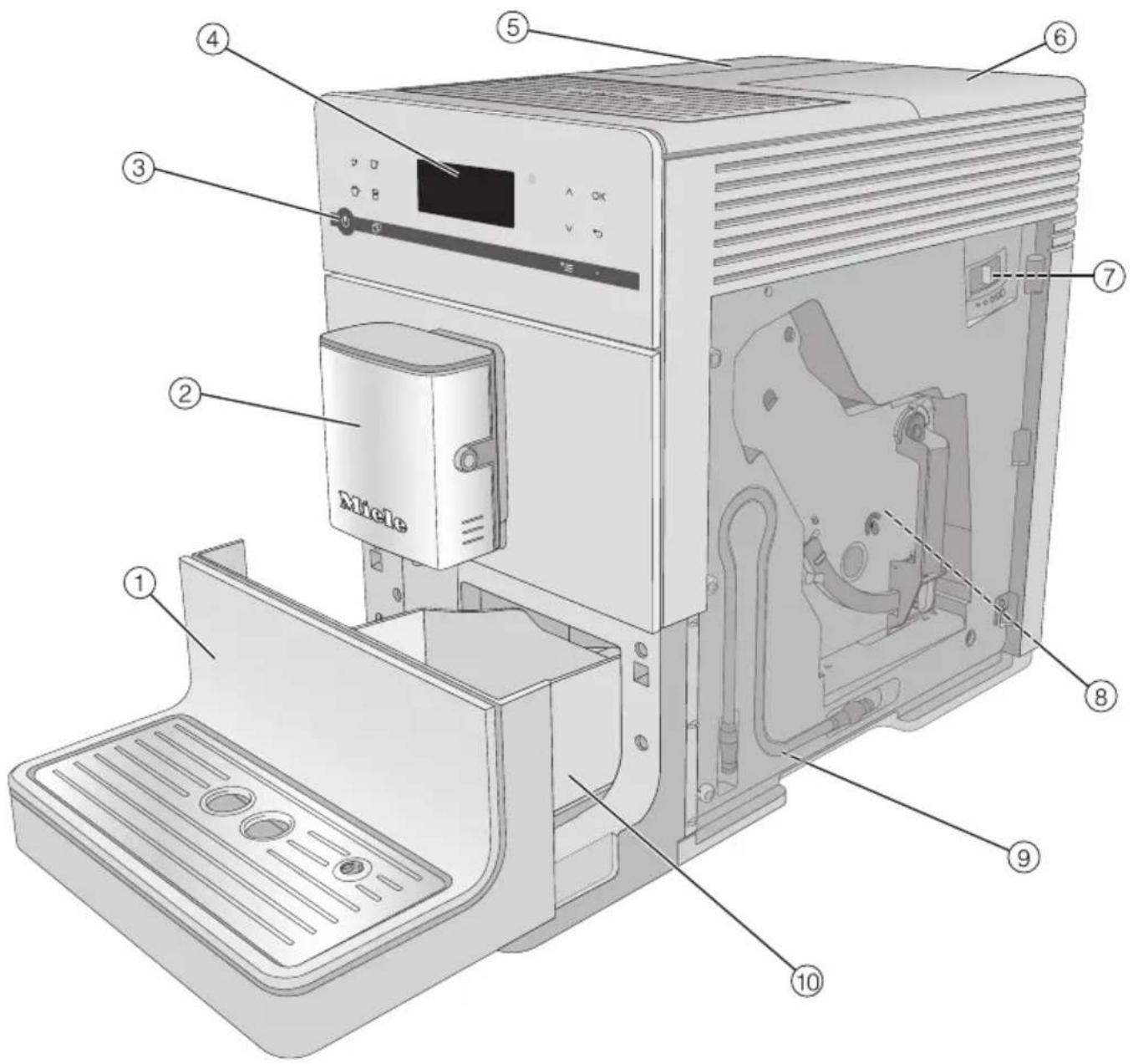
① Lower panel with drip tray cover ② Central spout with Cappuccinatore and hot water spout ③ On/Off button ⏻ ④ Control panel ⑤ Water container ⑥ Bean container and ground coffee chute
⑦ Grinder setting (behind the appliance door) ⑧ Brew unit (behind the appliance door) ⑨ Park position for milk tube ⑩ Drip tray with lid and waste container
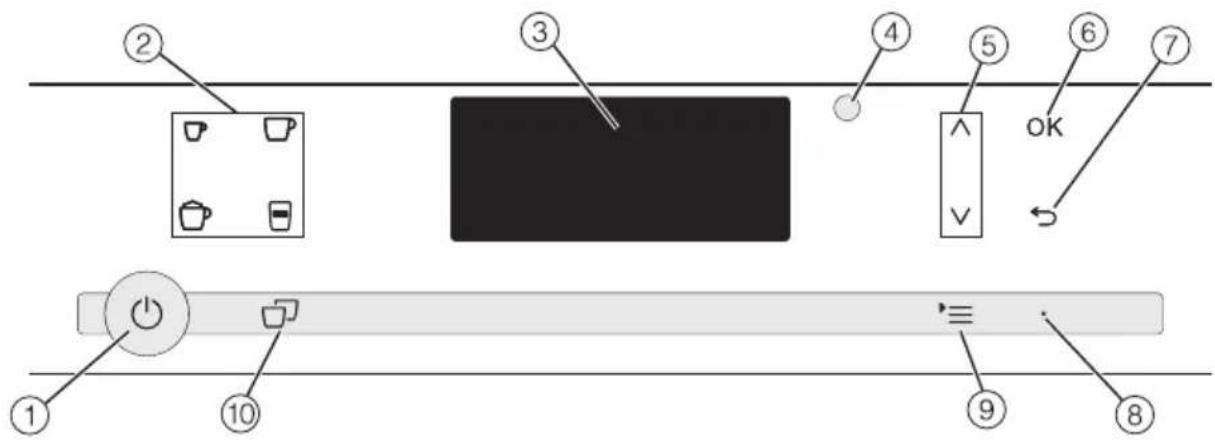
① On/Off button ⏻
For switching coffee machine on and off
② Drink buttons
Making drinks
- □ Espresso
- □ Coffee
- 📐 Cappuccino
- □ Latte macchiato
③ Display
For showing information about the current action or status
④ Optical interface
(For Miele Customer Service Department only)
⑤ Arrow buttons ∧ ∨
For scrolling through lists, selecting entries or changing values
⑥ OK sensor
For confirming display messages and saving settings
⑦ “Back” ⇔ sensor
For returning to the previous menu and cancelling unwanted actions
⑧ LED
Flashes when the appliance is switched on and the display is in energy saving mode
⑨ Sensor control ►
Other drinks
Profiles (CM 5410, CM 5510, CM 5710)
Maintenance
Parameters
Settings
⑩ “2 portions” sensor
For dispensing 2 portions of a drink at once
These products and other useful accessories can be ordered via the Miele webshop, from Miele (see back cover for contact details) or from your Miele dealer.
Accessories supplied
- Starter set "Miele appliance care"
Various cleaning products are supplied depending on model.
- Cleaning brush
for cleaning the milk pipework
Optional accessories
Miele accessories and cleaning and conditioning products are available for your coffee machine.
- Microfibre cloth
for removing finger marks and light soiling
- Cleaning agent for milk pipework
for cleaning the milk system
- Cleaning tablets
for degreasing the brew unit
- Descaling tablets
for descaling the water pipework
- CJ JUG coffee flask
Vacuum flask for coffee or tea (capacity 1 l)
- Milk container with lid
For storing and preparing milk
Sensors
To operate the coffee machine, touch the sensors with your finger.
An audible signal is generated each time a sensor is touched. You can adjust the volume of the signal tones or switch the tones off (see “Settings – Volume”).
Drinks menu
When the following appears in the display, you are in the drinks menu: Select drink.

Miele
Select drink
You can find more drinks in the Other drinks menu ( * ≡ sensor control).
Selecting a menu and navigating within a menu
To select a menu, touch the sensor control ⇒ .
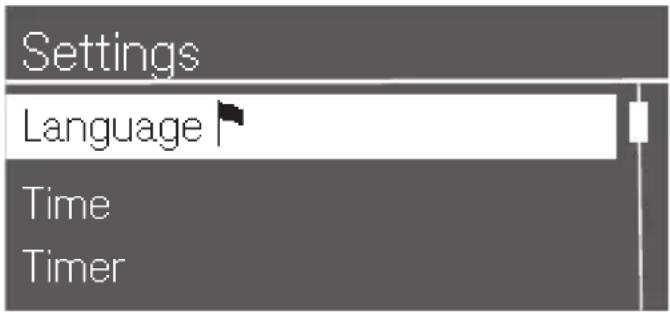
You will then be able to start an action or change settings in the menu. A bar on the right-hand side of the display indicates that further options or text are available.
To select an option, keep pressing the arrow buttons ∧ and ∨ until the menu option you want is highlighted.
Touch the OK sensor control to confirm your selection.
The setting which is currently selected in a list will have a tick √ beside it.
Exiting a list or cancelling an action
To exit the current menu, touch the ↔ sensor control.
Before using for the first time
Remove any labels from the machine.
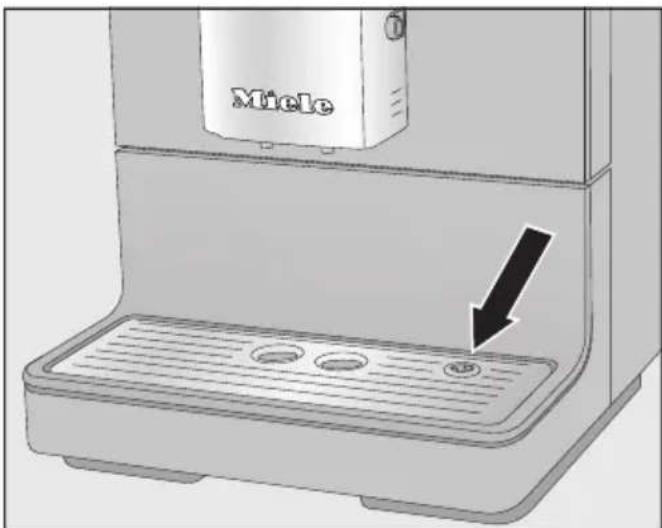
Remove the protective foil from the drip tray cover and place the drip tray cover into the lower panel. Place the coffee machine on a level flat surface that is not sensitive to water (see “Installation”).
Clean the coffee machine thoroughly (see "Cleaning and care") before filling it with water and coffee beans.
Insert the plug of the coffee machine into the socket. Remove the water container and fill it with fresh, cold tap water. Only fill the water container up to the “max.” marker and then refit it in the machine. Take the lid off the coffee bean container, fill it with roasted coffee beans and replace the lid.
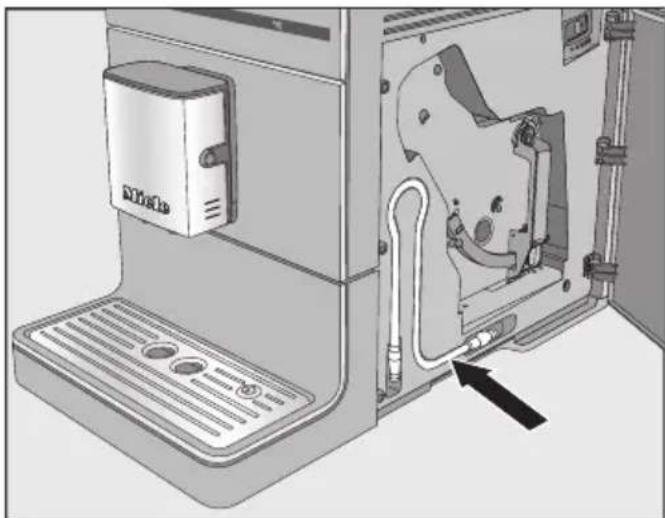
Tip: The milk pipework can be stored behind the appliance door when not in use.
Switching on for the first time
Touch the On/Off button ⏻.
The welcome message Miele – Wilkommen will appear on the display briefly.
Use the arrow sensors ∧∨ to highlight the required language. Touch OK.
You might also be asked for your location.
Your machine has been successfully set up and is ready for use.
Confirm with OK.
The coffee machine heats up and rinses the pipework. The water used for rinsing will run out of the central spout.
Before preparing milk for the first time, rinse the milk pipework (see "Cleaning and care – Rinsing the milk pipework").
Please note that the full aroma of the coffee and typical crema will not develop fully until several coffees have been made.
To ensure that any coffee residues from the factory testing process are removed from the brewing system, please throw away the first 2 cups of coffee when using the coffee machine for the first time.
For the first coffee drinks, a larger quantity of coffee beans is ground. This means that powder from the coffee grounds may adhere to the lid of the drip tray.
Water hardness is an indication of the amount of minerals dissolved in water. The more minerals in the water, the higher the water hardness. The harder the water is, the more frequently the coffee machine needs to be descaled.
The coffee machine measures the amount of water used and steam made. Depending on the level of water hardness set, more or fewer drinks can be dispensed before the appliance needs to be descaled.
Set the water hardness level on the coffee machine to the water hardness level for the local area to ensure that the appliance functions correctly and is not damaged. A prompt to descale the coffee machine will then appear in the display at the correct time.
Contact your local water supplier to find out the water hardness in your area.
The machine is programmed ex-works to hardness level 3.
The appliance has 4 programmable hardness levels:
| °dH mmol/l ppm | (mg/l CaCO3 ) | Setting* | |
| 0–8.4 0–1.5 0–150 Soft 1 | |||
| 8.4–14 1.5–2.5 150–250 Medium 2 | |||
| 14–21 2.5–3.8 250–375 Hard 3 | |||
| >21 >3.8 >375 Very hard | 4 | ||
* The hardness level shown in the display may differ from the hardness level in your area. You must follow the values in the chart to set your coffee machine to your local water hardness level.
Setting the water hardness
■ Touch the ⇒ sensor control. ■ Select Settings ▶ | Water hardness and confirm with OK. ■ Select the hardness level and confirm with OK.
The setting is now saved.
Filling the water container

Risk to health due to minated water.
Bacteria can develop in water which has been sitting in the water container for too long and is a risk to your health.
Change the water in the water container every day.

Risk of damage due to incorrect operation.
Unsuitable liquids such as hot or warm water or other liquids can damage the coffee machine.
Bottled mineral water leaves too much limescale in the coffee machine.
Only use cold, fresh tap water to fill the water container.
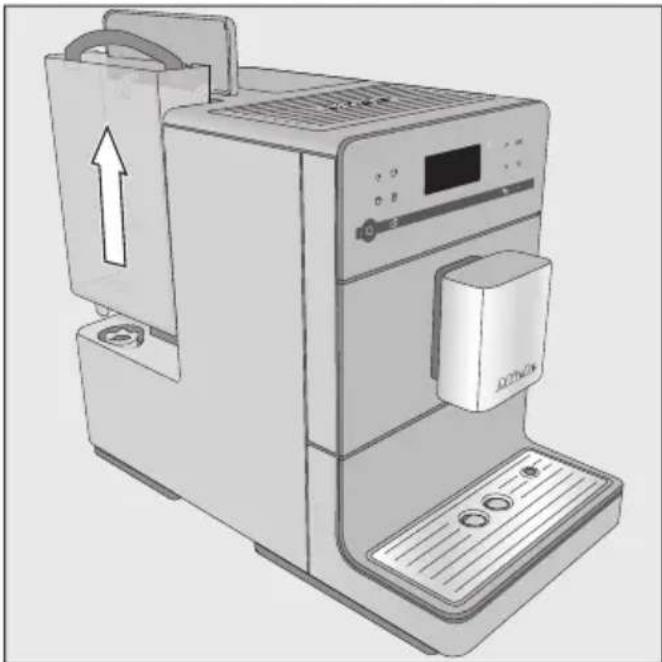
■ Open the lid on the left hand side of the coffee machine. ■ Pull the water container upwards and out. - Fill the water container with fresh, cold tap water up to the “Max.” mark.
■ Replace the water container and close the lid.
Make sure that the water container handle is on the right so that the lid can close properly.
If the water container sits a little too high or at an angle, check that it is fitted correctly or whether the surface that it sits on is soiled. Water could leak. If necessary clean the surface that the water container sits on.
Coffee or espresso can be made from whole roasted coffee beans which are freshly ground in the coffee machine for each portion. This requires the coffee bean container to be filled with coffee beans.
Alternatively, you can make coffee drinks with ready ground coffee.
Risk of damage to the grinder due to incorrect operation.
The coffee machine will be damaged if the bean container is filled with unsuitable substances such as liquids, ground coffee or coffee beans treated with caster sugar, caramel or similar.
In addition, green (unroasted) coffee beans or mixtures of coffee beans which contain green coffee beans can damage the grinder. Green coffee beans are very hard and still contain residual moisture. These can damage the coffee machine grinder as soon as grinding begins.
Only put roasted coffee beans in the bean container.
Tip: You can use a nut or seed grinder to grind green coffee beans. These types of grinder generally have a rotating stainless steel blade. You can then add the ground green coffee one portion at a time to the ground coffee chute and make the desired coffee drink.
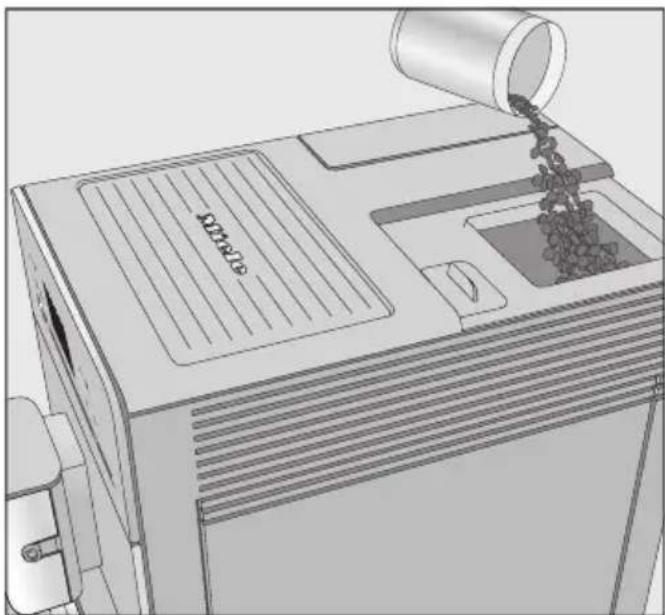
■ Take the lid off the coffee bean container. ■ Fill the container with roasted coffee beans. - Replace the lid.
Switching the coffee machine on
■ Touch the On/Off button ⏻.
The appliance heats up and rinses the pipework. Hot water will run out of the central spout.
When Select drink appears in the display, you can make drinks.
If the coffee machine is already at operating temperature, rinsing will not take place.
If you do not touch any buttons or run any maintenance programmes, the display will switch itself off after approx. 7 minutes to save energy.
The right-hand LED will flash on and off as long as the coffee machine is switched on.
■ Touch one of the sensor controls to wake the coffee machine up again to make a drink.
Switching the coffee machine off
■ Touch the On/Off button ⏻.
If coffee has been dispensed, the coffee machine will rinse the pipework automatically before switching off.
If you have made a drink using milk, Place milk pipe in drip tray will appear in the display.
Insert the end of the milk pipework into the aperture in the drip tray, then touch OK.
Switching off for longer periods of time
If the coffee machine is not going to be used for a while, e.g. if you are going on holiday, remember to do the following:
Empty the drip tray, the waste container and the water container.
Clean all parts thoroughly, including the brew unit.
If necessary, switch off the coffee machine and unplug it to disconnect it from the power supply.
Adjusting the central spout to the correct cup height
You can adjust the central spout to suit the height of the cup you are using so that the coffee or espresso will not cool down as quickly and the crema will have a better consistency.
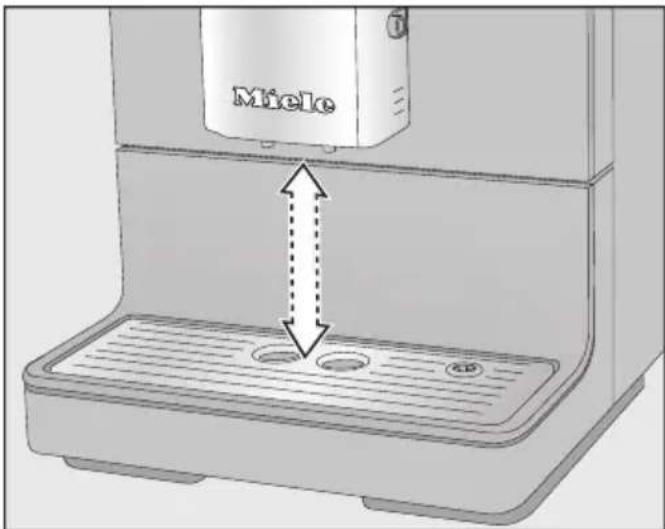
Pull the central spout down until it is at the same level as the rim of the cup. Alternatively, push the central spout up until there is enough room to fit a larger cup or mug underneath.

Danger of burning and scalding. The dispensing spouts.
The liquids and steam dispensed are very hot and can cause scalding.
Keep well away from the area underneath the spouts when hot liquids and steam are being dispensed.
Do not touch hot components.
Making coffee with and without milk
The following drinks can be made:
- Ristretto is a strong, concentrated espresso. It is prepared with the same amount of coffee as for an espresso but with a lot less water.
- Espresso is a strong aromatic coffee with a thick hazelnut brown coloured froth – known as the crema – on top. We recommend using espresso-roasted coffee beans to make an espresso.
- Coffee differs from espresso by the increased amount of water and the roast of the beans. We recommend using coffee beans of the correct roast to make the coffee.
- Long coffee is a coffee with considerably more water.
- Cappuccino consists of approx. 2 thirds milk froth and 1 third espresso.
- Latte macchiato consists of 1 third each of hot milk, milk froth and espresso.
- Caffè latte consists of espresso and hot milk.
Hot milk or milk froth can also be made.
Milk preparation
Milk or milk alternatives (e.g. soya milk) containing added sugar can clog up the milk pipe and the rest of the milk pipework. Residues from unsuitable liquids can interfere with milk preparation.
The milk used must not contain any additives.
Only use pasteurised cow's milk.
If you have not made any milk drinks for a while, rinse the milk pipework thoroughly before making the first drink.
Tip: Using cold cow's milk (< 10 °C) with a protein content of at least 3 % will produce the perfect milk froth. You can select milk with a fat content according to preference. With whole milk (at least 3.5 % fat), the milk froth will be slightly creamier than with low-fat milk.
Using milk cartons or bottles
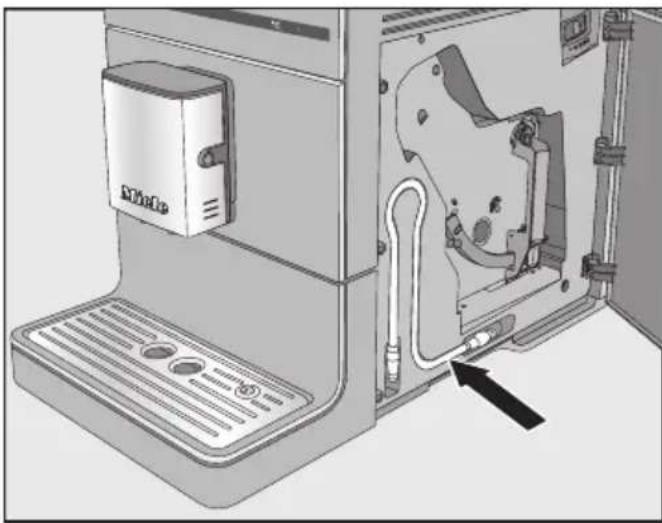
The milk tube for cartons and other suitable containers is located behind the appliance door.
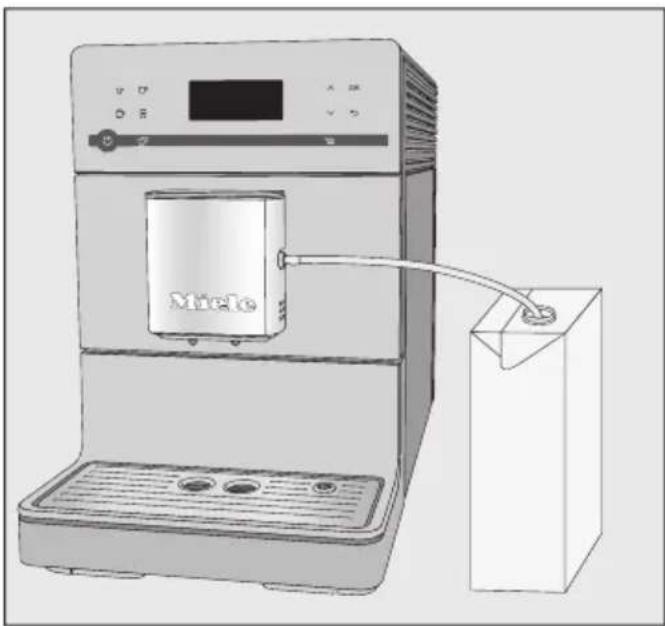
■ Connect the milk tube to the aperture in the central spout. ■ Place a container with sufficient milk in it beside the coffee machine. ■ Place the end of the milk tube in the container. Make sure that it is sufficiently immersed in the milk.
Tip: The Miele milk container is the perfect addition to Miele coffee machines if you make a lot of coffees with milk. The milk container is dishwasher-safe and easy to store in the fridge after use. Good milk froth can only be made with cold milk (< 10 °C). The milk container is available to order via the Miele webshop, from the Miele Customer Service Department (see the end of this booklet for contact details) or from your Miele dealer.
Making a coffee
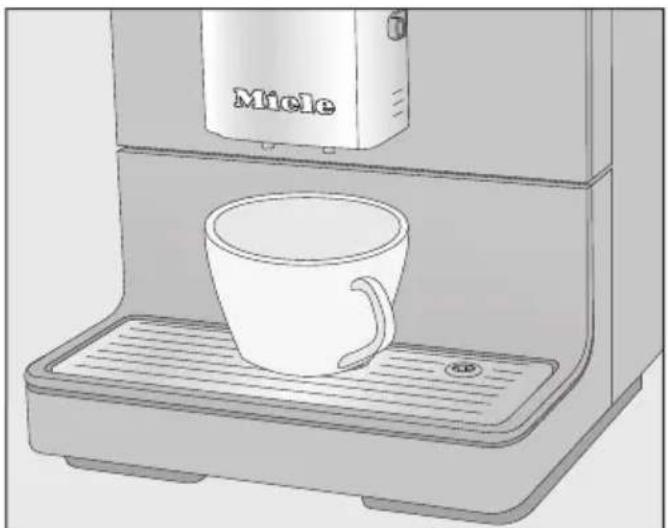
■ Place a cup under the central spout. ■ Select a drink: touch the sensor control for the drink you want. Or select a drink from the Other drinks menu (sensor control ≡).
Dispensing will start.
Cancelling a drink
■ To cancel making a drink, touch the drinks sensor control or the sensor control ≡ for drinks from Other drinks again.
The coffee machine will stop dispensing.
Tip: As soon as Stop appears in the display, you can cancel making a drink by touching the OK sensor control.
When making coffee with milk or 2 portions of a drink you can cancel each stage individually by touching the OK sensor control.
2 portions (sensor control 📋)
You can dispense 2 portions of a drink into 1 large cup or into 2 cups at the same time.
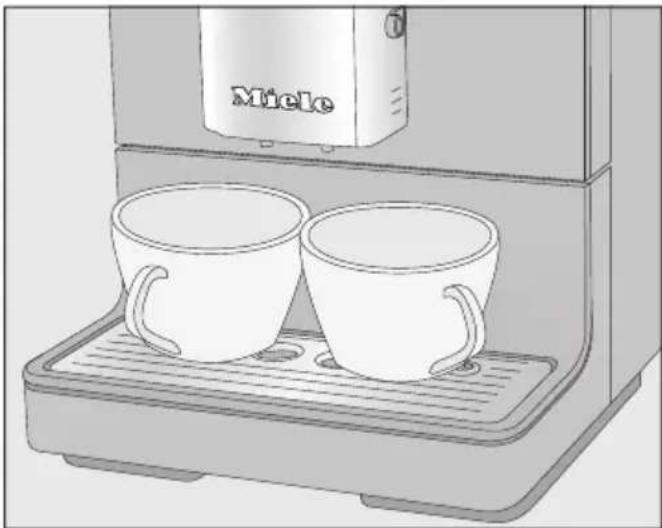
■ Place a cup under each of the coffee dispensers in the central spout. ■ Press the ☐ sensor control immediately before or after you start making a drink.
The dispensing starts and 2 portions of the desired drink will be dispensed.
If, after a while, you have not touched any of the drink sensor controls, the "2 portions" option will revert back to single portions.
Coffee pot
You can make several cups of coffee one after the other automatically with the Coffee pot function (max. 0.75 litre), e.g. to fill a coffee pot. This can make up to 6 cups.
You can use the Coffee pot function twice in a row. After this, the coffee machine needs a cooling down time of one hour in order to avoid it being damaged.
Make sure that the bean container and water container have enough beans and water inside them before starting the Coffee pot function.
■ Place a sufficiently large container under the central spout. ■ Touch the ⇒ sensor control. ■ Select Other drinks | Coffee pot and confirm with OK. ■ Select the number of cups you want (3 to 6) and confirm with OK. ■ Follow the instructions in the display.
Each portion of coffee will be brewed and dispensed individually. You can follow the process in the display.
Cancelling Coffee pot
■ Touch the ⇒ sensor control.
Coffee pot dispensing will stop.
Tip: A stainless steel vacuum flask is available as an optional accessory from Miele for the “Coffee pot” function. The CJ JUG vacuum flask is available to order via the Miele webshop, from Miele (see back cover for contact details) or from your Miele dealer.
Making coffee drinks with ground coffee
To make drinks using ready ground coffee, add a portion of ground coffee to the ground coffee chute.
This allows you to make a decaffeinated coffee if the bean container is already filled with regular coffee beans, for example.
Only 1 portion of coffee or espresso can be made at a time when using ready ground coffee.
Place a maximum of 12 g in the ground coffee chute.
If too much ground coffee is added, the brew unit will not be able to process the coffee.
Adding ground coffee
The coffee machine will use all the ground coffee which has been added to the chute to make the next coffee.
Touch the sensor control. Select Other drinks | Ground coffee and confirm with OK.
Add ground coffee and select drink will appear in the display.
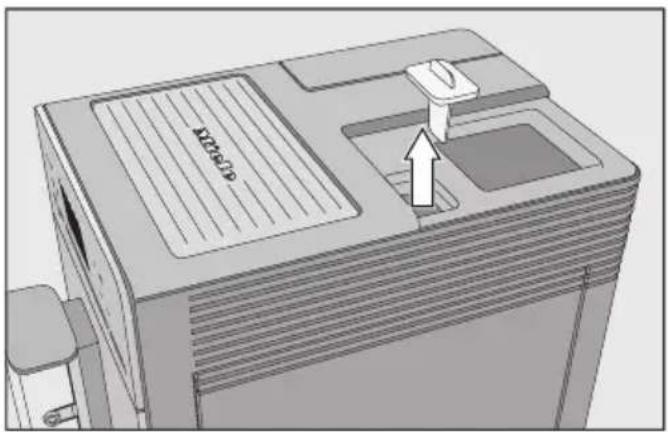
First take the lid off of the coffee bean container and then take the cover off the ground coffee chute.
Place a maximum of 12 g in the ground coffee chute.
Put the cover back on the ground coffee chute after adding the ground coffee. Replace the lid on the coffee bean container. Place a cup under the central spout. Select a drink.
The coffee will now be made.
Dispensing hot water (CM 5410, CM 5510, CM 5710)
Please note that the water dispensed is not hot enough for making black tea.
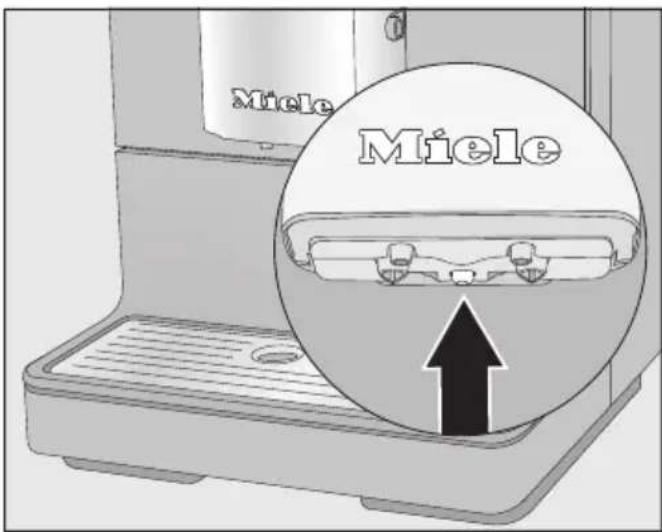
Place a suitable container centrally underneath the central spout. Touch the sensor control. Select Other drinks | Hot water and confirm with OK.
Hot water will run into the container under the central spout.
When the beans are ground correctly, the coffee or espresso will flow evenly into the cup with a good crema. The crema should have an even hazelnut brown colour.
The grinder setting you select will be used for all coffee drinks.
There are various ways to tell whether the coffee grinder is set correctly.
The coffee has been too coarsely ground if:
- Espresso or coffee flows into the cup too quickly,
- the crema is very pale and uneven. Set a finer grinder setting.
The coffee has been too finely ground if:
- espresso or coffee flows into the cup very slowly,
- the crema is dark brown.
Set a coarser grinder setting.
Only adjust the grinder one setting at a time.
Start making a new drink to grind beans again. Adjust the grinder setting one setting at a time again.
■ Open the service panel.
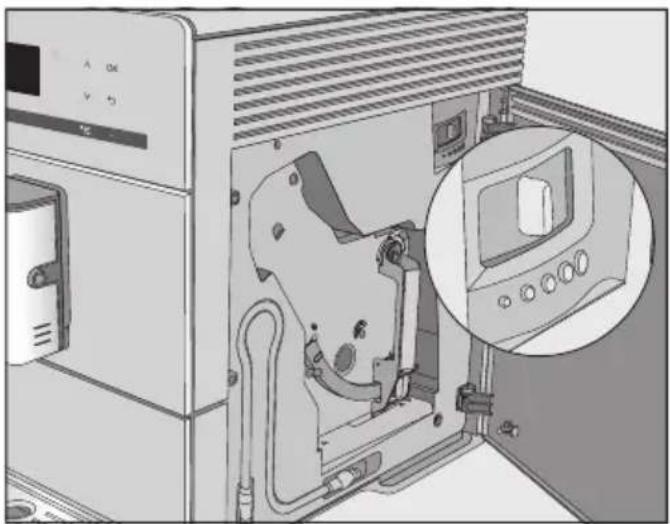
■ Push the slide control a maximum of one setting to the left (for finer grinding) or to the right (for coarser grinding). ■ Close the service panel. ■ Make one cup of coffee.
Adjust the grinder setting again.
The altered grinder setting will not be used until after the second coffee has been dispensed.
Quantity of coffee, brew temperature and pre-brewing
You can set the quantity of coffee, the brewing temperature and pre-brewing for each drink individually. To do this, first select the drink from the Parameters menu and then adjust the drink parameters.
■ Touch the '≡' sensor control and select Parameters. ■ Select the drink and confirm with OK.
The current settings for the quantity of coffee, brewing temperature and pre-brewing will be displayed for this drink.
■ Select Amount of coffee, Brew temperature or Pre-brewing.
■ Select the setting you want and confirm with OK.
The setting is now saved.
CM 5410, CM 5510, CM 5710: The changed parameter is always saved in the current profile. The name of the current profile is shown in the top left of the display.
Ground quantity
The coffee machine can grind and brew 6–14 g of coffee beans per cup. The greater the quantity, the stronger the coffee.
There are various ways to tell whether the amount of coffee is set correctly:
The amount of coffee is too low if
- espresso or coffee flows into the cup too quickly,
- the crema is very pale and uneven,
- the espresso or coffee lacks body.
Increase the amount of coffee so that more ground coffee is brewed.
The amount of coffee is too high if
- espresso or coffee flows into the cup very slowly,
- the crema is dark brown,
- the espresso or coffee tastes bitter.
Decrease the amount of coffee so that less ground coffee is brewed.
Tip: If the coffee is too strong for you or it tastes bitter, try a different type of bean.
Brewing temperature
The ideal brewing temperature will depend on
- the type of coffee being used,
- whether an espresso or a coffee is being made, and
- the air pressure in the region.
Tip: Not all types of coffee tolerate high temperatures. Several types are sensitive to high temperatures, resulting in an impaired crema and taste.
Pre-brewing the ground coffee
When you select pre-brewing, the coffee is moistened with a little hot water initially after it is ground. The remaining amount of water is then pressed through the moistened coffee grounds shortly after. This releases the aromas of the coffee better.
You can set a short or long duration for pre-brewing or turn the “Pre-brewing” function off completely.
The flavour of the coffee produced depends not only on the type of coffee, but also on the amount of water used. You can programme the amount of water for all coffee drinks and hot water to suit the size of your cups and the type of coffee you are using. This does not alter the amount of coffee used.
For coffee drinks that use milk, you can not only set the amount of espresso or coffee but also the amount of milk or milk froth to be dispensed with these drinks. Additionally, you can set the portion sizes for hot milk and milk froth alone.
A maximum portion size can be programmed for each type of drink. Dispensing stops once this has been reached. The maximum possible portion size is then saved by the machine for this type of drink.
If the water container becomes empty whilst making a drink, the coffee machine will stop programming the portion size. The portion size will not be saved.
There are two ways of initiating the programming of the portion size:
- By touching the drink sensor control when you are making a coffee; or
- By selecting Portion size in the Parameters list.
CM 5410, CM 5510, CM 5710: The changed portion size is always saved in the current profile. The name of the current profile is shown in the top left of the display.
Cancelling portion size programming
Touch the drinks sensor control again or the sensor control for drinks from Other drinks again.
Changing the portion size while making a drink
You can change and save the portion size for Espresso, Coffee, Cappuccino and Latte macchiato while making these drinks.
Place a cup under the central spout. Touch the sensor control for the drink you want until Change appears in the display.
A buzzer will sound as soon as portion programming starts. (As long as the volume has been set for the buzzers – see “Volume”).
The desired drink will be made and Save will appear in the display.
■ When the cup is filled up to the level you want, confirm with OK.
If you want to change the portion size for coffee made with milk, the ingredients which make up the drink will be saved one after the other while the drink is being made.
■ When the quantity for each ingredient reaches the level you want, confirm with OK.
The programmed mix of ingredients and portion size will now be dispensed every time that particular drink is selected.
Changing the portion sizes in the Parameters menu
You can only change the portion sizes for Long coffee, Caffè Latte, hot milk and milk froth via the Parameters menu.
■ Place a suitable container underneath the central spout. ■ Touch the ≡ sensor control and select Parameters. ■ Select the drink you want. ■ Select Portion size and confirm with OK.
Now proceed as for changing the portion size while making a drink.
(CM 5410, CM 5510, CM 5710)
In addition to the Miele drinks menu (Miele profile), you can create individual profiles to cater for different tastes and preferences.
Within the profile, you can adjust the portion sizes and parameters individually for all drinks.
The name of the current profile is shown in the top left of the display.
Creating profiles
■ Touch the ≡ sensor control and select Profiles. Confirm with OK.
The Profiles menu opens.
Select Create profile.
The editor will open in the display.
Enter the profile name:
To enter a character, highlight the one you want and confirm your choice with OK.
To delete a character, touch the ⇔ sensor control.
To save the name, select the tick √ and confirm with OK.
The profile has been created.
Changing drinks within a profile
When you change the parameters of a drink within a profile, these settings only apply to the active profile. The settings for drinks contained within other profiles remain unaffected.
Select the profile you want.
The name of the selected profile is shown in the top left of the display.
You can now change the drinks individually.
Making drinks stored in a profile
Place a suitable container underneath the central spout. Touch the ≡ sensor control and select Profiles. Select the profile you want and confirm with OK. Select the drink you want.
The machine starts dispensing the drink.
Changing the name
This option is only possible if a profile has been allocated in addition to the Miele standard profile.
■ Select Change name with the arrow sensors ∧∨ and touch OK. ■ Now proceed as described in "Creating a profile": - Select ⇔ to delete a character, - To enter new characters, highlight the relevant character and confirm with OK, - Save the new name by selecting √ in the display and touching OK.
Deleting a profile
This option can only be selected if a profile has been allocated in addition to the Miele standard profile.
■ Select Delete profile and confirm with OK. ■ Select the profile you wish to delete. ■ Select Yes and confirm with OK.
The profile will be deleted.
Setting when the profile should change (Change profile)
You can choose between the following options:
- Manually: The selected profile will remain active until you select another one.
- After each use: The machine will revert to the Miele profile whenever a drink is dispensed.
- When switched on: The Miele profile will be displayed whenever the coffee machine is switched on, regardless of which profile was selected before the machine was last switched off. ■ Select Change profile and confirm with OK. ■ Select the option you want and confirm with OK.
Displaying and changing Settings
The drinks menu is displayed.
■ Touch the ⇒ sensor control. ■ Select Settings and confirm with OK. ■ Select the menu option that you want to display or change. ■ Confirm with OK. ■ Change the setting as required and confirm with OK.
Language
You can select the language (and location variant of that language) for all display text.
Tip: If you select the wrong language by mistake, you can find the “Language” option again via the ▶ symbol.
Timer: switch off after
If none of the sensors have been touched or no drink has been made, the coffee machine will switch itself off after 30 minutes to save energy.
You can change this pre-setting using the arrow sensors ∨∧ to a time of between 15 minutes and 9 hours.
Eco mode
Eco mode is an energy-saving mode. The system does not heat up until someone starts making a drink.
Eco mode is activated by default.
Info (display information)
You can display the number of drinks dispensed so far and how many more can be dispensed until the maintenance programmes have to be run.
System lock 🔒
You can lock the coffee machine to prevent it being used without your knowledge, by children, for example.
Temporarily deactivating the system lock 🔒
Press and hold OK for 6 seconds.
The system lock is reactivated when the coffee machine is next switched off.
Water hardness
Information regarding water hardness is given in the “Water hardness” chapter.
Display brightness
Change the display brightness using the arrow sensors ∧∨.
Volume
You can set the volume of buzzer and sensor tones using the arrow sensors ∧∨.
Tip: To switch off the tones, touch the arrow sensor V, until no segments are filled and Switched off appears.
Factory defaults
You can reset the coffee machine to its factory default settings.
The following will not be reset:
- The number of drinks dispensed and the appliance status (No. of portions until appliance needs descaling, ... brew unit needs degreasing)
- Language
- Profiles and the associated drinks (CM 5410, CM 5510, CM 5710)
Demo mode (showroom programme)
Do not activate this setting for domestic use.
The Showroom programme function enables the coffee machine to be demonstrated in shops or showrooms. Although the sensor controls and display seem to be working, the thermo block is not being heated. The appliance does not dispense any drinks, run the maintenance programmes or save any settings.
You can activate demo mode without commissioning the appliance for the first time. The water container is empty or not inserted. Switch the coffee machine on. As soon as the Fill and replace the water container message appears, touch the ⬇ button for 5 seconds. Demo mode is activated.

Risk to health due to inadequate cleaning
Heat and moisture inside the coffee machine can cause coffee residues to become mouldy and/or milk residues to go off and pose a risk to health. Carefully clean the coffee machine regularly.
Overview of cleaning intervals
Recommended frequency What do I have to clean / maintain?
| Daily(at the end of the day) | Water container |
| Waste container | |
| Drip tray and drip tray cover | |
| Once a week(more often if heavily soiled) | Central spout with integrated Cappuccinatore |
| Brew unit | |
| Area underneath the brew unit and the drip tray | |
| Casing (especially important immediately after descaling) | |
| Milk pipework | |
| Once a month Bean container and ground coffee chute | Water container filter |
| When prompted Degrease the brew unit (with 1 cleaning tablet) | Descale the appliance (with 1 descaling tablet) |
Cleaning by hand or in the dishwasher
The brew unit is not dishwasher safe.
Clean the brew unit by hand only under warm running water. Do not use washing-up liquid or any other cleaning agent.
The following components must be cleaned by hand only:
- Central spout stainless steel cover
- Brew unit
- Bean container lid
- Lower panel
⚠️ Risk of damage as a result of excessively high dishwasher temperatures.
Components may be ruined (e.g. may become warped) if washed in a dishwasher at temperatures higher than 55 °C.
For dishwasher-safe components, always select dishwasher programmes with a maximum temperature of 55 °C.
Contact with natural dyes such as those found in carrots, tomatoes and ketchup may discolour the plastic parts in the dishwasher. This discolouration does not affect the stability of the parts.
The following components are dishwasher safe:
- Drip tray and lid
- Drip tray cover
- Waste container
- Water container
- Central spout (without stainless steel cover)
- Ground coffee chute cover
Danger of burning and scalding on hot components or by hot liquids.
Components can become very hot during operation. Touching hot components can cause burning. The liquids and steam dispensed are very hot and can cause scalding.
Keep well away from the area underneath the spouts when hot liquids and steam are being dispensed.
Always allow the coffee machine to cool down before cleaning it.
Please be aware that water in the drip tray can also be very hot.
⚠️ Risk of damage due to moisture ingress.
The steam from a steam cleaning appliance could reach live electrical components and cause a short circuit.
Do not use a steam cleaner to clean the coffee machine.
It is important to clean the machine regularly, as the used coffee grounds will soon go mouldy. Milk residues can go off and can block the milk pipework.
Unsuitable cleaning agents
Contact with unsuitable cleaning agents can alter or discolour the external surfaces. All surfaces are susceptible to scratching. Scratches on glass can in some circumstances lead to breakage.
Remove all cleaning agent residues immediately. To protect the machine and surrounding surfaces from damage, make sure you remove any spillages or splashes of descaling agent immediately.
To avoid damaging the surfaces, do not use:
- cleaning agents containing soda, ammonia, acids or chlorides
- solvent-based cleaning agents
- cleaning agents containing descaling agents (unsuitable for cleaning the housing)
- stainless steel cleaning agents
- dishwasher cleaners (unsuitable for cleaning the housing)
- glass cleaning agents
- cleaning agents for ceramic hobs
- oven cleaner
- abrasive cleaning agents, e.g. powder cleaners and cream cleaners
- hard, abrasive brushes or sponges, e.g. pot scourers, brushes or sponges which have been previously used with abrasive cleaning agents
Cleaning and care
- melamine eraser blocks
- sharp metal scrapers
- steel wool or stainless steel wire scourers
Waste container, drip tray and drip tray cover
Clean the drip tray and waste container every day to avoid unpleasant smells and mildew.
The waste container is located in the drip tray. Water from rinsing also collects in the waste container.
A prompt will appear in the display when the drip tray and/or the waste container is full and needs to be emptied. Empty the drip tray and the waste container.

Danger of burning.
If the rinsing process has just finished, wait a while before removing the drip tray from the machine. The water used for rinsing will continue to run out of the coffee spouts for a while.
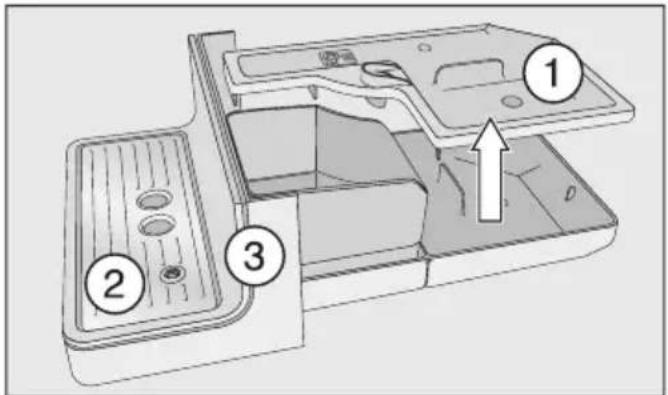
■ Pull the drip tray carefully out of the machine. Take the lid ① off. ■ Empty the drip tray and the waste container. ■ Remove drip tray cover ② and lower panel ③. ■ Clean all parts thoroughly.
Clean the lower panel by hand only using hot water, a little washing up liquid and a soft cloth.
All other parts are dishwasher-safe.
■ Clean the inside of the machine underneath the drip tray. ■ Reassemble all parts and place the drip tray back in the coffee machine.
Make sure the drip tray has been pushed right into the machine as far as it will go.
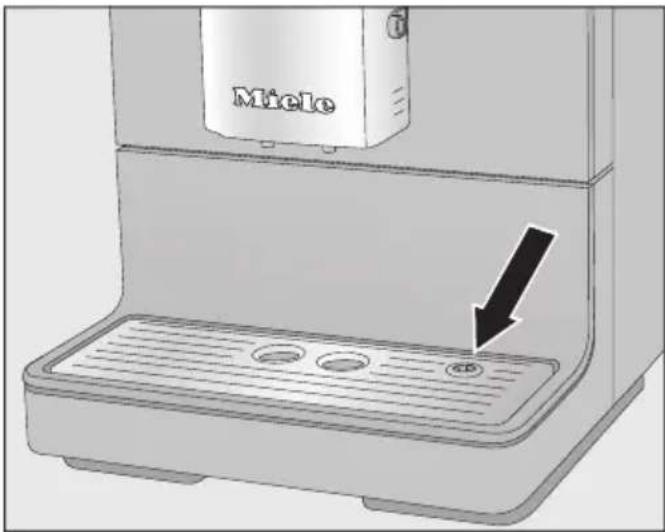
■ Make sure that the drip tray cover is correctly fitted (see picture). ■ Clean the area under the coffee machine. Water can get under the machine when the drip tray is removed.
Cleaning the water container
Clean the water container every day. You can clean the water container in the dishwasher once a week.
Make sure that the valve, the underside of the water container and the surface the water container sits on are clean. Otherwise, the water container will not sit correctly.
■ Remove the water container. ■ The water container can be cleaned in the dishwasher, or by hand using hot water and a little washing-up liquid. After cleaning, dry the water container. ■ Carefully clean and dry the surface the water container sits on, taking special care to clean the recesses properly. ■ Push the water container back into the appliance.
Removing and cleaning the water container filter
Clean the water container filter once a month.
The water container filter is located under the water container.
■ Remove the water container.
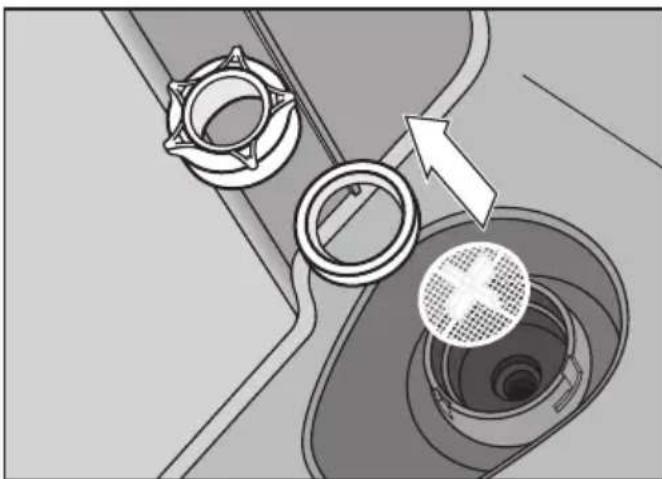
■ Unscrew the cap. Remove the sealing ring and the filter. ■ Rinse all parts carefully under running water. ■ Then replace the water container filter (with the cross facing upwards) and then the sealing ring. Finally screw the cap back on tightly. ■ Replace the water container.
Central spout
Clean the central spout's stainless steel cover by hand only, using warm water and a little washing-up liquid.
All other parts are dishwasher-safe.
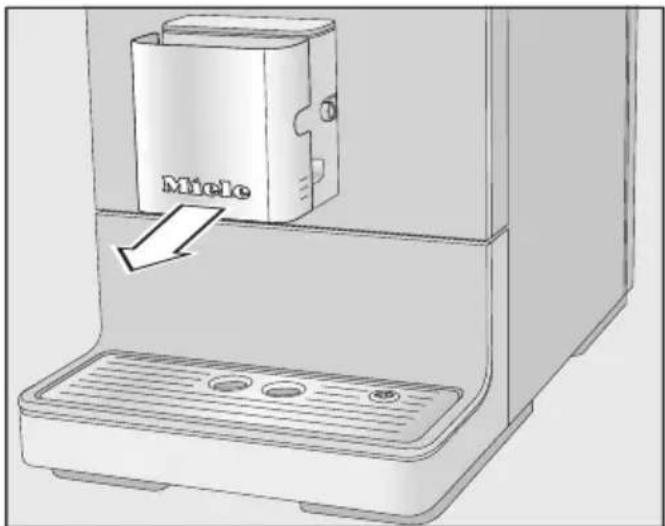
■ Carefully pull the stainless steel cover off.
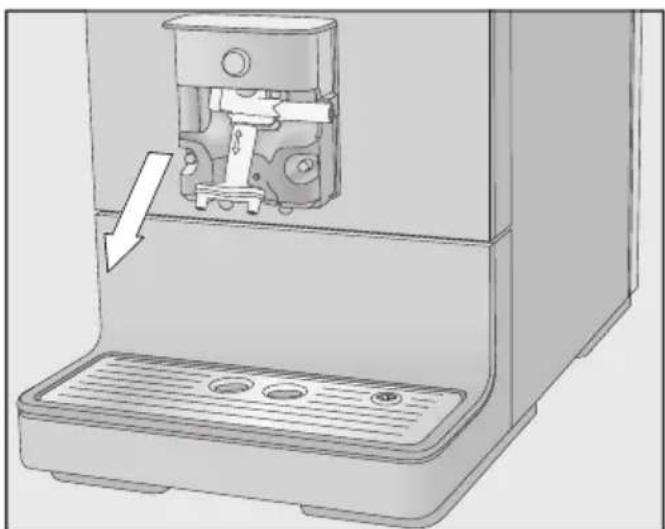
■ Pull the dispensing unit down to remove it.
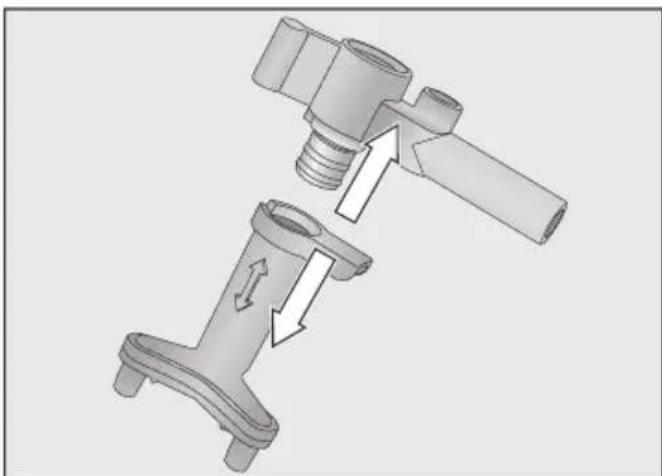
■ Release the upper section with the holder for the milk pipework from the dispensing spouts.
■ Clean all parts thoroughly.
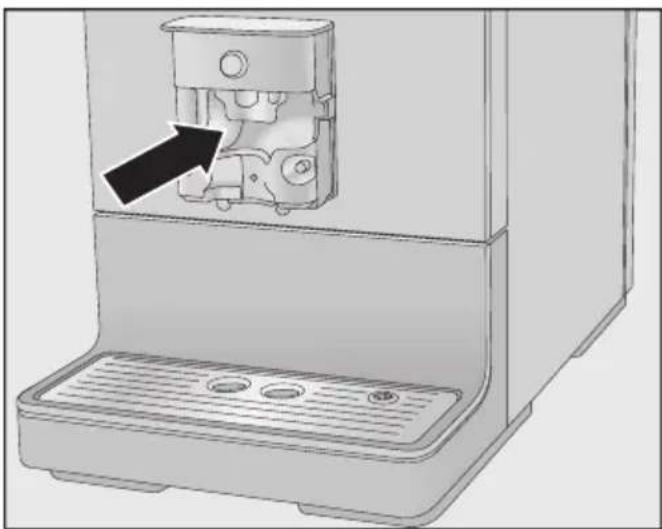
■ Clean the surfaces of the central spout and the dispensing spouts with a damp cloth.
Clean any blockages in the milk pipework under running water with the special brush supplied:
■ Insert the brush in the pipework. Move it back and forth until all milk residue has been removed.
Reassembling the central spout
The dispensing unit is easier to reassemble if the individual parts are dampened with water beforehand.
■ Fit the dispensing unit back together.
■ Refit the dispensing unit onto the central spout. Press firmly to ensure the dispensing unit is securely fitted without any gaps.
■ Replace the stainless steel cover and connect the milk pipework if required.
Milk pipework
⚠️ Risk to health due to inadequate cleaning.
Milk naturally contains bacteria. Heat and moisture inside the coffee machine can cause these bacteria to multiply, e.g. milk residues can go off and pose a risk to health.
Clean all components in which milk is transported on a regular basis.
The coffee machine's milk pipework must be cleaned at least every 5 days.
There are two options for cleaning the milk pipework:
- You can remove and dismantle the central spout with its integrated cappuccinatore and either wash it in the dishwasher or by hand with hot water and a little washing-up liquid (see “Central spout with integrated cappuccinatore”).
- Or you can clean the milk pipework using the Clean milk pipework maintenance programme together with cleaning agent for milk pipework (see “Maintenance programmes - Cleaning the milk pipework”).
Tip: In addition to your weekly cleaning routine we recommend carrying out the alternative cleaning procedure once a month. For example if you manually clean the machine once a week, then you should run the Clean milk pipework maintenance programme once a month. This combination will ensure that the milk pipework is cleaned optimally.
Bean container and ground coffee chute
Danger of injury from the grinder! Switch off the machine and disconnect it from the power supply before cleaning the bean container.
Coffee beans contain oils which can deposit on the walls of the bean container and hinder the flow of the beans. Therefore, clean the bean container regularly with a soft cloth.
■ Open the bean container. ■ Remove any coffee beans. ■ Clean the bean container with a dry, soft cloth.
The bean container can now be refilled.
If necessary, clean the ground coffee chute:
Open the coffee chute and remove any ground coffee residue.
Tip: Use a vacuum cleaner to remove any coffee residues from the bean container and the ground coffee chute.
Cleaning the casing
If soiling is allowed to stay on for a long time or there is contact with unsuitable cleaning agents, surfaces can alter or discolour.
Remove any soiling immediately. Ensure that any splashes of descaler are wiped up immediately.
Switch the coffee machine off. Clean the appliance front with a clean soft sponge and a solution of warm water and washing-up liquid. Then wipe it all dry using a soft cloth.
Tip: You can also clean the appliance casing with the Miele all purpose microfibre cloth.
Opening the Maintenance menu
You can find the maintenance programmes in the Maintenance menu. Run the relevant maintenance programme when the prompt to do so appears in the display.
Touch the sensor control. Select Maintenance and confirm with OK.
You can now select a maintenance programme.
Rinsing the appliance
If you have made a coffee drink, the coffee machine will rinse the coffee pipework automatically before switching off. You can also start the Rinse appliance function manually.
Rinsing the milk pipework
The milk pipework can become blocked by milk residues. The milk pipework should therefore be rinsed regularly. If a drink has been made using milk, the prompt to place the milk pipework into the drip tray will appear at the latest when you switch the machine off.
You can also rinse the milk pipework manually.
Touch the sensor control. Select Maintenance | Rinse milk pipework and confirm with OK.
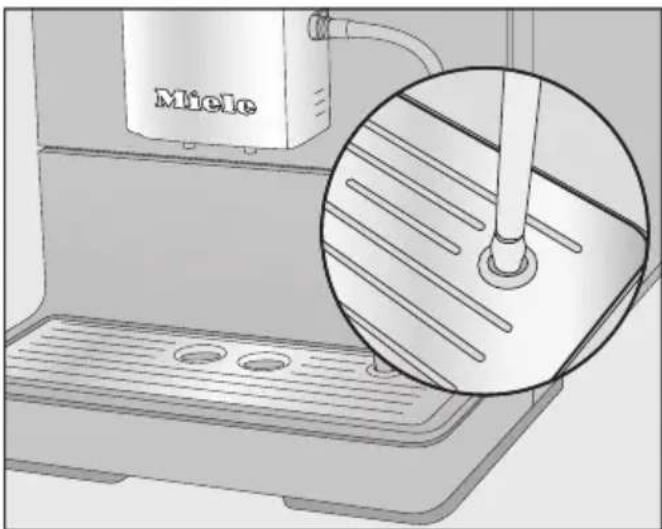
When prompted, place the milk pipework into the right-hand opening in the drip tray.
Confirm with OK.
The milk pipework will now be rinsed.
Cleaning the milk pipework using the maintenance programme
For optimal cleaning results, we recommend using the Miele cleaning agent for milk pipework. The cleaning agent for milk pipework has been specially developed for use with Miele coffee machines and prevents subsequent damage.
It is available to order via the Miele webshop, the Miele Customer Service Department (see the end of this booklet for contact details) or from your Miele dealer.
To clean the milk pipework you need 1 sachet of cleaning agent for milk pipework.
The Clean milk pipework maintenance programme lasts for approx. 10 minutes.
Touch the sensor control. Select Maintenance | Clean milk pipework.
The cleaning process cannot be cancelled. It must be completed through to the end.
Confirm with OK.
The process will start.
Follow the instructions in the display.
Place milk pipe in cleaning agent will appear in the display.
Preparing the cleaning solution:
■ Dissolve the cleaning agent in a container with 200 ml of lukewarm water. Stir the solution with a spoon until the powder has fully dissolved.
Carrying out the cleaning process:
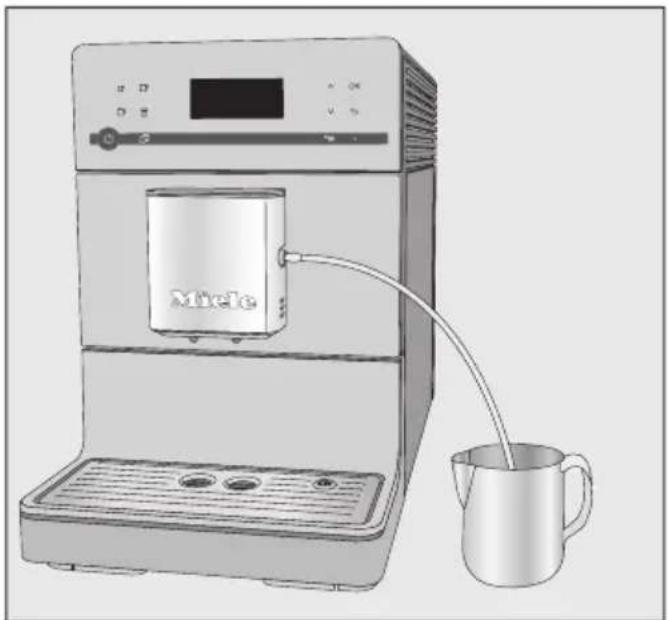
■ Place the container next to the coffee machine and hang the milk pipework tube in the solution. Make sure the milk pipework is placed sufficiently far into the cleaning solution.
■ Confirm with OK. ■ Follow the further instructions given in the display.
The cleaning process is finished at the end of the rinsing cycle.
Tip: Flush any residual cleaning agent out of the milk pipework with running water.
Degreasing the brew unit and cleaning the interior
Depending on the natural oil content of the coffee used, the brew unit can become blocked quite quickly. It must be degreased regularly in order to ensure aromatic coffee and trouble-free operation of the coffee machine.
We recommend using Miele cleaning tablets to clean the brew unit. These have been specially developed for degreasing the brew unit in Miele coffee machines and prevent subsequent damage. The cleaning tablets are available to order via the Miele webshop, the Miele Customer Service Department (see the end of this booklet for contact details) or from your Miele dealer.
The maintenance programme for degreasing the brew unit lasts for approx. 15 minutes.
You need 1 cleaning tablet for the maintenance programme.
After 200 portions have been dispensed, a message prompting you to degrease the brew unit will appear in the display.
■ Confirm the message with OK.
The message will appear at regular intervals. Once the maximum possible number of portions has been reached, the coffee machine will lock out.
Degrease the brew unit
No drinks can be made and 'Degrease the brew unit and clean inside the machine' appears in the display.
Cleaning and care
The cleaning process cannot be cancelled. It must be completed through to the end.
■ Confirm with OK.
The maintenance programme will then start.
■ Follow the instructions in the display.
Cleaning the brew unit and interior
Clean the brew unit by hand only with warm water. Do not use any cleaning agents. The moving parts of the brew unit are lubricated. Cleaning agents will damage the brew unit.
To ensure good tasting coffee and to prevent the formation of microbes in the machine, remove and clean the brew unit under running water once a week.
'Rinse the brew unit by hand and clean inside the machine' will appear in the display.
■ Open the appliance door.
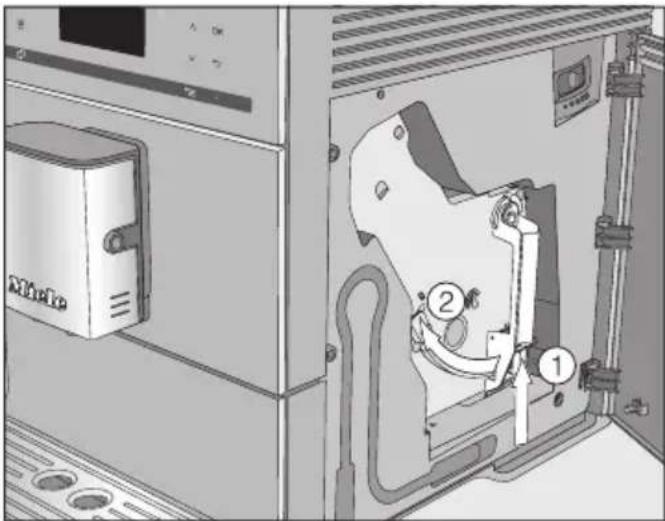
■ Press and hold the button under the brew unit handle ① and, whilst doing so, turn the handle to the left ②.
■ Carefully pull the brew unit out of the coffee machine.
When you have removed the brew unit, do not change the position of the handle on the brew unit.
Clean the brew unit by hand under warm running water without using cleaning agent.
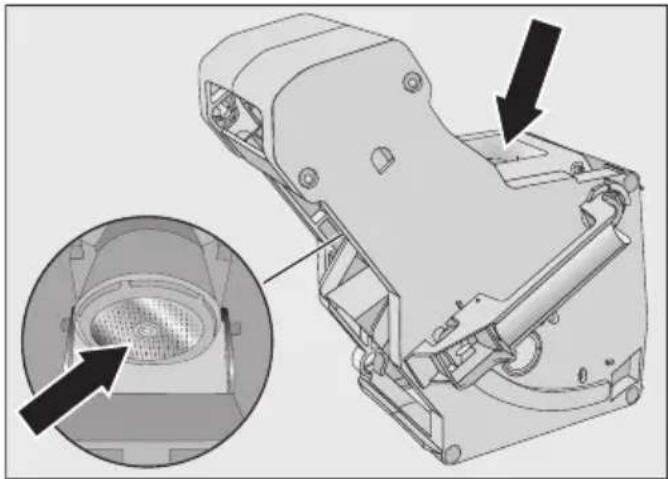
Wipe any remaining coffee off the filters (see arrows).
Dry the funnel to prevent ground coffee sticking to it the next time a coffee is made.
Risk to health due to inadequate cleaning.
Damp coffee residues in the interior of the machine can go mouldy and pose a risk to health.
Remove coffee residues regularly and clean the interior of the machine.
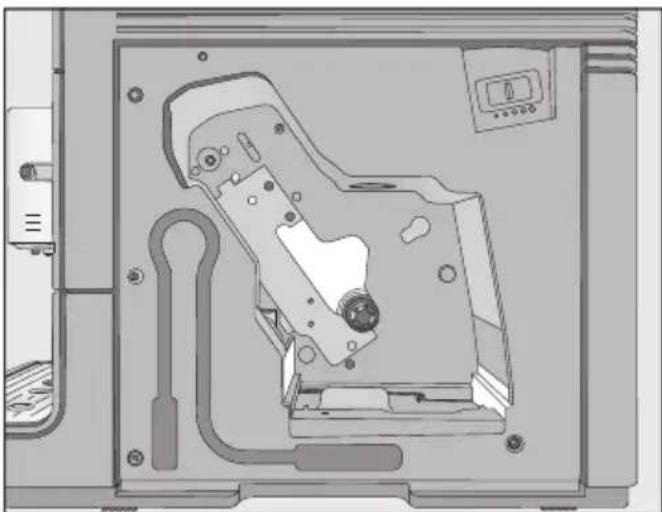
Clean the inside of the coffee machine. Make sure that the areas highlighted in the illustration are cleaned especially well.
Tip: Use your vacuum cleaner to remove dry ground coffee residues.
Dropping a cleaning tablet into the brew unit
Insert the brew unit with a cleaning tab in it and close the machine will appear in the display.
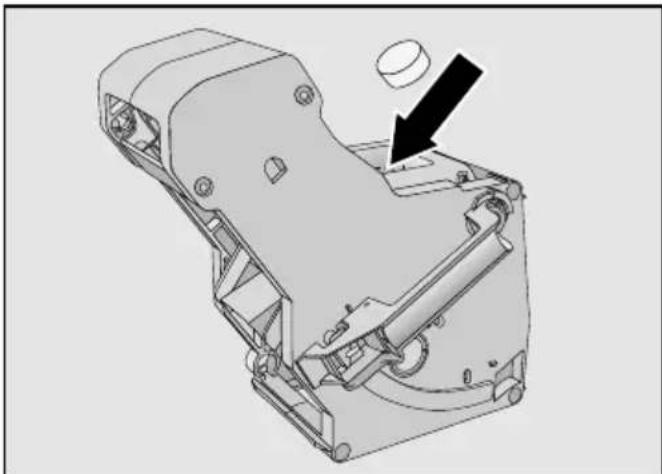
- Drop a cleaning tablet into the top of the brew unit (arrow). - Push the brew unit containing the cleaning tablet back into the coffee machine.
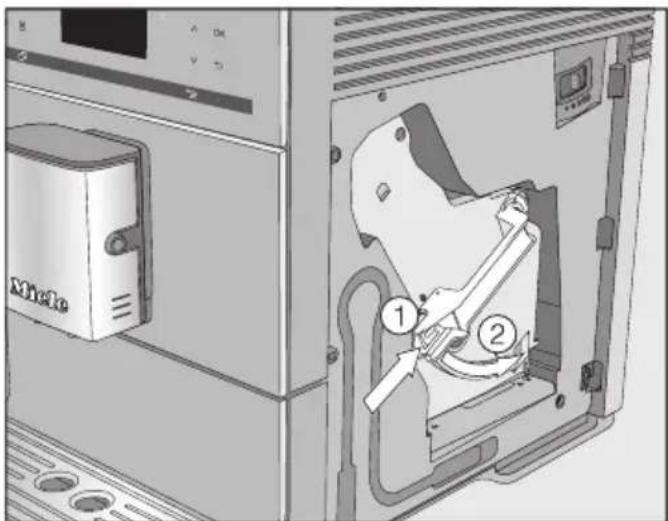
- Press the button under the handle of the brew unit ① and, whilst doing so, turn the handle to the right ②. - Close the appliance door. - Follow the further instructions given in the display.
The cleaning process is complete when the drinks menu appears.
Descaling the machine
Risk of damage from spilt descaling solution.
Sensitive surfaces and/or natural floors can suffer damage.
Wipe up any spillages of descaling agent immediately.
Limescale builds up in the coffee machine through use. How often the appliance needs to be descaled will depend on the water hardness level in your area. Limescale must be removed regularly.
The machine will guide you through the descaling process. Various messages will appear in the display, e.g. you will be prompted to empty the drip tray or fill the water container.
Descaling must be carried out. The process takes approx. 15 minutes.
You need 1 descaling tablet for the maintenance programme.
The coffee machine prompts you when it needs to be descaled. No. of uses until appliance needs descaling: 50 will appear in the display. The remaining number of drinks that can be made before descaling will now show in the display after each drink is made.
■ Confirm the message with OK.
When the number of remaining portions reaches 0, the coffee machine will lock out.
You can switch the coffee machine off if you do not want to carry out the descaling programme at this point in time. You can not make any drinks until the machine has been descaled.
Descaling after prompt appears in the display
Descale the appliance will appear on the display.
Descaling cannot be cancelled once it has started. It must be completed through to the end.
■ Confirm with OK.
The process will start.
■ Follow the instructions in the display.
When Fill water container with descaling agent and lukewarm water up to the ➕ symbol and place in the appliance appears in the display, proceed as follows.
Preparing the descaling solution
For optimum descaling results, we recommend using the Miele descaling tablets provided.
The descaling tablets have been specially developed for Miele coffee machines.
Other descalers, which contain other acids besides citric acid and/or other undesirable substances, such as chlorides for example, can cause damage to the product. Moreover, the descaling result required cannot be guaranteed if the descaling solution was not of the appropriate concentration.
Miele descaling tablets are available to order via the Miele webshop, from the Miele Customer Service Department (see the end of this booklet for contact details) or from your Miele dealer.
You will need 1 descaling tablet to descale the machine.
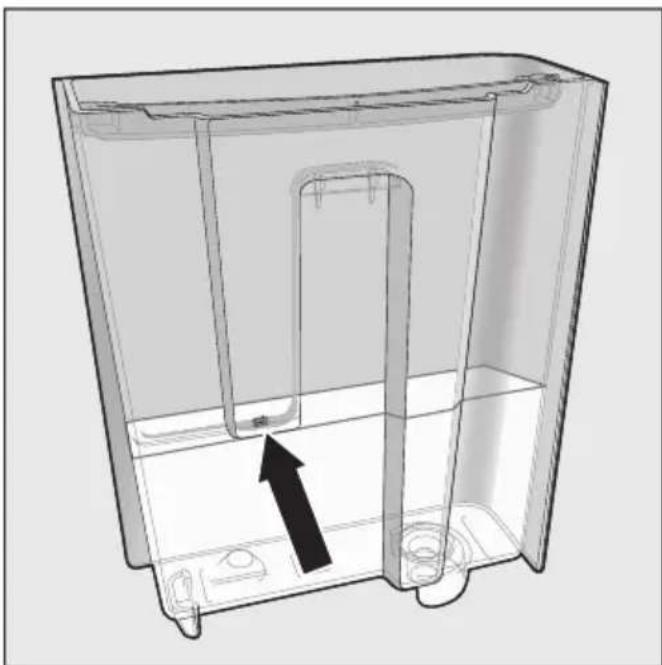
■ Place 1 descaling tablet in the water container. ■ Fill the water container to the Ⓧ mark with lukewarm water.
Follow the instructions for the descaler mixing ratio carefully. Fill the water container with the specified amount of water. Otherwise, descaling will be incomplete.
Carrying out descaling
■ Push the water container back into the machine. ■ Follow the further instructions given in the display.
When Rinse the water container and fill with fresh tap water up to the ⬆ symbol appears in the display:
■ Remove the water container and rinse it thoroughly with clean water. Ensure that no descaling solution
Residue remains in the water container. Fill the water container to the ⬇ mark with fresh tap water.
The descaling process is complete when the drinks menu appears.
If you are not going to use the coffee machine for an extended period of time, e.g. whilst on holiday, or if it needs to be moved, a number of procedures will need to be carried out to ensure its safety.
- Empty and clean the coffee bean container.
- Empty and clean the water container.
- Evaporate the coffee machine.
- Clean the inside of the machine.
- Pack the machine securely.
Evaporating the coffee machine.
The coffee machine should be evaporated before it is stored for a long period of time or transported any distance – particularly at temperatures below freezing.
Evaporating the appliance involves removing all traces of water from the system to prevent the risk of water and frost damage.
■ Switch the coffee machine on with the On/Off button ⏻. ■ Touch the ⇔ sensor control. ■ Touch the 📋 sensor control twice.
Empty the system? will appear in the display.
■ Select Yes and confirm with OK. ■ Follow the instructions in the display.
Danger of burning and scalding on the dispensing spouts. Hot steam can cause scalding. Keep well away from the area underneath the spouts when hot liquids or steam are being dispensed. Do not touch hot components.
The evaporation process is finished when Prog. finished appears in the display and the display then goes out.
■ Switch off the coffee machine and unplug it to disconnect it from the power supply. ■ Clean the drip tray and waste container.
Packing the machine
The coffee machine should only be packed when it is clean and dry. Residues of coffee grounds can cause scratches on surfaces. Coffee and milk residues or water can cause a build-up of bacteria.
Use the original packaging including polystyrene blocks to pack the coffee machine.
Also pack the operating instructions so that they are available when the coffee machine is next used.
Many malfunctions and faults that can occur in daily operation can be easily remedied. Time and money will be saved because a service call will not be needed.
The following guide may help you to find the reason for a malfunction or a fault, and to correct it.
Messages in the display
Error messages must be confirmed with OK, otherwise the message can reappear in the display even though the problem has been remedied.
Follow the instructions which appear in the display to remedy the problem.
If after this, the fault message appears in the display again, contact Miele Service.
| Problem Cause and remedy | |
| F1, F2,F80, F82 | There is an internal fault.■ Switch the coffee machine off with the On/Off button ⏻. Wait for approximately 1 hour before switching the appliance back on again. |
| F41, F42, F74, F77, F235,F236 | There is an internal fault.■ Switch the coffee machine off with the On/Off button ⏻. Wait for approximately 2 minutes before switching the appliance back on again. |
| F10, F17 No water or very | little water is being drawn in.■ Remove the water container. Fill the water container with fresh tap water and reinsert the water container.■ Remove and clean the water container filter (see “Cleaning and care – Removing and cleaning the water container filter”). |
Problem solving guide
| Problem Cause and remedy | |
| F73 orCheck the brew unit | The brew unit cannot be positioned correctly.■ Switch the coffee machine off with the On/Off button ⏻.■ Switch off at the wall socket and unplug the coffee machine. Wait for two minutes before inserting the plug back in the socket and switching on.■ Remove the brew unit and rinse under warm running water.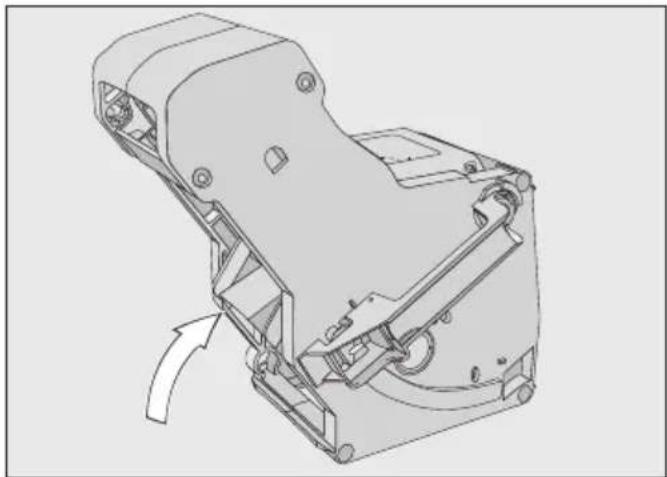 ■ Push the coffee ejector of the brew unit into the correct position.■ Do not fit the brew unit. Close the appliance door and switch the coffee machine on with the On/Off button ⏻.This will initialise the brew unit drive and put it back into the start position.■ When Insert the brew unit appears in the display, put the brew unit back in the appliance. Close the appliance door. ■ Push the coffee ejector of the brew unit into the correct position.■ Do not fit the brew unit. Close the appliance door and switch the coffee machine on with the On/Off button ⏻.This will initialise the brew unit drive and put it back into the start position.■ When Insert the brew unit appears in the display, put the brew unit back in the appliance. Close the appliance door. |
| Too much ground coffee There | re is too much ground coffee in the coffee chute.The brew unit cannot compact ground coffee if more than two level spoonfuls of ground coffee are added to the coffee chute. The ground coffee will be emptied into the waste container and the fault message will appear in the display.■ Switch the coffee machine off with the On/Off button ⏻.■ Remove and clean the brew unit by hand (see “Degreasing the brew unit and cleaning the interior”).■ Remove the ground coffee inside the coffee machine, e.g. with a vacuum cleaner.■ Place a maximum of 12 g of coffee in the ground coffee chute. |
Unusual performance of the coffee machine
| Problem Cause and remedy | |
| The display remains dark when the coffee machine is turned on using the On/Off button ⏻. | The On/Off button ⏻ was not held for long enough.■ Touch and hold the On/Off button ⏻ for at least 3 seconds. |
| The plug is not inserted in the socket correctly.■ Insert the plug into the socket. | |
| The fuse has tripped because the coffee machine, voltage or another appliance is defective.■ Switch off at the wall socket and unplug the coffee machine.■ Contact a qualified electrician or the Miele Customer Service Department. | |
| The coffee machine turns off suddenly. | The factory set switch-off time (20 minutes) or the switch-off time you have programmed has been reached.■ If required, you can select a new switch-off time (see “Settings – Timer”). |
| The plug is not inserted in the socket correctly.■ Insert the plug into the socket. | |
| The sensors do not react to touch.The coffee machine cannot be operated. | There is an internal fault.■ Disconnect the machine from the power supply by removing the plug from the socket. |
| The display is hard to see or not able to be read. | The display brightness has been set too low.■ Change this setting (see “Settings”). |
| The water container is empty. Fill and replace the water container has not appeared in the display. | Droplets of water have settled between the water container and the side walls of the casing, or this area is damp (see illustration).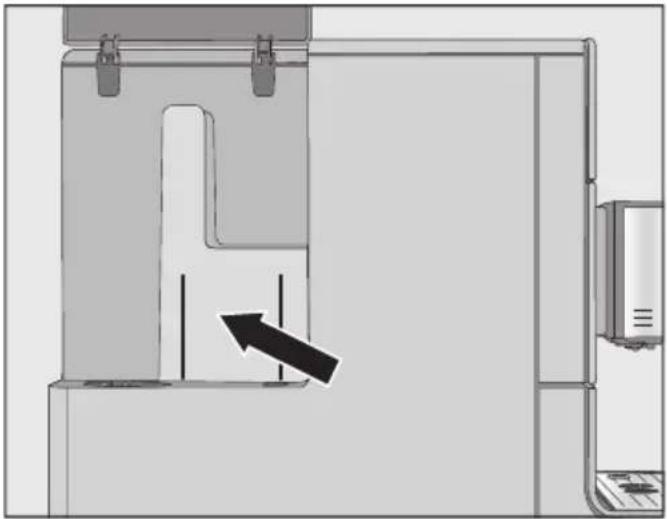 ■ Dry these surfaces thoroughly. Take the water container out to refill it with water. ■ Dry these surfaces thoroughly. Take the water container out to refill it with water. |
| There is too much residual water on the inside walls of the water container, e.g. a biofilm has developed. Or the water container has a build-up of limescale.■ Clean the water container every day. | |
| Fill and replace the water container appears in the display even though the water container is full and in the machine. | The water container is not in the correct position.■ Remove the water container and push it back in again. |
| The water container was not correctly filled and refitted for descaling.■ Fill the water container to the descaling symbol ⇌ and restart the descaling programme. | |
| Fill and replace the water container appears after switching on even though the container is filled and fitted in the machine. The appliance does not rinse. | The coffee machine needs descaling.■ Switch the coffee machine off with the On/Off button ⏻. Wait approx. 1 hour.■ Switch the appliance back on again. As soon as Heating-up phase appears, touch the □ sensor control and then select Descale the appliance.■ Descale the coffee machine. |
| After switching on the machine the message Empty the drip tray and the waste container appears even though they are both empty. | This is not a fault.When the drip tray and waste container are emptied, the internal counter is not reset after the coffee machine has been switched off. Empty the drip tray and the waste container appears in the display even though the drip tray and the waste container are not filled to the maximum. |
| Neither milk nor milk froth comes out of the central spout. | The milk pipework is blocked.■ Clean the central spout, taking particular care to clean the cappuccinatore and milk pipework connections carefully with the cleaning brush. |
| Empty the drip tray and the waste container appears in the display, even though the drip tray has been emptied. | This is not a fault. The drip tray was not properly removed and/or replaced too quickly. |
| Insert the drip tray and the waste container appears in the display even though both are fitted. | The drip tray is not in the correct position and is therefore not detected.■ Empty the drip tray and the waste container. Reassemble all parts and push the drip tray back as far as it will go in the coffee machine. |
| The drip tray or waste container is full or overflowing, although they have been emptied following each reminder. | This is not a fault.The drip tray and waste container were probably removed or the machine was opened without the drip tray and waste container being emptied. When the drip tray is removed or the machine opened, the internal counter for emptying the drip tray and waste container is automatically reset.■ Remove the drip tray and waste container from the machine and empty them. |
| Problem Cause and remedy | |
| Fill the bean container appears in the display even though the bean container has just been filled. | This is not a fault.■ Confirm the message with OK. |
| Insufficient coffee beans are getting into the grinder. Have you used a dark roast? This type of coffee bean is often more oily. These oils can cling to the inside of the coffee bean container and hinder the flow of beans.■ Make a coffee and observe whether the coffee beans drop into the coffee bean container.■ Clean the coffee bean container more often if you are using a darker, more oily bean.Try other types of coffee bean which are less oily. | |
| The coffee machine does not rinse itself when turned on. | This is not a fault.If the coffee machine is already at operating temperature, rinsing will not take place. |
| Coffee dispensing is repeatedly interrupted and the message Fill the bean container appears in the display. | This is not a fault.The brew unit has not detected the ground coffee. Certain types of coffee produce a small amount of coffee when they are ground. Usually this is because the grinder is set too fine and the minimum quantity of coffee is set.■ Confirm the message with OK.If the coffee is too strong for you or tastes bitter, try a different type of coffee beans.If the display appears with all types of coffee:■ Set the grinder to a coarser setting (see “Grinder setting”).■ Select a larger quantity of coffee.Don't forget to check any drinks changed in “Profiles”. |
| If the message only appears when dispensing certain drinks:■ Check the quantity of coffee set for this drink (see “Quantity of coffee”). Select a larger quantity of coffee.■ You may also need to set a coarser grinder setting. | |
Problem solving guide
| Problem Cause and remedy | |
| The descaling process was started by mistake. | The descaling process cannot be stopped once the “OK” sensor has been touched.Descaling must be continued through to completion.This is a safety precaution to make sure the machine is descaled correctly. This is important for the longevity and functional efficiency of your coffee machine.■ Descale the coffee machine (see “Descaling”). |
| The milk sputters when it is dispensed. Hissing noises can be heard when milk is being heated up or frothed. Although the milk should be frothed, only hot milk comes out of the main dispenser. | The milk temperature is too high. Good milk froth can only be achieved with cold milk (below 10°C).■ Check the temperature of the milk. |
| The central dispenser with integrated cappucinatore is not correctly fitted and is taking in air. Or the spouts are blocked.■ Check whether the central spout has been assembled correctly. Make sure that all parts are tightly connected to one another.■ If necessary, clean the central spout. | |
| The milk pipework, connections or the intake tube on the milk flask are blocked.■ Clean all parts thoroughly. | |
The steam jet on the central spout has a blockage.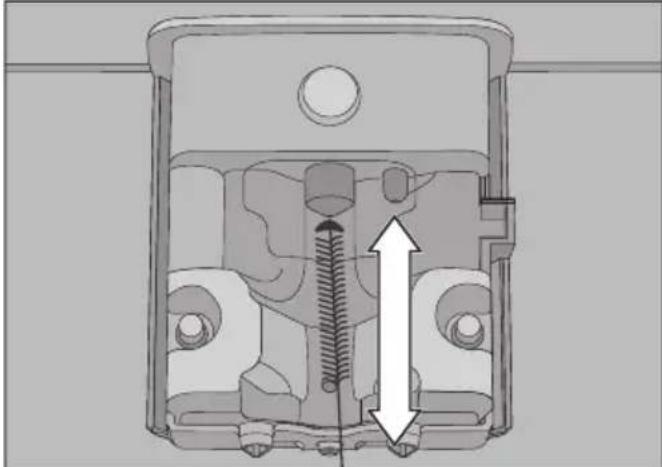 | |
| Push the cleaning brush a max. of 1 cm into the steam jet.■ Clean the steam jet with the cleaning brush. | |
| Problem Cause and remedy | |
| Coffee grounds have settled on the lid of the drip tray and in the interior around the brew unit. | This is not a fault.The movement of the brew unit during the brewing process can cause some ground coffee to fall around it. The type of beans used, the fineness of the ground coffee and the quantity of coffee ground also affect the quantity. Important! Clean the inside of the coffee machine regularly to prevent mould etc.Check whether the quantity of coffee is set too high. |
| The underside of the coffee bean container cover is very damp Drops of water are visible. | Too many drinks have been made one after the other and the ground coffee chute is not closed or not properly closed. Steam has risen up from the brew unit via the ground coffee chute and condensed under the cover.■ Replace the lid on the ground coffee chute making sure it is properly sealed. |
| Water from making coffee has collected on the worktop underneath the coffee machine. | This is not a fault. Water can get under the machine when the drip tray is removed.Clean the surfaces underneath the coffee machine regularly. |
| The display lights up but the coffee machine does not heat up and no drinks are made.The coffee machine cannot be turned off. | The Demo mode for demonstrating the coffee machine in the showroom has been activated.■ Deactivate Demo mode. |
Unsatisfactory results
| Problem Cause and remedy | |
| The coffee is not hot enough. | The cup has not been pre-heated.The smaller the cup and the thicker its sides, the more important it is to pre-heat it.■ Pre-heat the cup, for example, with hot water. |
| The brewing temperature has been set too low.■ Set a higher brewing temperature. | |
| The filters in the brew unit are blocked.■ Remove the brew unit and clean by hand■ Degrease the brew unit. | |
| The heating-up time is getting longer, the amount of water being dispensed is incorrect and the coffee machine is not performing properly. Coffee flows very slowly out of the central spout. | The coffee machine needs descaling.■ Descale the coffee machine. |
| Coffee is not flowing out of the central spout.Or coffee is only being dispensed via one spout. | The central spout has a blockage.■ Clean the coffee pipework (see "Cleaning and care - Rinsing the machine).■ If there is still no coffee coming out, or coffee is only coming out of one side, clean the dispensing spouts with the cleaning brush. |
| The consistency of the milk froth is unsatisfactory. | The milk temperature is too high. Good milk froth can only be achieved with cold milk (below 10 °C).■ Check the temperature of the milk in the milk flask. |
| The milk pipework is blocked.■ Clean the central spout and milk pipework with the brush. | |
| Problem Cause and remedy | |
| The coffee grinder makes a louder noise than usual. | The coffee bean container has become empty during the grinding process.■ Fill the coffee bean container with fresh beans. |
| There may be foreign objects such as plastic or stones in amongst the coffee beans.■ Switch the coffee machine off immediately. Call Service. | |
| The coffee flows too quickly into the cup. | The coffee is too coarsely ground.■ Set the grinder to a finer setting (see “Grinder setting”). |
| The coffee is dispensed too slowly into the cup. | The coffee is too finely ground.■ Set the grinder to a coarser setting (see “Grinder setting”). |
| The brew unit is blocked.■ Degrease the brew unit (see “Cleaning and care – Degreasing the brew unit and cleaning the interior”). | |
| The crema on the coffee or espresso is not as it should be. | The grinder setting is not correct.■ Set the grinder to a finer or coarser setting. |
| The brew temperature is too high for the type of coffee being used.■ Set a lower brewing temperature. | |
| The coffee beans are no longer fresh.■ Add fresh beans to the coffee bean container. | |
Contact in the event of a fault
In the event of any faults which you cannot remedy yourself, please contact your Miele dealer or the Miele Customer Service Department.
You can book a Miele Customer Service Department call-out online at www.miele.com/service.
Contact information for the Miele Customer Service Department can be found at the end of this document.
Please quote the model identifier and serial number of your appliance (Fabr./SN/Nr.) when contacting the Miele Customer Service Department. This information can be found on the data plate.
Please note that telephone calls may be monitored and recorded for training purposes and that a call-out charge will be applied to service visits where the problem could have been resolved as described in this booklet.
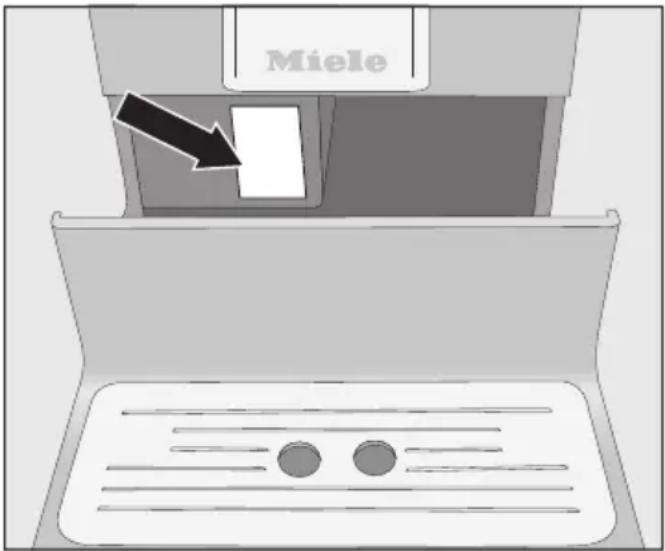
Warranty
For information on the appliance warranty specific to your country please contact Miele. See back cover for address.
In the UK, your appliance warranty is valid for 2 years from the date of purchase. However, you must activate your cover by calling 0330 160 6640 or registering online at www.miele.co.uk.
The following tips can help you save energy and money as well as care for the environment:
- Operate the coffee machine in Eco mode (default setting).
- The coffee machine's energy consumption may increase if you change the settings for the timer.
This setting uses more energy appears in the display.
- Switch the coffee machine off with the On/Off button ⏻ when it is not in use.
- Change the setting for the “Switch off after” timer to 15 minutes. The coffee machine will then switch itself off 15 minutes after the last drink was made or a sensor control was touched.
Before connecting the coffee machine, make sure that the connection data on the data plate (voltage and frequency) matches the mains electricity supply. This data must correspond in order to avoid the risk of damage to the coffee machine. If in any doubt, consult a qualified electrician.
The required connection data is given on the data plate. The data plate can be seen on the left-hand side of the machine when the drip tray is pulled out.
The machine is supplied with a mains cable with moulded plug for connection to a 50 Hz 220-240 V supply.
The coffee machine must be connected to the mains supply via a suitable switched socket with earthing contact. Connection must comply with national and local safety regulations (BS 7671 in the UK).
The fuse rating must be at least 10 A.
The socket should be next to the appliance and easily accessible where possible.
Do not connect the coffee machine to the mains electricity supply using a multi-socket adapter or an extension lead. These do not guarantee the required safety of the machine (fire risk).
Do not connect the coffee machine to an off-grid inverter. These devices are used for autonomous power supply, e.g. a solar power system. Power surges could cause a safety shutdown. This could damage the electronic module.
The coffee machine must not be used with “energy saving plugs”. These reduce the amount of energy supplied to the machine, causing it to overheat.
If the mains connection cable is faulty, it must only be replaced by a qualified electrician in order to avoid a hazard.

Danger of overheating due to insufficient ventilation.
If the coffee machine is not sufficiently ventilated, the appliance can overheat.
Please ensure that there is adequate ventilation around the coffee machine.
Do not cover the coffee machine with tea towels etc. while it is in use.
If the coffee machine is installed behind a closed furniture front, heat and moisture can build up behind the furniture front when closed. This can result in damage to the coffee machine and/or furniture unit.
Do not close the furniture front while the coffee machine is in use.
Please observe the following installation instructions:
- The location of the machine must be dry and well ventilated.
- The ambient temperature of the room in which the machine is used must be between 10 °C and 38 °C.
- The machine must be set up on a level surface. The surface must be water resistant.
If the machine is installed in a niche, the niche must provide the following minimum dimensions:
Height 510 mm
Width 450 mm
Depth 575 mm
When setting up the machine: make sure that the service panel can be fully opened so that the brew unit can be removed with ease when required.
■ The machine must be set up in the niche such that it sits flush with the front edge of the niche.
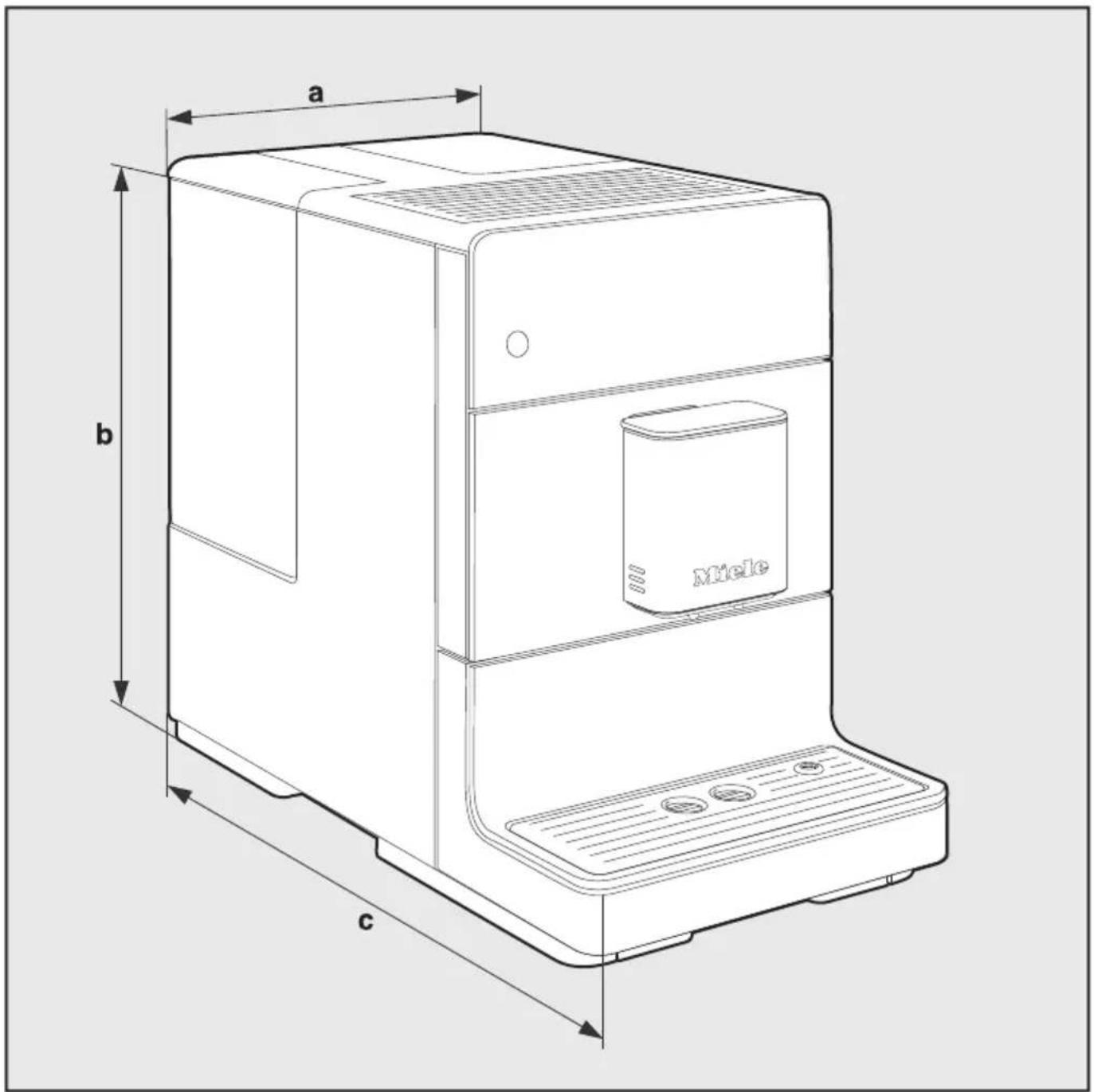
a = 241 mm
b = 360 mm
c = 460 mm
Electricity consumption in standby mode < 0.5 Watt (default setting):
Pump pressure: max. 15 bar
Through-flow heater: 1 stainless steel thermo block
Dimensions (W x H x D): 241 x 360 x 460 mm
Net weight: 9.48 kg
Connection cable length: 120 cm
Water container capacity: 1.3 l
Bean container capacity: 200 g
Waste container capacity: max. 6 portions of coffee grounds
Central spout: Height adjustable from 80–135 mm
Grinder: Steel conical grinder
Grinder setting: 5 settings
Ground coffee amount: max. 12 g
United Kingdom
Miele Co. Ltd., Fairacres, Marcham Road, Abingdon, Oxon, OX14 1TW
Tel: 0330 160 6600, Internet: www.miele.co.uk/service, E-mail: info@miele.co.uk
Australia
Miele Australia Pty. Ltd.
ACN 005 635 398
ABN 96 005 635 398
1 Gilbert Park Drive
Knoxfield, VIC 3180
Tel: 1300 464 353
Internet: www.miele.com.au
China Mainland
Miele Electrical Appliances Co., Ltd.
1-3 Floor, No. 82 Shi Men Yi Road
Jing' an District
200040 Shanghai, PRC
Tel: +86 21 6157 3500
Fax: +86 21 6157 3511
E-mail: info@miele.cn
Kowloon Bay, Hong Kong
Tel: (852) 2610 1025
Fax: (852) 3579 1404
Email:
customerservices@miele.com.hk
Website: www.miele.hk
India
Miele India Pvt. Ltd.
Ground Floor, Copia Corporate Suites, 29 Media Circle
Plot No. 9, Jasola
New Delhi - 110025
Tel: 011-46 900 000
Fax: 011-46 900 001
E-mail: customercare@miele.in
Internet: www.miele.in
Ireland
Miele Ireland Ltd.
2024 Bianconi Avenue
Citywest Business Campus
Dublin 24
Tel: (01) 461 07 10
Fax: (01) 461 07 97
E-Mail: info@miele.ie
Internet: www.miele.ie
Malaysia
Miele Sdn Bhd
Suite 12-2, Level 12
Menara Sapura Kencana
Petroleum
Solaris Dutamas No. 1
Jalan Dutamas 1
50480 Kuala Lumpur, Malaysia
Phone: +603-6209-0288
Fax: +603-6205-3768
New Zealand
Miele New Zealand Limited
IRD 98 463 631
8 College Hill
Freemans Bay, Auckland 1011
New Zealand
Tel: 0800 464 353
Internet: www.miele.co.nz
Singapore
Miele Pte. Ltd.
29 Media Circle
11-04 ALICE@Mediapolis
Singapore 138565
Tel: +65 6735 1191
Fax: +65 6735 1161
E-Mail: info@miele.com.sg
Internet: www.miele.sg
South Africa
Miele (Pty) Ltd.
63 Peter Place
Bryanston 2194
P.O. Box 69434
Bryanston 2021
Tel: (011) 875 9000
Fax: (011) 875 9035
E-mail: info@miele.co.za
Internet: www.miele.co.za
Thailand
Miele Appliances Ltd.
BHIRAJ TOWER at EmQuartier
43rd Floor Unit 4301-4303
689 Sukhumvit Road
North Klongton Sub-District
Vadhana District
Bangkok 10110, Thailand
United Arab Emirates
Miele Appliances Ltd.
Showroom 1
Eiffel 1 Building
Sheikh Zayed Road, Umm Al She
P.O. Box 114782 - Dubai
Tel. +971 4 3044 999
Fax. +971 4 3418 852
800-MIELE (64353)


- OPERATING INSTRUCTIONS COFFEE MACHINE
- DISPOSING OF YOUR OLD APPLIANCE
- CONTENTS
- SETTINGS
- CLEANING AND CARE
- TRANSPORTING THE MACHINE
- PROBLEM SOLVING GUIDE
- AFTER SALES SERVICE AND WARRANTY
- SAVING ENERGY
- CORRECT APPLICATION
- SAFETY WITH CHILDREN
- TECHNICAL SAFETY
- CORRECT USE
- WARNING AND SAFETY INSTRUCTIONS
- FOR MACHINES WITH STAINLESS STEEL SURFACES
- ① ON/OFF BUTTON ⏻
- ② DRINK BUTTONS
- ③ DISPLAY
- ④ OPTICAL INTERFACE
- ⑤ ARROW BUTTONS ∧ ∨
- ⑥ OK SENSOR
- ⑦ “BACK” ⇔ SENSOR
- ⑧ LED
- ⑨ SENSOR CONTROL
- ⑩ “2 PORTIONS” SENSOR
- ACCESSORIES SUPPLIED
- STARTER SET "MIELE APPLIANCE CARE
- CLEANING BRUSH
- OPTIONAL ACCESSORIES
- MICROFIBRE CLOTH
- CLEANING AGENT FOR MILK PIPEWORK
- CLEANING TABLETS
- DESCALING TABLETS
- CJ JUG COFFEE FLASK
- MILK CONTAINER WITH LID
- SENSORS
- DRINKS MENU
- SELECTING A MENU AND NAVIGATING WITHIN A MENU
- EXITING A LIST OR CANCELLING AN ACTION
- BEFORE USING FOR THE FIRST TIME
- SWITCHING ON FOR THE FIRST TIME
- SETTING THE WATER HARDNESS
- FILLING THE WATER CONTAINER
- SWITCHING THE COFFEE MACHINE ON
- SWITCHING THE COFFEE MACHINE OFF
- SWITCHING OFF FOR LONGER PERIODS OF TIME
- ADJUSTING THE CENTRAL SPOUT TO THE CORRECT CUP HEIGHT
- MAKING COFFEE WITH AND WITHOUT MILK
- MILK PREPARATION
- USING MILK CARTONS OR BOTTLES
- MAKING A COFFEE
- CANCELLING A DRINK
- PORTIONS (SENSOR CONTROL 📋)
- COFFEE POT
- CANCELLING COFFEE POT
- MAKING COFFEE DRINKS WITH GROUND COFFEE
- ADDING GROUND COFFEE
- DISPENSING HOT WATER (CM 5410, CM 5510, CM 5710)
- QUANTITY OF COFFEE, BREW TEMPERATURE AND PRE-BREWING
- GROUND QUANTITY
- BREWING TEMPERATURE
- PRE-BREWING THE GROUND COFFEE
- CANCELLING PORTION SIZE PROGRAMMING
- CHANGING THE PORTION SIZE WHILE MAKING A DRINK
- CHANGING THE PORTION SIZES IN THE PARAMETERS MENU
- CREATING PROFILES
- CHANGING DRINKS WITHIN A PROFILE
- MAKING DRINKS STORED IN A PROFILE
- CHANGING THE NAME
- DELETING A PROFILE
- SETTING WHEN THE PROFILE SHOULD CHANGE (CHANGE PROFILE)
- DISPLAYING AND CHANGING SETTINGS
- LANGUAGE
- TIMER: SWITCH OFF AFTER
- ECO MODE
- INFO (DISPLAY INFORMATION)
- SYSTEM LOCK 🔒
- TEMPORARILY DEACTIVATING THE SYSTEM LOCK 🔒
- WATER HARDNESS
- DISPLAY BRIGHTNESS
- VOLUME
- FACTORY DEFAULTS
- THE FOLLOWING WILL NOT BE RESET
- DEMO MODE (SHOWROOM PROGRAMME)
- OVERVIEW OF CLEANING INTERVALS
- CLEANING BY HAND OR IN THE DISHWASHER
- THE FOLLOWING COMPONENTS ARE DISHWASHER SAFE
- UNSUITABLE CLEANING AGENTS
- WASTE CONTAINER, DRIP TRAY AND DRIP TRAY COVER
- CLEANING THE WATER CONTAINER
- REMOVING AND CLEANING THE WATER CONTAINER FILTER
- CENTRAL SPOUT
- REASSEMBLING THE CENTRAL SPOUT
- MILK PIPEWORK
- BEAN CONTAINER AND GROUND COFFEE CHUTE
- CLEANING THE CASING
- OPENING THE MAINTENANCE MENU
- RINSING THE APPLIANCE
- RINSING THE MILK PIPEWORK
- CLEANING THE MILK PIPEWORK USING THE MAINTENANCE PROGRAMME
- PREPARING THE CLEANING SOLUTION
- CARRYING OUT THE CLEANING PROCESS
- DEGREASING THE BREW UNIT AND CLEANING THE INTERIOR
- DEGREASE THE BREW UNIT
- CLEANING THE BREW UNIT AND INTERIOR
- DROPPING A CLEANING TABLET INTO THE BREW UNIT
- DESCALING THE MACHINE
- DESCALING AFTER PROMPT APPEARS IN THE DISPLAY
- PREPARING THE DESCALING SOLUTION
- CARRYING OUT DESCALING
- EVAPORATING THE COFFEE MACHINE
- PACKING THE MACHINE
- MESSAGES IN THE DISPLAY
- CONTACT IN THE EVENT OF A FAULT
- WARRANTY
- THE FOLLOWING TIPS CAN HELP YOU SAVE ENERGY AND MONEY AS WELL AS CARE FOR THE ENVIRONMENT
- UNITED KINGDOM
- AUSTRALIA
- CHINA MAINLAND
- INDIA
- IRELAND
- MALAYSIA
- NEW ZEALAND
- SINGAPORE
- ALICE@MEDIAPOLIS
- SOUTH AFRICA
- THAILAND
- UNITED ARAB EMIRATES
Brand : MIELE
Model : Silence CM 5510
Category : Coffee maker