
Optix MAG274QRF-QD - Monitor MSI - Free user manual and instructions
Find the device manual for free Optix MAG274QRF-QD MSI in PDF.


Pick your language and provide your email: we'll send you a specifically translated version.
| Product Type | Gaming Monitor |
| Model | Optix MAG274QRF-QD |
| Brand | MSI |
| Screen Size | 27 inches |
| Resolution | 2560 x 1440 (QHD) |
| Panel Type | IPS |
| Refresh Rate | 165 Hz |
| Response Time | 1 ms (GTG) |
| Aspect Ratio | 16:9 |
| Brightness | 300 cd/m² |
| Contrast Ratio | 1000:1 |
| Color Gamut | DCI-P3 97% / sRGB 147% |
| Viewing Angle | 178° / 178° |
| Connectivity | 2x HDMI 2.0, 1x DisplayPort 1.2, 1x USB Type-C (DP Alt), 2x USB 3.2 Gen1, 1x USB-B, 1x Headphone-out |
| VESA Mount | 100 x 100 mm |
| Height Adjustment | 0 - 130 mm |
| Tilt | -5° ~ 20° |
| Swivel | -75° ~ 75° |
| Pivot | Yes (90°) |
| Power Consumption | 65 W (typ.) |
| Weight (without stand) | 5.95 kg |
| Weight (with stand) | 8.05 kg |
| Dimensions (with stand) | 615 x 405 x 196 mm |
| Special Features | G-Sync Compatible, Adaptive Sync, Quantum Dot, HDR Ready, Night Vision, OSD App |
Frequently Asked Questions - Optix MAG274QRF-QD MSI
How do I enable G-Sync on the MSI Optix MAG274QRF-QD?
Ensure your GPU supports G-Sync. Connect via DisplayPort, then enable G-Sync in NVIDIA Control Panel under 'Set up G-Sync'.
What is the recommended resolution and refresh rate for this monitor?
The native resolution is 2560x1440 at 165Hz. Use a DisplayPort cable for full refresh rate.
How do I clean the monitor screen safely?
Turn off the monitor and unplug it. Use a soft, dry microfibre cloth. Avoid harsh chemicals. For stubborn spots, lightly dampen the cloth with distilled water.
Does this monitor support HDR?
Yes, it is HDR Ready with VESA DisplayHDR 400 certification. Enable HDR in Windows display settings for compatible content.
How do I adjust the monitor's height and tilt?
Hold the monitor base firmly and adjust the height by pushing down or lifting up. Tilt by holding the top edge and moving forward/backward within the -5° to 20° range.
What is the warranty period for MSI monitors?
Typically 3 years for parts and labor, but check your region-specific warranty card included in the box.
Can I mount this monitor on a VESA arm?
Yes, it supports 100x100 mm VESA mount. Remove the stand by pressing the release button and unscrewing the bracket.
How do I enable the OSD (On-Screen Display) menu?
Press the joystick button at the back of the monitor to open the OSD. Navigate using the joystick to adjust settings like brightness, contrast, and gaming modes.
Does the USB-C port support video input and charging?
Yes, the USB-C port supports DisplayPort Alt Mode for video input and can deliver up to 15W charging for compatible devices.
What should I do if the screen flickers?
Check your cable connection and try a different cable or port. Ensure the refresh rate is set correctly. If using FreeSync/G-Sync, update your GPU drivers. Also disable 'MPRT' in OSD if enabled.
User questions about Optix MAG274QRF-QD MSI
0 question about this device. Answer the ones you know or ask your own.
Ask a new question about this device
No questions yet. Be the first to ask one.
Download the instructions for your Monitor in PDF format for free! Find your manual Optix MAG274QRF-QD - MSI and take your electronic device back in hand. On this page are published all the documents necessary for the use of your device. Optix MAG274QRF-QD by MSI.
USER MANUAL Optix MAG274QRF-QD MSI
Nastavení monitoru
natural_image
Line drawing of a computer monitor and its rear panel (no text or symbols)natural_image
Diagram of a computer monitor with a vertical lock and cable, labeled D and B (no text or symbols beyond labels)Nastavení OSD
natural_image
Line drawing of a monitor with a vertical stand and a circular control knob labeled 'OK' (no text or symbols on the device itself)Nabídky OSD
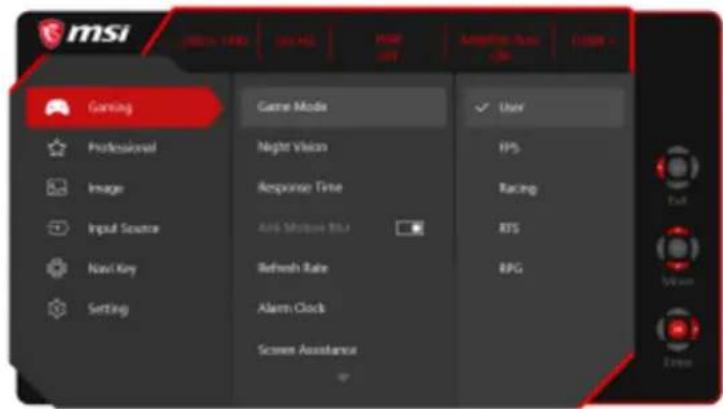
Gaming (Hry)

Table of contents
Click a title to access it
Manual assistant
Powered by Anthropic
Waiting for your message
Product information
Brand : MSI
Model : Optix MAG274QRF-QD
Category : Monitor