
Smart Thermostat - Thermostat TADO - Free user manual and instructions
Find the device manual for free Smart Thermostat TADO in PDF.


| Product Type | Smart Thermostat |
| Brand | Tado |
| Model | Smart Thermostat X |
| Connectivity | Wi-Fi (802.11 b/g/n), Bluetooth Low Energy |
| Power Supply | 2x AAA batteries or via Bridge X (mains-powered) |
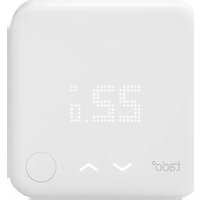
| Display | OLED display with touch arrows |
| Control | Push button and touch arrows on device, tado° app |
| Smart Scheduling | Yes, customizable time blocks with Home and Away modes |
| Geofencing | Yes, with Auto-Assist subscription |
| Open Window Detection | Yes, with Auto-Assist subscription |
| Energy Savings Report | Yes, via Energy IQ feature |
| Air Comfort Monitoring | Yes, temperature and humidity |
| HomeKit Integration | Yes |
| Compatibility | Requires Tado Bridge X; works with Wireless Receiver X, Heat Pump Optimizer X |
| Dimensions | 86 x 86 x 25 mm (approx.) |
| Weight | 150 g (approx.) |
| Installation | Wall-mounted; professional installation recommended |
| Operating Temperature | 0°C to 40°C |
| Warranty | 2 years |
| Languages | Multilingual (app interface) |
Frequently Asked Questions - Smart Thermostat TADO
User questions about Smart Thermostat TADO
0 question about this device. Answer the ones you know or ask your own.
Ask a new question about this device
Download the instructions for your Thermostat in PDF format for free! Find your manual Smart Thermostat - TADO and take your electronic device back in hand. On this page are published all the documents necessary for the use of your device. Smart Thermostat by TADO.
USER MANUAL Smart Thermostat TADO
natural_image
Illustration of a person sitting on a sofa using a smartphone with a 22° thermal management icon and off-screen button (no text or symbols)tado°
Welcome to tado°
Congratulations on your tado° X purchase!
We want to ensure you have the best possible experience using our products, therefore we have created this guide to support you in creating your tado° account and controlling your heating using tado°.
Contents
1 App installation & account creation
2 Home screen explained
③ Manual control of your heating
4 Smart Schedule
5 Auto-Assist
6 Balance for Heat Pump
⑦ tado° Support
1 App installation & account creation

natural_image
Illustration of a person interacting with a large user profile interface (no text or symbols)tado°
1
App installation
Install the tado° app

Visit App Store

Visit Google play
natural_image
Illustration of a person using a smartphone with open interface elements (no text or symbols on main subjects)1
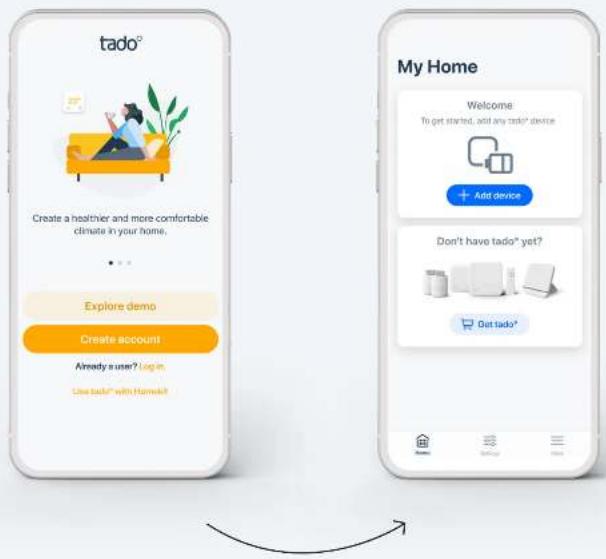
Account creation
Step 1
Create your account in the app.
Step 2.
Once you have created your tado° home select 'add device'.
If your setup includes a tado° Bridge X, Wireless Receiver X or Heat Pump Optimizer X, this should be the first device to register.*
Step 3.
After your tado° is professionally installed, select 'add device' and follow the instructions to scan in the QR code of the Bridge X. The QR Codes are laser-etched on each tado° X room control device and also printed on the Get started cards in each device's packaging.
* If you're installing yourself, the app will guide you with customized instructions for each device. If your devices have already been professionally installed, you can skip those installation steps.
tado°
② Home screen explained

natural_image
Illustration of a person sitting on a sofa holding a smartphone, with a potted plant nearby (no text or symbols)tado°

Your tado° home screen
The most important tado° features can be controlled from your home screen. Here you can also see the current temperature of your rooms or zones as well as the geofencing mode.
Zone/Room
Control your heating system per room.*
Air Comfort
Highlights the air quality in each room with a Smart Thermostat or Smart Radiator Thermostat.
Energy Savings Report
See how much energy you are saving thanks to tado° Skills.
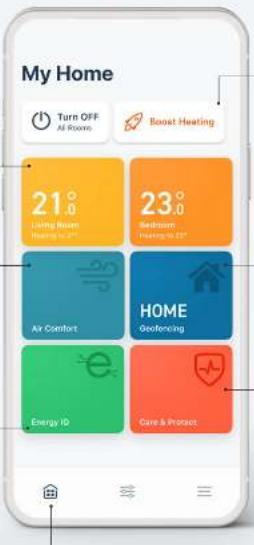
Quick Action
Quick Actions allow you to make changes that affect specific rooms or all of your rooms at once, from your Home screen.
Geofencing
Quickly check whether your tado ^® system is in Home or Away Mode.
Care & Protect
Monitors your heating system and notifies you if unusual heating behaviour is detected.
Settings & More
Access skills, settings, support and more.
* If the home is only set up with a single Smart Thermostat then the zone widget will control the heating in the entire home.
(!) Some features are only available with Auto-Assist.
tado°

Your tado° home screen - explained
Heat Pump Optimizer X
The most important tado° features can be controlled from your home screen. Here you can also see the current temperature of your rooms or zones as well as the geofencing mode.
Heating & Hot Water schedules
Easily adjust the schedules for your heat pump heating and hot water.
Balance for Heat Pump
Adjust the activity of your heat pump to save energy and costs according to your electricity tariff.
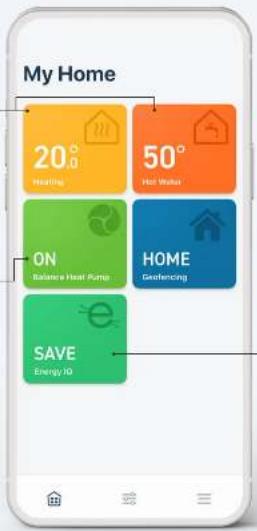
Energy IQ
Monitor the energy consumption of your heat pump.
(!) Some features are only available with Auto-Assist.
tado°
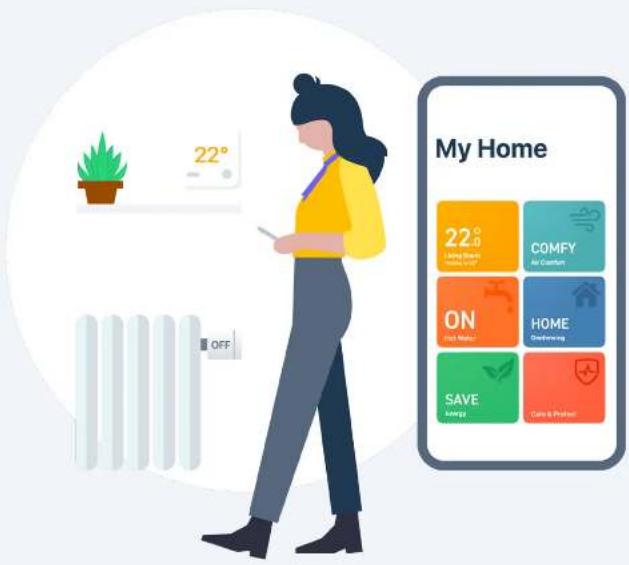
③ Manual control of your heating
Smart Thermostat X/ Wireless Temperature Sensor X
Smart Radiator Thermostat X
tado° App
tado°
3
Manual control:
Smart Thermostat X/ Wireless Temperature Sensor X
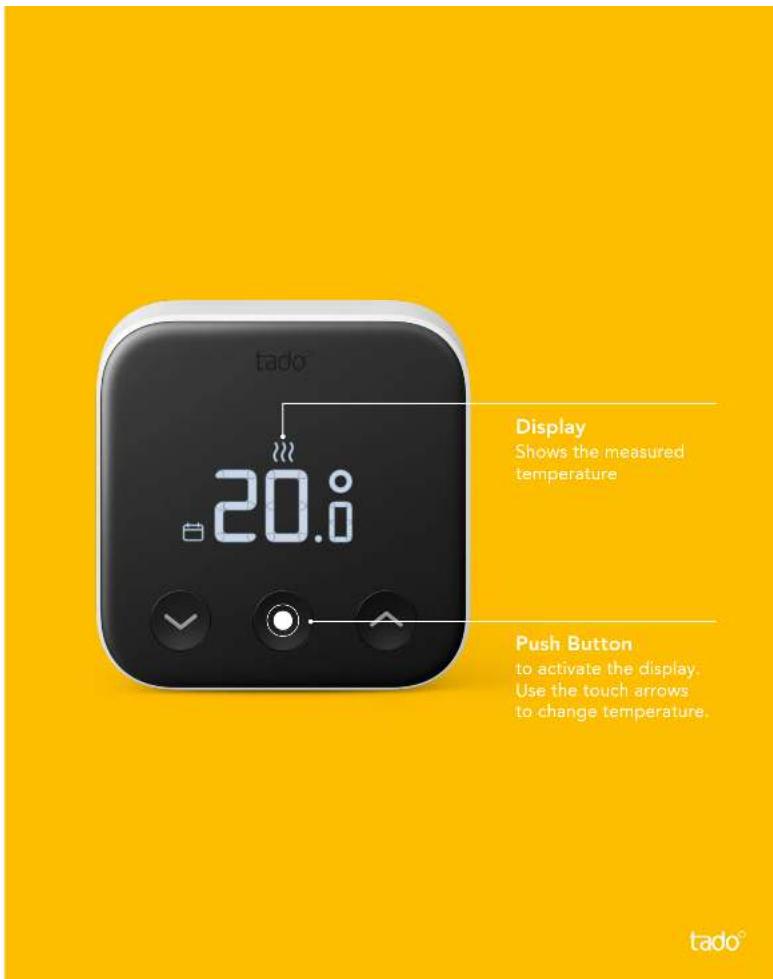
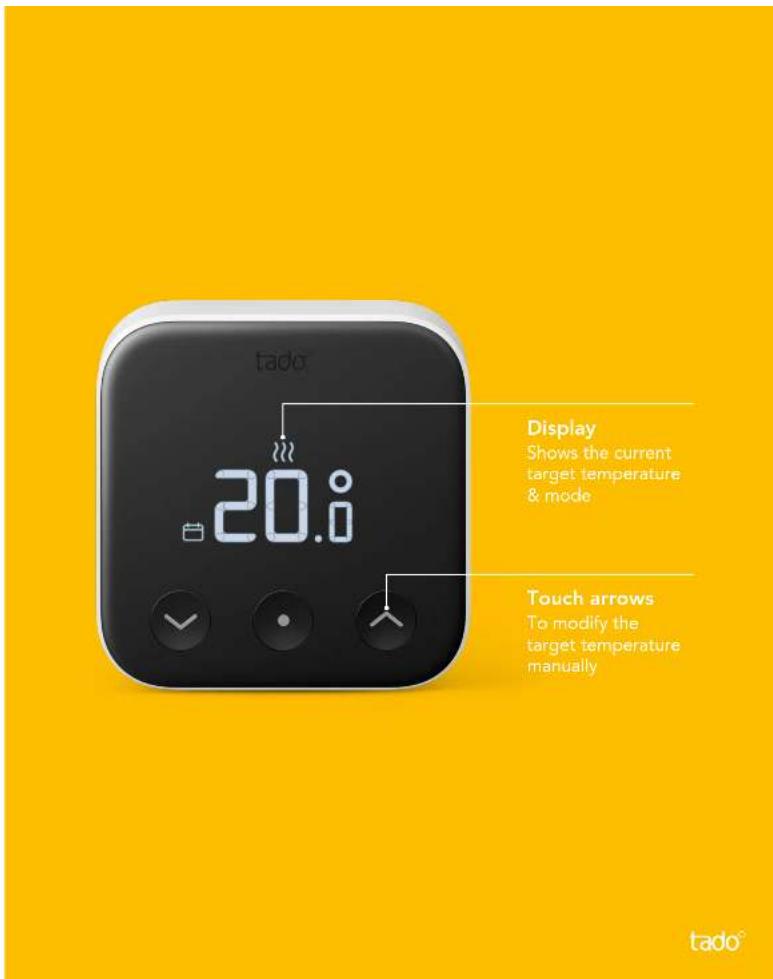
To make temporary temperature adjustments via the Smart Thermostat press the button to activate the display.
The device will first show the current measured temperature in the room.
3
Press the middle button again to view the current target temperature. You can use the up and down buttons to modify the target temperature manually.
The icons shown next to the target temperature indicate the current tado° mode:

- The Smart Schedule is active and tado° is in Home Mode

- The Smart Schedule is active and tado° is in Away Mode

- Manual control is active
3
Manual control:
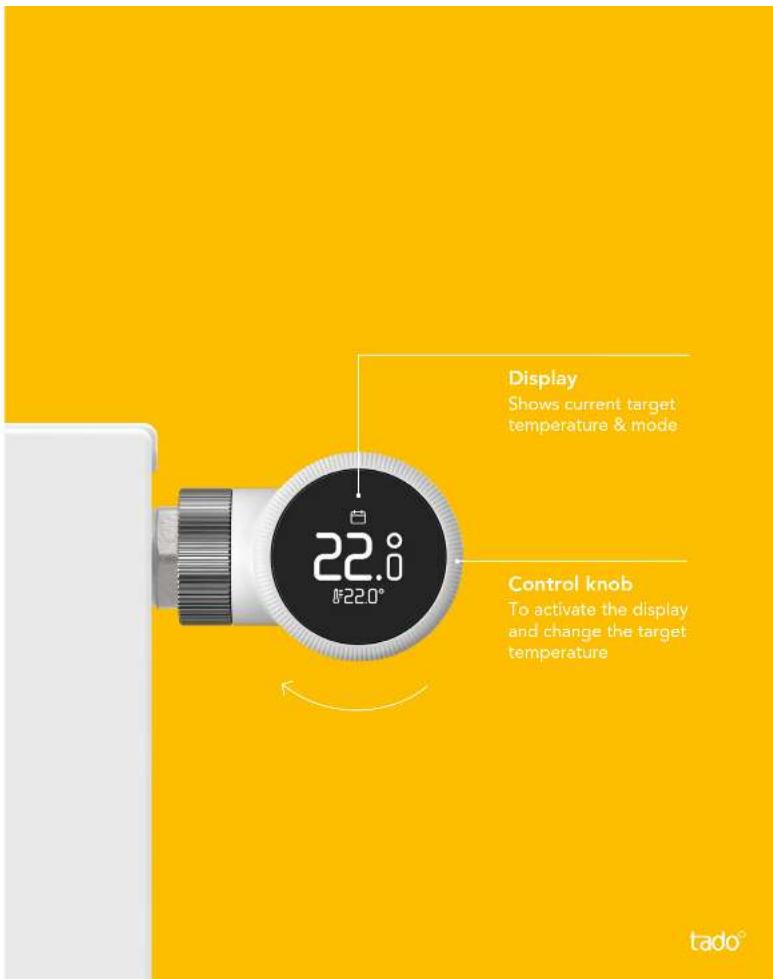
Smart Radiator Thermostat X Tap the display of the Smart Radiator Thermostat X to check the current target temperature.
Turn the control knob to change the target temperature.
The icons shown next to the target temperature indicate the current tado° mode:


- The Smart Schedule is active and tado° is in Home Mode
- The Smart Schedule is active and tado° is in Away Mode
- Manual control is active
3
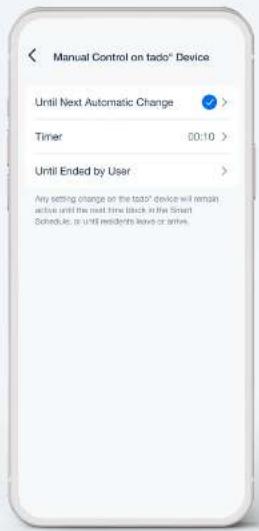
Manual Control Duration
In the app you can modify the default behavior for how long a Manual Control setting stays active. This setting applies when you adjust the temperature directly on the device or with voice commands.
Just go to the settings in your app, select the room and open Manual control on tado° device.
tado°
3
Manual control:
tado° App
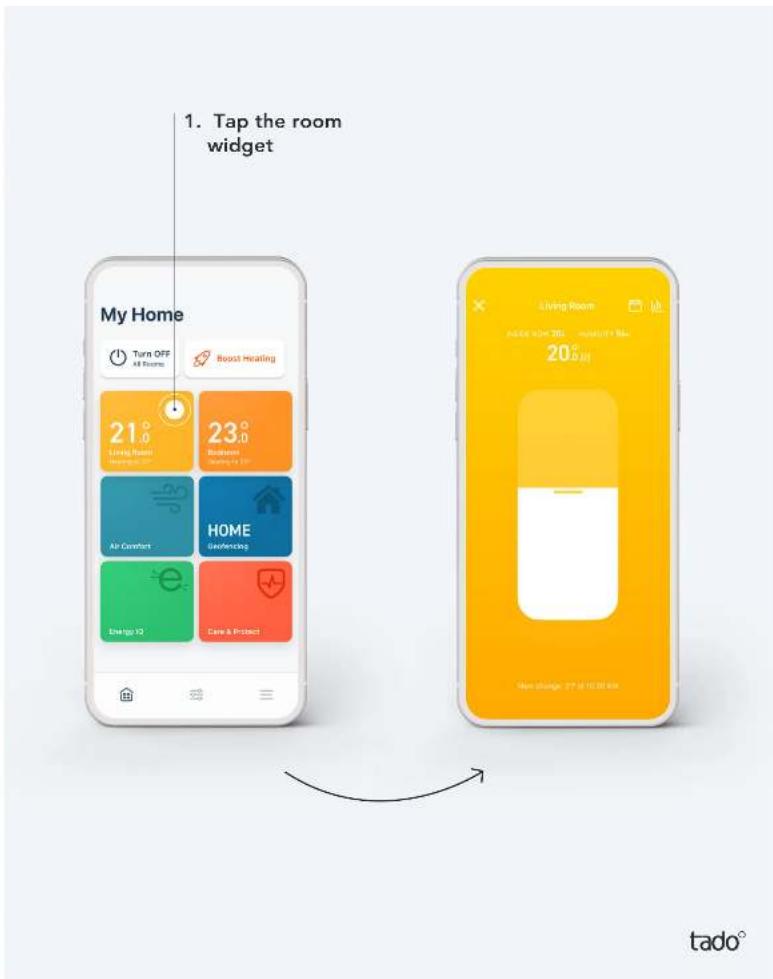
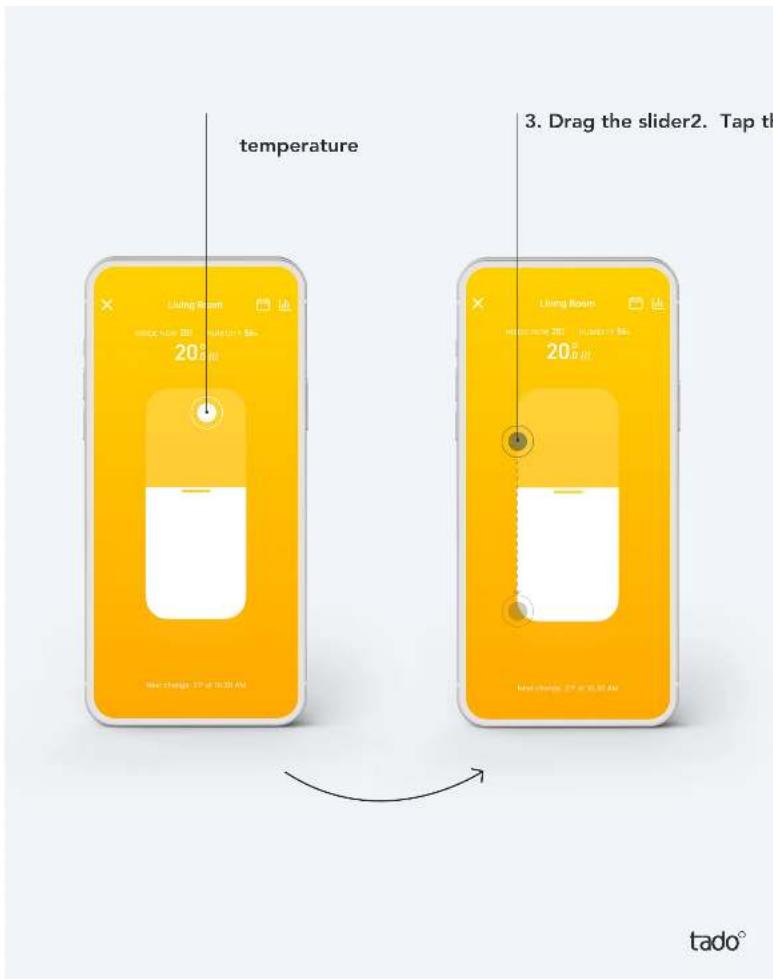
Step 1
Open the room screen by tapping the widget.
3
Step 2.
Tap on the centre of the screen where the set temperature is shown.
Step 3.
Drag the slider up or down to make changes to the target temperature.
3
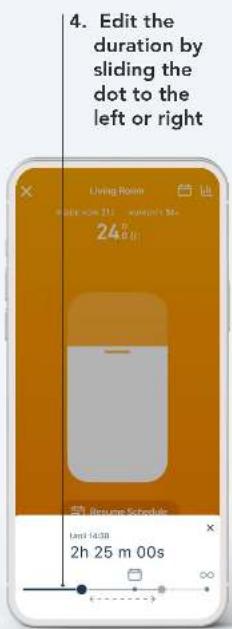
Step 4.
You can edit the duration of this temperature change at any time. tado° will remember your settings for the next manual control.
Manual Control Duration:

- Until next time block in your Smart Schedule
- Duration according to the Timer you specified

- In manual control Until ended by user
tado°
4 Smart Schedule

natural_image
Illustration of a person sitting with a smartphone, using a tablet, next to a clock and abstract data visualization (no text or symbols)tado°
4
Set up – Smart Schedule
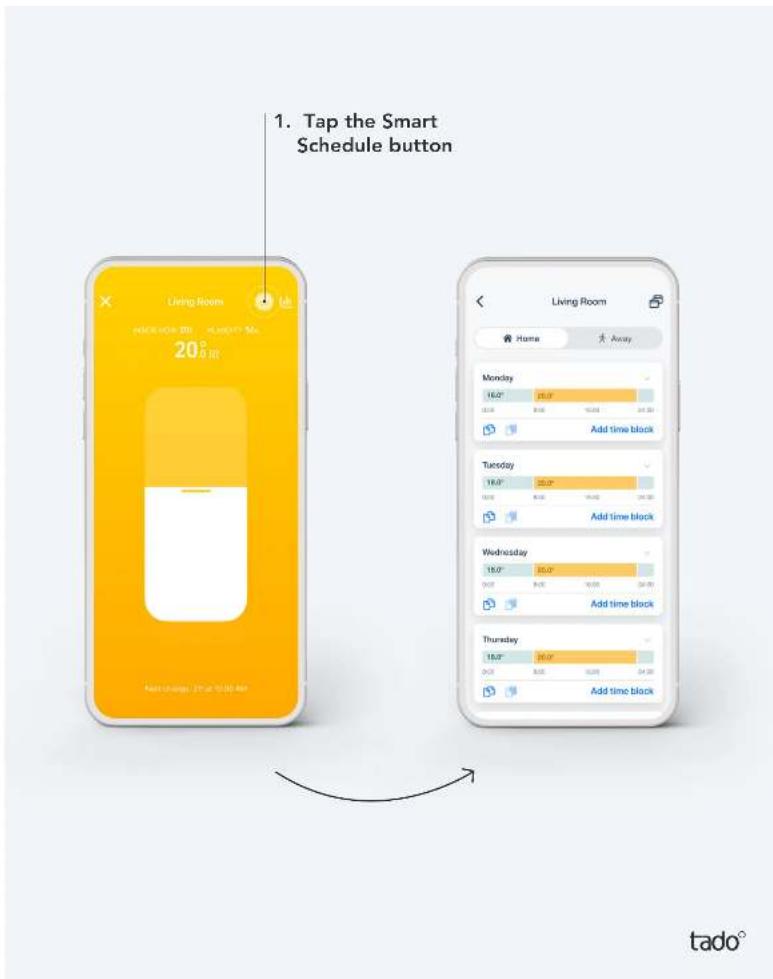
Your tado ^° account comes with a default Smart Schedule already set up. To personalize it, go to the room screen of your choice and tap the Smart Schedule button.
4
Set up – Smart Schedule
Heat Pump Optimizer Smart Schedule
The Heat Pump Optimizer X gives you smart multi-room control with your heat pump. If you have tado° thermostats to control individual rooms, these rooms schedules will be unified in the heat pump schedule when you activate.

tado°
4
Your Smart Schedule consists of a Home and an Away section
Home Settings:
These settings will be active when tado° is in Home Mode. You can divide your days into multiple time blocks and specify custom settings for each block here.

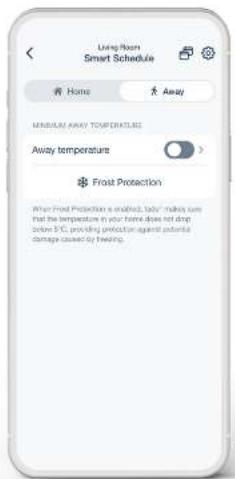
Away Settings:
These settings will be active when tado° is in Away Mode. When tado° is in Away Mode it ensures that the home stays at least at the minimum temperature you set.
4
You can personalise your Smart Schedule to your needs
2. Tap to select the days
for which you want to set a specific schedule.
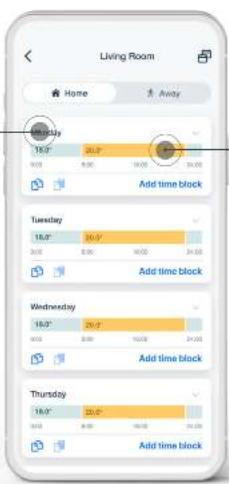
- Tap a time block to open the settings and personalise them to your needs.
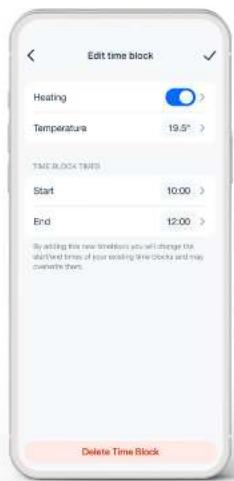
tado°
4
You can easily add additional time blocks to your Smart Schedule
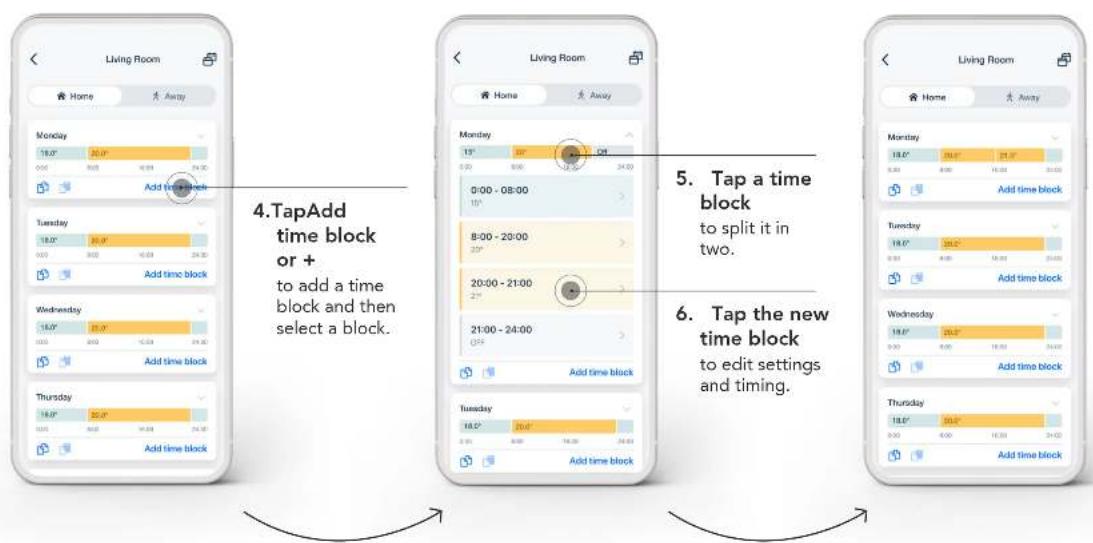
flowchart
graph TD
    A["4. TapAdd time block or + to add a time block and then select a block."] --> B["5. Tap a time block to split it in two."]
    B --> C["6. Tap the new time block to edit settings and timing."]
tado°
5 Auto-Assist

natural_image
Illustration of a person using a tablet with surrounding icons (no text or symbols)tado°
5
Auto-Assist
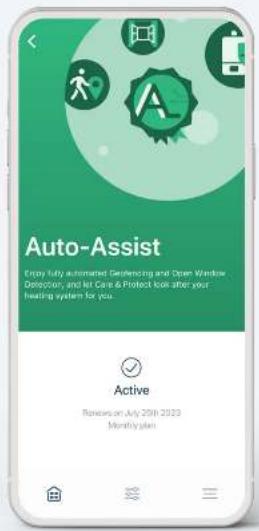
A feel-good package: tado° Auto-Assist
Get an overview of the energy savings you've made so far, including comparisons with previous months, and get help to recognize and solve any problems with your heating system. In addition, Geofencing and Open Window Detection control your heating automatically, instead of sending you notifications. You can purchase a subscription and activate Auto-Assist through your tado® app. Only €3.99/month, €29.99/year, if you're not satisfied, you can cancel at any time.
tado°
6 Balance for Heat Pump

natural_image
Illustration of a person in meditation pose with a circular logo (no text or symbols)tado°
6
Balance for Heat Pump
Turn your heat pump into a cost saver
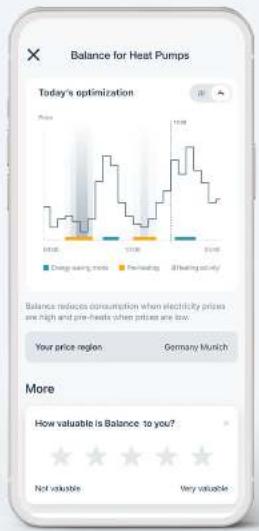
Subscribe to tado° Balance for Heat Pumps and ensure to shift the energy consumption for your heat pump to times when electricity prices are lower. Balance scans the development of the electricity price over the course of the day and reduces the operation of your heat pump when prices are high. Consumption is thus shifted to times when electricity prices are more favourable. Simply subscribe through the tado° app (€49.99/year). To use Balance, you need the tado° Heat Pump Optimizer X.
tado°
⑦ tado° Support

natural_image
Illustration of a person standing with speech bubbles containing question marks, no text or symbols presenttado°

Need additional help? tado° is here to help!
- Viaapp2. Via Help Center
flowchart
graph TD
    A["User"] --> B{More}
    B --> C["Success"]
    C --> D["Community"]
    D --> E["New Process"]
    E --> F["App Analytics"]
    F --> G["Help"]
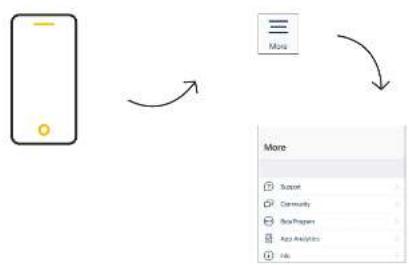
Open the More tab in the tab bar and tap on one of the topics

Visit: support.tado.com/en/
- Via online chat
flowchart
graph LR
    A["Envelope"] --> B["Folder Icon"]
    B --> C["Arrow Down"]
Visit: tado.com
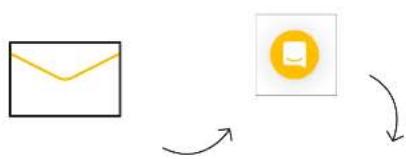
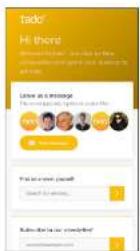
Tap on the icon and start with the conversation
tado°
Thank you for using tado°!
tado°

- Welcome to tado°
- Contents
- App installation & account creation
- App installation
- Account creation
- Step 1
- Step 2.
- Step 3.
- ② Home screen explained
- Your tado° home screen
- Zone/Room
- Air Comfort
- Energy Savings Report
- Quick Action
- Geofencing
- Care & Protect
- Settings & More
- Your tado° home screen - explained
- Heating & Hot Water schedules
- Balance for Heat Pump
- Energy IQ
- ③ Manual control of your heating
- Manual control:
- Manual Control Duration
- Step 4.
- Manual Control Duration:
- Smart Schedule
- Set up – Smart Schedule
- Your Smart Schedule consists of a Home and an Away section
- Home Settings:
- Away Settings:
- You can personalise your Smart Schedule to your needs
- Tap to select the days
- You can easily add additional time blocks to your Smart Schedule
- Auto-Assist
- Auto-Assist
- A feel-good package: tado° Auto-Assist
- Balance for Heat Pump
- ⑦ tado° Support
- Need additional help? tado° is here to help!
Brand : TADO
Model : Smart Thermostat
Category : Thermostat