Fast Track C600 - Dictaphone M-AUDIO - Free user manual and instructions
Find the device manual for free Fast Track C600 M-AUDIO in PDF.


| Product Type | Digital Audio Interface / Voice Recorder |
| Brand | M-Audio |
| Model | Fast Track C600 |
| Power Supply | 5VDC, 2A via included power adapter |
| Connectivity | USB 2.0, MIDI In/Out, S/PDIF In/Out, 6 combo XLR/TRS inputs, 6 line outputs, 2 headphone outputs |
| Phantom Power | Yes, switchable on inputs 1-2 |
| Sample Rate | Up to 48 kHz (estimated) |
| Bit Depth | 24-bit (estimated) |
| Dimensions (approx.) | 200 x 150 x 50 mm (7.9 x 5.9 x 2.0 in) |
| Weight (approx.) | 0.8 kg (1.8 lb) |
| Driver Support | Windows 7, XP, Vista; Mac OS (via manufacturer website) |
| Security | Kensington lock slot; use only supplied power adapter; avoid moisture |
| Maintenance | Clean with dry cloth; keep dust from ports; update drivers periodically |
| Spare Parts / Repairability | Contact M-Audio support for replacement parts; user-replaceable power adapter |
Frequently Asked Questions - Fast Track C600 M-AUDIO
User questions about Fast Track C600 M-AUDIO
0 question about this device. Answer the ones you know or ask your own.
Ask a new question about this device
Download the instructions for your Dictaphone in PDF format for free! Find your manual Fast Track C600 - M-AUDIO and take your electronic device back in hand. On this page are published all the documents necessary for the use of your device. Fast Track C600 by M-AUDIO.
USER MANUAL Fast Track C600 M-AUDIO
Français
fr.m-audio.com/drivers/
USB Audio Ser Foot Track C800
1.2017/12/22
Deutsch
de.m-audio.com/drivers/
USB Audio Ser Fast Track C600
Past Track 000
Español
la.m-audio.com/drivers/
USB Audio Ser Fast Track C800
Past Track 200
日本語
jp.m-audio.com/drivers/
USD Audio SE Fast Track C600
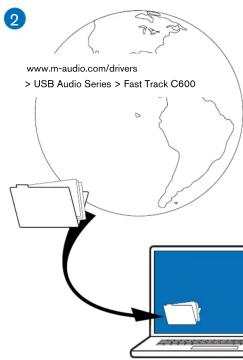
Download the latest drivers for Fast Track C600.
Français
Track C600 herunter.
Español
In Windows 7, XP and Vista, a series of Windows Security dialogs may appear. Depending on your version of Windows, click "Continue Anyway" or "Yes" or "Install" on each one until they no longer appear.
Français
Follow the on-screen instructions.
Français
Follow the on-screen instructions, then restart your computer.
-
Connect Fast Track C600 to your computer.
Francais
Collegare Fast Track C600 al computer.
Deutsch
Schließen Sie Fast Track C600 an Ihren Computer an. 将Fast Track C600 连接到您的电脑。
Español
Connect Equipment
For connection diagrams, see reverse side of this document.
Francais Español
Connectez votre
equipement
Voir les schémas de
For detailed information on setting up and configuring your
system for optimum performance, see the Fast Track C600
User Guide.
Français
Besoin d'aide ? 困ったときには
performances optimales,
vedilliez consulter le Guide de
Futinst
0000
Italiano
WARNING: This product contains chemicals, including lead, known to the State of California to cause cancer, and birth defects or other reproductive harm. Wash hands after handling.
M-AUDIO

© 2011 Avid Technology, Inc Guide Part Number: 9323-65059-00 REV-B
English
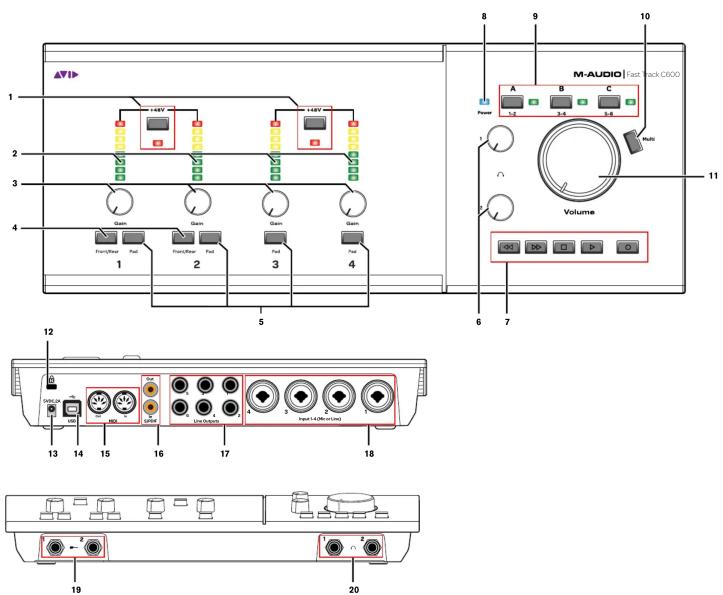
1 Phantom Power switches and indicators
- Input meters
3 Gain knobs
4 Channels 1 and 2 Front/Rear buttons
5 Pad buttons
6 Headphone Volume knobs
7 Transport Control bu
8 Power Indicator LED
9 Output Management buttons and LEDs
10 Multi button
11 Master Volume knob
12 Kensington ^TM Lock
13 Power connector (5VDC, 2A)
14 USB connector
15 MIDI In/Out connectors
16 S/PDIF connectors 47 Line Outputs 4.6
17 Line Outputs 1-6 18 Inputs 1,4 (Mis or line)
18 Inputs 1-4 (MIC of 19 Instrument inputs
19 Instrument inputs 20 Headphone outputs
,
Français

Brand : M-AUDIO
Model : Fast Track C600
Category : Dictaphone