
ControlSync 16 - Télécommande à distance Impact - Free user manual and instructions
Find the device manual for free ControlSync 16 Impact in PDF.


| Product Type | Wireless Remote Control for Studio Lights |
| Brand | Impact |
| Model | ControlSync 16 |
| Channels | 16 |
| Groups per Channel | 16 |
| Operating Frequency | 433 MHz |
| Effective Range | 150 ft (50 m) |
| Transmitter Power | 2 AA batteries (not included) |
| Receiver Power | USB 5V (from compatible flash/monolight) |
| Transmitter Weight (without batteries) | 2.3 oz (65 g) |
| Receiver Weight | 0.7 oz (20 g) |
| Transmitter Dimensions (body) | 3.75 x 2 x 1.5 in (95 x 50 x 37 mm) |
| Transmitter Dimensions (with antenna) | 5.4 x 2 x 1.5 in (137 x 50 x 37 mm) |
| Receiver Dimensions | 2.2 x 1.2 x 1 in (57 x 30 x 27 mm) |
| Per-Group Controls | Raise/Lower power (1/10 or 1/3 stop), Model light/AF assist on/off, Audio alert on/off |
| Global Controls | Test fire (all groups) |
| Max Sync Speed | 1/250 sec |
| Display Modes | Decimal (1/10 stop) or Fraction (1/3 stop) |
| Compatibility | Requires ControlSync 16 Receiver on each flash; additional flashes via optical slave |
| Safety Features | Do not disassemble, keep dry, avoid flammable gases, keep away from children, avoid high temperatures, battery precautions |
| Warranty | 1 year limited warranty |
Frequently Asked Questions - ControlSync 16 Impact
User questions about ControlSync 16 Impact
0 question about this device. Answer the ones you know or ask your own.
Ask a new question about this device
Download the instructions for your Télécommande à distance in PDF format for free! Find your manual ControlSync 16 - Impact and take your electronic device back in hand. On this page are published all the documents necessary for the use of your device. ControlSync 16 by Impact.
USER MANUAL ControlSync 16 Impact
The Impact ControlSync 16 system allows you to control all compatible monolights and strobes from one convenient location with a reliable, easy-to-use controller.
The ControlSync 16 is a great solution to speed up and simplify your workflow. Whether you work with a few flashes in a single setup, or in a large studio with a number of sets with many lights, you will immediately see the advantage of being able to make adjustments to your lighting without the need to maneuver into crowded, hard to reach places.
You can adjust the power level of each flash or group of flashes in 1/10 stop increments as well as controlling model lamps or AF assist lamps, turning alert sounds on or off and test firing and triggering your entire lighting setup, all from a central location. The ControlSync 16 also features 16 channels to avoid interference and false triggers, along with the ability to address 16 separate groups for precision control of your lighting.
You may even find that this convenience frees you to experiment with new ideas and styles. You'll discover creative ways to use your lighting to bring out your very best work.
Warnings
Before using this product, please read the following safety instructions carefully in order to ensure your safety and the proper operation of the Control Sync 16 system. Failure to observe these precautions could result in product malfunction, fire or explosion, electric shock or other physical injury.
- Do not disassemble or modify. Should the product break open due to accidental damage, remove the batteries and send it to an authorized repair center.
- Keep dry. Do not handle with wet hands, immerse in water, or expose to rain or snow.
- Do not use in the presence of flammable gasses.
- Keep out of reach of children. This product contains small parts that may pose a choking hazard. Should a child swallow any part of this product, consult a physician immediately.
- Turn off the transmitter or receiver immediately should a malfunction occur. Should smoke or any unusual smell come from this product, shut it off and remove the batteries immediately. Send it to an authorized repair facility for service. Continued use may result in physical injury.
-
Do not expose to high temperature. Do not leave product in a closed vehicle in the sun or other areas subject to extremely high temperature.
-
Keep away from strong magnetic fields. Strong static or magnetic fields produced by devices such as cell phones and radios may lead to malfunction.
- Observe precautions when handling batteries. Batteries may leak or explode if improperly handled.
Please observe the following precautions when using batteries with this product.
- Use only batteries listed in this manual. Do not mix new and old batteries or different brand batteries.
- Read and follow all warnings and instructions provided by the battery manufacturer.
- Do not attempt to short-circuit or disassemble batteries.
- Do not put batteries in a fire or apply direct heat to them.
- Do not attempt to install batteries in the reverse direction.
- Batteries may leak when fully discharged. To avoid damage to the product, be sure to remove the batteries if the product will not be used for an extended period of time, or if the battery power is low.
- Should fluid from damaged batteries come into contact with skin or clothing, rinse immediately with fresh water.
Features
![impact™ ControlSync 16 1132 ±0.7 GROUP ON [+] 1 2 3 4 CHANNEL SET SOUND LAMP TEST - +](/content/2026/05/760686/images/5183d1c96d5d8dfbf6f558c858f2327f5067cd64b9d7263ffd6db2e1c0cf532f.jpg)
![CHANNEL ON [★] 1 2 3 4 impact ControlSprint M GROUP 12.13.14.15.16.1.2.3.4.5 7.8.9.10.11.12.13.14.15.16.1.2.3.4.5](/content/2026/05/760686/images/4efbe362833759f1832dee362932e6e1be9242d73629048e3a81a7213a1127be.jpg)
natural_image
Close-up of a black USB flash drive with a metallic connector (no text or symbols visible)• 16 channels
- Up to 16 groups
• 433 MHz
• Effective range 150' (50 m)
- Raise or lower flash power
- Model or AF Assist light On/Off
- Audio alert On/Off
• Test flash (triggers all groups)
NOTE: All flashes that you wish to control from the ControlSync 16 must be equipped with a ControlSync 16 Receiver. Additional flashes may be triggered using their optical slave function if available.
Using the ControlSync 16
Installing Batteries in Transmitter
- Remove battery cover from unit.
- Insert two AA batteries, being sure to follow illustrations inside unit to properly position the positive (+) and negative (−) terminals.
- Replace battery cover.
Attaching the ControlSync 16 Transmitter to Your Camera: Rotate the locking wheel counterclockwise on the ControlSync 16 until it is in the fully open (uppermost) position. Slide the unit's hot shoe foot into your camera's hot shoe, and tighten until secure. You can also connect a PC cord from your camera to the unit's 3.5mm mini sync socket.
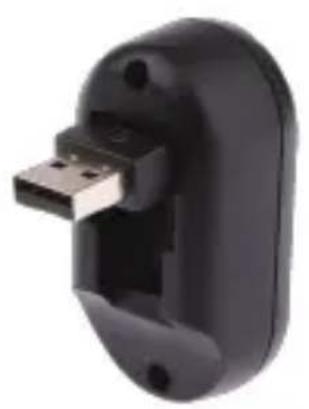
Attaching the ControlSync 16 Receiver to Your Compatible Flash or Monolight: Flip up the USB connector on the ControlSync 16 Receiver. Plug it into the USB port on your compatible flash or monolight.
The Receiver is powered from the USB port, so no battery or external power is required. The Receiver has no On/Off switch. As soon as it is set and plugged in to an active, compatible flash or monolight, it will automatically begin to function.
Turning on the ControlSync 16
Transmitter: To turn on the transmitter, slide the Power switch to the On position.
Setting the Channel: The ControlSync 16 has 16 channels available for use. This allows you to avoid interference with other devices or photographers in a busy work environment, with each photographer operating on a different
channel. Use the DIP switches on the front panel of the transmitter and receiver to select the desired channel as shown on the DIP switch configuration chart.
In order for the transmitter and receiver to communicate with each other, both have to be set to the same channel.
Selecting the Group on the ControlSync
16: Use the Group Select dial to choose the group you want to adjust. A group can consist of just one flash up to any number of flashes you wish. The Group function allows you to adjust settings on specific flashes or groups of flashes from one location, without having to go to each flash and make those adjustments individually. Group-specific controls are raising and lowering the power, turning the sound on or off, and turning the modeling/AF assist light on or off.
Selecting the Group on the Receiver: Use the Group Select dial to choose the desired group.
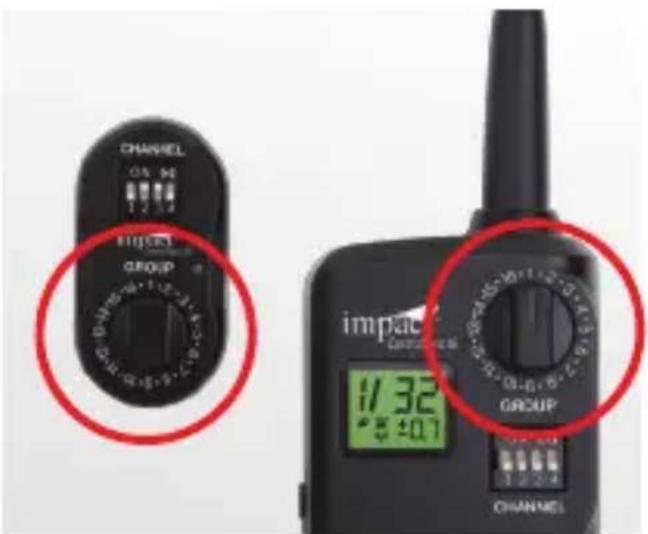
Adjusting Power Output: Use the + and - buttons to adjust the power of the selected group up or down.
Using the ControlSync 16
Note: The transmitter's display can be switched from showing power output in decimals (generally used for monolights) to fractions (typically used for flashes). To change this setting, press and hold the Set button until the display switches.
When the display is set to decimals, the power adjustments will be in 1/10th-stop increments. When set to fractions, the adjustments will be in 1/3rd-stop increments.
Sound: Use the Sound button to turn the sound on or off for all the flashes in the selected group. ▶ will be displayed on the LDC.
Lamp: Use the Lamp button to turn the Modeling or AF-Assist Light (depending on your device) on or off for all the flashes in the selected group. 🏠 will be displayed on the LDC.
Test: Press the Test button to test fire all flashes in all groups.
Turning Off a Group: To turn off a group, use the - button to turn its power down all the way. The display will indicate OF.
NOTE: After making any changes to settings, whether on the ControlSync 16 or on any connected flashes, press the SET button to confirm and sync all settings. * will be displayed on the LDC.
Changes made to flash settings will be reflected on the ControlSync 16 display, and on each flash's display as well.
The ColorSync 16 can also be used as a handheld central remote controller to adjust the settings on all your compatible lights, even if you use a different method to actually trigger them (e.g. a sync cord, Pocket Wizard, etc.).
Troubleshooting
-
Unable to trigger a flash by pressing the Test button or the camera's shutter release:
-
Make sure the batteries are installed properly and the transmitter is powered on.
- Check the DIP switches to see that the transmitter and receiver are set to the same channel.
-
Check if the transmitter is firmly seated in the camera's hot shoe.
-
Signal disturbance or shooting interference (lights not firing or firing irregularly):
- Try using a different channel.
- Reduced operating range, or monolights not firing.
- Check if batteries in transmitter are drained. Try replacing with fresh ones.
-
Flashes not responding to adjustments made on transmitter.
-
Check that transmitter and receiver are set to the same channel
- Check that the transmitter and receiver are set to the same group
- Check if the flash power is out of adjustment range (e. g. flash has 1.0-6.0 power adjustment range but remote is set to 7.0).
Specifications
| Transmitter Power: | 2 AA batteries |
| Receiver power | USB 5V |
| Transmitter frequency | 433 MHz |
| Effective range | Approx. 150' (50 m) |
| Controls (for each group) | Raise and Lower Flash Power |
| Model Light/AF Assist On/Off | |
| Audio Alert On/Off | |
| Control (for all groups) | Test Fire |
| Max. sync speed | 1/250th sec. |
| No. of channels | 16 |
| Groups per channel | 16 |
| Weight: | |
| Transmitter (w/o batteries) | 2.3 oz. (65 g) |
| Receiver | 0.7 oz. (20 g) |
| Dimensions: | |
| Transmitter body | 3.75" x 2"x 1.5" (95 x 50 x 37 mm) |
| Transmitter body w/Antenna | 5.4" x 2"x 1.5" (137 x 50 x 37 mm) |
| Receiver | 2.2" x 1.2" x 1" (57 x 30 x 27 mm) |
DIP Switch Configurations
Channel 1 Channel 2
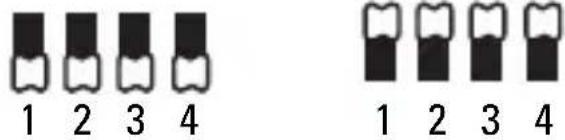
Channel 3 Channel 4
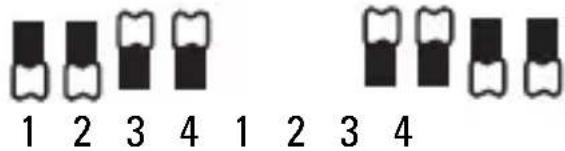
Channel 5 Channel 6
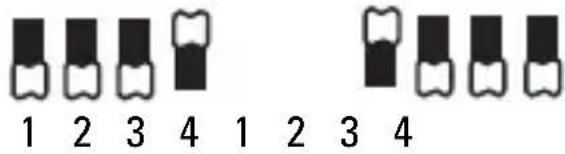
Channel 7 Channel 8
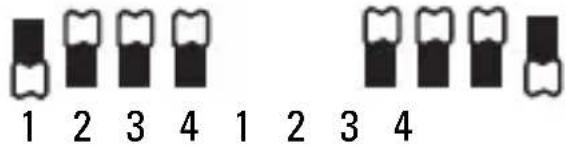
Channel 9 Channel 10
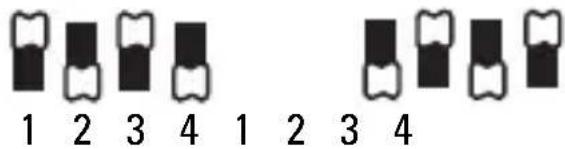
Channel 11 Channel 12
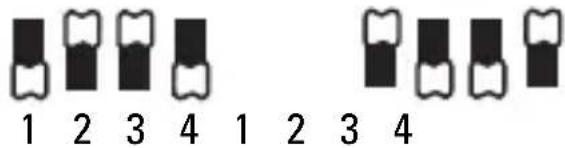
Channel 13 Channel 14
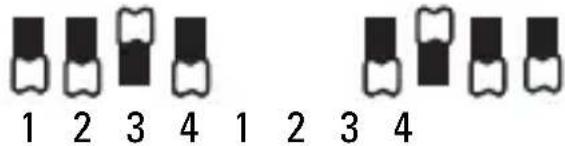
Channel 15 Channel 16
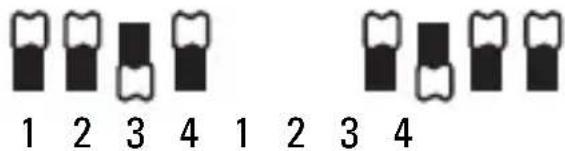
Warranty
Limited Warranty
This IMPACT product is warranted to the original purchaser to be free from defects in materials and workmanship under normal consumer use for a period of one (1) year from the original purchase date or thirty (30) days after replacement, whichever occurs later. The warranty provider's responsibility with respect to this limited warranty shall be limited solely to repair or replacement, at the provider's discretion, of any product that fails during normal use of this product in its intended manner and in its intended environment. Inoperability of the product or part(s) shall be determined by the warranty provider. If the product has been discontinued, the warranty provider reserves the right to replace it with a model of equivalent quality and function.
This warranty does not cover damage or defect caused by misuse, neglect, accident, alteration, abuse, improper installation or maintenance. EXCEPT AS PROVIDED HEREIN, THE WARRANTY PROVIDER MAKES NEITHER ANY EXPRESS WARRANTIES NOR ANY IMPLIED WARRANTIES, INCLUDING BUT NOT LIMITED TO ANY IMPLIED WARRANTY OF MERCHANTABILITY OR FITNESS FOR A PARTICULAR PURPOSE.
This warranty provides you with specific legal rights, and you may also have additional rights that vary from state to state.
To obtain warranty coverage, contact the Impact Customer Service Department to obtain a return merchandise authorization ("RMA") number, and return the defective
product to Impact along with the RMA number and proof of purchase. Shipment of the defective product is at the purchaser's own risk and expense.
For more information, or to arrange service, visit www.impactstudiolighting.com or call Customer Service at 212-594-2353.

IMPACT™ A Gradus Group Brand
Product warranty provided by the Gradus Group.
www.gradusgroup.com
IMPACT is a registered trademark of the Gradus Group. © 2015 Gradus Group LLC. All Rights Reserved
All other trademarks are the property of their respective owners. © Copyright 2015 Gradus Group

Brand : Impact
Model : ControlSync 16
Category : Télécommande à distance