
HEX70B-TX - AV Extender Blustream - Free user manual and instructions
Find the device manual for free HEX70B-TX Blustream in PDF.


| Product Type | AV Extender (Transmitter) |
| Model | HEX70B-TX |
| Brand | Blustream |
| Video Input | 1 x HDMI Type A (female) |
| Video Output | 1 x HDBaseT RJ45 (female) |
| IR Input | 1 x 3.5mm stereo jack |
| IR Output | 1 x 3.5mm mono jack |
| Power Supply | 12V/2A DC via screw-type connector |
| Power Over HDBaseT | Bi-directional PoH (Power over HDBaseT) |
| Video Resolution Support | Up to 4K UHD (3840x2160 @30Hz 4:4:4, 4096x2160 @24Hz 4:4:4, 4K @60Hz 4:2:0); also 1080p, 3D, VGA-WUXGA, 480i-4K |
| Transmission Distance | 1080p up to 70m; 4K up to 40m over single CAT cable |
| Audio Formats | All known HDMI audio including Dolby TrueHD, Dolby Atmos, Dolby Digital Plus, DTS-HD Master Audio |
| HDCP Compliance | HDCP 2.2 |
| Latency | Zero latency (uncompressed) |
| IR Control | Bi-directional IR pass-through; compatible with Blustream 5V IR devices |
| Status Indicators | HDMI link (source), HDBaseT link, Power status |
| Dimensions (W x D x H) | 105mm x 73mm x 27mm (excluding connectors) |
| Operating Temperature | 0°C to 40°C (32°F to 104°F) |
| Storage Temperature | -20°C to 60°C (-4°F to 140°F) |
| Mounting | Mounting bracket kit included |
| Recommended Cable | CAT6 or better, terminated with T568B standard |
| Safety | Surge protection recommended; do not disassemble |
| Maintenance | Clean with soft, dry cloth; no alcohol or solvents |
Frequently Asked Questions - HEX70B-TX Blustream
User questions about HEX70B-TX Blustream
0 question about this device. Answer the ones you know or ask your own.
Ask a new question about this device
Download the instructions for your AV Extender in PDF format for free! Find your manual HEX70B-TX - Blustream and take your electronic device back in hand. On this page are published all the documents necessary for the use of your device. HEX70B-TX by Blustream.
USER MANUAL HEX70B-TX Blustream
HEX70B-KIT
User Manual
Thank you for purchasing this product.
For optimum performance and safety, please read these instructions carefully before connecting, operating or adjusting this product. Please keep this manual for future reference.

Surge protection device recommended
This product contains sensitive electrical components that may be damaged by electrical spikes, surges, electric shock, lightning strikes, etc. Use of surge protection systems is highly recommended in order to protect and extend the life of your equipment.
Safety And Performance Notice
The transmission distances of HDMI over UTP cables are measured using TE CONNECTIVITY 1427071-6
EIA/TIA-568-B termination (T568B) of cables is recommended for optimal performance.
To minimise interference of the unshielded twisted pairs in the CAT5e/6 cable do not run the HDBaseT/Cat5e/6/6a cabling with or in close parallel proximity to mains power cables.
Do not substitute or use any other power supply other than the enclosed unit, or a Blustream approved replacement.
Do not disassemble either the Transmitter or Receiver units for any reason. Doing so will void the manufacturer's warranty.
Contents
Introduction 03
Features 03
Panel Descriptions 04
Terminating HDBaseT CAT Cables 05
Understanding TX/RX Status Lights 05
4K Video Distribution 06
Application Diagram 06
InfraRed Distribution 07
Specifications 08
Package Contents 08
Maintenance 08
Installer notes 09
Introduction
Our HEX70B-KIT 4K HDBaseT™ extender set offers market leading features and outstanding value. The product delivers HDMI, Bi-directional IR and Bi-directional PoH (PoE) up to lengths of 70m.
FEATURES:
- Advanced HDBaseT technology offering uncompressed video and audio with zero latency
- Extends HDMI 1080p up to a distance of 70m over a single CAT cable
• Supports 4K UHD video up to 40m (3840 x 2160 @30Hz 4:4:4, 4096 x 2160 @24Hz 4:4:4, and 4K @60Hz 4:2:0)
• Supports all industry standard video resolutions including VGA-WUXGA and 480i-4K
• Supports 3D signal display
• Supports all known HDMI audio formats including Dolby TrueHD, Dolby Atmos, Dolby Digital Plus and DTS-HD Master Audio transmission
• Bi-directional IR pass-through
• Supplied with Blustream IR receiver and emitter
• Supports bi-directional PoH (Power over HDBaseT™) to power extenders from either Transmitter or Receiver end - HDCP2.2 compliant
Panel Description HEX70B-RX
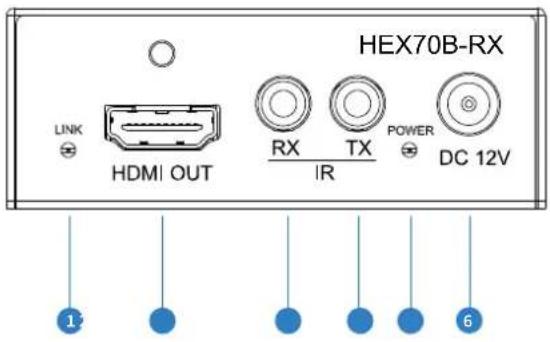
1 HDMI link indicator
2 HDMI output
3 IR RX jack (to Blustream 5V IR Receiver)
4 IR TX jack (to Blustream 5V IR Emitter)
5 Power status indicator
6 DC 12V screw type connector
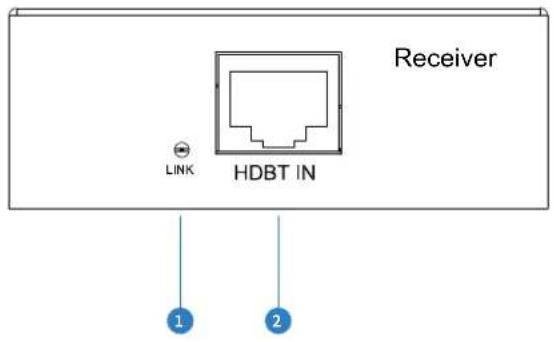
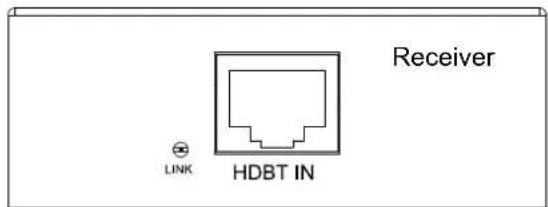
1 HDBaseT signal link indicator
2 HDBaseT input
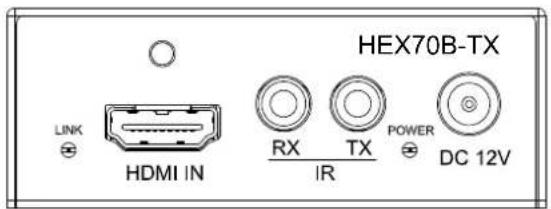
Panel Description HEX70B-TX
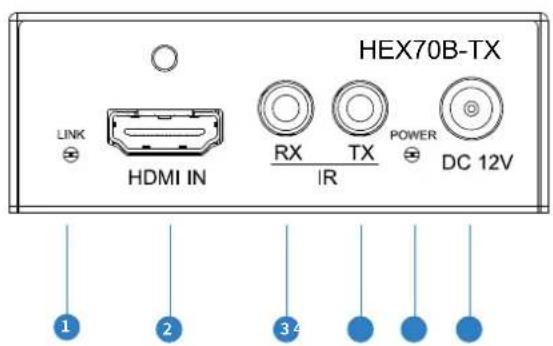
1 HDMI link indicator
2 HDMI input
3 IR RX jack (to Blustream 5V IR Receiver)
4 IR TX jack (to Blustream 5V IR Emitter)
5 Power status indicator
6 DC 12V screw type connector
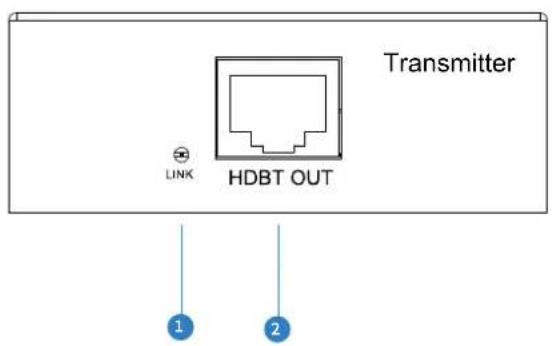
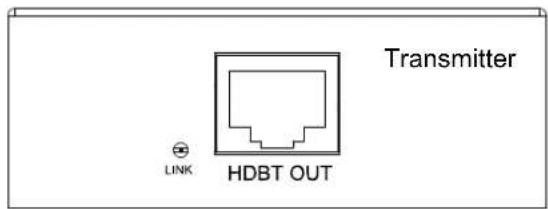
① HDBaseT signal link indicator
2 HDBaseT output
Terminating the interconnecting HDBaseT CAT cable
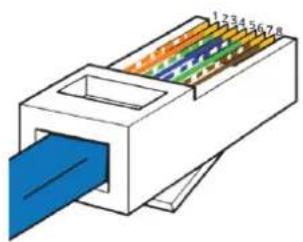
It is important that the interconnecting CAT cable between the Blustream HDBaseT products is terminated using the correct RJ45 pin configuration. The link CAT cable MUST be a 'straight' (pin-to-pin) CAT cable and it is advised that this is wired to the T568B wiring standard as this format is less prone to EMI (Electro-Magnetic Interference).
When installing CAT cables it is advised that you use the best possible CAT cable quality possible. HDMI distribution products will only work if used with CAT5e standard cable or above. Blustream recommends using a CAT6 (or better) cable for your installations, especially when running over longer distances, in areas of high EMI, or for 4K signal distribution.
RJ45 Wiring - T568B
natural_image
Diagram of a 3D printer or connector with color-coded internal structure (no text or symbols)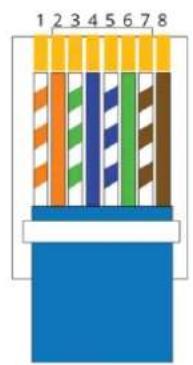
Understanding the HEX70B signal status lights
The Blustream HEX70B extender solutions include status LED indicators on both the Transmitter and Receiver products to show all connections are active and to help diagnose possible problems.
Understanding the status lights:
Receiver:
- The HDMI signal link light will be off when there is no connection with a display/sink
- The HDMI link light will be on when there is an active connection with a display
- The HDBaseT link light will be off when there is no CAT cable/active HDBaseT connection on the RJ45 HDBaseT input
• The HDBaseT link light will blink if there is an unstable connection between the Transmitter/Matrix and Receiver - The HDBaseT link light will be lit when a CAT cable is connected to the HDBaseT RJ45 output on the Transmitter/Matrix and an active connection is achieved with the Receiver
- The Power link light will be off when no power is connected to the Receiver, or to the connected Transmitter unit
• The Power link light will be on when power is connected directly to the Receiver or is being received from the Transmitter unit
Transmitter:
- The HDMI signal link light will be off when there is no connection with a source device
- The HDMI link light will be on when there is an active connection with a source device
- The HDBaseT link light will be off when there is no CAT cable/active HDBaseT connection on the RJ45 HDBaseT output
- The HDBaseT link light will blink if there is an unstable connection between the Transmitter and Receiver/Matrix
- The HDBaseT link light will be lit when a CAT cable is connected to the HDBaseT RJ45 output on the Transmitter and an active connection is achieved with the Receiver/Matrix.
- The Power link light will be off when no power is connected to the Transmitter, or to the connected Receiver unit
• The Power link light will be on when power is connected directly to the Transmitter or is being received from the Receiver unit
4K Video Distribution
The HEX70B is designed to distribute 4K video formats up to 4K 30Hz 4:4:4 & 4K 60Hz 4:2:0. Any video formats above this resolution cannot be distributed using the HEX70B extender kit.
Please note: The HEX70B-KIT supports EDID and HDCP 2.2 pass-through which may result in loss of signal should your source be able to output video signals up to 4K 60Hz 4:4:4 (18Gbps). Due to the limitations in HDBaseT video distribution it is not possible to pass 18Gbps HDMI over a CAT cable without manipulation of the HDMI signal using scaling, colour space conversion or compression.
Should you experience problems with video distribution please try the following to make sure your source device is outputting a maximum video format of either 4K 60Hz 4:2:0 or 4K 30Hz 4:4:4
• Fix the video output resolution within the source device
- Use an EDID management device on the HDMI output of your source device. This will trick the source device into thinking it is connected to a lower resolution display of up to 4K 60Hz 4:2:0 or 4K 30Hz 4:4:4
For distribution of video resolutions exceeding the maximum capabilities of the HEX70B extender kit please contact your local Blustream distributor
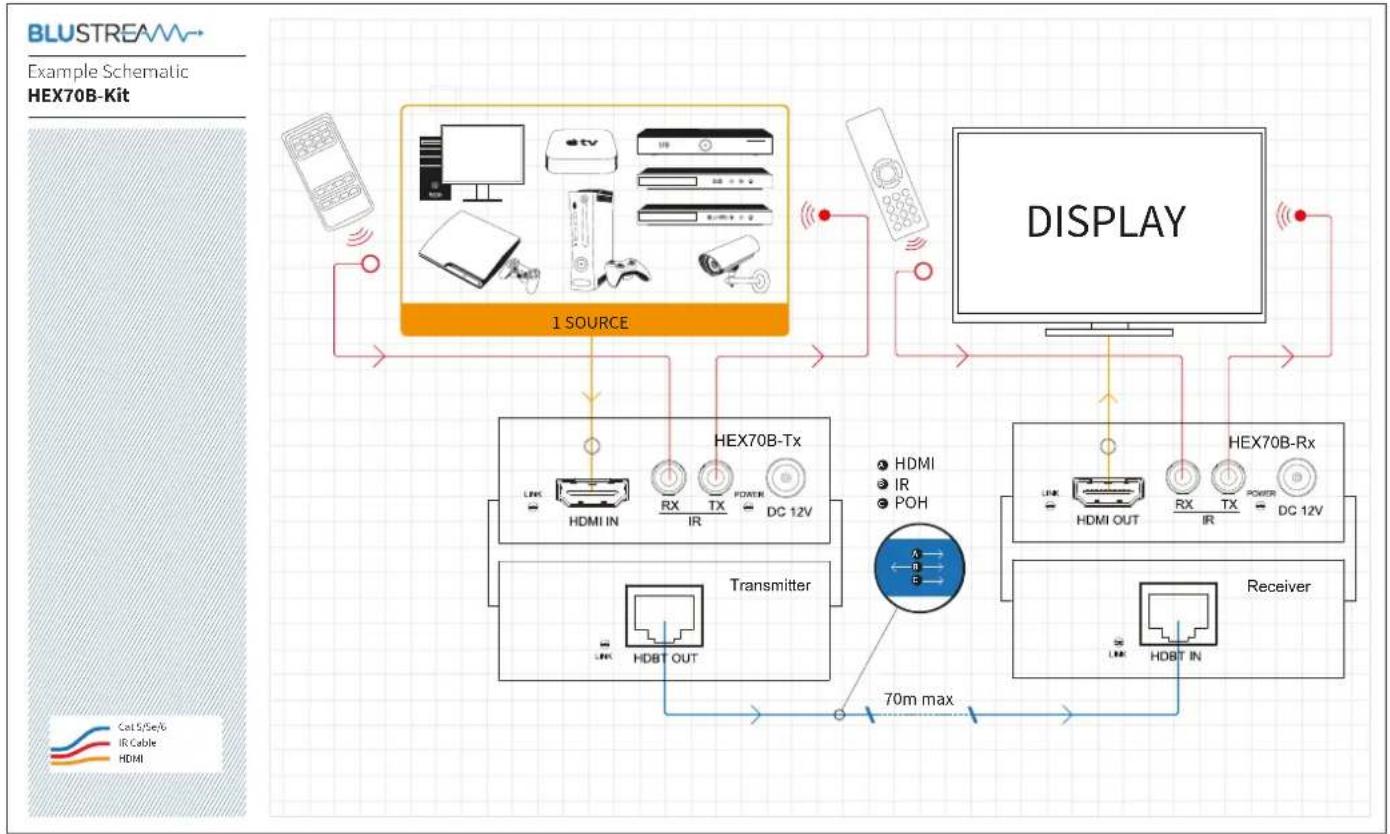
flowchart
graph TD
    A["BLUSTREAM"] --> B["1 SOURCE"]
    B --> C["DISPLAY"]
    C --> D["HEX70B-Tx"]
    C --> E["HEX70B-Rx"]
    C --> F["Receiver"]
    D --> G["Transmitter"]
    E --> G
    F --> G
    G --> H["70m max"]
    style A fill:#f9f,stroke:#333
    style C fill:#ccf,stroke:#333
    style D fill:#cfc,stroke:#333
    style E fill:#fcc,stroke:#333
    style F fill:#cff,stroke:#333
Infrared (IR) Distribution
The Blustream range of HDBaseT products include multiple options for control and routing of IR.
IMPORTANT: Blustream Infrared products are all 5v and NOT compatible with alternative manufacturers Infrared solutions. When using third party 12v IR control solutions please use Blustream IRCAB cable for IR conversion (sold separately).
Each Blustream Matrix and HDBaseT extender kit is supplied with all necessary IR hardware required and includes:
IR Emitter - IR1 & IR2 (IR2 sold separately)
Blustream 5V IR Emitter designed for discrete IR control of hardware
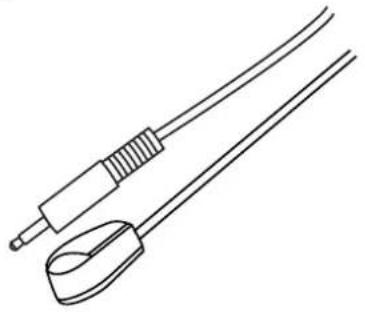
natural_image
Line drawing of two medical or electrical instruments with no text or symbolsInfrared 3.5mm Pin-Out
IR Emitter - Mono 3.5mm
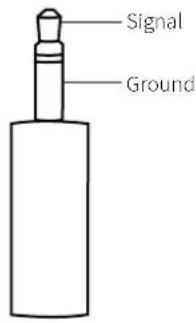
IR Receiver - IRR
Blustream 5V IR receiver to receive IR signal and distribute through Blustream products
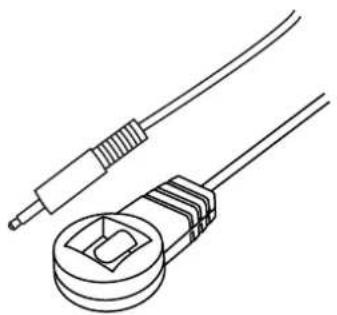
natural_image
Line drawing of two electrical components: a wire and a terminal block (no text or symbols)IR Receiver - Stereo 3.5mm
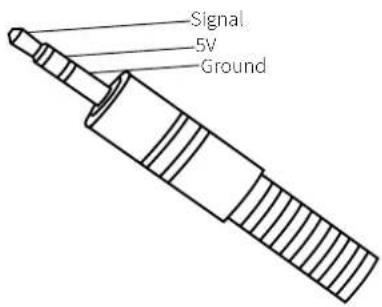
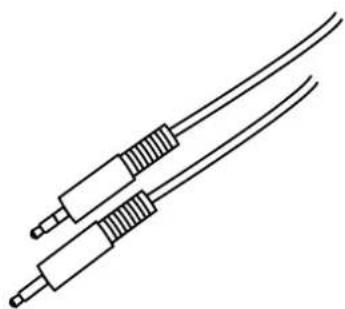
IR Control Cable - IRCAB
Blustream IR Control cable 3.5mm Mono to 3.5mm Stereo for linking third party control solutions to Blustream products.
Compatible with 12v IR third party products.
Note: Cable is directional as indicated
natural_image
Line drawing of two coaxial cables with connectors (no text or symbols)Specifications
HEX70B-TX
• Video input: 1x HDMI Type A, female
• Video output: 1x HDBaseT RJ45 connector
• IR input: 1x 3.5mm stereo jack
• IR output: 1x 3.5mm mono jack
- Mounting kit included
- Dimensions excl connections (W x D x H):
105mm x 73mm x 27mm
- Shipping weight (Kit): 1 kg
• Power: 12V/2A DC, screw type connector
- Operating temperature: 32^ to 104^ (0°C to 40°C)
- Storage temperature: -4^ to 140^ (-20°C to 60°C)
HEX70B-RX
• Video input: 1x HDBaseT RJ45 connector
• Video output: 1x HDMI Type A, female
• IR input: 1x 3.5mm stereo jack
• IR output: 1x 3.5mm mono jack
- Mounting kit included
- Dimensions excl connections (W x D x H):
105mm × 73mm × 27mm
• Shipping weight (Kit): 1 kg
• Power: 12V/2A DC, screw type connector
- Operating temperature: 32^ to 104^ (0°C to 40°C)
- Storage temperature: -4^ to 140^ (-20°C to 60°C)
NOTE: Specifications are subject to change without notice. Weights and dimensions are approximate.
Package Contents
HEX70B-KIT
- 1 x HEX70B-TX and 1 x HEX70B-RX
• 1 x 12V/2A DC power supply - 1 x IR emitter (IRE)
- 1 x IR receiver (IRR)
- 2 x Mounting bracket sets
- 1 x User manual
HEX70B-RX (when sold individually)
- 1 x HEX70B-RX
- 1 x Mounting bracket set
HEX70B-TX (when sold individually)
- 1 x HEX70B-TX
- 1 x Mounting bracket set
Maintenance
Clean this unit with a soft, dry cloth. Never use alcohol, paint thinner or benzene to clean this unit.
Components inside this kit are not user serviceable. Do not remove the protective cover from either unit. Removing any panel from this product will invalidate the manufacturers warranty.
Installer notes:
BLUSTREA
www.blustream.co.uk
www.blustream.com.au

- HEX70B-KIT
- Thank you for purchasing this product.
- Surge protection device recommended
- Safety And Performance Notice
- Contents
- Introduction
- FEATURES:
- Panel Description HEX70B-RX
- Panel Description HEX70B-TX
- Terminating the interconnecting HDBaseT CAT cable
- Understanding the HEX70B signal status lights
- Understanding the status lights:
- Receiver:
- Transmitter:
- 4K Video Distribution
- Infrared (IR) Distribution
- IR Emitter - IR1 & IR2 (IR2 sold separately)
- Infrared 3.5mm Pin-Out
- IR Receiver - IRR
- IR Receiver - Stereo 3.5mm
- IR Control Cable - IRCAB
- Specifications
- HEX70B-TX
- HEX70B-RX
- Package Contents
- HEX70B-RX (when sold individually)
- HEX70B-TX (when sold individually)
- Maintenance
- BLUSTREA
Brand : Blustream
Model : HEX70B-TX
Category : AV Extender