
Panzer Max - PC Case Cougar - Free user manual and instructions
Find the device manual for free Panzer Max Cougar in PDF.


| Product Type | PC Case |
| Model | Panzer Max |
| Brand | Cougar |
| Form Factor | Full Tower |
| Motherboard Support | E-ATX, ATX, Micro-ATX, Mini-ITX |
| Dimensions (H x W x D) | 550 x 240 x 520 mm (approx.) |
| Weight | 11.5 kg (approx.) |
| Material | Steel, Plastic, Tempered Glass |
| Side Panel | Tempered Glass (left), Steel (right) |
| Power Supply Support | ATX PS2 (bottom mount, max length 200 mm) |
| Expansion Slots | 8+2 vertical |
| Drive Bays | 2x 5.25", 2x 3.5" (compatible with 2.5"), 4x 2.5" |
| Fan Support (Front) | 3x 120mm or 3x 140mm (2x 120mm pre-installed) |
| Fan Support (Rear) | 1x 120mm (pre-installed) |
| Fan Support (Top) | 3x 120mm or 2x 140mm (optional) |
| Fan Support (Bottom) | 1x 120mm or 1x 140mm (optional) |
| Radiator Support | Front: up to 360mm, Top: up to 360mm, Rear: 120mm |
| I/O Panel | 2x USB 3.0, 2x USB 2.0, HD Audio, Fan Controller |
| Maximum GPU Length | 420 mm |
| Maximum CPU Cooler Height | 175 mm |
| Dust Filters | Front, Bottom, Top (removable) |
| Accessories Included | Screws, cable ties, fan splitter, headphone hook, water cooling brackets |
| Cleaning Instructions | Use a soft dry cloth; avoid liquids and abrasive cleaners. |
| Safety Precautions | Keep away from moisture, do not block vents, ensure proper grounding. |
| Spare Parts & Repairability | Contact Cougar support for replacement parts; all components are replaceable. |
Frequently Asked Questions - Panzer Max Cougar
User questions about Panzer Max Cougar
0 question about this device. Answer the ones you know or ask your own.
Ask a new question about this device
Download the instructions for your PC Case in PDF format for free! Find your manual Panzer Max - Cougar and take your electronic device back in hand. On this page are published all the documents necessary for the use of your device. Panzer Max by Cougar.
USER MANUAL Panzer Max Cougar
PANZER
| MAX | THE ULTIMATE COMPUTER CASE |
| COUGARFacebook | |
Accessory Kit
| 1 | X 4Power Sup | ||
| 2 | X 16M8D/HD | ||
| 3 | X 205D screw | ||
| 4 | ODD screws | X 8 | |
| 5 | X 16Short fan | ||
| 6 | X 2Headphone | ||
| 7 | Shockproof rubber washers for top fans | X 4 | |
| 8 | X 4Cable Tier | ||
| 9 | X 3Water con | ||
| 10 | X 1Headphone | ||
| 11 | Fan connection splitter | X 2 | |
| 12 | X 2Stand-off |
Compucase Enterprise Co., Ltd.
No. 225, Lane 54, An Ho Road Sec. 2 Tainan, Taiwan, R.O.C.
Tel:+886-6-356-0606
Service E-Mail: service@cougargaming.com
For more information, please visit www.cougargaming.com Compucase Enterprise Co Ltd.
All rights reserved.
www.cougargaming.com
Assembly Drawing

natural_image
Illustration of a rectangular electronic device with a central label and 'F' mark (no text or symbols on the device itself)A Power button / Reset button
B Fan controller
USB 3.0 / USB 2.0 / HD audio ports
D Removable front panel
E Removable 5.25" cover
F Left cover with transparent window
G Right side cover

H Vented slot cover
5.25" device bays (tool-less)
J 3.5" HDD trays (compatible with 2.5" HDD/SSD)
K 2.5" HDD trays
Air Guide
M Power supply cover
3 x 140/120mm fans for front panel (2 x 120mm fans pre-installed, other fans are optional, to be purchased separately)
1 x 140/120mm fan for bottom panel (optional, purchased separately)
Air filter on bottom cover to prevent dust from entering the power supply
Q 2 x140mm / 3 x 120mm fans for top panel (optional, purchased separately)
R Top panel
S 1 x 120mm fan for rear panel (pre-installed)
T Headphone hook
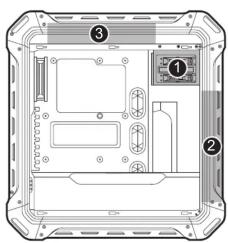

natural_image
Technical diagram of a device rear panel with labeled components (no text or symbols beyond numbers)RIGHT SIDE
Removing the front cover and installing/removing 5.25" devices


② Removing a water cooler (top)


3 Removing a water cooler (front)


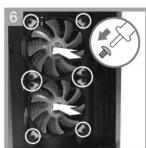
4 Installing an internal 3.5" HDD

5 Installing an internal 2.5" device


Removing the 2.5" device tray


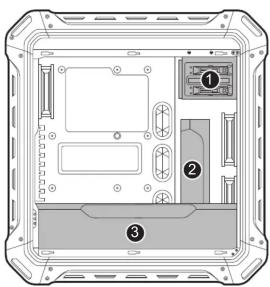
LEFT SIDE
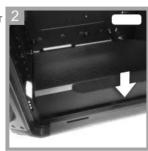
2 Removing the Air Guide


3 Installing/removing the power supply cover
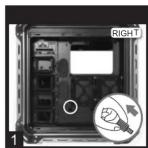


Removing the headphone hook



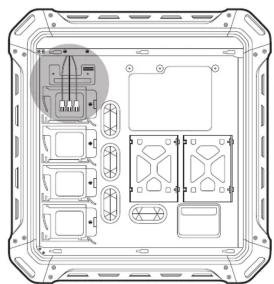
Through the use of splitters (2 included, 3 maximum), up to 8 fans can be connected
natural_image
Top-down view of a device casing with internal components and mounting holes (no text or symbols visible)RIGHT SIDE

⚠️ Fan cable max current loading is 1A


Brand : Cougar
Model : Panzer Max
Category : PC Case