Toughpower GF1 - Chargeur pour appareils mobiles THERMALTAKE - Free user manual and instructions
Find the device manual for free Toughpower GF1 THERMALTAKE in PDF.


User questions about Toughpower GF1 THERMALTAKE
0 question about this device. Answer the ones you know or ask your own.
Ask a new question about this device
Download the instructions for your Chargeur pour appareils mobiles in PDF format for free! Find your manual Toughpower GF1 - THERMALTAKE and take your electronic device back in hand. On this page are published all the documents necessary for the use of your device. Toughpower GF1 by THERMALTAKE.
USER MANUAL Toughpower GF1 THERMALTAKE
How to connect PCIe cables to high power consumption graphics cards properly?
Please make sure total power consumption before PCIe cables connect to graphics card, warranty will not cover all the human errors.
A single PCIe 8pin cable and connector's maximum current rating is 12.5A, which is 150W (+12V x 12.5A). So a single PCIe 8pin connector that exceeds the standard 225W total power draw (150W from PCIe 8pin connector + 75W from PCIe motherboard slot) will cause damage. Similarly, a graphics card or expansion card with dual PCIe 8pin connectors that exceed 375W total power draw (300W from two PCIe 8pin connectors + 75W from PCIe motherboard slot) will also cause damage and not be covered under warranty.
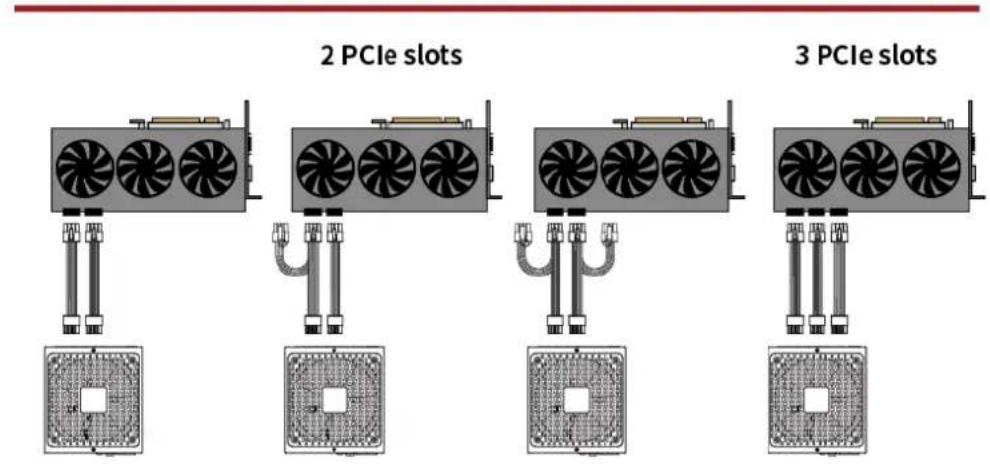
Thus, to power high-consumption graphics cards (above 225W) with two or three PCIe slots, please use the single PCIe cables same number as PCIe slots.
We highly recommend that check the power consumption from the official Graphic card website before installation, and also please see the PCIe slots installation instruction below.