
Eurodesk SX3242FX-PRO - Mixer BEHRINGER - Free user manual and instructions
Find the device manual for free Eurodesk SX3242FX-PRO BEHRINGER in PDF.


| Product Type | Mixing Console |
| Model | Eurodesk SX3242FX-PRO (SL3242FX-PRO) |
| Channels | 32 (24 mono + 4 stereo) 4 subgroups |
| Dimensions (H x W x D) | 100 mm x 896 mm x 410 mm (3.9" x 35.3" x 16.1") |
| Weight | 11.5 kg (25.4 lbs) |
| Power Supply | Auto-ranging 100–240 V~, 50/60 Hz |
| Power Consumption | 50 W |
| Fuse | T 2.0 AH 250 V |
| Built-in Effects | Two independent 24-bit multi-effects processors with 99 presets each |
| Equalizer | 9-band stereo graphic EQ with FBQ Feedback Detection Mono channels: 3-band EQ with semi-parametric mid Stereo channels: 4-band EQ with fixed mid frequencies |
| Microphone Preamps | IMP "Invisible" Mic Preamps with 130 dB dynamic range Gain range: +10 to +60 dB Phantom power: +48 V switchable |
| Inputs | 24 XLR mic inputs, 24 TRS line inputs, 4 stereo TRS line inputs, RCA CD/Tape input |
| Outputs | Main XLR and TRS, 4 subgroup TRS, AUX sends, FX sends, Mono out, Phones/Control Room TRS, RCA CD/Tape out |
| Insert Points | Mono channel inserts (TRS), Main insert |
| Talkback | Built-in microphone with level control and routing to AUX 1/2 |
| Frequency Response | <10 Hz – 200 kHz (-3 dB) for mic preamp |
| Signal-to-Noise Ratio | 110 dB / 112 dB A-weighted (0 dBu In @ +22 dB GAIN) |
| Total Harmonic Distortion | 0.004% / 0.003% A-weighted |
| Maintenance | Clean with dry cloth only. No user-serviceable parts. Refer servicing to qualified personnel. |
| Safety | Do not expose to rain or moisture. Use grounded power outlet. Do not remove covers. |
| Spare Parts / Repairability | Fuse replaceable (same type/rating). Footswitch connector available. Contact authorized service center for repairs. |
| General Information | Designed by BEHRINGER Germany. Assembled in China under ISO 9000 certified management system. 1-year warranty (subject to registration). |
Frequently Asked Questions - Eurodesk SX3242FX-PRO BEHRINGER
User questions about Eurodesk SX3242FX-PRO BEHRINGER
0 question about this device. Answer the ones you know or ask your own.
Ask a new question about this device
Download the instructions for your Mixer in PDF format for free! Find your manual Eurodesk SX3242FX-PRO - BEHRINGER and take your electronic device back in hand. On this page are published all the documents necessary for the use of your device. Eurodesk SX3242FX-PRO by BEHRINGER.
USER MANUAL Eurodesk SX3242FX-PRO BEHRINGER
natural_image
Front view of a multi-tiered audio recording and audio workstation with multiple knobs, dials, and control panels (no visible text or labels)Important Safety Instructions

This symbol, wherever it appears, alerts you to the presence of uninsulated dangerous voltage inside the enclosure - voltage that may be sufficient to constitute a risk of shock.

This symbol, wherever it appears, alerts you to important operating and maintenance instructions in the accompanying literature. Please read the manual.
Caution
To reduce the risk of electric shock, do not remove the top cover (or the rear section). No user serviceable parts inside. Refer servicing to qualified personnel.
Caution
To reduce the risk of fire or electric shock, do not expose this appliance to rain and moisture. The apparatus shall not be exposed to dripping or splashing liquids and no objects filled with liquids, such as vases, shall be placed on the apparatus.
Caution
These service instructions are for use by qualified service personnel only. To reduce the risk of electric shock do not perform any servicing other than that contained in the operation instructions. Repairs have to be performed by qualified service personnel.
Read these instructions.1)
Keep these instructions.2)
Heed all warnings.3)
Follow all instructions.4)
Do not use this apparatus near water.5)
Clean only with dry cloth.6)
Do not block any ventilation openings. Install in accor-7) dance with the manufacturer's instructions.
8) Do not install near any heat sources such as radiators, heat registers, stoves, or other apparatus (including amplifiers) that produce heat.
9) Do not defeat the safety purpose of the polarized or grounding-type plug. A polarized plug has two blades with one wider than the other. A grounding-type plug has two blades and a third grounding prong. The wide blade or the third prong are provided for your safety. If the provided plug does not fit into your outlet, consult an electrician for replacement of the obsolete outlet.
(10) Place the power cord so that it is protected from being walked on and sharp edges. Be sure that the power cord is protected particularly at plugs, convenience receptacles and the point where it exits from the apparatus.
11) The apparatus shall be connected to a MAINS socket outlet with a protective earthing connection.
12) Where the MAINS plug or an appliance coupler is used as the disconnect device, the disconnect device shall remain readily operable.
13) Use only attachments/accessories specified by the manufacturer.
(14) Use only with the cart, stand, tripod, bracket, or table specified by the manufacturer, or sold with the apparatus. When a cart is used, use caution when moving the cart/ apparatus combination to avoid injury from tip-over.

15) Unplug this apparatus during lightning storms or when unused for long periods of time.
Refer all servicing to qualified service personnel. Servic-16) ing is required when the apparatus has been damaged in any way, such as power supply cord or plug is damaged, liquid has been spilled or objects have fallen into the apparatus, the apparatus has been exposed to rain or moisture, does not operate normally, or has been dropped.

Foreword
natural_image
Black-and-white photo of a man standing at a wooden table in a control room with multiple equipment (no visible text or symbols)Dear Customer,
Welcome to the team of EURODESK users and thank you very much for expressing your confidence in BEHRINGER products by purchasing this mixing console.
It is one of my most pleasant tasks to write this letter to you, because it is the culmination of many months of hard work delivered by our engineering team to reach a very ambitious goal: to present you two outstanding mixing consoles that give you maximum flexibility and performance with a unique sound character and broad
range of striking functions. The task to design the new SL series certainly meant a great deal of responsibility, which we assumed by focusing on you, the discerning user and musician. It also meant a lot of work and night shifts to accomplish this goal. But it was fun, too. Developing a product usually brings a lot of people together, and what a great feeling it is when everybody who participated in such a project can be proud of what we've achieved.
It is our philosophy to share our joy with you, because you are the most important member of the BEHRINGER team. With your highly competent suggestions for new products you've greatly contributed to shaping our company and making it successful. In return, we guarantee you uncompromising quality as well as excellent technical and audio properties at an extremely favorable price. All of this will enable you to fully unfold your creativity without being hampered by budget constraints.
We are often asked how we can make it to produce such high-grade devices at such unbelievably low prices. The answer is quite simple: it's you, our customers! Many satisfied customers means large sales volumes enabling us to get better conditions of purchase for components, etc. Isn't it only fair to pass this benefit back to you? Because we know that your success is our success, too!
I would like to thank all people whose help on "Project SL" has made it all possible. Everybody has made very personal contributions, starting from the designers of the unit to the many staff members in our company and finally to you, the user of BEHRINGER products.
My friends, it's been worth the trouble!
Thank you very much,
Uli Behringer
Table of contents
- Introduction ...... 4
1.1 Before you get started 4
1.1.1 Shipment 4
1.1.2 Initial operation 4
1.1.3 Online Registration 4
1.2 The manual 4
- Control elements and connections .... 5
2.1 Mono input channels 5
2.1.1 Microphone and line inputs 5
2.1.2 Equalizer 5
2.1.3 Aux/FX send buses 5
2.1.4 Mono channel fader and further control elements 6
2.2 Stereo channels 6
2.2.1 Channel inputs 6
2.2.2 Stereo channel equalizer 6
2.2.3 Stereo channel aux/FX send buses 6
2.2.4 Stereo channel fader and other control elements 7
2.3 Stereo channels 21 - 24 (SL2442FX-PRO) or 29 - 32 (SL3242FX-PRO)....7
2.4 Subgroups 1 - 4 ...... 7
2.5 Mono out section for subwoofer applications ..... 8
2.6 Main out section 8
2.6.1 Talkback 9
2.6.2 Phones & control room 9
2.7 CD/tape 9
2.8 Master aux send 1 and 2 ...... 9
2.9 Graphic 9-band stereo equalizer .... 10
2.10 Effects section 10
2.11 Rear panel 11
-
Digital effects processor.... 11
-
Wiring examples 12
4.1 Studio set-up 12
4.2 Live set-up 13
-
Audio connectors .... 14
-
Presets.... 15
-
Specifications 16
-
Warranty 17
Introduction1.
Congratulations! With the EURODESK you have acquired a state-of-the-art mixing console that sets new standards. Right from the very start it has been our goal to design a revolutionary unit that can be used for a great variety of applications. And indeed, this overwhelming mixing console gives you plenty of functionality and a broad range of connection and expansion options.
BEHRINGER is a company with its roots in professional recording studio technology. For many years now we have been successful in developing products for studio and live use. These include microphones and studio gear of all kinds (compressors, enhancers, noise gates, tube processors, headphone amplifiers, digital effects DI boxes, etc.), monitor and P.A. speakers as well as professional live and recording mixers. Our entire technical know-how has gone into your EURODESK mixing console.
FBQ Feedback Detection System

One of the most outstanding features of this console is the FBQ Feedback Detection System, which is part of the graphic equalizer. This ingenious circuit makes it possible to detect and subsequently eliminate feedback frequencies very quickly. FBQ
increases the brightness of the EQ fader LEDs for the frequency bands where feedback is occurring. What used to be a tedious search for feedback frequencies is now mere child's play.
IMP "Invisible" Mic Preamp

The microphone channels are equipped with BEHRINGER's brand-new high-end IMP Invisible Mic Preamps, which offer you:
130 dB of dynamic range and hence an unbelievable amount of headroom,
a bandwidth from below 10 Hz to above 200 kHz for the crystal-clear reproduction of even the slightest details,
extremely noise and distortion-free circuitry for absolutely natural sound and neutral signal reproduction,
perfect adaptation to any microphone on the market (upto 60 dB gain and +48 V phantom power), and
the possibility of pushing the dynamic range of your 24-bit/192-kHz HD recorder to the max and thus achieving ultimate audio quality.

What is more, the EURODESK comes with two effects processors using 24-bit A/D and D/A converters and the effects algorithms of our renowned 19" multi-effects device VIRTUALIZER PRO DSP2024P. Each processor offers 99 presets with first-class room
simulations, delay and modulation effects as well as compressor, tube distortion and numerous other effects available—all with excellent audio quality!

The mixer is equipped with a state-of-the-art integrated switch-mode power supply. Unlike conventional designs, this supply automatically adapts to supply voltages between 100 and 240V . With its considerably higher efficiency, it is also more economical in
terms of power consumption than standard power supply units.
Before you get started1.1
Shipment1.1.1
Your product was carefully packed at the factory to ensure safe transport. Nevertheless, if the box is damaged inspect the unit immediately for signs of damage.
If the unit is damaged please do NOT return it to us, but notify your dealer and the shipping company immediately; otherwise, claims for damage or replacement may not be granted.
We recommend that you use a flight case to give the unit optimum protection during use or transport.
Always use the original box to prevent damage during storage or transport.
Make sure that children cannot play unsupervised with the unit or its packaging.
Please ensure proper disposal of all packing materials.
1.1.2 Initial operation
Ensure adequate air supply and to avoid overheating do not place the unit near radiators etc.
Blown fuses must be replaced by fuses of the correct rating! Please refer to the "SPECIFICATIONS" section for the applicable rating.
For connection to the mains use the enclosed power cord with cold connector which complies with the relevant safety regulations.
Please make sure that all devices are properly grounded. For your own safety, never remove or disable the ground conductors from the devices or on the power cords. The unit must always be connected to the mains outlet with a protective grounding connection.
We would like to point out that high volume levels may damage your hearing and/or your headphones/ loudspeakers. To avoid switch-on/off thumps from the console and any downstream devices, always make sure that your power amp(s) or active speakers are the last components that are switched on and the first to be switched off. Always make sure that the appropriate volume is set.
Important notes concerning installation
The sound quality may diminish within the range of powerful broadcasting stations and high-frequency sources. Increase the distance between the transmitter and the device and use shielded cables for all connections.
1.1.3 Online Registration
Please register your new BEHRINGER equipment right after your purchase by visiting http://www.behringer.com and read the terms and conditions of our warranty carefully.
Should your BEHRINGER product malfunction, it is our intention to have it repaired as quickly as possible. To arrange for warranty service, please contact the BEHRINGER retailer from whom the equipment was purchased. Should your BEHRINGER dealer not be located in your vicinity, you may directly contact one of our subsidiaries. Corresponding contact information is included in the original equipment packaging (Global Contact Information/European Contact Information). Should your country not be listed, please contact the distributor nearest you. A list of distributors can be found in the support area of our website (http://www.behringer.com).
Registering your purchase and equipment with us helps us process your repair claims more quickly and efficiently.
Thank you for your cooperation!
1.2 The manual
This manual is designed to give you an overview of all control elements and at the same time inform you in detail about how to use them. To provide you with a clear structure, we have grouped the control elements according to their function. They can easily be found on the enclosed numbered illustrations. If you need more detailed information on specific topics, please visit our web site at www.behringer.com. The product-related information pages and the ULTRANET-based glossary explain the relevant audio engineering terminology in full detail.

Control elements and connections2.
This chapter describes the various control elements of your mixing console. All controls and connections are explained in full detail.
Mono input channels2.1
Microphone and line inputs2.1.1
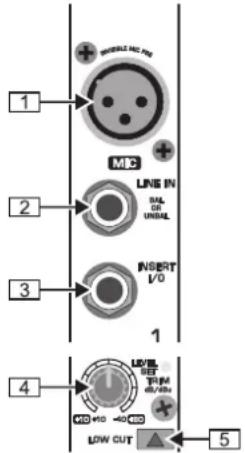
Connectors and controls of the mic/line inputsFig. 2.1:

1 Each mono input channel is equipped with a balanced microphone input on an XLR connector, which provides +48 V phantom power for condenser microphones at f a button (see rear panel).
Be sure to switch off your audio system before you activate the phantom power supply to prevent audible switch-on thumps from reaching your monitor speakers. Please also note the information given in chapter 2.11 "Rear panel".
2 Each mono input also has a balanced line input on 1/4" TRS connectors. Of course, these inputs can also be used with unbalanced plugs (1/4" TS connector).
3 The INSERT I/O connector is used to process a signal with dynamic processors or equalizers. This insert point is pre-fader, pre-EQ and pre-aux send.
Unlike reverb and other effects, which are usually added to the dry signal, dynamic processors process the entire signal. So, aux send buses are not the best solution here. Instead, dynamic processors and equalizers are inserted into the signal path. Once processed, the signal then re-enters the mixing console at the same point where it left. Signal interruption only occurs if a plug is inserted into the corresponding jack (1/4" stereo plug: tip = signal output, ring = input). All mono input channels are equipped with insert points. They can also be used as pre-EQ direct outputs, without signal flow interruption. For this you need a cable with a 1/4" TS connector on the recorder/effects processor end, and a bridged stereo 1/4" TRS connector on the console end (tip and ring interconnected).
4 The TRIM control adjusts the input gain. Be sure to set this control fully counter-clockwise before you connect or disconnect a signal source to or from one of the inputs.
TRIM has a dual scale: the first scale has a gain from +10 to +60dB for the MIC input.
The second scale has a gain from +10 to -40dBu for the line input. For devices with a normal line output level of -10 dBV or +4 dBu the setting is as follows: with TRIM fully counterclockwise connect the external device and adjust the output level recommended by the manufacturer. If available, the output level display of the external device should read 0 dB with signal peaks. For +4 dBu increase TRIM, for -10 dBV increase it further. The fine-tuning can be done with a music
signal and the LEVEL SET LED, which will illuminate when the optimum operating level has been set.
5 Mono channels are equipped with a high-slope LOW CUT filter eliminating unwanted low-frequency signals, such as floor rumble (18 dB/oct., -3 dB at 80 Hz).
2.1.2 Equalizer
All mono input channels are equipped with a 3-band equalizer. The maximum boost/cut of the individual bands is 15 dB, in mid position the EQ is set to neutral.
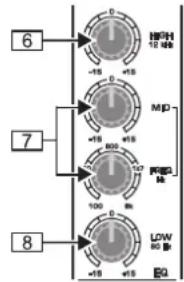
Fig. 2.2: Equalizer section of input channels
6 The HI control in the EQ section controls the high frequency range of the respective channel. It is a shelving-type filter which can boost or cut all frequencies above a fixed frequency (12 kHz).
7 The MID control allows you to raise or lower the mid-range level. It is a semi-parametric peak filter, which boosts or cuts the frequency range around a variable mid-range frequency. Use the FREQ control to select the mid-range frequency from 100 Hz to 8 kHz. Then use the MID control to boost or cut the selected frequency range.
8 The LOW control boosts or cuts the low-frequency range. Like the HI filter it is a shelving-type filter, which raises or lowers the level of all frequencies below a specific frequency (80 Hz).
2.1.3 Aux/FX send buses
Aux sends enable you to take the signals from one or multiple channels and collect them on one bus. This signal is then present at one of the aux send jacks, from where it can be routed to an active monitor speaker or external effects device, for example. The FX returns are subsequently used as a return bus for the processed signal.
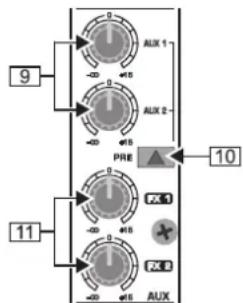
Fig. 2.3: AUX/FX send controls in the channel strips
9 On each channel, the AUX 1 and AUX 2 controls allow you to determine the level of the aux signals sent from the channel. The main aux send signal comprising the aux send signals from all channels can then be adjusted with the corresponding master AUX SEND controls [51], and is present at the AUX SEND outputs [52]. Both aux sends are mono, post-EQ, with a gain of up to +15 dB.
10 Press the PRE switch to set all aux sends to pre-fader. In this case, the volume of the aux signals is no longer dependent on the fader position, so you can create completely independent monitor mixes.

For most applications when controlling an external effects device from one of the aux buses, the aux sends must be set post-fader, so that the effect volume in a channel depends on the position of the channel fader. Otherwise, the effect signal would still be audible, even if the channel was turned down completely. For this type of application it is advisable to leave the PRE switch out (= not pressed).
[11] FX 1 and FX 2 controls provide a direct route to the built-in effects processor. Additionally, they can be used to control an external effects unit, via the FX SEND 1 and 2 outputs (similar to the AUX SEND 1 and 2 jacks). To ensure that the internal effects processor and the FX SEND outputs actually get a signal, the corresponding FX control must not be set fully counter-clockwise (-oo), and the master FX SEND (see [60]) must be turned up. The FX buses are hard wired post-fader.
Please also read chapter 2.10 "Effects section" and 3 "DIGITAL EFFECTS PROCESSOR".
Mono channel fader and further control 2.1.4 elements
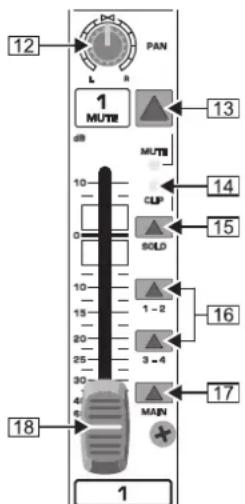
Channel fader, pan control, mute button, etc. Fig. 2.4:
[12] The PAN control determines the position of the channel signal in the stereo mix as well as the subgroup to which the channel signal is routed (see chapter 2.4).
13 Use the MUTE switch to mute the channel signal, so it is no longer part of the main mix. At the same time, all aux buses set to post-fader are muted for the respective channel, while the pre-fader monitor buses remain operative. The MUTE LED is illuminated when the channel is muted.
14 The CLIP LED illuminates when the channel overloads. In this case, please reduce the input gain using the TRIM control. This LED also illuminates when you activate the sold function with the SOLO switch below.
15 The SOLO switch routes the channel signal to the solo bus (Solo In Place) or the PFL bus (Pre Fader Listen). Thus, you can monitor a channel signal without affecting the main output signal. The signal to be monitored is taken either pre (PFL, mono) or post-panorama control (Solo, stereo) and post-channel fader (depending on the position of the SOLO/PFL switch 40).
16 The SUB switch routes the signal to the respective subgroups. Your EURODESK features 4 subgroups (1-2 and 3-4). With the PAN control on the input channel (see 12) you can determine to which of the two groups the signal is routed (hard left: sub 1 or 3, hard right: sub 2 or 4).
17 The MAIN switch routes the signal to the main mix.
18 The channel fader governs the level of the channel signal as part of the main mix (or submix).
Stereo channels2.2
Channel inputs2.2.1
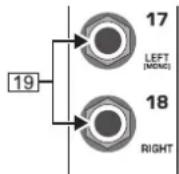
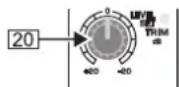
Fig. 2.5: Stereo channel inputs
[NO TEXT]
19 Each stereo channel is equipped with two balanced line-level inputs on 1/4" TRS connectors for the left and right channels. The channels can also process mono signal, as long as you use the "LEFT" jack only.
20 All stereo channel strips have a TRIM control for gain adjustment. Its scale ranges from +20 to -20 dB and allows you to adapt the input level to the line inputs.
2.2.2 Stereo channel equalizer
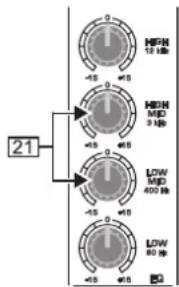
Fig. 2.6: Stereo channel equalizer
The stereo channels are equipped with a stereo equalizer. The filter types and cutoff frequencies for HIGH and LOW filters are the same as on the mono channels. Instead of one semi-parametric midrange band, the stereo channels have two separate midrange bands ( [21] HIGH MID and LOW MID) with fixed mid-frequencies (3 kHz and 400 Hz). Stereo EQs are preferable for processing the frequency response of stereo signals. With two mono equalizers you might encounter problems with different settings between the left and right channels.
2.2.3 Stereo channel aux/FX send buses
Basically, the aux and FX buses on the stereo channels are the same as on the mono channels. Since aux buses are always mono, the signal from a stereo channel is first mixed to mono before it is routed to the aux bus.
Stereo channel fader and othercontrol elements2,2.4
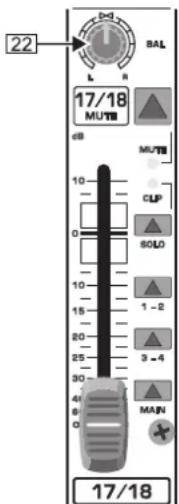
Channel fader, balance control, mute switch, etc. Fig.
22 The BAL(ANCE) control has the same function as the PAN control on the mono channels. It determines the relative volume of the left and right input signals before they are routed to the stereo main mix bus (or to two subgroups).
All other control elements of the stereo channels work in the same ways as their counterparts on the mono channels (faders, MUTE switches, etc.).
Please note: When you route a stereo channel to the B subgroups using the SUB switches, please be sure to set the BAL control to its mid position, so that the signal is sent to two subgroups and remains stereo.
Stereo channels 21 - 24 (SL2442FX-PRO) 2.3 or 29 - 32 (SL3242FX-PRO)
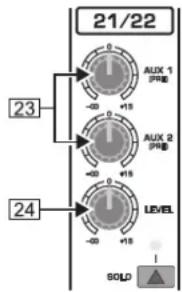
Auxiliary stereo channelsFig. 2.8:
Your EURODESK has two stereo channels with an aux send section (23 AUX 1 and AUX 2) and one LEVEL control [24]. For these channels, the aux buses are hard-wired to pre-fader and are therefore particularly useful for monitoring. They have no routing switches and are always sent to the main mix. Like the normal stereo channels they have two line-level inputs on 1/4" TRS connectors for the left and right channels, and a SOLO switch.
Similar to the CD/TAPE inputs (see [49]) the auxiliary stereo channels can be connected to CD players, tape decks, etc., for example, to feed in playback material.
Subgroups 1 - 42.4
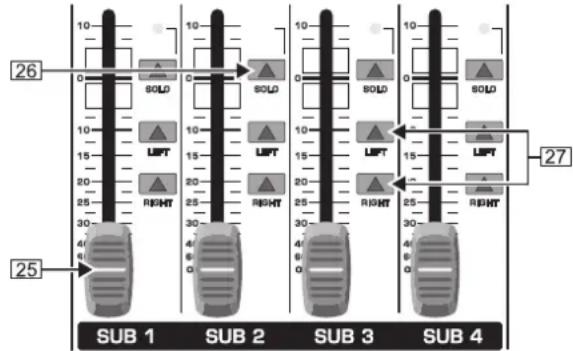
Fig. 2.9: Subgroups 1 - 4
The EURODESK has 4 subgroups enabling you to create mono or stereo mixes from multiple input signals. Subgroups are controlled from one (mono) or two (stereo) subgroup faders. Additionally, it is possible to connect the subgroup outputs as tape sends to a multi-track recorder.
25 The subgroup faders determine the volume of the subgroup signal at the subgroup output 28. Depending on the position of the routing switch 27 you can thus control the subgroup volume in the main mix.
26 The SOLO switch routes the subgroup signal to the solo bus (Solo In Place) or PFL bus (Pre Fader Listen), so that you can monitor the subgroup signal without affecting the main or sub output signals. The signal to be monitored is taken either pre (PFL, mono) or post-subgroup fader(Solo, stereo), depending on the position of theSOLO/PFL switch [40]. The SOLO LED illuminates when the SOLO switch is pressed.
27 Use the routing switches for the subgroups to send the subgroup signal to the main mix. You can route it to the left stereo side (=LEFT pressed), to the right stereo side (=RIGHT pressed) or to both (=LEFT and RIGHT pressed). For example, when you have created a stereo submix using subgroups 1 and 2, be sure to route group 1 to the left and group 2 to the right side to maintain proper stereo positioning. If it is a mono submix with just one subgroup, route it to the left and right sides of the main mix to make the signal audible on both sides.
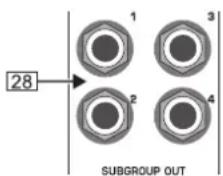
Fig. 2.10: Subgroup outputs 1 - 4
28 These four SUBGROUP OUT (puts) carry the signals of the individual subgroups. For multi-tracking connect the outputs to the inputs of a multi-track recorder (see chapter 4.1 "Studio set-up").

Mono out section for subwoofer 2.5 applications
Using this auxiliary mono output you can route the main mix signal to a separate power amp. The tunable low-pass filter allows you to limit the signal content to the low-frequency range to get a perfect subwoofer signal. This signal is mono because very low frequencies disperse quickly, so there would be no benefit to position this signal in the stereo mix.
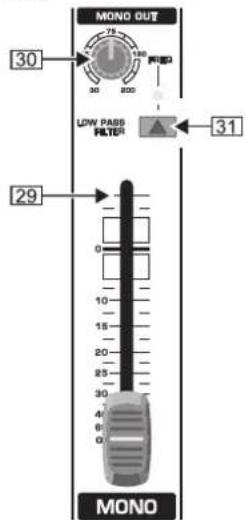
Mono out fader and low-pass filterFig. 2.11:
29 The MONO fader controls the volume of the signal present at the MONO OUT (see 32).
30 The FREQ control adjusts the cut-off frequency of the low-pass filter (30 to 200 Hz). Frequencies above cut-off are filtered out when activated.
31 Use the LOW PASS FILTER switch to activate the filter function (LED illuminates).
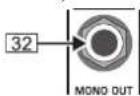
Mono out connectorFig. 2.12:
32 The MONO OUT connector provides the line-level mono signal for connection to the inputs of a power amp or active speaker. You can also use this output as a monitor bus, e.g. to connect a headphone amplifier. In this case, the signal should of course not be limited by the low-pass filter.
Main out section2.6
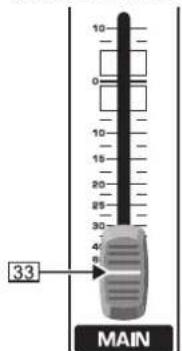
Main out faderFig. 2.13:
33 Use this high-precision MAIN fader to control the output level of the main mix.
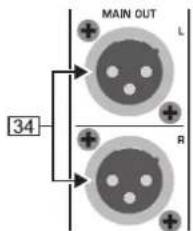
XLR main out connectorsFig. 2.14:
34 The MAIN OUT(puts) are balanced XLR connectors with a nominal operating level of +4 dBu and provide the main mix signal.
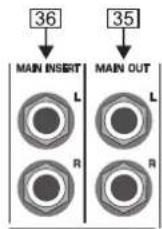
Main out connectors and main insertFig. 2.15:
35 The MAIN OUT 1/4" TRS connectors outputs also provide the main mix signal.
36 Like the channel inserts, the MAIN INSERT connectors can be used to connect a dynamics processor or equalizer for further processing of the mix signal. The MAIN INSERT refers to the Main Outs (XLR and 1/4" TRS connectors), the MONO OUT (see [32]) and, if the MAIN switch in the PHONES/CONTROL ROOM section is pressed, also to the PHONES/CTRL ROOM output (see [46]).
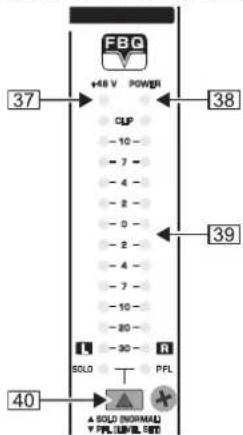
Level meterFig. 2.16:
37 The red "+48 V" LED illuminates when phantom power is on. Phantom power is required for the operation of condenser microphones, and can be switched on with the corresponding switch on the rear of the console.
38 The POWER LED is illuminated when the console is switched on.
39 The high-precision level meter accurately indicates the output signal level. For example, when you press the SOLO switch on one of the input channels, its signal level will be displayed here, either pre-fader (PFL) or post-fader (SOLO), depending on the position of the SOLO/PFL switch (see 40). In PFL mode only the left display is active, because the PFL signals are mono.
40 The SOLO/PFL switch determines whether the monitored signal is pre (PFL) or post-fader (SOLO) after pressing the SOLO/PFL switch (the LED illuminates). The level meter indicates the corresponding signal (see 39). When you adjust a signal with the TRIM control, it is advisable to select PFL mode, so that the level shown is independent of the channel fader position.

Talkback2.6.1
The talkback function of the EURODESK allows you to communicate with the musicians in the recording room or on the stage. The talkback signal is present at the AUX SEND outputs, which are particularly useful for monitor/headphone mixes.
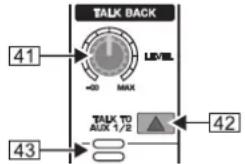
Talkback sectionFig. 2.17:
41 The LEVEL control determines the volume of the talkback signal at the AUX 1/2 outputs.
42 Use the TALK TO AUX 1/2 switch to activate the built-in talk-back microphone. Its signal is sent to the AUX SEND jacks 1 and 2. Keep the switch pressed while you're speaking.
43 This is the built-in talkback microphone.
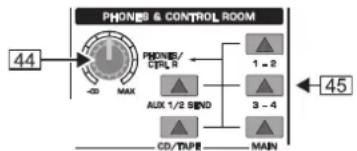
Phones & control room2.6.2
flowchart
graph LR
    A["44"] --> B["PHONES & CONTROL ROOM"]
    B --> C["PHONES/LCPU R"]
    B --> D["AUX 1/2 SEND"]
    B --> E["CD/TV/PE"]
    B --> F["MAIN"]
    G["45"] --> H["PHONES & CONTROL ROOM"]
Phones/control room sectionFig. 2.18:
44 The PHONES/CTRL R control adjusts the volume of the headphones connected to the PHONES/CTRL ROOM OUT jack (see 46). If you have an active monitor speaker or power amp connected here, you can also control the monitor volume.
45 These switches select the signal sent to the PHONES/CTRL ROOM jack. Available sources are: MAIN, CD/TAPE, AUX 1/2 and subgroups 1 - 2 and 3 - 4.
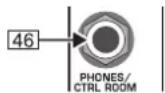
Phones/control room outputFig. 2.19:
46 Connect your headphones or monitor speaker to the PHONES/CTRL ROOM OUT 1/4" TRS connector.
IMPORTANT! High volume levels may damage your hearing and/or your headphones/loudspeakers. To avoid switch-on/off thumps from the console and any downstream devices, always make sure that the power amp(s) or active speaker(s) are the last components that are switched on and the first to be switched off. Always make sure that the appropriate volume is set.
2.7 CD/tape
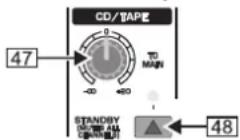
Fig. 2.20: CD/tape
47 TO MAIN controls the volume of, for example, a CD player connected to the CD/tape input connectors (see 49).
43 When the STANDBY switch is pressed, all input channels are muted. Only the CD/tape signal will be routed to the main mix. In this way, you can prevent the microphones from pickung up unwanted sounds or noise that would interfere with CD playback during a break. The main mix and channel faders can remain in their normal positions while playing back music from CD (using the CD/TAPE INPUTs [49]), so you don't lose your mix.
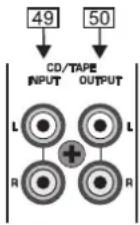
Fig. 2.21: CD/tape connectors
49 The CD/TAPE INPUT RCA connectors are for the connection of CD players, tape decks or other line-level sources. The signal volume is adjusted with the TO MAIN control.
50 The CD/TAPE OUTPUT RCA connectors provide the stereo main mix signal to a tape deck or DAT recorder to record your mix. The signal is taken pre-fader, so that it will not be influenced by the fader positions.
2.8 Master aux send 1 and 2
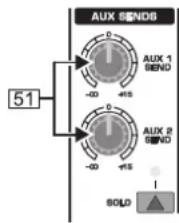
Fig. 2.22: Master aux sends
51 These are the master AUX SEND controls 1 and 2 for adjusting the volume level sent to the corresponding aux send connectors (see 52). This way, you can control the mix of all AUX 1 or AUX 2 signals of the input channels. The AUX SEND section also has a SOLO switch.
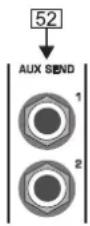
Fig. 2.23: Master aux send outputs
52 Use the AUX SEND outputs 1 and 2 to take the masterAUX SEND signals and route them to an external effects device or your monitor speakers. Subsequently, you can return the effect signal, e.g. via the STEREO FX RETURN inputs (see [67]) or specific input channels.
Graphic 9-band stereo equalizer2.9
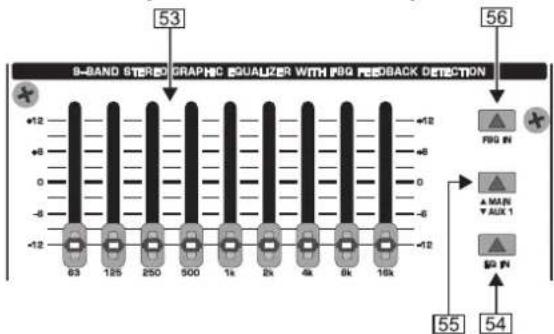
The graphic stereo equalizerFig. 2.24:
53 Your EURODESK is equipped with a graphic 9-band stereo equalizer processing either the main or the AUX 1 signal. Use the EQ to adapt the sound to the room acoustics.
54 Use the EQ IN switch to switch the equalizer on. In this case, the fader LEDs illuminate.
55 With the MAIN/AUX 1 switch you can determine the signal to be processed, either main or AUX 1.
56 Press the FBQ IN switch to activate the FBQ Feedback Detection System. The frequencies causing feedback are indicated by the brightly lit fader LEDs, while all other LEDs are darker. Simply lower the level of the brightly lit faders until feedback disappears.
When the switch is in the "AUX 1" position (see 55), the EQ fader LEDs show both the MAIN and the AUX 1 signal simultaneously. However, if feedback occurs in one of the signals, those signals without feedback will be faded out to enable clear identification of where feedback is occurring. If the MAIN signal happens to be the one carrying feedback, put the switch 55 to "MAIN" and then use the 9-band EQ to remove the feedback.
Effects section2.10
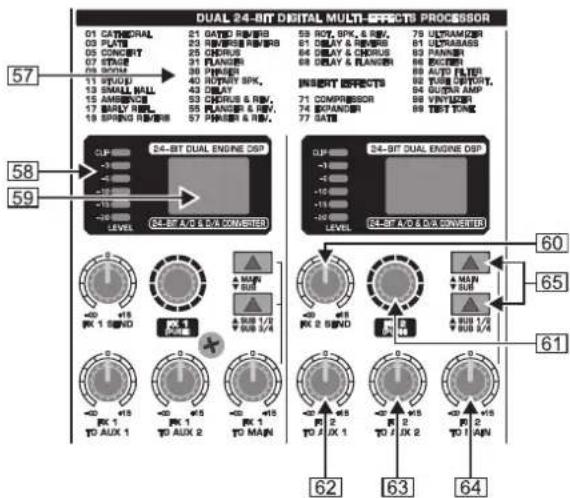
The digital effects processorFig. 2.25:
57 Here you will find a list of all multi-effects presets (see also chapter 3 "DIGITAL EFFECTS PROCESSOR").
[58] The FX LED level meters show the effects processor's input signal. Be sure that the clip LED only illuminates with signal peaks. If it is lit all the time, the effects processor is overloading and hence producing unpleasant distortion.
59 The EffeCt displays show the currently selected presets.
60 This is the master FX 1 (or 2) SEND control for adjusting the volume of all FX send signals at the correspondingFX send jacks (see 66) and at the inputs of the built-in effects processor. Use it to control the master signal of allFX 1/FX 2 signals from the input channels. When neither of the FX SEND controls is turned up, the effects processor will not receive a signal.
61 Turn the FX 1 (or FX 2) control to select an effects preset. Then, push it briefly to confirm your selection and activate the new effect.
62 The FX 1 (or 2) TO AUX 1 controls allow you to add the effect signal from the built-in effects processor (FX1 or FX2) to the AUX 1 monitor signal. Naturally, the effects processor must be provided with an input signal (i.e. the FX controls in the channel strips plus the FX SEND controls and the channel faders must be turned up).
63 This is the FX 1 (or 2) TO AUX 2 control adding the effect signal from the effects processor to the AUX 2 monitor signal. See [62] for further details.
64 The FX 1 (or 2) TO MAIN control routes the effect signal either to the main mix or the subgroups 1 and 2 (or 3 and 4), depending on the position of the selector switch (see 65). When it is hard left, no effect signal will be audible. Here, too, the FX controls in the channel strips plus theFX SEND controls and the channel faders must be turned up.
[65] These selector switches route the effect signal to the main mix or to the subgroups 1-2 or 3-4. If the MAIN/SUB switch is not pressed, the effect signal is sent to the main mix and the SUB 1/2 / SUB 3/4 switch below is inoperative. If the upper switch is pressed (SUB), however, the lower switch determines whether the effect signal is routed to subgroups 1 and 2 (SUB 1/2) or 3 and 4 (SUB 3/4).
flowchart
graph TD
    A["67"] --> B["STEREO FX RETURN"]
    C["66"] --> D["RX SEND"]
    B --> E["1"]
    D --> F["1"]
    E --> G["L"]
    F --> H["R"]
    G --> I["2"]
    H --> J["2"]
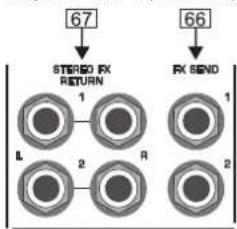
Fig. 2.26: FX send and return connectors
66 The FX SEND 1 and 2 connectors also provide the master FX send signals, for example, to connect them to the inputs of an external effects device. However, these are "dry" signals only with no "effect signals" from the built-in effects processor!
[67] The Stereo FX RETURN inputs 1 and 2 return the effect signals from external effects processors and add them to the main mix.
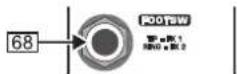
Fig. 2.27: Footswitch connectors
68 The FOOTSW(ITCH) connector allows you to connect a standard dual footswitch to separately enable/disableFX 1 or FX 2. The tip of the 1/4" plug controls FX 1, the ring controls FX 2.
Rear panel2.11
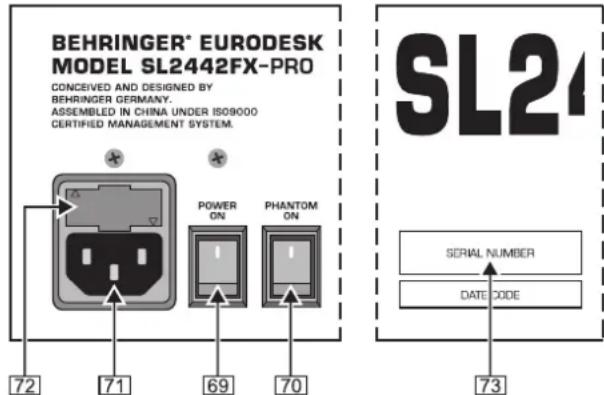
The rear panel of the EURODESKFig. 2.28:
69 Use the POWER switch to put the mixer into operation. This switch should always be in the "Off" position when you connect your unit to the mains.
Please note: The POWER switch does not fully disconnect the unit from the mains. To disconnect the unit from the mains, pull out the main cord plug or appliance coupler. When installing the product, ensure the plug or appliance coupler is readily operable. Unplug the power cord when the unit is not used for prolonged periods of time.
70 With the PHANTOM switch you can activate the phantom power supply for the XLR connectors of the mono channels for condenser microphones. The +48 V-LED 37 illuminates when phantom power is on. In most cases, dynamic microphones can still be used as long as they are connected in a balanced configuration. If in doubt, please contact the manufacturer of your microphone!
71 The mains connection is a standard IEC receptacle. An appropriate power cord is supplied with the unit.
72 FUSE HOLDER. Before connecting the unit to the mains, ensure that the voltage setting matches your local voltage. Blown fuses should only be replaced by fuses of the same type and rating. Please also read the information given in chapter 6 "SPECIFICATIONS".
73 SERIAL NUMBER.
Digital effects processor3.
| DUAL 24-BIT DIGITAL MULTI-EFFECTS PROCESSOR | ||||
| 01 CATHEDRAL | 21 GATED REVERS | 59 ROT, SPK, & REV. | 78 ULTRAMIZER | |
| 03 PLATE | 23 REVERSE REVERS | 61 DELAY & REVERS | 81 ULTRABASS | |
| 05 CONCERT | 25 CHORUS | 64 DELAY & CHORUS | 86 PHASER | |
| 07 STAGE | 31 FLANGER | 68 DELAY & FLANGER | 88 EXCITER | |
| 09 ROOM | 36 PHASER | 89 AUTO FILTER | ||
| 11 STUDD | 40 ROTARY SPK. | INSERT EFFECTS | 92 TUBE DISTORT. | |
| 13 SMALL HALL | 43 DELAY | 94 GUAR AMP | ||
| 15 AMBENCE | 53 CHORUS & REV. | 71 COMPRESSOR | 98 VINYLIZER | |
| 17 EARLY REPL | 55 FLANGER & REV. | 74 EXPANDER | 99 TEST TONE | |
| 19 SPRING REVERS | 57 PHASER & REV. | 77 GATE | ||
List of all effects presetsFig. 3.1:
99 FIRST-CLASS PRESETS

Here is the list of all multi-effects presets. The built-in effects processor offers you various standard effects such as reverb, chorus, flanger, delay and a variety of combination effects from our renowned studio effects processor VIRTUALIZER PRO DSP2024P.
Use the FX control on the channels and the FX SEND control to supply the effects processor with signals. A built-in digital stereo effects processor has the benefit of no external wiring, thus reducing the risk of ground loops or level differences. Handling is therefore much easier.
PARALLEL FX
The effects presets 1 to 70 provide classic "add-to-mix" effects. So, when you turn up the FX 1 (or 2) TO MAIN control, you create a mix of the (dry) channel signal and the effect signal. The balance between the two signals can be set with the FX send and FX 1/2 TO MAIN controls.
This also applies to adding effect signals to the AUX 1 (or 2) monitor mix, with the exception that the mix here is adjusted with the AUX 1 (or 2) control in the channel strip and the FX TO AUX 1 (or 2) potentiometer. Of course, the effects processor must receive a signal from the channel using the FX 1 (or 2) control. Make sure that the PRE switch in the corresponding channel strip(s) is pressed. Otherwise, the AUX buses will be set post-fader making the volume of the AUX monitor signal dependent on the position of the channel fader(s).
INSERT FX (channel is muted)
Effects presets #71 and higher process the entire signal, unlike the "add-to-mix" effects. When you use an insert preset, be sure to separate the respective channel from all buses (SUB button and MAIN button not pressed) and only route the effect signal to the main mix (FX 1/2 control, FX SEND 1/2 control and FX TO MAIN 1/2 control).
The channel fader of the corresponding channel remains active and governs (in combination with the FX controls) the signal level sent to the built-in effects processors.
Wiring examples4.
Studio set-up4.1
The following wiring example shows a studio set-up for 4-track-recording: the drums are mixed down to two subgroups and then routed via the subgroup outputs to two tracks of the multi-track recorder. The remaining two subgroups are used to record the guitar, keyboard (stereo channel) and two vocal signals on the remaining two tracks. The four return paths from the recorder are connected to four separate mono input channels on the EURODESK. The built-in compressor is used only for the bass, which is why this input channel is separate from all buses (SUB and MAIN switch not pressed). The bass signal is directly routed from the built-in effects processor to the respective subgroups (FX TO MAIN control). The MAIN/SUB switch in the FX1 section is pressed, but NOT the SUB 1/2 SUB 3/4 button.
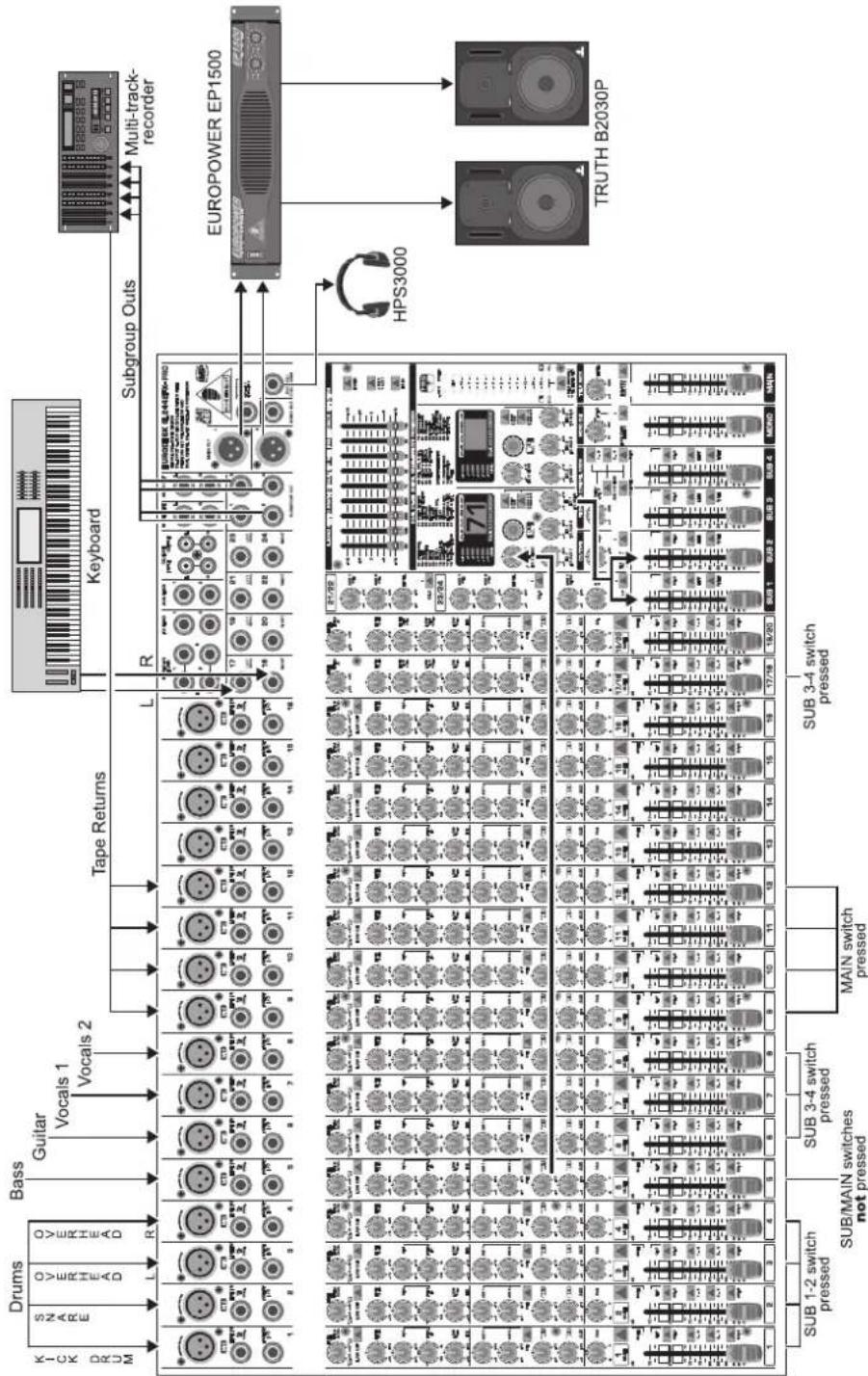
flowchart
graph TD
    A["Microcontroller"] -->|Drums, Bass, Guitar, Vocals 1, Vocals 2| B["Subgroup Outs"]
    B --> C["Multi-track-recorder"]
    C --> D["EUROPOWER EP1500"]
    D --> E["HPS3000"]
    E --> F["TRUTH B2030P"]
    G["Drums"] --> H["Microcontroller"]
    H --> I["Subgroup Outs"]
    I --> J["Multi-track-recorder"]
    J --> K["EUROPOWER EP1500"]
    K --> L["HPS3000"]
    L --> M["TRUTH B2030P"]
    N["Subgroup Outs"] --> O["Microcontroller"]
    O --> P["Subgroup Outs"]
    P --> Q["Multi-track-recorder"]
    Q --> R["EUROPOWER EP1500"]
    R --> S["HPS3000"]
    S --> T["TRUTH B2030P"]
Wiring the console for studio operationFig. 4.1:
Please make sure that none of the subgroup routing switches (1-2 and 3-4) is pressed in the channels connected to the recorder returns. Otherwise, a feedback loop will be created as soon as you start recording. Only press the MAIN switch on these input channels, so that the tape return signals are routed to the main outs and Phones/CTRL room outputs of the console.

flowchart
graph TD
    A["KICK DRUM"] --> B["Drums"]
    B --> C["SNARE"]
    B --> D["OVERHEAD"]
    B --> E["OVERHEAD"]
    B --> F["Bass"]
    F --> G["Guitar"]
    G --> H["Vocals 1"]
    G --> I["Vocals 2"]
    J["Keyboard"] --> K["R"]
    K --> L["EUROOBSK BL24429X-PRO"]
    L --> M["EUROPOWER EP1500"]
    M --> N["Live setup4.2"]
    N --> O["2 x BEHRINGER EUROLIVE stack (B1500X & B1020)"]
    N --> P["EUROPOWER EP1500"]
    P --> Q["EUROLIVE B1500X subwoofer"]

    R["1"] --> S["1/2"]
    T["2"] --> U["3"]
    V["3"] --> W["4"]
    X["5"] --> Y["6"]
    Z["7"] --> AA["8"]
    AB["9"] --> AC["10"]
    AD["11"] --> AE["12"]
    AF["13"] --> AG["14"]
    AH["15"] --> AI["16"]

    AJ["SUB 1-2 switch pressed"] --> AK["SUB/MAIN switches not pressed"]

    AL["MAIN switch pressed"] --> AM["L/R switch pressed"]

    AN["L"] --> AO["1/2/2"]
    AP["R"] --> AQ["2/2/4"]

    AR["L"] --> AS["1/2/2"]
    AT["L"] --> AU["2/2/4"]

    AV["L"] --> AW["1/2/2"]
    AX["L"] --> AY["2/2/4"]

    AZ["L"] --> BA["1/2/2"]
    BB["MONO"] --> BC["MAIN switch pressed"]

    BD["LEDA"] --> BE["LEDA"]

    BF["KEYBOARD"] --> BG["Keyboard"]

    BH["EUROPOWER EP1500"] --> BI["Live setup4.2"]
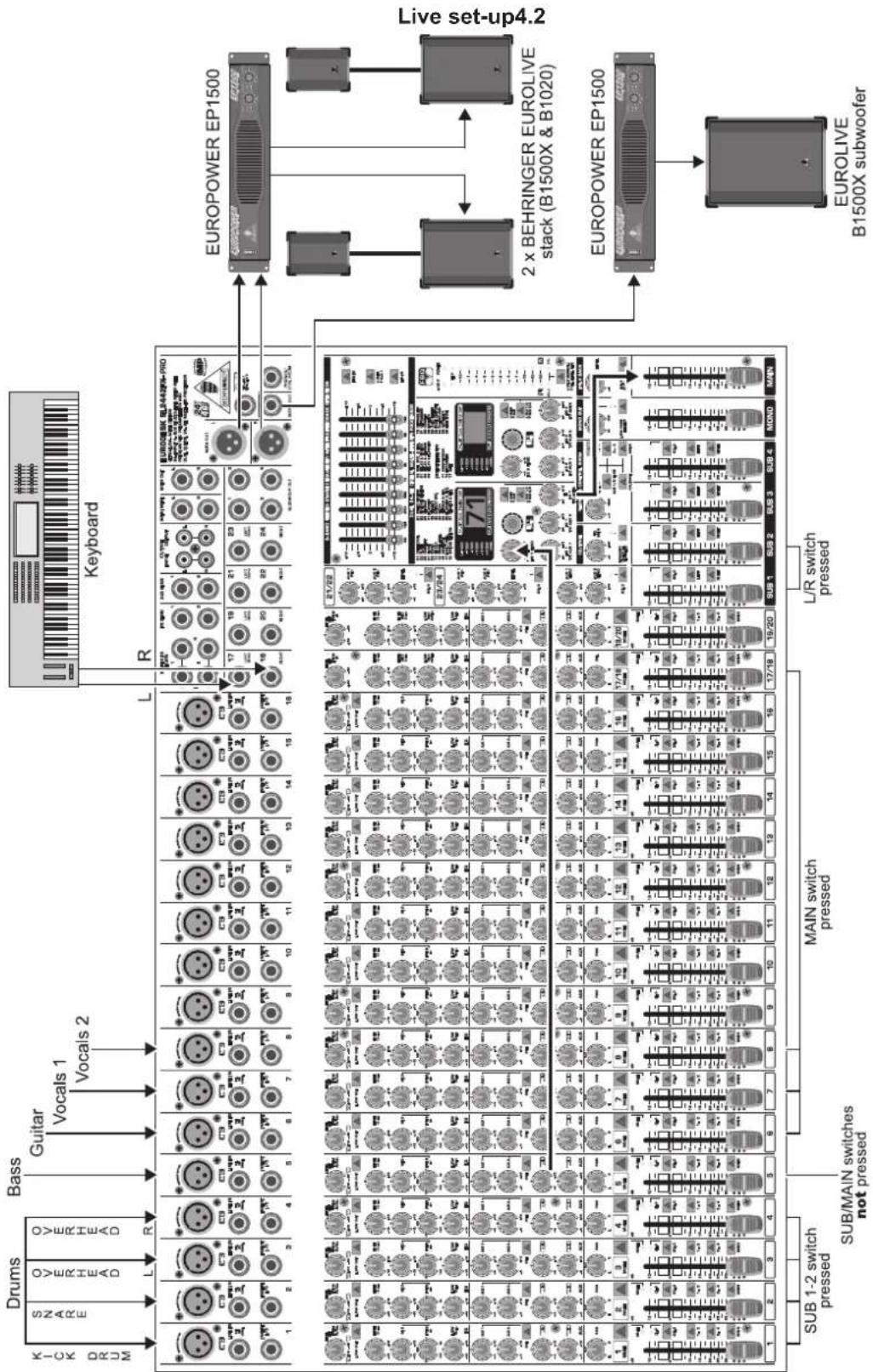
Wiring the console for live operationFig. 4.2:
This example shows a classic live set-up. As in the studio example, four drum microphones, bass, keyboard (stereo channel), guitar and two vocal microphones are connected. The four drum channels (kick drum, snare, overhead L, overhead R) are mixed down to two subgroups and then routed to the main mix. This way, it is possible to conveniently control the volume of the entire drums in the main mix with the two subgroup faders. The built-in compressor insert effect is used for the bass. The corresponding input channel is separate from all buses and the bass signal is routed directly from the internal effects processor to the main mix bus. The MAIN/SUB switch must not be pressed in this case and the position of the SUB 1/2 SUB 3/4 switch is irrelevant.

Audio connectors5.
The inputs and outputs of the BEHRINGER EURODESK are designed as unbalanced 1/4" TS connectors—except for the balanced line inputs of the mono and stereo channels and the main out connectors. Of course, all inputs and outputs work with both balanced and unbalanced connectors. The tape ins and outs are stereo RCA connectors.
Please ensure that only qualified personnel install and operate the EURODESK. During installation and operation, the user must have sufficient electrical contact to earth. Electrostatic charges might affect the operation of the unit.
1/4" TS footswitch connector
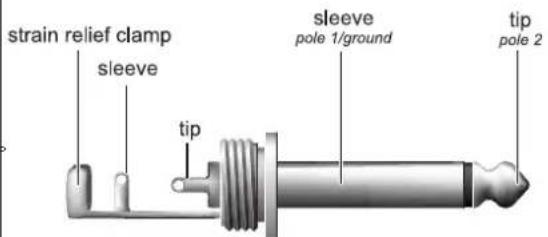
The footswitch connects both poles momentarily
14 " TS footswitch connectorFig. 5.5:
Unbalanced 1/4" TS connector
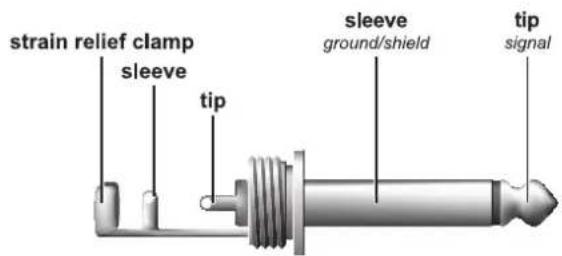
14 " TS connectorFig. 5.1:
1/4" TRS headphones connector
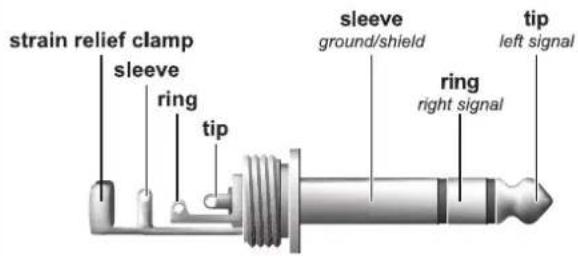
14 " TRS connector for headphonesFig. 5.6:
Balanced 1/4" TRS connector
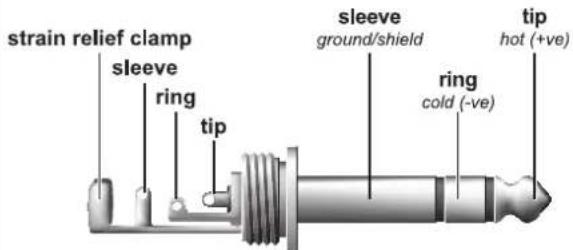
For connection of balanced and unbalanced plugs, ring and sleeve have to be bridged at the stereo plug.
14 " TRS connectorFig. 5.2:
Insert send return 1/4" TRS connector
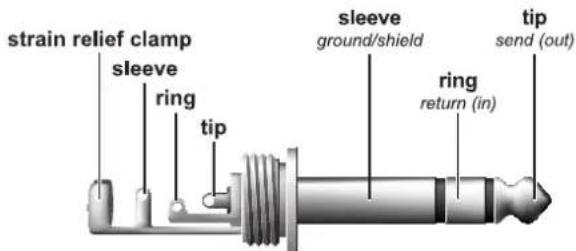
Connect the insert send with the input and the insert return with the output of the effects device.
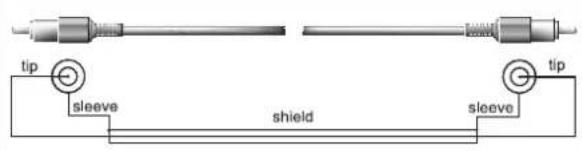
RCA cableFig. 5.3:
Insert send and return 14 " TRS connectorFig. 5.7:
Balanced use with XLR connectors
input
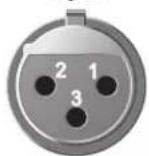
1 = ground/shield
2 = hot (+ve)
3 = cold (-ve)
output
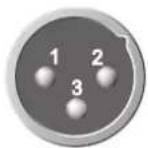
For unbalanced use, pin 1 and pin 3 have to be bridged
XLR connectorsFig. 5.4:
Presets6.
| Effect Description Application examples | ||
| PARALLEL EFFECTS | ||
| Cathedral Very dense and long reverberation of a large cathedral. Solo instruments / vocals in slow pieces. | ||
| Plate Simulates the sound of early plate reverberators. A classic for drums (snare) and vocals. | ||
| Concert Simulates a small theater or large concert hall. Creates an "atmosphere" (e.g. radioplay voices). | ||
| Stage Very dense reverb, especially for live applications. Dissipates the sound of keyboard pads, for example. | ||
| Room You can clearly hear the walls of the room. Reverb effect that isn't directly noticeable. | ||
| Studio | Adds spaciousness to the sound; signals sound natural, not "flat". | Gives a sound source more "class" in the mix. |
| Small Hall | Simulates a small, lively (strongly reflecting) hall. | Perfect for processing drums. |
| Ambience | Reproduces a middle-sized room without late reflections. | Extremely versatile effect. |
| Early Reflections | Very dense reverb with pronounced early reflections. | Drums, percussion, slap bass |
| Spring Reverb | Simulates a classic spring reverberation. | Extremely versatile effect. |
| Gated Reverb | Reverb that is synthetically cut off | Produces a very "crisp" snare sound. |
| Reverse Reverb | Reverb with reversed envelope, i.e. it slowly gets louder. | Produces a very spaced out vocal sound. |
| Chorus | Slight detuning of the original signal. | Extremely versatile effect (guitar, vocals, bass, keyboards etc.). |
| Flanger | A slightly delayed signal is added to the original signal, producing phase shifting of the signals. | Extremely versatile effect (guitar, vocals, bass, keyboards etc.). |
| Phaser | Another phase-shift effect. | Extremely versatile effect (guitar, vocals, bass, keyboards etc.). |
| Rotary Speaker | Simulation of a classic effect for electronic organ. | Organ / keyboards. |
| Delay | Delay of the input signal with several repetitions. | Extremely versatile effect. |
| Chorus & Reverb | Combination of chorus and reverb. | A classic effect for vocals. |
| Flanger & Reverb | Flanger combined with a reverb effect. | All-purpose effect. |
| Phaser & Reverb | Phaser combined with a reverb effect. | All-purpose effect. |
| Rotary Speaker & Reverb | Rotary Speaker effect combined with reverb. | Organ/keyboards/electric guitar. |
| Delay & Reverb | Delay combined with reverb. | The most common combination for vocals, solo guitar, etc. |
| Delay & Chorus | Widens the signals and produces interesting repetition effects. | Makes vocals stand out in the mix. Good intelligibility is preserved. |
| Delay & Flanger | Similar to Delay & Chorus, but with audible up/downward modulation. | Ideal for creating a slightly spaced out sound. |
| INSERT EFFECTS | ||
| Compressor | Soft or loud passages are raised or lowered in level respectively. | Single signals, especially from microphones. |
| Expander | No dynamics limitation (see Compressor), but quite the opposite: interference (noise, hum, etc.) is reduced in level. | Single signals, especially from microphones. |
| Gate | A gate opens for a specific period of time to make a specific signal pass, and then closes abruptly. | "Controls" feedback-prone microphones / eliminates interference. |
| Ultramizer | Extremely efficient compression through automatic adaptation of compression parameters. | Gives mix signals a constant output level. |
| Ultrabass | Combines sub-harmonics processor, bass exciter and limiter. | Gives keyboard sounds some special "class" / sound effect for electric basses. |
| Panner | The signal "wanders" between the sides of the stereo basis. | Special effect, e.g. for radioplay soundtracking. |
| Exciter | Adds synthetic harmonics to the signal, resulting in increased presence and "loudness". | Both mix and single signals. Improves intelligibility of vocal signals. |
| Auto Filter | Level-dependent boost of a specific frequency band, similar to auto-wah effect for electric guitars. | DJ-ing / sound effects for live events / electric guitar or bass. |
| Tube Distortion | Simulates the tube distortion of classic guitar amplifiers. | Electric guitar / vocals / keyboards. |
| Guitar Amp | Guitar amp simulation. | Electric guitar or bass. |
| Vinylizer | Adds the clicks and noise of old vinyl records. | DJ-ing / sound effects for live events. |
| Test Tone | 1-kHz test tone. | Makes P.A. level setting easier. |

Specifications7.
Mono inputs
Microphone inputs (IMP "Invisible" Mic Preamp)
Type XLR connector, electronically balanced,
discrete input circuit
Mic E.I.N. ^1 (20 Hz - 20 kHz)
@ 0 Ω source resistance -134 dB / 135.7 dB A-weighted
@ 50 Ω source resistance -131 dB / 134 dB A-weighted
@ 150 Ω source resistance -129 dB / 130.5 dB A-weighted
Frequency response
<10 Hz - 160 kHz -1 dB
<10 Hz - 200 kHz -3 dB
Gain range +10 dB to +60 dB
Max. input level +12 dBu @ +10 dB GAIN
Impedance approx. 2.6 kΩ balanced
Signal-to-noise ratio 110 dB / 112 dB A-weighted (0 dBu In @
+22 dB GAIN)
Distortion (THD+N) 0.004 % / 0.003 % A-weighted
Line input
Type 14 " TRS jack, electronically balanced
Impedance approx. 20 kΩ balanced, approx. 10 kΩ
unbalanced
Gain range -10 dB to +40 dB
Max. input level +22 dBu @ 0 dB GAIN
Fade-out attenuation ^2 (Crosstalk attenuation)
Main fader closed 90 dB
Channel muted 84 dB
Channel fader muted 85 dB
Frequency response (Mic In → Main Out)
<10 Hz - 70 kHz +0 dB / -1 dB
<10 Hz - 130 kHz +0 dB / -3 dB
Stereo inputs
| Type | 2 x 1⁄4" TRS jack, balanced |
| Impedance | approx. 20 kΩ balanced, 10 kΩ unbalanced |
| Gain range | -20 dB to +20 dB |
| Max. input level | +22 dBu @ 0 dB GAIN |
CD/Tape in
Type RCA connector
Impedance approx. 10 kΩ
Max. input level +22 dBu
Equalizer
EQ mono channels
LOW 80 Hz / ±15 dB
MID 100 Hz - 8 kHz / ±15 dB
HIGH 12 kHz / ±15 dB
LOW CUT 80 Hz, 18 dB/oct.
EQ stereo channels
LOW 80 Hz / ±15 dB
LOW MID 400 Hz / ±15 dB
HIGH MID 3 kHz / ±15 dB
HIGH 12 kHz / ±15 dB
Channel inserts
Type 14 " TRS jack, unbalanced
Max. input level +22 dBu
AUX/FX Send
Type 14 " mono jack, unbalanced
Impedance approx. 120 Ω
Max. output level +22 dBu
FX Returns
Type 14 " mono jack, unbalanced
Impedance approx. 10 kΩ
Max. input level +22 dBu
Subgroup outputs
Type 14 " mono jack, unbalanced
Impedance approx. 120 Ω
Max. output level +22 dBu
Main outputs (XLR)
| Type | XLR connector, electronically balanced |
| Impedance | approx. 240 Ω balanced, 120 Ω unbalanced |
| Max. output level | +28 dBu |
Main outputs (1/4")
| Type | 14 " TRS jack, electronically balanced |
| Impedance | approx. 240 Ω balanced, 120 Ω unbalanced |
| Max. output level | +28 dBu |
Main Inserts
Type 14 " TRS jack, unbalanced
Max. input level +22 dBu
Mono output
Type 14 " mono jack, unbalanced
Impedance approx. 120 Ω
Max. output level +22 dBu
Low pass variable30 Hz to 200 Hz, 18 dB/oct.
Phones/CTRL room output
| Type | 14 " TRS jack, unbalanced |
| Max. output level | +19 dBu / 150 Ω (+25 dBm) |
CD/Tape Out
Type RCA connector
Impedance approx. 1 kΩ
Max. output level +22 dBu
DSP
Type Texas Instruments
Converter 24-bit delta-sigma, 64/128-times
oversampling
Sampling rate 46 kHz
Main mix system data ^3 (Noise)
Main mix @ -∞, channel fader @ -∞ -100 dB / -102.5 dB
A-weighted
Main mix @ 0 dB, channel fader @ -∞ -82 dB / -85 dB A-weighted
Main mix @ 0 dB, channel fader @ 0 dB -72 dB / -75 dB A-weighted
Power supply
Power consumption 50 W
Fuse (100 - 240 V\~, 50/60 Hz) T 2.0 AH 250 V
Mains connector Standard IEC receptacle
Physical/weight
SL3242FX-PRO
Dimensions (H x W x D) 3.9" x 35.3" x 16.1" (100 mm x 896 mm x 410 mm)
Weight (net) 25.4 lbs (11.5 kg)
SL2442FX-PRO
Dimensions (H x W x D) 3.9" x 26.9" x 16.1" (100 mm x 682 mm x 410 mm)
Weight (net) 18.8 lbs (8.5 kg)
^1 Equivalent Input Noise
^2 Measuring conditions: 1 kHz rel. to 0 dBu; 20 Hz - 20 kHz; line input; main output; unity gain.
^3 20 Hz - 20 kHz; measured at main output. Channels 1 - 4 unity gain; EQ flat; all channels on main mix; channels 1/3 as far left as possible; channels 2/4 as far right as possible; reference = +6 dBu.
BEHRINGER is constantly striving to maintain the highest professional standards. As a result of these efforts, modifications may be made from time to time to existing products without prior notice. Specifications and appearance may differ from those listed or illustrated.

Warranty 8.
Other warranty rights and national law § 1
- This warranty does not exclude or limit the buyer's statutory rights provided by national law, in particular, any such rights against the seller that arise from a legally effective purchase contract.
- The warranty regulations mentioned herein are applicable unless they constitute an infringement of national warranty law.
Online registration § 2
Please do remember to register your new BEHRINGER equipment right after your purchase by visiting http://www.behringer.com and kindly read the terms and conditions of our warranty carefully. Registering your purchase and equipment with us helps us process your repair claims quicker and more efficiently.
Thank you for your cooperation!
Warranty § 3
- BEHRINGER (BEHRINGER International GmbH including all BEHRINGER subsidiaries, except BEHRINGER Japan) warrants the mechanical and electronic components of this product to be free of defects in material and workmanship for a period of one (1) year* from the original date of purchase, in accordance with the warranty regulations described below. If the product shows any defects within the specified warranty period that are not excluded from this warranty as described under § 5, BEHRINGER shall, at its discretion, either replace the product by providing a new or reconditioned product or repair the product using suitable new or reconditioned parts. In the case that other parts are used which constitute an improvement, BEHRINGER may, at its discretion, charge the customer for the additional cost of these parts. In case BEHRINGER decides to replace the product, this warranty shall apply to the replacement product for the remaining initial warranty period, i.e one year* from the date of purchase of the initial product.
- If the warranty claim proves to be justified, the product will returned to the user freight prepaid.
- Warranty claims other than those indicated above are expressly excluded.
Return authorization number § 4
- To obtain warranty service, the buyer (or his authorized dealer) must call BEHRINGER during normal business hours BEFORE returning the product. All inquiries must be accompanied by a description of the problem. The buyer or his authorized dealer will receive a return authorization number.
- Subsequently, the product must be returned in its original shipping carton, together with the return authorization number. The return shipment address will be indicated by BEHRINGER.
- Shipments without freight prepaid will not be accepted.
Warranty regulations§ 5
-
Warranty services will be furnished only if the product is accompanied by a copy of the original retail dealer's invoice. Any product deemed eligible for repair or replacement under the terms of this warranty will be repaired or replaced.
-
If the product needs to be modified or adapted in order to comply with applicable technical or safety standards on a national or local level, in any country which is not the country for which the product was originally developed and manufactured, this modification/adaptation shall not be considered a defect in materials or workmanship. The warranty does not cover any such modification/adaptation, irrespective of whether it was carried out properly or not. Under the terms of this warranty, BEHRINGER shall not be held responsible for any cost resulting from such a modification/adaptation.
- Free inspections and maintenance/repair work are expressly excluded from this warranty, in particular, if caused by improper handling of the product by the user. This also applies to defects caused by normal wear and tear, in particular, of faders, crossfaders, potentiometers, keys/buttons, tubes, guitar strings, illuminants and similar parts.
- Damage/defects caused by the following conditions are not covered by this warranty:
improper handling, neglect or failure to operate the unit in compliance with the instructions given in BEHRINGER user or service manuals.
▲ connection or operation of the unit in any way that does not comply with the technical or safety regulations applicable in the country where the product is used.
damage/defects caused by force majeure or any other condition that is beyond the control of BEHRINGER.
- Any repair or opening of the unit carried out by unauthorized personnel (user included) will void the warranty.
- If an inspection of the product by BEHRINGER shows that the defect in question is not covered by the warranty,
- Products which do not meet the terms of this warranty will be repaired exclusively at the buyer's expense. BEHRINGER will inform the buyer of any such circumstance. If the buyer fails to submit a written repair order within 6 weeks after notification, BEHRINGER will return the unit. Costs for freight and packing will be invoiced separately C.O.D. When the buyer has sent in a written repair order such costs will also be invoiced separately.
§ 6 Warranty transferability
This warranty is extended exclusively to the original buyer (customer of retail dealer) and is not transferable to anyone who may subsequently purchase this product. No other person (retail dealer, etc.) shall be entitled to give any warranty promise on behalf of BEHRINGER.
§ 7 Claim for damages
Failure of BEHRINGER to provide proper warranty service shall not entitle the buyer to claim (consequential) damages. In no event shall the liability of BEHRINGER exceed the invoiced value of the product. * Customers in the European Union please contact BEHRINGER Germany Support for further details.
Technical specifications and appearance are subject to change without notice. The information contained herein is correct at the time of printing. All trademarks (except BEHRINGER, the BEHRINGER logo, JUST LISTEN and ULTRABASS) mentioned belong to their respective owners, and such use neither constitutes a claim of the trademarks by BEHRINGER nor affiliation of the trademark owners with BEHRINGER. BEHRINGER accepts no liability for any loss which may be suffered by any person who relies either wholly or in part upon any description, photograph or statement contained herein. Colors and specifications may vary slightly from product. Our Products are sold through authorized dealers only. Distributors and dealers are not agents of BEHRINGER and have absolutely no authority to bind BEHRINGER by any express or implied undertaking or representation. This manual is copyrighted. No part of this manual may be reproduced or transmitted in any form or by any means, electronic or mechanical, including photocopying and recording of any kind, for any purpose, without the express written permission of BEHRINGER International GmbH.
ALL RIGHTS RESERVED. © 2007 BEHRINGER International GmbH, Hanns-Martin-Schleyer-Str. 36-38, 47877 Willich-Muenchheide II, Germany. Tel. +49 2154 9206 0, Fax +49 2154 9206 4903

- Important Safety Instructions
- Caution
- Foreword
- Table of contents
- Introduction1.
- FBQ Feedback Detection System
- IMP "Invisible" Mic Preamp
- Before you get started1.1
- Shipment1.1.1
- Initial operation
- Important notes concerning installation
- Online Registration
- The manual
- Control elements and connections2.
- Equalizer
- Aux/FX send buses
- Stereo channel aux/FX send buses
- Stereo channel fader and othercontrol elements2,2.4
- Stereo channels 21 - 24 (SL2442FX-PRO) 2.3 or 29 - 32 (SL3242FX-PRO)
- Mono out section for subwoofer 2.5 applications
- Talkback2.6.1
- FIRST-CLASS PRESETS
- PARALLEL FX
- INSERT FX (channel is muted)
- Wiring examples4.
- Studio set-up4.1
- Audio connectors5.
- Balanced use with XLR connectors
- Specifications7.
- Mono inputs
- Microphone inputs (IMP "Invisible" Mic Preamp)
- Mic E.I.N. 1 (20 Hz - 20 kHz)
- Frequency response
- Line input
- Fade-out attenuation 2 (Crosstalk attenuation)
- Frequency response (Mic In → Main Out)
- Stereo inputs
- CD/Tape in
- Equalizer
- EQ mono channels
- EQ stereo channels
- Channel inserts
- AUX/FX Send
- FX Returns
- Subgroup outputs
- Main outputs (XLR)
- Main outputs (1/4")
- Main Inserts
- Mono output
- Phones/CTRL room output
- CD/Tape Out
- DSP
- Main mix system data 3 (Noise)
- Power supply
- Physical/weight
- SL3242FX-PRO
- SL2442FX-PRO
- Warranty 8.
- Other warranty rights and national law § 1
- Online registration § 2
- Warranty § 3
- Return authorization number § 4
- Warranty regulations§ 5
- § 6 Warranty transferability
- § 7 Claim for damages
Brand : BEHRINGER
Model : Eurodesk SX3242FX-PRO
Category : Mixer