
GFR305SD - Memory card reader IOGEAR - Free user manual and instructions
Find the device manual for free GFR305SD IOGEAR in PDF.


| Product Type | Memory Card Reader |
| Brand | IOGEAR |
| Model | GFR305SD |
| Interface | USB 3.0 (backward compatible with USB 2.0) |
| Supported Card Formats | SD/SDHC/SDXC/MMC, MicroSD/SDHC/SDXC (adapter required for MMC Micro, RS-MMC, MiniSD) |
| Indicator Light | Blinking: data transfer; Steady: storage device connected |
| Plug and Play | Yes, no driver required |
| Compatible Operating Systems | Windows Vista, 7, 8, 8.1; Mac OS X |
| Power | Via USB port (bus-powered) |
| Warranty | 3-year limited |
| Certifications | FCC Class B, CE |
| Package Contents | GFR305SD reader, quick start guide, warranty card |
| Dimensions (approx.) | 6.5 x 3.5 x 1.5 cm |
| Weight (approx.) | 20 g |
| Care and Cleaning | Clean with a soft, dry cloth. Avoid any liquids. |
| Safety | Do not expose to moisture. Do not insert damaged cards. Disconnect before cleaning. |
| Spare Parts and Repairability | No user-serviceable parts. Contact technical support if issues arise. |
Frequently Asked Questions - GFR305SD IOGEAR
User questions about GFR305SD IOGEAR
0 question about this device. Answer the ones you know or ask your own.
Ask a new question about this device
Download the instructions for your Memory card reader in PDF format for free! Find your manual GFR305SD - IOGEAR and take your electronic device back in hand. On this page are published all the documents necessary for the use of your device. GFR305SD by IOGEAR.
USER MANUAL GFR305SD IOGEAR
SDXC/MicroSDXC Card Reader / Writer
Compact USB 3.0
- USB connector
- SD/SDHC/SDXC/MMC/*MMC Micro/*RS MMC/*MiniSD
- MicroSD/SDHC/SDXC
-
LED
-
Blinking light indicates data transfer
• Solid light indicates storage
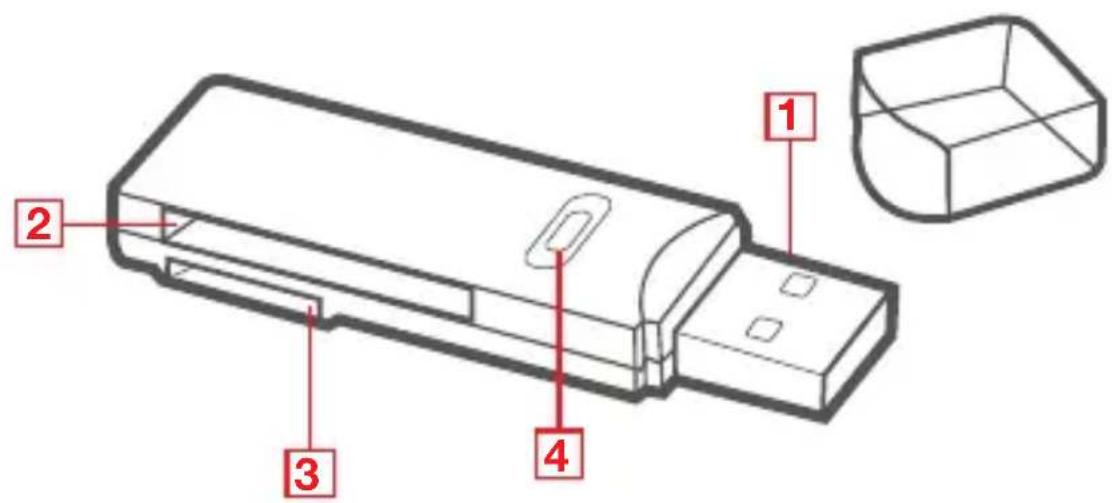
*card adapter needed
Hardware Installation
The GFR305SD is a plug-n-play device. No driver or software needed.
Compliance Information
FCC Statement
This equipment has been tested and found to comply with the limits for a Class B digital device, pursuant to Part 15 of the FCC Rules. These limits are designed to provide reasonable protection against harmful interference in a residential setting. This product generates, uses, and can radiate radio frequency energy and, if not installed and used as directed, it may cause harmful interference to radio communications. Although this product complies with the limits for a Class B digital device, there is no guarantee that interference will not occur in a particular installation.
CE Compliance
This device has been tested and found to comply with the following European Union directives:
Electromagnetic Capability (2004/108/EC), Low Voltage (2006/95/EC) and R&TTED (1999/5/EC).
Limited Warranty
WE'RE HERE TO HELP YOU!
NEED ASSISTANCE SETTING UP THIS PRODUCT?
Make sure you:
- Visit www.iogear.com for more product information
- Visit www.iogear.com/support for live help and product support
Warranty Information
This product carries a 3 Year Limited Warranty. For the terms and conditions of this warranty, please go to http://www.iogear.com/support/warranty
Register online at http://www.iogear.com/register
Important Product Information
Product Model ____
Serial Number ____
Contact
iogear.custhelp.com
support@iogear.com
www.iogear.com
19641 Da Vinci, Foothill Ranch, CA 92610
http://www.iogear.com/support/warranty
http://www.iogear.com/register
http://www.iogear.com/support/warranty
http://www.iogear.com/register
Brand : IOGEAR
Model : GFR305SD
Category : Memory card reader