A38FD - Tripod Benro - Free user manual and instructions
Find the device manual for free A38FD Benro in PDF.


User questions about A38FD Benro
0 question about this device. Answer the ones you know or ask your own.
Ask a new question about this device
Download the instructions for your Tripod in PDF format for free! Find your manual A38FD - Benro and take your electronic device back in hand. On this page are published all the documents necessary for the use of your device. A38FD by Benro.
USER MANUAL A38FD Benro
Operating Instructions
Thank you for making Benro your choice for professional photographic equipment. Your Benro gear is manufactured to provide years of dependable service. In order to obtain optimum satisfaction and performance, we suggest that you carefully read these instructions.

natural_image
Technical line drawing of a vertical cylindrical device with attached sensor components (no text or symbols)BENRO®
75 Virginia Road
North White Plains, NY 10603
T 914.347.3300
F 914.347.3309
info@BenroUSA.com
BenroUSA.com
Specifications and design are subject
to change without notice.
text_image
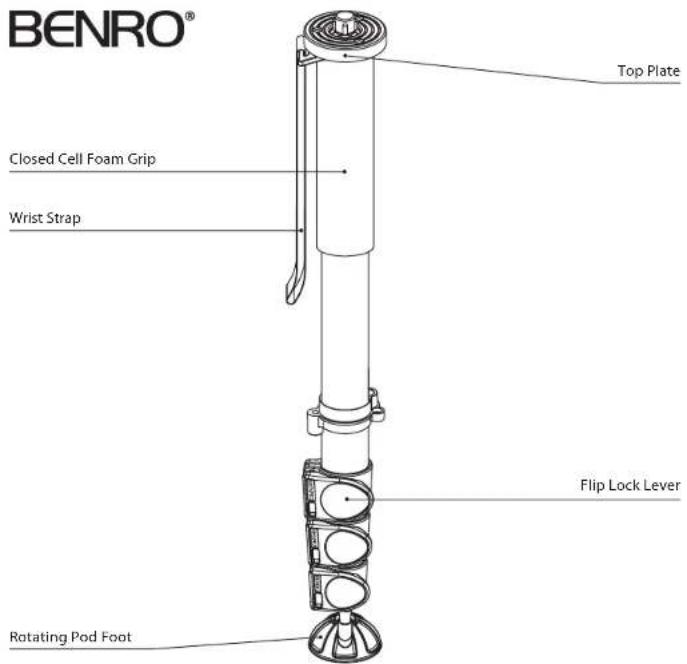
BENRO® Top Plate Closed Cell Foam Grip Wrist Strap Flip Lock Lever Rotating Pod Foot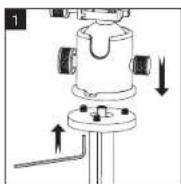
text_image
3 Unsolid link 4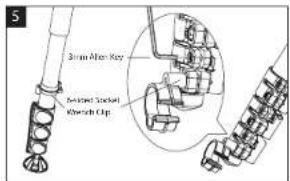
text_image
Start After Key Closed Screwed Switch ClipSETUP
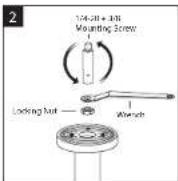
Head Mounting (FIGURES 1 & 2)
If your Monopod did not come with a Head, select one of the fine Benro Ballheads or Tilthead that match your size Monopod and install by screwing the Head clockwise onto the 3/8" Mounting Thread of the Top Plate. Once it is hand tight, secure by fully tightening the Head Locking Screw(s) (on select models) from below.
Most Heads have a 3/8" Base Mount so your Benro Monopod is shipped with the 3/8 Mounting Thread exposed, but if the Head you choose uses a 1/4-20 you can attach it by simply reversing the Mounting Screw. To do this turn the Locking Nut counterclockwise (using the supplied Wrench) until it becomes loose, and unscrew the Mounting Screw until it can be completely removed. Reverse the Screw, so that the threads are in position and screw it back into place, secure with the Locking Nut using the wrench.
NOTE: Allow enough of the screw threads to be available for maximum security when the Head is mounted onto the Monopod. It's recommended that at least 5 to 6 threads be exposed before locking the Mounting Screw in place.
OPERATION
Before using your Monopod, adjust each Leg Section to the desired height.
Make sure that the Monopod is firmly resting on a stable surface and mount your camera securely on the Monopod Head. Always engage any safety locks on the Monopod Head to prevent any accidental dismounting.
FOR BEST RESULTS: Do not raise the Monopod higher than necessary and extend the largest diameter Leg Sections first.
NOTE: Never carry your Monopod with camera gear attached.
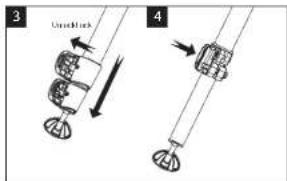
Leg Section Adjustment (FIGURES 3 & 4)
Each Leg Section can be adjusted to the desired length by opening the Flip Lock Lever so the Leg is free to slide in or out. Once the desired length is achieved, snap the Flip Lock Lever closed so that the leg section is securely locked. Repeat this step for each Leg Section until the Monopod is set to the desired height.
NOTE: To prevent any accidental damage to your gear, always remove any mounted equipment (camera, etc.) from the Monopod before adjusting the Leg Sections.
User Adjustments (FIGURE 5)
Flip Lock Lever tension is adjusted using the 3mm Allen Key plus the special Six-sided Socket Wrench built into the plastic clip which comes attached to the monopod leg.
USER NOTICE
- Do not exceed the maximum specified load capacity (see specifications at www.BenroUSA.com).
• Always ensure that Leg and Head Locks are tightly engaged before mounting any gear on your Monopod. - Always clean and dry any Monopod after it has been exposed to wet, dusty, sandy or salty conditions. Your Monopod is not recommended for use in salt water. If required, clean Monopod using a mild soap solution applied with a soft cloth, rinse with fresh water and dry with soft towel. Remove any dust, dirt or sand from all Leg Locks, Leg Sections and all moving parts.
- Do not leave any Monopod in the sun for prolonged periods and avoid high temperature exposure.
- Avoid leaving any Monopod or Tripod unattended in areas where people could trip over the equipment and get hurt.
- Remove camera, lens, and all gear from the Monopod when transporting.
- For your safety, don't let your Benro gear come in contact with any electrical power source.