Strobe - Lighting Lume Cube - Free user manual and instructions
Find the device manual for free Strobe Lume Cube in PDF.


User questions about Strobe Lume Cube
0 question about this device. Answer the ones you know or ask your own.
Ask a new question about this device
Download the instructions for your Lighting in PDF format for free! Find your manual Strobe - Lume Cube and take your electronic device back in hand. On this page are published all the documents necessary for the use of your device. Strobe by Lume Cube.
USER MANUAL Strobe Lume Cube
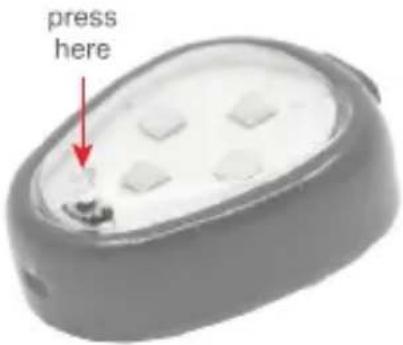
Pressing for 1 second will give you a 2-FLASH confirmation that your strobe is working and has battery. If there is no flash, this means your Strobe needs to be charged.
1) HIGH STROBE MODE
TURN ON: Press down for 3 seconds
TURN OFF: Press down for 3 seconds
2) LOW STROBE MODE
TURN ON: Press down for 3 seconds (activating High Strobe) then press once more for 1 second (activating Low Strobe)
TURN OFF: Press down for 3 seconds
text_image
press here3 CONTINUOUS MODE (ALWAYS ON)
TURN ON: Press down for 3 seconds (activating High Strobe) then press once more for 1 second (activating Low Strobe) then press a second time for 1 second (activating Continuous Mode).
TURN OFF: Press down for 3 seconds
GETTING STARTED
1) ATTACH 3M ^™ VELCRO
Included is your 3M™ Dual Lock™ velcro to mount your STROBE to your drone. Any side can be mounted to your STROBE.
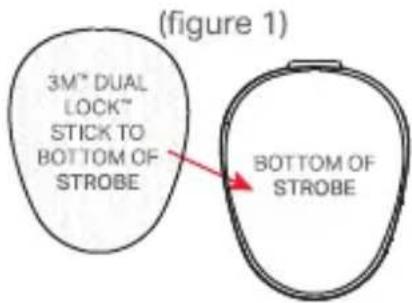
- Peel off the 3M™ protective film and stick your Velcro to your STROBE (figure 1).
- Peel off the 3M ^™ protective film from the other side (figure 2) and stick that anywhere on your drone that you'd like your STROBE to be placed.
*NOTE: Be sure to place where the propellers will not hit the Anti-Collision STROBE.
text_image
(figure 1) 3M" DUAL LOCK" STICK TO BOTTOM OF STROBE BOTTOM OF STROBE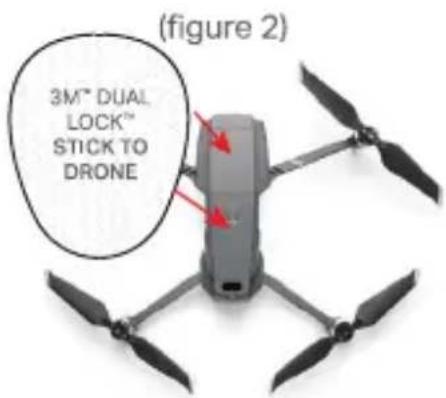
text_image
(figure 2) 3M™ DUAL LOCK™ STICK TO DRONE2 CHARGING
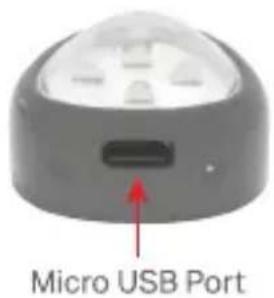
- Micro USB charging port
• Approximate Charge Time +/- 60 minutes - When plugged in STROBE will flash while charging
• Flashing will stop when fully charged
text_image
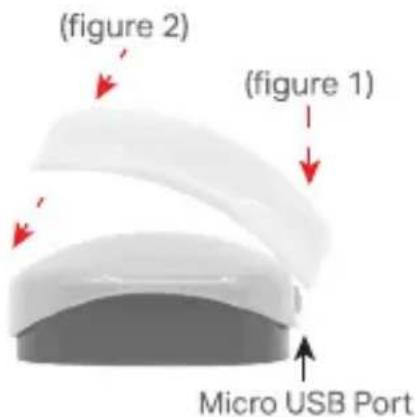
Micro USB Port3) COLOR CAP MOUNTING
Locate the micro USB port on your STROBE. Now, on the back end of the color cap, locate the cutout. Place the cutout over the micro USB port (figure 1) and bring the front end of the cap down over the STROBE until it snaps into place (figure 2).
text_image
(figure 2) (figure 1) Micro USB PortSUPPORT & ACCESSORIES
Email customer service with any product-related issues or questions: support@lumecube.com. If you'd like to explore accessories for your STROBE or other drone-related products, visit: LUMECUBE.COM/DRONE