
Lightning to USB Camera Adapter - Cables and Computer Accessories APPLE - Free user manual and instructions
Find the device manual for free Lightning to USB Camera Adapter APPLE in PDF.


| Product Type | Lightning to USB Camera Adapter |
| Brand | Apple |
| Model | Lightning to USB Camera Adapter |
| Connector Type | Lightning (male) to USB-A (female) |
| Dimensions | Approximately 1.2 x 0.6 x 0.4 inches (30 x 15 x 10 mm) |
| Weight | Approximately 0.2 oz (6 g) |
| Power Source | Powered by connected iOS device (no external power required) |
| Compatible Devices | iPhone (iOS 9.2+), iPad (iOS 9+), iPod touch with Lightning port |
| Supported Cameras | USB cameras with PTP or mass storage class support |
| Key Function | Import photos and videos from digital cameras, iOS devices to iPad/iPhone |
| Data Transfer Speed | USB 2.0 (up to 480 Mbps) |
| System Requirements | iOS 9.2 or later (iPhone), iPadOS (iPad); iTunes or Photos app |
| Materials | White plastic casing with Lightning and USB connectors |
| Certifications | FCC, IC, CE, VCCI, KC, BSMI |
| Warranty | Apple One Year Limited Warranty |
| Environmental Compliance | RoHS, WEEE, Apple environmental standards |
| Operating Temperature | 32°F to 95°F (0°C to 35°C) |
| Storage Temperature | -4°F to 113°F (-20°C to 45°C) |
| What's in the Box | Lightning to USB Camera Adapter, documentation |
Frequently Asked Questions - Lightning to USB Camera Adapter APPLE
User questions about Lightning to USB Camera Adapter APPLE
0 question about this device. Answer the ones you know or ask your own.
Ask a new question about this device
Download the instructions for your Cables and Computer Accessories in PDF format for free! Find your manual Lightning to USB Camera Adapter - APPLE and take your electronic device back in hand. On this page are published all the documents necessary for the use of your device. Lightning to USB Camera Adapter by APPLE.
USER MANUAL Lightning to USB Camera Adapter APPLE
Lightning to USB Camera Adapter
Use the Lightning to USB Camera Adapter to import photos and video from a USB camera or supported iOS device (iPhone, iPad, or iPod touch) to iPad or iPhone. (Importing to iPhone requires iOS 9.2 or later.)
To import photos from a camera or iOS device:
1. Turn on iPad or iPhone and attach the Lightning to USB Camera Adapter to the Lightning port. 2. Turn on your camera or iOS device and connect it to the Lightning to USB Camera Adapter using the USB cable that came with your camera or device.
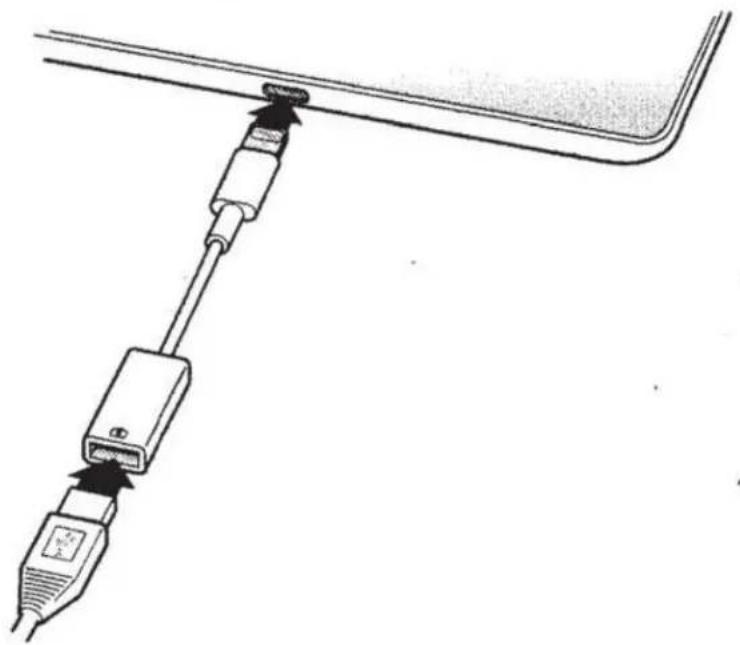
3. On iPad or iPhone, select the photos and videos that you want to import. See the iPad User Guide or iPhone User Guide for details.
Compatibility
The Lightning to USB Camera Adapter is compatible with USB cameras that support Picture Transfer Protocol (PTP) or mass storage class devices.
Tips and Troubleshooting
If your camera didn't come with a USB cable, you need to purchase one. See the camera manufacturer's website to find compatible cables.
If photos aren't transferring, be sure your camera is turned on and set to the correct mode for transferring photos (see the instructions provided with your camera). Also be sure the cable is connected firmly to your camera and to the Lightning to USB Camera Adapter. Completely unplug the connector, USB cable, and camera, then reconnect them and try again.
Regulatory Compliance Information
FCC Compliance Statement
This device complies with part 15 of the FCC rules. Operation is subject to the following two conditions: (1) This device may not cause harmful interference, and (2) this device must accept any interference received, including interference that may cause undesired operation.
Note: This equipment has been tested and found to comply with the limits for a Class B digital device, pursuant to part 15 of the FCC Rules. These limits are designed to provide reasonable protection against harmful interference in a residential installation. This equipment generates, uses, and can radiate radio frequency energy and, if not installed and used in accordance with the instructions, may cause harmful interference to radio communications. However, there is no guarantee that interference will not occur in a particular installation.
If this equipment does cause harmful interference to radio or television reception, which can be determined by turning the equipment off and on, the user is encouraged to try to correct the interference by one or more of the following measures:
• Reorient or relocate the receiving antenna. • Increase the separation between the equipment and receiver. • Connect the equipment to an outlet on a circuit different from that to which the receiver is connected. • Consult the dealer or an experienced radio/TV technician for help.
If necessary, consult an Apple Authorized Service Provider or Apple. See the service and support information that came with your Apple product. Or, consult an experienced radio/television technician for additional suggestions.
Important: Changes or modifications to this product not authorized by Apple could void the electromagnetic compatibility (EMC) and wireless compliance and negate your authority to operate the product. This product has demonstrated EMC compliance under conditions that included the use of compliant peripheral devices and shielded cables between system components. It is important that you use compliant peripheral devices and shielded cables between system components to reduce the possibility of causing interference to radios, televisions, and other electronic devices. This product was tested for EMC compliance under conditions that included the use of Apple peripheral devices.
Responsible party (contact for FCC matters only):
Apple Inc. Corporate Compliance
1 Infinite Loop, MS 91-1 EMC
Cupertino, CA 95014
Canadian Compliance Statement
This device complies with Industry Canada license-exempt RSS standard(s). Operation is subject to the following two conditions: (1) this device may not cause interference, and (2) this device must accept any interference, including interference that may cause undesired operation of the device.
Industry Canada Statement
Complies with CAN ICES-3 (B)/NMB-3(B).
Europe—EU Declaration of Conformity
Complies with the European EMC Directive.
Apple's EU representative is Apple Distribution International, Hollyhill Industrial Estate, Cork, Ireland.
Japan VCCI Class B Statement
Korea Warning Statement
Class B Equipment (Home Use Broadcasting & Communication Equipment)
Taiwan Class B Statement
Warning Statement for Class B Equipment
NIL
Apple and the Environment
At Apple, we recognize our responsibility to minimize the environmental impacts of our operations and products.
For more information, go to www.apple.com/environment.
Disposal and Recycling Information

The symbol indicates that this product and/or battery should not be disposed of with household waste. When you decide to dispose of this product and/or its battery, do so in accordance with local environmental laws and guidelines. For information about Apple's recycling program, recycling collection points, restricted substances and other environmental initiatives, visit www.apple.com/environment.
European Union—Disposal Information

The symbol above means that according to local laws and regulations your product and/or its battery shall be disposed of separately from household waste. When this product reaches its end of life, take it to a collection point designated by local authorities. The separate collection and recycling of your product and/or its battery at the time of disposal will help conserve natural resources and ensure that it is recycled in a manner that protects human health and the environment.
Lightning to USB Camera Adapter
Warranty Summary
The full terms of Apple's One Year Limited Warranty and detailed information on obtaining service are available at www.apple.com/legal/warranty and www.apple.com/support.

- LIGHTNING TO USB CAMERA ADAPTER
- TO IMPORT PHOTOS FROM A CAMERA OR IOS DEVICE
- COMPATIBILITY
- TIPS AND TROUBLESHOOTING
- REGULATORY COMPLIANCE INFORMATION
- FCC COMPLIANCE STATEMENT
- CANADIAN COMPLIANCE STATEMENT
- INDUSTRY CANADA STATEMENT
- EUROPE—EU DECLARATION OF CONFORMITY
- JAPAN VCCI CLASS B STATEMENT
- KOREA WARNING STATEMENT
- CLASS B EQUIPMENT (HOME USE BROADCASTING & COMMUNICATION EQUIPMENT)
- TAIWAN CLASS B STATEMENT
- WARNING STATEMENT FOR CLASS B EQUIPMENT
- APPLE AND THE ENVIRONMENT
- DISPOSAL AND RECYCLING INFORMATION
- EUROPEAN UNION—DISPOSAL INFORMATION
- WARRANTY SUMMARY
Brand : APPLE
Model : Lightning to USB Camera Adapter
Category : Cables and Computer Accessories