
LEDP260C - Light GODOX - Free user manual and instructions
Find the device manual for free LEDP260C GODOX in PDF.


| Product Type | LED Video Light Panel |
| Model | LEDP260C |
| Brand | Godox |
| Number of LEDs | 260 |
| Color Temperature Range | 3200K-5600K |
| Brightness Adjustment | 10%-100% dimmable |
| CRI (Color Rendering Index) | >95 |
| Dimensions (L x W x H) | 30 x 20 x 3 cm |
| Weight | 1.2 kg |
| Power Supply | AC 100-240V, 50/60Hz via adapter; optional battery (NP-F series) |
| Power Consumption | 45W |
| Control Methods | On-board buttons, remote control (optional) |
| Mounting | Cold shoe mount, 1/4"-20 thread for stand |
| Main Functions | Adjustable color temperature, brightness, sound activation mode (optional) |
| Care and Cleaning | Wipe with dry cloth; avoid moisture and solvents |
| Safety | Do not disassemble; use only recommended voltage; avoid overheating |
| Spare Parts and Repairability | Contact Godox service center; some parts (LED board, power supply) replaceable |
| General Information | For photography and video; includes diffusion filter |
Frequently Asked Questions - LEDP260C GODOX
User questions about LEDP260C GODOX
0 question about this device. Answer the ones you know or ask your own.
Ask a new question about this device
Download the instructions for your Light in PDF format for free! Find your manual LEDP260C - GODOX and take your electronic device back in hand. On this page are published all the documents necessary for the use of your device. LEDP260C by GODOX.
USER MANUAL LEDP260C GODOX
GODOX Photo Equipment Co., Ltd.
Add: Building 2, Yaochuan Industrial Zone, Tangwei Community, Fuhai Street, Bao'an District,
Shenzhen, China Tel: +86-755-29609320(8062) Fax: +86-755-25723423 E-mail: godox@godox.com
godox.com
Made in China

CE RoHS

Godox
LED摄影灯
LED VIDEO LIGHT
LEDP260©
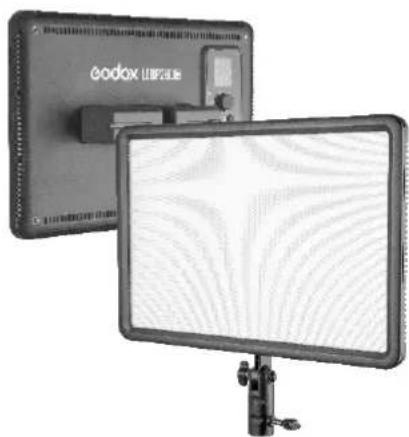
natural_image
Exterior view of a modern office building (no signage)使用手册
Instruction Manual
一、前言
感谢您购买神牛产品!
- 锂电池供电:
natural_image
Close-up of a computer monitor with a cable inserted, showing a small electronic component (no visible text or symbols)- 直流电源供电:
natural_image
Close-up of a device component with an arrow pointing to a mechanical assembly (no visible text or symbols)2、灯架使用(见图)
natural_image
Close-up of a mounted electronic device with a stand and cable (no visible text or symbols)六、操作说明
1、开始使用摄影灯(见图)
Thank you for purchasing this Godox Product!
This LEDP260C video light (color temperature 3300K\~5600K) is excellent for
macrophotography, product shooting, photojournalistic and video recording, etc.
The LED Light provides high brightness, a wide spectrum, soft light and accurate color temperature.
Features:
• 256-LED-bulbs panel is lithium-ion or DC powered
- Wireless 433MHz grouping system (6 groups & 16 channels)
- Wirelessly adjust brightness or color temperature
- Include a remote control, a detachable handle and AC adapter
• Large-sized LCD panel. Settings auto saved
• Fits almost any occasions
For your safety
Do not place in high temperature or high humidity conditions.
If this product overheats, it will cease operation and resume working after cooling down. This is due to the built-in overtemperature protection.
Do not handle with wet hands, immerse in water, or expose to rain.
⚠️ Observe precautions when handling batteries:
- Do not mix new and used batteries or batteries of different types.
- Do not put batteries into a fire or apply direct heat to it.
- Batteries are prone to leakage when fully discharged. To avoid damage to the product, be sure to remove batteries out when the product will not be used for a long time or when batteries run out of charge.
- Should liquid from batteries come into contact with skin or clothing, rinse immediately with fresh water.
Parts
- Body
256 LED Beads
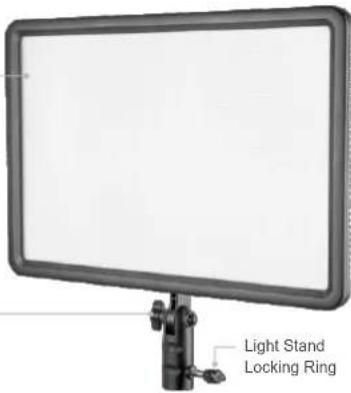
Video Light Angle Knob
LCD Panel
Battery Level Indicator Channel (16)
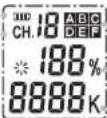
Controllable Group (6)
Light Brightness Color Temperature
Lithium Battery Compartment
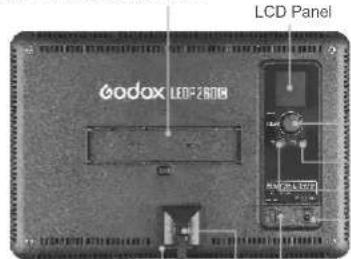
Detachable Handle Install Groove
Detachable Handle Button
et Dial + SET Button
STOP/RUN Button
CH/GR Button
Power Switch
DC Power Jack
Detachable Handle
What's in the Box of LEDP260C?
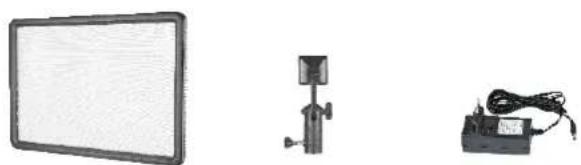
LED Video Light *1 AC Adapter *1 Detachable Handle*1
Power Management
- Power Supply
Two power supply modes are available:
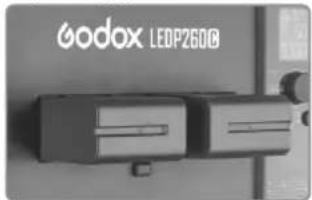
- Using lithium battery: Put two SONY NP-F970 model lithium batteries (purchased separately) into the battery compartment separately.
natural_image
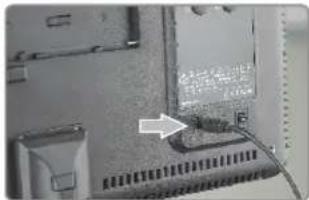
Close-up of a computer monitor with an attached drive and cable (no visible text or symbols)- Using DC power jack: This light can be powered by DC power supply. Use a 13\~16.8V adapter (included) to connect the light with the DC power jack.
Note:
- When using lithium battery, the Battery Level Indicator is displayed on the LCD panel. When the indicator blinks, the lithium battery power is low. Please recharge it immediately before usage in order to avoid forceful auto off.
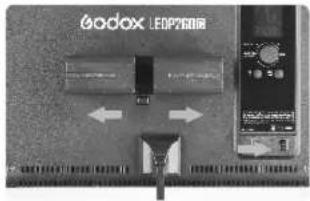
2、Installing Lithium Battery
- Turn the Power Switch off.
- Target the socket of the lithium battery towards the "+" "-" contacts of the Battery Compartment. Push the battery in until it locks.
• Power the light on. - After using the light, please power it off.
Using the Video Light
1、By the Handle
• Install the Detachable Handle into the Handle Install Groove.
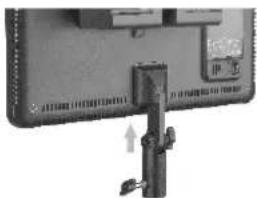
natural_image
Close-up of a black electronic device with a mounted cable and indicator lights (no visible text or symbols)2、On the Light Stand
- Screw the Light Stand Locking Ring to the highest point and install the video light. - Tighten the Light Stand Locking Ring.
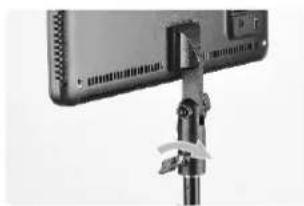
natural_image
Close-up of a smartphone mounted on a stand with a clip attached (no visible text or symbols)Operation
1、Before Usage
- Insert the lithium battery or connect the light with the DC power supply.
- Switch the power on, the video light giving out light.
- Press the STOP/RUN Button to light up and shut down the LED lights.
• LCD panel shows the information.
2、Light Brightness/Color Temperature Adjustment
Adjusting Light Brightness
• Tum the select dial to adjust the light brightness.
| Model | Temperature | Light Brightness Range |
| LEDP260C | 3300K~5600K ±300K | 10%~100% |
Adjusting Color Temperature
- Press the SET button once and the color temperature icon blinks.
- Turn the select dial to adjust color temperature.
| Model | Color temperature range |
| LEDP260C | 3300K~5600K |
3. Wireless Remote Control
- With 433 MHz wireless system, this product has remote grouping and control function. Up to 6 groups of LED light can be controlled. 16 channels are available with strong anti-interference capability.
LED Video Light
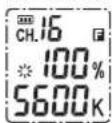
Please set the channels and groups of LED video light to the same as those of remote control before usage.
Adjusting Channel/Group of the LED Video Light
- Press the CH/GR button and the group icon blinks. Tum the select dial to choose a group ID (A to F).
- Press the CH/GR button twice and the channel icon blinks. Turn the select dial to choose a channel ID (1 to 16).
Note: The wireless signal can be received only when the LED light is power on.
Technical Data:
| LED Video Light | Changeable Version LEDP260C |
| Lithium Battery | 7.4V Lithium Battery (SONY NP-F970 model lithium battery) |
| DC Power Supply | 13-16.8V |
| Power | Max. 30W |
| Color Temperature | 3300K~5600K±300K |
| Channel | 16 |
| Group | 6 groups (A, B, C, D, E, F) |
| Brightness (LUX) | 2050 (0.5 m/4500K) |
| 2050 (0.5 m/3300K) | |
| 2200 (0.5 m/5600K) | |
| Color Rendering Index | >95 |
| TLCI | ≥94 |
| Light Brightness Range | 3300K~5600K: 10%~100% |
| LED Beads Quantity | 5600K: 128 |
| 3300K: 128 | |
| Operation Temperature | -10~40°C |
| Dimension | 360mm*240mm*27mm |
| Net Weight | 917g |
* Product design and specifications are subject to change without notice.
FCC Statement
This device complies with part 15 of the FCC Rules. Operation is subject to the following two conditions: (1) This device may not cause harmful interference, and (2) this device must accept any interference received, including interference that may cause undesired operation.
Note: This equipment has been tested and found to comply with the limits for a Class B digital device, pursuant to part 15 of the FCC Rules. These limits are designed to provide reasonable protection against harmful interference in a residential installation. This equipment generates uses and can radiate radio frequency energy and, if not installed and used in accordance with the instructions, may cause harmful interference to radio communications. However, there is no guarantee that interference will not occur in a particular installation. If this equipment does cause harmful interference to radio or television reception, which can be determined by turning the equipment off and on, the user is encouraged to try to correct the interference by one or more of the following measures:
- Reorient or relocate the receiving antenna.
- Increase the separation between the equipment and receiver.
- Connect the equipment into an outlet on a circuit different from that to which the receiver is connected.
- Consult the dealer or an experienced radio/TV technician for help.
产品保修
Dear customers, as this warranty card is an important certificate to apply for our maintenance service, please fill in the following form in coordination with the seller and safekeep it. Thank you!
| Product Information | Model | Product Code Number |
| Customer Information | Name | Contact Number |
| Address | ||
| Seller Information | Name | |
| Contact Number | ||
| Address | ||
| Date of Sale | ||
| Note: | ||
Note: This form shall be sealed by the seller.
Applicable Products
The document applies to the products listed on the Product Maintenance Information (see below for further information). Other products or accessories (e.g. promotional items, giveaways and additional accessories attached, etc.) are not included in this warranty scope.
Warranty Period
The warranty period of products and accessories is implemented according to the relevant Product MaintenanceInformation. The warranty period is calculated from the day(purchase date) when the product is bought for the first time, And the purchase date is considered as the date registered onthe warranty card when buying the product.
How to Get the Maintenance Service
If maintenance service is needed, you can directly contact the product distributor or authorized service institutions. You can also contact the Godox after-sale service call and we will offer you service. When applying for maintenance service, you should provide valid warranty card. If you cannot provide valid warranty card, we may offer you maintenance service once confirmed that the product or accessory is involved in the maintenance scope, but that shall not be considered as our obligation.
Inapplicable Cases
The guarantee and service offered by this document are not applicable in the following cases: ①. The product or accessory has expired its warranty period; ②. Breakage or damage caused by inappropriate usage, maintenance or preservation, such as improper packing, improper usage, improper plugging in/out external equipment, falling off or squeezing by external force, contacting or exposing to the improper temperature, solvent, acid, base, flooding and damp environments, etc; ③. Breakage or damage caused by non-authorized institution or staff in the process of installation, maintenance, alternation, addition and detachment; ④. The original identifying information of product or accessory is modified, alternated, or removed; ⑤. No valid warranty card; ⑥. Breakage or damage caused by using illegally authorized, nonstandard or non-public released software; ⑦. Breakage or damage caused by force majeure or accident; ⑧. Breakage or damage that could not be attributed to the product itself. Once met these situations above, you should seek solutions from the related responsible parties and Godox assumes no responsibility. The damage caused by parts, accessories and software that beyond the warranty period or scope is not included in our maintenance scope. The normal discoloration, abrasion and consumption are not the breakage within the maintenance scope.
Maintenance and Service Support Information
The warranty period and service types of products are implemented according to the following Product Maintenance Information:
| Product Type | Name | Maintenance Period(month) | Warranty Service Type |
| Parts | Circuit Board | 12 | Customer sends the product to designated site |
| Battery | 3 | Customer sends the product to designated site | |
| Electrical parts e.g.battery charger, power cord, sync cable, etc. | 12 | Customer sends the product to designated site | |
| Other Items | Flash tube, modeling lamp, lamp body, lamp cover, lockingdevice, package, etc. | No | Without warranty |
Godox After-sale Service Call 0755-29609320-8062


- 一、前言
- 六、操作说明
- Features:
- For your safety
- Parts
- What's in the Box of LEDP260C?
- Power Management
- Note:
- Using the Video Light
- Operation
- 1、Before Usage
- 2、Light Brightness/Color Temperature Adjustment
- Adjusting Light Brightness
- Adjusting Color Temperature
- Wireless Remote Control
- Adjusting Channel/Group of the LED Video Light
- FCC Statement
- 产品保修
- Applicable Products
- Warranty Period
- How to Get the Maintenance Service
- Inapplicable Cases
- Maintenance and Service Support Information
Brand : GODOX
Model : LEDP260C
Category : Light