
Talkabout T200 - Radio MOTOROLA - Free user manual and instructions
Find the device manual for free Talkabout T200 MOTOROLA in PDF.


| Product Type | Two-Way Radio (FRS/GMRS) |
| Brand | Motorola |
| Model | Talkabout T200 |
| Number of Channels | 22 (varies by country) |
| Interference Eliminator Codes | 121 codes (1–38 analog, 39–121 digital) |
| Call Tones | 20 |
| Power Source | 1 NiMH rechargeable battery pack OR 3 AA alkaline batteries |
| Charging Time (NiMH) | 12 hours for empty battery |
| Charging Port | Micro-USB |
| Belt Clip | Included, attachable |
| Keypad Lock | Yes |
| Scan Function | Yes, scan all channels |
| Monitor Function | Yes, press and hold for 3 seconds |
| Talk Confirmation Tone (Roger Beep) | Yes, user-selectable |
| PTT Timeout Timer | 60 seconds |
| Push-to-Talk (PTT) Button | Yes |
| Battery Meter | LCD icon shows charge level |
| Warranty | 1 year from date of purchase |
| Safety Compliance | FCC Part 15, Industry Canada, and international RF exposure standards |
| Operating Modes | Two-way mode only (no weather mode on T200) |
Frequently Asked Questions - Talkabout T200 MOTOROLA
User questions about Talkabout T200 MOTOROLA
0 question about this device. Answer the ones you know or ask your own.
Ask a new question about this device
Download the instructions for your Radio in PDF format for free! Find your manual Talkabout T200 - MOTOROLA and take your electronic device back in hand. On this page are published all the documents necessary for the use of your device. Talkabout T200 by MOTOROLA.
USER MANUAL Talkabout T200 MOTOROLA
MOTOROLA, MOTO, MOTOROLA SOLUTIONS and the Stylized M logo are trademarks or registered trademarks of Motorola Trademark Holdings, LLC and are used under license. All other trademarks are the property of their respective owners. © 2016 Motorola Solutions, Inc. All rights reserved.
Safety and General Information
RF Exposure and Product Safety Instructions for Portable Two-Way Radios General Populated and Uncontrolled Environments.
ATTENTION:
Before using this radio, refer to the important operating instructions for safe usage and RF energy awareness and control for compliance with applicable Standards and Regulations.
Compliance with RF Exposure Standards
Your Motorola Two-Way radio complies with the following RF
energy exposure standard and guidelines: • United States Federal Communications
• United States Federal Communications Commission; Code of Federal Regulations; 47 CFR et seq. & FCC. • Institute of Electrical and Electronic Engineers (IE EE) C95.1
• International Commission on Non-Ionizing Radiation
• Ministry of Health (Canada) Safety Code 6 & Industry Canada RSS-102
• Australian Communications Authority
Radiocommunications Standard et seq. • ANATEL ANNEX to Resolution No. 303 of July 2, 2002. • ANATEL ANNEX to Resolution No. 533 of September 10, 2009.
Transmit and Receive Procedure
Your two-way radio contains a transmitter and a receiver. To control your exposure and ensure compliance with the general population/uncontrolled environment exposure limits, always adhere to the following procedure:
• Transmit no more than 50% of the time.
- To receive calls, release the PTT button. - To transmit (talk), press the Push-to-Talk (PTT) button in front of the face.
- Hold the radio in a vertical position with the microphone (and other parts of the radio including the antenna) at least one inch (2.5 centimeters) away from the nose or lips. Keeping the radio at a proper distance is important to ensure compliance.
Note: RF exposure decreases with increasing distance from the antenna.
• Body Worn Operation. When worn on the body, always place the radio in a Motorola-approved clip, holder, holster, case or body harness for this product.
Please refer to the following websites for more information on what RF energy exposure is and how to control your exposure to assure compliance with established RF exposure limits: - http://www.fcc.gov/oet/rfsafety/rf-faqs.html - www.who.int/en/
- http://responsibility.motorolasolutions.com/index.php/
Two-way Radio Operation
- Use only Motorola-approved supplied or replacement antennas, batteries, and audio accessories. Use of non-Motorola-approved antennas, batteries, and wired or wireless accessories may exceed the applicable RF exposure guidelines (iEEE, ICNIRP or FCC).
- For a list of Motorola-approved accessories for your radio model, visit the following website: http://www.motorolasolutions.com/TalkaboutAccessories
Electromagnetic Interference/Compatibility
Nearly every electronic device is susceptible to electromagnetic interference (EMI) if inadequately shielded, designed or otherwise configured for electromagnetic compatibility.
This device complies with part 15 of the FCC Rules. Operation
Is subject to the following two conditions: 1. This device may not cause harmful interference, and 2. This device must accept any interference received, including interference that may cause undesired
operation.
This device complies with Industry Canada licence-exempt RSS standard(s). Operation is subject to the following two conditions: 1. This device may not cause interference, and
- This device must accept any interference received, including interference that may cause undesired operation of the device.
Facilities
To avoid electromagnetic interference and/or compatibility conflicts, turn off your radio in any facility where posted notices instruct you to do so. Hospitals or health care facilities may be using equipment that is sensitive to external RF energy. Aircraft
When instructed to do so, turn off your radio when onboard an aircraft. Any use of a radio must be in accordance with applicable regulations per airline crew instructions.
Medical Devices – Pacemakers, Defibrillators or other Implanted Medical Devices
Persons with pacemakers, Implantable cardioverter-defibrillators (ICDs) or other active implantable medical devices (AIMD) must:
- Consult with their physicians regarding the potential risk of interference from radio frequency transmitters, such as portable radios (poorly shielded medical devices may be more susceptible to interference).
- Turn the radio OFF immediately if there is any reason to suggest that interference is taking place.
- Do not carry the radio in a chest pocket or near the implantation site, and carry or use the radio on the opposite side of their body from the implantable device to minimize the potential for interference.
Hearing Aids
Some digital wireless radios may interfere with some hearing aids. In the event of such interference, you may want to consult your hearing aid manufacturer to discuss alternatives.
Other Medical Devices
If you use any other personal medical device, consult the manufacturer of your device to determine if it is adequately shielded from RF energy. Your physician may be able to assist you in obtaining this information.
Use of Communication Devices While Driving
Always check the laws and regulations on the use of radios in the areas where you drive.
- Give full attention to driving and to the road
- Use hands-free operation, if available. - Pull off the road and park before making an answering
Call, if driving conditions or regulations so require.
For Vehicle With Air Bags
Refer to the vehicle manufacturer's manual prior to installation of electronic equipment to avoid interference with air bag wiring. Do not place a portable radio in the area over an air bag or in the air bag deployment area. Air bags inflate with great force. If a portable radio is placed in the air bag deployment area and the air bag inflates, the radio may be propelled with great force and cause serious injury to occupants of the vehicle.
Potentially Explosive Atmosphere
Turn off your radio prior to entering any area with a potentially explosive atmosphere. Only radio types that are especially qualified must be used in such areas as "Intrinsically Safe". Do not remove, install or charge batteries in such areas. Sparks in a potentially explosive atmosphere can cause an explosion or fire resulting in bodily injury or even death.
Note: The areas with potentially explosive atmosphere referred to above include fueling areas such as below decks on boats, fuel or chemical transfer or storage facilities, areas where the air contains chemicals or particles (such as grain, dust or metal powders) and any other area where you would normally be advised to turn off your vehicle engine. Areas with potentially explosive atmospheres are often – but not always posted.
Blasting Caps and Areas
To avoid possible interference with blasting operations, turn off your radio when you are near electrical blasting caps, in a blasting area, or in areas posted "Turn off two-way radios". Obey all signs and instructions.
Operational Cautions
Antennas
Do not use any portable radio that has a damaged antenna. If a damaged antenna comes into contact with your skin, a minor burn can result.
Batteries
All batteries can cause property damage and/or bodily injury such as burns if a conductive material touches exposed terminals. The conductive material may complete an electrical circuit (short circuit) and become hot.
• Exercise care when removing NiMH or AA batteries. Do not use sharp or conductive tools to remove these batteries.
• Exercise care in handling any charged battery, particularly when placing it inside a pocket, purse or other container with metal objects.
- Do not discard your battery in a fire.
- Do not replace the battery in any area labeled "Hazard Atmosphere". Any sparks created in a potentially explosive atmosphere can cause explosion or fire
• Do not disassemble, crush, puncture, shred or otherwise
• Do not dry a wet battery or damp battery with an appliance
or heat source, such as a hair dryer or microwave oven. - If the radio battery contact area has been submerged in
water, dry and clean the battery contacts before attaching the battery to the radio.
Battery Charger Safety Instructions.
Save these Instructions
-
Turn the radio off when charging the battery
-
Do not expose the charger to outside environment.
Chargers must only be used indoors.
- Do not operate or disassemble the charger. Do not use a charger that has been dropped or damaged in any way 4. Never alter the AC cord or plug provided with the unit. If
the plug will not fit the outlet, have the proper outlet installed by a qualified electrician. An improper condition can result in a risk of electric shock.
- To reduce the risk of damage to the cord or plug, pull the plug rather than the cord when disconnecting the charge
from the AC receptacle.
-
To reduce the risk of electric shock, unplug the charger from the outlet before attempting any maintenance or cleaning.
-
Use of an attachment not recommended or sold by
Motorola Solutions may result in a risk of fire, electric
shock or personal injury. 8. Make sure the cord is located so it will not be stepped on
3) Maine said the Zona is located as it will not be stopped tripped over or subjected to damage or stress.
- An extension cord must not be used unless absolutely necessary. Use of an improper extension cord could result in a risk of a fire and/or electric shock. If an extension cord must be used, make sure that;
- The pins on the plug of the extension cord are the same number, size and shape as those on the plug of the
number, charger
• The extension cord is properly wired and in good
• The extension cord size is 18 AWG for lengths up to 100
The extension of 16 feet is 10 AWG for lengths up to 150 feet, and 16 AWG for lengths up to 150 feet.
- The supply cord of the AC adaptor cannot be replaced. If
Licensing Information
USA
Use of GMRS frequencies is subject to the Rules and
Regulations of the Federal Communications Commission
(FCC).
The FCC requires that all operators using GMRS frequencies obtain a radio license before operating their equipment. To
obtain a radio license before operating their equipment, obtain the ECC forms, please visit the ECC website at
obtain the FCC forms, please visit the FCC website at wireless.fcc.gov/uls/index.htm?job=home to source form 605
and 159, which includes all the instructions you will need.
If you wish to have the document faxed or mailed, or if you have questions, please use the following context information:
question, please see and referring consensus information.
| For a tax:Contact the Fax-On-Demand system | For mail service:Call the FCC Forms Hotline | If you have questions about the FCC License:Call the FCC |
| 1-202-418-0177 1-8 | 00-418-FORM (3676) | 1-888-CALL-FCC(225-5322) |
(No text to output)
Canada
Use of Motorola radio in Canada is subject to the rules & regulations of Industry Canada (IC). IC requires no license who operated in Canada.
Changes or modifications not expressly approved by Motorola
Solutions may void the user authority granted by the IC/FCC to
operate this radio and must not be made. To comply with IC/
FCC requirements, transmitter adjustments must be made only by or under the supervision of a person certified as technically
by of under the supervision of a person certified as technically qualified to perform transmitter maintenance and repairs in the
private land mobile and fixed services as certified by an
organization representative of the user of those services.
Replacement of any transmitter component (crystal, semiconductors, etc) not authorized by the IC/ECC equipment
semiconductor, etc) Not authorized by the IC/ECC equ authorization for this radio could violate IC/ECC rules.
Authorization for this radio could violate 10:100 ratios. Note: Line of this radio outside the country where it was
Note: Use of this radio outside the country where it was intended to be distributed is subject to government
intended to be distributed to subject regulations and may be prohibited
Mexico
Use of GMRS frequencies is subject to the Rules and Regulations of the Federal Communications Institute (IFT) requires that all operators using GMRS frequencies obtain a permit before operating their equipment. To obtain a permit from the IFT, the user must proceed in accordance with Articles 14 and 15 of the Federal Telecommunications Law. Consult your local IFT office for more information: www.ift.org.mx
“
Use of GMRS frequencies is subject to the Rules and
Regulations of the Regulatory Unit Communications Services (URB50) URB50
(URSEC). URSEC requires that all operators using GMRS frequencies obtain a permit before operating their equipment.
The authorization shall depend on the channel availability at the
the authorization shall depend on the character establishing at the time the authorization is requested. To obtain a permit from
URSEC,
www.urs
D
The Republic of Panama does not require authorization to use
FRS/GMRS radio equipment frequencies
[Non-Text]
Chile
Servicio de Banda Local UHF frequency use is subject to SURTEL Resolution 4.864 and Resolution 52 Events. All
SUBTEL Resolution 1.261 and Resolution 52 Exenta. A license is required for use in Chile. To obtain a Banda Local and user
is required for use in Chile. To obtain a Banana Local end-user license:
- Fill out the required application form to request Local Band
service.
a. It is available on the SUBTEL website:
http://www.subtel.gob.cl/index.php?option=com_content&view
=article&id=1388&Itemid=2087 b. It is also available at the SURTEL offices:
b. It is also available at the SUBTEL offices Subsecretario de Telecomunicaciones
-
Present this form with your ID at the above location
-
Consult the SUBTEL offices for applicable fees
For more information, consult SUBTEL at www.su
their offices at the telephone number listed above.
2.1. Li
Operacion itinerante de baja potencia frequency use is subject to CRC Resolución 002190 de 2003. No license is required for use in Colombia. Consult CRC at www.crcom.gov.co for more information.
-
Peru
Colectivo Familiar frequency use is subject to MTC RVM 388-200-MTC/15.03 and FCC (FRS), Part 95B. No license is required for use in Peru. Consult MTC Peru at www.mtc.gob.pe for more information.
[Non-Text]
Argentina
Uso Familiar frequency use is subject to CNC Resolution SC
No. 2750196. No license is required for use in Argentina
Consult the AFTIC at http://www.aftic.gob.ar/ for more information.
Information
Brazil
The frequency general use is subject to the Annex to Resolution
506 Section XIV - Radio Communication Equipment General
Purpose. It is not required use license in Brazil. See the
ANATEL site for more information: http://www.anatel.g
Portal/exibirPortallInternet.do
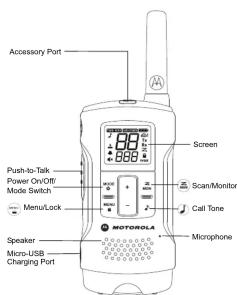
Control Buttons
Display Screen Guide
| TWO WAY | WEATHER | 7/7 | |
| Numbers for Channel | 80 | Tx | |
| 3 | Rx | ||
| 80 | Z | ||
| Numbers for Code | ▲ | 000 | 0 |
Numbers Call Tone
2.27
F
。
1
•
-
m = 311
(1) Name: (1) Name: (2) Name: (3) Name: (4) Name: (5) Name: (6) Name: (7) Name: (8) Name: (9) Name: (10) Name: (11) Name: (12) Name: (13) Name: (14) Name: (15) Name: (16) Name: (17) Name: (18) Name: (19) Name: (20) Name: (21) Name: (22) Name: (23) Name: (24) Name: (25) Name: (26) Name: (27) Name: (28) Name: (29) Name: (30) Name: (31) Name: (32) Name: (33) Name: (34) Name: (35) Name: (36) Name: (37) Name: (38) Name: (39) Name: (40) Name: (41) Name: (42) Name: (43) Name: (44) Name: (45) Name: (46) Name: (47) Name: (48) Name: (49) Name: (50) Name: (51) Name: (52) Name: (53) Name: (54) Name: (55) Name: (56) Name: (57) Name: (58) Name: (59) Name: (60) Name: (61) Name: (62) Name: (63) Name: (64) Name: (65) Name: (66) Name: (67) Name: (68) Name: (69) Name: (70) Name: (71) Name: (72) Name: (73) Name: (74) Name: (75) Name: (76) Name: (77) Name: (78) Name: (79) Name: (80) Name: (81) Name: (82) Name: (83) Name: (84) Name: (85) Name: (86) Name: (87) Name: (88) Name: (89) Name: (90) Name: (91) Name: (92) Name: (93) Name: (94) Name: (95) Name: (96) Name: (97) Name: (98) Name: (99) Name: (100)
m = 311
x = means 2 = 0.001
24
NOX - NOX/NOX
Battery Motor
Battery Meter
21 Weather Alert
GND! — Weather Alert
(1) 2017年1月1日
TxRx — Status (transn
receive)
Z - Scan
•
- Lock
-
Getting Started
Installing the Batteries
installing the Batteries
Discard the retailer tag (loose in one of the battery
compartments), before installing batteries.
Each radio can use either 1 NiMH rechargeable battery pack o
3 AA alkaline batteries and beeps when the batteries are low.
Installing the NiMU Rechargerable Battery Rack
Installing the NIMH Rechargeable Battery Pack
(Optional Accessory)
-
Take the bolt slip off
-
Take the belt clip off.
-
With the back of the radio facing you, lift the battery cover
-
With the back of the radio facing you, hit the battery cover latch up and remove the cover
-
Insert the NiMU battery pack by following the instruction
-
Insert the NIMH battery pack by following the instruction on the battery pack. (The ribbon must be underneath th
on the battery pack. (The hooft must be underneath the battery pack and must wrap around the right side of the
battery pack and must wrap around the right side of the pack (for easy removal).
(pack for easy removal).
- Close the battery cover firmly.
Installing the Three AA Alkaline Batteries
-
-
Take the belt clip off.
-
With the back of the radio facing you, lift the battery cover
latch up and remove the cover.
- Insert the three AA Alkaline batteries with + and - polarity
as shown inside. (The ribbon must be underneath the AA
alkaline batteries and must wrap around the right side of
the batteries
- Close the battery cover firmly.
Radio Battery Meter
Rad
The radio battery icon shows the battery charge level, from full
When to empty. When the radio has one segment left
to empty. When the radio has one segment left, the radio chips periodically or after releasing the RTT button.
the radio chirps periodically of after releasing the FTT button (Low Battery Alert)
(LOW Battery Alert).
Removing the NiMH Battery Pack
-
-
-
-
-
-
-
-
-
-
-
-
-
-
-
-
-
-
-
-
-
-
-
-
-
-
-
-
-
-
-
-
-
-
-
-
-
-
-
-
-
-
-
-
-
-
-
-
-
-
-
-
-
-
-
-
-
-
-
-
-
-
-
-
-
-
-
-
-
-
-
-
-
-
-
-
-
-
-
-
-
-
-
-
-
-
-
-
- 90.
-
-
-
-
-
-
-
-
-
-
-
-
-
-
-
-
-
-
-
-
-
-
-
-
-
-
-
-
-
-
-
-
-
-
-
-
-
-
-
-
-
-
-
-
-
-
-
-
-
-
-
-
-
-
-
-
-
-
-
-
-
-
-
-
-
-
-
-
-
-
-
-
-
-
-
-
-
-
-
-
-
-
-
-
-
-
-
-
Turn the radio off.
-
With the back of the radio facing you, lift the battery cover
latch up and remove the cover.
- Remove the NiMH battery pack by pulling the ribbon
attached to the radio.
- Close the battery cover
Removing the Three AA Alkaline Batteries
Removing the "
-
Turn the radio off.
-
With the back of the radio facing you, lift the battery cover
latch up and remove the cover.
- Gently remove each alkaline batter
attached to the radio.
- Close the battery cover firmly.
71.
Note:
• Exercise care when removing NiMH or AA batteries. Do
not use sharp or conductive tools to remove either o
these batteries
- Remove the batteries before storing your radio for
extended periods of time. Batteries corrode over time and
sitiorated periods of time. Batteries controls over time and may cause permanent damage to your radio.
May, cause permanent damage.
Battery Capacity Maintenance
-
Choose the NiMM batteries once as
-
Charge the NIMH batteries once e
in use.
-
Before placing the radio in storage, remove the battery.
-
Store the NIMH batteries in temperature between -20 °C to 25 °C.
35 °C and in low humidity. Avoid damp conditions and
corrosive materials.
Using the Micro-USB Charger
using the more 325 charger.
The micro-USB charger is a handy port that allows you to
conveniently charge your NiMH battery pack
-
Make sure your radio is turned OFF
-
Plug the micro-USB cable into the micro-USB charging
port on your radio. Connect the other end of the micro
USB charger to wall power outlet.
-
An empty battery will be fully charged in 12 hours.
-
The battery meter on LCD will move to indicate the battery
is charging.
Note:
- It is recommended to power OFF your radio while
charging. However, if power is turned on while charging,
you may not be able to transmit a message if the battery is
completely empty. Allow time for the battery to charge to 1
bar before attempting to transmit a message.
- When moving between hot and cold temperatures, do not
charge the NiMH battery pack until the battery
temperature acclimates (usually about 20 minutes).
- For optimal battery life, remove the radio from the charger
within 16 hours. Do not store the radio while connected to
the charger
Attaching and Removing the Bolt Clin
Attack
- Attach the belt clip to the back of the radio until the clip
clicks in place
- Attach the belt clip to pocket or belt strap until the clin
clicks in place
To Owners
TO REMOVE
- Push the release tab on top of the belt clip to release the
latch.
- Pull the belt clip away from the back of the radio.
Turning your Day
Turning your Radio On and Off
-
Press and hold on the button to turn your radio ON/
-
Press the PTT button to save the channel setting and exit menu or continue set up.
Selecting the Interference Eliminator Code
Interference Eliminator Codes help minimize interference by blocking transmissions from unknown sources. Your radio has 121 Interference Eliminator Codes. Codes 1 – 38 are standard analog codes that appear on other FRS/GMRS radios. Codes 39 – 121 are additional digital codes added for superior interference protection. 0 is the off position, no analog or digital codes are enabled.
To set the code for a channel:
-
Press two times until the code starts to flash.
-
Press or to select the code.
-
Press the RTT button to save the code setting and exit
-
Press the PTT button to save the code setting and exit menu or To continue set up
You can set a different code for ea
procedure. An extended press of or allows you to scroll through the Interference Code rapidly so you can quickly reach the code you want.
Note: On a radio that uses Interference Eliminator Codes, the
code must be set to 0 to communicate with radios that do not have Interference Eliminator Codes. Select 0 for "no
tone, no code" on the display of your radio
Setting and Transmitting Call Tones
Your radio can transmit different call tones to other radios in your group so you can alert them that you want to talk. Your radio has 20 call tones from which to choose.
To set a call tone:
- Press three times until appeals. The current call
tone setting will flash.
- Press or to change and hear the call tone
- Press the RTT button to set the new call tor
TOMY DE T. contigua sol up
nmit your call tone to other
channel and Interference Eliminator Code as your radio, press
2.
Note: Setting the call to OFF disables the call tone feature.
Hands-Free Use Without Accessories (i)vox
Note: iVOX feature is not available on model T20
You can use the iVpXure to transmit hands-free without
the need for any headset accessories. Once iVOMned or
the radio detects your voice and transmits when you speak into the internal microphone.
- Press four times until appeven on the display
The current setting will flash.
- Press + or to select Off or
L3
- Press the PTT button to set and exit menu or to
continue set up.
Hands-Free Use with Accessories (vox
Note: VOX feature is not available on model T200.
You can transmit hands-free more reliable with the use of
optional venset accessories. Once is tunneling, the radio detects your voice and transmits when you speak
Many accessories (sold separately) are available for your radio.
For more information, visit our website at www.motorolasolutions.com/TalkaboutAccessories or ca
customer service.
g the accessory into the accessory port. Press
- four times until appears on the display. The current setting will flash
current setting will hash.
2.
- Press the PTT button to set and exit menu or to
continue set up,
-
Lower the volume before placing the accessory on your head or in your ear.
-
To turn off, sivox remove accessory.
en accessory is connected, only accessory
microphone is functional. Pressing T-11 on radio will also allow user to transmit via accessory microphone.
Note: There is a short delay between the time you start talking
and when the radio transmits. There is a short delay
before the transmission is completed.
Setting the Sensitivity Level When in iwox vox
Mode
Adjusting the sensitivity level of the radio helps minimize the
possibility of unintended noises triggering a transmission and helps the radio pick up soft voices.
(1) 2017年1月1日
L3 = High Sensitivity for quiet environments L2 = Medium Sensitivity for most environments
L1 = Low Sensitivity for noisy environments
Keypad Tones
You may enable or disable the speaker key tones. You will hear
the key tone each time a button is pushed.
-
Press liveames (four times on model 1200) but appears. The current setting On/Off will flash
-
Press either or to turn On or Off.
-
Press the PTT button to confirm and exit menu or to
continue set up.
Note: When the key tone feature is off, the following are not
disabled:
- Transmit timeout alert tone - Call tone
- Low battery alert tone or
• The transmitted talk confirmation tone
Transmitting a Talk Confirmation Tone
You can set your radio to transmit a unique tone when you finish
transmitting. It is like saying "Roger" or "Over" to let others know you are finished talking.
- With the radio on press, six times (five
model T300) until the Appears. The current e
Off flashes.
-
Press or to turn-On or Off
-
Press the PTT button to set and exit menu.
Special Features
Keypad Lock
To avoid accidentally changing your radio settings:
。
- Press and hold until displays
-
When in lock made you can try
-
When in book mode, you can turn the radio on and off, adjust the volume, receive, transmit, send a call tone and
monitor channels. All other functions a
- To unlock the radio, press and hold until is not
longer displayed.
Scanning Channels
Use scan to search all channels for transmissions from
unknown parties, to find someone in your group who has accidentally changed channels or to quickly find unused.
channels for your ov
To start Scanning:
- Briefly press the key The scan will appear in th
display and the radio will begin to scroll through the
-
When the radio detects channel acti
-
When the table contains channel activity, matching the channel and code combination, it stops scrolling a
L1⊥2 of can hear the transmission
- To respond and talk to the person transmitting, press the PTT button within five seconds after the end of the
transmission.
- The radio will resume scrolling through the channels five seconds after the end of the received activity.
Second class of the site at any received facility.
- To stop scanning, briefly press the keys
Scanning Notes:
- If you press the PTT button while the radio is scrolling
through inactive channels, the transmission will be on the "theme charge". Scanning will assume five seconds after
Home channel: Scanning will resume five seconds after
the end of your transmission. You may press the key to stop scanning at any time.
- If the radio stops on an undesired transmission, you may
immediately resume the scan by briefly pressing or
(一).
©1, Liberadio repeatedly stops on an undesired
transmission, you may temporarily remove that channel from the novel list compressing and holding ② of
three seconds. You may remove more than one channel in
this way.
- To restore the removed channel(s) to the scan list, turn the
scanning mode by pressing
- You cannot remove the home channel from the scan list
Weather Receiver
Note: Weather feature is not available on model T200. Weather
feature is available on model 126U designed for use in USA and Canada.
M
Your Radio can tune in to broadcasts by the United States National Oceanic and Atmospheric Administration (NOAA)
Weather Radio and Environment Canada Weather Radio.
You can listen to a weather channel (see "Weather Channels and Frequencies" table for details) or set your radio to alert you
to emergency weather broadcasts that interrupt routine
broadcasts. When you listen to a weather channel, you cannot
Use your radio in scan mode of for two-way communications. Both NOAA and Environment Canada have transmitters located
throughout the United States and Canada, respectively. These
transmitters broadcast watches, forecasts and other information
24
Note: NOAA weather radio stations are assigned to cover
specific areas and service may be limited. Please check
with your local weather office for frequency and details of visit www.weather.com in the US to view the
appropriate transmitter for your area. The use of the
NOAA logo does not provide an endorsement or implied
endorsement by the National Weather Service of NOR per does the use of the Weatheradie logo provide on
endorsement or implied endorsement by Environment
Canada
Entering Weather Mode
- From two-way mode, press to enter weather mode
WEATHER
Setting the Weather Channel
Your radio receives weather frequencies:
- In weather mode, press one time until weather
channel number flashes.
-
Press or to select the appropriate channel with good retention in your area
-
Press the RTT button to set and exit menu or, to
continue set up weather alert
Setting the Weather Alert
Your radio can be set to respond to NOAA Weather Radio
emergency messages. A special alarm tone sounds an alert and
and emergency information.
-
In weather mode press twice until displays!
-
Press or 40 select On/Off.
-
Press the PTT button or to exit the weather menu set
up,
- Press to return to two-way mode. If you activate
Weather Alert and return to two-way mode (cmb) display
2.2p12y
Note: When the weather channel is activated, either manually or after receiving an clart, and no buttons are prepared for 5
minutes, the weather mode will automatically revert back
to two-way mode.
As with two-way radio reception, weather channel reception
depends on how close you are to a transmitter and whether you
are indicators of databases. Because weather channels are transmitted without codes, they may contain static or noise
Weather Alert will not function while actively transmitting o
receiving in two-way mode.
Weather Channels and Frequencies
Weather Channel Frequency Weather Channel Frequency
WX1 162.550 MHz WX7 162.525 MHz
WX2 162.400 MHz WX8 161.650 MHz
WX3 162.475 MHz WX9 161.775 MHz
WX4 162.425 MHz WX10 161.750 MHz
WX5 162.450 MHz WX11 162.000 MHz
WAS 102.000 MHz
Channels and Frequencies
(1) m = 311 ;
Channel Frequency Description Channel Frequency Description
1 4625625 MHz GMRS/FRS 12 467.6625 MHz FRS
2 462.5875 MHz GMRS/FRS 13 467.6875 MHz FRS
3 462 6125 MHz GMRS/FRS 14 467.7125 MHz FRS
4 462 6375 MHz GMRS/FRS 15 462.5500 MHz GMRS
5 462 6625 MHz GMRS/FRS 16 462.5750 MHz GMRS
6 462 6875 MHz GMRS/FRS 17 462.6000 MHz GMRS
1462.7125 MHz GMRS/FRS 18 462.6250 MHz GMRS
8 407.0020 MHz FR3 19 402.0000 MHz GMR3
3407.3075 MHz 1KJ 20402.07.30 MHz QWCS
10 401.0125 MHz FRO3 21 402.7605 MHz GRAU3
11 457.9875 MHz TTR 22 407.9875 MHz GRAU3
11.10.2023年4月2日 22.10.2023年4月2日
Argentin
| Channel | Frequency |
| 1 | 462.5625 MHz |
| 2 | 462.5875 MHz |
| 3 | 462.6125 MHz |
| 4 | 462.6375 MHz |
| 5 | 462.6625 MHz |
| 6 | 462.6875 MHz |
| 7 | 462.7125 MHz |
Brazil
| Channel | Frequency | Channel | Frequency |
| 1 462 | 5625 MHz | 14 467.5675 MHz | |
| 2 462 | 5750 MHz | 15 467.5750 MHz | |
| 3 462 | 5875 MHz | 16 467.5875 MHz | |
| 4 462 | 6000 MHz | 17 467.6000 MHz | |
| 5 462 | 6125 MHz | 18 467.6125 MHz | |
| 6 462 | 6250 MHz | 19 467.6250 MHz | |
| 7 462 | 6375 MHz | 20 467.6375 MHz | |
| 8 462 | 6500 MHz | 21 467.6500 MHz | |
| 9 462 | 6625 MHz | 22 467.6625 MHz | |
| 10 462 | 6750 MHz | 23 467.6750 MHz | |
| 11 462 | 6875 MHz | 24 467.6875 MHz | |
| 12 462 | 7000 MHz | 25 467.7000 MHz | |
| 13 462 | 7125 MHz | 26 467.7125 MHz |
Chile
| Channel | Frequency | Channel | Frequency |
| 1 462 | 5500 MHz 18 | 467.6000 MHz | |
| 2 462 | 5625 MHz 19 | 467.6250 MHz | |
| 3 462 | 5750 MHz 20 | 467.6500 MHz | |
| 4 462 | 5875 MHz 21 | 467.6750 MHz | |
| 5 462 | 6000 MHz 22 | 467.7000 MHz | |
| 6 462 | 6125 MHz 23 | 467.7250 MHz | |
| 7 462 | 6250 MHz 24 | 467.8125 MHz | |
| 8 462 | 6375 MHz 25 | 467.8250 MHz | |
| 9 462 | 6500 MHz 26 | 467.8375 MHz | |
| 10 462 | 6625 MHz 27 | 467.8500 MHz | |
| 11 462 | 6750 MHz 28 | 467.8625 MHz | |
| 12 462 | 6875 MHz 29 | 467.8750 MHz | |
| 13 462 | 7000 MHz 30 | 467.8875 MHz | |
| 14 462 | 7125 MHz 31 | 467.9000 MHz | |
| 15 462 | 7250 MHz 32 | 467.9150 MHz | |
| 16 462 | 7500 MHz 33 | 467.9250 MHz | |
| 17 462 | 7575 MHz |
Columbia
| Channel | Frequency | Channel | Frequency |
| 1 462 | 5625 MHz | 10 467.6125 MHz | |
| 2 462 | 5875 MHz | 11 467.6375 MHz | |
| 3 462 | 6125 MHz | 12 467.6625 MHz | |
| 4 462 | 6375 MHz | 13 467.6875 MHz | |
| 5 462 | 6625 MHz | 14 467.7125 MHz | |
| 6 462 | 6875 MHz | 15 467.7625 MHz | |
| 7 462 | 7125 MHz | 16 467.8125 MHz | |
| 8 467 | 5625 MHz | 17 467.8375 MHz | |
| 9 467 | 5875 MHz | 18 467.9125 MHz |
Peru
| Channel | Frequency | Channel | Frequency |
| 1 462 | 5625 MHz | 8 467.5625 MHz | |
| 2 462 | 5875 MHz | 9 467.5875 MHz | |
| 3 462 | 6125 MHz | 10 467.6125 MHz | |
| 4 462 | 6375 MHz | 11 467.6375 MHz | |
| 5 462 | 6625 MHz | 12 467.6625 MHz | |
| 6 462 | 6875 MHz | 13 467.6875 MHz | |
| 7 462 | 7125 MHz | 14 467.7125 MHz |
Patent and Copyright Information
MOTOROLA, MOTO, MOTOROLA SOLUTIONS and the Stylized M logo are trademarks or registered trademarks of Motorola Trademark Holdings, LLC and are used under license. All other trademarks are the property of their respective owners. © 2016 Motorola Solutions, Inc. All rights reserved.
Warranty
Consumer Two-Way Radio Products and Accessories purchased in the USA, Canada, Mexico, Uruguay, Panama, Brazil, Argentina, Chile, Peru, and Columbia.
What Does this Warranty Cover?
Subject to the exclusions contained below, Motorola Solutions, Inc. ("Motorola") warrants the Motorola branded consumer two-way radios that operate via Family Radio Service or General Mobile Radio Service ("Products"), the Motorola branded or certified accessories sold for use with these Products ("Accessories") to be free from defects in materials and workmanship under normal consumer usage for the period(s) outlined below. This limited warranty is the exclusive remedy of a consumer, and applies as follows to new Products and Accessories and purchased by consumers in the United States or Canada, which are accompanied by this written warranty:
Who is Covered?
This warranty extends only to the first consumer purchaser, and is not transferable.
What will MOTOROLA SOLUTIONS, INC. do?
Motorola Solutions, Inc., at its option, will at no charge repair, replace or refund the purchase price of any Products or Accessories that do not conform to this warranty. We may use functionally equivalent reconditioned/ refurbished/ pre-owned or new Products or Accessories.
What Other Limitations Are There?
Any Implied Warranties, Including Without Limitation The implied warranties of merchantability and fitness for a particular purpose, shall be limited to the duration of this limited warranty, otherwise the repair, replacement, or refund as provided under this express limited warranty is the exclusive remedy of the consumers, and is provided in lieu of all other warranties, express or implied. In no event shall Motorola Solutions be liable, whether in contract or tort (including negligence) for damages in excess of the purchase price of the product or accessory, or for any indirect, incidental, special or consequential damages of any kind, or loss of revenue or profits, loss of business, loss of information or other financial losses or arising from the ability or inability to use the products or accessories to the full extent these damages may be disclaimed by law.
Some states and jurisdictions do not allow the limitation or exclusion of incidental or consequential damages, or limitation on the length of an implied warranty, so the above limitations or exclusions may not apply to you. This warranty gives you specific legal rights, and you may also have other rights that vary from state to state or from one jurisdiction to another.
| Products Covered | Length Of Coverage |
| Products and Accessoriesas defined above, unless otherwise provided for below:Batteries whose fully charged capacity falls below 80% of their rated capacity and batteries that leak | One (1) year from the date of purchase by the first consumer purchaser of the product unless otherwise provided for below. |
| Products and Accessories that are repaired or replaced | The balance of the original warranty or for ninety (90) days from the date returned to the consumer, whichever is longer. |
Exclusions From Warranty Coverage
Normal Wear and Tear: Periodic maintenance, repair and replacement of Products or
Periodic maintenance, repair and replacement of Products or Accessories due to normal wear and tear
Abuse & Misuse: Defects or damage that result from: (a) improper operation, storage, misuse or abuse, accident or neglect, such as physical damage (cracks, scratches, etc.) to the surface of the Products and Accessories resulting from misuse; (b) contact with liquid, water, rain, extreme humidity or heavy perspiration, sand, dirt or the like, extreme heat, or food; (c) use of the Products or Accessories for commercial purposes or subjecting the Product or Accessory to abnormal usage or conditions; or (d) other acts which are not the fault of Motorola.
Use of Non-Motorola branded Products and Accessories: Defects or damage that result from the use of Non-Motorola branded or certified products, accessories, software or other peripheral equipment.
Unauthorized Service or Modification:
Defects or damages resulting from service, testing, adjustment, installation, maintenance, alteration, or modification in any way by someone other than Motorola or its authorized service centers.
Altered Products
Products or Accessories with (a) serial numbers or date tags that have been removed, altered or obliterated; (b) broken seals or that show evidence of tampering; (c) mismatched board serial numbers; or (d) nonconforming or non-Motorola branded housings, or parts.
Communication Services:
Defects, damages, or the failure of Products or Accessories due to any communication service or signal you may subscribe to or use with the Products or Accessories.
How to Obtain Warranty Service or Other
Information?
To obtain customer service or information:
USA and Canada
1-800-448-6686. www.materclassolutions.com/talksbouf
Email us at consumerradio@motorolasolutions.com
Latin America
Toll free:
Argentina 0800-333-3708 Brazil 0800-892-4264
Chile 123-0020-2126
Colombia 01-800-710-2285 Mexico 001 855 241 8353
Panama 001-800-205-3867
Peru 0800-55760 Uručetu: 508 - 24001716
Toll as long distance:
Spanish +001-312-725-5372
Portuguese +001.312.725.5373 English +004.242.725.5369
。
motorplasolutions.com/talkabout/pt (Portuguese
For Accessories:
Please call the telephone number designated above for the Product with which they are used.
You will receive instructions on how to ship the Products or
Accessories at your expense, to Motorola of a Motorola Authorized Repair Center. To obtain service, you must include:
(a) a copy of your receipt, bill of sale or other comparable proof
of purchase, (b) a written description of the problem, (c) the name of your service provider, if applicable; (d) the name and
location of the installation facility (if applicable) and, m
For more information, please visit us at

https://www.facebook.com/
Motorola TalkaboutWalkie Talkies
YouTube http://bit.ly/Talkabout

www.motorclasolutions.com/talkabout
[Non-Text]

www.motorolasolutions.com/talkabout/pt
(Poruguese)

www.motorlasolutions.com/talkabout/es
(Spanish)

- Safety and General Information
- Licensing Information
- Getting Started
- Selecting the Interference Eliminator Code
- Setting and Transmitting Call Tones
- Hands-Free Use with Accessories (vox
- Setting the Sensitivity Level When in iwox vox
- Mode
- Keypad Tones
- Transmitting a Talk Confirmation Tone
- Special Features
- Keypad Lock
- longer displayed.
- Scanning Channels
- Scanning Notes:
- Weather Receiver
- Entering Weather Mode
- WEATHER
- Setting the Weather Channel
- Setting the Weather Alert
- m = 311 ;
- Patent and Copyright Information
- Warranty
- What Does this Warranty Cover?
- Who is Covered?
- What will MOTOROLA SOLUTIONS, INC. do?
- What Other Limitations Are There?
- Unauthorized Service or Modification:
- Altered Products
- Communication Services:
- How to Obtain Warranty Service or Other
- USA and Canada
- For Accessories:
Brand : MOTOROLA
Model : Talkabout T200
Category : Radio