
CA014A-6246U - Car radio AKAI - Free user manual and instructions
Find the device manual for free CA014A-6246U AKAI in PDF.


| Product Type | Car Stereo with Radio, MP3, AUX |
| Power Source | 12V DC (10.8-15.1V), Negative Ground |
| Speaker Impedance | 4-8 Ω |
| Max Output Power | 7W x 4 |
| Rated Output Power | 5W x 4 |
| FM Frequency Range | 87.5 MHz - 108 MHz |
| FM Sensitivity | ≤ 26 dB |
| MP3 Sensitivity | ≥ 35 dB |
| MP3 Frequency Response | 100 Hz - 10 kHz (±6 dB) |
| Harmonic Distortion | ≤ 5% (1 kHz) |
| Channel Separation | ≥ 35 dB |
| Stereophonic Channel Balance | ≤ 3 dB |
| Supported Media | USB, SD card |
| Audio Sources | Radio (FM), MP3, AUX IN |
| Radio Features | Auto search & memory, preset stations (6), band switching |
| MP3 Playback Features | Play/Pause, Previous/Next, Fast Rewind/Fast Forward, Repeat, Random, Folder Navigation |
| Clock Display | Yes, with time setting |
| Equalizer (EQ) | Preset EQ modes via long press volume knob |
| Loudness Function | Yes, selectable via long press volume knob |
| Volume Control | Rotary knob with display |
| Mounting Type | DIN front or rear installation |
| Installation Angle | Less than 60° from horizontal for optimal performance |
| Disposal | WEEE compliant – do not dispose as household waste |
Frequently Asked Questions - CA014A-6246U AKAI
User questions about CA014A-6246U AKAI
0 question about this device. Answer the ones you know or ask your own.
Ask a new question about this device
Download the instructions for your Car radio in PDF format for free! Find your manual CA014A-6246U - AKAI and take your electronic device back in hand. On this page are published all the documents necessary for the use of your device. CA014A-6246U by AKAI.
USER MANUAL CA014A-6246U AKAI
- Short press is time display function.
- Long press is set the clock, rotate the volume knob selected time.
3
• In the radio: Short press is autofremedecodingradio;
Long press is Mamidduanytradio.
- Play MP3: Short press is previous a song play function, Long press is fast rewind play the song function.
4
• In the radio: Short press is #######mingradio;
Long press is Magnufetunemyradio.
• Play MP3: Short press is next a song play function, Long press is fast forward play the song function.
5 BAND
- In the radio: Short press is a wavelength conversion function; Long press is automatic searching and memory functions.
6 MODE
• Radio/MP3 / AUX IN mode transfers.
7 1/▶II
- In the radio: Short press is listening to the storage station in advance. Long press is stored to listen to the radio. - Play MP3: Short press is pause, play function. Long press is previous the folder.
8 2/RPT
- In the radio: Short press is listening to the storage station in advance. Long press is stored to listen to the radio. - Play MP3: Short press is repeat cycle play function. Long press is next the folder.
.1.
9 3/RDM
- In the radio: Short press is listening to the storage station in advance, Long press is stored to listen to the radio.
- Play MP3: Short press is random play songs. Long press is fast rewind 10 songs play.
10 4
- In the radio: Short press is listening to the storage station in advance, Long press is stored to listen to the radio.
- Play MP3: Long press is fast forward 10 songs play.
11 5/-10
- In the radio: Short press is listening to the storage station in advance, Long press is stored to listen to the radio.
- Play MP3: Short press is fast rewind 10 songs play.
12 6/+10
- In the radio: Short press is listening to the storage station in advance,
Long press is stored to listen to the radio.
• Play MP3: Short press is fast forward 10 songs play.
13 VOLUME
- Rotate the button, the LCD will continually display the alteration of volume value.
Note: If the machine support voice channel separation, can operate the following functions.
- Short press button to select the following patterns, rotate the knob to adjust different parameters:

flowchart
graph TD
    A["VOLUME"] --> B["BASS"]
    B --> C["TREBLE"]
    C --> D["BALANCE"]
    D --> E["FADER"]
- Long press the volume button is EQ: Rotate the button to select the EQ function.
- Long press the volume button again is LOUD: Rotate the button to select the loudness function.
.2.
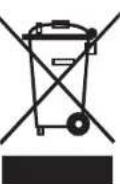
DISPOSAL OF WASTE ELECTRICAL AND ELECTRONIC EQUIPMENT
This symbol on the product or packaging means that the product should not be treated as household waste. Do not throw it to the garbage at the end of its life, but take it to a collection center for recycling. in this way you will help to protect the environment and be able to prevent any negative consequences that it would have on the environment and human health.
To find your nearest collection center:
- Contact local authorities;
-Access the website: www.mmediu.ro;
-Request additional information from the store where you purchased the product.
3.
INSTALLATION
If the angle of the unit to the level is large than 60 degree, this unit may not reach the optimum performance. (A)

A
Front installation (B)
- Instrument Board
2.Metal mantle
After putting the mantel into the instrument board, bend the steel of the mantel and make it fixed on the instrument board.
3.Fastening bolt


Rear Installation(C)
- Instrument Board
2.Nut
3.Spring washer
4.Bolt
5.Fastening bolt
6.Fixed steel
In order to improve the
anti-interference, please fix the
steel on the car underframe. You
can make the steel bent if need.
4.
UNLOAD THE UNIT
- Please remove the front frame, when remove this model.
- Put the keys into the slot at both sides until hear the sound of locking (D)
- Pull out the key and the unit

GUIDE YOU TO FIND THE SIMPLE PROBLEMS
Following guideline can help you to resolve the problems may encounter. Please make sure the connection and the operation is correct before you check below guide line.
| PROBLEMS | CAUSES AND SOLUTION |
| No Power Supply | Check the fuse if burnt or not, please change the proper fuse if necessary. |
| The display is disorder or the buttons not work | reconnect after power off several seconds |
| Can not receive radio | Please check if the antenna have been set, or if set properly. |
| Can not receive the radio clearly | May be the length of the antenna is not proper or did not extend and broken. If broken, please change the antenna. |
| Can not read USB and SD card | The file format is not available / USB and SD card have been damage |
Note: If you can not resolve the problem by above guideline, please ask help from the supplier. Do not fix it by yourself.
.5.
TECHNICAL DATA
| The machine | ||
| Power source | 12V(10.8-15.1V)DC Negative pole earth | |
| Speaker | 4-8Ω | |
| power machines | Max output | 7Wx4 |
| Output rating | 5Wx4 | |
| FM | European frequency machines |
| Frequency scope | 87.5MHz-108MHz |
| Sensitivity | ≤slant 26dB |
| MP3 | |
| Sensitivity | ≥35dB |
| Frequency | (100HZ-10KHZ) ±6dB |
| Harmonic voltage distortion (1KHz) | ≤5% |
| Channel separation | ≥35dB |
| Stereophonic reproduction channel balancing | ≤3dB |
Specification subject to change without notice
.6.
FUNCTIILE PANOULUI
1 / POWER / PWR
Comută Pornit/oprit
2 /CLK / DISP
Instalare spate(C)


Brand : AKAI
Model : CA014A-6246U
Category : Car radio