
511510 - Microwaves MORPHY RICHARDS - Free user manual and instructions
Find the device manual for free 511510 MORPHY RICHARDS in PDF.


| Product Type | Microwave Oven |
| Brand | Morphy Richards |
| Model | 511510 |
| Power Supply | 230V ~ 50Hz, 13A (requires earthed socket) |
| Power Consumption | Approx. 1050W (output 700W estimated) |
| Capacity | 20 litres (estimated) |
| Turntable Diameter | 255mm (estimated) |
| Control Type | Digital LED display with rotary dial and buttons |
| Power Levels | 5 levels: 100%, 80%, 50%, 30%, 10% |
| Defrost Functions | Defrost by weight (dEF1) and defrost by time (dEF2) |
| Auto Menus | 8 preset programs: Reheat, Vegetable, Fish, Meat, Pasta, Potato, Pizza, Soup |
| Quick Start | +30 sec button at 100% power, up to 95 minutes |
| Clock & Preset | 24-hour clock with delayed start (preset cooking) |
| Multi-Stage Cooking | Up to 2 stages, including defrost |
| Child Safety Lock | Press and hold Stop (9) for 3 seconds to lock/unlock |
| Door & Seals | WARNING: Do not operate if door or seals are damaged |
| Cleaning | Mild detergent; lemon & water steam clean; do not immerse turntable in cold water |
| Removable Parts | Glass turntable and turntable ring assembly |
| Warranty | 1 year standard, extendable to 2 years with registration (UK & Ireland only) |
| Safety Certifications | CE marked, earthed appliance |
| Installation Clearance | Min. 20cm sides, 30cm above, rear adjacent to wall |
| Usage | Household and similar (staff kitchens, farm houses, hotels, B&B) |
Frequently Asked Questions - 511510 MORPHY RICHARDS
User questions about 511510 MORPHY RICHARDS
0 question about this device. Answer the ones you know or ask your own.
Ask a new question about this device
Download the instructions for your Microwaves in PDF format for free! Find your manual 511510 - MORPHY RICHARDS and take your electronic device back in hand. On this page are published all the documents necessary for the use of your device. 511510 by MORPHY RICHARDS.
USER MANUAL 511510 MORPHY RICHARDS
smart ideas for your home

Accents Microwave Oven
i Please read and keep these instructions for future use
natural_image
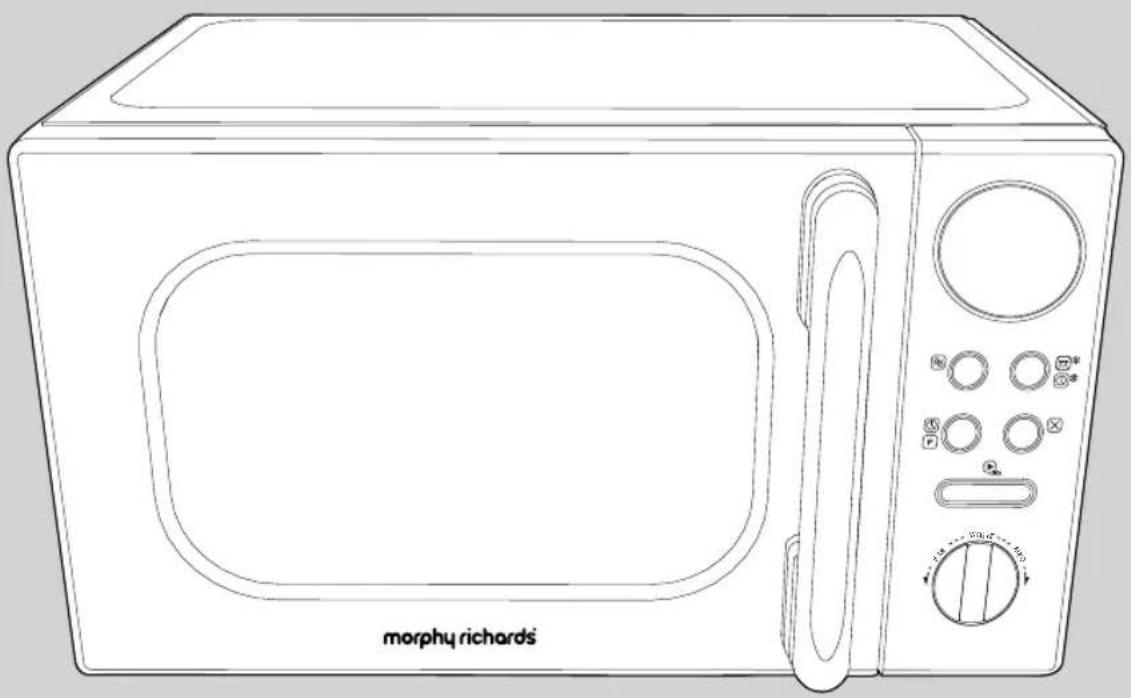
Line drawing of a morphy richards microwave oven with control knobs and a door (no text or symbols on the device itself)For competitions, product hints and tips and more join us at

www.morphyrichards.co.uk/blog

www.facebook.com/morphyrichardsuk
@loveyourmorphy
Health And Safety
The use of any electrical appliance requires the following common sense safety rules. Please read these instructions carefully before using the product.
- This appliance can be used by children aged from 8 years and above with reduced physical, sensory or mental capabilities or lack of experience and knowledge if they have been given supervision or instruction concerning use of the appliance in a safe way and understand the hazards involved. Children shall not play with the appliance. Cleaning and user maintenance shall not be made by children without supervision.
- Keep the appliance and cord out of the reach of children less than 8 years of age.
- WARNING: If the door or door seals are damaged, the oven must not be operated until it has been repaired by a competent person.
- WARNING: it is hazardous for anyone other than a competent person to carry out any service or repair operation that involves the removal of a cover which gives protection against exposure to microwave energy.
-
WARNING: Liquids and other foods must not be heated in sealed containers since they are liable to explode.
• This appliance is intended to be used in household and similar applications such as: -
staff kitchen areas in shops, offices and other working environments;
- farm houses;
- by clients in hotels, motels and other residential environments;
• bed and breakfast type environments;
- If the supply cable is damaged, it must be replaced by the manufacturer, its service agent or similarly qualified persons in order to avoid a hazard.
- The appliance is not intended to be operated by means of an external timer or separate remote system.
Health And Safety
Location
- A lways locate your appliance away from the edge of the worktop.
- Ensure that the appliance is used on a firm, flat, heat resistant surface.
- D o not use the appliance outdoors or near water. Mains cable
- T he mains cable should reach from the socket to the appliance without straining the connections.
- Do not let the mains cable hang over the edge of the worktop or open space where a child could reach it.
- Do not let the cable run across a cooker or hot area which might damage the cable.
Other safety considerations
- The microwave oven is intended for heating food and beverages. Drying of food or clothing and heating of warming pads, slippers, sponges, damp cloth and similar may lead to rish of injury, ignition of fire.
- When heating food in plastic or paper containers, keep an eye on the oven due to possibility of ignition.
- If smoke is emitted, switch off or unplug the appliance and keep the door closed in order to stifle any flames.
- Microwave heating of beverages can result in delayed eruptive boiling, therefore care must be taken when handling the container.
- The contents of feeding bottles and baby food jars shall be stirred or shaken and the temperature checked before consumption, in order to avoid burns.
- Eggs in their shell and whole hard-boiled eggs should not be heated in microwave ovens since they may explode, even after microwave heating has ended.
- Details for cleaning door seals, cavities and adjacent parts on page 13.
- The oven should be cleaned regularly and any food deposits removed.
- Failure to maintain the oven in a clean condition could lead to deterioration of the surface that could adversely affect the life of the appliance and possibly result in a hazardous situation.
• T he use of attachments or tools not recommended by Morphy Richards may cause fire, electric shock or injury. - Do not place on or near a hot gas or electric burner or in any heated oven.
- Only use utensils that are suitable for use in microwave ovens.
- When heating food in plastic or paper containers, keep an eye on the oven due to the possibility of ignition.
Personal safety
- WARNING: Misuse of appliance could cause potential injury.
- WARNING: Take extra care when removing cookware from the microwave as the cookware may be very hot.
Electrical requirements
Check that the voltage on the rating plate of your appliance corresponds with your house electricity supply which must be A.C. (Alternating Current).
Should the fuse in the mains plug require changing, 13 amp BS1362 fuse must be fitted.
WARNING: This appliance must be earthed.
Microwave Oven Installation
- Select a level surface that provides enough space for the outlet vents.
- A minimum clearance of 20cm is required between the oven and any adjacent walls. Leave a minimum clearance of 30cm above the oven. The rear surface of the appliance shall be placed adjacent to the wall.
- Place the oven as far away from radios and TV's as possible. Using the oven may cause interference with the reception.
- Plug the oven into a suitable 13amp mains socket, make sure the voltage is the same as on the rating label (do not use extension cables or mains socket adaptors).
- WARNING: do not install the oven over a cooker or other heat producing appliance. This will damage the oven.
- Do not cover ventilation on top of microwave, the outer casing can get extremely hot.
Introduction
Thank you for purchasing your new Morphy Richards Microwave Oven.
Your Microwave Oven will enable you to make an extensive selection of meals, desserts and snacks with the press of a button.
Please read these instructions thoroughly before you first use your Microwave Oven.
Contents
Health And Safety 2
Introduction 4
Features 5
Setting Up Your Microwave Oven 6
Clock Setting 6
Operating Your Microwave Oven 7
Microwave Oven Power Chart 7
Quick Cooking 8
Cooking at a Preset Time 8
Defrost by Weight dEF1.... 10
Defrost by Weight dEF2 10
Multi-Stage Cooking 11
Checking Information During Cooking 11
Microwave Oven Auto Function 12
Auto Menu Chart 12
Child Safety Lock Function 13
Care & Cleaning 13
Troubleshooting 14
Notes 15
Guarantee 16
Product Overview
Features
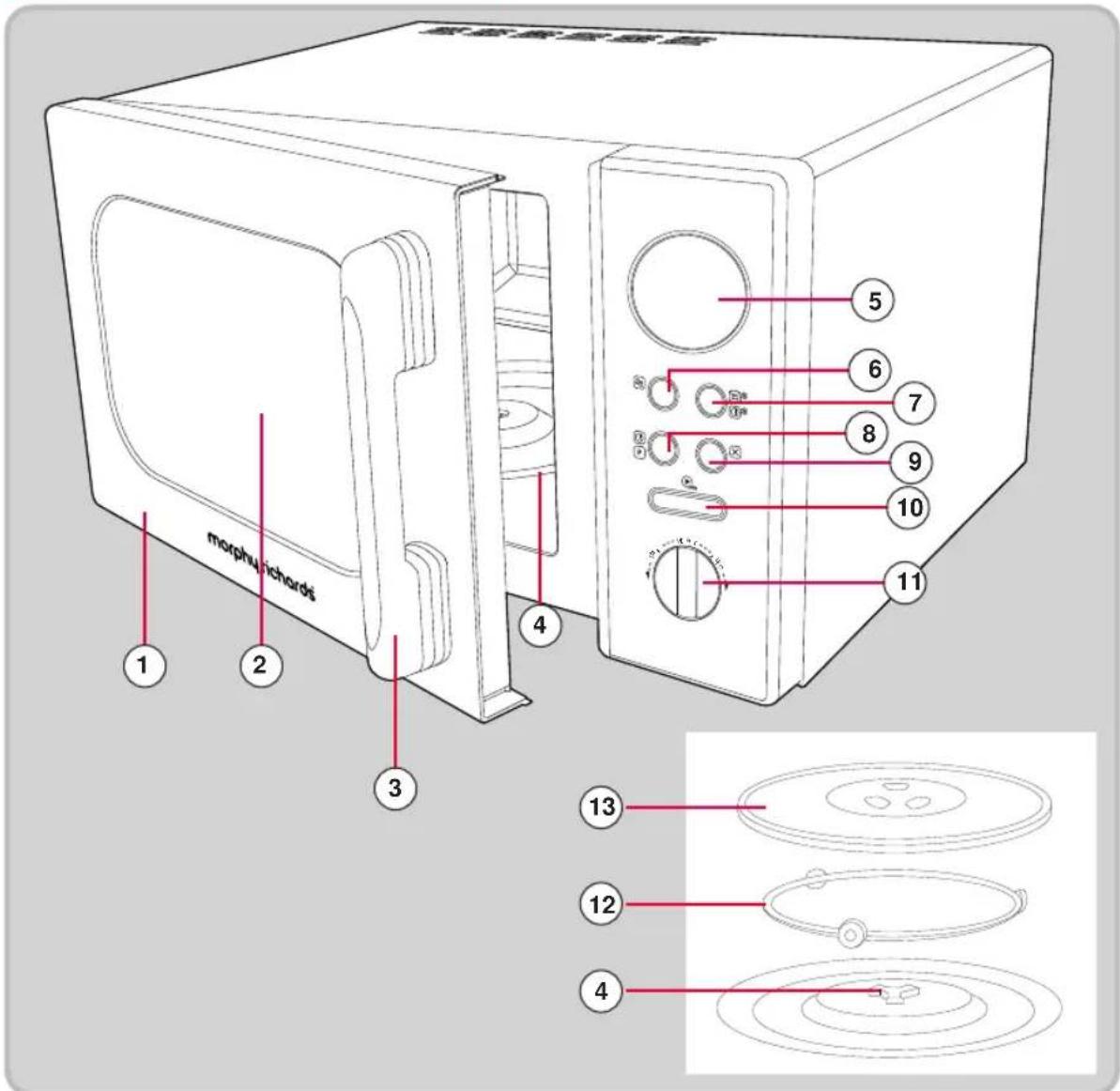
(1) Door
(2) Observation Window
(3) Handle
(4) Turntable Shaft
(5) LED Display
(6) Power Button
(7) Weight/Time Defrost Button
(8) Clock/Preset Button
(9) Cancel Stop/Clear Button
(10) Start/+30 Sec/Confirm Button
(11) Time/Weight/Auto Dial
(12) Turntable Ring Assembly
(13) Glass Turntable
PLEASE NOTE: Remove all stickers and labels from the appliance (excluding the rating label). We recommend cleaning your Microwave Oven with warm soapy water before use.
Setting Up Your Microwave Oven
Place the Turntable Ring Assembly(12) in the centre of the oven to support the Glass Turntable (13). Place the Glass Turntable (13) on the Turntable Ring Assembly (12) with the centre fitting onto the Turntable Shaft(4). Never place the Glass Turntable(13) upside down. Both the Glass Turntable (13) and the Turntable Ring Assembly (12) must always be used during cooking.
The Glass Turntable(13) rotates clockwise or anti-clockwise randomly, this is normal.
Clock Setting
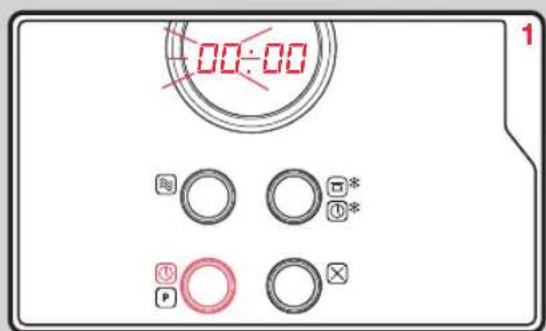
Press Clock Button (8) once, the hour figure will flash.
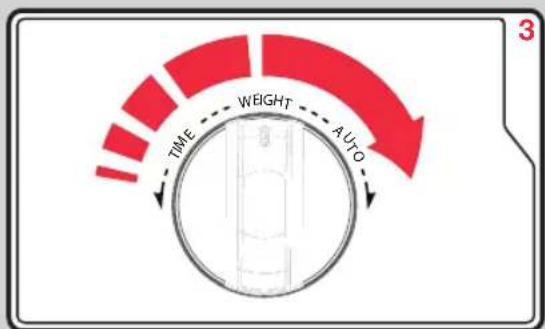
Turn the Time Dial (11) to adjust the hour. Press the Clock Button (8) again to move onto the minutes figure and turn the Time Dial (11) to adjust. Press the Clock Button (8) to finish. Note: During the process of clock setting, if you press the Stop/Clear (9) button your Microwave Oven will go back to the previous status automatically.
Operating Your Microwave Oven
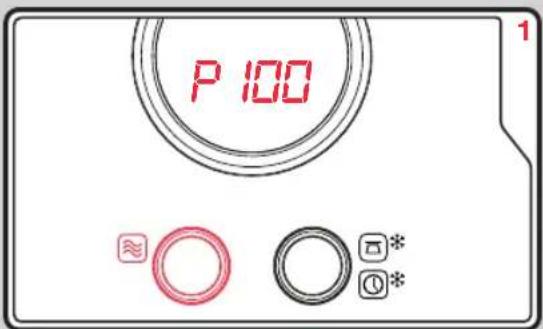
Press the Power Button (6) once. It will display P100. Continue to press Power Button (6) to select a lower power or turn the Auto Dial (11) to select an alternative power. See the table below.
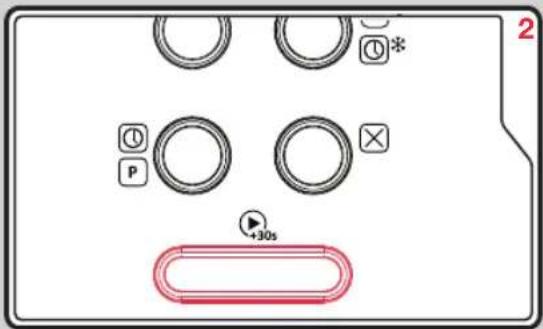
Press the Confirm Button (10) to confirm the power.
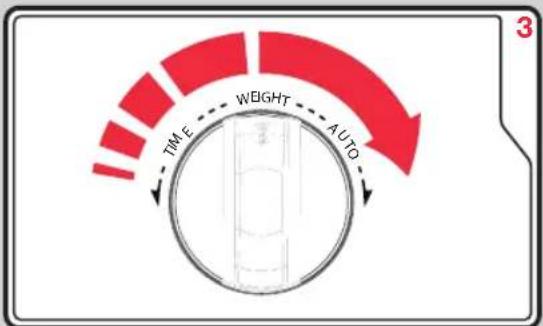
Turn the Time Dial (11) clockwise to adjust the time required.
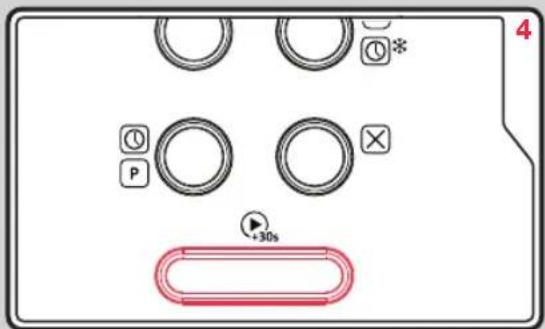
Press the Confirm Button (10) to start cooking. When cooking is finished, your microwave oven will beep 5 times.
PLEASE NOTE: The cooking time can be adjusted in the following increments:
Microwave Power Chart
| No. of time to press Power Button | Microwave Power Level | Display |
| 1 | 100% | P100 |
| 2 | 80% | P80 |
| 3 | 50% | P50 |
| 4 | 30% | P30 |
| 5 | 10% | P10 |
Always remember that cooking instructions are intended only as a guide. If you have followed the instructions and the food is still not piping hot throughout, simply return it to the Microwave.
Quick Cooking
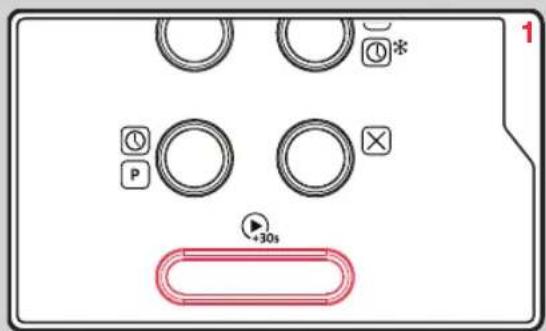
Press Start/+30 Button (10) once to start cooking with 100% power level for 30 seconds. Each press on the same key will increase cooking time by 30 seconds. The maximum cooking time is 95 minutes.
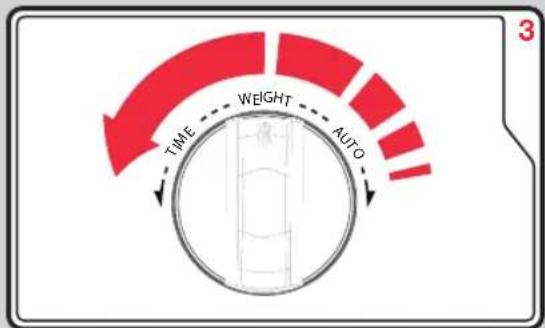
If you require a more specific cooking time turn the Auto Dial (11) anti-clockwise to choose the cooking time directly. Press the Confirm Button (10) to start cooking. The microwave power is 100%.
Cooking at a Preset Time
Set the clock first (see page 6). Input the cooking program (see example below). A maximum of two stages can be set. Do not use the de-frost function in the pre-set function. The auto menu can be set for a single stage only.
EXAMPLE: If you want to cook at 14.30 with 80% microwave power for 7 minutes.
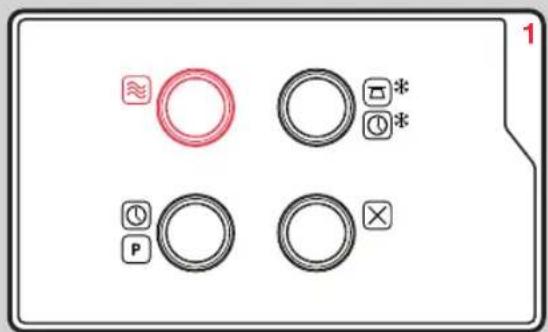
Press the Power Button(6) once.
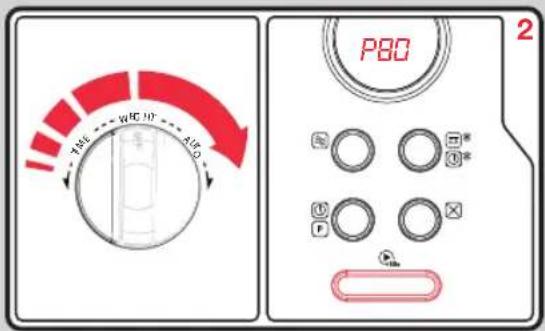
Turn the Auto Dial (11) clockwise to choose 80% microwave power until P80 is displayed. Press the Confirm Button (10) to confirm.
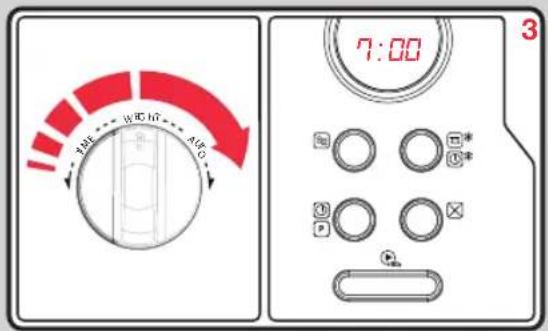
Turn the Auto Dial (11) to adjust the cooking time to 7 minutes. After steps 1-3 DO NOT press Start/+30 Sec button (10). Continue to step 4.
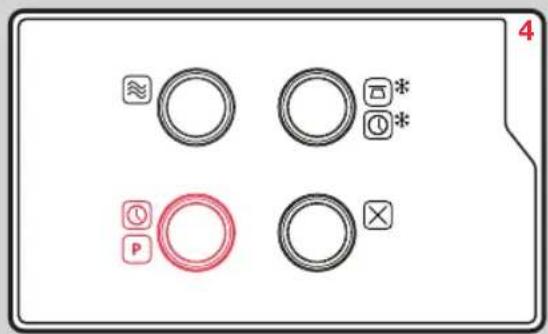
Press the Clock/Preset Button (8), the current time displays and the hour figures flash.
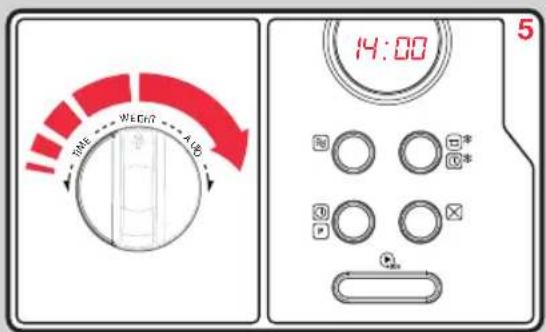
Turn the Auto Dial (11) to adjust the hours, the input time should be within 0-23.
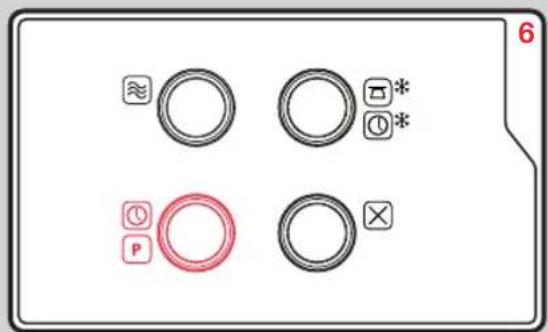
Press the Clock/Preset Button (8) and the minute figures will flash.
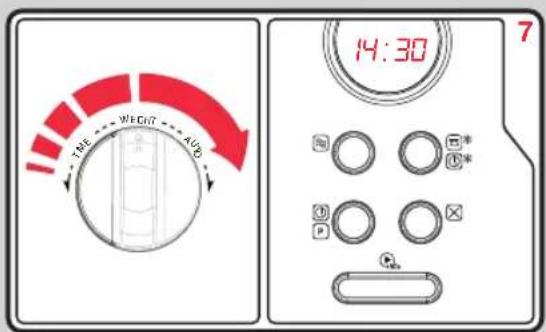
Turn the Auto Dial (11) to adjust the minutes, the input time should be within 0-59.
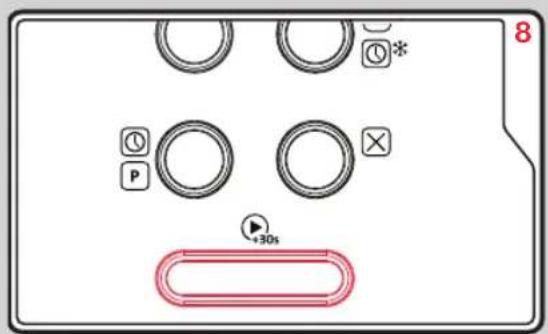
Press the Confirm button (10) to finish setting.
The microwave will beep twice when the time to start arrives and then cooking will start automatically.
NOTE: The clock must be set first, otherwise, the pre-set function will not work.
Defrost By Weight - dEF1
Example: Defrost 500g.
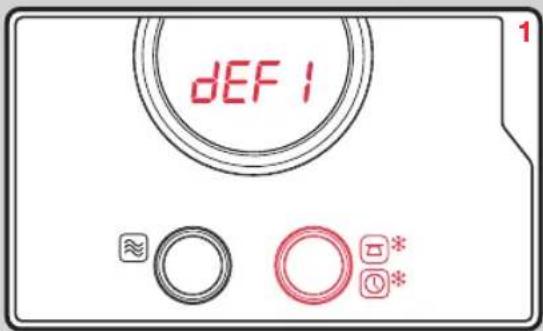
Press Weight/Time Defrost Button (7) LED will display dEF1.
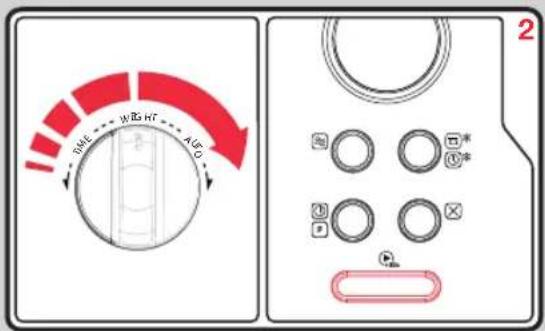
Turn the Auto Dial (11) to select the food weight.
The range weight is 100-2000g.
Press the Confirm Button (10) to start defrosting.
Defrost By Time - dEF2
Example: Defrost time of 5 minutes.
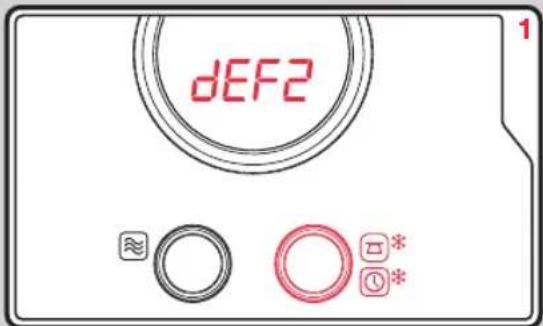
Press Weight/Time Defrost Button (7) twice, the LED will display dEF2.
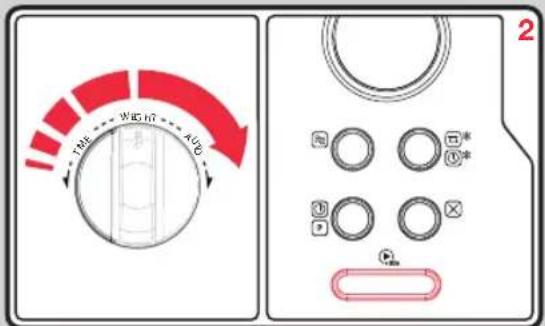
Turn the Auto Dial (11) to select the time.
The maximum cooking time is 95 minutes.
Press the Confirm Button (10) to start defrosting.
Multi-Stage Cooking
The microwave can be set up to 2 stages cooking.
Example: to cook with defrost for 5 minutes, then with 80% microwave power for 7 minutes.
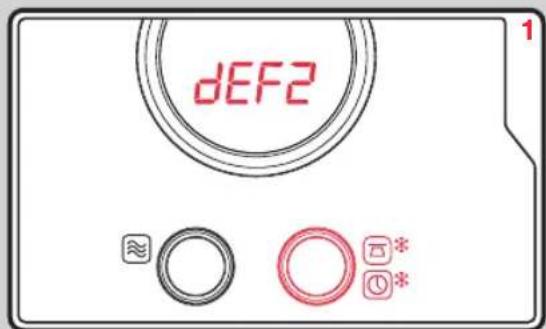
Press the Weight Defrost Button (7) twice, the LED will display dEF2. Turn the Auto Dial (11) to adjust the defrost time to 5 minutes.
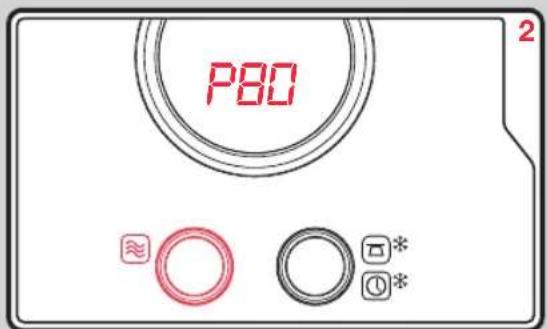
Press Power button (6). Turn the Auto Dial (11) to choose 80% microwave power until it displays P80.
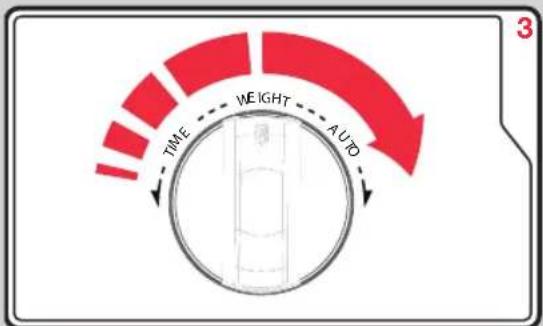
Press the Confirm Button (10). Turn the Auto Dial (11) to adjust the cooking time to 7 minutes.
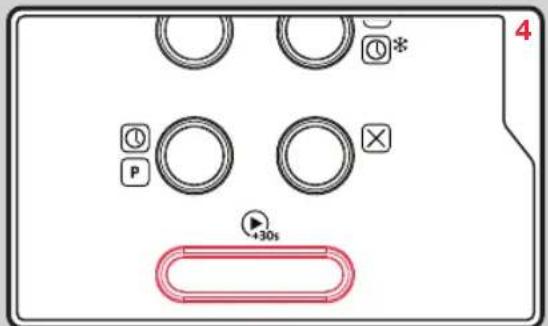
Press the Confirm Button (10) to start cooking.
Note: If one of the stages in your Multi-Stage cooking is the defrost function, the defrost cooking will be started at the 1st stage automatically. The microwave will beep once after each stage and the next stage will automatically begin.
Checking Information During Cooking
During microwave cooking, press the Power Button (6) and the current power will be displayed for 3 seconds. After 3 seconds the LED will turn back to the former state.
During cooking state, press the Clock Preset Button(8) to check the current time. The current time will flash for 2-3 seconds, then the LED display will turn back to the former state.
Microwave Auto Function
This auto function has eight pre-programmed cooking programs. You do not need to set either cooking times or the power level.
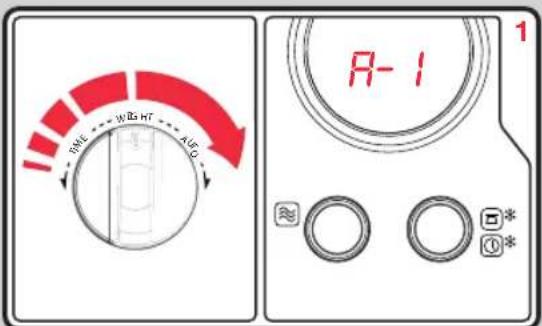
Turn the Auto Dial (11) to activate the microwave auto function. It displays A-1. Continue to turn the Auto Dial (11) to choose A-1 to A-8.
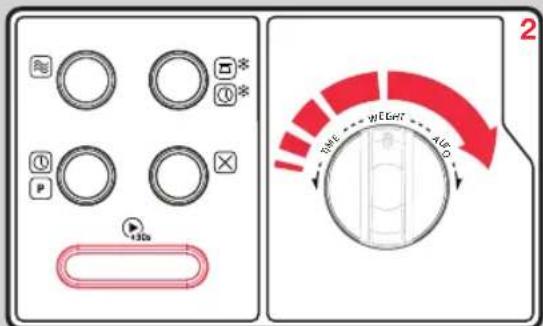
Press the Confirm Button (10) to select the menu you require. Turn the Auto Dial (11) to choose the food weight. Press the Confirm Button (10) to start cooking. When the cooking is finished the oven will beep 5 times.
Auto Menu Chart
| Menu | Weight | Display | Power |
| A-1 | 200g | 200 | 100% |
| AUTO | 400g | 400 | |
| REHEAT | 600g | 600 | |
| A-2VEGETABLE | 200g | 200 | 100% |
| 300g | 300 | ||
| 400g | 400 | ||
| A-3FISH | 250g | 250 | 80% |
| 350g | 350 | ||
| 450G | 450 | ||
| A-4MEAT | 250g | 250 | 100% |
| 350g | 350 | ||
| 450g | 450 | ||
| A-5PASTA | 50g (with water 450g) | 50 | 80% |
| 100g (with water 800g) | 100 | ||
| A-6POTATO | 200g | 200 | 100% |
| 400g | 400 | ||
| 600g | 600 | ||
| A-7PIZZA | 200g | 200 | 100% |
| 400g | 400 | ||
| A-8SOUP | 200ml | 200 | 80% |
| 400ml | 400 |
Child Safety Lock Function
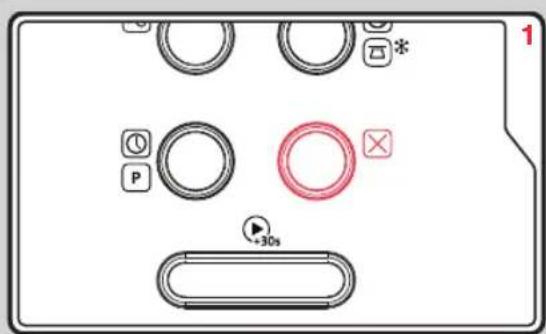
To lock your microwave in the standby state press and hold the Stop Button (9) for 3 seconds. There will be a long beep. The LED display will change to show safety lock engaged. To unlock repeat the process.
Care & Cleaning
Your microwave oven should be cleaned regularly to prevent grease and food particles from building up on the inside surface. The accumulated grease/food particles may cause a fire hazard.
It is important to clean the interior, use a mild detergent solution, such as washing-up liquid with warm water on a soft cloth. It is suggested to place half a lemon in a bowl and add 300ml water inside the oven. Then heat it on 100% power setting for 10 minutes. Wipe the oven clean with a soft, dry cloth.
IMPORTANT:
ALWAYS switch off your microwave oven and unplug from power supply.
Removable Parts
- The Glass Turntable(13) may be cleaned in the sink. Be careful not to chip or scratch the edges as this may cause the Glass Turntable (13) to break during use.
- The turntable Ring Assembly (12) should be cleaned regularly.
- Do not immerse the Glass Turntable(13) in cold water.
For best performance and safety, the inner door panel and the oven front frame should be free of food residue. To prevent damage to the operating parts inside the oven, water should not be allowed to seep in to the ventilation openings.
Troubleshooting
| Problem | Possible Cause |
| Oven will not start | a. Plug not secure in power socket, or not switched onb. Door is openc. Wrong operation is setd. Plug fuse has blown |
| Arcing or sparking | a. Materials which should be avoided in a microwave oven are usedb. The oven is operated when emptyc. Spilled food remains in the cavity |
| Unevenly cooked food | a. Materials which should be avoided in a microwave oven are usedb. Food is not defrosted completelyc. Power settings for cooking time is incorrectd. Food is not turned or stirred |
| Overcooked food | Power settings for cooking time is incorrect |
| Undercooked food | a. Materials to be avoided in microwave oven are usedb. Food is not defrosted completelyc. Oven ventilation ports are restrictedd. Power settings for cooking time is incorrect |
| Incomplete defrosting | a. Materials to be avoided in a microwave oven are usedb. Power settings for cooking time is incorrectc. Food is not turned or stirred |
| Noise comes from the turntable | a. Food residue exists between the turntable ring assembly and the cavity bottom when the oven is turned on.b. The Glass Turntable and/or Ring Assembly are not fitted correctly |
| Oven light does not glow | a. The light bulb has burned out. A new bulb must be fitted by a qualified service engineerb. START has not been pressed |
Notes
MW511500 MUK Rev2 04/17
Registering your 2 year guarantee
Your standard one year guarantee is extended for an additional 12 months when you register the product within 28 days of purchase with Morphy Richards. If you do not register the product with Morphy Richards within 28 days, your product is guaranteed for 1 year. To validate your 2 year guarantee register with us online at www.morphyrichards.co.uk
Or call our customer registration line quoting model and serial number, these numbers can be found on the base of the product.
UK 0344 871 0944
IRE 1800 409 119
N.B. Each qualifying product needs to be registered with Morphy Richards individually.
Please note that the 2 year guarantee is only available in the UK and Ireland. Please refer to the one year guarantee for more information.
Your 1 year guarantee
It is important to retain the retailer's receipt as proof of purchase. Staple your receipt to this back cover for future reference.
Please quote the following information if the product develops a fault. These numbers can be found on the base of the product.
Model no.
Serial no.
All Morphy Richards products are individually tested before leaving the factory. In the unlikely event of any appliance proving to be faulty within 28 days of purchase, it should be returned to the place of purchase for it to be replaced.
If the fault develops after 28 days and within 12 months of original purchase, you should contact the Helpline number quoting Model number and Serial number on the product, or write to Morphy Richards at the address shown.
You may be asked to return a copy of proof of purchase. Subject to the exclusions set out below (see Exclusions), the faulty appliance will then be repaired or replaced as appropriate and dispatched usually within 7 working days of receipt.
If, for any reason, this item is replaced or repaired during the 1 year guarantee period, the guarantee on the new item will be calculated from original purchase date. Therefore it is vital to retain your original till receipt or invoice to indicate the date of initial purchase.
To qualify for the 1 year guarantee, the appliance must have been used according to the instructions supplied.
For example, crumb trays should have been emptied regularly.
Exclusions
Morphy Richards shall not be liable to replace or repair the goods under the terms of the guarantee where:
1 The fault has been caused or is attributable to accidental use, misuse, negligent use or used contrary to the manufacturer's recommendations or where the fault has been caused by power surges or damage caused in transit.
2 T he appliance has been used on a voltage supply other than that stamped on the products.
3 Repairs have been attempted by persons other than our service staff (or authorised dealer).
4 The appliance has been used for hire purposes or non domestic use.
5 The appliance is second hand.
6 M orphy Richards reserves the right not to carry out any type of servicing under the guarantee at its discretion
7 Batteries and damage from leakage are not covered by the guarantee.
- This guarantee does not confer any rights other than those expressly set out above and does not cover any claims for consequential loss or damage. This guarantee is offered as an additional benefit and does not affect your statutory rights as a consumer. Morphy Richards products are intended for household use only. See usage limitations within the location safety instructions.
Disclaimer
Morphy Richards has a policy of continuous improvement in product quality and design. The company, therefore reserves the right to change the specification of it's models at any time.
The Ground Truth image displays a single, solid horizontal line. According to Rule 2 (UNDERSCORE & LINE RULES), this is a stylistic or background line, not a placeholder underscore. Therefore, the OCR result must ignore it and output nothing or only meaningful text. The provided OCR content is "____", which consists of four underscores. This is an incorrect interpretation of the line as a placeholder, violating the rule that stylistic lines must be ignored. The OCR has hallucinated underscores where none should exist based on the GT's visual context. Hence, the OCR result is inconsistent with the Ground Truth.
For electrical products sold within the European Community. At the end of the electrical products useful life, it should not be disposed of with household waste.
Please recycle where facilities exist. Check with your Local Authority or retailer for recycling advice in your country
IF YOU ARE HAVING A PROBLEM WITH ONE OF OUR PRODUCTS, CALL OUR HELPLINE:
UK: 0344 871 0944 EIRE: 1800 409 119 SPARES: 0344 873 0710
morphy richards
The After Sales Division
Morphy Richards Ltd
Mexborough, South Yorkshire,
England, S64 8AJ
Helplines (office hours)
UK 0344 871 0944
Spare Parts 0344 873 0710
Republic of Ireland 1800 409 119
www.morphyrichards.com
CE

- Accents Microwave Oven
- Health And Safety
- Location
- Other safety considerations
- Personal safety
- Electrical requirements
- Microwave Oven Installation
- Introduction
- Contents
- Features
- Setting Up Your Microwave Oven
- Clock Setting
- Operating Your Microwave Oven
- PLEASE NOTE: The cooking time can be adjusted in the following increments:
- Microwave Power Chart
- Quick Cooking
- Cooking at a Preset Time
- Defrost By Weight - dEF1
- Defrost By Time - dEF2
- Multi-Stage Cooking
- Checking Information During Cooking
- Microwave Auto Function
- Child Safety Lock Function
- Care & Cleaning
- IMPORTANT:
- Removable Parts
- Notes
- Registering your 2 year guarantee
- Your 1 year guarantee
- Exclusions
- Disclaimer
- morphy richards
Brand : MORPHY RICHARDS
Model : 511510
Category : Microwaves