
Walkman WM-FS222 - Cassette player SONY - Free user manual and instructions
Find the device manual for free Walkman WM-FS222 SONY in PDF.


User questions about Walkman WM-FS222 SONY
0 question about this device. Answer the ones you know or ask your own.
Ask a new question about this device
Download the instructions for your Cassette player in PDF format for free! Find your manual Walkman WM-FS222 - SONY and take your electronic device back in hand. On this page are published all the documents necessary for the use of your device. Walkman WM-FS222 by SONY.
USER MANUAL Walkman WM-FS222 SONY
Radio Cassette Player
Operating Instructions

Printed using VOC (Volatile Organic Compound) free vegetable oil based ink.
http://www.sony.net/
"WALKMAN" is a registered trademark of Sony Corporation to represent Headphone Stereo products.
W. WALKMAN is a trademark of Sony Corporation.


WM-FS222
Sony Corporation © 2003 Printed in Malaysia
A
text_image
Diagram showing three steps of a device grip or clamp mechanism with numbered instructionsB
text_image
Belt clipC
text_image
Diagram showing a car compartment with labeled parts and a close-up of the device being adjusted for use.D
text_image
Diagram showing seatbelt switch mechanism with labeled parts and directional arrowsE
text_image
MB TAPE A/LS FM MODE MB METAL A/S LOCAL RESET 8880 MENU SET ENTERSpecifications
• Frequency range
TV: 2 - 17 ch
WEATHER: 1-7 ch
FM: 87.5 - 108 MHz
AM: 530 - 1710 kHz (North, Central and South America) 531 - 1602 kHz (Other countries)
• Power requirements
1.5 V DC, battery size AA (R6) × 1
• Dimensions (w/h/d)
Approx. 102.3 × 117.5 × 43.2 mm (4½ × 4¼ × 1¼ inches) (excluding projecting parts and controls)
• Mass
Approx. 219 g (7.8 oz) (main unit only)
• Supplied accessories
Stereo headphones or earphones (1)
Hand strap with belt clip (1)
Design and specifications are subject to change without notice.
Battery life* (approximate hours)
| Tape playback | Radio reception | |
| Sony alkaline LR6 (SC)* 32 | 50 | |
| Sony R6P (SR) | 9 | 15 |
* Measured value by the standard of JEITA (Japan Electronics and Information Technology Industries Association). (Using a Sony HF series cassette tape) *When using a Sony I R6 (SG) "STAMINA" alkaline dry battery (produced in Japan).
Note
- The battery life may be shorter depending on the operating condition, the surrounding temperature and battery type.
Product registration
For the customers in the USA
Please register this product on line at www.sony.com/
productregistration.
http://www.sony.com/productregistration
Proper registration will enable us to send you periodic mailings about new products, services, and other important announcements. Registering your product will also allow us to contact you in the unlikely event that the product needs adjustment or modification. Thank you.
Owner's Record
The model number is located on the front and the serial number is located inside the cassette lid. Record these numbers in the space provided below. Refer to them whenever you call upon your Sony dealer regarding this product.
Model No. WM-F5222
Serial No.
INFORMATION
This device complies with Part 15 of the FCC Rules. Operation is subject to the following two conditions: (1) This device may not cause harmful interference, and (2) this device must accept any interference received, including interference that may cause undesired operation.
You are cautioned that any changes or modifications not expressly approved in this manual could void your authority to operate this equipment.
If you have any questions about this product, you may call: Sony Direct Response Center 1-(830)-222-7669
or write to:
Sony Direct Response Center 12451 Gateway Blvd. Fort Myers, FL.33913
Declaration of Conformity
Trade Name: SONY
Model No.: WM-FS222
Responsible Party: Sony Electronics Inc.
Address: 680 Kinderkamack Road, Oradell,
NJ 07649 USA
Telephone No.: 201-930-6972
This device complies with Part 15 of the FCC Rules
Operation is subject to the following two conditions: (1) This
Operation is subject to the following two conditions: (1) this device may not cause harmful interference, and (2) this
device must accept any interference received, including
interference that may cause undesired operation.
Preparations
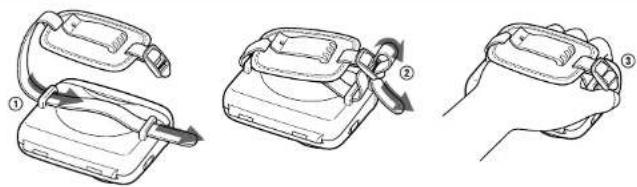
To use the hand strap
Holding the Walkman in a hand A
1 Pass the strap through the handle of the Walkman.
2 Pass one side of the strap through the ladder lock of the other side.
3 Put your hand between the Walkman and the strap, then adjust the length of the strap and fix it. Slot the excess strap into the handle of the Walkman.
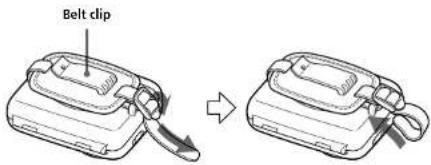
Placing the Walkman on a belt
1 Pass the strap through the handle described above in steps 1 and 2.
2 Tighten the strap at the ladder lock, then slot the excess strap into the handle of the Walkman. B
3 Put the belt clip on a belt.
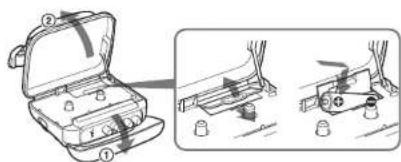
To insert a battery ©
1 Unfasten the buckle.
2 Open the cassette lid.
3 Release the catch to open the battery compartment lid and insert one size AA (R6) dry battery with correct polarity.
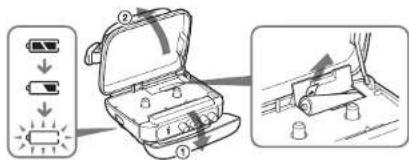
When to replace the battery ☐
Replace the battery with the new one when “☐” flashes in the display.
To replace the battery
1 Release the catch to open the battery compartment lid.
2 Pull the ribbon up slowly and replace the battery with new one.
Playing a Tape
1 Unfasten the buckle.
2 Open the cassette lid and place a cassette.
3 Press MENU repeatedly to set the cursor to TAPE in the display. Then press SET to select the tape type. E
No message: normal (TYPE I)
METAL: High-position (TYPE II) or metal (TYPE IV)
4 Press ▶.
Adjust the volume with VOLUME.
To increase the volume, turn VOLUME
counterclockwise.
ToPress
| Stop playback* ■ | |
| Wind rapidly** | ▶▶ or ◀◀ |
* When the tape ends, the depressed ▶ button is released automatically (Auto shut-off function).
“ If you leave the Walkman after the tape has been wound or rewound, the battery will be consumed rapidly. Be sure to press ■.
Note
- Do not open the lid of the cassette compartment while the tape is running.
(turn over)
F
text_image
TAPPE AVG.5 FM MODE METAL AVG.5 LOCK 88.00 MENU SET ENTERG
natural_image
Line drawing of a portable radio with control panel and attached cable (no text or symbols)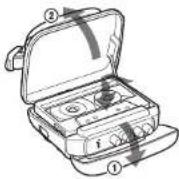
text_image
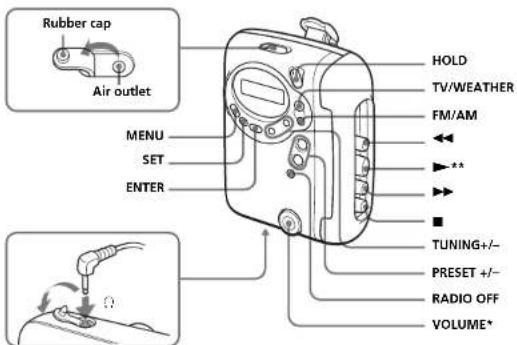
Rubber cap Air outlet MENU SET ENTER HOLD TV/WEATHER FM/AM ** TUNING+/- PRESET +/- RADIO OFF VOLUME** There is a tactile dot beside VOLUME on the main unit to
show the direction to turn up the volume.
**The button has a tactile dot.
This warranty is valid only in the United States.
SONY®
LIMITED WARRANTY
Portable Audio
Sony Electronics Inc. ("Sony") warrants this Product (including any accessories) against defects in material or workmanship as follows:
-
LABOR: For a period of 90 days from the date of purchase, if this Product is determined to be defective, Sony will repair or replace the Product, at its option, at no charge, or pay the labor charges to any Sony authorized service facility. After the Warranty Period, you must pay for all labor charges.
-
PARTS: In addition, Sony will supply, at no charge, new or rebuilt replacements in exchange for defective parts for a period of one (1) year. After 90 days from the date of purchase, labor for removal and installation is available from Sony authorized service facilities or a Sony Service Center at your expense.
To obtain warranty service, you must take the Product, or deliver the Product freight prepaid, in either its original packaging or packaging affording an equal degree of protection, to any authorized Sony service facility.
This warranty does not cover customer instruction, installation, set up adjustments or signal reception problems.
This warranty does not cover cosmetic damage or damage due to acts of God, accident, misuse, abuse, negligence, commercial use, or modification of, or to any part of the Product, including the antenna. This warranty does not cover damage due to improper operation or maintenance, connection to improper voltage supply, or attempted repair by anyone other than a facility authorized by Sony to service the Product. This warranty does not cover Products sold AS IS or WITH ALL FAULTS, or consumables (such as fuses or batteries). This warranty is valid only in the United States.
Proof of purchase in the form of a bill of sale or receipted invoice which is evidence that the unit is within the Warranty period must be presented to obtain warranty service.
This warranty is invalid if the factory applied serial number has been altered or removed from the Product.
REPAIR OR REPLACEMENT AS PROVIDED UNDER THIS WARRANTY IS THE EXCLUSIVE REMEDY OF THE CONSUMER, SONY SHALL NOT BE LIABLE FOR ANY INCIDENTAL OR CONSEQUENTIAL DAMAGES FOR BREACH OF ANY EXPRESS OR IMPLIED WARRANTY ON THIS PRODUCT, EXCEPT TO THE EXTENT PROHIBITED BY APPLICABLE LAW, ANY IMPLIED WARRANTY OF MERCHANTABILITY OR FITNESS FOR A PARTICULAR PURPOSE ON THIS PRODUCT IS LIMITED IN DURATION TO THE DURATION OF THIS WARRANTY.
Some states do not allow the exclusion or limitation of incidental or consequential damages, or allow limitations on how long an implied warranty lasts, so the above limitations or exclusions may not apply to you. In addition, if you enter into a service contract with the Sony Partnership within 90 days of the date of sale, the limitation on how long an implied warranty lasts does not apply to you. This warranty gives you specific legal rights, and you may have other rights which vary from state to state.
For your convenience, Sony Electronics Inc. has established telephone numbers for frequently asked questions:
To locate the servicer or dealer nearest you, or for service assistance or resolution of a service problem, or for product information or operation, call:
Sony Direct Response Center
1-(800)-222-7669
Sony Direct Response Center
12451 Gateway Blvd.
For an accessory or part not available from your authorized dealer, call:
1-(800)-488-SONY (7669)
Listening to the Radio
1 If the HOLD function is on, turn the HOLD switch in the opposite direction of the arrow to unlock the controls. Make sure that the tape has stopped completely.
2 Press TV/WEATHER or FM/AM to select the desired band and to turn on the radio.
3 Press TUNING +/- to tune in to the desired station. Hold down TUNING +/- for a few seconds to scan for stations.
To turn off the radio
Press RADIO OFF.
To improve the broadcast reception
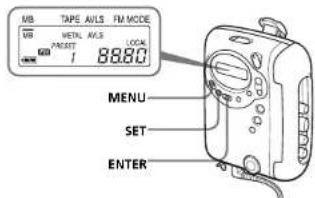
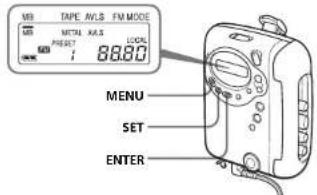
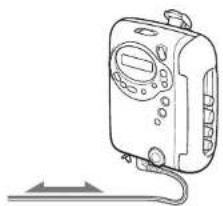
- For TV/WEATHER/FM: Extend the headphones/ earphones cord (antenna). If the reception is still not good, press MENU repeatedly to set the cursor in the display to FM MODE. Then press SET to switch between "LOCAL" and none (DX) for best reception. F, G
•For AM: Reorient the unit itself.
Presetting Radio Stations
You can preset up to 40 radio stations, 7 for TV, 4 for WEATHER, 24 for FM and 5 for AM.
Presetting Automatically Scanned Stations
1 Press TV/WEATHER or FM/AM.
2 Press ENTER for more than 3 seconds. Preset number 1 will flash in the display and the Walkman starts scanning the stations from the lower frequencies and stops for about 3 seconds when a station is received.
3 If you wish to preset the received station, press ENTER while the preset number is flashing.
The received station is preset on preset number 1 and the unit starts scanning for the next receivable station.
4 Repeat step 3 until all receivable stations are preset.
To stop scanning
Press RADIO OFF. The radio is turned off at the same time.
Notes
- If stations are already stored, the newly preset stations replace the old ones when the above procedure is completed.
- If stations cannot be preset automatically, preset stations manually.
Presetting Stations Manually
1 Press TV/WEATHER or FM/AM.
2 Press ENTER.
The frequency digits and a preset number flash in the display.
3 While the frequency digits and the preset number are flashing, tune in to a station you wish to store using TUNING +/-, and select a preset number using PRESET +/-.
4 While the frequency digits and the preset number are flashing, press ENTER.
Notes
- If you cannot complete step 3 or 4 while the indications are flashing, repeat from step 2.
- If a station is already stored, the new station replaces the old one.
To cancel the stored station
Follow the procedure above and in step 3, press and hold TUNING +/- until “----” is displayed and select the preset number you want to cancel using PRESET +/-. Press ENTER while “----” is flashing.
Playing the preset radio stations
1 Press TV/WEATHER or FM/AM.
2 Press PRESET +/-
Using Other Functions
Locking the controls
Turn the HOLD switch to the direction of the arrow to lock the controls.
The HOLD function only locks the radio operation buttons, MENU button and SET button.
Emphasizing bass sound F
Press MENU repeatedly to set the cursor to MB in the display. Then, press SET to turn MB (mega bass) on. With each press, the indications change as follows.
MB (mega bass) : emphasizes bass sound No message: off (normal)
Notes
- If the sound is distorted with the mode "MB", turn down the volume or select normal mode. - Bass emphasis may not show great effect if the volume is turned up too high.
Protecting Your Hearing — AVLS (Automatic Volume Limiter System) F
Press MENU repeatedly to set the cursor to AVLS in the display. Then press SET to show "AVLS". The maximum volume is kept down to protect your ears.
Precautions
On battery
- Do not carry dry batteries with coins or other metallic objects. It can generate heat if the positive and negative terminals of the batteries are accidentally contacted by a metallic object. - When you are not going to use the Walkman for a long time, remove the battery to avoid any damage caused by battery leakage and subsequent corrosion.
On handling
- Do not leave the unit in a location near heat sources, or in a place subject to direct sunlight, excessive dust or sand, moisture, rain, mechanical shock, or in a car with its windows closed. - We do not recommend the use of tape longer than 90 minutes. They are very thin and tend to be stretched easily. This may cause malfunction of the unit or sound deterioration. - The LCD display may become hard to see or slow down when using the unit at high temperatures (above 40^ / 104^ ) or at low temperatures (below 5^ / 32^ ). At room temperature, the display will return to its normal operating condition. - If the unit has not been used for a long time, set it in the playback mode to warm it up for a few minutes before you start using again.
On water resistance
Before opening or closing the cassette lid, be sure to wipe off water, dust or sand on the exterior of the Walkman. (The Walkman is not water-resistant with the cassette lid open.) Since water in the headphones/earphones jack may cause rust, cover it with the attached rubber cap when the headphones/earphones are not in use. Since the Walkman is aight, you may not be able to open the cassette lid because of sudden change in air pressure inside the Walkman, which happens after being transported on a plane or moving from a warm place to a cold place. To open the cassette lid see "Troubleshooting." The supplied headphones/earphones are not meant to be immersed in water or come in continuous contact with water. If they are accidentally dropped into water or get wet, dry from with cloth cloth. Never use an electric hair dryer. If the Walkman or the headphones/earphones are immersed in salt water, he sure to wash them in non-running fresh water. Never wash them under running water, and never use soap or detergent. Any sand or dust on the rubber packing will prevent the cassette lid from closing tightly, and water may leak in. Brush off the dust once in a while. We recommend the packing to be changed every year. Replacement packing is available at an authorized Sony Service facility.
On headphones/earphones
Road safety
Do not use headphones/earphones while driving, cycling, or operating any motorized vehicle. It may create a traffic hazard and is illegal in some areas. It can also be potentially dangerous to play your headphones/earphones at high volume while walking, especially at pedestrian crossings. You should exercise extreme caution or discontinue use in potentially hazardous situations. Preventing hearing damage Do not use headphones/earphones at high volume. Hearing experts advise against continuous, loud and extended play. If you experience a ringing in your ears, reduce volume or discontinue use.
Caring for others
Keep the volume to a moderate level. This will allow you to hear outside sounds and to be considerate to the people around you.
On maintenance
- Clean the tape head and tape path using a cotton swab and commercially available cleaning solvent after every 10 hours of use.
- To clean the exterior, use a soft cloth slightly moistened in water. Do not use alcohol, benzine or thinner. - Clean the headphones/earphones plugs periodically.
Troubleshooting
The display shows incorrect information.
• The battery is weak. Replace the battery with a new one.
The display and the operation are not normal.
- Remove the battery for 30 seconds or more, and then insert it again. If this does not solve the problem, remove the battery and leave the unit without battery for 30 minutes or more, and then insert it again. In this case, preset the stations again, since the preset stations are erased from the memory.
The cassette lid cannot be opened.
- Open the rubber cap, then open the cassette lid. When the cassette lid opens, remember to close the rubber cap to prevent intrusion of water.