SRS 2.1 - Loudspeaker Andersson - Free user manual and instructions
Find the device manual for free SRS 2.1 Andersson in PDF.


| Product Type | 2.1 Speaker System |
| Model | Andersson SRS 2.1 |
| Satellite Speakers | 2 x 10W (RMS) |
| Subwoofer | 1 x 30W (RMS) |
| Total Power Output | 50W RMS |
| Frequency Response | 40Hz - 20kHz |
| Impedance | 4 ohms (satellites), 8 ohms (subwoofer) |
| Connectivity | 3.5mm AUX input, RCA input |
| Controls | Volume knob, bass control, power switch |
| Dimensions (Satellite) | 90 x 150 x 100 mm |
| Dimensions (Subwoofer) | 200 x 300 x 250 mm |
| Weight (Total) | 4.5 kg |
| Power Supply | AC 100-240V, 50/60Hz |
| Power Consumption | 60W maximum |
| Driver Units | Satellites: 2.5" full-range; Subwoofer: 5.25" |
| Enclosure Type | Bass reflex (subwoofer) |
| Material | MDF wood (subwoofer), plastic (satellites) |
| Color | Black |
| Included Accessories | AUX cable, remote control (battery not included), manual |
Frequently Asked Questions - SRS 2.1 Andersson
User questions about SRS 2.1 Andersson
0 question about this device. Answer the ones you know or ask your own.
Ask a new question about this device
Download the instructions for your Loudspeaker in PDF format for free! Find your manual SRS 2.1 - Andersson and take your electronic device back in hand. On this page are published all the documents necessary for the use of your device. SRS 2.1 by Andersson.
USER MANUAL SRS 2.1 Andersson
natural_image
Abstract artistic rendering of swirling light patterns with a glowing ring (no text or symbols)
natural_image
Abstract purple background with a white stylized 'a' and dot (no text or symbols)

natural_image
Solid black rectangular object with rounded edges, resembling a stylized tablet or device (no text or symbols visible)andersson®
SRS 2.1 | Soundbar system
a.
Q. Safety Instructions
Electrical conducts:
→ To reduce the risk of electric shock, do not remove cover. No user serviceable parts inside. Refer servicing to qualified service personnel.
→ Before you connect the appliance, ensure the voltage rating on the type plate corresponds to your mains voltage (type plate is located on the bottom of the unit).
Technical conducts:
→ Repairs to electrical appliances should only be performed by qualified personnel. Improper repairs may place the user and/or equipment at serious risk.
→ Do not operate this appliance with a damaged plug or cord, after a malfunction or after being dropped or damaged in any way.
→ If the supply cord is damaged, it must be replaced by the manufacturer, its service agent or similarly qualified people in order to avoid a hazard.
→ Do not push objects into any openings as damage to the equipment and/or electric shock may occur.
→ If abnormal noise, smell, smoke or any other failure is discovered during operation, turn off the product and unplug the power plug. Then contact the service centre for repair.
→ Do not remove the appliance from the mains power supply by pulling the cord; pull the plug.
Operational conducts:
→ This equipment is not intended for use by people (including children) with reduced physical, sensory or mental capabilities or lack of experience or knowledge. They should be given appropriate supervision and instructions to use the equipment by a person responsible for their safety.
→ This product is not a toy. Never leave the equipment within reach of children. Close supervision is required when using this equipment near children.
→ This equipment is intended for household use only and should not be used for industrial or commercial purposes.
→ Do not use this equipment for anything other
Q. Safety Instructions
than its intended use.
→ Do not immerse the product in water or any other liquid.
→ Always unplug the appliance after use and before any cleaning or user maintenance.
Environmental conducts:
→ Ensure the equipment is not too close to heat emitting appliances or placed in direct sunlight.
→ Do not use this appliance outdoors.
Other conducts:
→ Do not listen to music at a high volume for an extended period, as this may cause hearing damage.
→ Reduce volume or discontinue use if a ringing in the ears occurs.
a. Overview
Product:
- Power/Mode
- Play/pause
- Previous/Next
- Volume -/+
- Display Panel
- Optical in
- Coaxial in
- Aux-in
- Subwoofer output
- DC in
- Subwoofer

a. Overview
Remote:
- Standby/on
- Play/Pause
- Previous track
- TONE
- Mute
- Volume -
- Mode
- Next track
- EQ
- Volume +

Operation
Install the Remote Control:
→ The Remote Control has two pre-installed AAA batteries. Remove the protective tab to activate the Remote Control battery.
Note: The Remote Control works within a range of 6 meter.
Get Started:
-
Connect the Subwoofer cable to the subwoofer output of the soundbar.
-
Make sure you have made all the necessary cable connections before you connect the Soundbar to a wall outlet, the display will lit and the soundbar will auto enter the last used mode.
-
Press the Power button in the remote or long press the Power button on the top of soundbar to enter standby mode. Press again to wake up the soundbar.
-
Press the Source button on the Soundbar or Remote Control to choose an audio source. The display will change as you switch mode.
Note: The Soundbar will re-enter the Standby Mode again if there is no operation for 15 minutes.
Bluetooth Pairing:
-
Press the Mode button on the Remote control or power button in soundbar to enter Bluetooth mode.
-
The Display will show "bt" during connection, Bluetooth icon will flash fast.
-
Turn on the Bluetooth function on your device and the device will start to search for the Soundbar.
-
Select 'SRS 2.1' from the list of found devices.
-
If asked, enter the password '0000' and press OK.
-
When successfully paired with your device, the bluetooth icon will be lit steadily.
Note: The Bluetooth playback is controlled by your device and the buttons on the remote control and the soundbar.
Note: The operation range for the Bluetooth connection is 10 meters.
Note: If a mobile phone on which you are playing music receives a call, the music will be interrupted. The sound however is not played back via the Soundbar. After you have ended the call, the devices are connected to each other again and playback continues.
Operation
Optical/Coaxial/AUX Source:
- Ensure that the soundbar is connected to the audio device via optical or coaxial or AUX cables.
- Press the Mode button on the remote control to enter the desired mode. You can also short press the power button on the soundbar to choose the Optical or coaxial or AUX source.
Note: The playback is controlled by your device not by the buttons on the remote control and the soundbar.
EQ
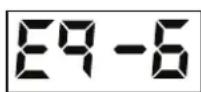
→ This product presets six EQ sound modes. To switch each EQ sound mode, press "EQ" on the remote control.
Eq-1=Flat Eq-2=Pop Eq-3=Rock Eq-4=Classical Eq-5=Soft Eq-6=Jazz

Tone
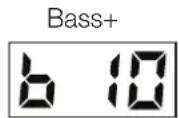
→ The product has independent subwoofer volume adjustment, bass adjustment and treble adjustment. Press "TONE" on the remote control and the display will show as below. Press Volume +/- on the remote control to adjust.


Q. Troubleshooting
| Problem Solution | |
| No sound from the Sound-Bar speakers | 1. Switch to correct source mode and connect the cables correctly.2. Press MUTE again to restore sound |
| Abnormal sound 1. Adjust the volume on device.2. Connect the audio cable correctly | |
| A Bluetooth device cannot connect with the SoundBar | 1. Switch on Bluetooth function in bluetooth device.2. Reconnect the Bluetooth device |
| No sound from the wired subwoofer | Disconnect the subwoofer cable and reconnect correctly. |
| The remote control does not work | Replace new battery. |
Q. Specifications
| Product name SRS 2.1 | |
| Power supplier AC100-240, | 50/60Hz |
| Output power 30W x 2 + 50W | |
| Speaker driver 2"x4 (main unit) + 5"x1 (subwoofer) | |
| Speaker frequency 20Hz-20kHz | |
| Bluetooth version 2.1+EDR | |
| Bluetooth range 10 m | |
| Included in the packaging | - Soundbar- Subwoofer- AC adapter- Remote control- User manual |
| Dimension (soundbar) 870 x | 65 x 65 mm |
| Dimension (Subwoofer) 245 x | 245 x 245 mm |
| Weight 1.4 kg (Soundbar) | 2 kg (Subwoofer) |
a. Other
Copyright:
This manual is the copyright of CI no 556520-4137. No part of this manual may be revised, copied or transmitted in any way without written permission from CI no 556520-4137.
Recycling:
This product's packaging materials are recyclable and can be reused. This product and the accessories packed together are the applicable product to the WEEE directive except batteries. Please dispose of any materials in accordance with your local recycling regulations.

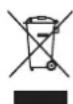
Batteries should never be thrown away or incinerated but disposed of in accordance with your local regulations concerning chemical wastes.
Law and Safety:
The CE mark indicates that this product has been manufactured according to current regulations for electromagnetic fields, which means that it is safe to use if used according to safety instructions. The product is manufactured according to current regulations within the EU legislation, limiting the use of hazardous substances in electrical and electronic equipment.
Statement:
This manual does not provide any warranty or related declarations. All information in this manual including the product specification, pictures and literatures is just for reference, CI no 556520-4137 reserves the rights to update contents of this manual without further notice.
Bluetooth:
The Bluetooth® word mark and logos are registered trademarks owned by the Bluetooth SIG, Inc. and any use of such marks by Andersson is under license. Of trade names are those of their respective

a.
13E
Q. Säkerhetsinstruktioner
- andersson®
- Safety Instructions
- Electrical conducts:
- Technical conducts:
- Operational conducts:
- Environmental conducts:
- Other conducts:
- a. Overview
- Product:
- Remote:
- Operation
- Install the Remote Control:
- Get Started:
- Bluetooth Pairing:
- Optical/Coaxial/AUX Source:
- EQ
- Tone
- Troubleshooting
- Specifications
- a. Other
- Copyright:
- Recycling:
- Law and Safety:
- Statement:
- Bluetooth:
- Säkerhetsinstruktioner
Brand : Andersson
Model : SRS 2.1
Category : Loudspeaker