
RAK-SSU129WH - Remote control TECHNICS - Free user manual and instructions
Find the device manual for free RAK-SSU129WH TECHNICS in PDF.


| Product Type | Remote Control |
| Brand | Technics |
| Model | RAK-SSU129WH |
| Compatible Devices | Amplifiers, CD players/changers, cassette decks, DCC decks, tuners (Technics) |
| Power Supply | 2 x R03/LR03 (AAA) batteries, 1.5 V each |
| Battery Life | Approximately 1 year with normal use |
| Operating Range | Up to 7 meters (23 ft) within 60-degree angle |
| Dimensions | Approximately 160 x 50 x 20 mm (estimated) |
| Weight | Approximately 80 g (with batteries, estimated) |
| Main Functions | Power ON/OFF, volume control, input selection, play/pause/stop, track skip/ search, fast-forward/rewind, tape side switching, tuning |
| Special Features | Multi-device operation, TPS function for cassette decks |
| Care Instructions | Clean with a soft dry cloth; avoid exposure to direct sunlight or strong light |
| Safety Precautions | Do not mix old/new batteries or different types; remove batteries if unused for long periods; keep out of reach of children |
| Spare Parts & Repairability | Batteries are the only replaceable part (standard AAA) |
Frequently Asked Questions - RAK-SSU129WH TECHNICS
User questions about RAK-SSU129WH TECHNICS
0 question about this device. Answer the ones you know or ask your own.
Ask a new question about this device
Download the instructions for your Remote control in PDF format for free! Find your manual RAK-SSU129WH - TECHNICS and take your electronic device back in hand. On this page are published all the documents necessary for the use of your device. RAK-SSU129WH by TECHNICS.
USER MANUAL RAK-SSU129WH TECHNICS
How to use the remote control transmitter RAK-SU129WH

E EB EM
Before use
Battery installation
Insert the batteries included with this unit as shown below.

When you need to replace these batteries
Use two R03/LR03 (AAA SIZE, UM-4) (1.5 V) or equivalent batteries.
Method for use
Use the remote control within 60 degrees and within 7 meters (23 ft.) facing directly toward the amplifier's remote control signal sensor.

Note
Be sure the transmission window and the unit's sensor are free from dust. Excessive dust might affect performance.
The operation may not be correct if direct sunlight or another strong light source strikes the receiving sensor of this unit. If there is a problem, place the unit away from the light source.
When operating a Technics audio equipment with a remote control sensor, face this remote control toward the remote control sensor of the unit to be operated
RQT3529-B
Remote control operation
This remote control transmitter can be used to operate other units manufactured by Technics in addition to this amplifier, including CD players (or CD changers), cassette decks, DCC decks, or tuners.
- For detailed information concerning operation steps, etc., please refer to the appropriate page for each unit and the respective operating instructions.
- Make sure that the power of each unit is set to the "ON" position before beginning the operations.
NOTE:
Face this remote control transmitter toward the main unit to operate the main unit or other units which are connected to the main unit by means of a remote control cable.
To operate any other unit with a remote control sensor, face this remote control transmitter toward that unit.
To operate the amplifier
 | To turn the unit ON/OFF | POWER |
| To change the input source | TAPE 1 TAPE 2 CD TUNERDCC AUX PHONOThe input source on the amplifier will change each time a button is pressed.Furthermore, if either TAPE 2 or DCC is pressed, only the "TAPE 2/DCC" Input indicator will illuminate in both cases. | |
| To adjust the volume level | - VOLUME + | |
| To turn the system OFF | AUDIO OFF (This may not be possible with some models.) |
To operate a digital compact cassette deck (DCC)
The explanation below is an example of operation in the case where a DCC been connected to the "TAPE 2/DCC" terminals on the rear of this amplifier.
Note The Technics RS-DC10 can not be operated by this remote control
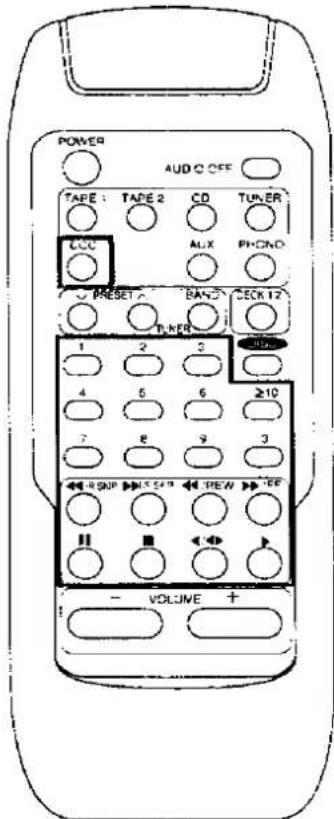 | To switch the remote control transmitter to DCC operation mode | The input source for the amplifier will switch to the DCC deck which is connected to the "TAPE 2/DCC" terminals, and operation of the buttons listed below will be possible.The power supply of the DCC deck can be turned on by pressing this button for approximately 2 seconds.(This may not be possible with some models.) |
| To start play | ||
| To select by track number | This is only effective for commercially-available DCC tapes and for other DCC tapes for recording purposes which have had track numbers recorded.(Example: Track 9)(Example: Track 12)After the desired track has been searched for, the unit will return to the condition before the button was pressed (playing back, stopped or paused). | |
| To change the tape side | ||
| To fast-forward or rewind the tape | (Backward) (Forward) | |
| To skip a track | (Backward) (Forward) | |
| To stop play temporarily | Press to resume play. | |
| To stop play |
To operate a cassette deck
 | To switch the remote control transmitter to cassette deck operation mode | TAPE 1○ The input source for the amplifier will switch to the tape deck which is connected to the "TAPE 1" terminals, and operation of the buttons listed below will be possible.or TAPE 2○ The input source for the amplifier will switch to the cassette deck which is connected to the "TAPE 2/DCC" terminals, and operation of the buttons listed below will be possible.The power supply of the cassette deck can be turned on by pressing TAPE 1 or TAPE 2 for approximately 2 seconds. (This may not be possible with some models.) |
| (Only when using a double cassette deck)Select the tape deck (DECK 1/DECK 2) | DECK 1?○ The remote control indicator of the cassette deck will change each time the button is pressed. | |
| To start play | (Reverse) (Forward) | |
| To fast-forward or rewind the tape | With this Technics cassette deck, the "TPS" function can be used to move to the beginning of a track during playback. | |
| To stop play temporarily | II○ Press ○ or ○ to resume play | |
| To stop play | ○ | |
To operate a CD player (or CD changer)
 | To switch the remote control transmitter to CD operation mode | The input source for the amplifier will switch to the CD player and operation of the buttons listed below will be possible.The power supply of the CD player or CD changer can be turned on by pressing this button for approximately 2 seconds. (This may not be possible with some models.) |
| To start play | ||
| To start play from the desired track | ||
| To skip a track | ||
| To search for the desired place | [In the play or pause mode]Keep pressing until the desired place is reached.(Backward) (Forward)NoteThis operation is not possible in cases where the CD player or CD changer is connected by means of a remote control cable. | |
| To stop play temporarily | ||
| To stop play |
To operate a tuner
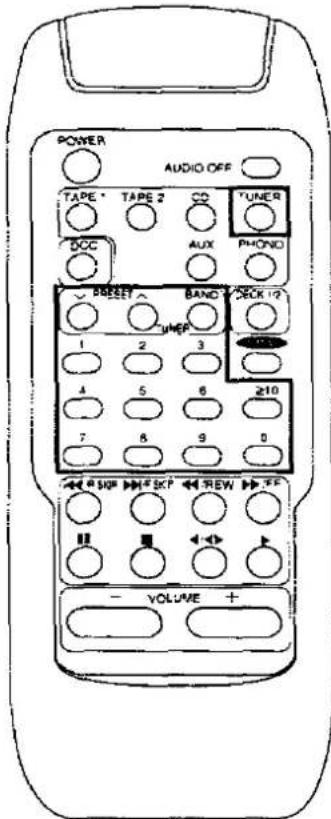 | To switch the remote control transmitter to tuner operation mode | The input source for the amplifier will switch to the tuner, and operation of the buttons listed below will be possible.The power supply of the tuner can be turned on by pressing this button for approximately 2 seconds.(This may not be possible with some models.) |
| To select the desired channel sequentially | ||
| To select the desired channel directly | ||
| To select the desired band | The band changes each time the button is pressed. | |
Battely notes
- Do not mix old and new batteries, or batteries of different types (carbon and alkaline, etc.).
- Always remove old, weak or worn-out batteries promptly and dispose of them properly.
• The average battery life is about one year.
Although the battery life varies depending on how often the device is used, you should generally replace the batteries about once a year. - The batteries should be replaced if commands from the remote control transmitter do not operate the unit even when the transmitter is held close to the front panel.
-
Never subject batteries to excessive heat or flame; do not attempt to disassemble them; and be sure they are not short-circuited.
-
If you will not use the remote control for a long period of time, remove the batteries and store them in a cool, dark place.
- If a battery leaks, remove all batteries and dispose of them properly. Thoroughly clean the battery compartment before inserting new batteries.
If the leaking electrolyte comes into contact with skin or clothes, flush with water immediately. - Keep batteries out of reach of children.
- Do not use rechargeable type batteries.
- Do not attempt to recharge alkaline or carbon batteries
- Do not dispose of used batteries in household rubbish.

Brand : TECHNICS
Model : RAK-SSU129WH
Category : Remote control