DP-85 - Pedometer Professor - Free user manual and instructions
Find the device manual for free DP-85 Professor in PDF.


User questions about DP-85 Professor
0 question about this device. Answer the ones you know or ask your own.
Ask a new question about this device
Download the instructions for your Pedometer in PDF format for free! Find your manual DP-85 - Professor and take your electronic device back in hand. On this page are published all the documents necessary for the use of your device. DP-85 by Professor.
USER MANUAL DP-85 Professor
Directions for use - digital pedometer Professor DP-85
Congratulations for purchasing the easy to handle, ultra lightweight digital pedometer Professor. We hope that it will provide effective assistance for securing your health, condition and energy.
The pedometer counts steps while walking or running according to waste movement. Therefore the pedometer should be fixed by a belt or on training apparel at waist level. Mind the horizontal level placement for accurate measuring. Fasten the pedometer safely by a clip to prevent from losing or damaging by dropping.
Note: Incorrect placement of the pedometer can lead to incorrect measuring and inaccurate readings the number of steps, thus also the distances walked and burned calories.
Functions and buttons
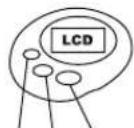
A. LCD - 5 place single-row display
B. MODE repeatedly press the MODE button to change from mode to mode in order
C. SET button - begins, changes, and ends the setup mode.
D. UP button - in the time setup mode, this button changes the system from 12-hour to 24-hour and vice versa system. When this button is held in data setup mode longer, the values set run faster.
E. RESET button - If the pedometer does not react to any button, press the RESET button to restart the pedometer.
SET UP MODE

RESET
Functions and buttons
A. Deleting the memory: Access the „Step" mode by pressing the MODE button. The number of steps so far will appear on the display. Press and hold the UP button for 2 seconds. This deletes the memory of steps. The pedometer counts the number steps up to 39999 steps and then again begins counting from 0
B. Weight and average step length setup: Hold the SET button down for 2 seconds in the „Step“ mode. Then you can set your weight and average step length. The display will show 00kg and 00cm. Press the SET button once and the first figure (kg) will begin to flash. The weight range is adjustable from 10-150kg. Use the UP button to set your weight (the values set run faster by holding the button down). Press the SET button again and the second figure (cm) will begin to flash. Use the UP button to set the average length of your step. The range is adjustable from 0.1 to 1m. If a button is not pressed within 60 seconds, the display returns to the time mode. Note : Once the length of your step is set, it will be stored in the memory until the battery is replaced or the device is reset. The initial step and weigh values is set at 10 cm and 10 kg is stored in the memory when the battery is replaced.
C. Time setup: Hold the SET button down for 2 seconds in the „Time" mode (display shows 00:00). The first two digits will begin to flash (hour). Use the UP button to adjust the hour. Press the SET button again and the second two digits will begin to flash (minutes). Use the UP button to adjust the minutes. If a button is not pressed within 60 seconds, the display returns to the time mode.
Since this pedometer is a sensitive and accurate electronic device, please use it carefully and correctly. Do not open it, apart from replacing the battery (1x AG10 battery cell, 1.5V). Taking the device apart improperly can result in its damaging and inaccurate measuring.
Replacing the battery and maintenance
The device operates with 1 x AG10 battery cell 1.5V. Unscrew the 2 Phillips screws on the back side of the pedometer and remove the clip with the battery cover. Replace the battery and mind the correct polarity! Do not clean the device with strong cleaning and abrasive agents. Do not dip the device into water or other solutions. Do not expose the device to high temperatures. Do not try to repair the device yourself.

Device and battery disposal
When the service time of this device passes, do not throw it into a container with mixed waste but submit it to the determined place. Batteries are classified as ha-
"zarcous waste and due to its harmful impact on the environment, is can not come into contact with municipal refuse. Return the batteries to the store from which
and contact with municipal lease. Return the batteries to the store from which they were purchased or to your local scrap-yard. The reverse collection from the customer is without the right for payment for this collection. More information regarding reverse collections of electronic device waste and batteries can be found under waste act no. 185/2001 Sb. as amended at www.zasobovani.cz/odben/ and on the webpage www.ecobat.cz (battery disposal) and www.asekol.cz (electronic device disposal).
Guarantee terms
We provide a guarantee for the flawless operation of this Professor label device for the duration of 24 months from the date of purchase by the customer. The guarantee applies to defects caused by a manufacturing error or defects in material. The guarantee for the flawless operation of the device is provided only when the proof of purchase is submitted, consisting of the product type, purchase date and store stamp. The guarantee can be applied at the organization, where the product was purchased. The guarantee is invalid if the defect is caused by mechanical damage (e.g. during transport), incorrect utilization or using the device contrary to the directions for use, by inevitable damaging (e.g. natural disaster), if the product was connected to different voltage level other than the level specified, and also if the product is repaired by persons not authorized for this procedure.