
SC-800 RDS - Car radio VOLVO - Free user manual and instructions
Find the device manual for free SC-800 RDS VOLVO in PDF.


Pick your language and provide your email: we'll send you a specifically translated version.
| Product Type | Car Stereo with RDS, Cassette, and CD Changer Control |
| Brand | Volvo |
| Model | SC-800 RDS |
| Dimensions (W x H x D) | 7.0 x 2.0 x 5.0 inches (178 x 50 x 127 mm) – standard 1-DIN |
| Weight | 1.5 lbs (0.68 kg) |
| Power Supply | 12V DC (negative ground) |
| Power Output | 4 x 20W RMS (max 50W per channel) |
| Tuner Bands | FM1, FM2, AM (MW/LW) |
| RDS Functions | AF, TP, PTY, EON, Traffic Announcements |
| Cassette Player | Auto-reverse, tape direction indicator, electronic tuning |
| CD Changer Control | Compatible with Volvo CD changer (sold separately) |
| Audio Controls | Bass, Treble, Balance, Fader, Loudness |
| Preset Stations | 18 FM + 6 AM (total 24 presets) |
| Anti-Theft Code | 4-digit user-programmable security code |
| Display | LCD with RDS text and station frequency |
| Cleaning Instructions | Use a soft, dry cloth; avoid harsh chemicals; clean tape heads with a cleaning cassette |
| Safety Warning | Disconnect battery before installation; professional installation recommended |
| Spare Parts Availability | Contact Volvo authorized dealer; use only genuine parts |
| Warranty | Standard 1-year limited warranty from date of purchase |
| Manual Languages | English, Dutch, German, French, Swedish (multilingual user manual) |
Frequently Asked Questions - SC-800 RDS VOLVO
How do I set the clock on the Volvo SC-800 RDS?
Press and hold the CLK button (or similar) until the hour digits flash. Use the SEEK or TUNE knob to adjust, then press again to set minutes. Refer to your manual for exact steps.
What does RDS stand for and how do I use it?
RDS stands for Radio Data System. It displays station name, song info, and supports traffic announcements (TP), alternative frequencies (AF), and program types (PTY). Press the RDS button to cycle modes.
How do I play a cassette tape?
Insert the cassette with the exposed tape facing right and the window facing up. The unit will automatically play. Use REV, RPT, and NXT buttons for controls.
I forgot my anti-theft code. What should I do?
Contact a Volvo dealer with your radio’s serial number. The code can be retrieved from their database. Do not attempt to guess, as this may lock the unit permanently.
Can I connect an external CD changer?
Yes, the SC-800 RDS has a dedicated port for a Volvo CD changer (model CD-300 recommended). Connect via the round DIN cable and control it from the head unit.
Why is there no sound from the speakers?
Check the volume level and attenuation. Ensure the speaker wires are correctly connected and not shorted. Verify the fader and balance settings are centered.
How do I clean the cassette player?
Use a dry or slightly moist (isopropyl alcohol) cleaning cassette. Insert it and play for 10-15 seconds. Do not use abrasive materials. Regular cleaning prevents sound quality issues.
What does the TP indicator mean?
TP stands for Traffic Programme. It lights when a station broadcasts traffic announcements. When active, the radio will automatically switch to traffic info even in other modes.
How do I store radio stations as presets?
Tune to the desired station, then press and hold one of the preset buttons (1-6) for a few seconds until a beep sounds. Repeat for other stations. Use FM1, FM2, and AM banks for more.
The display is dim. Can I adjust the brightness?
Yes, press the DIM button (if available) to cycle through brightness levels. Alternatively, adjust the dashboard dimmer control, as the radio syncs with the vehicle’s lighting.
User questions about SC-800 RDS VOLVO
0 question about this device. Answer the ones you know or ask your own.
Ask a new question about this device
No questions yet. Be the first to ask one.
Download the instructions for your Car radio in PDF format for free! Find your manual SC-800 RDS - VOLVO and take your electronic device back in hand. On this page are published all the documents necessary for the use of your device. SC-800 RDS by VOLVO.
USER MANUAL SC-800 RDS VOLVO
VOLVO

- ● Aan/uit (draaien)
Volume (draaien)


(604)05385
Antidiefstalcode
*“Middle Of the Road Music”
1:17
Programmatype:

Programmatype
A - Cassette-opening


CD-wisselaar
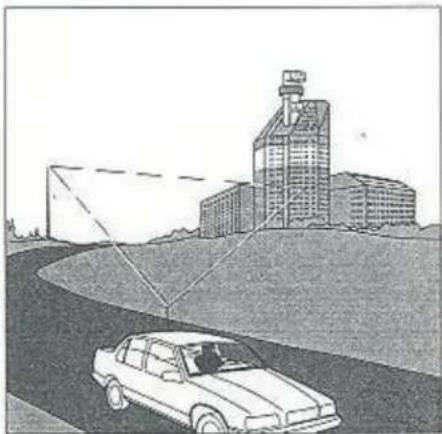
Radiosignalen
Interferentie
Table of contents
Click a title to access it
Manual assistant
Powered by Anthropic
Waiting for your message
Product information
Brand : VOLVO
Model : SC-800 RDS
Category : Car radio