X4 - Bike light Roxim - Free user manual and instructions
Find the device manual for free X4 Roxim in PDF.


| Product Type | Bicycle light (headlight) |
| Model | X4 (also X4A, X4W, X4AN) |
| Brand | Roxim |
| Mounting Options | Handlebar, helmet (optional kit), front fork (optional kit) |
| Power Source | Integrated USB lithium battery (X4, X4A, X4W) or 4AA battery box (X4AN) |
| Charging | DC 5V USB port, requires charger with output ≥1A |
| Operational Modes | Standard (Manual) and Advanced (AUTO) |
| Auto Mode Features | Daytime Running Light (DRL), stop detection (30s -> DRL, 4min -> OFF), ambient light sensor (dusk -> DRL on, dark -> main LED on) |
| Battery Indicator | 4-lamp LED: steady blue (full), blinking blue/red (<70%), slow red (low), fast red (<5%) |
| Charging Indicator | Green steady (charging), off (complete), blinking green (incompatible charger) |
| Brightness Levels | HI, MID, LOW, DRL |
| Switch Operation | Press 0.5s for Manual mode; press 2s for AUTO mode |
| Compatible Accessories | Helmet Mounting Kit (MB XF), Front Fork Mounting Kit, AC Fast Charger, USB power cable (optional) |
| Compatibility Note | USB power bank must support max discharge ≥1.2A; some power banks may have compatibility issues |
| Battery Recommendation | Rechargeable AA batteries for X4AN; alkaline not suggested |
| Dimensions | Not specified in manual; typical bike light size |
| Weight | Not specified in manual; approx. 150-200g |
| Manufacturer | Roxim, Taiwan (No. 5, Lane 388, Sec. 1, Jieshou Rd., Sanxia, New Taipei City 237) |
| Manual Language | English (available for download) |
Frequently Asked Questions - X4 Roxim
User questions about X4 Roxim
0 question about this device. Answer the ones you know or ask your own.
Ask a new question about this device
Download the instructions for your Bike light in PDF format for free! Find your manual X4 - Roxim and take your electronic device back in hand. On this page are published all the documents necessary for the use of your device. X4 by Roxim.
USER MANUAL X4 Roxim
X4 / X4A / X4W / X4AN
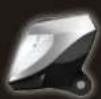
UGX4A160H20ECA
No. 5, Lane 388, Sec. 1, Jieshou Rd., Sanxia, New Taipei City 237, Tokyo
Sanxia, New Taipei City 237, Taiwan TEL: 886 (2) 8671-1688
FAX:886(2)8671-7388
Services: services@roxim.net
Package Contents
包裝內容
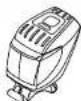
① X4 Bod
重烧本聘
(含把手固定座)
USB锂電池
及電池袋
USB Union
358 Li-ion battery & bar
BPC-126U
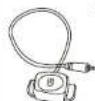
4 wire
note
(24W)
(僅
(4W適用)
RB-1

B
^
Velcro
strap
x2
帽固定座
束帶x2
Helmet Mounting Kit (Optional)
安全帽固定座組(選配)
MB XF
Mounti
Moans
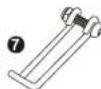
Front York eg Kit (Optional
ng Kit (Optional)
前又固定座(适配)
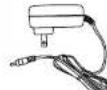
AC快速充电器(适配)
AC Fast Charger
(Optional)
- 2017年

。
USB power cable
(Optional)
USB 電源線 (選配)
CBL-USB
BB-4A
4AA Battery Box & Bag
(X4AN only)
4AA 電池盒及
(X4AN標配)
D
m = 311
1
[Non-Text]
法定代表人:
A
□
m = 311
池袋
A
1
m = 311
How To Mount 安装方式
Mount to Handlebar 安装至把手
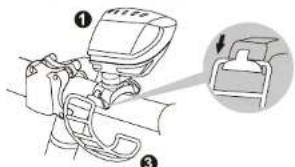
text_image
Diagram showing a mechanical device with labeled parts and an inset view of the switch mechanism.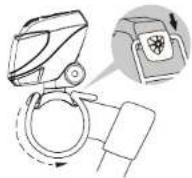
Mount to Helmet 安装至安全帽
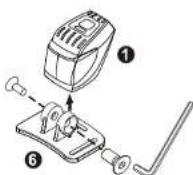
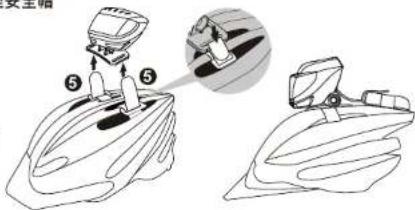
text_image
安全帽 ⑤ ⑤How To Connect
接線方式
Notes:
-
USB power bank should be capable of max. discharge current output >= 1.2A. Some power banks may have compatibility issue with lamp.
-
Recommend rechargeable AA batteries, Alkaline batteries are not suggested.
单位:
- USB電力銀行輸出電流車支援排量1.2
安培以上,部分電力銀行可能與電燈
- 表为AA在腹腹迷垫划
磁性AA電力。
X4W
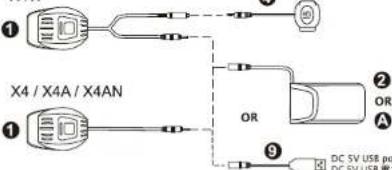
text_image
① X4 / X4A / X4AN ① OR ② OR A ⑨ DC 5V USB port DC 5V USB portHow To Charge
充電方法
Note:
USB wall charger or USB port must capable of constant current output > 1A. Some USB chargers or USB ports may have compatibility issue with battery integrated charger (blinking Green while battery charging is fail)
附件:
The twin operation modes, Standard/Manual and Advanced/AUTO are decided by pressing down the button 0.5 or 2.0 seconds.
Manual operation mode (0.5 sec):

[Non-Text]
AUTO operation mode (2 sec): In AUTO mode, press button to exit AUTO mode and enter Standard(Manual) mode.
Bicycle Motion
| MOVING ON | STOP : DRL | PARK : OFF |
| Bicycle Motion | Lighting Mode | |
| Stop for 30 seconds | DRL (power saving) | |
| Stop for 4 minutes | POWER OFF | |
Ambient lighting

| Ambient Lighting | Lighting Mode |
| BRIGHT | LED lights OFF |
| DUSK | DRL lights ON |
| DARK | Main LED light ON |
Battery status
| HI | MID | LOW | DRL |
4 Lamp LED Indicator: shows the battery status.
| Battery Status | State of Indicator |
| FULL | Steady BLUE |
| < 70% | Blinking BLUE and RED |
| LOW | Slow blinking RED |
| < 5% | Fast blinking RED |
Note: LED indicator will not show the status of the light until LOW battery under AUTO mode.
Battery LED Indicator: The LED indicator on battery is used for status of the integrated battery charger.
Green steady ON: Battery is charging
Green turns OFF: Charging completed
Hashing Green: Incompatible charger, cannot charge