S668PPW14 - Uncategorized Sandstrøm - Free user manual and instructions
Find the device manual for free S668PPW14 Sandstrøm in PDF.


| Product Type | Portable Power Bank |
| Brand | Sandstrøm |
| Model | S668PPW14 |
| Battery Type | Lithium (18650 cell) |
| Battery Capacity | 6800 mAh |
| Input | DC 5V 2000mA |
| Output 1 | DC 5V 1000mA (1A) |
| Output 2 | DC 5V 2100mA (2.1A) |
| Number of USB Ports | 2 |
| Charging Time | Approximately 4.5 hours |
| Dimensions (H x W x D) | 97 x 45 x 26 mm |
| Weight | Approx. 150 g |
| Power Level Indicators | 4 LED indicators (1-4 lights: <25%, 25-50%, 50-75%, 75-100%) |
| Main Functions | Charge smartphones, tablets, and other USB devices; power level check |
| Usage | Press Power Check button to start charging; indicators flash during own charging |
| Safety Instructions | Do not drop, disassemble, immerse in water, expose to fire or heat. Do not dispose with household waste. |
| First Use | Fully charge before first use |
| Maintenance | Keep dry; recharge periodically if not used; store in cool, dry place |
| Spare Parts & Repairability | Not user-serviceable; no spare parts available. Do not attempt to repair. |
| Disposal | Recycle at designated WEEE collection point; do not dispose with household waste. |
Frequently Asked Questions - S668PPW14 Sandstrøm
User questions about S668PPW14 Sandstrøm
0 question about this device. Answer the ones you know or ask your own.
Ask a new question about this device
Download the instructions for your Uncategorized in PDF format for free! Find your manual S668PPW14 - Sandstrøm and take your electronic device back in hand. On this page are published all the documents necessary for the use of your device. S668PPW14 by Sandstrøm.
USER MANUAL S668PPW14 Sandstrøm
natural_image
White power bank with two USB ports and a gray control panel (no visible text or symbols)Safety Warnings
GB
- Do not drop, tamper, disassemble or attempt to repair the unit by yourself.
- Do not immerse it in water or expose it to wet conditions.
- Do not expose it to fire or any heat source.
- Do not dispose the unit in your household waste.
Sikkerhetsadvarsler
NO
- When using the unit for the first time, charge it fully first.
- While charging, the indicators will flash. When fully charged, the indicators will turn off. You can also turn the indicators off anytime by pressing the Power Check button.
- Recharge the unit if needed. Check the current power level by pressing the Power Check button.

Power Check button with Indicators
| Number of light up indicator Power level | |
| 1<25% | |
| 225%-50% | |
| 350%-75% | |
| 475%-100% | |
Charging Digital Devices
Press the Power Check button to start charging.
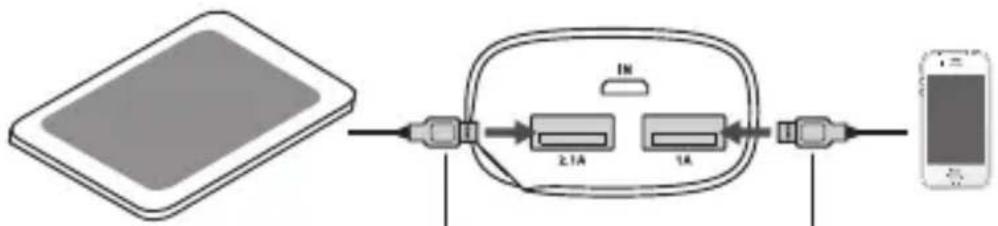
flowchart
graph LR
    A["Table with LCD"] --> B["Inverter"]
    B --> C["2.1A"]
    B --> D["1A"]
    C --> E["USB cable"]
    D --> F["USB cable"]
    G["Smartphone"] --> H["Data"]
For charging mobile phones For charge
Specifications
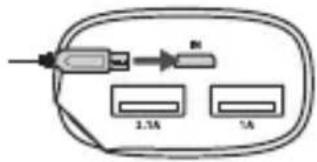
| Battery type Lithium (18650) | cell |
| Capacity 6800 mAh | |
| Input DC 5V 2000mA | |
| Output 1A DC 5V 1000mA | 2.1A DC 5V 2100mA |
| Dimension (H x W x D) 97 x 45 x 26 mm | |
| Charging time About 4.5 hours | |
Features and specifications are subject to change without prior notice.
Ladeenhet

natural_image
Simple line drawing of a computer monitor with ports and scroll (no text or symbols)Strømbryter med indikator-lamper
| Antall tente indikatorer Effekttrinn | |
| 1<25% | |
| 225%-50% | |
| 350%-75% | |
| 475%-100% | |
flowchart
graph LR
    A["Table with Screen"] --> B["Internal Network"]
    B --> C["2.1A"]
    B --> D["1A"]
    C --> E["Mobile Device"]

natural_image
Simple line drawing of a computer monitor with ports and cables (no text or symbols)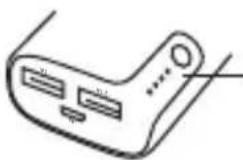
flowchart
graph LR
    A["Table with Screen"] --> B["Internal Network"]
    B --> C["2.1A"]
    B --> D["1A"]
    C --> E["Mobile Device"]
For at oplade tabletter For at oplade mobiltelefoner
Specifikationer
| Batteritype | Litium (18650) celle |
| Kapacitet | 6800 mAh |
| Input | DC 5V 2000mA |
| Output | 1A DC 5V 1000mA2,1A DC 5V 2100mA |
| Størrelse (H x B x D) | 97 x 45 x 26 mm |
| Opladningstid | Omkring 4.5 timer |
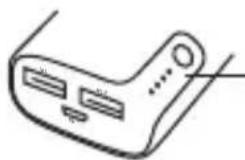
Tlačítko Power Check (kontrola nabití) s kontrolkami

Tlačidlo na kontrolu napájania s indikátormi
SK
The symbol on the product or its packaging indicates that this product must not be disposed of with your other household waste. Instead, it is your responsibility to dispose of your waste equipment by handing it over to a designated collection point for the recycling of waste electrical and electronic equipment. The separate collection and recycling of your waste equipment at the time of disposal will help conserve natural resources and ensure that it is recycled in a manner that protects human health and the environment.
For more information about where you can drop off your waste for recycling, please contact your local authority, or where you purchased your product.
NO
Brand : Sandstrøm
Model : S668PPW14
Category : Uncategorized