
G-Shock DW-6900BBA-1ER - Watch CASIO - Free user manual and instructions
Find the device manual for free G-Shock DW-6900BBA-1ER CASIO in PDF.


User questions about G-Shock DW-6900BBA-1ER CASIO
0 question about this device. Answer the ones you know or ask your own.
Ask a new question about this device
Download the instructions for your Watch in PDF format for free! Find your manual G-Shock DW-6900BBA-1ER - CASIO and take your electronic device back in hand. On this page are published all the documents necessary for the use of your device. G-Shock DW-6900BBA-1ER by CASIO.
USER MANUAL G-Shock DW-6900BBA-1ER CASIO
Operation Guide 3230/3232
CASIO®
About This Manual
- Depending on the model of your watch, display text appears either as dark figures on a light background or light fi gures on a dark background. All sample displays in this manual are shown using dark fi gures on a light background.
- Button operations are indicated using the letters shown in the illustration.
- Depending on the model of your watch, display text appears either as dark figures on a light background or light fi gures on a dark background. All sample displays in this manual are shown using dark fi gures on a light background.
- Button operations are indicated using the letters shown in the illustration.
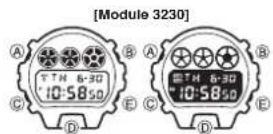
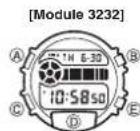
E-1
Contents
General Guide....E-4
Timekeeping....E-6
Alarm E-10
Countdown Timer....E-14
Stopwatch E-17
Specifications....E-19
Procedure Lookup
The following is a handy reference list of all the operational procedures contained in this manual.
To set the time and date....E-6
To switch the backlight function on and off....E-9
To set the alarm time....E-12
To stop the alarm E-13
To switch an alarm and Hourly Time Signal on and off....E-13
To set the countdown time....E-14
To use the countdown timer....E-15
To switch auto repeat timing on and off E-16
To measure elapsed time....E-17
To record split times E-18
To time first and second place finishes....E-18
E-2
E-3
General Guide
All of the illustrations in this manual show Module 3230.

flowchart
graph LR
    A["Timekeeping"] -->|Press Ⓐ.| B["Alarm"]
    B --> C["Countdown Timer"]
    C --> D["Stopwatch"]
E-4
E-5
Timekeeping
Day of week

Hour:Minutes Seconds
To set the time and date
-
Press Ⓐ while in the Timekeeping Mode. The seconds digits flash on the display because they are selected.
-
Press (C) to change the selection in the following sequence.
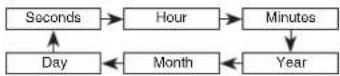
- While the seconds digits are selected (fl ashing), press E to reset the seconds to "00". If you press E while the seconds count is in the range of 30 to 59, the seconds are reset to "00" and 1 is added to the minutes. If the seconds count is in the range of 00 to 29, the minutes count is unchanged.
E-6
While any other digits (besides seconds) are selected (fl ashing), press 4. Ⓔ to increase the number. Holding down Ⓔ changes the number at high speed.
- To switch between the 12-hour and 24-hour formats, press while some digits are fl ashing.
After you set the time and date, press 5. (A) to return to the Timekeeping Mode.
• The day of the week is automatically set in accordance with the date.
• The date can be set within the range of January 1, 2000 to December 31, 2099.
- If you do not operate any button for a few minutes while a selection is flashing, the flashing stops and the watch goes back to the Timekeeping Mode automatically.
E-7
About the backlight
When you switch the backlight function on, the backlight of the watch fl ashes whenever alarm (page E-10), countdown timer or hourly time signal is sounding. - Pressing Ⓐ in any mode illuminates the display, regardless of the backlight's on/off setting.
- The backlight of this watch employs an electro-luminescent (EL) light, which loses its illuminating power after very long term use.
Frequent use of the backlight shortens the battery life.
The watch will emit an audible sound whenever the display is illuminated. This is caused by a transistor that vibrates when the EL panel lights up. It does not indicate malfunction of the watch.
The illumination provided by the backlight may be hard to see when viewed under direct sunlight.
The backlight automatically stops illuminating whenever an alarm sounds.
To switch the backlight function on and off
In the Timekeeping Mode, hold down (E) for about two seconds to switch the backlight function on and off. When you switch the backlight function on, an indicator appears on the display as shown.
Backlight function on indicator
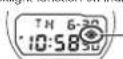
The backlight function indicator remains on the display in all modes until you switch • the backlight function off.
The above operation controls operation of the backlight function only. It does not affect operation of audible tones and signals.
E-8
E9
Alarm
Alarm on indicator
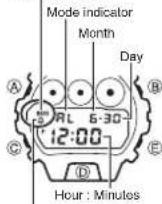
Hourly time signal on
indicator
E-10
You can set an alarm with hour, minutes, month, and day. When the alarm is on, the alarm sounds for 20 seconds at the preset time. When the Hourly Time Signal is on, the watch beeps every hour on the hour.
Alarm Types
The types of alarm you get depends on the information you set.
To set a daily alarm
Set the hour and minutes for the alarm time. Set "-" for the month and "-" for the day (see step 3 under "To set the alarm time"). This type of setting causes the alarm to sound every day at the time you set.
To set a date alarm
Set the month, day, hour and minutes for the alarm time. This type of setting causes the alarm to sound at the specific time, on the specific date you set.
• To set a 1-month alarm
Set the month, hour and minutes for the alarm time. Set “—” for the day (see step 3 under “To set the alarm time”). This type of setting causes the alarm to sound every day at the time you set, only during the month you set.
• To set a monthly alarm
Set the day, hour and minutes for the alarm time. Set “-” for the month (see step 3 under “To set the alarm time”). This type of setting causes the alarm to sound every month at the time you set, on the day you set.
E·11
To set the alarm time
Press 1. Ⓐ while in the Alarm Mode until the hour digits start to flash on the display. The hour digits flash because they are selected.
At this time the alarm is automatically switched on.
Press 2. © to change the selection in the following sequence.

- Press Ⓔ to increase the selected digits. Holding down Ⓔ: changes the number at high speed.
- The format (12-hour and 24-hour) of the alarm time matches the format you select for normal timekeeping.
- When setting the alarm time using the 12-hour format, take care to set the time correctly as morning or afternoon.
- After you set the alarm time, press (A) to return to the Alarm Mode.
- If you do not operate any button for a few minutes while a selection is flashing, the flashing stops and the watch goes back to the Alarm Mode automatically.
E-12
To stop the alarm
Press any button to stop the alarm after it starts to sound.
To switch an alarm and Hourly Time Signal on and off
Press (E) while in the Alarm Mode to change the status of an alarm (see "Alarm Types" on page E-10) and Hourly Time Signal in the following sequence.


text_image
Alarm on indicator A RL 6-30 Hourly time signal on indicator A RL 6-30 BE-13
Countdown Timer
Mode Indicator
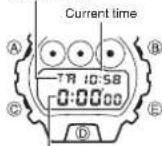
Hours : Minutes Seconds
The countdown timer can be set within a range of 1 second to 24 hours. When the countdown reaches zero, an alarm sounds for 10 seconds or until you press any button.
To set the countdown time
Press 1. Ⓐ while in the Countdown Timer Mode. The hours digit flashes on the display because it is selected. Press 2. Ⓞ to change the selection in the following sequence.

- Press Ⓔ to increase the selected number. Holding down Ⓔ changes the number at high speed.
• To set the starting value of the countdown time to 24 hours, set 0:00'00.
E-14
After you set the countdown time, press 4. Ⓐ to return to the Countdown Timer Mode.
If you do not operate any button for a few minutes while a selection is fl ashing, the fl ashing stops and the watch goes back to the Countdown Timer Mode automatically.
To use the countdown timer
Press 1. E while in the Countdown Timer Mode to start the countdown timer. Press 2. E again to stop the countdown timer.
- You can continue countdown timer operation by pressing (E).
Stop the timer and then press 3. Ⓐ until the countdown time is reset to its starting value.
- When the end of the countdown is reached and auto repeat timing is off, the alarm sounds for 10 seconds or until you stop the alarm by pressing any button.
Countdown timing stops, and the countdown time is automatically reset to its starting value after the alarm stops.
E-15
To switch auto repeat timing on and off
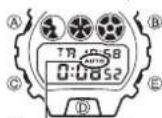
Auto repeat on indicator
Press 1. A while in the Countdown Timer Mode. The hours digit flashes on the display because it is selected. Press 2. D to switch auto repeat on and off. Press 3. A to return to the Countdown Timer Mode. When the end of the countdown is reached while • auto repeat is on, the alarm sounds, but the starting countdown time is reset and countdown timing starts again automatically whenever the countdown reaches zero. You can stop timing by pressing (E), and manually reset to the starting countdown time by pressing (A).
Stopwatch
Mode indicator
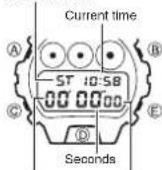
Minutes
The Stopwatch Mode lets you measure elapsed time, split times, and two finishes. The range of the stopwatch is 23 hours, 59 minutes, 59 seconds.
To measure elapsed time
Press 1. (E) to start the stopwatch.
Press 2. (E) to stop the stopwatch
You can resume the measurement operation by • pressing (E) again.
Press 3. Ⓑ to clear the stopwatch to all zeros. For the first 60 minutes, the display shows minutes, • seconds, and 1/100 second. After 60 minutes, the display format changes to show hours, minutes, and seconds.
E-16
E-17
To record split times
Press 1. Ⓔ to start the stopwatch.
Press 2. Ⓑ to display the timing up to that point. Stopwatch timing continues
internally
Press 3. (B) to clear the split time and to continue time measurement on the display.
You can repeat steps 2 and 3 as many times as you want.
Press 4. Ⓔ to stop the time measurement.
Press 5. Ⓑ to clear the stopwatch to all zeros.
To time first and second place finishes
Press 1. Ⓔ to start the stopwatch.
Press 2. (B) when the first fi nisher crosses the line, and record the time.
Press 3. Ⓔ when the second fi nisher crosses the line.
Press 4. Ⓑ to display the fi nishing time of the second fi nisher.
Press 5. (B) again to clear the stopwatch to all zeros.
Specifications
Accuracy at normal temperature: ±15 seconds a month
Timekeeping: Hour, minutes, seconds, pm (P), month, day, the day of the week
Time system: Switchable between 12-hour and 24-hour formats
Calendar system: Auto-calendar pre-programmed from the year 2000 to 2099
Alarm: Multi-function alarm, hourly time signal
Countdown Timer
Measuring unit: 1 second
Input range: from 1 second to 24 hours
Other: Auto-repeat function
Stopwatch
Measuring units: 1/100 second (for the first 60 minutes)
1 second (after 60 minutes)
Measuring capacity: 23 hours, 59 minutes, 59 seconds
Measuring modes: Elapsed time, split time and two fi nishes
Illumination: EL (electro-luminescent) backlight
E-19
E-18
Battery: One lithium battery (Type: CR2016)
Approximately 2 years on type CR2016 (assuming backlight operation
3.5 sec./day and alarm operation 20 sec./day)
Note: Frequent use of the backlight shortens the battery life noted above.