
Baby-G BA-110-4A2ER - Watch CASIO - Free user manual and instructions
Find the device manual for free Baby-G BA-110-4A2ER CASIO in PDF.


| Product Type | Watch (Analog-Digital) |
| Brand | Casio |
| Model | Baby-G BA-110-4A2ER |
| Display Type | Analog hands and digital LCD |
| Water Resistance | 100 meters (10 ATM) |
| Battery Type | Two SR726W silver oxide batteries |
| Battery Life | Approximately 2 years |
| Accuracy | ±30 seconds per month |
| Dimensions (approx) | 46 × 43 × 15 mm |
| Weight (approx) | 45 g |
| Clock Modes | Timekeeping, World Time, Alarm, Stopwatch, Countdown Timer |
| World Time | 48 cities (29 time zones) |
| Alarms | 5 daily alarms (1 snooze) + Hourly Time Signal |
| Stopwatch | 1/100 sec, up to 23:59'59.99", with split and two finishes |
| Countdown Timer | 1 minute to 24 hours, 1-second increments |
| Illumination | LED (light-emitting diode) |
| Button Operation Tone | On/Off (mute indicator) |
| Calendar | Full auto-calendar (2000 to 2099) |
| Time Format | 12-hour / 24-hour selectable |
| Daylight Saving Time | On/Off per city |
| Analog Hand Setting | Adjustable independently |
| Case Material | Resin |
| Band Material | Resin |
| Care Instructions | Clean with a soft dry cloth; avoid solvents; rinse after saltwater use |
| Spare Parts / Repairability | Battery replacement by authorized service; no user-serviceable parts |
Frequently Asked Questions - Baby-G BA-110-4A2ER CASIO
User questions about Baby-G BA-110-4A2ER CASIO
0 question about this device. Answer the ones you know or ask your own.
Ask a new question about this device
Download the instructions for your Watch in PDF format for free! Find your manual Baby-G BA-110-4A2ER - CASIO and take your electronic device back in hand. On this page are published all the documents necessary for the use of your device. Baby-G BA-110-4A2ER by CASIO.
USER MANUAL Baby-G BA-110-4A2ER CASIO
Operation Guide 5338
CASIO®
ENGLISH
Congratulations upon your selection of this CASIO watch.
E-1
About This Manual
E-2
- Depending on the model of your watch, display text appears either as dark figures on a light background, or light figures on a dark background. All sample displays in this manual are shown using dark figures on a light background.
- Button operations are indicated using the letters shown in the illustration.
• Note that the product illustrations in this manual are intended for reference only, and so the actual product may appear somewhat different than depicted by an illustration.
Things to check before using the watch
1. Check the Home City and the daylight saving time (DST) setting.
Use the procedure under "To configure Home City settings" (page E-12) to configure your Home City and daylight saving time settings.
Important
- Proper World Time Mode data depend on correct Home City, time, and date settings in the Timekeeping Mode. Make sure you configure these settings correctly.
2. Set the current time.
- See "Adjusting the Digital Time and Date Settings" (page E-15).
The watch is now ready for use.
E-3
Contents
E-2 About This Manual
E-3 Things to check before using the watch
E-7 Mode Reference Guide
E-11 Timekeeping
E-12 Configuring Home City Settings
E-12 To configure Home City settings
E-14 To change the Daylight Saving Time (summer time) setting
E-15 Adjusting the Digital Time and Date Settings
E-15 To configure the digital time and date settings
E-19 Checking the Current Time in a Different Time Zone
E-19 To enter the World Time Mode
E-19 To view the time in another time zone
E-4
E-20 To specify standard time or daylight saving time (DST) for a city
E-21 Using the Alarm
E-22 To enter the Alarm Mode
E-22 To set an alarm time
E-23 To test the alarm
E-24 To turn an alarm and the Hourly Time Signal on and off
E-24 To stop the alarm
E-25 Using the Stopwatch
E-25 To enter the Stopwatch Mode
E-26 To perform an elapsed time operation
E-26 To pause at a split time
E-26 To measure two finishes
E-28 Countdown Timer
E-28 To enter the Countdown Timer Mode
E-29 To configure the countdown timer
E-5
E-30 To perform a countdown timer operation
E-30 To stop the alarm
E-31 Adjusting the Analog Hand Setting
E-31 To adjust the analog time
E-33 Illumination
E-33 To turn on illumination
E-34 Button Operation Tone
E-34 To turn the button operation tone on and off
E-35 Troubleshooting
E-36 Main Indicators
E-38 Specifications
Mode Reference Guide
Your watch has 5 "modes". The mode you should select depends on what you want to do.
| To do this: Enter this mode: See: | ||
| • View the current date in the Home City • Confi gure Home City and daylight saving time (DST) settings • Confi gure time and date settings • Select 12 hour or 24 hour timekeeping • Adjust the analog hands | Timekeeping Mode E-11 | |
| View the current time in one of 48 cities (29 time zones) around the gloce | World Time Mode E-19. | |
| Sat an alarm time Alarm Mode E-21 | ||
| Use the slopwatch to measure elapsed time Slopwatch Mode E-25 | ||
| Use the countdown timer | Countown Timer Mode | E-28 |
E-6
E-7
Selecting a Mode
- Press © to cycle between the modes as shown below.
- In any mode (except when a setting mode, with flashing digits is on the display), press Ⓑ to illuminate the display.

flowchart
graph LR
    A["MON 6:30"] --> B["World Time Mode WT 9:08"]
    B --> C["Alarm Mode ALM 12:00"]
    C --> D["Stopwatch Mode STW 0:00"]
    D --> E["Countdown Timer Mode TMR 0:05"]
F-8
©
E-9
Operation Guide 5338
CASIO®
General Functions (All Modes)
The functions and operations described in this section can be used in all of the modes.
Auto Return Features
If you leave a setting mode with flashing digits on the display for two or three minutes without performing any operation, the watch exits the setting mode automatically.
Initial Screens
When you enter the World Time Mode or Alarm Mode, the data you were viewing when you last exited the mode appears first.
Scrolling
The Ⓑ and Ⓓ buttons are used on the setting mode to scroll through data on the display. In most cases, holding down these buttons during a scroll operation scrolls through the data at high speed.
E-10
Timekeeping
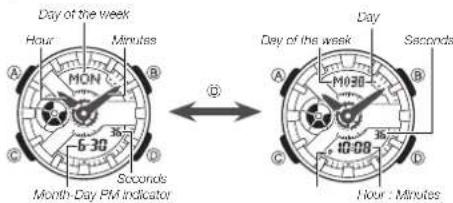
Use the Timekeeping Mode to set and view the current time and date.
• Each press of (D) toggles the digital display between the two formats shown nearby.
text_image
Day of the week Hour Minutes MON 5-30 Seconds Month-Day PMI indicator Day of the week A B C D 10:08 10:30 26 36 46 56 66 76 86 96 106 116 126 136 146 156 166 176 186 196 206 216 226 236 246 256 266 276 286 296 306 316 326 336 346 356 366 376 386 396 406 416 426 436 446 456 466 476 486 496 506 516 526 536 546 556 566 576 586 596 606 616 626 636 646 656 666 676 686 696 706 716 726 736 746 756 766 776 786 796 806 816 826 836 846 856 866 876 886 896 906 916 926 936 946 956 966 976 986E-11
Configuring Home City Settings
There are two Home City settings: actually selecting the Home City, and selecting either standard time or daylight saving time (DST).
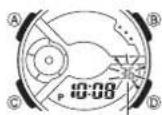
Seconds
To configure Home City settings
- In the Timekeeping Mode, hold down Ⓐ for about two seconds until the seconds start to ll ash. This is the setting mode.
- The watch will exit the setting mode automatically if you do not perform any operation for about two or three minutes.
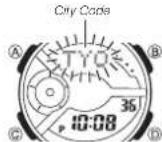
- Press © twice to move the fl ashing to the city code.
- For details about city codes, see the "City Code Table" at the back of this manual.
- Press (East) and (West) to select the city code you want to use as your Home City.
- Keep pressing (or (B) until the city code you want to select as your Home City appears on the display.
- After the setting is the way you want, press Ⓐ to return to the Timekeeping Mode.
Note
- After you specify a city code, the watch will use UTC® offsets in the World Time Mode to calculate the current time for other time zones based on the current time in your Home City.
* Coordinated Universal Time, the world-wide scientific standard of timekeeping. The reference point for UTC is Greenwich, England.
E-12
E-13
To change the Daylight Saving Time (summer time) setting
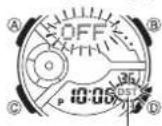
DST indicator
- In the Timekeeping Mode, hold down Ⓐ for about two seconds until the seconds start to flash. This is the setting mode.
- Press © to display the DST setting mode.
- Press Ⓓ to toggle between Daylight Saving Time (ON) and Standard Time (OFF).
- After the setting is the way you want, press Ⓐ to return to the Timekeeping Mode.
• The DST indicator appears to indicate that Daylight Saving Time is turned on.
Adjusting the Digital Time and Date Settings
Use the procedure below to adjust the digital time and date settings.
To confi gure the digital time and date settings
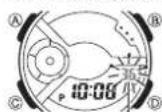
Seconds
- In the Timekeeping Mode, hold down Ⓐ for about two seconds until the seconds start to flash. This is the setting mode.
E-14
E-15
2. Press © to move the flashing in the sequence shown below to select the other settings.

flowchart
graph LR
    A["Day"] --> B["Month"]
    B --> C["Year"]
    C --> D["12/24 Hour Format"]
    D --> E["Minutes"]
    E --> F["Hour"]
    F --> G["Home City Code"]
    G --> H["DST"]
    H --> I["Seconds"]
- The following steps explain how to configure timekeeping settings only.
3. When the timekeeping setting you want to change is flashing, use ① and/or ⑧ to change it as described below.
| Screen To | Do this: Do this: | |
| 36 | Reset the seconds to 00 | Press (1). |
| OFF | Toggle between Daylight Saving Time (ON) and Standard Time (OFF) | Press (1). |
| TYO | Change the city code | Use (2) (East) and (3) (West). |
| 10:08 | Change the hour or minute | Use (3) (-) and (4) (-). |
| 12H | Toggle between 12-hour (12H) and 24-hour (24H) timekeeping | Press (4). |
| 6:3020:14 | Change the year, month, or day | Use (5) (-) and (6) (-). |
- Press Ⓐ to exit the setting mode.
E-17
E-16
Note
- For information about selecting a Home City and configuring the DST setting, see "Configuring Home City Settings" (page E-12).
- While 12-hour format is selected for timekeeping, a P (PM) indicator will appear for times from noon to 11:59 p.m. No indicator appears for times from midnight to 11:59 a.m. With 24-hour format, time is displayed from 0:00 to 23:59, without any P (PM) indicator.
- The watch's built-in full automatic calendar makes allowances for different month lengths and leap years. Once you set the date, there should be no reason to change it except after you have the watch's battery replaced.
• The day of the week changes automatically when the date changes.
Checking the Current Time in a Different Time Zone
Currently selected World Time City
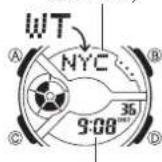
Current times in the currently selected World Time City
You can use the World Time Mode to view the current time in one of 29 time zones (48 cities) around the globe. The city that is currently selected in the World Time Mode is called the "World Time City".
To enter the World Time Mode
Use © to select the World Time Mode as shown on page E-8.
To view the time in another time zone
In the World Time Mode, use Ⓓ (East) to scroll through city codes.
F-18
E-19
Operation Guide 5338
CASIO®
To specify standard time or daylight saving time (DST) for a city
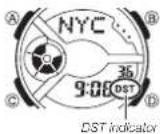
- In the World Time Mode, use Ⓓ (East) to display the city code (time zone) whose Standard Time/Daylight Saving Time setting you want to change.
-
Hold down (A) for about two seconds. • This toggles the city code you selected in step 1 between Daylight Saving Time (DST indicator displayed) and standard time (DST indicator not displayed).
-
You cannot use the World Time Mode to change the DST setting of the city currently selected as your Home City in the Timekeeping Mode.
- Note that you cannot switch between standard time/daylight saving time (DST) while UTC is selected as the World Time City.
- The standard time/daylight saving time (DST) setting affects only the currently selected time zone. Other time zones are not affected.
E-20
Using the Alarm
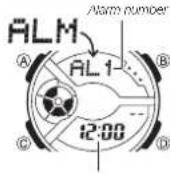
Alarm time (Hour : Minutes)
You can set fi ve independent daily alarms. When a daily alarm is turned on, an alarm tone will sound for about 20 seconds each day when the time in the Timekeeping Mode reaches the preset alarm time. One of the alarms is a snooze alarm, while the other four are one-time alarms. The snooze alarm operation will repeat every fi ve minutes, up to seven times. You can also turn on an Hourly Time Signal, which will cause the watch to beep twice every hour on the hour.
E-21
To enter the Alarm Mode
Use © to select the Alarm Mode as shown on page E-9.
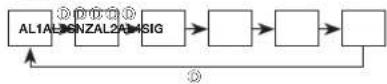
- The snooze alarm screen is indicated by SNZ, while the other alarm screens are numbered AL1 through AL4. The Hourly Time Signal screen is indicated by SIG.
- When you enter the Alarm Mode, the data you were viewing when you last exited the mode appears first.
To set an alarm time
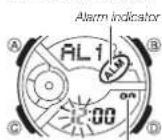
- In the Alarm Mode, use Ⓓ to scroll through the alarm screens until the one whose time you want to set is displayed.
Alarm ON/OFF indicator
E-22
- Hold down Ⓐ for about two seconds until the alarm time starts to 11 ash. This is the setting mode.
- Press © to move the fl ashing between the hour and minute settings.
- While a setting is flashing, use Ⓓ (+) and Ⓑ (−) to change it.
- When setting the alarm time using the 12-hour format, take care to set the time correctly as a.m. (no indicator) or p.m. (P indicator).
- Press Ⓐ to exit the setting mode.
To test the alarm
In the Alarm Mode, hold down Ⓓ to sound the alarm.
E-23
To turn an alarm and the Hourly Time Signal on and off
Snoozs siem indicator
In the Alarm Mode, use Ⓓ to select an alarm or the Hourly Time Signal.
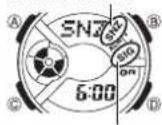
Hourly time signal on indicator
- When the alarm you want or the Hourly Time Signal is displayed, press (A) to toggle it between on (" on" displayed) and off (" --" displayed).
- The alarm on indicator (when any alarm is on), snooze alarm indicator (when the snooze alarm is on), and the Hourly Time Signal on indicator (when the Hourly Time Signal is on) are shown on the display in all modes.
To stop the alarm
Press any button.
Using the Stopwatch
The stopwatch measures elapsed time, split times, and two finishes.
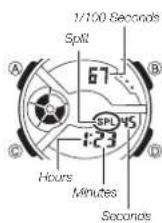
To enter the Stopwatch Mode
Use Ⓗ to select the Stopwatch Mode as shown on page E-9.
F-25
E-24
To perform an elapsed time operation
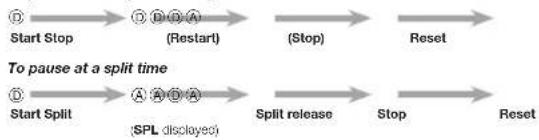
flowchart
graph LR
    A["Start Stop"] --> B["Restart (D) D A"]
    B --> C["Stop"]
    C --> D["Reset"]
    E["Start Split"] --> F["SPL displayed (A) A A D A"]
    F --> G["Split release"]
    G --> H["Stop"]
    H --> I["Reset"]
To measure two fi nishes

flowchart
graph LR
    A["Start Split"] --> B["SPL displayed"]
    B --> C["First runner fi nishes."]
    C --> D["Display time of first runner."]
    D --> E["Stop"]
    E --> F["Second runner fi nishes."]
    F --> G["Split release"]
    G --> H["Display time of second runner."]
    H --> I["Reset"]
E-26
Note
- The Stopwatch Mode can indicate elapsed time up to 23 hours, 59 minutes, 59.99 seconds.
- Once started, stopwatch timing continues until you press (ID) to stop it, even if you exit the Stopwatch Mode to another mode and even if timing reaches the stopwatch limit defi ned above.
- Exiting the Stopwatch Mode while a split time is frozen on the display clears the split time and returns to elapsed time measurement.
E-27
Countdown Timer
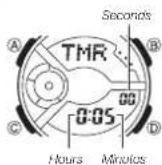
The countdown timer can be set within a range of one minute to 24 hours. An alarm sounds when the countdown reaches zero.
To enter the Countdown Timer Mode
Use © to select the Countdown Timer Mode as shown on page E-9.
To configure the countdown timer
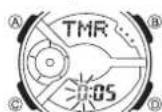
- While the countdown start time is on the display in the Countdown Timer Mode, hold down Ⓐ until the current countdown start time starts to flash, which indicates the setting mode.
- If the countdown start time is not displayed, use the procedure under "To perform a countdown timer operation" (page E-30) to display it.
- Press © to move the flashing in the sequence shown below to select other settings.

F-28
E-29
Operation Guide 5338
CASIO®
- Use Ⓓ (+) and Ⓑ (−) to change the hours and minutes settings.
- To count down from 24 hours, set a start time of 0:00.
- Press Ⓐ to exit the setting mode.
To perform a countdown timer operation

StartStop(Restart)(Stop)Reset
- Before starting a countdown timer operation, check to make sure that a countdown operation is not in progress (indicated by the seconds counting down). If it is, press Ⓑ to stop it and then Ⓐ to reset to the countdown start time.
To stop the alarm
Press any button.
Adjusting the Analog Hand Setting
Use the following procedure to adjust the analog hands so their settings match the digital time.
To adjust the analog time
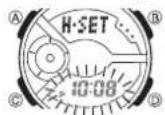
- In the Timekeeping Mode, hold down Ⓓ for about three seconds until the current time start to flash. This is the analog setting mode.
- Press ① to advance the analog time setting by 20 seconds. • Holding down ② advances the analog time setting at high speed.
E-30
E-31
- If you need to advance the analog time setting a long way, hold down ① until the time starts advancing at high speed, and then press ②. This locks the high-speed hand movement, so you can release the two buttons. High-speed hand movement continues until you press any button. It will also stop automatically after the time advances 12 hours or if an alarm (daily alarm, Hourly Time Signal, or countdown beeper) starts to sound.
- Press Ⓐ to exit the setting mode.
- The watch will automatically adjust the minute hand slightly to match its internal second count when you exit the setting mode.
Illumination
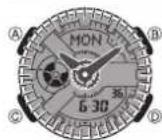
The face of the watch is illuminated for easy reading in the dark.
To turn on illumination
In any mode (except when a setting mode, with flashing digits is on the display), press Ⓔ to illuminate the display.
Illumination Precautions
- Illumination may be hard to see when viewed under direct sunlight.
- Illumination turns off automatically whenever an alarm sounds.
- Frequent use of illumination runs down the battery.
E-32
E-33
Button Operation Tone
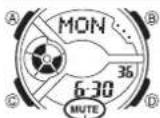
Mute indicator
The button operation tone sounds any time you press one of the watch's buttons. You can turn the button operation tone on or off as desired.
- Even if you turn off the button operation tone, alarms, the Hourly Time Signal, and other beepers all operate normally.
To turn the button operation tone on and off Hold down © until the button operation tone sounds (about 3 seconds).
- This will toggle the button operation tone either ON or OFF.
- The mute indicator is displayed while the button operation tone is turned off (muted).
- The mute indicator is displayed in all modes when the button operation tone is turned off.
E-34
Troubleshooting
Time Setting
■ The current time setting is off by hours.
Your Home City setting may be wrong (page E-12). Check your Home City setting and correct it, if necessary.
■ The current time setting is off by one hour.
You may need to change your Home City's standard time/daylight saving time (DST) setting. Use the procedure under "Adjusting the Digital Time and Date Settings" (page E-15) to change the standard time/daylight saving time (DST) setting.
World Time Mode
■ The time for my World Time City is off in the World Time Mode.
This could be due to incorrect switching between standard time and daylight saving time. See "To specify standard time or daylight saving time (DST) for a city" (page E-20) for more information.
E-35
Main Indicators
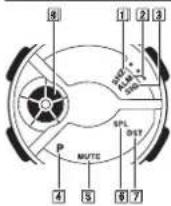
| Number Name See | ||
| 1 | Sncozo alarm indicator E-24 | |
| 2 | Alarm indicator | E-22 |
| 3 | Hourly time signal on indicator | E-24 |
| 4 | PM indicator | E-11 |
| 5 | Mute indicator | E-34 |
| 6 | Split indicator | E-25 |
| 7 | DST indicator | E-14 |
| 8 | Graphic indicator | - |
E-36
8 Graphic indicator
| Mode | Indicator Meaning |
| TimekeepingWorld TimeAlarm | Current second |
| Countdown Timer | Timer seconds |
| Stopwatch | Elapsed 1/10 seconds |
E-37
Specifications
Accuracy at normal temperature: ±30 seconds a month
Digital Timekeeping: Hour, minutes, seconds, p.m. (P), month, day, day of the week
Time format: 12-hour and 24-hour
Calendar system: Full Auto-calendar pre-programmed from the year 2000 to 2099 Other: Home City code (can be assigned one of 48 city codes); Standard Time/Daylight Saving Time (summer time)
Analog Timekeeping: Hour, minutes (hand moves every 20 seconds)
World Time: 48 cities (29 time zones)
Other: Daylight Saving Time/Standard Time
Alarms: 5 daily alarms (with 1 snooze alarm); Hourly time signal
Stopwatch:
Measuring unit: 1/100 second
Measuring capacity: 23:59'59.99"
Measuring modes: Elapsed time, split time, two finishes
F-38
Countdown Timer:
Measuring unit: 1 second
Countdown range: 24 hours
Countdown start time setting range: 1 minute to 24 hours (1-minute increments)
Illumination: LED (light-emitting diode)
Power Supply: Two silver oxide batteries (Type: SR726W)
Approximately 2 years on type SR726W (assuming alarm operation 20 seconds per day and one illumination operation 1.5 seconds per day)
Frequent use of illumination runs down the battery.
F-39
Operation Guide 5338
CASIO®
natural_image
Decorative corner design with symmetrical scrollwork and flourishes (no text or symbols)City Code Table
natural_image
Decorative corner design with symmetrical scrollwork and flourishes (no text or symbols)L-7
City Code Table
| City Code | City | UTC Offset/GMT Differential |
| PPG | Pago Pago | -11 |
| HNL | Honolulu | -10 |
| ANC | Anchorage | -9 |
| YVR | Vancouver | -8 |
| LAX | Los Angeles | |
| YEA | Edmonton | -7 |
| DEN | Denver | |
| MEX | Mexico City | -6 |
| CHI | Chicago | |
| MIA | Miami | -5YTO Tor |
| NYC | New York | |
| SCL | Santiago | -4 |
| YHZ | Halifax | |
| YYT | St. John's -3.5 |
| City Code | City | UTC Offset/GMT Differential |
| RIO | Rio De Janeiro | -3 |
| RAI | Praia | -1 |
| UTC | 0 | |
| LIS Lisbon | ||
| LON London | ||
| MAD Madrid | +1 | |
| PAR | Paris | |
| ROM Rome | ||
| BER Berlin | ||
| STO Stockholm | ||
| ATH Athens | +2 | |
| CAI | Cairo | |
| JRS Jerusalem | ||
| MOW Moscow | +3 | |
| JED Jeddah | ||
| THR Tehran | +3.5 | |
| City Code | City | UTC Offset/ GMT Differential |
| DXB | Dubai | +4 |
| KBL Kabul | +4.5 | |
| KHI Karachi | +5 | |
| DEL | Delhi | +5.5 |
| DAC | Dhaka | +6 |
| RGN | Yangon | +6.5 |
| BKK Bangkok | +7 | |
| SIN | Singapore | +8 |
| HKG Hong Kong | ||
| BJS | Beijing | |
| TPE | Taipei | |
| SEL | Seoul | +9 |
| TYO | Tokyo | |
| ADL | Adelaide | -9.5 |
| GUM Quam | +10 | |
| SYD Sydney | ||
| NOU Nournea | +11 | |
| WLG Wellington +12 | ||
* As of December 2012, the official UTC offset for Moscow, Russia (MOW) has been changed from +3 to +4, but this watch still uses an offset of +3 (the old offset) for MOW. Because of this, you should leave the summer time setting turned on (which advances the time by one hour) for the MOW time.
- This table shows the city codes of this watch.
• The rules governing global times (UTC offset and GMT differential) and summer time are determined by each individual country.
L-3