
Baby-G BA-130-7A1ER - Watch CASIO - Free user manual and instructions
Find the device manual for free Baby-G BA-130-7A1ER CASIO in PDF.


User questions about Baby-G BA-130-7A1ER CASIO
0 question about this device. Answer the ones you know or ask your own.
Ask a new question about this device
Download the instructions for your Watch in PDF format for free! Find your manual Baby-G BA-130-7A1ER - CASIO and take your electronic device back in hand. On this page are published all the documents necessary for the use of your device. Baby-G BA-130-7A1ER by CASIO.
USER MANUAL Baby-G BA-130-7A1ER CASIO
Operation Guide 5607
CASIO®
ENGLISH
Congratulations upon your selection of this CASIO watch.
To ensure that this watch provides you with the years of service for which it is designed, carefully read and follow the instructions in this manual, especially the information under "Operating Precautions" and "User Maintenance".
E
About This Manual
- Depending on the model of your watch, display text appears either as dark figures on a light background, or light figures on a dark background. All sample displays in this manual are shown using dark figures on a light background.
- Button operations are indicated using the letters shown in the illustration.
Note that the product illustrations in this manual are intended for reference only, and so the actual product may appear somewhat different than depicted by an illustration.
E-1
Things to check before using the watch
- Check the Home City and the daylight saving time (DST) setting.
Use the procedure under "To configure Home City settings" (page E-12) to configure your Home City and daylight saving time settings.
Important!
- Proper World Time Mode data depend on correct Home City, time, and date settings in the Timekeeping Mode. Make sure you configure these settings correctly.
- Set the current time.
• See "Adjusting the Digital Time and Date Settings" (page E-15).
The watch is now ready for use.
E-2
Contents
About This Manual....E-1
Things to check before using the watch....E-2
Mode Reference Guide....E-6
Timekeeping....E-11
Configuring Home City Settings E-12
To configure Home City settings....E-12 To change the Daylight Saving Time (summer time) setting....E-14
Adjusting the Digital Time and Date Settings....E-15
To configure the digital time and date settings....E-15
Checking the Current Time in a Different Time Zone ....E-19
To enter the World Time Mode....E-19
To view the time in another time zone....E-19
E-3
To specify standard time or daylight saving time (DST) for a city ....E-20
| Using the Alarm. | E-21 |
| To enter the Alarm Mode. | E-21 |
| To set an alarm time. | E-22 |
| To test the alarm. | E-23 |
| To turn an alarm and the Hourly Time Signal on and off. | E-23 |
| To stop the alarm. | E-24 |
| Using the Stopwatch | E-25 |
| To enter the Stopwatch Mode | E-25 |
| To perform an elapsed time operation | E-26 |
| To pause at a split time | E-26 |
| To measure two finishes | E-26 |
| Countdown Timer | E-28 |
| To enter the Countdown Timer Mode | E-28 |
| To configure the countdown timer | E-29 |
E-4
To perform a countdown timer operation....E-30
To stop the alarm....E-30
Adjusting the Analog Hand Setting....E-31
To adjust the analog time....E-31
Illumination....E-33
To turn on illumination....E-33
Button Operation Tone....E-34
To turn the button operation tone on and off....E-34
Troubleshooting....E-35
Main Indicators E-36
Specifications....E-38
Operating Precautions....E-40
User Maintenance....E-51
E-5
Mode Reference Guide
The mode you should select depends on what you want to do.
| To do this: Enter this mode: See: | ||
| ·View the current date in the Home City·Configure Home City and daylight saving time (OST) settings·Configure time and date settings·Select 12-hour or 24-hour timekeeping·Adjust the analog hands | Timekeeping Mode E-11 | |
| View the current time in one of 48 cities(28 time zones) around the globe | World Time Mode E-19 | |
| Set an alarm time Alarm Mode E 21 | ||
| Use the stopwatch to measure elapsad lime Stopwatch | Mode E-26 | |
| Use the countdown timer | Countdown Timer Mode | E-28 |
Selecting a Mode
- Press © to cycle between the modes as shown below.
E-7E-6
- In any mode (except when a setting mode, with flashing digits is on the display), press Ⓑ to illuminate the display.

flowchart
graph LR
    A["6:30 SUN"] --> B["9:08"]
    B --> C["NYC"]
    C --> D["12:00"]
    D --> E["OFF"]
    E --> F["STU"]
    F --> G["0:00"]
    G --> H["00:00"]
    H --> I["TMR"]
    I --> J["0:05"]
    J --> K["00"]
    style A fill:#f9f,stroke:#333
    style K fill:#f9f,stroke:#333
F-8
E-9
General Functions (All Modes)
The functions and operations described in this section can be used in all of the modes.
Auto Return Features
If you leave a setting mode with flashing digits on the display for two or three minutes without performing any operation, the watch exits the setting mode automatically.
Initial Screens
When you enter the World Time Mode or Alarm Mode, the data you were viewing when you last exited the mode appears first.
Scrolling
The ⑧ and ⑪ buttons are used on the setting mode to scroll through data on the display. In most cases, holding down these buttons during a scroll operation scrolls through the data at high speed.
E-10
Timekeeping
Use the Timekeeping Mode to set and view the current time and date.
- Each press of Ⓓ toggles the digital display between the two formats shown nearby.
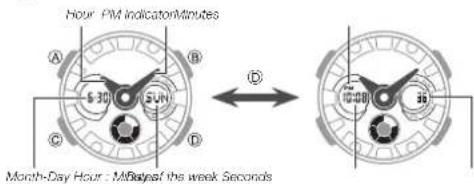
text_image
Hour PM indicatorMinutes A B S 30 SUN C D Month-Day Hour : May/Day of the week Seconds D 12:45 16:45E-11
Configuring Home City Settings
There are two Home City settings: actually selecting the Home City, and selecting either standard time or daylight saving time (DST).
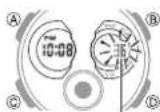
Seconds
To configure Home City settings
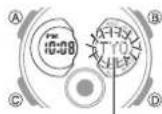
- In the Timekeeping Mode, hold down (A) for at least two seconds until the seconds start to flash. This is the setting mode.
- The watch will exit the setting mode automatically if you do not perform any operation for about two or three minutes.
City Cars
- Press © twice to move the flashing to the city code.
-
For details about city codes, see the "City Code Table" at the back of this manual.
-
Press Ⓓ (East) and Ⓔ (West) to select the city code you want to use as your Home City.
-
After the setting is the way you want, press Ⓐ to return to the Timekeeping Mode.
Note
- After you specify a city code, the watch will use UTC ^® offsets in the World Time Mode to calculate the current time for other time zones based on the current time in your Home City. ^1 Coordinated Universal Time, the world-wide scientific standard of timekeeping. The reference point for UTC is Greenwich, England.
E-12
E-13
To change the Daylight Saving Time (summer time) setting
DST indicator
-
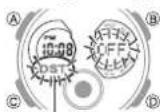
In the Timekeeping Mode, hold down Ⓐ for at least two seconds until the seconds start to flash. This is the setting mode.
-
Press © to display the DST setting mode.
-
Press Ⓓ to toggle between Daylight Saving Time (ON) and Standard Time (OFF).
-
After the setting is the way you want, press Ⓐ to return to the Timekeeping Mode.
• The DST indicator appears to indicate that Daylight Saving Time is turned on.
Adjusting the Digital Time and Date Settings
Use the procedure below to adjust the digital time and date settings.
To configure the digital time and date settings
Seconds
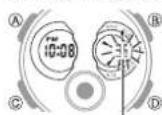
- In the Timekeeping Mode, hold down Ⓐ for at least two seconds until the seconds start to flash. This is the setting mode.
E-14
E-15
- Press © to move the flashing in the sequence shown below to select the other settings.
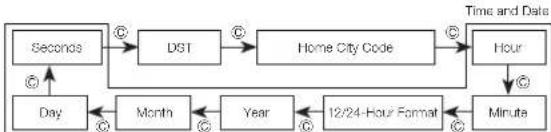
flowchart
graph TD
    A["Seconds"] --> B["DST"]
    B --> C["Home City Code"]
    C --> D["Hour"]
    D --> E["Minute"]
    F["Day"] --> G["Month"]
    G --> H["Year"]
    H --> I["12/24-Hour Format"]
    I --> J["Hour"]
    style A fill:#f9f,stroke:#333
    style B fill:#f9f,stroke:#333
    style C fill:#f9f,stroke:#333
    style D fill:#f9f,stroke:#333
    style E fill:#f9f,stroke:#333
    style F fill:#ccf,stroke:#333
    style G fill:#ccf,stroke:#333
    style H fill:#ccf,stroke:#333
    style I fill:#ccf,stroke:#333
    style J fill:#ccf,stroke:#333
- The following steps explain how to configure timekeeping settings only.
E-16
- When the timekeeping setting you want to change is flashing, use Ⓓ and/or Ⓑ to change it as described below.
| Screen To do this: Do this: | ||
| 36 | Reset the seconds to 00 | Press (D). |
| OFF | Toggle between Daylight Saving Time (ON) and Standard Time (OFF) | Press (F). |
| TYO | Change the city code | Use (I) (East) and (B) (West). |
| 40-48 | Change the hour or minute | Use (I) (-) and (B) (-). |
| 12H | Toggle between 12 hour (12H) and 24-hour (24H) timekeeping | Press (I). |
| 20 19 5:40 | Change the year, month, or day | Use (I) (-) and (B) (-). |
- Press Ⓐ to exit the setting mode.
E-17
Note
- For information about selecting a Home City and configuring the DST setting, see "Configuring Home City Settings" (page E-12).
- While 12-hour format is selected for timekeeping, a PM indicator will appear for times from noon to 11:59 p.m. No indicator appears for times from midnight to 11:59 a.m. With 24-hour format, time is displayed from 0:00 to 23:59, without any PM indicator.
- The watch's built-in full automatic calendar makes allowances for different month lengths and leap years. Once you set the date, there should be no reason to change it except after you have the watch's battery replaced.
• The day of the week changes automatically when the date changes.
Checking the Current Time in a Different Time Zone
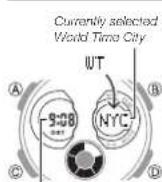
Current time in the currently selected World Time City
You can use the World Time Mode to view the current time in one of 29 time zones (48 cities) around the globe. The city that is currently selected in the World Time Mode is called the "World Time City".
To enter the World Time Mode
Use © to select the World Time Mode as shown on page E-8.
To view the time in another time zone
In the World Time Mode, use Ⓓ (East) to scroll through city codes.
F-18
E-19
Operation Guide 5607
CASIO®
To specify standard time or daylight saving time (DST) for a city
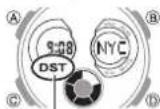
DST Indicator
-
In the World Time Mode, use Ⓓ (East) to display the city code (time zone) whose Standard Time/Daylight Saving Time setting you want to change.
-
Hold down Ⓐ for at least two seconds.
- This toggles the city code you selected in step 1 between Daylight Saving Time (DST indicator displayed) and standard time (DST indicator not displayed).
- You cannot use the World Time Mode to change the DST setting of the city currently selected as your Home City in the Timekeeping Mode.
- Note that you cannot switch between standard time/daylight saving time (DST) while UTC is selected as the World Time City.
- The standard time/daylight saving time (DST) setting affects only the currently selected time zone. Other time zones are not affected.
Using the Alarm
Alarm number
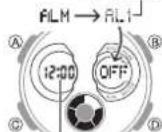
Alarm time (hour: Minutes)
When an alarm is turned on, the alarm tone will sound when its alarm time is reached. One of the alarms is a snooze alarm, while the other four are daily alarms. The snooze alarm operation will repeat every five minutes, up to seven times. You also can turn on an Hourly Time Signal that causes the watch to beep twice every hour on the hour.
To enter the Alarm Mode
Use © to select the Alarm Mode as shown on page E-9.
- The snooze alarm screen is indicated by SNZ, while the other alarm screens are numbered AL1 through AL4. The Hourly Time Signal screen is indicated by SIG.
E-20
E-21
To set an alarm time
Alarm on indicator
- In the Alarm Mode, use Ⓓ to scroll through the alarm screens until the one whose time you want to set is displayed.
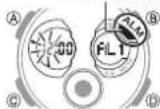
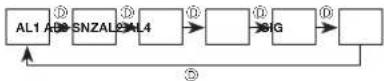
- Hold down Ⓐ for at least two seconds until the alarm time starts to flash. This is the setting mode.
- Press © to move the flashing between the hour and minute settings.
- While a setting is flashing, use ⓘ (+) and Ⓑ (−) to change it.
- When setting the alarm time using the 12-hour format, take care to set the time correctly as a.m. (no indicator) or p.m. (PM indicator).
E-22
- Press Ⓐ to exit the setting mode.
To test the alarm
In the Alarm Mode, hold down Ⓓ to sound the alarm.
To turn an alarm and the Hourly Time Signal on and off
Squeeze alarm or indicator
In the Alarm Mode, use Ⓓ to select an alarm or the Hourly Time Signal.
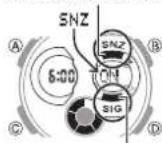
Hourly time signal on indicator
- When the alarm you want or the Hourly Time Signal is displayed, press Ⓐ to toggle it between on ("On" displayed) and off ("OFF" displayed).
- The alarm on indicator (when any alarm is on), snooze alarm on indicator (when the snooze alarm is on), and the Hourly Time Signal on indicator (when the Hourly Time Signal is on) are shown on the display in all modes.
E-23
To stop the alarm
Press any button.
NOTE
- In the case of the snooze alarm, the alert operation is performed a total of seven times, every five minutes, until you turn the alarm off.
- Performing any one of the following operations during a 5-minute interval between snooze alarms cancels the current snooze alarm operation.
- Displaying the Timekeeping Mode setting screen
Displaying the snooze alarm setting screen
Using the Stopwatch
The stopwatch measures elapsed time, split times, and two finishes.
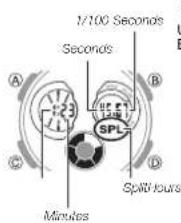
text_image
1/100 Seconds Seconds A B C D SPL Minutes Split HoursTo enter the Stopwatch Mode
Use © to select the Stopwatch Mode as shown on page E-9.
E-25
E-24
To perform an elapsed time operation

To pause at a split time

To measure two finishes

flowchart
graph LR
    A["Start Split"] --> B["(SPL displayed)<br>First runner finishes,<br>Display time of first runner"]
    B --> C["Stop<br>Second runner finishes"]
    C --> D["Split release<br>Display time of second runner"]
    D --> E["Reset"]
E-26
Note
- The Stopwatch Mode can indicate elapsed time up to 23 hours, 59 minutes, 59.99 seconds.
- Once started, stopwatch timing continues until you press Ⓑ to stop it, even if you exit the Stopwatch Mode to another mode and even if timing reaches the stopwatch limit defined above.
- Exiting the Stopwatch Mode while a split time is frozen on the display clears the split time and returns to elapsed time measurement.
E-27
Countdown Timer
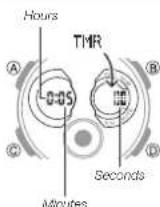
The countdown timer can be set within a range of one minute to 24 hours. An alarm sounds when the countdown reaches zero.
To enter the Countdown Timer Mode
Use © to select the Countdown Timer Mode as shown on page E-9.
To configure the countdown timer
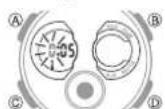
- While the countdown start time is on the display in the Countdown Timer Mode, hold down Ⓐ until the current countdown start time starts to flash, which indicates the setting mode.
- If the countdown start time is not displayed, use the procedure under "To perform a countdown timer operation" (page E-30) to display it.
- Press © to move the flashing in the sequence shown below to select other settings.

F-28
E-29
Operation Guide 5607
CASIO®
- Use (i) and (ii) to change the hours and minutes settings.
- To count down from 24 hours, set a start time of 0:00.
- Press Ⓐ to exit the setting mode.
To perform a countdown timer operation

- Before starting a countdown timer operation, check to make sure that a countdown operation is not in progress (indicated by the seconds counting down). If it is, press Ⓓ to stop it and then Ⓔ to reset to the countdown start time.
To stop the alarm
Press any button.
Adjusting the Analog Hand Setting
Use the following procedure to adjust the analog hands so their settings match the digital time.
To adjust the analog time
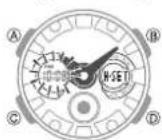
-
In the Timekeeping Mode, hold down Ⓓ for at least three seconds until the current time start to flash. This is the analog setting mode.
-
Press ① to advance the analog time setting by 20 seconds.
- Holding down Ⓓ advances the analog time setting at high speed.
E-30
E-31
- If you need to advance the analog time setting a long way, hold down (1) until the time starts advancing at high speed, and then press (2). This locks the high speed hand movement, so you can release the two buttons. High-speed hand movement continues until you press any button. It will also stop automatically after the time advances 12 hours or if an alarm (daily alarm, Hourly Time Signal, or countdown beeperi starts to sound.
- Press Ⓐ to exit the setting mode.
- The watch will automatically adjust the minute hand slightly to match its internal second count when you exit the setting mode.
Illumination
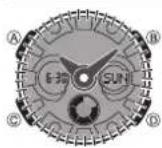
The face of the watch is illuminated for easy reading in the dark.
To turn on illumination
In any mode (except when a setting mode, with flashing digits is on the display), press Ⓑ to illuminate the display.
Illumination Precautions
- Illumination may be hard to see when viewed under direct sunlight.
- Illumination turns off automatically whenever an alarm sounds.
- Frequent use of illumination runs down the battery.
E-32
E-33
Button Operation Tone
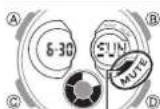
Mole indicator
The button operation tone sounds any time you press one of the watch's buttons. You can turn the button operation tone on or off as desired.
- Even if you turn off the button operation tone, alarms, the Hourly Time Signal, and other beepers all operate normally.
To turn the button operation tone on and off
Hold down Ⓒ until the button operation tone sounds (about 3 seconds).
• This will toggle the button operation tone either ON or OFF.
- The mute indicator is displayed while the button operation lone is turned off (muted).
- The mute indicator is displayed in all modes when the button operation tone is turned off.
E-34
Troubleshooting
Time Setting
■ The current time setting is off by hours.
Your Home City setting may be wrong (page E-12). Check your Home City setting and correct it, if necessary.
■ The current time setting is off by one hour.
You may need to change your Home City's standard time/daylight saving time (DST) setting. Use the procedure under "Adjusting the Digital Time and Date Settings" (page E-15) to change the standard time/daylight saving time (DST) setting.
World Time Mode
■ The time for my World Time City is off in the World Time Mode.
This could be due to incorrect switching between standard time and daylight saving time. See "To specify standard time or daylight saving time (DST) for a city" (page E-20) for more information.
E-35
Main Indicators
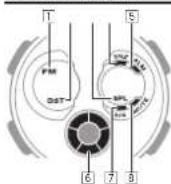
| Number | Name See | |
| 1 | PM indicator E-11 | |
| 2 | DST indicator E-14, E-20 | |
| 3 | Split indicator E-25 | |
| 4 | Snooze alarm on Indicator E-23 | |
| 5 | Alarm on Indicator E-22 | |
| 6 | Graphic indicator | - |
| 7 | Hourly time signal on indicator E-23 | |
| 8 | Mute indicator E-34 |
E-36
6 Graphic indicator
| Mode Indicator Meaning | |
| TimekeepingWorld TimeAlarm | Current second |
| Countdown Timer Timer seconds | |
| Stopwatch Flapsed 1/10 seconds | |
E-37
Specifications
Accuracy at normal temperature: ±30 seconds a month
Digital Timekeeping: Hour, minutes, seconds, p.m. (PM), month, day, day of the week
Time format: 12-hour and 24-hour
Calendar system: Full Auto-calendar pre-programmed from the year 2000 to 2099 Other: Home City code (can be assigned one of 48 city codes); Standard Time/Daylight Saving Time (summer time)
Analog Timekeeping: Hour, minutes (hand moves every 20 seconds)
World Time: 48 cities (29 time zones) and Coordinated Universal Time (UTC) Other: Daylight Saving Time/Standard Time
Alarms: 5 daily alarms (with one snooze alarm); Hourly time signal
Stopwatch:
Measuring unit: 1/100 second
Measuring capacity: 23:59'59.99"
Measuring modes: Elapsed time, split time, two finishes
F-38
Countdown Timer:
Measuring unit: 1 second
Countdown range: 24 hours
Countdown start time setting range: 1 minute to 24 hours (1-minute increments)
Illumination: LED (light-emitting diode)
Battery: Two silver oxide batteries (Type: SR726W)
Approximately 2 years on type SR726W (assuming alarm operation 20 seconds per day and one illumination operation 1.5 seconds per day)
Frequent use of illumination runs down the battery.
Specifications are subject to change without notice.
F-39
Operation Guide 5607
CASIO®
Operating Precautions
Water Resistance
- The information below applies to watches with WATER RESIST or WATER RESISTANT marked on the back cover.
| Water Resistance Under Daily Use | Enhanced Water Resistance Under Daily Use | ||||
| 5 Atmospheres | 10 Atmospheres | 20 Atmospheres | |||
| Marking | On watch front or on back cover | No BAR mark | 5BAR 10B | AFI 20BAR | |
| Example of Daily Use | Hand washing, rain Yes Yes Yes Yes | ||||
| Water rected work, swimming | No Yes Yes Yes | ||||
| Windsurbing No No Yes Yes | |||||
| Skin diving No No Yes Yes | |||||
Do not use your watch for scuba diving or other types of diving that requires air tanks.
E-40
OPUM-E
- Watches that do not have WATER RESIST or WATER RESISTANT marked on the back cover are not protected against the effects of sweat. Avoid using such a watch under conditions where it will be exposed to large amounts of sweat or moisture, or to direct splashing with water.
- Even if a watch is water resistant, note the usage precautions described below. Such types of use reduce water resistance performance and can cause fogging of the glass.
Do not operate the crown or buttons while your watch is submersed in water or wet.
Avoid wearing your watch while in the bath.
- Do not wear your watch while in a heated swimming pool, sauna, or any other high temperature/high humidity environment.
- Do not wear your watch while washing your hands or face, while doing housework, or while performing any other task that involves soaps or detergents.
- After submersion in seawater, use plain water to rinse all salt and dirt from your watch.
- To maintain water resistance, have the gaskets of your watch replaced periodically (about once every two or three years).
E-41
- A trained technician will inspect your watch for proper water resistance whenever you have its battery replaced. Battery replacement requires the use of special tools. Always request battery replacement from your original retailer or from an authorized CASIO service center.
- Some water-resistant watches come with fashionable leather bands. Avoid swimming, washing, or any other activity that causes direct exposure of a leather band to water.
- The inside surface of the watch glass may fog when the watch is exposed to a sudden drop in temperature. No problem is indicated if the fogging clears up relatively quickly. Sudden and extreme temperature changes (such as coming into an air conditioned room in the summer and standing close to an air conditioner outlet, or leaving a heated room in the winter and allowing your watch to come into contact with snow) can cause it to take longer for glass fogging to clear up. If glass fogging does not clear up or if you notice moisture inside of the glass, immediately stop using your watch and take it to your original retailer or to an authorized CASIO service center.
- Your water-resistant watch has been tested in accordance with International Organization for Standardization regulations.
E-42
Band
- Tightening the band too tightly can cause you to sweat and make it difficult for air to pass under the band, which can lead to skin irritation. Do not fasten the band too lightly. There should be enough room between the band and your wrist so you can insert your finger.
- Deterioration, rust, and other conditions can cause the band to break or come off of your watch, which in turn can cause band pins to fly out of position or to fall out. This creates the risk of your watch falling from your wrist and becoming lost, and also creates the risk of personal injury. Always take good care of your band and keep it clean.
- Immediately stop using a band if you even notice any of the following: loss of band flexibility, band cracks, band discoloration, band looseness, band connecting pin flying or falling out, or any other abnormality. Take your watch to your original retailer or to a CASIO service center for inspection and repair (for which you will be charged) or to have the band replaced (for which you will be charged).
E-43
Temperature
- Never leave your watch on the dashboard of a car, near a heater, or in any other location that is subject to very high temperatures. Do not leave your watch where it will be exposed to very low temperatures. Temperature extremes can cause your watch to lose or gain time, to stop, or otherwise malfunction.
- Leaving your watch in an area hotter than +60°C (140°F) for long periods can lead to problems with its LCD. The LCD may become difficult to read at temperatures lower than 0°C (32°F) and greater than +40°C (104°F).
Impact
- Your watch is designed to withstand impact incurred during normal daily use and during light activity such as playing catch, tennis, etc. Dropping your watch or otherwise subjecting it to strong impact, however, can lead to malfunction. Note that watches with shock-resistant designs (G-SHOCK, BABY-G, G-MS) can be worn while operating a chain saw or engaging in other activities that generate strong vibration, or while engaging in strenuous sports activities (motocross, etc.)
Magnetism
- The hands of analog and combination (analog-digital) watches are moved by a motor that uses magnetic force. When such a watch is close to a device (audio speakers, magnetic necklace, cell phone, etc.) that emits strong magnetism, the magnetism can cause timekeeping to slow down, speed up, or stop, resulting in the incorrect time being displayed.
- Very strong magnetism (from medical equipment, etc.) should be avoided because it can cause malfunction of your watch and damage to electronic components.
Electrostatic Charge
- Exposure to very strong electrostatic charge can cause your watch to display the wrong time. Very strong electrostatic charge even can damage electronic components.
- Electrostatic charge can cause the display to go blank momentarily or cause a rainbow effect on the display.
E-44
E-45
Chemicals
- Do not allow your watch to come into contact with thinner, gasoline, solvents, oils, or fats, or with any cleaners, adhesives, paints, medicines, or cosmetics that contain such ingredients. Doing so can cause discoloration of or damage to the resin case, resin band, leather, and other parts.
Storage
- If you do not plan to use your watch for a long time, thoroughly wipe it free of all dirt, sweat, and moisture, and store it in a cool, dry place.
Resin Components
- Allowing your watch to remain in contact with other items or storing it together with other items for long periods while it is wet can cause color on resin components to transfer to the other items, or the color of the other items to transfer to the resin components of your watch. Be sure to dry off your watch thoroughly before storing it and make sure it is not in contact with other items.
- Leaving your watch where it is exposed to direct sunlight (ultraviolet rays) for long periods or failure to clean dirt from your watch for long periods can cause it to become discolored.
- Friction caused by certain conditions (strong external force, sustained rubbing, impact, etc.) can cause discoloration of painted components.
- If there are printed figures on the band, strong rubbing of the printed area can cause discoloration.
- Leaving your watch wet for long periods can cause fluorescent color to fade. Wipe the watch dry as soon as possible after it becomes wet.
- Semi-transparent resin parts can become discolored due to sweat and dirt, and if exposed to high temperatures and humidity for long periods.
- Daily use and long-term storage of your watch can lead to deterioration, breaking, or bending of resin components. The extent of such damage depends on usage conditions and storage conditions.
E-46
E-47
Leather Band
- Allowing your watch to remain in contact with other items or storing it together with other items for long periods while it is wet can cause the color of the leather band to transfer to the other items or the color of the other items to transfer to the leather band. Be sure to dry off your watch thoroughly with a soft cloth before storing it and make sure it is not in contact with other items.
- Leaving a leather band where it is exposed to direct sunlight (ultraviolet rays) for long periods or failure to clean dirt from a leather band for long periods can cause it to become discolored.
CAUTION: Exposing a leather band to rubbing or dirt can cause color transfer and discoloration.
Metal Components
- Failure to clean dirt from metal components can lead to formation of rust, even if components are stainless steel or plated. If metal components exposed to sweat or water, wipe thoroughly with a soft, absorbent cloth and then place the watch in a well-ventilated location to dry.
- Use a soft toothbrush or similar tool to scrub the metal with a weak solution of water and a mild neutral detergent, or with soapy water. Next, rinse with water to remove all remaining detergent and then wipe dry with a soft absorbent cloth. When washing metal components, wrap the watch case with kitchen plastic wrap so it does not come into contact with the detergent or soap.
Bacteria and Odor Resistant Band
- The bacteria and odor resistant band protects against odor generated by the formation of bacteria from sweat, which ensures comfort and hygiene. In order to ensure maximum bacteria and odor resistance, keep the band clean. Use an absorbent soft cloth to thoroughly wipe the band clean of dirt, sweat, and moisture. A bacteria and odor resistant band suppresses the formation of organisms and bacteria. It does not protect against rash due to allergic reaction, etc.
Liquid Crystal Display
- Display figures may be difficult to read when viewed from an angle.
F-48
F-49
Note that CASIO COMPUTER CO., LTD. assumes no responsibility for any damage or loss suffered by you or any third party arising through the use of your watch or its malfunction.
E-50
User Maintenance
Caring for Your Watch
Remember that you wear your watch next to your skin, just like a piece of clothing. To ensure your watch performs at the level for which it is designed, keep it clean by frequently wiping with a soft cloth to keep your watch and band free of dirt, sweat, water and other foreign matter.
- Whenever your watch is exposed to sea water or mud, rinse it off with clean fresh water.
- For a metal band or a resin band with metal parts, use a soft toothbrush or similar tool to scrub the band with a weak solution of water and a mild neutral detergent, or with soapy water. Next, rinse with water to remove all remaining detergent and then wipe dry with a soft absorbent cloth. When washing the band, wrap the watch case with kitchen plastic wrap so it does not come into contact with the detergent or soap.
- For a resin band, wash with water and then wipe dry with a soft cloth. Note that sometimes a smudge like pattern may appear on the surface of a resin band. This will not have any effect on your skin or clothing. Wipe with a cloth to remove the smudge pattern.
E-51
- Clean water and sweat from a leather band by wiping with a soft cloth.
- Not operating a watch crown, buttons, or rotary bezel could lead to later problems with their operation. Periodically rotate the crown and rotary bezel, and press buttons to maintain proper operation.
Dangers of Poor Watch Care
Rust
- Though the metal steel used for your watch is highly rust-resistant, rust can form if your watch is not cleaned after it becomes dirty.
- Dirt on your watch can make it impossible for oxygen to come into contact with the metal, which can lead to breakdown of the oxidization layer on the metal surface and the formation of rust.
- Rust can cause sharp areas on metal components and can cause band pins to fly out of position or to fall out. If you ever notice any abnormality immediately stop using your watch and take it to your original retailer or to an authorized CASIO service center.
E-52
- Even if the surface of the metal appears clean, sweat and rust in crevasses can soil the sleeves of clothing, cause skin irritation, and even interfere with watch performance.
Premature Wear
• Leaving sweat or water on a resin band or bezel, or storing your watch an area subject to high moisture can lead to premature wear, cuts, and breaks.
Skin Irritation
- Individuals with sensitive skin or in poor physical condition may experience skin irritation when wearing a watch. Such individuals should keep their leather band or resin band particularly clean. Should you ever experience a rash or other skin irritation, immediately remove your watch and contact a skin care professional.
E-53
Battery Replacement
- Leave battery replacement up to your original retailer or authorized CASIO service center.
- Have the batteries replaced only with the type specified in the User's Guide. Use of a different battery type can cause malfunction.
- When replacing the batteries, also request a check for proper water resistance.
- Ornamental resin components may become worn, cracked, or bent over time when subjected to normal daily use. Note that if cracking or any other abnormality indicating possible damage is noticed in a watch submitted for battery replacement, your watch will be returned with an explanation of the abnormality, without the requested servicing being performed.
Initial Batteries
- The batteries that come loaded in your watch when you purchase it are used for function and performance testing at the factory.
- Test batteries may go dead quicker than the normally rated battery life as noted in the User's Guide. Note that you will be charged for replacement of these batteries, even if replacement is required within your watch's warranty period.
E-54
Low Battery Power
- Low battery power is indicated by large timekeeping error, by dim display contents, or by a blank display.
- Operation while battery power is low can result in malfunction. Replace the batteries as soon as possible.
E-55
City Code Table
L
City Code Table
| City Code | City | UTC Offset/GMT Differential |
| PPG | Pago Pago | -11 |
| HNL | Honolulu | -10 |
| ANC | Anchorage | -9 |
| YVR | Vancouver | -8 |
| LAX | Los Angeles | |
| YEA | Edmonton | -7 |
| DEN Denver | ||
| MEX | Mexico City | -6 |
| CHI | Chicago | |
| MIA Miami | ||
| YTO | Toronto | -5 |
| NYC | New York | |
| SCL | Santiago | -4 |
| YHZ Halifax | ||
| City Code | City | UTC Offset/GMT Differential |
| YYT St. John's | -3.5 | |
| RIO | Rio De Janeiro | -3 |
| RAI | Praia | -1 |
| UTC | 0 | |
| LIS Lisbon | ||
| LON | London | |
| MAD | Madrid | +1 |
| PAR | Paris | |
| ROM Rome | ||
| BER Berlin | ||
| STO | Stockholm | |
| ATH Athens | +2 | |
| CAI Cairo | ||
| JRS | Jerusalem | |
L-1
| City Code | City | UTC Offset/ GMT Differential |
| MOW | Moscow | +3 |
| JED | Jeddah | |
| THR | Ishran +3.5 | |
| DXB | Dubai +4 | |
| KBL | Kabul +4.5 | |
| KHI | Karachi +5 | |
| DEL | Delhi +5.5 | |
| DAC | Dhaka +6 | |
| RGN | Yangon | +6.5 |
| BKK | Bangkok | +7 |
| SIN | Singapore | +8 |
| HKG | Hong Kong | |
| BJS | Beijing | |
| TPE | Taipei |
| City Code | City | UTC Offset/GMT Differential |
| SEL | Seoul | +9 |
| TYO | Tokyo | |
| ADL | Adelaide | +9.5 |
| GUM Guam | +10 | |
| SYD | Sydney | |
| NOU | Noumea | +11 |
| WLG | Wellington | +12 |
• This table shows the city codes of this watch (As of July 2018).
• The rules governing global times (UTC offset and GMT differential) and summer time are determined by each individual country.
CASIO®
CASIO COMPUTER CO., LTD.
6-2, Hon-machi 1-chome
Shibuya-ku, Tokyo 151-8543, Japan
L-2