
FWDD117168W - Washing machine WHIRLPOOL - Free user manual and instructions
Find the device manual for free FWDD117168W WHIRLPOOL in PDF.


| Product Type | Freestanding Washing Machine |
| Brand | Whirlpool |
| Model | FWDD117168W |
| Capacity | 11 kg |
| Maximum Spin Speed | 1600 rpm |
| Energy Class | A+++ |
| Dimensions (H x W x D) | 850 x 595 x 605 mm |
| Weight | 75 kg |
| Power Supply | 220-240 V, 50 Hz, 10 A |
| Noise Level (Wash/Spin) | 56 dB / 76 dB |
| Number of Programs | 15 |
| Key Functions | Delayed Start, Quick Wash, Eco Wash, Anti-Allergy, Stain Assistant |
| Display | Digital LED |
| Drum Material | Stainless Steel |
| Door Type | Porthole |
| Water Supply | Cold only, single intake |
| Annual Water Consumption | 9500 L |
| Annual Energy Consumption | 178 kWh |
| Self-Cleaning | Drum Clean Program |
| Child Lock | Yes |
| Spare Parts Availability | 7 years |
Frequently Asked Questions - FWDD117168W WHIRLPOOL
User questions about FWDD117168W WHIRLPOOL
0 question about this device. Answer the ones you know or ask your own.
Ask a new question about this device
Download the instructions for your Washing machine in PDF format for free! Find your manual FWDD117168W - WHIRLPOOL and take your electronic device back in hand. On this page are published all the documents necessary for the use of your device. FWDD117168W by WHIRLPOOL.
USER MANUAL FWDD117168W WHIRLPOOL
DAILY REFERENCE GUIDE

THANK YOU FOR BUYING A WHIRLPOOL PRODUCT.
For even more complete user support, register your appliance at www.whirlpool.eu/register

Download the Instructions for use from the website http://docs.whirlpool.eu
Follow the procedure described on the last page.
Please read the content of the Health & Safety and Installation Guides thoroughly before you use this appliance.

The transit bolts must be removed before the appliance is used.
See the Health & Safety and Installation Guides for detailed instructions on how to remove the transit bolts
PRODUCT DESCRIPTION
APPLIANCE
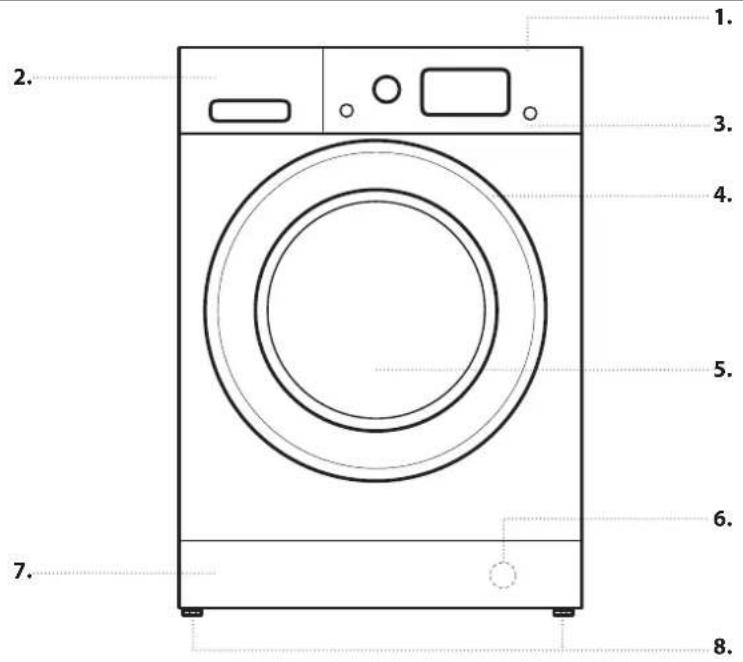
text_image
1. 2. 3. 4. 5. 6. 7. 8.- Top
- Detergent dispenser
- Control Panel
- Lid handle
- Door
- Water filter - behind kick panel
- Removable kick panel
- Adjustable feet (2)
CONTROL PANEL
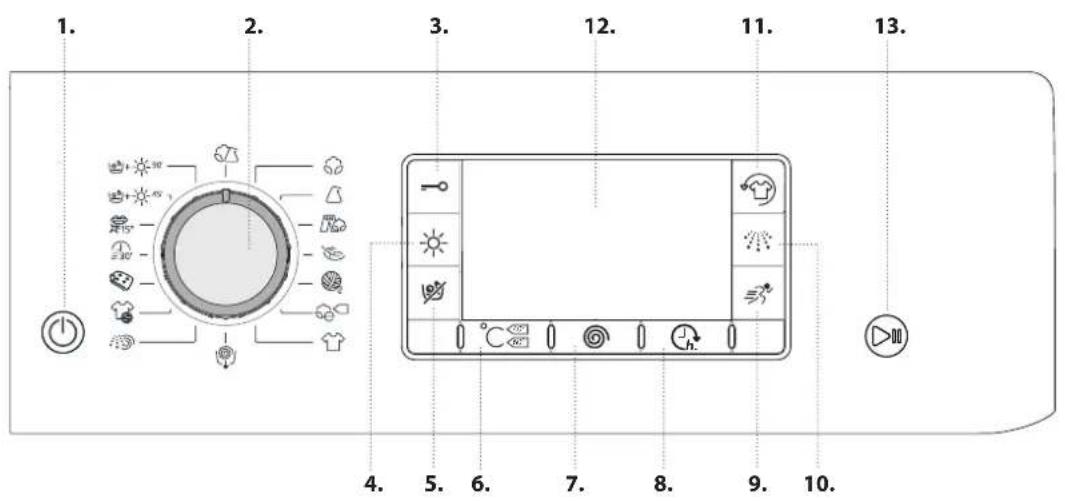
text_image
Technical diagram showing a device interior with labeled components and a magnified view of the handle mechanism.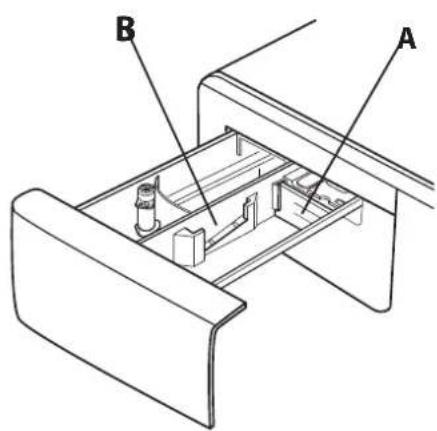
text_image
B A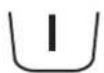
Prewash Compartment
• Detergent for prewash
Main Wash Compartment
• Detergent for the main wash
- Stain remover
• Water softener

Softener compartment
- Softener
- Liquid starch
Pour softener or starch solution into the compartment without exceeding the "max" level.
Release button
(press to remove tray for cleaning).
Preferably use the partition A when washing with a liquid detergent for washing, to ensure that the correct quantity of detergent is used (the partition is included in the bag containing the instructions). Move the partition into slot B when using detergent powder.
FIRST TIME USE
See the section DAILY USE for instructions on selecting and starting a programme.
The first time the machine is switched on, you will be asked to select the language and the display will automatically show the language selection menu.
To select the desired language press the and buttons; to confirm the selection press the button. To change the language switch off the machine and press buttons, simultaneously until an alarm is heard: the language-selection menu will be displayed again.
To change the display luminosity, which by default is set to the medium value, switch the machine off then simultaneously press buttons and until the buzzer sounds. Press buttons and to choose the desired level of luminosity then confirm by pressing button.
FIRST CYCLE OPERATION
Remove any manufacturing debris:
- Select the programme with a temperature setting of 60 °C.
- Pour a small quantity of detergent powder into the main wash compartment of the detergent dispenser (maximum 1/3 of the quantity the detergent manufacturer recommends for lightly soiled laundry).
- Start the programme without loading the washer dryer machine (with empty drum).
For more information on functions, a more detailed guide may be requested or downloaded from the website following the instructions given on the last page. www
1. LOADING LAUNDRY.
• Prepare the laundry, following the
recommendations given in the section "HINTS AND TIPS". - Open the door and load the laundry into the drum, without exceeding the maximum load capacities indicated in the Programme Chart.

- Close the door, pressing until the latch audibly locks, and check that there is no laundry trapped between the door glass and the rubber seal.

2. OPEN THE WATER TAP
Check that the washer dryer is connected correctly to the water mains. Open the water tap.

3. SWITCHING ON THE WASHER DRYER MACHINE.
Press button: the lamp flashes slowly.
4. SELECTING A PROGRAMME AND CUSTOMISING A CYCLE.
The following functions are possible with this appliance:
- Wash only
- Wash and dry
- Dry only
Wash only
Select the required programme with the PROGRAMME selector dial. The display will show the name and duration of the cycle. The washer dryer machine automatically displays the maximum temperature and spin speed settings possible for the selected programme. Adjust the temperature and/or spin speed settings if needed with the relative buttons.
- Press button to cycle through progressively lower temperature settings until cold wash is set ("--") shown on display.
- Press button to cycle through progressively lower spin speed settings until the spin cycle is turned off ("--" shown on display).
Pressing the button again sets the highest possible setting.
Select the required options (if necessary).
- Press the button to select the option; the respective button lamp illuminates.
- Press the button again to cancel the option; the lamp extinguishes.
! If the selected option is not compatible with the programme set, an error warning tone sounds and the wording "No Selection" is shown on the display. The option is not selected.
Wash and dry
To wash and dry a load with no interruption between the wash and dry cycles, make sure that the load does not exceed the maximum permissible drying load for the selected programme (see the column "Max. load for drying cycle" in the Programme chart).
- Follow the instructions given in the paragraph "Wash Only" to select and, if necessary, customise the required programme.
- Press to select the required drying mode. Two drying modes are available: automatic or timer.
- Automatic drying with selectable levels:
In automatic drying mode, the washer dryer machine dries the laundry until the set level of dryness is reached. Pressing button once automatically selects the highest drying level available for the selected programme. Press the button again to reduce the drying level.
The following levels are available:
Cupboard extra dry extuitable for garments which need to be dried completely, such as sponges and bathrobes. Cupboard dry laundry is completely dry and ready to be put away in the wardrobe without ironing.
Hanger dry laundry is left slightly damp to minimise creasing. Garments must be hung to air dry completely. Iron dry garments are left reasonably damp to make ironing easier.
- Timer drying mode:
Press button repeatedly to set timer drying mode. After cycling through all the automatic drying levels, continue pressing button until the desired time is displayed. Values from 180 to 30 minutes are settable.
To wash a load of laundry larger than the maximum permissible load for drying (see the column "Max. load for drying cycle" in the Programme chart), remove a few garments once the washing cycle has finished before starting the drying cycle. Proceed as follows:
- Follow the instructions given in the paragraph "Wash Only" to select and, if necessary, customise the required programme.
- Do not include a drying cycle.
- Once the washing cycle is finished, open the door and remove a few garments to reduce the load. Now follow the instructions for "Dry only".
N.B.: always allow a cooling down period after drying before opening the door.
When using the two preset cycles and it is not necessary to select and start a drying cycle.
Dry only
This function is used to simply dry a wet load washed previously in the washer dryer or by hand.
- Select a suitable programme for the laundry you want to dry (e.g. select cotton to dry wet cotton laundry).
- Press button to dry without a wash cycle.
- Press to select the required drying mode. Two drying modes are available: automatic drying by levels or drying by time.
- Automatic drying with selectable levels:
In automatic drying mode, the washer dryer machine dries the laundry until the set level of dryness is reached. Pressing button once automatically selects the highest drying level available for the selected programme. Press the button again to reduce the drying level.
The following levels are available:
Cupboard extra dry ex suitable for garments which need to be dried completely, such as sponges and bathrobes.
Cupboard dry laundry is completely dry and ready to be put away in the wardrobe without ironing.
Hanger dry laundry is left slightly damp to minimise creasing. Garments must be hung to air dry completely. Iron dry garments are left reasonably damp to make ironing easier.
- Timer drying mode:
Press button repeatedly to set timer drying mode. After cycling through all the automatic drying levels, continue pressing button until the desired time is displayed.
Values from 180 to 30 minutes are settable.
N.B.: always allow a cooling down period after drying before opening the door.
-
USING THE CORRECT AMOUNT OF DETERGENT. Pull out the tray and pour detergent into the relative compartments as described in "Detergent dispenser". This is only necessary when using a wash only or a wash + dry programme.
-
DELAYING THE START OF A PROGRAMME. To set a programme to start at a later time, see the section "Options and Functions".
-
STARTING A PROGRAMME.
Press the START/PAUSE button. The relative indicator lamp illuminates, the door locks and the door open symbol extinguishes. To change a programme while a cycle is in progress, press START/PAUSE to pause the washer dryer (the START/ PAUSE lamp flashes amber slowly); then select the required cycle and press START/PAUSE again. To open the door while a cycle is in progress, press START/PAUSE; the door may be opened if the symbol lights. Press the START/ PAUSE button again to resume the programme from where it was paused.
- CANCELLING A RUNNING PROGRAMME (IF NECESSARY)
Press and hold the button until the washer dryer stops. If the water level and temperature are low enough, the door unlocks and may be opened.
The door remains locked if there is water in the drum. To unlock the door, switch the washer dryer on, select the programme and turn the spin function off by setting the spin speed to "--". The water is emptied and the door unlocks at the end of the programme.
- SWITCHING THE WASHER DRYER OFF AT THE END OF A PROGRAMME.
At the end of the cycle, the message "Cycle end" is shown on the display. The door can only be opened when the symbol lights. Check that the door unlocked symbol is lit, then open the door and take out the laundry.
Press ☐ switch the washer dryer off. To save energy, if the washer dryer is not switched off manually with the ⏻ button, it turns off automatically approximately 30 minutes after the end of the programme.
Leave the door ajar to let the interior of the washer dryer dry.
RULES FOR SEPARATING LAUNDRY
- Fabric type / indications on label (cotton, mixed fibres, synthetic, wool, handwash items)
• Colour (separate coloured garments from whites, wash new coloured items separately) - Size (wash items of different sizes in the same load to improve washing efficacy and weight distribution in the drum)
- Delicates (place small items – such as nylon stockings – and garments with clasps – such as braziers – in a laundry bag or in a pillow case with a zip).
EMPTY POCKETS
- Objects such as coins or safety pins can damage laundry and the washer dryer drum.
WASH SYMBOLS
ON GARMENT LABELS
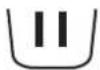
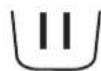
The value given in the tub symbol is the maximum temperature possible for washing the garment.

Normal mechanical action

Reduced mechanical action

Much reduced mechanical action

Hand wash only

Do not wash
CLEAN THE WATER FILTER REGULARLY
- This is needed to prevent the filter from blocking and preventing the water from draining correctly. See the section "Cleaning and Maintenance" / "Cleaning the water filter" in the detailed guide that may be requested or downloaded from the website.
SAVING ENERGY AND PROTECTING THE ENVIRONMENT
- Keeping within the load limits indicated in the programme chart will optimise energy, water and detergent consumption and reduce washing times.
- Do not exceed the detergent quantities recommended by the detergent manufacturer.
- Save energy by using a 60°C instead of a 90°C wash programme, or by using a 40°C instead of a 60°C wash programme. We recommend using the 60°C programme for cotton garments, which is longer but uses less energy.
- To save energy and time when washing and drying, select highest spin speed available for the programme to reduce the residual water remaining in the garments at the end of the wash cycle.
PROGRAMME CHART
| Detergents and additives | Recommended detergent | ||||||||||
| Programme | Available temperatures | Max. spin speed (rpm) | Drying | Max. load for wash cycle (kg) | Max. load for drying cycle (kg) | Duration (Minutes) | Prewash | Main | Softener | Powder | Liquid |
| I | II | ※ | |||||||||
| MIXED | -40°C | 1000 | √ | 5,5 5,5 | - | The duration of the programme is shown on the display. | ● | ○ | √ | ||
| COTTON (2) | -60°C | 1600 | √ | 11 7 - | ● | ○ | √ | √ | |||
| SYNTHETICS (3) | -60°C | 1200 | √ | 5 5 - | ● | ○ | √ | √ | |||
| JEANS | -40°C | 800 | √ | 5 5 - | ● | ○ | √ | ||||
| DELICATES | -30°C | -- | √ | 1 1 - | ● | ○ | √ | ||||
| WOOL | -40°C | 800 | √ | 2,5 2,5 | - | ● | ○ | √ | |||
| ECO COTTON (1) | -60°C | 1600 | √ | 11 7 - | ● | ○ | √ | √ | |||
| ECO COTTON | -40°C | 1600 | √ | 11 7 - | ● | ○ | √ | √ | |||
| WHITES | -90°C | 1600 | √ | 11 | 7 | ●(90°) | ● | ○ | √ | ||
| SPIN + DRAIN * | -1600 11 7 -- | √ | |||||||||
| RINSE + SPIN | -1600 | √ | 11 7 - | ○ | |||||||
| SPORT | -40°C | 600 | √ | 4,5 4,5 | - | ● | ○ | √ | |||
| DUVET | -30°C | 1000 | - | 3,5 - | ● | ○ | √ | ||||
| RAPID 30' | -30°C | 800 | - | 4 | - | - | ● | ○ | √ | ||
| COLOURS 15° | 15°C | 1000 | √ | 5,5 5,5 | - | ● | ○ | √ | |||
| WASH & DRY 45' | 30°C | 1600 | √ | 1 1 - | ● | ○ | √ | ||||
| WASH & DRY 90' | 30°C | 1200 | √ | 2 2 - | ● | ○ | √ | ||||

Selectable/optional
- Not selectable/applicable
- Required quantity
○ Optional quantity
For wash programmes with temperatures above 50^ C, we recommend using powder detergent rather than liquid, and following the directions given on the detergent package.
* Select the ⏻ programme and set the spin speed to "--" to empty only.
1) Test programme in compliance with standard EN 50229 (Wash): select the programme with a temperature of 60°C.
2) Long cotton programme: set the programme with a temperature of 40^ C.
3) Long wash cycle for synthetics: set wash cycle with a temperature of 40°C.
Test programme in compliance with standard EN 50229 (Drying): select the ☑ wash programme and set the drying level to “☐”, for both loads. The first drying cycle must be carried out with the nominal load.
The cycle duration indicated on the display or in the manual is an estimated time calculated for standard conditions. The actual cycle time may vary in relation to a number of different factors, such as inlet water temperature and pressure, ambient temperature, quantity of detergent, size and type of load, load balancing and any additional optional functions selected.
Follow the directions indicated in the garment wash symbols.

MIXED
for washing lightly to normally soiled resilient garments in cotton, linen, synthetic fibres and mixed fibres.

COTTON
for washing normally to heavily soiled towels, underwear, table and bed linen etc. in resilient cotton and linen.

SYNTHETICS
for washing normally soiled garments made from synthetic fibre (such as polyester, polyacrylic, viscose etc.) or cotton/synthetic blend

JEANS
Turn garments inside-out before washing and use a liquid detergent.

DELICATES
for washing particularly delicate garments. Preferably turn garments inside out before washing.

WOOL
All wool garments can be washed using programme, "Wool" even those carrying the "hand-wash only" label. For best results, use special detergents and do not exceed max kg declaration of laundry.

ECO COTTON
for washing normally soiled cotton garments. At 40^ C and 60^ C, this is the standard cotton programme and the most efficient and terms of water and energy consumption.

WHITES
For washing normally to heavily soiled towels, underwear, table and bed linen, etc in resilient cotton and linen. Only when the temperatu is selected at 90°C the cycle is provided with a prewash phase before main washing phase. In this case it is recommended to add detergent both, in the prewash and main wash section.

SPIN + DRAIN
spins the load then empties the water. For resilient garments.

RINSE + SPIN
rinses and then spins. For resilient garments.

SPORT
for washing lightly soiled sports clothing (tracksuits, shorts, etc.); for best results, we recommend not exceeding the maximum load indicated in the "Programme chart". We recommend using liquid detergent, and adding the amount suitable for a half-load.

DUVET
designed for washing eiderdown padded items such as double or single duvets, cushions and anoraks. It is recommended to load such padded items in the drum with the edges folded inwards and not to exceed 34 of the drum's volume. For optimal washing, we recommend using a liquid detergent.

RAPID 30'
for washing lightly soiled garments quickly: this cycle lasts only 30 minutes, saving time and energy. Maximum load 4 Kg.

COLOURS 15°
This cycle helps protect colours by washing in cold water (15°C) and uses less energy to heat the water while still offering satisfactory wash results. Suitable for lightly soiled, unstained garments. This cycle offers wash results comparable to 40°C mixed at just 15°C.

45' WASH & DRY 45'
for washing and drying lightly soiled cotton and synthetic fibre garments quickly. This cycle washes and dries a laundry load of up to 1 Kg in just 45 minutes.

90' WASH & DRY 90'
for washing and drying cotton and synthetic fibre garments quickly. This cycle washes and dries a laundry load of up to 2 Kg in just 90 minutes.
OPTIONS AND FUNCTIONS
OPTIONS selectable directly by pressing the relative button
! If the selected option is not compatible with the programme set, an error warning tone sounds and the wording "No Selection" is shown on the display. The option is not selected.

FRESHCARE+
If associated with wash cycles, this option increases their performances by generating steam to block proliferation of the main sources of unpleasant odours inside the appliance (exclusively for the wash). After the steam phase, the machine runs a delicate cycle with slow drum rotations. When the FRESHCARE+ option is associated with drying cycles, it prevents stubborn creases from stabilising on garments, thanks to slow drum rotations.
The FreshCare+ cycle starts at the end of the wash or drying cycle and continues for maximum 6 hours; it can be
interrupted at any time by pressing any button on the control panel, or by turning the knob. Wait roughly 5 minutes before opening the door.

NTENSIVE RINSE
Option makes it possible to select the desired rinse type for sensitive skin. Press the button once for the "Extra +1" level, which makes it possible to select an additional rinse after the standard cycle rinse and remove all traces of detergent. Press the button again for the "Extra +2" level, which makes it possible to select two additional rinses to the standard cycle rinses; it is recommended for very sensitive skin. When the button is pressed for the third time, the "Extra +3" level is set, thus allowing the selection of 3 rinses in addition to the standard cycle's rinses. The option - started with cycles at a temperature of 40^ - makes it possible to remove major allergens such as pollen, cat and dog hair. With cycles at a temperature higher than 40^ a very good level of antiallergic protection is achieved. Press the button again to go back to
the "Normal rinse" rinse type.
If the current adjustment can be neither set nor changed, the display will show "No Selection" or "No Change".

RAPID
If you select this option, the wash duration will be reduced by up to 50% depending on the selected cycle, thereby guaranteeing simultaneos water and energy saving. Use this cycle for lightly soiled garments.

DELAY TIMER
To set the selected programme to start at a later time, press the button to set the desired delay time. To cancel the delayed start, press the button again until the value "-- h" is shown on the display.

LOCK BUTTON
to lock the control panel, press and hold the button for approximately 2 seconds. When the display visualises "KEY LOCK ON" the control panel is locked (with the exception of the button). This prevents unintentional changes to programmes, especially with children near the machine. To unlock the control panel, press and hold the button =0 for approximately 2 seconds.
MAINTENANCE AND TROUBLESHOOTING GUIDE
See the Instructions for use for instructions on maintenance procedures and troubleshooting problems.
TECHNICAL DOSSIER
The technical dossier containing energy consumption figures may be downloaded from the Whirlpool website http://docs.whirlpool.eu
CONTACTING THE AFTER-SALES SERVICE
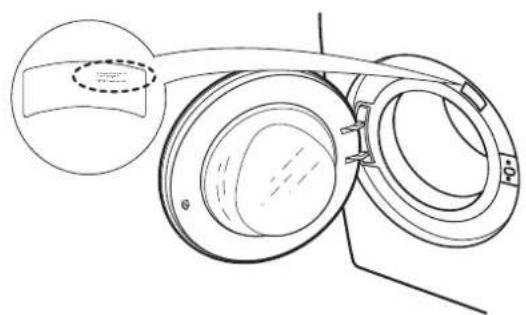
When contacting the After-Sales Service, you will need to be able to provide the codes indicated on the adhesive label on the inner side of the door. The telephone number is indicated in the warranty booklet.
natural_image
Technical line drawing of a mechanical component with concentric rings and a highlighted section (no text or symbols)Whirlpool® is a registered trademark of Whirlpool, USA.
HOW TO RECEIVE THE INSTRUCTIONS FOR USE
Phone the After-Sales Service
Use this QR Code

Download the guide from the Whirlpool website http://docs.whirlpool.eu
To do this, you need to enter the correct commercial code of the product indicated on the adhesive label.