32W2963 - TV TOSHIBA - Free user manual and instructions
Find the device manual for free 32W2963 TOSHIBA in PDF.


User questions about 32W2963 TOSHIBA
0 question about this device. Answer the ones you know or ask your own.
Ask a new question about this device
Download the instructions for your TV in PDF format for free! Find your manual 32W2963 - TOSHIBA and take your electronic device back in hand. On this page are published all the documents necessary for the use of your device. 32W2963 by TOSHIBA.
USER MANUAL 32W2963 TOSHIBA
24/32/39/40/43/48/49 L28 Series
32/39/40/43/49 L38 Series
24/28/32 W/D28 Series
24/28/32 W/D38 Series
24 L/W/D29 Series
32 L/W29 Series
32 L/W39 Series
24/32 WD2A Series
24 WL2A Series
32/40/43 LL2A Series
24/32/40/43 LL/WL/WD3A Series
QUICK START GUIDE
KURZANLEITUNG
GUIDE DE MISE EN MARCHE RAPIDE
GUIDA RAPIDA ALL'AVVIO
SNELLE START GIDS
SKRÓCONA INSTRUKCJA OBSŁUGI
Please visit www.toshiba-tv.com to download the full user manual.
① Inserting the batteries into the remote
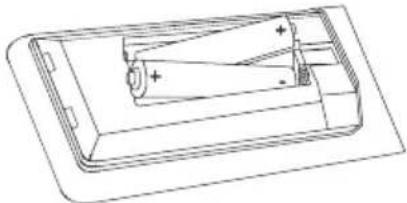
Remove the back cover to reveal the battery compartment. Insert two size AAA batteries. Make sure the (+) and (-) signs match (observe correct polarity). Do not mix old and new batteries. Replace only with same or equivalent type. Place the cover back on. A message will be displayed on the screen when the batteries are low and must be replaced.
natural_image
Technical line drawing of a battery pack with internal components and polarity indicators (no text or symbols)② Connections
Antenna
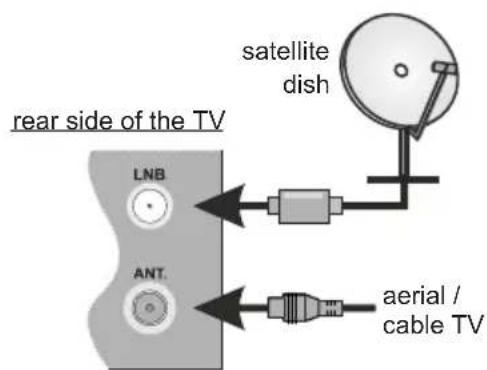
Connect the antenna cable/s to your TV.
text_image
rear side of the TV LNB ANT. satellite dish aerial / cable TVExternal Devices

PLEASE ENSURE BOTH UNITS ARE SWITCHED OFF BEFORE CONNECTING
Use the proper cable to connect two units together.
To select the desired input source, press the Source button on the remote control. Or press the centre of the control switch inwards consecutively until the Sources list is displayed.
HDMI connection

text_image
rear of TVPower
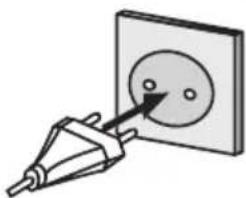
After unpacking, allow the TV set to reach the ambient room temperature before you connect the set to the mains. Plug the power cable to the mains socket outlet.
IMPORTANT: The TV set is designed to operate on a 220-240V AC, 50 Hz supply.
natural_image
Simple line drawing of a plug inserted into a square socket with two circular holes (no text or symbols)③ Switching on the TV
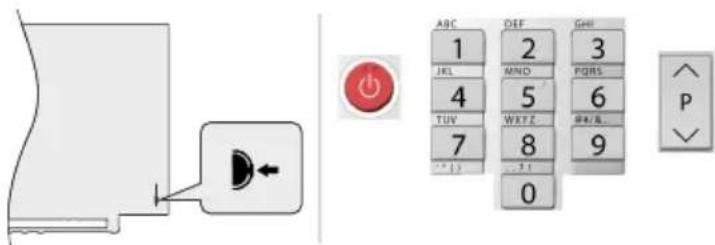
In order to turn the TV on from standby mode:
- Press the Standby button, a numeric button or Programme +/- button on the remote control
- Press the centre of the control switch inwards, located at the rear left hand side of the TV
text_image
Diagram showing a door panel with an orange button and a numeric keypad, alongside a directional indicator.
Internet connection
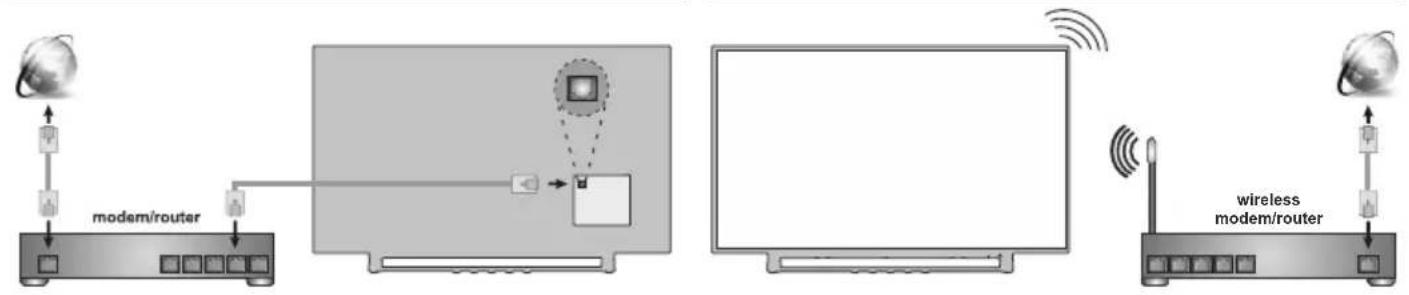
You can set up your TV so that it can access the Internet through your local area network (LAN) using a wired or wireless connection.
Wired Wireless
flowchart
graph TD
    A["Modem/router"] --> B["Router"]
    B --> C["Monitor"]
    C --> D["Wireless modem/router"]
    D --> E["Internet"]
    style A fill:#f9f,stroke:#333
    style B fill:#ccf,stroke:#333
    style C fill:#cfc,stroke:#333
    style D fill:#fcc,stroke:#333
    style E fill:#cff,stroke:#333
Note: The figures are for representation only

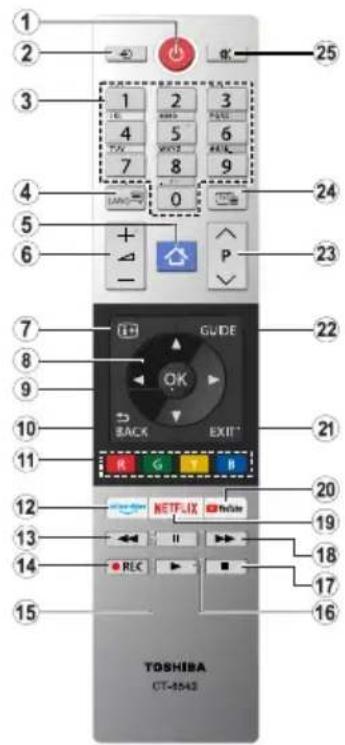
Remote control
text_image
1 2 3 4 5 6 7 8 9 10 11 12 13 14 15 TOSHIBA CT-8543 25 24 23 22 21 20 19 18 17 16 15 G E F GND EXIT R LRC NETFLIX VHSLR- Standby 14. Record
- Source 15. Pause
- Numeric buttons 16. Play
- Language 17. Stop
- Menu 18. Fast Forward
- Volume +/- 19. Netflix
- Info 20. YouTube
- Directional buttons 21. Exit
- OK 22. Guide
- Back/Return 23. Programme +/-
- Coloured Buttons 24. Text
- Prime Video 25. Mute
- Rewind

First time installation
When turned on for the first time, the TV's welcome screen will be displayed. Select your language and press OK. Follow the on screen instructions to set your TV and install channels. The installation wizard will guide you through the setup process. You can perform First Time Installation anytime using the related option in the Settings>Installation menu.

Accessing E-Manual and the full user manual
You can find instructions for your TV's features in the E-Manual. To use E-Manual, enter Settings menu, select Manuals and press OK. For quick access to E-Manual press Menu "button and then Info " button.
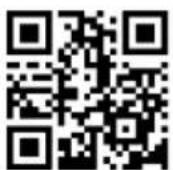
You can also review your TV user manual online or download as you like. Scan this QR code or visit https://toshiba-tv.com
Accessories Included
- Remote Control
- Batteries: 2 x AAA
- Quick Start Guide
- Product Fiche
Feature Overview
Media Browser
Browse the media content stored on USB devices that are connected to your TV
Common Interface
Decode encrypted digital TV channels with a Conditional Access Module(CAM) and a card provided by a digital TV service operator
USB Recording
Record your favourite TV programmes
Electronic Programme Guide
Display the scheduled digital TV programmes
CEC
Control basic functions of the connected HDMI-CEC compatible audio/video devices with the remote control of the TV
Audio Video Sharing
Access your media files stored on media server devices, such as PC's or handheld devices, that are connected to your home network
HbbTV
Access to HbbTV services (services are dependant on broadcast)
Apps
Access the applications installed on your TV, add more from the market
Open Browser
Browse the internet from the comfort of your sofa
Wireless Display
Wirelessly stream video and sound content and use your TV as a second screen for your compatible PC or handheld device
Smart Center
Use the Smart Center application installed on your mobile device to launch your applications, control your TV, share media files and stream TV programmes
Virtual Remote
Control your TV via a wireless handheld device
Bluetooth ^® (\*\*)
Connect audio devices or remote controllers wirelessly to your TV.
(**) Limited Models Only
Some features may not be available dependant on your TV model, please check the product fiche for your product specifications
For more detailed information on installation, function and control refer to the full manual on our website at http://www.toshiba-tv.com
Safety Information
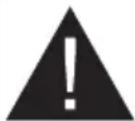
CAUTION
RISK OF ELECTRIC SHOCK DO NOT OPEN
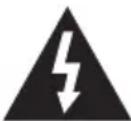
CAUTION: TO REDUCE THE RISK OF ELECTRIC SHOCK DO NOT REMOVE COVER (OR BACK).
NO USER-SERVICEABLE PARTS INSIDE. REFER SERVICING TO QUALIFIED SERVICE PERSONNEL.
In extreme weather (storms, lightning) and long inactivity periods (going on holiday) disconnect the TV set from the mains.
The mains plug is used to disconnect TV set from the mains and therefore it must remain readily operable. If the TV set is not disconnected electrically from the mains, the device will still draw power for all situations even if the TV is in standby mode or switched off.
Note: Follow the on screen instructions for operating the related features.
IMPORTANT - Please read these instructions fully before installing or operating
WARNING: This device is intended to be used by persons (including children) who are capable / experienced of operating such a device unsupervised, unless they have been given supervision or instruction concerning the use of the device by a person responsible for their safety.
- Use this TV set at an altitude of less than 2000 meters above the sea level, in dry locations and in regions with moderate or tropical climates.
- The TV set is intended for household and similar general use but may also be used in public places.
- For ventilation purposes, leave at least 5cm of free space around the TV.
- The ventilation should not be impeded by covering or blocking the ventilation openings with items, such as newspapers, table-cloths, curtains, etc.
- The power cord plug should be easily accessible. Do not place the TV, furniture, etc. on the power cord. A damaged power cord/plug can cause fire or give you an electric shock. Handle the power cord by the plug, do not unplug the TV by pulling the power cord. Never touch the power cord/plug with wet hands as this could cause a short circuit or electric shock. Never make a knot in the power cord or tie it with other cords. When damaged it must be replaced, this should only be done by qualified personnel.
- Do not expose the TV to dripping or splashing of liquids and do not place objects filled with liquids, such as vases, cups, etc. on or over the TV (e.g., on shelves above the unit).
- Do not expose the TV to direct sunlight or do not place open flames such as lit candles on the top of or near the TV.

- Do not place any heat sources such as electric heaters, radiators, etc. near the TV set.
- Do not place the TV on the floor and inclined surfaces.
- To avoid danger of suffocation, keep plastic bags out of the reach of the babies, children and domestic animals.
- Carefully attach the stand to the TV. If the stand is provided with screws, tighten the screws firmly to prevent the TV from tilting. Do not over-tighten the screws and mount the stand rubbers properly.
- Do not dispose of the batteries in fire or with hazardous or flammable materials.
WARNING
- Batteries must not be exposed to excessive heat such as sunshine, fire or the like.
- Excessive sound pressure from earphones or headphones can cause hearing loss.
ABOVE ALL - NEVER let anyone, especially children, push or hit the screen, push anything into holes, slots or any other openings in the case.
 Caution Caution | Serious injury or death risk |
 , Risk of electric shock , Risk of electric shock | Dangerous voltage risk |
 , Maintenance , Maintenance | Important maintenance component |
Markings on the Product
The following symbols are used on the product as a marker for restrictions and precautions and safety instructions. Each explanation shall be considered where the product bears related marking only. Note such information for security reasons.


Class II Equipment: This appliance is designed in such a way that it does not require a safety connection to electrical earth.
Hazardous Live Terminal: The marked terminal(s) is/are hazardous live under normal operating conditions.

Caution, See Operating Instructions: The marked area(s) contain(s) user replaceable coin or button cell batteries.
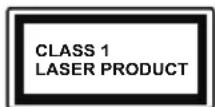
Class 1 Laser Product: This product contains Class 1 laser source that is safe under reasonably foreseeable conditions of operation.
WARNING
Do not ingest the battery, Chemical Burn Hazard This product or the accessories supplied with the product may contain a coin/button cell battery. If the coin/button cell battery is swallowed, it can cause severe internal burns in just 2 hours and can lead to death.
Keep new and used batteries away from children. If the battery compartment does not close securely, stop using the product and keep it away from children.
If you think batteries might have been swallowed or placed inside any part of the body, seek immediate medical attention.

Never place a television set in unstable or inclined locations. A television set may fall, causing serious personal injury or death. Many injuries, particularly to children, can be avoided by taking simple precautions such as;
- Using cabinets or stands recommended by the manufacturer of the television set.
- Only using furniture that can safely support the television set.
- Ensuring the television set is not overhanging the edge of the supporting furniture.
- Not placing the television set on tall furniture (for example, cupboards or bookcases) without anchoring both the furniture and the television set to a suitable support.
- Not standing the television set on cloth or other materials placed between the television and supporting furniture.
• Educating children about the dangers of climbing on furniture to reach the television set or its controls. If your existing television set is being retained and relocated, the same considerations as above should be applied.

Apparatus connected to the protective earthing of the building installation through the MAINS connection or through other apparatus with a connection to protective earthing – and to a television distribution system using coaxial cable, may in some circumstances create a fire hazard. Connection to a television distribution system has therefore to be provided through a device providing electrical isolation below a certain frequency range (galvanic isolator)
Using the special functions to change the size of the displayed image (i.e. changing the height/width ratio) for the purposes of public display or commercial gain may infringe on copyright laws.
The LCD display panels are manufactured using an extremely high level of precision technology; however, sometimes some parts of the screen may be missing picture elements or have luminous spots. This is not a sign of a malfunction.
The set should be operated only from a 220-240 V AC 50 Hz outlet. Ensure that the television is n standing on the mains lead. Do not cut off the mains plug from this equipment, this incorporates a special Radio Interference Filter, the removal of which will impair its performance. It should only be replaced by a correctly rated and approved type. IF IN DOUBT PLEASE CONSULT A COMPETENT ELECTRICIAN.
WALL MOUNTING WARNINGS
- Read the instructions before mounting your TV on the wall.
- The wall mount kit is optional. You can obtain from your local dealer, if not supplied with your TV.
- Do not install the TV on a ceiling or on an inclined wall.
- Use the specified wall mounting screws and other accessories.
- Tighten the wall mounting screws firmly to prevent the TV from fall. Do not over-tighten the screws.
Figures and illustrations in this user manual are provided for reference only and may differ from the actual product appearance. Product design and specifications may be changed without notice.
Licenses
The terms HDMI and HDMI High-Definition Multimedia Interface, and the HDMI Logo are trademarks or registered trademarks of HDMI Licensing Administrator, Inc. in the United States and other countries.

Manufactured under license from Dolby Laboratories. Dolby, Dolby Audio and the double-D symbol are trademarks of Dolby Laboratories. Confidential unpublished works. Copyright ©1992-2019 Dolby Laboratories. All rights reserved.
YouTube and the YouTube logo are trademarks of Google Inc.
(**)For DTS patents, see http://patents.dts.com. Manufactured under license from DTS Licensing Limited. DTS, the Symbol, & DTS and the Symbol together are registered trademarks, and DTS TruSurround is a trademark of DTS, Inc. © DTS, Inc. All Rights Reserved.

(**)For DTS patents, see http://patents.dts.com. Manufactured under license from DTS Licensing Limited. DTS, DTS-HD, the Symbol, & DTS or DTS-HD and the Symbol together are registered trademarks of DTS, Inc. © DTS, Inc. All Rights Reserved.

The Bluetooth ^® word mark and logos are registered trademarks owned by the Bluetooth SIG, Inc. and any use of such marks by Vestel Elektronik Sanayi ve Ticaret A.S. is under license. Other trademarks and trade names are those of their respective owners.
DVB is a registered trademark of the DVB Project.
[1] EIA/CEA-861-D compliance covers the transmission of uncompressed digital video with high-bandwidth digital content protection, which is being standardized for reception of high-definition video signals. Because this is an evolving technology, it is possible that some devices may not operate properly with the television.
This product contains technology subject to certain intellectual property rights of Microsoft. Use or distribution of this technology outside of this product is prohibited without the appropriate license(s) from Microsoft.
Content owners use Microsoft PlayReady™ content access technology to protect their intellectual property, including copyrighted content. This device uses PlayReady technology to access PlayReady-protected content and/or WMDRM-protected content.
If the device fails to properly enforce restrictions on content usage, content owners may require Microsoft to revoke the device's ability to consume PlayReady-protected content. Revocation should not affect unprotected content or content protected by other content access technologies. Content owners may require you to upgrade PlayReady to access their content. If you decline an upgrade, you will not be able to access content that requires the upgrade.
The "CI Plus" Logo is a trademark of CI Plus LLP.
This product is protected by certain intellectual property rights of Microsoft Corporation. Use or distribution of such technology outside of this product is prohibited without a license from Microsoft or an authorized Microsoft subsidiary.
(**) Limited Models Only
Wireless LAN Transmitter Specifications
| Frequency Ranges | Max Output Power |
| 2400 - 2483,5 MHz (CH1-CH13) < 100 | mW |
| 5150 - 5250 MHz (CH36 - CH48) < 200 | mW |
| 5250 - 5350 MHz (CH52 - CH64) < 200 | mW |
| 5470 - 5725 MHz (CH100 - CH140) < 200 | mW |
Country Restrictions
This device is intended for home and office use in all EU countries (and other countries following the relevant EU directive) without any limitation except for the countries mentioned below.
| Country Restriction | |
| Bulgaria | General authorization required for outdoor use and public service |
| France In-door use only for 2454-2483.5 MHz | |
| Italy | If used outside of own premises, general authorization is required |
| Greece | In-door use only for 5470 MHz to 5725 MHz band |
| Luxembourg | General authorization required for network and service supply(not for spectrum) |
| Norway | Radio transmission is prohibited for the geographical area within a radius of 20 km from the centre of Ny-Ålesund |
| Russian Federation | In-door use only |
The requirements for any country may change at any time. It's recommended that user checks with local authorities for the current status of their national regulations for both 2.4 GHz and 5 GHz wireless LAN's.
Disposal...
The following information is only for EU-member states:
Disposal of products
The crossed out wheeled dust bin symbol indicates that products must be collected and disposed of separately from household waste. Integrated batteries and accumulators can be disposed of with the product. They will be separated at the recycling centres.
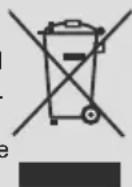
The black bar indicates that the product was placed on the market after August 13, 2005.
By participating in separate collection of products and batteries, you will help to assure the proper disposal of products and batteries and thus help to prevent potential negative consequences for the environment and human health.
For more detailed information about the collection and recycling programmes available in your country, please contact your local city office or the shop where you purchased the product.
Disposal of batteries and/or accumulators
The crossed out wheeled dust bin symbol indicates that batteries and/or accumulators must be collected and disposed of separately from household waste.
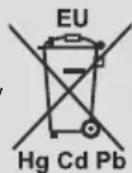
If the battery or accumulator contains more than the specified values of lead (Pb), mercury
(Hg), and/or cadmium (Cd) defined in the European Battery Directive, then the chemical symbols for lead (Pb), mercury (Hg) and/or cadmium (Cd) will appear below the crossed out wheeled dust bin symbol.
By participating in separate collection of batteries, you will help to assure the proper disposal of products and batteries and thus help to prevent potential negative consequences for the environment and human health. For more detailed information about the collection and recycling programmes available in your country, please contact your local city office or the shop where you purchased the product.
REACH information
The European Union (EU) chemical regulation, REACH (Registration, Evaluation, Authorization and Restriction of Chemicals), entered into force on 1 June 2007.
Toshiba will meet all REACH requirements and is committed to provide our customers with information about the presence in our articles of substances included on the candidate list according to REACH regulation.
Please consult the following website www.toshiba-tv.com for information about the presence in our articles of substances included on the candidate list according to REACH in a concentration above 0.1 % weight by weight.
EU Conformity Statement

This product is carrying the CE-Mark in accordance with the related European Directives.
Responsible for CE-Marking is Vestel Poland sp. zo.o. ul. Salsy 2, 02-823 Warszawa, Polska.
This product is labeled with the CE Mark in accordance with the related European Directives, notably RoHS Directive 2011/65/EU. Furthermore the product complies with the Ecodesign Directive 2005/32/EC (EuP) and 2009/125/EC (ErP) and its related implementing measures.
This equipment corresponds to requirements of the Technical Regulation on limitation of usage of certain dangerous substances in electrical and electronic equipment.
Find out all you need to know about the latest, trend-setting TV technology on our website.
www.toshiba-tv.com
You can review your TV user manual online or download as you like