Volt 400 XC HL-EL070RC - Bike light Cateye - Free user manual and instructions
Find the device manual for free Volt 400 XC HL-EL070RC Cateye in PDF.


| Brand | Cateye |
| Model | Volt 400 XC HL-EL070RC |
| Product Type | Bicycle front light |
| Dimensions (mm) | 93 x 30.5 x 40 |
| Weight (g) | 95 |
| Power Source | Rechargeable lithium-ion battery (2200 mAh, 3.6V) |
| Charging Interface | Micro USB |
| Operating Temperature Range | -10°C to 40°C (14°F to 104°F) |
| Light Modes and Run Times | High (400 lm): 2.5h, Low (100 lm): 13.5h, High-High Flashing (400/100 lm): 12h, Flashing (100 lm): 110h |
| Mode Memory Function | Yes (turns on in last used mode) |
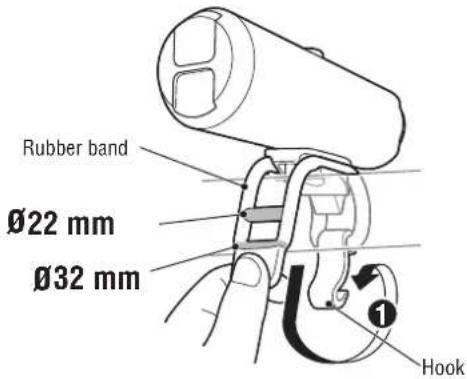
| Mounting | Rubber band and hook; 360° rotation |
| Weather Resistance | Splash proof, usable in rain (not submersible) |
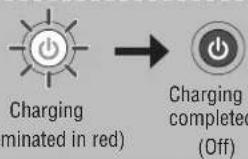
| Battery Charge Indicator | Red light during charging, off when full |
| Battery Life (cycles) | Approx. 300 cycles until 70% capacity |
| Spare Parts Available | Rubber band, hook, micro USB cable (long) |
| Warranty | 2 years on light unit (excludes battery deterioration) |
| Maintenance | Clean with soft cloth and mild soap; avoid solvents |
| Safety Warnings | Do not dazzle drivers; ensure secure attachment; charge in specified temperature range |
Frequently Asked Questions - Volt 400 XC HL-EL070RC Cateye
User questions about Volt 400 XC HL-EL070RC Cateye
0 question about this device. Answer the ones you know or ask your own.
Ask a new question about this device
Download the instructions for your Bike light in PDF format for free! Find your manual Volt 400 XC HL-EL070RC - Cateye and take your electronic device back in hand. On this page are published all the documents necessary for the use of your device. Volt 400 XC HL-EL070RC by Cateye.
USER MANUAL Volt 400 XC HL-EL070RC Cateye
text_image
ENG VOLT400XC™ HL-EL070RC Manual Li-ion 3.6 v Before using the light, read this manual thoroughly and keep it for future reference. Design Pat. Pending Copyright© 2017 CATEYE Co., Ltd. HLEL070RC-170525 5WARNING!!!
driver approaching does not get dazzled.
attached securely. Do not use a damaged rubber band.
checking the indicator periodically while using.
CAUTION!
firmly mounted to the bracket, it lights up, and the light is not blocked by baggage, etc.
recommend you carry a spare light.
computer may adversely affect the reading of the computer.
use and can be used in the rain. However, do not intentionally submerge it in water.
etc., clean with a soft cloth which is moistened with mild soap. Never apply paint thinner, benzine or alcohol; damage will result.
⚠ LITHIUM-ION BATTERIES Cautions on recharging
battery charger.
parked under direct sunlight, and make sure to charge only when the ambient temperature is between 41°F and 104°F (5 and 40°C).
foreign objects attach to the USB plug.
charged.
the USB plug.
and will vary by environmental and user conditions.
Cautions in use
temperatures will cause the rechargeable battery to deteriorate faster. Do not place the light inside a vehicle or near a heater.
after proper charging, the rechargeable battery may be nearing the end of its service life. Dispose of the battery as described in "PRECAUTIONS ON DISPOSAL".
Cautions on storage
Cool and dry storage is recommended.
For long period storage, it is important to charge the battery 30 minutes every 6 months.
Cautions for dispose
When disposing of the light unit, remove the internal rechargeable battery and dispose of it according to local regulations.
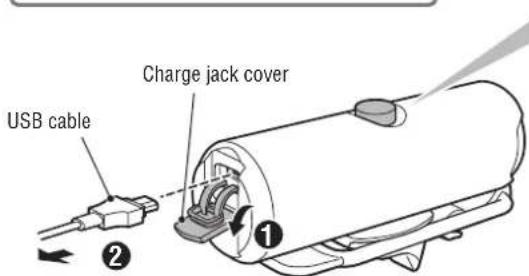
1 HOW TO CHARGE
Always charge the product before use.
text_image
USB cable Charge jack cover ①To PC or USB battery charger
Switch (Indicator)
text_image
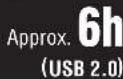
Charging (minated in red) Charging i completed (Off)Standard charging time
2 HOW TO MOUNT
Attach securely in the mounting position.
text_image
Rubber band Ø22 mm Ø32 mm Hook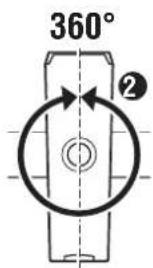
text_image
360° ②This light rotates 360 degrees to adjust angle.
3 SWITCH OPERATION
text_image
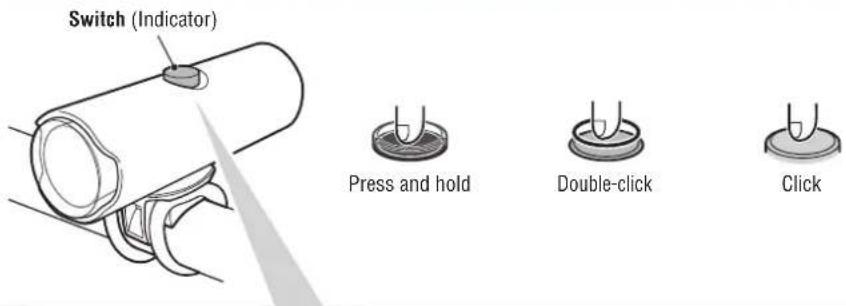
Switch (Indicator) Press and hold Double-click Click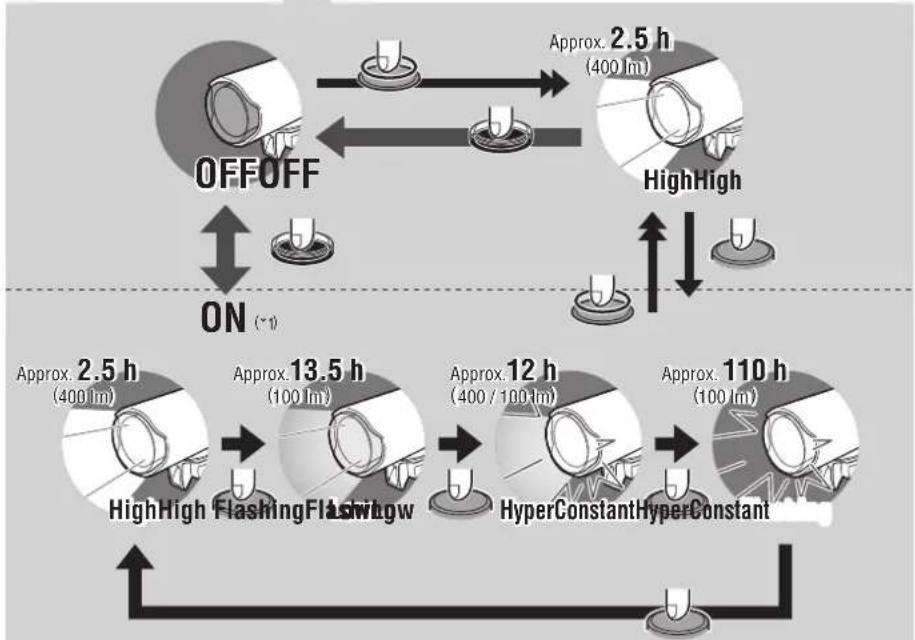
flowchart
graph TD
    A["High-High Flashing"] --> B["Approx. 2.5 h (400 lm)"]
    B --> C["Approx. 13.5 h (100 lm)"]
    C --> D["Approx. 12 h (400 / 100 lm)"]
    D --> E["Approx. 110 h (100 lm)"]
    E --> F["High-High Flashing + ON (-1)"]
    F --> G["OFF/OFF"]
    G --> H["High-High Flashing + ON (-1)"]
    H --> I["High-High Flashing + ON (-1)"]
    I --> J["High-High Flashing + ON (-1)"]
    J --> K["High-High Flashing + ON (-1)"]
    K --> L["High-High Flashing + ON (-1)"]
    L --> M["High-High Flashing + ON (-1)"]
    M --> N["High-High Flashing + ON (-1)"]
    N --> O["High-High Flashing + ON (-1)"]
    O --> P["High-High Flashing + ON (-1)"]
    P --> Q["High-High Flashing + ON (-1)"]
    Q --> R["High-High Flashing + ON (-1)"]
    R --> S["High-High Flashing + ON (-1)"]
    S --> T["High-High Flashing + ON (-1)"]
    T --> U["High-High Flashing + ON (-1)"]
    U --> V["High-High Flashing + ON (-1)"]
    V --> W["High-High Flashing + ON (-1)"]
    W --> X["High-High Flashing + ON (-1)"]
    X --> Y["High-High Flashing + ON (-1)"]
    Y --> Z["High-High Flashing + ON (-1)"]
    Z --> AA["High-High Flashing + ON (-1)"]
    AA --> AB["High-High Flashing + ON (-1)"]
    AB --> AC["High-High Flashing + ON (-1)"]
    AC --> AD["High-High Flashing + ON (-1)"]
    AD --> AE["High-High Flashing + ON (-1)"]
    AE --> AF["High-High Flashing + ON (-1)"]
    AF --> AG["High-High Flashing + ON (-1)"]
    AG --> AH["High-High Flashing + ON (-1)"]
    AH --> AI["High-High Flashing + ON (-1)"]
    AI --> AJ["High-High Flashing + ON (-1)"]
    AJ --> AK["High-High Flashing + ON (-1)"]
    AK --> AL["High-High Flashing + ON (-1)"]
    AL --> AM["High-High Flashing + ON (-1)"]
    AM --> AN["High-High Flashing + ON (-1)"]
    AN --> AO["High-High Flashing + ON (-1)"]
    AO --> AP["High-High Flashing + ON (-1)"]
    AP --> AQ["High-High Flashing + ON (-1)"]
    AQ --> AR["High-High Flashing + ON (-1)"]
    AR --> AS["High-High Flashing + ON (-1)"]
    AS --> AT["High-High Flashing + ON (-1)"]
    AT --> AU["High-High Flashing + ON (-1)"]
    AU --> AV["High-High Flashing + ON (-1)"]
    AV --> AW["High-High Flashing + ON (-1)"]
    AW --> AX["High-High Flashing + ON (-1)"]
    AX --> AY["High-High Flashing + ON (-1)"]
    AY --> AZ["High-High Flashing + ON (-1)"]
    AZ --> BA["High-High Flashing + ON (-1)"]
    BA --> BB["High-High Flashing + ON (-1)"]
    BB --> BC["High-High Flashing + ON (-1)"]
    BC --> BD["High-High Flashing + ON (-1)"]
    BD --> BE["High-High Flashing + ON (-1)"]
    BE --> BF["High-High Flashing + ON (-1)"]
    BF --> BG["High-High Flashing + ON (-1)"]
    BG --> BH["High-High Flashing + ON (-1)"]
    BH --> BI["High-High Flashing + ON (-1)"]
    BI --> BJ["High-High Flashing + ON (-1)"]
    BJ --> BK["High-High Flashing + ON (-1)"]
    BK --> BL["High-High Flashing + ON (-1)"]
    BL --> BM["High-High Flashing + ON (-1)"]
    BM --> BN["High-High Flashing + ON (-1)"]
    BN --> BO["High-High Flashing + ON (-1)"]
    BO --> BP["High-High Flashing + ON (-1)"]
    BP --> BQ["High-High Flashing + ON (-1)"]
    BQ --> BR["High-High Flashing + ON (-1)"]
    BR --> BS["High-High Flashing + ON (-1)"]
    BS --> BT["High-High Flashing + ON (-1)"]
    BT --> BU["High-High Flashing + ON (-1)"]
    BU --> BV["High-High Flashing + ON (-1)"]
    BV --> BW["High-High Flashing + ON (-1)"]
    BW --> BX["High-High Flashing + ON (-1)"]
    BX --> BY["High-High Flashing + ON (-1)"]
    BY --> BZ["High-High Flashing + ON (-1)"]
    BZ --> CA["High-High Flashing + ON (-1)"]
    CA --> CB["High-High Flashing + ON (-1)"]
    CB --> CC["High-High Flashing + ON (-1)"]
    CC --> CD["High-High Flashing + ON (-1)"]
    CD --> CE["High-High Flashing + ON (-1)"]
    CE --> CF["High-High Flashing + ON (-1)"]
    CF --> CG["High-High Flashing + ON (-1)"]
    CG --> CH["High-High Flashing + ON (-1)"]
    CH --> CI["High-High Flashing + ON (-1)"]
    CI --> CJ["High-High Flashing + ON (-1)"]
    CJ --> CK["High-High Flashing + ON (-1)"]
*1 When you turn the light on, it lights up in the last lighting mode you used. (Mode memory function)
SPARE / OPTIONAL PARTS
54416215342730 5342990
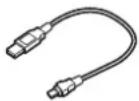
(MICRO USB)
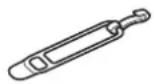
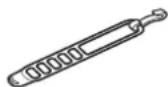
Rubber band and hook USB cable and hook (LONG)
SPECIFICATIONS
Battery : Rechargeable lithium-ion battery (2200 mAh)
Temperature range : 14°F - 104°F (-10°C - 40°C)
Recharge/discharge number of times
: About 300 times (until the rated capacity
Dimensions/weight : 3-21/32" x 1-13/64" x 1-37/64"
(93 x 30.5 x 40 mm) / 3.35 oz (95 g)
* The specifications and design are subject to change without notice.
LIMITED WARRANTY
2-year Warranty: Light unit only (excludes battery deterioration)
CatEye products are warranted to be free of defects from materials and workmanship for a period of 2 years from original purchase. If the product fails to work during normal use, CatEye will repair or replace the defect at no charge. Service must be performed by CatEye or an authorized retailer. To return the product, pack it carefully and enclose the warranty certificate (proof of purchase) with instruction for repair. Please write or type your name and address clearly on the warranty certificate. Insurance, handling and transportation charges to CatEye shall be borne by person desiring service.
For UK and REPUBLIC OF IRELAND consumers, please return to the place of purchase. This does not affect your statutory rights.
Please register your CatEye product on the website.
http://www.cateye.com/en/support/regist/
CATEYE CO., LTD.
2-8-25, Kuwazu, Higashi Sumiyoshi-ku,
Osaka 546-0041 Japan
Attn: CATEYE Customer Service
(Section 10 70%)
Phone : (06)6719-6863
Fax : (06)6719-6033
E-mail : support@cateye.co.jp
URL : http://www.cateye.com
[For US Customers]
CATEYE AMERICA, INC
2825 Wilderness Place Suite 1200,
Boulder CO 80301-5494 USA
Phone : 303.443.4595
Toll Free : 800.5.CATEYE
Fax : 303.473.0006
E-mail: service@cateye.com