MT1073 - Mouse Media-Tech - Free user manual and instructions
Find the device manual for free MT1073 Media-Tech in PDF.


User questions about MT1073 Media-Tech
0 question about this device. Answer the ones you know or ask your own.
Ask a new question about this device
Download the instructions for your Mouse in PDF format for free! Find your manual MT1073 - Media-Tech and take your electronic device back in hand. On this page are published all the documents necessary for the use of your device. MT1073 by Media-Tech.
USER MANUAL MT1073 Media-Tech
WIRELESS OPTICAL MOUSE 2.4G
MT1073
Hi-Res Wireless Optical Mouse
Instructions Manual
EN
Package contents
■ Wireless Optical Mouse
USB receiver
■ 2 AAA alkaline batteries
■ User manual
System requirements
■ Windows ME, 2000, XP or Vista
■ Free USB Port
Installation
text_image
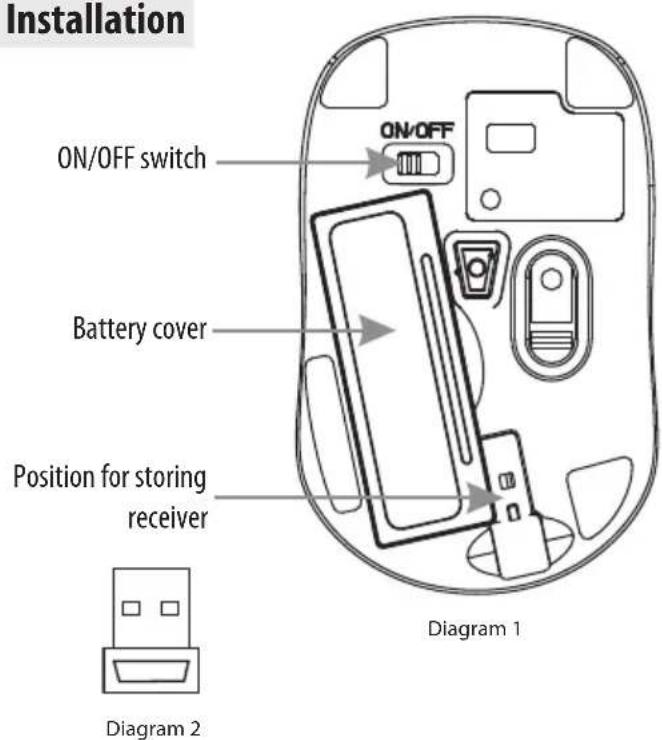
Installation ON/OFF switch Battery cover Position for storing receiver ON/OFF Diagram 1 Diagram 2Installing the battery
- Remove the battery cover.
- Insert two AAA batteries into the battery compartment, make sure to properly orient the positive (+) and negative (-) ends as specified by the marks in the battery compartment. Replace the battery cover.
- Switch on the mouse, the LED in bottom of mouse will blink.
Installing the receiver
- Insert receiver into USB port of PC, the com-
puter system will automatically detect it and prepare it for full operation.
- The mouse may use then. If the user wrongly operates, please redo the above operating procedures.
Description of keys and DPI adjusting
text_image
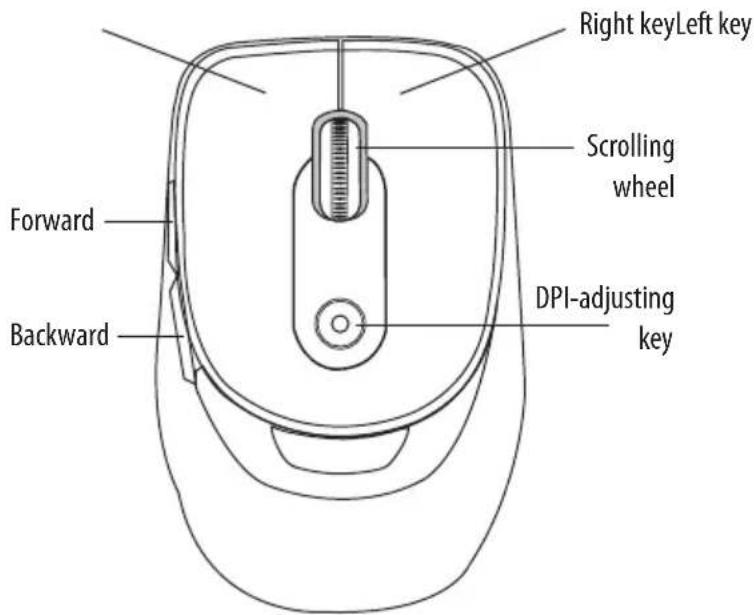
Right keyLeft key Scrolling wheel Forward Backward DPI-adjusting keyUsing "DPI-adjusting key"
Using "DPI-adjusting key", the resolution of mouse can be switched between 800DPI and 1600DPI in turn. That LED light in "DPI-adjusting key" blinks slowly indicates 800DPI and fast 1600DPI.
Backward and Frontward keys
Backward and Frontward keys for your easily navigating forward and backward on the Internet.
Low-voltage alarming function
When batteries have been used for some time and discover the LED light in "DPI-adjusting key" blinks automatically, which reminds you that batteries voltage is becoming low, suggested you replace the batteries with new ones.