SXCD - CD Player Perreaux - Free user manual and instructions
Find the device manual for free SXCD Perreaux in PDF.


User questions about SXCD Perreaux
0 question about this device. Answer the ones you know or ask your own.
Ask a new question about this device
Download the instructions for your CD Player in PDF format for free! Find your manual SXCD - Perreaux and take your electronic device back in hand. On this page are published all the documents necessary for the use of your device. SXCD by Perreaux.
USER MANUAL SXCD Perreaux
natural_image
Three black and silver electronic devices with visible branding, arranged side by side (no readable text or symbols on the devices themselves)Owners Manual
Perreaux Industries Limited makes no warranty for the use of its products, other than those expressly contained in the warranty detailed herein. The Company assumes no responsibility for any errors which may appear in this document, reserves the right to change products or specifications detailed herein at any time without notice, and does not make any commitment to update the information contained herein. No licenses to patents or other intellectual property of Perreaux are granted by the Company in connection with the sale of Perreaux products, expressly or by implication.
PERREAUX ^® is a registered trademark of Perreaux Industries Ltd.
Terms and product names in this document may be trademarks of others.
This page has intentionally been left blank.
i Introducing the
Perreaux Silhouette Series
Key Features
Designed as a range of high quality, yet affordable modules; the Silhouette series will compliment and enhance your existing system.
Drawing on our extensive knowledge gained from more than a quarter of a century of developing highest quality audio products, the Silhouette series concentrates our legendary design and build-quality into a compact package without sacrificing performance.
The Perreaux Silhouette series provides performance levels never before seen in its class.
▪ Computer optical drive transport
- Flexible two-box solution
- Low-jitter, precision master clock
- Burr-Brown (Texas Instruments) DAC and SPDIF transmitter
- Option to use external master clock via pLINK
- Optimal PCB and ground plane layout
▪ Ultra-short signal paths
▪ High-quality fibreglass PCB with minimal internal wiring
- Digital output
▪ Scientific Conversion digital output transformer
▪ RS232 communication via pLINK
- RC-5 remote input
- Compact and stylish
The Perreaux Silhouette series takes you even closer to the
elusive goal of "The Perfect Re-Creation of a Musical
Event".
From all of us at Perreaux Industries Limited, thank you for choosing the Perreaux Silhouette Series SXCD Compact Disc Player.
ii Important Safety Instructions
Note:
Please read all instructions carefully before attempting to operate your Perreaux Silhouette SXCD Compact Disc Player.
ALWAYS switch off power to your system before attempting to connect or disconnect cables.
ALWAYS disconnect your system from the mains before attempting to clean your unit.
ALWAYS keep electrical equipment out of reach of children.
ALWAYS unplug sensitive electronic equipment during electrical storms.
NEVER disconnect the mains earth from the system.
NEVER operate the SXCD with the cover removed.
NEVER use any liquid inside the SXCD.
NEVER attempt to repair the SXCD. In the event of a problem, please contact your Perreaux dealer.
NEVER expose the SXCD to extremely high or low temperatures.
iiiiiii Table of Contents
i Introducing the Perreaux Silhouette Series .... 3
II Important Safety Instructions .... 4
iiiii Table of Contents 5
1 Unpacking and Placement 6
2 Instant Install 7
3 Electronics Module 9
4 Transport Module 15
5 Placement Options....17
6 Special Design Philosophies....18
7 Special Design Features ....20
8 Care and Maintenance ....23
9 Warranty Information ....24
10 Extended Warranty Registration Form....25
11 Troubleshooting Guide ......26
12 Specifications....28
13 Physical Dimensions....31
14 Contact Details ....33
1 Unpacking and Placement
| Unpacking Procedure | The two components which comprise the SXCD CD player are packaged for maximum protection. To open, sit each box upright and cut the reinforced tape at the top of each box. Each module can now be removed.Pull the foam protecting end-caps off either side of each of the modules and remove the black material covering.The SXCD Compact Disc Player is now unpacked and ready for further installation. |
| Note: | Please retain all packaging material for future transport. |
| Box Contents | 1 x SXCD Compact Disc Player Electronics1 x SXCD Compact Disc Player Transport1 x Product manual1 x Detachable AC power cord1 x 50-way ribbon cable1 x 75Ω coaxial cable1 x BNC to RCA adaptor3 x Performance analysis charts |
| Placing Your SXCD | The SXCD should generally be placed close to your preamplifier or integrated amplifier, thus keeping interconnect cabling between the SXCD and associated components as short as practical. This will reduce the systems susceptibility to radio frequency (RF) interference and the negative effects associated with long cables. |
| Ventilation Requirements | The SXCD is a low power electronic device. Ventilation requirements are not considered an important factor in product placement.In the event that the SXCD is to be incorporated into custom cabinetry, please refer to the dimensional information provided in the Physical Dimensions section of the manual (Chapter 13). |
2 Instant Install
Note:
If you are like us, the first thing you will want to do is to play your favourite piece of music through your new SXCD Compact Disc Player. The following instructions are written to enable you to achieve this as quickly as possible. These are not comprehensive instructions, but are designed to enable you to play music now!
Please take the time to read the SXCD manual thoroughly as it incorporates many features, which will enhance its operation.
Placement
The SXCD is a low power electronic device and best results will be achieved when placed away from potential interference from other components and electrical devices, for example AC mains cords/outlets, transformers, high-power amplifiers, computers, etc.
Place the SXCD close or near the preamplifier in order to make as short a connection as possible.
Turn off associated components
This minimises the potential to damage any other components when connecting your SXCD into the system.
Connect Transport module to Electronics module
Connect the Transport module to the Electronics module by connecting the 50-way ribbon cable between the header on the underside of the Transport and the header at the rear of the Electronics module. Noting polarity of each connector. Refer to Chapters 3 and 4 for more information about connecting this cable.
Connect SXCD to preamplifier
Connect the analog output of the SXCD to the input of your preamplifier. Refer to Chapter 3 for Rear Panel information.
Connect preamplifier to power amplifier
Connect the audio output from the preamplifier to the input of the power amplifier.
Caution!
Switch on preamplifier
Turn on your preamplifier.
Switch on power amplifier
Turn on your power amplifier.
Plug CD player into AC mains
Please check the voltage label to ensure that your unit conforms to the mains voltage in your region then connect to the AC mains using the AC power cord supplied.
Never attempt to connect the unit to the incorrect voltage.
Switch on SXCD CD player
Power up your SXCD CD Player by setting the power switch at the rear of the electronics unit to the down position.
Open disc drawer
Open the disc drawer of the SXCD by pressing the EJECT button, topmost button of user interface.
Insert disc
Place your favourite CD recording in the drawer label-side up, ensuring the disc is properly centered.
Press PLAY
Start your favourite recording by pressing PLAY, the centre button. The tray will retract and your favourite recording will be playing in seconds.
Turn it up
Slowly increase the volume of your preamplifier to achieve a comfortable listening level.
CONGRATULATIONS!
Now that you have achieved your first objective, sit back, relax and please read the rest of the manual at your own pace in your favourite armchair whilst sipping a glass of wine. You'll find the whole experience much more pleasurable whilst listening to music.
3 Electronics Module
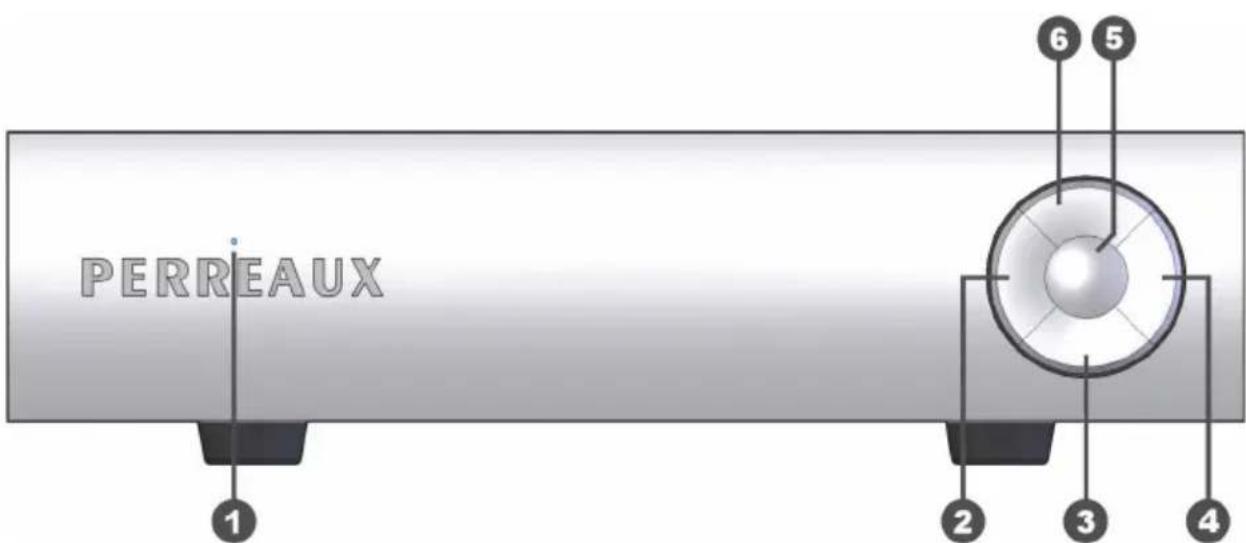
text_image
PERREAUX 1 2 3 4 5 6Front Panel Functions
1 Status LED
This blue LED indicates the status of your SXCD compact disc player.
Off
This indicates the power to the CD player is switched off.
On
The LED constantly illuminated indicates the SXCD is powered and either playing a disc or is in an idle state ready for a disc to be played.
Slow Flashing
If the LED is flashing slowly, the CD player is paused.
Moderate Flashing
If the LED is flashing at a moderate rate, the CD player is busy and may not respond immediately to any user interface.
Fast Flashing
If the LED flashes fast, the CD player has encountered an error, such as a bad disc or incompatible media format.
2 Skip/Scan Back
Pressing this button momentarily returns to the beginning of the current track. Pressing multiple times quickly in succession returns to the beginning of the applicable track, until the start of the disc is reached.
Pressing and holding this button will scan backwards through the
currently playing disc. Upon releasing the button, the disc will play. If the start of the disc is reached the disc will stop
3 Stop
Pressing this button stops a disc that is playing. If play is resumed, the disc will start over from the first track.
4 Skip/Scan Forward
Pressing this button momentarily advances to the beginning of the next track. Pressing multiple times quickly in succession advances to the beginning of the applicable track, until the end of the disc is reached.
Pressing and holding this button will scan forwards through the currently playing disc. Upon releasing the button, the disc will play. If the end of the disc is reached the disc will stop.
5 Play/Pause
Pressing this button starts playing the current disc. If the disc drawer is open, it will close automatically.
Normally, the disc will start playing from the first track. However, a different track can be selected using the SKIP buttons before pressing the PLAY button to start playing a different selection.
Pressing this button once during playback will suspend play at that point in the track. The disc continues to spin and play will be resumed from the current position. Pressing the PAUSE button a second time will resume play.
6 Eject
When the transport drawer is closed, pressing this button opens the drawer. To close the drawer press the EJECT button again. The drawer can also be closed by pressing the PLAY button.
text_image
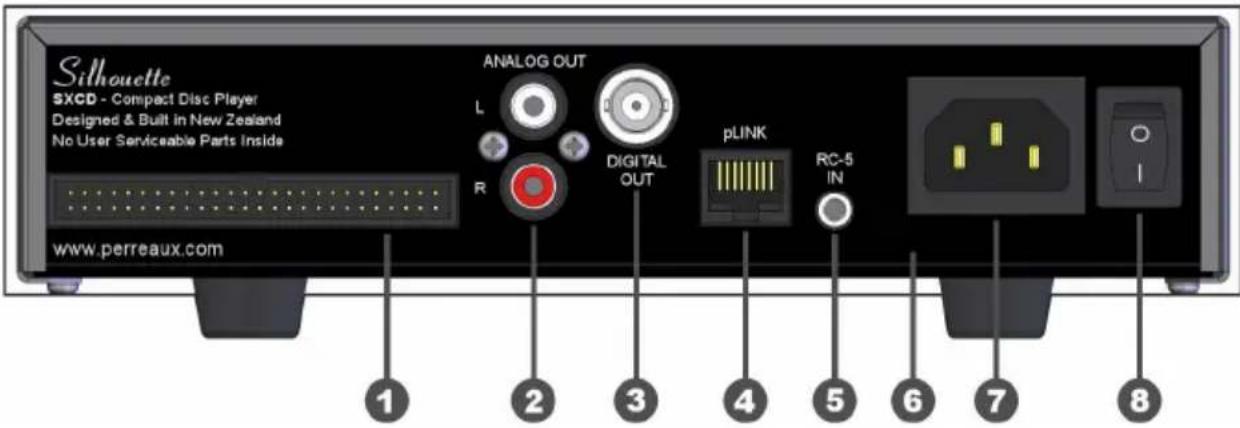
Silhouette SXCD - Compact Disc Player Designed & Built in New Zealand No User Serviceable Parts Inside ANALOG OUT L R DIGITAL OUT pLINK RC-5 IN www.perreaux.com 1 2 3 4 5 6 7 8Rear Panel Functions
Caution!
1 Transport Interface
The 50-way header allows connection to the SXCD transport unit using the ribbon cable supplied.
This header is polarised, please note polarity of mating plug when connecting the ribbon cable.
Damage may occur to the transport and/or electronics if ribbon cable is connected with the incorrect polarity.
Use only the supplied 50-way ribbon cable.
2 Analog Outputs
These single-ended (RCA) outputs provide line-level analog audio, via suitable RCA interconnect cables, to a preamplifier or integrated amplifier.
For more information on analog output specifications, please refer to Chapter 12.
3 Digital Output
The single-ended (BNC) output provides a Sony/Philips Digital Interface Standard (SPDIF) digital audio signal to an outboard digital to analog converter (DAC) or digital receiver.
The SPDIF standard dictates 75Ω transmission of the digital audio signal. Use a digital interconnect cable specifically designed with a characteristic impedance of 75Ω, such as the coaxial cable supplied.
A BNC connector has been used in place of the “standard” RCA type because RCA connectors can never achieve a characteristic impedance of 75Ω. Refer to Chapter 7 ‘Special Design Features’ for more information on why a BNC connector is used.
Note:
If you already have a suitable high-quality digital interconnect equipped with RCA connectors, please use the supplied adaptor to convert the BNC output to RCA.
For more information on digital output specifications, please refer to Chapter 12.
Use a 75Ω digital interconnect cable equipped with BNC connectors to get the best possible digital performance, such as the coaxial cable supplied.
Using the supplied adaptor to convert the BNC output to RCA will not degrade the signal any more than if an RCA connector was fitted by default.
4 pLINK Port
This RJ45 connector offers two functions - communication using the RS232 protocol and the ability to use the master clock of an external source.
RS232 Communication
Basic functions of the SXCD compact disc player can be controlled using the RS232 serial communication protocol.
The RJ45 pins are configured for RS232 as follows:
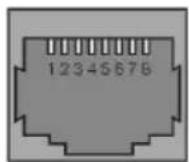
Pin 1:5V
Pin 2: CMOS/TTL Receive (RX)
Pin 3: CMOS/TTL Transmit (TX)
Pin 4: Ground (GND)
Caution!
An adaptor, available from your Perreaux dealer, enables integration via RS232 with control products; such as AMX, Crestron and Control4.
Attempting to use the pLINK port for RS232 without the necessary adaptor will result in damage to the SXCD, and may also damage the control device.
External Master Clock
Best jitter performance in any digital system occurs when there is a single master clock in the entire system and that clock is located as close as possible to the conversion stage.
The SXCD compact disc player facilitates this functionality by allowing the internal master clock to be disabled and sourced from an external device, such as an external digital to analog converter (DAC).
The RJ45 pins are configured for using an external master clock as follows:
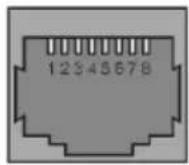
Pin 6: Master Clock Input
Pin 7: Ground (GND)
Pin 8: Internal Clock Disable
To enable this function the internal master clock must first be disabled by connecting the Internal Clock Disable (Pin 8) to GND. The master clock from the external device can then be supplied to the Master Clock Input (Pin 6).
Caution!
The frequency of the external master clock must be 11.2896MHz.
5 RC-5 Input
This 3.5mm stereo jack allows standard CD player RC-5 remote control codes to control the basic functions of the SXCD compact disc player.
IR Repeater Port
Directly connecting to a device with an infrared (IR) repeater port, via a 3.5mm stereo plug cable, allows easy integration into automation and control solutions such as Niles and Xantech.
Each 3.5mm stereo plug must follow the specifications as per the diagram below:

text_image
Sleeve Ring TipSleeve: Ground (GND)
Ring: No connection
Tip: Signal
Caution!
Do not use a mono 3.5mm plug when directly connecting the RC-5 input to an infrared (IR) repeater port.
A stereo 3.5mm plug must be used to avoid damage to the SXCD. Using a stereo 3.5mm plug will not harm the infrared (IR) repeater port.
The SXCD is designed to function with the standard CD player RC-5 remote control codes. For more information about the standard RC-5 remote control codes for CD players please visit www.perreaux.com/files/sxcd-rc5-codes.pdf on the Perreaux website.
External IR Receiver
Alternately, by using an external infrared (IR) receiver, commands can be received from a universal or programmable remote control which uses the standard CD player RC-5 remote codes.
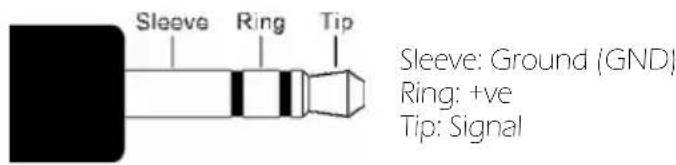
The stereo 3.5mm plug of the infrared (IR) receiver must follow the specifications as per the diagram below:
text_image
Sleeve Ring Tip Sleeve: Ground (GND) Ring: +ve Tip: SignalMore information about the infrared (IR) receiver can be obtained from your Perreaux dealer or found on the Perreaux website at www.perreaux.com/files/sxcd-ir-receiver.pdf.
6 Serial Number/Voltage Label
The serial number is unique to your SXCD. Please record this number and store it in a safe place. For any service related enquiry, please be prepared to quote the product serial number to Perreaux personnel or their service representative.
The voltage displayed in this area is the ONLY voltage that can be accepted by the unit.
Caution!
Never attempt to connect the unit to the incorrect voltage.
7 AC Mains Input
An IEC-standard mains input is provided at the rear of the unit. The AC cord set is removable, allowing it to be upgraded at your will.
8 On/Off Switch
When operating the switch down, power is applied to the SXCD compact disc player.
4 Transport Module
natural_image
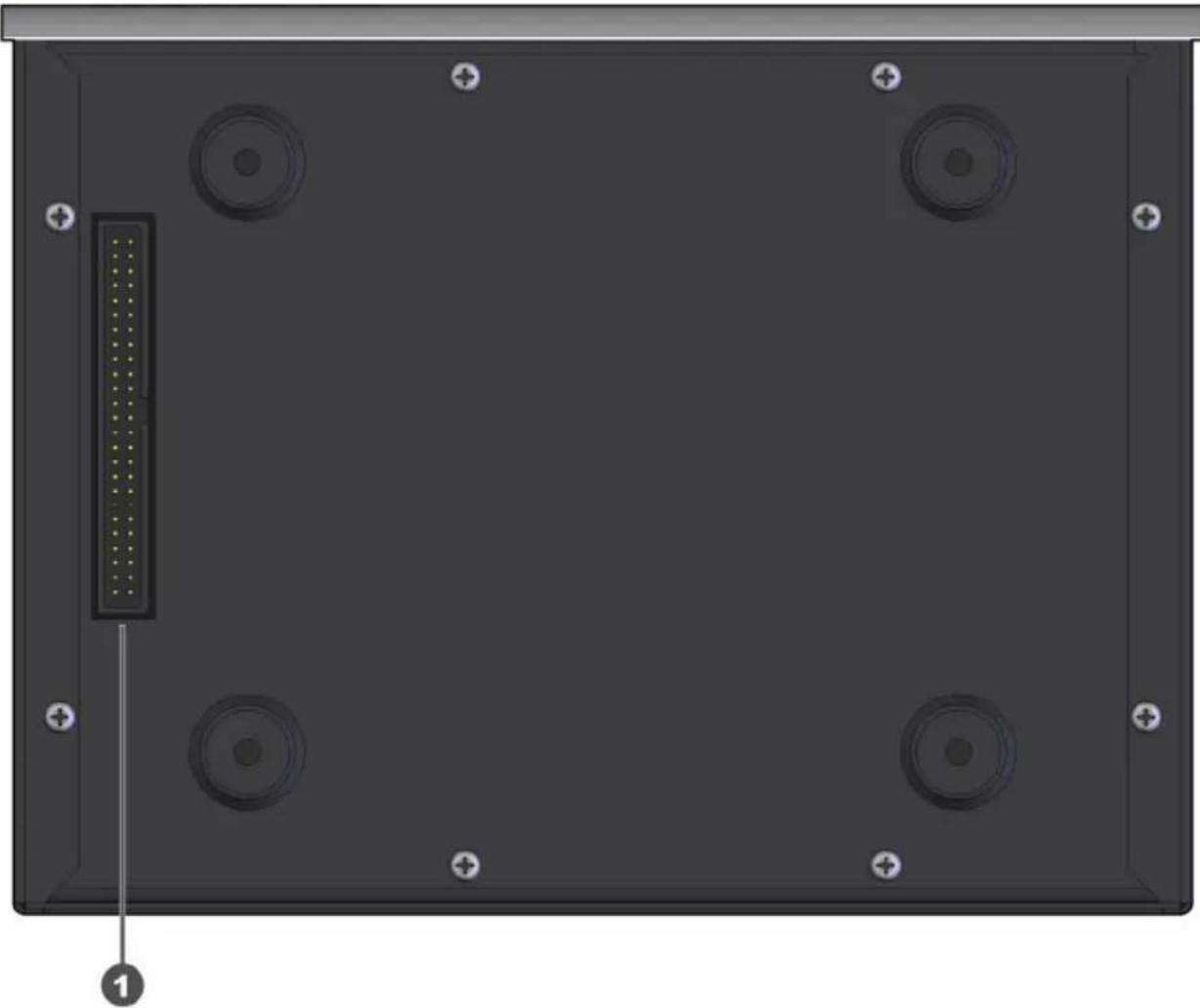
Top-down view of a black electronic device casing with four circular ports and a central connector (no text or symbols visible)Underside Functions
Caution!
1 Electronics Interface
The 50-way header allows connection to the SXCD electronics unit using the ribbon cable supplied.
This header is polarised, please note polarity of mating plug when connecting the ribbon cable.
Damage may occur to the transport and/or electronics if ribbon cable is connected with the incorrect polarity.
Use only the supplied 50-way ribbon cable.
text_image
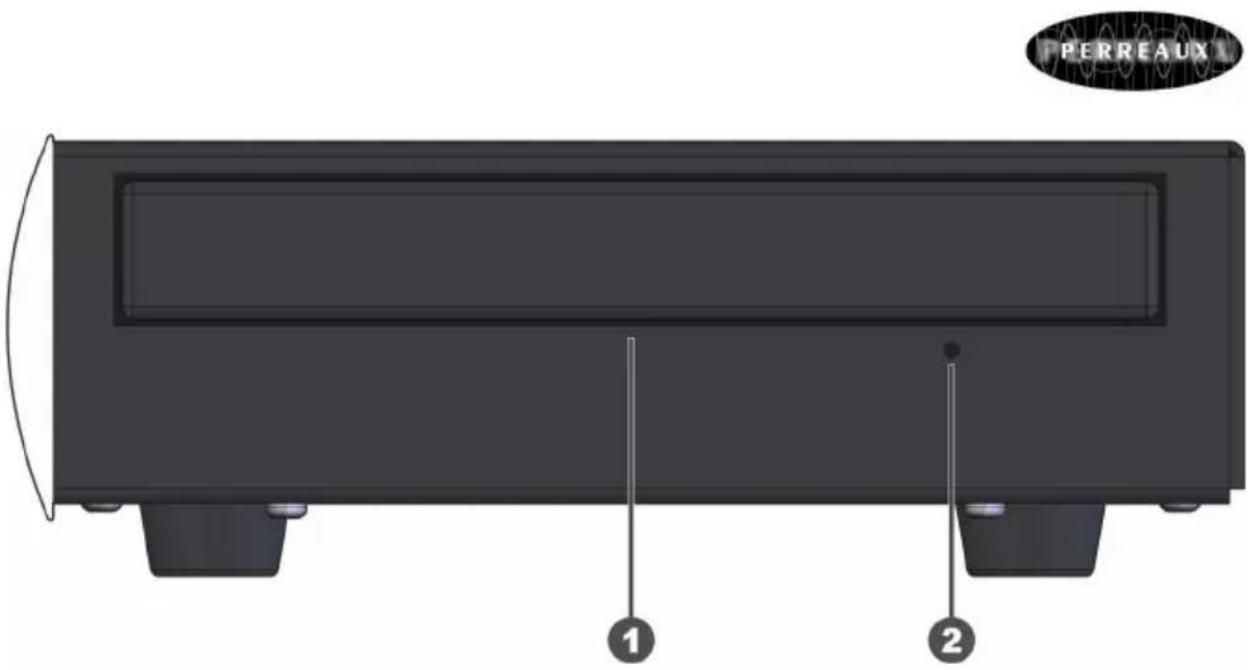
PERREAUX 1 2Disc Drawer Functions
1 Disc Drawer
The disc drawer glides out to accept a compact disc and retracts to play it. Place the disc in the drawer label-side up and make sure the disc is properly centred in the tray.
The disc drawer is normally opened by pressing the EJECT button. It may be closed by pressing the EJECT button again or by pressing the PLAY button, where the drawer will retract and playback will commence.
2 Manual Eject
In the event that the disc drawer doesn't respond to the EJECT button being pressed; a small thin object, such as a straightened paper clip, can be inserted into the hole to manually eject the disc drawer.
Caution!
To avoid potentially damaging the transport, the CD player must be switched OFF before attempting to manually eject the disc drawer.
5 Placement Options
Two-Box Solution
The compact two-box solution provides the flexibility and versatility to meet a range of placement and style options.
Mixing with other Silhouette Series components creates a system which strikes at the heart of Silhouette Series philosophies – minimalist form and function harmoniously encompassing superlative performance.
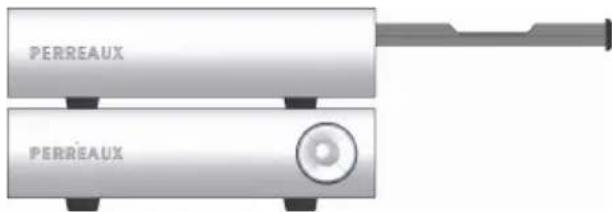
Stacked
The two modules can be stacked one on top of the other for a narrow front profile.
Electronics on top

text_image
PERREAUX PERREAUXTransport on top
text_image
PERREAUX PERREAUXSide-by-Side
Placing the units side-by-side is gives a sleek modern form.

text_image
PERREAUX PERREAUX6 Special Design Philosophies
Minimalist Design
Perreaux has been designing and manufacturing only the highest quality audio componentry for more than a quarter of a century. Technology has continued to evolve rapidly over that time and our knowledge and application of design, materials and manufacturing techniques has advanced in tandem with this. Today's Perreaux range comes closer to fulfilling our shared vision than at any other time in the past.
The SXCD has been developed to meet customer demands for compact higher quality products. Careful attention has been taken throughout the development phase, not to make compromises that would degrade the high quality of reproduction that the unit is capable of delivering.
To follow is a discussion on some of Perreaux design philosophies that have been incorporated into the entire range.
Leading British architect, John Pawson, writes:
"The Minimum can be defined as the perfection that an object achieves when it is no longer possible to improve it by subtraction. This is the quality that an object has when every component, every detail, and every junction has been reduced or condensed to the essentials. It is the result of the omission of the inessentials".
Perreaux has historically embraced the minimalist ethic from an audio design perspective only. The concept of “less equating to more” has been at the heart of all Perreaux audio designs for more than a quarter of a century. Our current product offering takes the minimalist ethic to new levels by totally embracing the concept.
Minimalist Electronics
We wish to maximise the quality of your listening pleasure by keeping the componentry and signal path as uncluttered, short and clean possible. All components in the signal path, even those of the highest quality have an effect on the signal, thereby altering the quality of the reproduction in some way. Our aim is to recreate in its entirety, the original performance by not adding or subtracting anything, irrespective of the source.
Minimalist Aesthetics
Our products appeal to those who seek the ultimate in audio exclusivity, namely the perfect blend of “form and function”.
“Form and function” are both tough masters. We make no excuses for producing some of the most distinctive high-end audio products on the planet. We let “form and function” blend together in perfect harmony. This surely is the essence of true minimalist utilisation.
Minimalism in a Wider Context
John Pawson writes:
“Clearly simplicity has dimensions to it that go beyond the purely aesthetic: it can be seen as the reflection of some innate, inner quality, or the pursuit of philosophical or literary insight into the nature of harmony, reason, and truth”.
7 Special Design Features
Construction
The SXCD is stylish and unobtrusive. The front panel is made from high quality solid 6.0mm (0.2") thick aluminium extrusion featuring our trademark machined Perreaux logo and intuitive user-interface. The front-panels are finished in durable and stylish satin chrome finish electroplate. The chassis and cover are both manufactured from heavy gauge steel. No cover fixing screws are visible. These minimalist styling cues combine seamlessly to allow form and function to blend in harmony and are typical hallmarks of the Perreaux brand.
Block Diagram
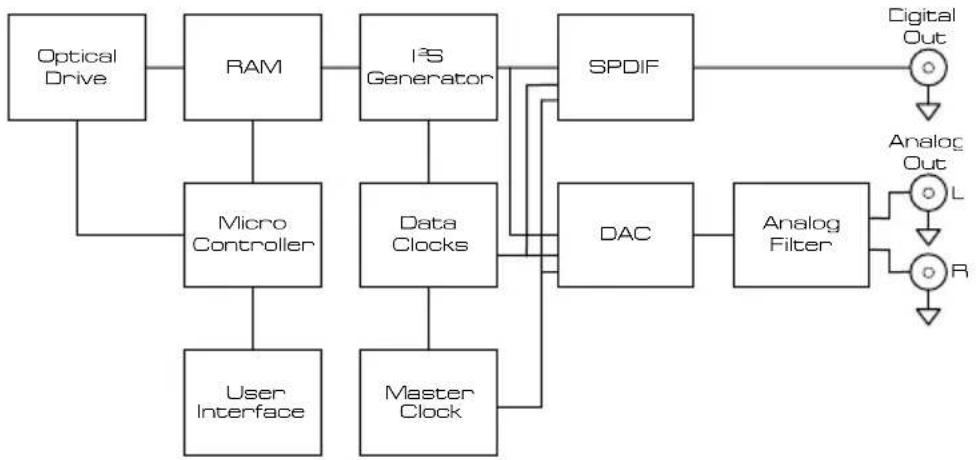
flowchart
graph TD
    A["Optical Drive"] --> B["RAM"]
    B --> C["I²S Generator"]
    C --> D["SPDIF"]
    D --> E["Digital Out"]
    B --> F["Micro Controller"]
    F --> G["User Interface"]
    C --> H["Data Clocks"]
    H --> I["Master Clock"]
    I --> J["DAC"]
    J --> K["Analog Filter"]
    K --> L["Analog Out"]
    L --> M["L"]
    L --> N["R"]
Compact Two-Box Solution
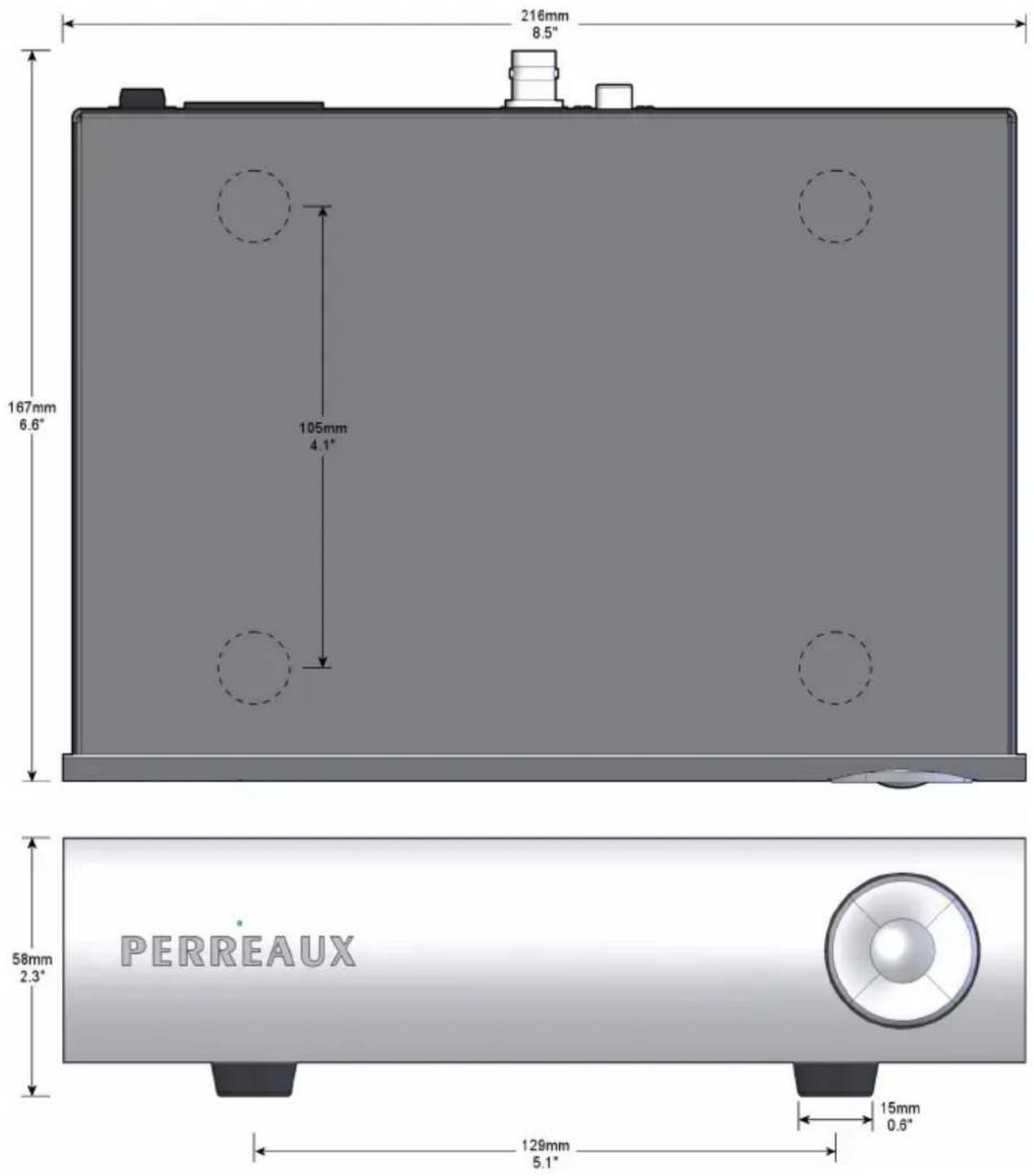
At 216mm (8.5") wide x 58mm (2.3") high x 172mm (6.8") deep, each module of the SXCD is extremely compact – the two-box solution providing the flexibility and versatility to meet a wide range of placement options.
Signal Ground
Special attention has been paid to sensitive analog and digital ground planes to maintain sonic purity. All signal grounding is optimised to provide a platform for a black background and increased dynamic range.
Simple User Interface
The five buttons on the front panel provide a simple and intuitive user interface – allowing easy access to all the standard functions of a CD player.
Computer Optical Drive
Using a computer optical drive to access audio data via the IDE interface, and ATAPI protocol, provides an architecture which keeps the number of jitter contributors to an absolute minimum. Extracting the data in a parallel fashion, rather than serial, via the IDE interface the transport operates independently of the master clock therefore completely eliminating jitter and data timing errors between the controller and the optical mechanism.
| Increased Read Speed | The increased 4x-8x read speed of the optical drive, compared with 1x-2x speeds of standard mechanisms, gives the drive more opportunity for error correction – ensuring the audio data stream is a true reflection of what is presented on the compact disc. |
| Precision Master Clock | The master clock, and its implementation, is the single most important aspect of any CD player. A precision clock oscillator with high temperature stability, fast 8ns rise and fall times and jitter less than 5ps provides the foundation for best possible jitter performance. Optimal physical location close to the SPDIF transmitter and DAC ensure jitter levels are kept to a minimum. |
| Ultra Short Signal Paths | The circuitry for the analog and digital outputs have been laid out with the utmost care – components are arranged as compact as physically possible to keep track lengths to a minimum, ensuring signal paths are as short and direct as possible. |
| Digital Output Transformer | Utilising what is arguably the best digital audio transformer on the market today, the digital output transformer from Scientific Conversion ensures the SPDIF signal maintains very low levels of jitter. High Common Mode Rejection Ratio (CMMR) and decreased capacitance guarantee greatly reduced interference susceptibility, noise and pulse aberration. |
| BNC Digital Output Connector | RCA connectors are inherently disadvantaged for use with the high frequency (1.4MHz-2.8MHz) signals associated with 44.1kHz/16-bit digital audio. Design limitations mean RCA connectors can never achieve a characteristic impedance of 75Ω, resulting in reflections and signal loss due to impedance mismatch. In contrast, BNC connectors are purposely designed to carry high frequency signals, up to 2GHz for 75Ω – therefore overcome the problems exhibited by RCA connectors. |
| Custom Designed Toroidal Transformer | The 36VA toroid transformer is custom designed by Toroid International (Noratel) exclusively for Perreaux. The fully screened transformer, along with the low mechanical hum and low exterior magnetic field inherent in toroidal transformers, provides a solid foundation for the low-noise power supplies. |
| Multiple Regulated Power Supplies | Stable, clean power is paramount in any CD player for good performance. Two transformer secondary windings, and three regulated power supplies, ensure power to the optical drive is isolated from the sensitive analog and digital supplies. The DAC is further isolated from the digital supply with its own local voltage regulator. |
Digital Noise Filtering
pLINK Port
Conducted and radiated digital noise can wreak havoc on power supplies and sensitive circuits. Filtering is heavily employed throughout to stop conducted digital noise infecting power supplies and sensitive circuits, and greatly reduce radiated noise.
The pLINK port provides communication to an external device via the RS232 protocol, allowing easy integration into automation and control solutions. The pLINK port also supports the capability to receive a master clock from an external source, such as an external DAC.
RC-5 Remote Input
Standard CD player RC-5 remote control codes can be used to control the basic functions of the SXCD. Directly connecting to a device via a 3.5mm stereo plug cable allows easy integration into automation and control solutions. Alternately, by using an infrared (IR) receiver, commands can be received from any off-the-shelf universal or programmable remote controls which use the standard CD player RC-5 remote codes.
Multiple Media Support
By default, the computer optical drive supports a multitude of media types and formats – allowing the SXCD to function consistently and reliably with CD-DA, CD-R and CD-RW media, including Mixed Mode audio and data content.
No Display
Liquid Crystal Displays (LCD) with Cold Cathode Fluorescent Lamp (CCFL) backlighting, and Vacuum Fluorescent Displays (VFD) both require an inverter for operation. Inverters typically run at frequencies greater than 100kHz and are a source of conducted and radiated radio frequency (RF) interference. By excluding the display, this source of RF interference has been eliminated and cannot infect the precious power supplies or sensitive digital and analog circuitry.
8 Care and Maintenance
| Note: | Never apply liquid directly to the SXCD. Never use abrasives. Never rub in a circular motion. |
| Cover | The cover features a durable high quality powder coat finish. To remove finger marks and dirt, lightly rub the surface with a soft cloth. If the dirt is not removed, dip your cloth in a mild solution of soap and water, squeeze excess moisture from it and then gently reapply to the surface. Stubborn dirt may be removed by the application of a small quantity of isopropyl alcohol, applied directly to the cleaning cloth only, and reworking the effected area. |
| Front Panel | The SXCD front panel features a high quality electroplate finish. Over time the surface may retain finger marks and may need to be cleaned to restore it to original condition. Regular Cleaning Gently wipe the front panel with a very clean cotton cloth. Wipe across the surface and never in a circular motion. Removing Stubborn Marks Only attempt this infrequently, as too regular or vigorous application may damage the surface. Apply a small quantity of any car polish containing carnauba wax to a very clean cotton cloth. |
| Note: | The car polish must state “Safe for Clear Coats” as the polish will therefore contain the absolute minimum amount of abrasive compound. Gently wipe over the front panel in lateral motion, allow to dry then gently wipe off with a very clean cotton cloth. |
9 Warranty Information
1 Year Limited Warranty
The Perreaux SXCD is warranted free from defects in material and workmanship under normal use for a period of 1-year (365 days) from the date of purchase.
To extend the warranty of the Perreaux SXCD to three (3) years from date of purchase, please return a fully completed warranty registration form along with a copy of the original receipt of purchase to:
Perreaux Industries Ltd
PO Box 305
Mosgiel
Dunedin 9053
New Zealand
3 Year Extended Warranty
For the Extended Warranty Registration Form, please refer to Chapter 10.
The extended warranty for the Perreaux SXCD is three (3) years from the date of purchase. If during the warranty period the SXCD exhibits defects in materials and/or workmanship, it will be repaired or replaced, at our option, without charge for either parts or labour, at our factory in New Zealand. The warranty does not apply to any unit that has been misused, abused or altered.
Any unit that is not performing satisfactorily may be returned to the factory in New Zealand for evaluation. Return authorisation must first be obtained by either calling or writing to Perreaux prior to shipping the unit. Perreaux Industries Ltd and its authorised distributors and dealers shall not be held liable for any freight or insurance charges. Freight and insurance charges to and from the Perreaux factory will be the sole responsibility of the owner of the unit.
Obtaining Service
There is no other express warranty on the SXCD. Neither this warranty nor any other warranty, express or implied, including any implied warranties of merchantability of fitness, shall extend beyond the warranty period. No responsibility is assumed for any incidental or consequential damages.
In the event that you are experiencing difficulty with your SXCD, please as a first step consult the troubleshooting guide in Chapter 11. For further assistance, please contact your Perreaux dealer.
10 Extended Warranty
Registration Form
Please complete this form and either fax, mail or e-mail it, along with a copy of the original receipt, to Perreaux Industries Ltd.
Fax: +64 3 489 2976
Mail: Perreaux Industries Ltd
PO Box 305
Mosgiel
Dunedin 9053
New Zealand
E-mail: info@perreaux.com
Alternatively, complete the online Warranty Registration Form on our website – www.perreaux.com.

3 Year Extended Warranty Form
text_image
PERREAUX| Name: | ||||||||||||||||||||||
| Address: | ||||||||||||||||||||||
| Suburb: | ||||||||||||||||||||||
| City: | ||||||||||||||||||||||
| Country: | ||||||||||||||||||||||
| Telephone: | ||||||||||||||||||||||
| E-mail: | ||||||||||||||||||||||
| Website: | ||||||||||||||||||||||
| Product: | S | I | L | H | O | U | E | T | T | E | S | X | C | D | ||||||||
| Serial No: | ||||||||||||||||||||||
| Dealer: |
Purchase Date: / / /
11 Troubleshooting Guide
| SXCD won't function | Please use this guide if you are experiencing any problems with the SXCD in your system. It will provide possible solutions for some given symptoms.The unit is not turned onCheck the SXCD power switch is turned on.Power not turned onCheck that the SXCD is plugged in to the AC mains and the main power switch is turned on.Faulty wall socket or mains leadMake sure the AC mains wall socket is working properly and the mains lead is not damaged.Fuse is blownA fuse is blown in your SXCD; please contact your Perreaux dealer. |
| SXCD won't play a CD | CD in upside downMake sure the disc is inserted the correct way up.Disc is not a compatible formatEnsure the disc is a CD and of a compatible format, i.e. CD-DA, CD-R or CD-RW. The SXCD cannot read data discs, unless they are Mixed Mode and contain audio data. |
| The sound skips | Scratched or dirty discCheck the CD is not severely scratched and remove any marks, smudges or dust. |
| There is no output from my system | Interconnect cables not connectedMake sure that the input and output interconnect cables are plugged in and are connected to the respective RCA sockets on the rear of the SXCD.Not set to playEnsure that the SXCD is playing the recording you would like to listen to, and that pause has not been pressed. |
I can hear a hum coming through my loud speakers
pLINK functions don't work
RC-5 codes don't work
No disc present
Check that a disc is inserted for the SXCD to play.
No volume setting
Make sure that the volume on your preamplifier or integrated amplifier is set to a suitable level.
Incorrect input
Confirm that the SXCD output is connected to the appropriate source input of the preamplifier or integrated amplifier.
Loud speakers not connected
Check that your loud speakers are firmly connected via cables into the binding posts n the rear of the amplifier.
Input sockets and/or output binding posts corroded
Check that RCA sockets and binding posts on the SXCD and other associated equipment are all free from corrosion.
Interconnect cables damaged
Make sure that the integrity of your interconnect cables is sound and they are firmly connected to your preamplifier or integrated amplifier and the SXCD CD player.
SXCD is close to external interference
Check the proximity of your SXCD to any possible source of EMI and/or RF interference, for example computers, televisions, amplifiers, speakers, etc. Ideally the SXCD should be placed as close as possible to your preamplifier or integrated amplifier.
Cable not plugged in
Ensure the pLINK cable is connected at both ends, to the SXCD and the controller device.
Connectors wired incorrectly
Check that the pLINK cable is wired correctly to interface with the controller device.
Incompatible remote codes
Make sure the remote control supports CD player RC-5 codes.
Weak remote batteries
The remote control's batteries may need to be replaced, also check they are inserted correctly.
12 Specifications
Specifications in Brief
The correlation between published specifications and sonic quality can be unreliable. A list of numbers reveals virtually nothing. All technical measurements must be subject to qualitative as well as quantitative interpretation. Measurements of the SXCD reveal excellent results by any standards.
Total Harmonic Distortion (THD+N): Typically....0.0005%, @ 1kHz 20Hz to 20kHz....Ω 0.001%
Frequency Response: 20Hz–20kHz....+0.1dB, -0.5dB
Analog Output Impedance: 47Ω
Analog Output Voltage: 1.1V _rms
Signal to Noise Ratio (unweighted): 105dB
Dynamic Range: 96dB
Crosstalk: -100dB @ 1kHz
Channel Balance: 0.1dB
Digital Sampling Frequency: 44.1kHz
Resolution: 16-bit
Digital Output Impedance: 75Ω
Digital Output Voltage: 0.6V p-p
Compatible Media Formats:CD, CD-R, CD-RW
Audio Connections
Outputs.... 1 pair analog line-level (RCA) .... 1 x digital SPDIF coaxial (BNC)
Other Connections
Transport....1 x 50-way header pLINK .... 1 x RJ45 modular jack
RC-5....1 x 3.5mm stereo jack
Mains....1 x IEC AC mains input receptacle
Overall Dimensions
Electronics Component:
Width 216mm (8.5")
Depth 167mm (6.6")
Height 58mm (2.3")
Specifications Explained
Transport Component:
Width:
Disc Drawer Closed....216mm (8.5")
Disc Drawer Open 335mm (13.2")
Depth 161mm (6.3")
Height 58mm (2.3")
Weight
Gross 4.1kg (9.0lb)
Electronics Module 1.7kg (3.7lb)
Transport Module.... 1.6kg (3.5lb)
THD+N 0.0005%, @ 1kHz
Total Harmonic Distortion + Noise is the percentage of output signal which is made up of frequencies added due to harmonics of the fundamental frequency and noise.
Frequency Response.....20Hz to 20kHz, +0.1dB -0.5dB
Shows that the amplitude or strength of the output signal deviates by no more than 0.5dB over the entire audio band.
Analog Output Impedance 47Ω
A low output impedance ensures the analog output signal will not be greatly degraded by the use of interconnect cables with high capacitive or inductive properties.
Analog Output Voltage.... 1.1V rms
This is the maximum output voltage at 0dBFS, or a full scale digital signal.
Signal to Noise Ratio (unweighted).... 105dB
The ratio of desired signal to noise signals in the output.
Perreaux engineers have designed the SXCD to maintain a low noise floor.
Dynamic Range 96dB
The difference between the highest and lowest amplitude portions of a signal.
Crosstalk....-100dB @ 1kHz
Crosstalk is caused by stray inductances and capacitances between components and lines, which results in unintentional mixing of stereo signals. Meticulous wire routing ensures excellent high-frequency separation.
Channel Balance....0.1dB
Channel balance is the difference in level between the left and right channels.
Digital Sampling Frequency 44.1kHz
The digital sampling frequency for compact discs conforming to the red-book CD standard is 44.1kHz.
Resolution 16-bits
The resolution, or data word-length, for compact discs conforming to the red-book CD standard is 16-bits.
Digital Output Impedance.... 75Ω
The SPDIF standard dictates 75Ω transmission of the digital signal. Output impedance which differs from this causes poor jitter and noise performance due to reflections and signal loss.
Digital Output Voltage....0.6V p-p
The SPDIF standard requires the output voltage to be between 0.4V_p-p and 0.6V_p-p . Setting the output voltage at the upper limit allows for signal losses due to low terminating impedance or long cable length.
Compatible Media Formats ...... CD, CD-R, CD-RW
CD, CD-R and CD-RW media, including Mixed Mode audio and data content, will function consistently and reliably.
13 Physical Dimensions
text_image
216mm 8.5" 167mm 6.6" 105mm 4.1" 58mm 2.3" 129mm 5.1" 15mm 0.6" PERREAUX
text_image
335mm 13.2" 216mm 8.5" 161mm 6.3" 105mm 4.1" 58mm 2.3" 129mm 5.1" 15mm 0.6" PERREAUX14 Contact Details
For more information please contact your Perreaux dealer, or contact:
Perreaux Industries Ltd
PO Box 305
Mosgiel
Dunedin 9053
New Zealand
Ph: +64 3 489 2975
Fax: +64 3 489 2976
E-mail: info@perreaux.com
Internet: www.perreaux.com