M-860 - Speaker Microlab - Free user manual and instructions
Find the device manual for free M-860 Microlab in PDF.


User questions about M-860 Microlab
0 question about this device. Answer the ones you know or ask your own.
Ask a new question about this device
Download the instructions for your Speaker in PDF format for free! Find your manual M-860 - Microlab and take your electronic device back in hand. On this page are published all the documents necessary for the use of your device. M-860 by Microlab.
USER MANUAL M-860 Microlab
Operation Instruction:
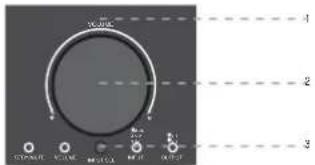
A. Operation by hand(as diagram 1):
Turn on the power switch on the back of the subwoofer, the system into ST-BY mode, the ST-BY/MUTE LED is lighted, turn the master volume knob to turn on the system.
-
Press INPUT SEL button to select the audio input mode between 5.1CH/CD and AUX.
-
Turn the master volume knob to adjust the volume level.
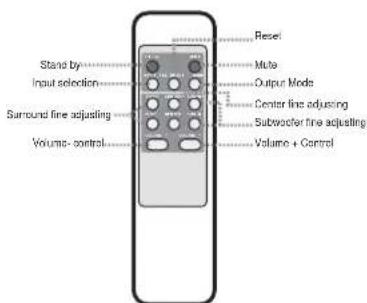
B. Operation by remote control(as diagram 2):
-
While ST-BY mode, ST-BY/MUTE LED is lighted, other indicator off. Press ST-BY key, the system turn on, the ST-BY/MUTE LED off
-
Press INPUT SEL key to select 5.1CH/CD or AUX
-
Press MODE key to select 5.1CH or 2.1CH output.
-
Press Volume +/- key adjusting Volume, adjusting range 0-80dB (default 40dB). (1) press VOLUME+, VOLUME LED is flashed, until 80dB the LED flashed stop. (2) press VOLUME-, VOLUME LED is flashed, until 0dB the LED flashed stop.
-
Press SUB-WOOF +1 key adjusting subwoofer volume, adjusting range +7 dB (default 0dB). While press SUB-WOOF +1 key, the VOLUME LED is flashed as above.
-
Press CENTER +/- adjusting the CENTER VOLUME, adjusting range +/- 7dB, and the CENTER LED is flashed.
-
Press SURR +/- key adjusting the tone of surround, adjusting range +/- 7dB, and the VOLUME LED is flashed.
-
Press MUTE key, the sound will be muted, and the ST-BY/MUTE LED is flashed, press again or press. Volume key, the MUTE off.
-
Press RESET key, the adjusted SUB-W +/- CENTER+/- and SURR +/- Volume reset to normal(0dB).
Specification
*Amplifier specification:
AC IN
220V-240V\~50Hz 300mA
Power output
22W+8Wx5 RMS
Frequency response
30Hz-20KHz
Sensitivity
350mV
Harmonic distortion
<0.3% 1W 1KHz
S/N
80dB
Separation
45dB
*Speaker unit:
Subwoofer 5.25" magnetically shielded
*Audio input:
Satellite 2.5"x5 magnetically shielded
*Audio output:
RCA
*Product size:
DxWxH
Subwoofer
340x165x240mm
Satellites
85x100x165mm
microlab®
Caution:
-
Do not exposed to dripping or splashing
-
Do not placed any objects filled with water over the apparatus.
-
Do not block the ventilation holes.
-
For indoor use only.
-
When using high output signal, please don't turn the volume to maximum to avoid distortion.
-
In case of long time not using, please plug off the power plug.
natural_image
Black-and-white photo of a violin resting on an ornate chair, no visible text or symbols
text_image
microlab® AMPLIFIED SPEAKER M-860 User Manual80-M860-97-0001-02 2008-07-04出
microlab®
Inside Package
| Subwoofer speaker | 1 pc |
| Satellite speaker | 5 pcs |
| 3.5ST-2RCA audio cable | 1 pc |
| 2RCA-2RCA audio cables | 3 pcs |
| Remote control | 1 pc |
| User manual | 1 pcs |
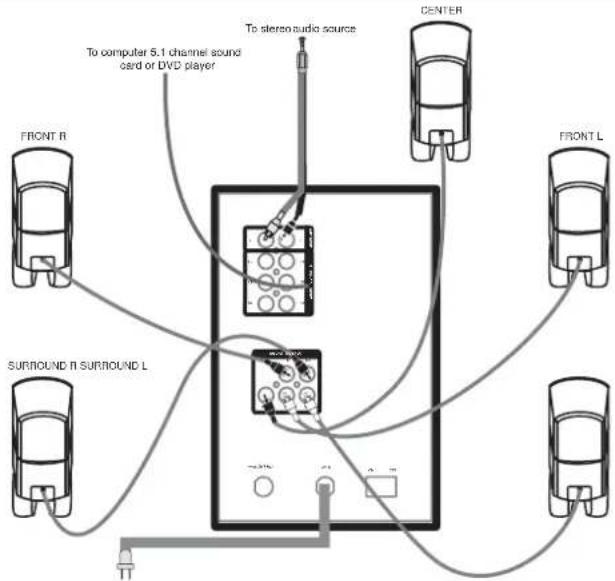
System Connection(as diagram 3):
Warning: before connecting the speakers, make sure that the power plug is disconnected from the AC outlet.
-
Connect Front Left/Right, Center, Surround Left/Right speaker cables to the appropriate audio output jacks on the back of the subwoofer.
-
Connect one end of the 2RCA-2RCA audio cable to the appropriate
5.1CH/CD input jacks of the Front Left/Right, Center, Surround Left/Right channel on the back of the subwoofer, the other end to the appropriate audio output jacks on the DVD or the other audio source.
- If connect to any 2-channel audio source, just connect one end of the
2RCA-2RCA audio cable to the R/L AUX input jacks on the back of the subwoofer.
- If connect to PC soundcard or any audio source only with headset output, then please use the 2RCA-3.5mm audio cable.
5.the jacks and plugs are color-coded. Be sure to attach each color-coded plug to a matching color coded jack.
- Make sure all the cables are connected correctly. connect the power plug to the correct AC outlet.
Remarks the system positioning:
* The system is magnetically shielded which could be positioned besides the PC monitor or near the TV.
* Please refer to sound card instruction when connect 5.1 channel sound card.
* Statement indicating that the socket-outlet shall be installed near the equipment and shall be easily accessible.
* The highest environmental temperature suitable for this product is 40°C.
(Diagram 1) Front Panel
text_image
Wristor 1 2 3 O CINIC 50000 MELON 10000 WTR 10000Controls on the front of Subwoofer
-
Remote Control Signal Receiving Window and LED display
-
Master Volume Knob
The master volume could be adjusted either by hand or remote control
- Input selection button
(Diagram 2) Remote Control
text_image
Stand by Input selection Surround fine adjusting Volume- control Reset Mute Output Mode Center line adjusting Subwoofer line adjusting Volume + Control(Diagram 3)
flowchart
graph TD
    A["To computer 5.1 channel sound card or DVD player"] --> B["Central Audio System"]
    C["To stereo audio source"] --> B
    D["Front R"] --> B
    E["Front L"] --> B
    F["SURROUND R SURROUND L"] --> B
    G["CENTER"] --> B
    H["Ground"] --> B
*Please note the correct placement of speaker is shown in the above picture.