USER MANUAL 1054D ALCATEL
natural_image
White and black foldable phone with a red heart on screen, against a blue background (no visible text or symbols)
1054D 1054X
For more information on how to use the phone, please go to www.alcatel-mobile.com and download the complete user manual. Moreover, on the website, you can also find answers to frequently asked questions, upgrade the software via Mobile Upgrade, and so much more.
Table of contents
Safety and use 3
Regulatory information....7
General information....10
1 Getting started....11
1.1 Set up 11
1.2 Power on your phone....12
1.3 Power off your phone....12
2 Your mobile....13
2.1 Keys....14
2.2 Status bar icons....15
3 Calls....17
3.1 Making a call 17
3.2 Calling your voicemail 17
3.3 Receiving a call....17
3.4 During a call....18
4 FM radio....19
5 Call logs 20
5.1 Access....20
5.2 Available options....20
6 Music....21
6.1 Music playing mode 21
7 Tools....22
7.1 Alarm....22
7.2 Calculator....22
7.3 Calendar....23
7.4 Bluetooth....23
7.5 Unit conversion....23
7.6 Fake call....24
7.7 Call filter....24
7.8 Torch 24
7.9 Browser 25
7.10 Service....25
8 Message....26
8.1 Access....26
8.2 Create message....26
8.3 Message folders 26
8.4 Broadcast message....27
8.5 Voice mail server....27
8.6 Templates....27
8.7 Settings....28
9 Media 29
9.1 Camera....29
9.2 Image 29
9.3 Recorder....29
9.4 Video....30
10 My files....30
10.1 Managing audios, images, videos and others....30
10.2 Formats and compatibility ....31
11 Contacts....32
11.1 Consulting your contacts ....32
11.2 Adding a contact....32
11.3 Available options....33
12 Settings....34
12.1 Profiles....34
12.2 Phone settings 35
12.3 Call settings 36
12.4 Network selection....38
12.5 Connections....38
12.6 Security 39
12.7 Restore factory settings....39
13 Input mode 40
14 Telephone warranty....40
15 Accessories 41
16 Troubleshooting....42

www.sar-tick.com
This product meets applicable national SAR limits of 2.0 W/kg. The specific maximum SAR values can be found on page 5 of this user guide.
When carrying the product or using it while worn on your body, either use an approved accessory such as a holster or otherwise maintain a distance of 5mm from the body to ensure compliance with RF exposure requirements. Note that the product may be transmitting even if you are not making a phone call.
Safety and use
We recommend that you read this chapter carefully before using your phone. The manufacturer disclaims any liability for damage, which may result as a consequence of improper use or use contrary to the instructions contained herein.
• TRAFFIC SAFETY:
Given that studies show that using a mobile phone while driving a vehicle constitutes a real risk, even when the hands-free kit is used (car kit, headset...), drivers are requested to refrain from using their mobile when the vehicle is not parked.
When driving, do not use your phone and headphone to listen to music or to the radio. Using a headphone can be dangerous and forbidden in some areas.
When switched on, your phone emits electromagnetic waves that can interfere with the vehicle's electronic systems such as ABS anti-lock brakes or airbags. To ensure that there is no problem:
- do not place your phone on top of the dashboard or within an airbag deployment area,
- check with your car dealer or the car manufacturer to make sure that the dashboard is adequately shielded from mobile phone RF energy.
• CONDITIONS OF USE:
You are advised to switch off the telephone from time to time to optimise its performance.
Switch the phone off before boarding an aircraft.
Switch the phone off when you are in health care facilities, except in designated areas. As with many other types of equipment now in regular use, mobile telephones can interfere with other electrical or electronic devices, or equipment using radio frequencies.
Switch the phone off when you are near gas or flammable liquids. Strictly obey all signs and instructions posted in a fuel depot, petrol station, or chemical plant, or in any potentially explosive atmosphere.
When the phone is switched on, it should be kept at least 15 cm from any medical device such as a pacemaker, a hearing aid or insulin pump, etc. In particular when using the phone, you should hold it against the ear on the opposite side to the device, if any.
To avoid hearing impairment, pick up the call before holding your phone to your ear. Also move the handset away from your ear while using the "hands-free" mode because the amplified volume might cause hearing damage.
Do not let children use the phone and/or play with the telephone and accessories without supervision. When replacing the cover, please note that your phone may contain substances that could create an allergic reaction.
Always handle your phone with care and keep it in a clean and dust-free place.
Do not allow your phone to be exposed to adverse weather or environmental conditions (moisture, humidity, rain, infiltration of liquids, dust, sea air, etc). The manufacturer's recommended operating temperature range is -10^ to +55^ .
At over 55^ the legibility of the phone's display may be impaired, though this is temporary and not serious.
Emergency call numbers may not be reachable on all mobile network. You should never rely only on your phone for emergency calls.
Do not open, dismantle or attempt to repair your mobile phone yourself.
Do not drop, throw or bend your mobile phone.
Do not use the phone if the glass screen, is damaged, cracked or broken to avoid any injury.
Do not paint it.
Only use batteries, battery chargers, and accessories which are recommended by TCL Communication Ltd. and its affiliates and are compatible with your phone model. (see Accessories List, page 37). TCL Communication Ltd. and its affiliates disclaim any liability for damage caused by the use of other chargers or batteries.
Remember to make back-up copies or keep a written record of all important information stored on your phone.
Some people may suffer epileptic seizures or blackouts when exposed to flashing lights, or when playing video games. These seizures or blackouts may occur even if a person has never had a previous seizure or blackout. If you have experienced seizures or blackouts, or if you have a family history of such occurrences, consult your doctor before playing video games on your phone or enabling a flashing-lights feature on your phone.
Parents should monitor their children's use of video games or other features that incorporate flashing lights on the phones. All persons should discontinue use and consult a doctor if any of the following symptoms occur: convulsion, eye or muscle twitching, loss of awareness, involuntary movements, or disorientation. To limit the likelihood of such symptoms, take the following safety precautions:
- Do not play with or use flashing-light features if you are tired or need sleep.
- Take a minimum 15-minute break per hour.
- Play in a room in which all lights are on.
- Play at the farthest distance possible from the screen.
- If your hands, wrists, or arms become tired or sore while playing, stop and rest for several hours before playing again.
- If you continue to have sore hands, wrists, or arms during or after playing, stop the game and see a doctor.
When you play games on your phone, you may experience occasional discomfort in your hands, arms, shoulders, neck, or other parts of your body. Follow the instructions to avoid problems such as tendinitis, carpal tunnel syndrome, or other musculoskeletal disorders.

PROTECT YOUR HEARING
To prevent possible hearing damage, do not listen at high volume levels for long periods. Exercise caution when holding your device near your ear while the loudspeaker is in use.
• PRIVACY:
Please note that you must respect the laws and regulations in force in your jurisdiction or other jurisdiction(s) where you will use your mobile phone regarding taking photographs and recording sounds with your mobile telephone. Pursuant to such laws and regulations, it may be strictly forbidden to take photographs and/or to record the voices of other people or any of their personal attributes, and duplicate or distribute them, as this may be considered to be an invasion of privacy. It is the user's sole responsibility to ensure that prior authorisation be obtained, if necessary, in order to record private or confidential conversations or take a photograph of another person; the manufacturer, the seller or vendor of your mobile phone (including the operator) disclaim any liability which may result from the improper use of the mobile phone.
BATTERY:
Following air regulation, the battery of your product is not charged. Please charge it first.
Before removing the battery from your phone, make sure that the phone is switched off.
Observe the following precautions for battery use:
- Do not attempt to open the battery (due to the risk of toxic fumes and burns).
- Do not puncture, disassemble or cause a short-circuit in a battery,
- Do not burn or dispose of a used battery in household rubbish or store it at temperatures above 60°C.
Batteries must be disposed of in accordance with locally applicable environmental regulations. Only use the battery for the purpose for which it was designed. Never use damaged batteries or those not recommended by TCL Communication Ltd. and/or its affiliates.

This symbol on your telephone, the battery and the accessories means that these products must be taken to collection points at the end of their life:
- Municipal waste disposal centres with specific bins for these items of equipment
- Collection bins at points of sale.
They will then be recycled, preventing substances being disposed of in the environment, so that their components can be reused.
In European Union countries:
These collection points are accessible free of charge.
All products with this sign must be brought to these collection points.
In non-European Union jurisdictions:
Items of equipment with this symbol are not to be thrown into ordinary bins if your jurisdiction or your region has suitable recycling and collection facilities; instead they are to be taken to collection points for them to be recycled.
CAUTION: RISK OF EXPLOSION IF BATTERY IS REPLACED BY AN INCORRECT TYPE. DISPOSE OF USED BATTERIES ACCORDING TO THE INSTRUCTIONS.
- CHARGERS
Mains powered chargers will operate within the temperature range of: 0°C to 40°C.
The chargers designed for your mobile phone meet with the standard for safety of information technology equipment and office equipment use. They are also compliant to the ecodesign directive 2009/125/EC. Due to different applicable electrical specifications, a charger you purchased in one jurisdiction may not work in another jurisdiction. They should be used for this purpose only.
• RADIO WAVES:
Proof of compliance with international standards (ICNIRP) or with European Directive 1999/5/EC (R&TTE) is required of all mobile phone models before they can be put on the market. The protection of the health and safety for the user and any other person is an essential requirement of these standards or this directive.
THIS DEVICE MEETS INTERNATIONAL GUIDELINES FOR EXPOSURE TO RADIO WAVES
Your mobile device is a radio transmitter and receiver. It is designed not to exceed the limits for exposure to radio waves (radio frequency electromagnetic fields) recommended by international guidelines. The guidelines were developed by an independent scientific organisation (ICNIRP) and include a substantial safety margin designed to assure the safety of all persons, regardless of age and health.
The radio wave exposure guidelines use a unit of measurement known as the Specific Absorption Rate, or SAR. The SAR limit for mobile devices is 2.0 W/kg.
Tests for SAR are conducted using standard operating positions with the device transmitting at its highest certified power level in all tested frequency bands. The highest SAR values under the ICNIRP guidelines for this device model are:
1054X:
| Maximum SAR for this model and conditions under which it was recorded. |
| Head SAR | GSM 900 | 0.685 W/kg |
| Body-worn SAR | GSM 900 | 0.994 W/kg |
1054D:
| Maximum SAR for this model and conditions under which it was recorded. |
| Head SAR | GSM 900 | 0.525 W/kg |
| Body-worn SAR | GSM 900 | 0.994 W/kg |
During use, the actual SAR values for this device are usually well below the values stated above. This is because, for purposes of system efficiency and to minimize interference on the network, the operating power of your mobile device is automatically decreased when full power is not needed for the call. The lower the power output of the device, the lower its SAR value.
Body-worn SAR testing has been carried out at a separation distance of 5 mm. To meet RF exposure guidelines during body-worn operation, the device should be positioned at least this distance away from the body. If you are not using an approved accessory ensure that whatever product is used is free of any metal and that it positions the phone the indicated distance away from the body.
Organisations such as the World Health Organisation and the US Food and Drug Administration have stated that if people are concerned and want to reduce their exposure they could use a hands-free device to keep the phone away from the head and body during phone calls, or reduce the amount of time spent on the phone.
For more information you can go to www.alcatel-mobile.com
Additional information about electromagnetic fields and public health are available on the following site: http://www.who.int/peh-emf.
Your telephone is equipped with a built-in antenna. For optimal operation, you should avoid touching it or degrading it.
As mobile devices offer a range of functions, they can be used in positions other than against your ear. In such circumstances the device will be compliant with the guidelines when used with headset or USB data cable. If you are using another accessory ensure that whatever product is used is free of any metal and that it positions the phone at least 5 mm away from the body.
Please note by using the device some of your personal data may be shared with the main device. It is under your own responsibility to protect your own personal data, not to share with it with any unauthorised devices or third party devices connected to yours. For products with Wi-Fi features, only connect to trusted Wi-Fi networks. Also when using your product as a hotspot (where available), use network security. These precautions will help prevent unauthorised access to your device. Your product can store personal information in various locations including a SIM card, memory card, and built-in memory. Be sure to remove or clear all personal information before you recycle, return, or give away your product. Choose your apps and updates carefully, and install from trusted sources only. Some apps can impact your product's performance and/or have access to private information including account details, call data, location details and network resources.
Note that any data shared with TCL Communication Ltd. is stored in accordance with applicable data protection legislation. For these purposes TCL Communication Ltd. implements and maintains appropriate technical and organisational measures to protect all personal data, for example against unauthorised or unlawful processing and accidental loss or destruction of or damage to such personal data whereby the measures shall provide a level of security that is appropriate having regard to:
(i) the technical possibilities available,
(ii) the costs for implementing the measures,
(iii) the risks involved with the processing of the personal data, and
(iv) the sensitivity of the personal data processed.
You can access, review and edit your personal information at any time by logging into your user account, visiting your user profile or by contacting us directly. Should you require us to edit or delete your personal data, we may ask you to provide us with evidence of your identity before we can act on your request.
The following approvals and notices apply in specific regions as noted.
1054X:
1054D:
TCTMobile
TCT Mobile Europe SAS
55 Avenue des Champs Pierreux,
Product identification:
ALCATEL 1054X type Tiger L4 2G
We
TCT Mobile Europe SAS
Declare under our sole responsibility that the product above mentioned is conform to the applicable essential requirements of the directive 1999/5/EC and that all essential radio test suites have been carried out. Conformity assessment procedure : annex IV of the directive.
Applied standards :
- Item 3.1.a ( protection of the health and of the safety of the user ) :
- EN 60950-1:2006 + A11:2009 + A1:2010 + A12:2011 + A2 :2013
- EN 50 360: 2001 + A1:2012, EN 50 566: 2013 + AC :2014, EN 62479 :2010
- Item 3.1.b (protection requirements with respect to electromagnetic compatibility) :
- EN 301 489-1 V1.9.2 (2011-09), EN 301 489-7 V1.3.1 (2005-11), EN 301 489-17 V2.2.1 (2012-09), EN 55013:2013, EN 55020:2007+ A11:2011
- Item 3.2 (effective use of spectrum so as to avoid harmful interferences) : - EN 301 511 V9.0.2 (2003-03), EN 300 328 V1.9.1 (2015-02)
This product also conforms to the applicable requirements of following directives: - directive 2011/65/EU (RoHS - restriction of the use of certain hazardous substances)
The chargers delivered with this product (When included into the box) also conform to the applicable requirements of the relevant Union harmonisation legislations :
- Directive 2014/35/EU (LVD)
- Directive 2014/30/EU (EMC)
- Directive 2009/125/EC(Energy Related Product)
This product can connect with a Common Mobile Phone Charger which complies with below standards:
- EN301 489-34 v1.4.1 (2013-05)
- EN 62684:2010
Conformity of this product with the essential requirements of the R&TTE Directive 1999/5/EC has been viewed by the following Notified Body:
American Certification Body, Inc.
Suite C110, Whittier Avenue 6731, 22101 McLean, Virginia, United States Identification number: 1588
C€1588
Date :2016-06-24
Signature

TCT Mobile Europe SAS Immeuble L 2017
55, avonue des 21
92000 M
RCCN Nanterre - FRAN
RCS Nanterze 440
440 038 222
Alain Pakiry
TCT Mobile Europe SAS / General Manager, Europe
Product identification:
ALCATEL 1054D type Tiger L4 2G
We
TCT Mobile Europe SAS
Declare under our sole responsibility that the product above mentioned is conform to the applicable essential requirements of the directive 1999/5/EC and that all essential radio test suites have been carried out. Conformity assessment procedure : annex IV of the directive.
Applied standards :
- Item 3.1.a ( protection of the health and of the safety of the user ) :
- EN 60950-1:2006 + A11:2009 + A1:2010 + A12:2011 + A2 :2013
-
EN 50 360: 2001 + A1:2012, EN 50 586: 2013 + AC :2014, EN 62479 :2010
-
Item 3.1.b (protection requirements with respect to electromagnetic compatibility):
-
EN 301 489-1 V1.9.2 (2011-09), EN 301 489-7 V1.3.1 (2005-11), EN 301 489-17 V2.2.1
(2012-09), EN 55013:2013, EN 55020:2007+ A11:2011
-
Item 3.2 ( effective use of spectrum so as to avoid harmful interferences ) :
- EN 301 511 V9.0.2 (2003-03) , EN 300 328 V1.9.1 (2015-02)
This product also conforms to the applicable requirements of following directives: - directive 2011/65/EU (RoHS - restriction of the use of certain hazardous substances)
The chargers delivered with this product (When included into the box) also conform to the applicable requirements of the relevant Union harmonisation legislations :
- Directive 2014/35/EU (LVD)
- Directive 2014/30/EU (EMC)
- Directive 2009/125/EC(Energy Related Product)
This product can connect with a Common Mobile Phone Charger which complies with below standards:
- EN301 489-34 v1.4.1 (2013-05)
- EN 62684:2010
Conformity of this product with the essential requirements of the R&TTE Directive 1999/5/EC has been reviewed by the following Notified Body:
American Certification Body, Inc.
Suite C110, Whittier Avenue 6731, 22101 McLean, Virginia, United States Identification number: 1588
Date:2016-06-24
Signatu

C€1588
microSD Logo is a trademark.
The Bluetooth word mark and logos are owned by the Bluetooth SIG, Inc. and any use of such marks by TCL Communication Ltd. and its affiliates is under license. Other trademarks and trade names are those of their respective owners.
alcatel 1054 Bluetooth Declaration ID B020196
We hereby point out that the end user warranty for infringement IPR is solely limited to the EU.
If and to the extent that the Product is exported, taken with or used by end customer or end user outside the EU any responsibility, warranty or indemnification of manufacturer and its suppliers in regard to the Product expires (including any indemnification in regard to infringement IPR).
- Internet address: www.alcatel-mobile.com
- Hot Line Number: see "TCL Communication" leaflet or go to our Internet site.
• Manufacturer: TCL Communication Ltd.
- Address: Flat/RM 1910-12A, Block 3, China HongKong City, 33 Canton Road, Tsimshatsui, Kowloon, Hong Kong
On our Internet site, you will find our FAQ (Frequently Asked Questions) section. You can also contact us by e-mail to ask any questions you may have.
An electronic version of this user guide is available in English and other languages according to availability on our server: www.alcatel-mobile.com
Your telephone is a transceiver that operates on GSM networks in quad -band with 850/900/1800/1900 MHz.
CEI588
This equipment is in compliance with the essential requirements and other relevant provisions of Directive 1999/5/EC. The entire copy of the Declaration of Conformity for your telephone can be obtained through our website: www.alcatel-mobile.com
Protection against theft ^(1)
Your telephone is identified by an IMEI (phone serial number) shown on the packaging label and in the product's memory. We recommend that you note the number the first time you use your telephone by entering *#06# and keep it in a safe place. It may be requested by the police or your operator if your telephone is stolen. This number allows your mobile telephone to be blocked preventing a third person from using it, even with a different SIM card.
Disclaimer
There may be certain differences between the user manual description and the phone's operation, depending on the software release of your telephone or specific operator services.
TCL Communication shall not be held legally responsible for such differences, if any, nor for their potential consequences, which responsibility shall be borne by the operator exclusively.
1 Getting started......
1.1 Set up
Removing and installing the back cover

natural_image
Illustration of four views of a smartphone showing internal components and battery structure (no text or symbols)
Removing and installing the battery

natural_image
Four-step diagram showing a smartphone chassis with an open panel, each with an orange arrow indicating the process (no text or symbols present)
Inserting and removing TF card

flowchart
graph TD
    A["Device 1"] --> B["Internal Block"]
    B --> C["Device 2"]
    C --> D["Internal Block"]
    D --> E["Device 3"]
    E --> F["Internal Block"]
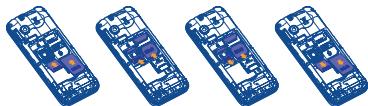
Inserting and removing the SIM card ^(1)
1054X

natural_image
Four identical isometric views of a mobile phone chassis with internal circuitry (no text or symbols)
1054D
natural_image
Four identical blue isometric smartphones with internal circuitry and labeled components (no text or symbols visible)
Place the SIM card with the chip facing downwards and slide it into its housing. Make sure that it is correctly inserted. To remove the card, press it and slide it out.
(1) Check with your network operator to make sure that your SIM card is 3V or 1.8V compatible. The old 5 Volt cards can no longer be used. Please contact your operator.

For dual SIM models, SIM1 supports a mini SIM card and SIM 2 supports a micro-SIM card. ^(1) The single SIM model ^(2) only supports a mini SIM card. Do not attempt to insert other SIM types like micro and nano cards as this may cause damage to your phone.
Charging the battery
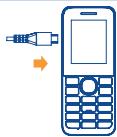
Connect the battery charger to your phone and plug it into the socket.
- Charging may take about 20 minutes to start if the battery is out of power.
- Be careful not to force the plug into the socket.
- Make sure the battery is correctly inserted before connecting the charger.
- The mains socket must be near to the phone and easily accessible (avoid electric extension cables).
- You are advised to charge the battery to its maximum when using the phone for the first time (approximately 3 hours).
- To reduce power consumption and energy waste, when battery is fully charged, disconnect your charger from the plug; reduce the backlight time, etc.

The charge is complete when the animation stops.
1.2 Power on your phone
Hold down the 🔒 key until the telephone powers on, type in your PIN code if necessary and then confirm. The main screen will be displayed.
- If you do not know your PIN code or if you have forgotten it, contact your network operator. Do not leave your PIN code with your telephone. Store this information in a safe place when not in use.
If cell broadcast messages are displayed, you can browse through them or press 📋 to return to the main screen.
While the phone is searching for a network, "Searching network/Emergency call" will be displayed.
1.3 Power off your phone
Hold down the 🔍 key.
(1) 1054D only.
(2) 1054X
2
Your mobile
Camera
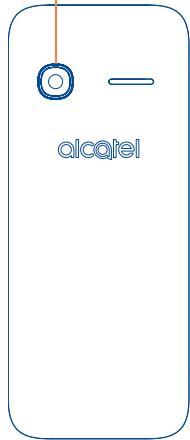
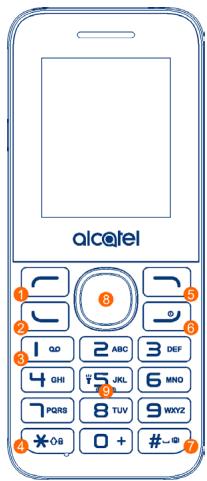
1 Left soft key
② Call logs (idle screen) Send call
③ Voice mail (long key-press)
4 Lock Key (long press ✦08 key)
⑤ Right soft key
6 Power on/Power off End call
⑦ Vibration alert (Meeting mode activated)
8 Navigation key :
Menu/Confirm an option

Increase volume ▲
Decrease volume

New SMS
Alarm
9 Torch
2.1
Keys

Navigation key
Confirm an option (press the middle of the key)

Send call
Access to call log (idle screen)

Power on/off the handset (long press)
End call
Return to idle

Left soft key

Right soft key

Dial the voice mail number (long press)

From Idle screen
- Press: Enter zero
- Long press: input +, "+" are used for dialing an international call.
In Edit mode:
- Press: Access symbols table 0 (add numbers)

From Idle screen
- Press: input *
- Long press: lock keypad
In Edit mode:
- Press: change input methods

From Idle screen
- Press: input #
- Long press: activate/deactivate the vibrator
In Edit mode:
- Press: input space

From Idle screen:
- Press: dial '5'
- Long press: turn the Torch on/off
2.2 Status bar icons ^(1)
In 1054X:

Battery charge level.

Level of network reception.

Meeting mode: your phone vibrates, but neither rings nor beeps.

Silent mode: your phone neither rings, beeps nor vibrates.

Bluetooth status (Activated).

Flight mode.

Headset connected.

Alarm clock programmed.

Missed calls.

GPRS connection status.

Roaming.

Unread SMS.

Message full.

Call divert.

Music activated.
In 1054D:

Level of network reception.

Call divert.

GPRS connection status.

Roaming.
3
Calls
3.1 Making a call
Dial the desired number then press the key to place the call. If you make a mistake, you can delete the incorrect digits by pressing the right softkey.
To hang up the call, press the 🔍 key.
Making an emergency call
If your phone is covered by the network, dial the emergency number and press the ____ key to make an emergency call. This works even without a SIM card and without typing the PIN code.
3.2 Calling your voicemail ^(1)
Your voicemail is provided by your network to avoid missing calls. It works like an answering machine that you can consult at any time. To access your voicemail, hold down the ∞ key.
If the access number for your operator's voicemail service does not work, dial the number that you were given. To change this number, see "Voicemail".

To use your voicemail service from abroad, contact your network operator before leaving.
3.3 Receiving a call
When you receive an incoming call, press the ____ key to talk and then hang up using the ____ key. If the ⚫ icon is displayed, the phone neither rings nor vibrates.

The caller's number is displayed if it is transmitted by the network (contact your network operator to check service availability).
Muting the ringtone
You can mute the ringtone of current incoming calls by pressing the key.
Answer the call by pressing the key.
Rejecting a call
Press the 🔍 key once to reject calls.
(1) Contact your network operator to check service availability.
3.4 During a call ^(1)
Available functions:
During a call, you can access your contacts, calendar, short messages, etc. without hanging up the phone.
WARNING: move the handset away from your ear while turning on the speaker because the amplified volume might cause hearing damage.
Adjusting the volume
You can adjust the sound level during a call using the up/down key.
Handling two calls
- Answering a second call (ensure that "Call waiting" is activated, see page 36).
- To call a second party during a call, press "Options" and select "New call".
(1) Contact your network operator to check service availability.
Your phone is equipped with a radio ^(1) . You can use the application as a traditional radio with saved channels or with parallel visual information related to the radio programme on the display if you tune to stations that offer Visual Radio service. You can listen to it while running other applications.
To use this feature you must plug in your headset, which works as an antenna when connected to your phone.
Available options:
| Channel list | Open the list of saved stations. |
| Save | Save the current tuned station to the "Channel list". |
| Manual search | Search for channels by entering their frequency (MHz) |
| Auto search and save | Automatically search FM stations and save them to "Channel list". |
| Record | Record the current tuned radio: files will be automatically saved to "Record file list". |
| Record Timing | Enable/disable FM Record and set start time, time length, frequency etc. for automatically recording. |
| Record file list | View the recorded file list. |
| Open/close speaker | Open/close speaker. |
| Background play | Play the FM radio in background, then you can exit the FM radio interface for other options. |
5.1 Access
You can access the call log function using the following options:
- Select from the main menu.
- Press the send key from the Home screen.
- For dual SIM model, the contacts of both SIM1 and SIM2 are available in this menu (1).
Once entered this menu, following list will be displayed:

Missed calls (red arrows)

Outgoing calls (green arrows)

Incoming calls (blue arrows)
5.2 Available options
When you press "Options", you can access View, Send message, Save to contacts, Add to blacklist, Add to whitelist, Missed calls/All calls, Delete, Delete all, etc.
You can access this feature from the main menu by selecting "Music".
You have full flexibility in managing music on your mobile and SD card.
6.1 Music playing mode
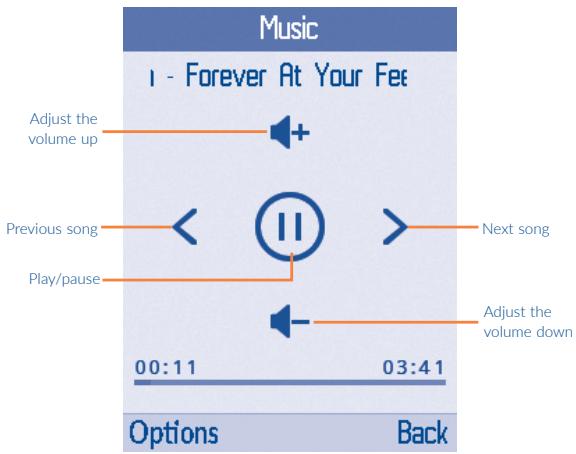
7.1 Alarm
Your mobile phone has a built-in alarm clock with a snooze feature. You can set up to five separate alarms and choose whether or not the alarm should repeat.
Time
Set the required time for the alarm.
Ringtone
You can choose or record one audio as the alarm ringtone.
Repeat
You can select Once (default)/Everyday/Days as the alert frequency.
7.2 Calculator
Access this feature by selecting "Calculator" from "Tools".
Enter a number, select the type of calculation to be performed using the Navigation key, and enter the second number, then press "=" to display the result.
Once an operation is complete, you can press
to clear numbers and carry out a new operation.
To return to the main screen, press 📄.
7.3 Calendar
Once you enter this menu from "Tools", there is a monthly-view calendar for your view.
Available options:
| Add new schedule | Edit a new schedule by setting Subject, Date, Time, Ringtone and Type. |
| View schedules | View today's appointments. |
| All schedules | View all the created appointments. |
| Clear today's tasks | Clear today's appointments. |
| Clear all | Clear all appointments. |
| Go to date | Input the required date and it will be immediately highlighted. |
| Weekly | View or edit appointments by week. |
7.4 Bluetooth
You can transfer data, such as music to other device using Bluetooth. Search for the device and accept/transfer data. The received data is automatically stored in the My files.
7.5 Unit conversion
Unit conversion supports weight conversion and length conversion. When weight is selected, you can quickly check the difference between kg and pound values. When length is selected you can convert between km and mile values.
7.6 Fake call
This programme enables you to call yourself by simulating a caller number/name and ringtone at a scheduled time. It helps you to politely escape from social situations at any time you wish. This call can be rejected by 📷.
Fake call mode Activate or Deactivate a fake call by "Disable\Enable".
Caller name Predefine the caller name of the fake call.
Set active time Predefine time for fake incoming calls, The calls will then be made at the predetermined time.
Mode Select alert types between "Ringtone", "Vibrate", "Silent" and "Vibrate then ring"
Ringtone Predefine ringtone for fake call.
7.7 Call filter
To add numbers or contacts to the Blacklist/Whitelist, press √ to add items from Contacts, you can also create them directly by selecting New.
Blacklist Enable blacklist: all callers in the list will be automatically blocked.
Whitelist Enable whitelist: only callers in the list can be connected.
Settings You are allowed to select between Enable blacklist, Enable whitelist and Disable call filter.
7.8 Torch
You can activate 'Torch' to turn on/off flashlight in darkness with these instructions:
Select "On" under Torch to turn on the flashlight and "Off" to turn off it.
In idle screen, press and hold 🌐S JKL to turn on the flashlight and hold 🌐S JKL to turn off it.
7.9 Browser
7.9.1 Homepage
Open the Wap browser with the preset home page.
7.9.2 Bookmarks
Quickly access a maximum of 20 of your favourite sites.
Enter the URL of the Wap site.
7.9.4 History
View a list of a maximum of 50 recently visited websites.
7.9.5 Offline pages
Pages available for offline viewing.
7.9.6 Settings
Customise your browser preferences.
7.10 Service
STK service is the tool kit of SIM card. This phone supports the service function. The specific items depend on SIM card and network. Service menu will be automatically added to the phone menu when supported by network and SIM card.
You can create, edit and receive SMS with this mobile phone.
8.1 Access
You can open this menu using the following options:
- Press ○ to enter the main menu screen, and then select 📋.
- Access via ◀ of the Navigation key.
8.2 Create message
From the main menu select "Messages" to create a text. You can type a message and you can also modify a predefined message in Templates. While writing a message, select "Options" to open all of the messaging options. You can save your messages that you often send to Drafts. For dual SIM model, you can type a message and select to send it to a recipient in either the SIM1 or SIM2 directory ^(1) .
When in edit mode, the default input method is English, you can press ✦a to change the input method to access numbers 1, 2, 3... or long press the corresponding key to get the number you want.

An SMS message of more than a certain number of characters (the number of accentedcters depends on your language) will be charged as several SMS. Specific letters (accented) will increase the size of the SMS, this may cause multiple SMS messages to be sent to your recipient.
8.3 Message folders
8.3.1 Inbox
All received messages (read and unread) are stored in the same Inbox.
Available options: Reply, Delete, Call, Move, Copy, Mark, Sort, Add sender to, Delete repeated number, Add to blacklist, Add to whitelist, etc.
8.3.2 Drafts
All draft messages.
(1) 1054D only.
8.3.3 Outbox
All messages failed to be sent.
8.3.4 Sentbox
All sent messages.
8.4 Broadcast message ^(1)
View cell broadcast list and access options.
Forward
• Forward the chosen broadcast message.
Delete
- Delete the chosen broadcast message.
Settings
- On/Off
Enable/disable broadcast message reception.
- Select language
Language selection.
- Channel settings
Add/Edit/Delete channels.
8.5 Voice mail server
View or edit the number to open your voicemail and confirm by pressing "OK". Your telephone number is usually written on your SIM card.
8.6 Templates
A list of predefined messages is available. Select one, edit it if needed, and then send it.
(1) Depending on your network operator.
8.7 Settings
Go to common settings for SMS.
SIM message center ^(1)
You can read and change the message centre number.
Message validity period
A value for the message validity period.
Status report
Enable/disable the status report function.
Save sent messages
You can choose to save/don't save sent message or prompt user.
Preferred storage
Select default message storage: SIM or phone.
(1) 2051D has two message centre numbers when two SIM card are inserted.
9.1 Camera
9.1.1 Take a photo, save or delete
The screen acts as the viewfinder. Position the object or landscape in the viewfinder and press ☐ to take the picture. The images will be automatically saved if you activate "Auto save" under "settings". If you don't want the image, you can delete it straight away.
9.1.2 Available options in framing mode
Image
- Access "My files\Phone" or "My files\Memory Card" to view the photos you have taken.
DV mode
- Access video recording mode and available options.
Effect
- Choose the effect you want to produce when taking a photo
Settings
- You can set the photo size, quality, banding values, shutter sound, storage location etc.
9.1.3 Options available after taking the photo
Once you have taken a photo, you can send it by Bluetooth, delete it, set as wallpaper, or go to "Image" to view it.
9.2 Image
Access the image library stored in your phone or memory card, you can rename the images, set as wallpaper, contact icon or send them by Bluetooth etc.
Press an image once to view it in full screen.
9.3 Recorder
Use this function to record/play audio files. The phone supports WAV and AMR filetypes. A stopped recorded file will be automatically stored in the "Audio" folder.
9.4 Video
Use this function to play video files. Press the Navigation key play/pause the video. You can adjust the volume by scrolling the Navigation key up or down and press left and right direction key to return to the previous video or skip to the next video.
10 My files......

The phone provides a certain space for you to manage files and supports the memory card. The capacity of the memory card is selectable. You can use the file manager to conveniently manage various directories and files on the phone and the memory card.
10.1 Managing audios, images, videos and others
According to the item chosen, you can access some of the functions as below:
New folder
Create new folders.
Set as
- Wallpaper, contact icon.
- Incoming call ringtone, alarm ringtone.
Bluetooth
Activate Bluetooth and send the audio/image/video via bluetooth.
Rename
Rename the folder/audio/image/video/.
Delete
Delete the folder/audio/image/video selected (not applicable to embedded items).
Copy
Copy a file to the phone or the memory card.
Details
View details of the file.
Search
Search the file by entering the file name.
Sort
Organize the currently displayed files by name/time/size/type.
Mark
Mark/unmark (all) the chosen files for further options.
Memory Status
View phone/memory card capacity and format phone/memory card ^(1) .
Sounds: MP3, AMR-NB.
Images: jpg, gif, wbmp, bmp.
Videos: H.263, MPEG4 (may vary depending on specific product), 3gp.

To open the "Contacts" from the main menu, press the 🔔 key and select the 🔊 icon.
For dual SIM model, the contacts of both SIM1 and SIM2 are available in this menu ^(1) .
You can search for a contact by inserting the initial of their name. Subsequent letters may be added to refine the search. You can also scroll up/down the contact list (A-Z) to find the contact you need.
Select a name from your directory to read their contact information. Select "Options" to send messages, edit the contact, etc.
You can add a new contact to your phone or SIM card by selecting "Add contacts".
The following fields are accessible when you create a new contact Name, Number, etc.
You can move from one field to another by scrolling up and down.

If you use your phone abroad, store the numbers in your Contacts in international format "+" followed by the country code.
11.3 Available options
From the contact list, you can access the following options:
| Add contact | Add a contact (name, numbers, etc.) in the Contacts. |
| Write message | Send an SMS to a contact selected from the directory. |
| Edit | Modify the contents of a file: name, number, etc. |
| Edit before dialling | Edit the phone number before placing a call. |
| Delete | Delete the selected contact. |
| Delete multiple | Delete the selected contacts. |
| Copy | Copy the selected contact to phone, SIM card. |
| Import contacts | Import contacts from phone or memory card. |
| Export contacts | Exprot contacts from phone or memory card. |
| Send vCard | Exchange data by SMS, Bluetooth. |
Settings
- Speed dial
- Own number
• Service number
- Memory status
12 Settings......

From the main menu, select the menu icon ⚙️ and select the function of your choice in order to customise your telephone.
12.1 Profiles
With this menu, you can personalise ringtones for different events and environments.
12.1.1 General
To modify the sound settings, press "Options\Settings" and you will see the functions below using the Navigation key:
| Rename | Rename General with other names. |
| Ring settings | Set ringtones for Callers or Messages. |
| Adjust volume | Adjust the sound level of caller/message/alarm&calendar/power ringtone and call by the Navigation key. |
| Ring type | Choose your call/message alert ring type, ringtone, vibrate, silent (no sounds except for alarms) etc. |
| Other alert rings | Set other phone alert ringtones including "Key tone", "Battery low alert" and "Power ringtone". |
12.1.2 Silent
This profile will turn off all ringtones, including notification sounds.
12.1.3 Vibrate
All alert sounds are replaced by vibrations except for alarms.
12.1.4 Flight mode
All voice calls, Bluetooth, and messaging functions are blocked. This mode can be used to increase standby duration.
12.2 Phone settings
12.2.1 Display
Wallpaper settings
The wallpaper is displayed when you switch on your telephone.
By selecting "More pictures" you can customise it by replacing the default image displayed on your phone.
Idle display settings
Choose the items showed on the idle screen.
Contrast
Adjust the display brightness by the Navigation key.
Backlight
You can adjust the length of time that the backlight remains on to enhance battery performance and to save power during periods of expected inactivity.
Keypad backlight time
Turn on/off the keypad backlight and choose the backlight time when the phone is idle.
12.2.2 Time & date
You can enter the settings of date and time, including 12/24h format.
12.2.3 Shortcut settings
Choose the shortcut for left/right scroll key on navigation key, "Contacts", "Message", "Write message" included.
12.2.4 Auto keypad lock
Set specific period for phone's auto lock.
12.2.5 Languages settings
You can choose the display and input language of your phone. The "Auto" option under "Display language" selects the language according to the home network (if available).
12.3 Call settings ^(1)
You can access a number of options under this menu:
12.3.1 Dual-SIM
Standby mode
- Activate/deactivate the standby mode for SIM card.
Reply by original SIM
- Select/cancel reply call and/or message by original SIM.
Set SIM name
- Set SIM card name.
12.3.2 Call divert
You can activate or cancel the status of call diverts to the voicemail or to a specified number under several different conditions. The following configurations are possible:
- Unconditional: systematic forwarding of all your calls. The icon is displayed.
- Conditional: if your line is busy, if you don't answer or if you are outside the network range.
12.3.3 Call waiting
Activate/deactivate the second incoming call notification beep.
12.3.4 Call barring
You can activate or deactivate call barring for outgoing and incoming calls. The available options are:
All outgoing calls
Activate/deactivate (by entering password) and check the status of all outgoing call barring.
All incoming calls
Activate/deactivate (by entering password) and check the status of all incoming call barring.
Incoming calls when roaming
Incoming calls are barred when roaming.
ISD calling
Activate/deactivate (by entering password) and check the status of ISD call barring.
Dial when INTL roaming
Activate/deactivate (by entering password) and check the status of INTL call barring when INTL roaming.
Cancel all barring
Deactivate all call barring by entering password.
Change password
Change the original password for call barring function.
12.4 Network selection
Network connection can be switched between "Auto select" and "Manual select".
12.5 Connections
12.5.1 Network account
Choose one of your local network accounts.
12.5.2 GPRS Service
Activate/deactivate GPRS data services.
12.5.3 Data Roaming
Activate/deactivate data roaming.
12.5.4 Data connection settings
You can decide to connect when needed or always be connected when the GPRS service is activated.
12.6 Security
| PIN | Activate/deactivate and modify your PIN. The PIN is requested each time the SIM card is activated. |
| Modify PIN2 | A protection code for certain SIM card features will be requested if you attempt to access it, if the code is activated. Select to update it with a new one (between 4 and 8 digits). |
| Phone lock | Lock/unlock the phone by entering the correct password. The initial password is 0000. |
| Modify the cellphone password | Modify the cellphone password after entering the correct password. The initial password is 0000. |
| Privacy | Activate/deactivate the privacy security by password for certain functions, such as "Call logs" "Messages". |
| Lock screen by end-key | Enable/disable the option of locking the screen using the end-key. |
| Fixed dial number | Allow the phone to be "locked", so that it can only dial certain numbers, or numbers with certain prefixes. To activate this function, PIN2 is mandatory. |
12.7 Restore factory settings
Restore the current phone settings to its default status after entering the correct password. User data will be cleared and the initial password is 0000.
This mode allows you to type text by choosing a letter or a sequence of characters associated with a key. Press the key several times until the desired letter is highlighted. When you release the key the highlight character is inserted into the text.
14 Telephone warranty......
Your phone is warranted against any defect or malfunctioning which may occur in conditions of normal use during the warranty period of twelve (12) months ^(1) from the date of purchase as shown on your original invoice.
Batteries ^(2) and accessories sold with your phone are also warranted against any defect which may occur during the first six (6) months ^(1) from the date of purchase as shown on your original invoice.
In case of any defect of your phone which prevents you from normal use thereof, you must immediately inform your vendor and present your phone with your proof of purchase.
If the defect is confirmed, your phone or part thereof will be either replaced or repaired, as appropriate. Repaired Phone and accessories are entitled to a one (1) month ^(1) warranty for the same defect. Repair or replacement may be carried out using reconditioned components offering equivalent functionality.
This warranty covers the cost of parts and labour but excludes any other costs.
This warranty shall not apply to defects to your phone and/or accessory due to (without any limitation):
1) Non-compliance with the instructions for use or installation, or with technical and safety standards applicable in the geographical area where your phone is used,
2) Connection to any equipment not supplied or not recommended by TCL Communication Ltd.,
3) Modification or repair performed by individuals not authorised by TCL Communication Ltd. or its affiliates or your vendor,
4) Modification, adjustment or alteration of software or hardware performed by individuals not authorised by TCL Communication Ltd.
5) Inclement weather, lightning, fire, humidity, infiltration of liquids or foods, chemical products, download of files, crash, high voltage, corrosion, oxidation...
Your phone will not be repaired in case where labels or serial numbers (IMEI) have been removed or altered.
There are no express warranties, whether written, oral or implied, other than this printed limited warranty or the mandatory warranty provided by your country or jurisdiction.
(1) The warranty period may vary depending on your country.
(2) The life of a rechargeable mobile phone battery in terms of conversation time standby time, and total service life, will depend on the conditions of use and network configuration. Batteries being considered expendable supplies, the specifications state that you should obtain optimal performance for your phone during the first six months after purchase and for approximately 200 more recharges.
In no event shall TCL Communication Ltd. or any of its affiliates be liable for indirect, incidental or consequential damages of any nature whatsoever, including but not limited commercial or financial loss or damage, loss of data or loss of image to the full extent those damages can be disclaimed by law.
Some countries/states do not allow the exclusion or limitation of indirect, incidental or consequential damages, or limitation of the duration of implied warranties, so the preceding limitations or exclusions may not apply to you.
15 Accessories (1)
The latest generation of alcatel GSM mobile phones offers a built-in handsfree feature that allows you to use the telephone from a distance, placed on a table for example. For those who prefer to keep their conversations confidential, an earpiece is also available known as the headset.
- Standard charger
- Battery

Only use your telephone with alcatel batteries, chargers and accessories in your box.
Depending on your product and market.
16
Troubleshooting.

Before contacting the service centre, you are advised to follow the instructions below:
- You are advised to fully charge (☐) the battery for optimal operation.
- Avoid storing large amounts of data in your phone as this may affect its performance.
- You can reset by long pressing the # key and the power on/off key under power off mode. ALL User phone data: contacts, messages and files will be lost permanently. It is strongly advised to fully back up the phone data and profile before doing formatting.
and carry out the following checks:
My phone can't switch on
- Check the battery contacts, remove and reinstall your battery, then turn your phone on
- Check the battery power level, charge for at least 20 minutes
- If it still does not work, please reset the phone using the power key and the # key.
My phone is frozen or has not responded for several minutes
- Restart your phone by pressing and holding the 🔒 key
- Remove the battery and re-insert it, then restart the phone
- If it still does not work, please reset the phone using the power key and the # key.
My phone turns off by itself
• Make sure the power off key is not mis-contacted
- Check the battery charge level
- If it still does not work, please reset the phone using the power key and the # key.
My phone can't charge properly
• Make sure you are using an alcatel battery and the charger from the box
- Clean the battery contact if it's dirty
- Make sure your battery is inserted properly before plugging in the charger
- Make sure that your battery is not completely discharged; if the battery power is empty for a long time, it may take around 20 minutes to display the battery charger indicator on the screen
• Make sure charging is carried out under normal conditions (0°C to +40°C)
- When abroad, check that the voltage input is compatible
My phone can't connect to a network or "No service" is displayed
- Try connecting in another location
- Verify the network coverage with your operator
- Check with your operator that your SIM card is valid
• Try selecting the available network(s) manually
- Try connecting at a later time if the network is overloaded
My phone can't connect to the Internet
- Check that the IMEI number (press *#06#) is the same as the one printed on your warranty card or box
• Make sure that the internet access service of your SIM card is available
- Check your phone's Internet connecting settings
• Make sure you are in a place with network coverage
- Try connecting at a later time or another location
Invalid SIM card
• Make sure the SIM card has been correctly inserted
• Make sure the chip on your SIM card is not damaged or scratched
• Make sure the service of your SIM card is available
Unable to make outgoing calls
- Make sure you have dialled a valid number and press the key
- For international calls, check the country and area codes
• Make sure your phone is connected to a network, and the network is not overloaded or unavailable
- Check your subscription status with your operator (credit, SIM card valid, etc.)
• Make sure you have not barred outgoing calls
• Make sure that your phone is not in flight mode
Unable to receive incoming calls
- Make sure your phone is switched on and connected to a network (check for overloaded or unavailable network)
- Check your subscription status with your operator (credit, SIM card valid, etc.)
• Make sure you have not forwarded incoming calls
• Make sure that you have not barred certain calls
• Make sure that your phone is not in flight mode
- Check that you have subscribed to this service with your operator
- Your caller has concealed his/her name or number
• Make sure your SIM card is not broken
• Make sure your SIM card is inserted properly
- Import all contacts stored in SIM card to phone
The sound quality of the calls is poor
- You can adjust the volume during a call by pressing the volume key
- Check the network strength
• Make sure that the receiver, connector or speaker on your phone is clean
I am unable to use the features described in the manual
- Check with your operator to make sure that your subscription includes this service
• Make sure this feature does not require an alcatel accessory
• Make sure that you have correctly recorded the number in your file
• Make sure that you have inputted the country prefix when calling a foreign country
- Make sure that your SIM card contacts are not full; delete some files from your SIM card or save the files in the phone contacts
My callers are unable to leave messages on my voicemail
- Contact your network operator to check service availability
I can't access my voicemail
- Make sure your operator's voicemail number is correctly entered in "Messages\Voice mail server"
• Try later if the network is busy
The flickering 📋 icon is displayed on my standby screen
- You have saved too many short messages on your SIM card; delete some
SIM card PIN locked
- Contact your network operator to obtain the PUK code (Personal Unblocking Key)
• Make sure there is sufficient phone memory for your download
- Select the microSD card as the location to store downloaded files
- Check your subscription status with your operator
I am unable to download new files
The phone can't be detected by others via Bluetooth
• Make sure that Bluetooth is turned on and your phone is visible to other users
- Make sure that the two phones are within Bluetooth's detection range
How to make your battery last longer
• Make sure you follow the complete charge time (minimum 3 hours)
• After a partial charge, the battery level indicator may not be exact. Wait for at least 20 minutes after removing the charger to obtain an exact indication
- Adjust the brightness of screen as appropriate
• Deactivate Bluetooth when not in use
alcatel is a trademark of Alcatel-Lucent and is used under license by TCL Communication Ltd.
© Copyright 2016 TCL Communication Ltd
All rights reserved
TCL Communication Ltd reserves the right to alter material or technical specification without prior notice.