
VI-1030 - Cooker Concept - Free user manual and instructions
Find the device manual for free VI-1030 Concept in PDF.


| Product Type | Freestanding Cooker |
| Energy Source | Electric |
| Number of Cooking Zones | 4 |
| Oven Type | Electric Fan Oven |
| Oven Capacity | 70 L |
| Oven Functions | Conventional, Grill, Fan, Lower Heat |
| Interior Light | Yes |
| Grill Element | Top element, 2000 W |
| Control Type | Knobs |
| Timer | Mechanical timer with shut-off |
| Child Lock | Yes |
| Auto Shut-Off | Yes, after 12 hours |
| Cooling Fan | Integrated for electronic components |
| Catalytic Cleaning | Yes, oven interior |
| Dimensions (H×W×D) | 85 × 60 × 60 cm |
| Weight | 52 kg |
| Power Supply | 230 V ~ 50 Hz |
| Rated Power | 8.5 kW |
| Energy Label Class | A |
| Door Type | Drop-down with glass panel |
| Drawer | Storage drawer at bottom |
| Adjustable Feet | Yes, 4 leveling feet |
| Certification | CE |
Frequently Asked Questions - VI-1030 Concept
User questions about VI-1030 Concept
0 question about this device. Answer the ones you know or ask your own.
Ask a new question about this device
Download the instructions for your Cooker in PDF format for free! Find your manual VI-1030 - Concept and take your electronic device back in hand. On this page are published all the documents necessary for the use of your device. VI-1030 by Concept.
USER MANUAL VI-1030 Concept
natural_image
Black industrial induction cooktop appliance with digital display and control buttons (no readable text or symbols)VI1030
CZ EN DESK PL LV
PODĚKOVÁNÍ
natural_image
Three identical black-and-white line drawings of a cooking pot with crossed-out handles, no text or symbols present.POPIS OVLÁDACÍHO PANELU
NÁVOD K OBSLUZE
natural_image
Three identical black-and-white line drawings of a cooking pot with crossed handles, no text or symbols present.POPIS OVLÁDACIEHO PANELA
NÁVOD NA OBSLUHU
natural_image
Three identical black-and-white line drawings of a cooking pot with crossed handles, no text or symbols present.Rys. 1
OPIS PANELU STEROWANIA
INSTRUKCJA OBSŁUGI
natural_image
Three identical black-and-white line drawings of a cooking pot with crossed x-marks, no text or symbols present.KONTROLPANELA APRAKSTS
EKSPLUATĀCIJAS NORĀDĪJUMI
Thank you for purchasing a Concept product. We hope you will be satisfied with our product throughout its service life.
Please study the entire Operating Manual carefully before you start using the product. Keep the manual in a safe place for future reference. Make sure other people using the product are familiar with these instructions.
What does cooking with induction mean?
Cooking with induction is based on a completely different principle than the usual ways of heating. The heat is created directly in the cooking utensil, whilst the hotzone remains cold. This method of heating has many advantages in comparison with other ones:
1. Saving of time at cooking and baking
The cooking utensil is heated directly, not the glass-ceramic plate. There are no big heat losses so the effectiveness is higher than other heating methods.
2. Energy saving
It is established that cooking with induction consumes less electric power than other cooking methods.
3. Controlled supply of heat and more safety
The heating plate transfers heat or interrupts its supply immediately after setting the power. As soon as you take the cooking utensil off the heating plate, heating is interrupted without the need to switch off the hotzone. After the end of cooking, only residual heat coming from the cooking utensil remains on the heating plate. Nevertheless, we do not recommend leaving anything on the plate without attendance.
Note: So as to prevent unwanted heating, e.g. in case of laying metal instruments on the plate, the system activates only if the bottom of the utensil is of a specific dimension or bigger.
WARNING!
This appliance complies with the directive on safety and electromagnetic compatibility; nevertheless, people with a pacemaker should not approach the appliance. Some other devices, such as hearing aids etc., could malfunction as well.
If the appliance is on, do not bring magnetically sensitive items (diskettes, credit cards, magnetic tapes etc.) near it.
| Technical Parameters | |
| Voltage 220-240 V ~ 50 Hz | |
| Maximum input 2000 W | |
| Heat zone diameter 200 mm | |
| Usable utensil diameter 120 – 260 mm | |
| Weight 1,65 kg | |
| Fan noise level < 60 dB(A) | |
The manufacturer reserves the right of possible technical changes, misprints and differences in pictures without previous notice.
IMPORTANT SAFETY NOTES:
• Do not use the appliance in a different manner than described in this manual.
- Remove all packaging and marketing material from the appliance before you use it for the first time.
- Make sure the connecting voltage corresponds to the values on the appliance type label. Use grounded wall outlets with a guard pin only.
- Do not connect the appliance to adapter plugs or extension cables.
• Do not leave the appliance unattended when turned on, or plugged into the electric voltage outlet.
• Make sure to place the appliance on a stable, heat-resistant surface, away from other heat sources.
- Do not cover the appliance. There is a risk of overheating.
- Do not place anything on the edge of the glass-ceramic plate.
• The appliance must not be placed directly in front of or under the electric outlet.
• Any cooking utensil on the switched-on heat zone must contain liquid or food.
- Never move the appliance when it is switched on, hot or containing hot food.
- Never touch the hot surface. Use the handles and control buttons. Use oven mitts to handle hot pots or pans.
- Keep a 20 cm safety clearance from flammables such as furniture, curtains, drapery, blankets, clothes or paper.
- Keep the appliance clean; prevent debris or other foreign bodies from entering the openings of the unit body. Contaminants may short out the appliance, causing damage or fire.
- Disconnect the appliance from the electric voltage socket when you are not using it.
- Never pull the supply cable when disconnecting the appliance from the electric voltage outlet; pull the plug instead.
- Do not allow children or irresponsible people to handle the appliance. Use the appliance out of the reach of these individuals.
- Handicapped persons, persons with impaired sensation, mental capabilities, or persons unfamiliar with the appliance operation are only allowed to use it when supervised by responsible, knowledgeable persons.
• Take extra care when using the appliance near children.
• Do not allow the appliance to be used as a toy.
• Make sure the power cord does not hang over the edge of the working area, to prevent children from reaching it.
- Do not use the appliance outdoors or on wet surfaces, as an electric shock threat exists in these places.
- Never use the appliance with the supply cable or plug damaged; have the defect repaired immediately by an authorised service centre.
- Do not use any accessories except those recommended by the manufacturer.
- Do not use accessories that have the surface finish damaged, are worn or have other defects.
• Do not pull or carry the appliance by the supply cable.
- Keep the appliance away from any sources of heat, such as radiators, ovens and others. Do not appliance to direct sunlight or humidity.
• Do not touch the appliance with moist or wet hands.
- Food such as soups, sauces or beverages may heat and overflow very quickly during cooking. Proceed carefully, use the appropriate settings and stir the food throughout the process.
• Hot oil or fat is capable of rapid ignition. There is a risk of fire!
• Never leave oil or grease unattended while it is being heated!
- Never extinguish flaming oil with water. Use a close-fitting lid or a plate to cover the utensil. Turn off the appliance and allow the utensil to cool.
• Never touch hot heat zones. There is a risk of being burnt!
• After cooking is finished, there residual heat in the glass-ceramic plate comes from the cooking utensil. Do not allow children to get close to the appliance. There is a risk of being burnt!
- Do not place flammable items on the hob. There is a risk of fire!
• The supply cables of electrical appliances must not touch hot heat zones. Otherwise, both the insulation of the
cables and the hob may be damaged.
- If there is water between the utensil bottom and the heat zone, vapour pressure can arise. The vapour pressure can cause the cooking utensil to bounce. Danger of injury!
• Make sure that the heat zones and the bottoms of the utensils are dry. - If any cracks, fissures or breaks appear on the glass-ceramic plate, there is a risk of electric shock. Switch the appliance off immediately and disconnect it from the mains. Do not use the appliance afterward. Contact an authorised service centre.
- If a heat zone heats but the indicator does not work, switch off the heat zone. There is a risk of being burnt! Do not use the appliance afterward. Contact an authorised service centre.
- Do not leave any lids or other metal items on the glass-ceramic hob. If the appliance is switched on accidentally, these items could heat very quickly and cause burning.
- Caution! No small objects or paper must be kept near the appliance as there is the possibility that the fan will suck them in; the items may subsequently damage the fan, which would adversely influence the cooling of the appliance.
- No aluminium foil or flammable materials (e.g. sprays) must be stored in the drawer or near the hob. Danger of explosion!
- Keep a distance at least of 10 cm between the fan ventilation grids and the surrounding items.
• Turn off the appliance and disconnect the plug from the mains outlet in the event of any failure.
• The appliance is intended for household use only and not for commercial use. - Do not immerse the supply cable, the plug, or the appliance itself in water or any other liquid.
- Check the appliance and the supply cable regularly for any damage. Never turn the appliance on if damaged.
- Prior to cleaning and after using the appliance, turn it off, disconnect it from the electric voltage outlet, and let it cool down.
• Never repair the appliance yourself. Instead, contact an authorised service centre for repair.
Failure to follow the manufacturer's instructions invalidates the warranty.
ADDITIONAL INFORMATION:
Utensil and pan bottoms
• Cooking with induction is based on the generation of heat utilising the magnetic properties of material. That is why the material of the utensil must contain iron. Using a magnet, check to see whether the utensil is magnetic.
- The bottom diameter of a utensil used for induction cooking may be smaller than or equal to that of the indicated heat zone. The minimum diameter of the bottom is 120 mm.
- Do not use utensils with flaking enamel. A high temperature occurs at the point of damage to the enamel, which heats the corresponding spot on the hob. There is a risk of damage to the hob.
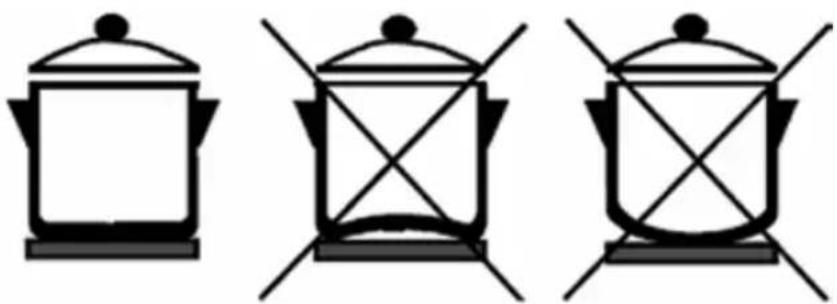
• Do not use cooking utensils with a concave bottom (Fig. 1), as the cooking efficiency could be reduced.
natural_image
Three identical black-and-white line drawings of a cooking pot with crossed handles, no text or symbols present.Fig. 1
- Rough bottoms of pots and pans could scratch the glass-ceramic plate. Therefore, always check the cooking utensil.
- A cooking utensil on the switched-on hob must contain liquid or food. The hob is equipped with an internal safety system to protect against overheating. However, an empty utensil can heat so quickly that the automatic switch-off system does not manage to react and the utensil may reach very high temperatures. This could damage both the bottom of the utensil and the glass-ceramic plate. If this happens, do not touch the utensil and switch off the hob. If the appliance does not heat after cooling down, contact an authorised service centre.
Hot cooking utensil
- Do not put hot pots or pans on the control panel or the frame or edge of the heating plate. Otherwise damage could occur.
Salt, sugar and sand
- Salt, sugar and grains of sand (coming e.g. from cleaning vegetables) could scratch the heating plate. Do not use the heating plate as a work area or a side table!
Hard and sharp objects
- If a hard and/or sharp object falls on the heating plate, the plate can be damaged. Do not place such objects above the heating plate.
Overboiled food
- Sugar, as well as food with high sugar content, damages the heating plate when coming into contact with it. Immediately remove overboiled food of this kind using a glass scraper. WARNING! A glass scraper is sharp.
Foils and plastic
• Aluminium foils and plastic utensils melt down, when on a hot hotzone.
- Protective foil for cookers is not suitable for the heating plate.
Examples of possible damages
The following damages do not negatively affect the function or performance of the heating plate.
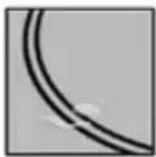
Stains
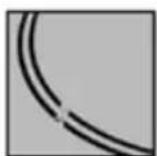
Burnt remains of sugar or food with high sugar content.
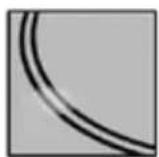
Colouring
Metallic-gloss colouring caused by the use of unsuitable cleaning agents or abrasions from the bottom of cooking utensils.
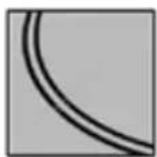
Scratches
Scratches caused by grains of salt, sugar or sand or by the coarse bottom of utensils.
Wear of the decoration
Wear caused by the use of unsuitable cleaning agents.
These damages result from improper maintenance of the heating plate and are not covered by the warranty. These are not technical problems of the unit.
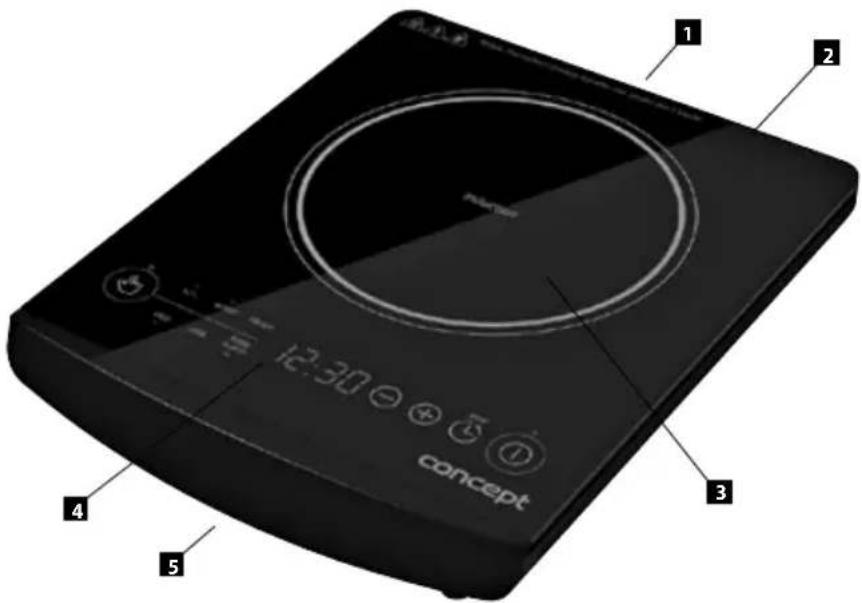
APPLIANCE DESCRIPTION
- Air outlet grid
- Glass-ceramic plate
- Heat zone ( 200 mm)
- Control panel
- Air inlet grid
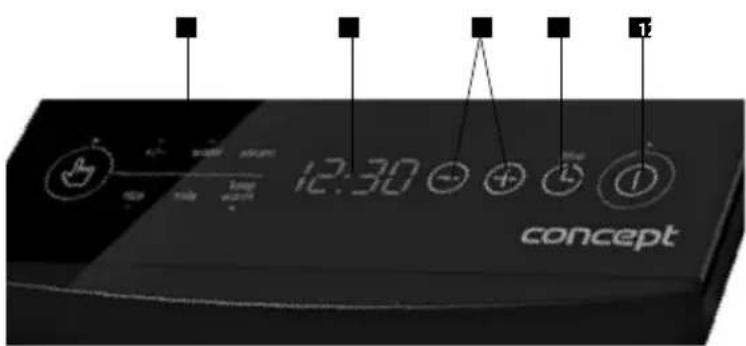
CONTROL PANEL DESCRIPTION
- ON/OFF symbol
- Timer setting symbol
- Heat zone power level set-up display
- Display of selected power or preset time
- Function selection button
- Panel with function symbols
OPERATING INSTRUCTIONS
• A place is indicated on the hob - electric heat zone (3) - designated for cooking only.
- Only the surface inside the indicated diameter is heated; other surfaces remain relatively cool.
• The temperature limiter prevents heat zones under the glass-ceramic plate from overheating.
- The power input of the cooking zone can be selected from 5 preset grades and one variable grade using the button for function selection (5).
WARNING!
- After cooking has finished, there is residual heat in the glass-ceramic plate coming from the cooking utensil. Pay extra attention as the heat zone is hot and you can be burnt. This residual heat can be utilised.
- The touch control is activated by placing a finger on the required symbol on the glass-ceramic plate. Therefore, keep the control panel clean and dry.
• The control panel must be kept clean and dry.
• Make sure the appliance is prevented from being accidentally switched on, e.g. by kids or pets. - When the hob is disconnected from the mains, the set-up parameters are reset.
Prior to first use
Prior to operating a new appliance for the first time, wipe the top glass-ceramic plate with a wet cloth.
- Place the appliance on a stable, heat-resistant surface away from other heat sources.
- Unwind the entire supply cable. Make sure it is not in contact with any heat sources nearby. Insert the plug into the electric voltage outlet.
- Check to ensure that the surrounding of the air inlet/outlet grids are open and that there is no danger of the grids clogging or sucking in an object.
- Remove small metal items from the surroundings of the appliance; they can become hot or magnetised.
- Place the cooking utensil containing food in the centre of the heat zone. Use a utensil with a diameter of 120 to 260 mm (210 mm is the best). The safety fuse prevents utensils with a diameter less than 120 mm from heating to avoid the unwanted heating of other metallic items, such as nearby cutlery, spoons, and other items.
- To switch on the hob, press the ON/OFF symbol (1). If you do not make a further selection within 1 minute, the hob automatically switches off.
- Set the power grade of the cooking zone by pressing the power selection symbol (5) repeatedly, until the desired function is selected.
Unit functions:
a) +/- function selection and subsequent regulation using + and - buttons (3) provides for power control from min 200W up to max 2000 W
b) WATER preset function at 2000 W
c) STEAM preset function at 1600 W
d) KEEP WARM preset function at 80°C
e) MILK preset function at 800 W
f) RICE preset function at 1000 W
- After you finish cooking by pressing the ON/OFF symbol (1), switch off the hob.
Note: After the hob is off, residual heat in the glass-ceramic plate comes from the cooking utensil. Take extra care as the hob is hot and you can be burnt (symbol „H“ - hot). This residual heat can be utilised. - The cooling fan may continue to operate for several minutes in order to cool the internal electronics. Wait until the cooling fan switches off automatically!
- Disconnect the appliance from the power supply.
Cooking zone functions of delayed switch-off and delayed start
The delayed switch-off function can only be selected in combination with +/- function enabling power control (max 180 min).
In the other preset functions it works as delayed start (max 24 h).
- Press the symbol of delayed switch-off/delayed start timer setting (2). By pressing symbols "+" and "-" (3) set the time of delayed switch-off/delayed start of the desired cooking zone (3/24 h).
- The function of delayed switch-off is initiated after a few seconds (the remaining time is shown on the display).
- The function of delayed start is initiated after a few seconds (the remaining time to the appliance start is shown on the display).
- When the selected time elapses an audio signal is activated and the unit is switched off/switched on.
Note: The function of delayed switch-off is deactivated by pressing the timer setting (2) once. If you switch off the cooking zone manually before the time of delayed switch-off elapses, the delayed switch-off timer is reset.
The function of delayed start can also be deactivated by pressing the timer symbol (2). When this function is deactivated, the appliance is immediately switched to the operation mode according to the selected preset function.
Switching off the hob
a) Manual switch-off
Press the ON/OFF symbol (1). The entire hob switches off and its setting is reset. After cooking has finished, residual heat in the glass-ceramic plate comes from the cooking utensil. Take extra care as the hob is hot and you can be burnt. This residual heat can be utilised.
b) Automatic switch-off
If you set up the required heat zone power level to „0“, the entire hob will be switched off automatically within 2 minutes.
c) Safety switch-off
For safety reasons, the cooking time on individual heat zones is limited to 4 hours (with the power level set at 1-2), 3 hours (with the power level set at 3-4), or 2 hours (with the power level set at 5-6). When needed, you can turn the appliance on again and continue processing food.
Cooling fan
To ensure that the internal electronics are properly cooled, the appliance is equipped with a cooling fan. The fan switches on and off automatically as needed.
Cooking tips
Some power level set-up examples:
a) Function KEEP WARM/MILK is designed for
- Keeping liquids simmering;
• Moderate and slow heating without the risk of burning;
- Melting e.g. butter or chocolate;
• Defrosting food;
- Boiling a small volume of liquid.
b) Function RICE can be used for
• Strong boiling;
- Keeping a larger quantity of liquid boiling;
- Stewing or braising.
c) Function RICE/STEAM/WATER can be used for
- Strong boiling;
- Keeping a larger quantity of liquid boiling;
- Stewing or braising.
- Cooking food requiring fast heating and high temperature (beefsteak, schnitzel, fried potatoes, etc.);
- Warm up food prior to switching to a lower level.
Energy-saving tips
• Flat-bottomed utensil
Use pots and pans with thick, flat bottoms. Uneven bottoms extend the cooking time.
- Correct utensil size
Use the proper cooking utensil size for each heat zone. The bottom diameter of the pots and pans should be smaller than or equal to the heat zone diameter (size).
Note: Keep in mind that manufacturers often mark a utensil with the upper diameter, which is usually larger than the bottom diameter.
- Adequate utensil size
Use a small utensil for a small volume of food. A large, half-empty utensil consumes more energy.
- Lid cover
Always cover pots and pans with suitable lids. Cooking without a lid considerably increases the energy consumption.
• Cooking with a low volume of water
Boil food in a small quantity of water. This way, you can save energy. Cooking vegetables retain their vitamins and minerals.
• Lower power level switch
Switch to a lower power level in time.
CLEANING AND MAINTENANCE
Clean the appliance after every use to prevent the accumulation of grease, burnt-on food remnants, and unpleasant odours.
Prior to cleaning and after using the appliance, turn it off, disconnect it from the electric voltage outlet, and let it cool down.
Do not immerse the supply cable, the plug, or the appliance itself in water or any other liquid.
Never use high-pressure cleaners or autoclaves to clean the hob.
Cleaning the hob
For removing food remnants and greasy layers, use a glass scraper. Then, wipe the plate with a damp cloth and dry it using a soft cloth. You can remove dirt from the fan ventilation grids with a soft cloth, a small brush, or vacuum them carefully with a vacuum cleaner.
Maintenance
Treat the hob with a protective and curing agent designed for glass-ceramic surfaces. The agent will coat the hob with a protective layer repelling dirt and facilitate cleaning.
Cleaning agents
Use cleaning agents suitable for glass-ceramic surfaces, e.g. CERA, CLEN, Cera-fix, and Sidol for ceran + steel.
Water stains can also be removed using lemon juice or vinegar.
Improper cleaning agents
Never use:
Rough sponges, abrasive agents or aggressive cleaners such as oven cleaning spray or stain remover.
Glass scraper
Tough dirt should be removed preferably by means of a glass scraper.
Clean the hob with the edge only.
If the scraper handle is made of metal, you could scratch the hob.
WARNING!
The scraper is very sharp. Danger of injury! After cleaning, secure the scraper again.
If the edge is damaged, replace it immediately.
Metallic-gloss colouring
A metallic-gloss colouring appears after the use of unsuitable cleaners or is caused by abrasion from the bottom of the cooking utensil.
This colouring is very difficult to remove. Use Stahl-Fix or Sidol for ceran + steel.
Control panel
Always keep the panel clean and dry.
Food residue and food that has boiled over may affect the performance of the controls.
TROUBLESHOOTING
| Problem Cause, solution | |
| When the hob is turned on, the household wiring protection reacts. | Check to ensure that the input of all switched-on units does not exceed the maximum load of the household wiring. |
| The hob has switched off. | Somebody has touched the main switch accidentally. Switch on the hob again. Perform the setting once more. |
| The heating of the heat zone is interrupted. | The temperature surrounding the appliance is too high. The appliance ventilation openings are clogged. The set cooking time is over. |
| When a cooking utensil is put on the induction heat zone, a intermittent sound signal (beeping) is heard and the heat zone does not heat. | Check to see if the cooking utensil is electromagnetic (i.e. whether it attracts a magnet). Check to see if the bottom diameter of the utensil is sufficient. |
| Displayed code E0 Improper vessel on the cooktop. Replace the vessel. | |
| Displayed code E1, E2 Power supply failure. Switch off the appliance and check the supply voltage. | |
| Displayed code E3, E4, Failure of electronics. Contact an authorized service centre. | |
| Displayed code E5 Overheated cooking zone. Let it cool down before further use. | |
| Displayed code E6 Defective sensor. Check the air outlet and fan. | |
Operation sounds of the unit
The induction heating technology is based on specific parameters of metal materials, when under the influence of high-frequency waves. Under special circumstances these vibrations can manifest themselves by weak sounds, which do not signal any fault. These include:
| Deep hum such as at a transformer | This sound accompanies cooking at high power level. It is caused by big amount of energy which is transferred from the heating plate to the cooking utensil. This sound will disappear or weaken as soon as the hotzone is switched over to lower power. |
| Beeping | This sound usually appears in the case of an empty cooking utensil. It will disappear when you pour water or put food in the utensil. |
| High beeping sounds | These sounds appear mainly with cooking utensils consisting of several layers of various materials, when they are in operation at the maximum heating power. This effect does not influence the result of cooking. The beeping disappears or weakens as soon as the power is reduced. |
| Crackling | This sound appears with cooking utensils consisting of several layers of various materials. It is caused by vibrations on the connecting areas of individual layers. The sound depends on the cooking utensil. It may change in dependence on the quantity and kind of food being cooked in the utensil. |
| Sound of the fan | For good operation of the electronics it is necessary that it works at a permanently controlled temperature. That is why the heating plate is equipped with a fan which can be set to various power levels according to the measured temperature. The fan may work even after the switch-off of the heating plate, if the measured temperature is still too high. |
REPAIR & MAINTENANCE
Any extensive maintenance or repair that requires access to the inner parts of the product must be performed by an expert service centre.
ENVIRONMENTAL PROTECTION
• Packaging materials and obsolete appliances should be recycled.
• The transport box may be disposed of as sorted waste.
• Polyethylene bags shall be handed over for recycling.
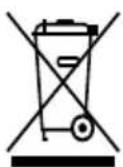
Appliance recycling at the end of its service life:
A symbol on the product or its packaging indicates that this product should not go into household waste. It must be taken to the collection point of an electric and electronic equipment recycling facility. By making sure this product is disposed of properly, you will help prevent the negative effects on the environment and human health that would otherwise result from inappropriate disposal of this product. You can learn more about recycling this product from your local authorities, a household waste disposal service or in the shop where you bought this product.
WIR DANKEN IHNEN FÜR IHR VERTRAUEN
BEDIENUNGSANLEITUNG



- PODĚKOVÁNÍ
- POPIS OVLÁDACÍHO PANELU
- NÁVOD K OBSLUZE
- POPIS OVLÁDACIEHO PANELA
- NÁVOD NA OBSLUHU
- OPIS PANELU STEROWANIA
- INSTRUKCJA OBSŁUGI
- KONTROLPANELA APRAKSTS
- EKSPLUATĀCIJAS NORĀDĪJUMI
- What does cooking with induction mean?
- Saving of time at cooking and baking
- Energy saving
- Controlled supply of heat and more safety
- WARNING!
- IMPORTANT SAFETY NOTES:
- ADDITIONAL INFORMATION:
- Utensil and pan bottoms
- Hot cooking utensil
- Salt, sugar and sand
- Hard and sharp objects
- Overboiled food
- Foils and plastic
- Examples of possible damages
- Stains
- Colouring
- Scratches
- Wear of the decoration
- APPLIANCE DESCRIPTION
- CONTROL PANEL DESCRIPTION
- OPERATING INSTRUCTIONS
- Prior to first use
- Unit functions:
- Cooking zone functions of delayed switch-off and delayed start
- Switching off the hob
- a) Manual switch-off
- b) Automatic switch-off
- c) Safety switch-off
- Cooling fan
- Cooking tips
- Some power level set-up examples:
- Energy-saving tips
- • Flat-bottomed utensil
- - Correct utensil size
- - Adequate utensil size
- - Lid cover
- • Cooking with a low volume of water
- • Lower power level switch
- CLEANING AND MAINTENANCE
- Cleaning the hob
- Maintenance
- Cleaning agents
- Improper cleaning agents
- Glass scraper
- Metallic-gloss colouring
- Control panel
- Operation sounds of the unit
- REPAIR & MAINTENANCE
- ENVIRONMENTAL PROTECTION
- Appliance recycling at the end of its service life:
- WIR DANKEN IHNEN FÜR IHR VERTRAUEN
- BEDIENUNGSANLEITUNG
Brand : Concept
Model : VI-1030
Category : Cooker