
MCM108C - Hi-Fi PHILIPS - Free user manual and instructions
Find the device manual for free MCM108C PHILIPS in PDF.


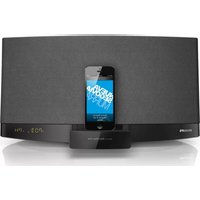
| Product Type | Hi-Fi Micro System |
| Brand | Philips |
| Model | MCM108C |
| Power Supply | 120V, 60 Hz |
| Amplifier Output Power | 2 x 2W RMS (4W total) |
| Signal-to-Noise Ratio (Amplifier) | ≥62 dBA |
| Frequency Response (Amplifier) | 60 - 16000 Hz, ±3 dB |
| Speaker Impedance | 8 Ω |
| CD Player Frequency Response | 20 - 20000 Hz |
| CD Player Signal-to-Noise Ratio | 75 dBA |
| Tuner FM Range | 87.5 - 108 MHz |
| Tuner AM Range | 530 - 1700 kHz |
| Speaker Dimensions (WxHxD) | 150 x 150 x 200 mm |
| Main Unit Dimensions (WxHxD) | 150 x 150 x 220 mm |
| Weight (with speakers) | 4.9 kg |
| Weight (without speakers) | 2.3 kg |
| Standby Power Consumption | <3 W |
| Supported Disc Formats | CD, CD-R, CD-RW, MP3 CD |
| Audio Input | AUX In (3.5mm) |
| Headphone Output | 3.5mm jack |
| Remote Control | Yes (CR2032 battery) |
| Sound Enhancement | DSC (Jazz/Pop/Classic/Rock), DBB |
| Play Modes | Program, Shuffle, Repeat (All/Track/Album) |
| Timer Functions | Sleep Timer, Wake-up Timer |
| Accessories Included | 2 speakers, remote control, AM loop antenna |
Frequently Asked Questions - MCM108C PHILIPS
User questions about MCM108C PHILIPS
0 question about this device. Answer the ones you know or ask your own.
Ask a new question about this device
Download the instructions for your Hi-Fi in PDF format for free! Find your manual MCM108C - PHILIPS and take your electronic device back in hand. On this page are published all the documents necessary for the use of your device. MCM108C by PHILIPS.
USER MANUAL MCM108C PHILIPS
Meet Philips at the Internet
http://www.philips.com

Thank you for choosing Philips
Need help fast?
Read your Quick Use Guide and/or
Owner's Manual first for quick tips
e using your Phil more enjoyable.
If you have read your instructions
and still need assistance,
you may access our online help at
www.philips.com/ussupport
or call
1-888-PHILIPS (744-5477)
while with your product.
(and Model / Serial number)

www.philips.com/usasupport
o llame al teléfono
I-888-PHILIPS (744-5477)
natural_image
Three white audio speakers stacked vertically with a remote control unit beside them (no visible text or symbols)
PHILIPS

Printed in China
PDCC-JH-0624
Note: This equipment has been tested and found to comply with the limits for a Class B digital device, pursuant to port 15 of the FCC Rules. These limits are designed to provide reasonable protection against harmful interference in a residential installation. This equipment generates, uses, and can radiate radio frequency energy and, if not installed and used in accordance with the instruction manual, may cause harmful interference to radio communications. However, there is no guarantee that interference will not occur in a particular installation. If this equipment does cause harmful interference to radio or television reception, which can be determined by turning the equipment off and on, the user is encouraged to try to correct the interference by one or more of the following measures:
- Relocate the receiving antenna.
- Increase the separation between the equipment and receiver
- Connect the equipment into an outlet on a circuit different from that to which the receiver is connected.
- Consult the dealer or an experienced radio/TV technician for help.
IMPORTANT!
modifications not authorized by the manufacturer may void users authority to operate this device.
Return your Product Registration Card or register online at www.phillips.com/usasupport today to get the very most from your purchase.
Registering your model with PHILIPS makes you eligible for all of the valuable benefits listed below, so don't miss out. Complete and return your Product Registration Card at once, or register online at www.philips.com/ussupport to ensure:
\*Proof of Purchase
Returning the enclosed card guarantees that your date of purchase will be on file, so no additional paperwork will be required from you to obtain warranty service.
\*Product Safety Notification
By registering your product, you'll receive notification - directly from the manufacturer - in the rare case of a product recall or safety defect.
\*Additional Benefits
Registering your product guarantees that you'll receive all of the privileges to which you're entitled, including special money-saving offers.
PHILIPS
Congratulations on your purchase, and welcome to the "family!"
Dear PHILIPS product owner:
Thank you for your confidence in PHILIPS. You've selected one of the best-built, best-backed products available today. We'll do everything in our power to keep you happy with your purchase for many years to come. As a member of the PHILIPS "family," you're entitled to protection by one of the most comprehensive warranties and outstanding service networks in the industry. What's more, your purchase guarantees you'll receive all the information and special offers for which you qualify, plus easy access to accessories from our convenient home shopping network.
Most importantly, you can count on our uncompromising commitment to your total satisfaction.
All of this is our way of saying welcome - and thanks for investing in a PHILIPS product.
PS. To get the most from your PHILIPS purchase, be sure to complete and return your Product Registration Card at once, or register online at:
www.philips.com/usasupport
Know these
safety symbols
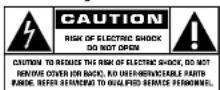
This "bolt of lightning" indicates uninsulated material within your unit may cause an electrical shock. For the safety of everyone in your household, please do not remove product covering.
The "exclamation point" calls attention to features for which you should read the enclosed literature closely to prevent operating and maintenance problems.
WARNING: To reduce the risk of fire or electric shock, this apparatus should not be exposed to rain or moisture and objects filled with liquids, such as vases, should not be placed on this apparatus.
CAUTION: To prevent electric shock, match wide blade of plug to wide slot, fully insert.
Enter below the Serial No. which is located on the rear of the cabinet. Retain this information for future reference.
Model No. Serial No.
PHILIPS
Visit our World Wide Web Site at http://www.philips.com/usasupport
IMPORTANT SAFETY INSTRUCTIONS
-
Read these instructions.
-
Keep these instructions.
-
Heed all warnings.
-
Follow all instructions.
-
Do not use this apparatus near water.
-
Clean only with dry cloth.
-
Do not block any ventilation openings. Install in accordance with the manufacturer's instructions.
-
Do not install near any heat sources such as radiators, heat registers, stoves, or other apparatus (including amplifiers) that produce heat.
-
Do not defeat the safety
purpose of the polarized or
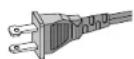
AC Polarized Plug
grounding-type plug. A polarized plug has two blades with one wider than the other. A grounding type plug has two blades and a third grounding prong. The wide blade or the third prong are provided for your safety. If the provided plug does not fit into your outlet, consult an electrician for replacement of the obsolete outlet.
-
Protect the power cord from being walked on or pinched, particularly at plugs, convenience receptacles, and the point where they exit from the apparatus.
-
Only use attachments/accessories specified by the manufacturer:
-
Use only with the cart, stand, tripod, bracket, or table specified by the manufacturer or sold with the apparatus. When a cart is
used, use caution when moving the cart /apparatus combination to avoid injury from tip-over:
-
Unplug this apparatus during lightning storms or when unused for long periods of time.
-
Refer all servicing to qualified service personnel. Servicing is required when the apparatus has been damaged in any way, such as power-supply cord or plug is damaged, liquid has been spilled or objects have fallen into the apparatus, the apparatus has been exposed to rain or moisture, does not operate normally, or has been dropped.
-
Battery usage CAUTION – To prevent battery leakage which may result in bodily injury, property damage, or damage to the unit:
Install all batteries correctly, + and - as marked on the unit.
Do not mix batteries (old and new or carbon and alkaline, etc.). Remove batteries when the unit is not used for a long time.
-
Apparatus shall not be exposed to dripping or splashing.
-
Do not place any sources of danger on the apparatus (e.g, liquid filled objects, lighted candles).
-
This product may contain lead and mercury. Disposal of these materials may be regulated due to environment considerations.
For disposal or recycling information, please contact your local authorities or the Electronic Industries Alliance: www.eiae.org.
EL 6475-S004: 03/12
Class II equipment symbol
This symbol indicates that the unit has a double insulation system

PHILIPS LIMITED WARRANTY ONE (I) YEAR
WARRANTY COVERAGE:
PHILIPS warranty obligation is limited to the terms set forth below.
WHO IS COVERED:
Philips warrants the product to the original purchaser or the person receiving the product as a gift against defects in materials and workmanship as based on the date of original purchase ("Warranty Period") from an Authorized Dealer. The original sales receipt showing the product name and the purchase date from an authorized retailer is considered such proof.
WHAT IS COVERED:
The Philips warranty covers new products if a defect arises and a valid claim is received by Philips within the Warranty Period. As its option, Philips will either (1) repair the product at no charge, using new or refurbished replacement parts, or (2) exchange the product with a product that is new or which has been manufactured from new, or serviceable used parts and is at least functionally equivalent or most comparable to the original product in Philips current inventory, or (3) refund the original purchase price of the product. Philips warrants replacement products or parts provided under this warranty against defects in materials and workmanship from the date of the replacement or repair for ninety (90) days or for the remaining portion of the original product's warranty, whichever provides longer coverage for you. When a product or part is exchanged, any replacement item becomes your property and the replaced item becomes Philips' property. When a refund is given, your product becomes Philips' property.
Note: Any product sold and identified as refurbished or renewed carries a ninety (90) day limited warranty.
Replacement product can only be sent if all warranty requirements are met. Failure to follow all requirements can result in delay.
WHAT IS NOT COVERED - EXCLUSIONS AND LIMITATIONS:
This Limited Warranty applies only to the new products manufactured by or for Philips that can be identified by the trademark, trade name, or logo affixed to it. This Limited Warranty does not apply to any non-Philips hardware product or any software, even if packaged or sold with the product. Non-Philips manufacturers, suppliers, or publishers may provide a separate warranty for their own products packaged with the bundled product.
Philips is not liable for any damage to or loss of any programs, data, or other information stored on any media contained within the product, or any non-Philips product or part not covered by this warranty. Recovery or reinstallation of programs, data or other information is not covered under this Limited Warranty.
This warranty does not apply (a) to damage caused by accident, abuse, misuse, misapplication, or non-Phillips product, (b) to damage caused by service performed by anyone other than Phillips or Philips Authorized Service Location, (c) to a product or a part that has been modified without the written permission of Philips, or (d) if any Philips serial number has been removed or defaced, or (e) product, accessories or consumables sold "AS IS" without warranty of any kind by including refurbished Philips product sold "AS IS" by some retailer's.
This Limited Warranty does not cover:
• Shipping charges to return defective product to Philips.
- Labor charges for installation or setup of the product, adjustment of customer controls on the product, and installation or repair of antenna systems outside of the product. - Product repair and/or part replacement because of improper installation, connections to improper voltage supply, abuse, neglect, misuse, accident, unauthorized repair or other cause not within the control of Philips.
- Damage or claims for products not being available for use, or for lost data or lost software.
- Damage occurring to product during shipping - A product that requires modification or adaptation to enable it to operate in any country other than the country for which it was designed, manufactured, approved and/or authorized, or repair of products damaged by these modifications. - A product used for commercial or institutional purposes (including but not limited to rental purposes). - Product lost in shipment and no signature verification receipt can be provided. - Failure to operate per Owner's Manual.
TO OBTAIN ASSISTANCE IN THE U.S.A., PUERTO RICO, OR U.S. VIRGIN ISLANDS...
Contact Philips Customer Care Center at 1-888-PHILIPS (1-888-744-5477)
TO OBTAIN ASSISTANCE IN CANADA...
1-800-661-6162 (French Speaking)
I-888-PHILIPS (I-888-744-5477) - (English or Spanish Speaking)
REPAIR OR REPLACEMENT AS PROVIDED UNDER THIS WARRANTY IS THE EXCLUSIVE REMEDY FOR THE CONSUMER. PHILIPS SHALL NOT BE LIABLE FOR ANY INCIDENTAL OR CONSEQUENTIAL DAMAGES FOR BREACH OF ANY EXPRESS OR IMPLIED WARRANTY ON THIS PRODUCT. EXCEPT TO THE EXTENT PROHIBITED BY APPLICABLE LAW, ANY IMPLIED WARRANTY OF MERCHANTABILITY OR FITNESS FOR A PARTICULAR PURPOSE ON THIS PRODUCT IS LIMITED IN DURATION TO THE DURATION OF THIS WARRANTY.
Some states do not allow the exclusions or limitation of incidental or consequential damages, or allow limitations on how long an implied warranty lasts, so the above limitations or exclusions may not apply to you.
This warranty gives you specific legal rights. You may have other rights which vary from state/province to state/province.
Philips, P.O. Box 671539, Marietta, GA. 30006-0026
3121 233 48B01
English Controls
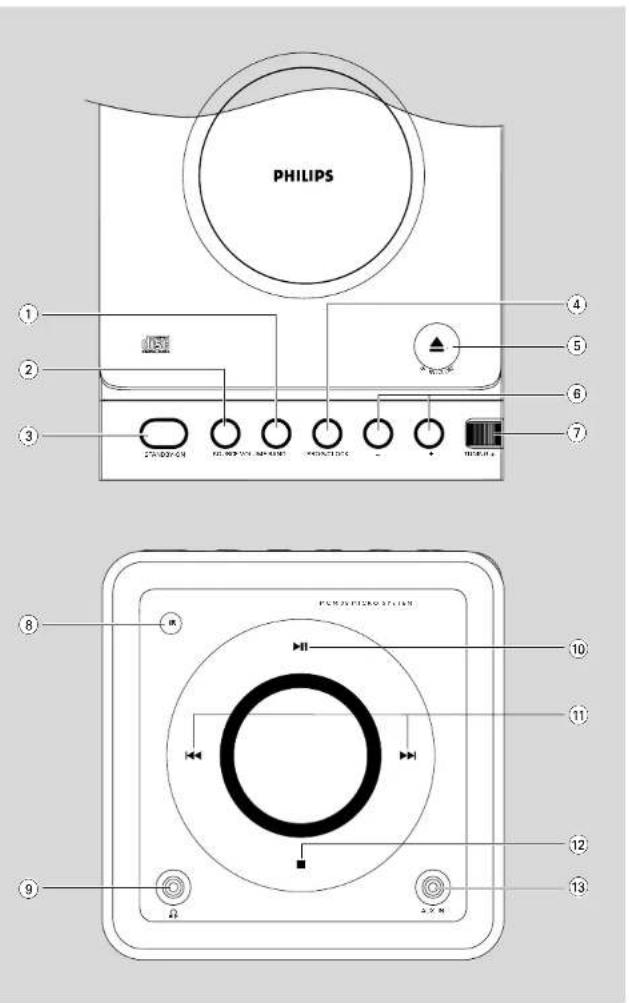
Controls on the system and remote control
① BAND
f or Tuner (on the set only) selects waveband.
② SOURCE (CD/ TUNER/ AUX)
- switches on the system.
- selects the respective sound source for CD/ FM/ AM/ AUX.
③ STANDBY-ON /
switches the system to standby/on.
④ PROG/CLOCK
for CD ...... programs tracks and reviews the
program.
for clock ...... sets the clock function.
⑤ OPEN·CLOSE
- opens/closes the CD door.
⑥ VOLUME-1 +
adjusts volume level.
⑦ TUNING ●
tunes to radio stations
⑧ IR SENSOR
- infrared sensor for remote control.
⑨
connect headphones.
⑩ ▶ II
for CD .... starts or pauses CD playback.
⑪ ◀◀/▶▶
- skips to the beginning of a current track/previous/ next track.
- fast searches back and forward within a track/CD.
⑫ STOP ■
stops CD playback or erase a CD program.
⑬ AUX IN
connects to external audio source.
⑭ MUTE
switches playback sound off and on.
⑮ REPEAT
- repeats a track / disc / all programmed tracks.
⑯ SHUFF (SHUFFLE)
plays CD/MP3 tracks in random order.
⑰ SLEEP
- activates/deactivates or selects the sleeper time.
⑱ TIMER
- activates/deactivates or sets the timer function.
19 ALBUM ▼ ▲
for MP3 disc......selects an album.
20 DBB
(Dynamic Bass Boost) enhances the bass.
②1 DSC
(Digital Sound Control) selects sound characteristics: JAZZ/POP/CLASSIC/ROCK
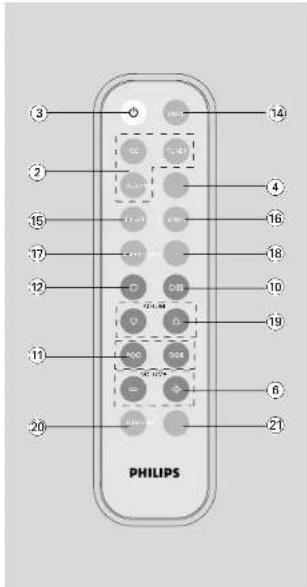
Notes for remote control:
- First select the source you wish to
control by pressing one of the source select keys on the remote control (for example
CD, TUNER).
- Then select the desired function (for
example ▶, ▶, ▶).
General Information
This set complies with the FCC rules.
Part 15 and with 21 CFR 1040.10. Operation is subject to the following two conditions:
- This device may not cause harmful interference, and
- This device must accept any
interference received, including
interference that may cause undesired operation.
Supplied accessories
- 2 speaker boxes
- remote control with battery
- AM loop antenna
Environmental Information
All unnecessary packaging has been omitted. We have tried to make the packaging easy to separate into three materials: cardboard (box), polystyrene foam (bufter) and polyethylene (bags, protective foam sheet).
Your system consists of materials which can be recycled and reused if disassembled by a specialized company. Please observe the local regulations regarding the disposal of packaging materials, exhausted batteries and old equipment.
Safety Information
- Before operating the system, check that the operating voltage indicated on the typeplate (or the voltage indication beside the voltage selector) of your system is identical with the voltage of your local power supply. If not, please consult your dealer.
- Place the system on a flat, hard and stable surface.
- Place the system in a location with adequate ventilation to prevent internal heat build-up in your system. Allow at least 10 cm (4 inches) clearance from the rear and the top of the unit and 5 cm (2 inches) from each side.
- The ventilation should not be impeded by covering the ventilation openings with items, such as newspapers, table-cloths, curtains, etc.
- Do not expose the system, batteries or discs to excessive moisture, rain, sand or heat sources caused by heating equipment or direct sunlight.
- No naked flame sources, such as lighted candles, should be placed on the apparatus.
- No objects filled with liquids, such as vases, shall be placed on the apparatus.
- If the system is brought directly from a cold to a warm location, or is placed in a very damp room, moisture may condense on the lens of the disc unit inside the system. Should this occur, the CD player would not operate normally. Leave the power on for about one hour with no disc in the system until normal playback is possible.
- The mechanical parts of the set contain self-lubricating bearings and must not be oiled or lubricated.
- When the system is switched to Standby mode, it is still consuming some power. To disconnect the system from the power supply completely, remove the AC power plug from the wall socket.
Preparations
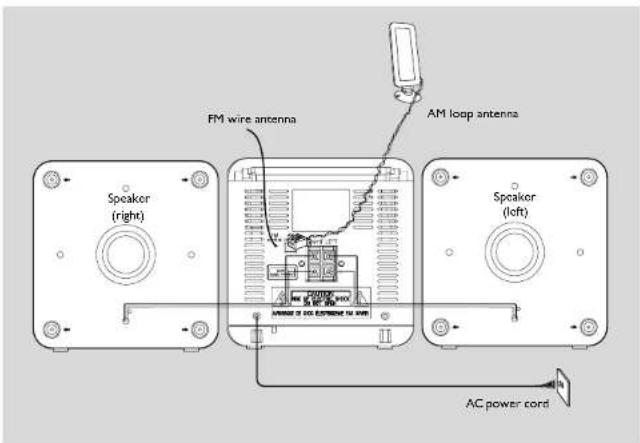
Rear connections
The type plate is located at the rear of the system.
A Power
- Before connecting the AC power cord to the wall outlet, ensure that all other connections have been made.
WARNING!
- F or optimal performance, use only the original power cable.
- N ever make or change any connections with the power switched on.
⑧ Antennas Connection
AM (MW) antenna
Unfold the loop antenna and if necessary, use screws (not supplied) to fix it to a flat, hard and stable place:

2 Fit the plug of the loop antenna to AM ANTENNA as shown above.
3 Adjust the antenna for optimal reception
FM Antenna
It is unnecessary to connect the FM pigtail antenna since it is fixed to the main unit.
- Position the antenna as far as possible from a TV, VCR or other radiation source.
Preparations
© Speakers Connection
Front Speakers
Connect the speaker wires to the SPEAKERS terminals, right speaker to 'RIGHT' and left speaker to 'LEFT', the wire (marked red) to '+' and the wire (marked black) to '-'
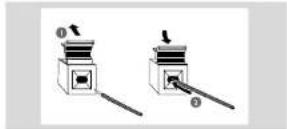
- Fully insert the stripped portion of the speaker wire into the terminal as shown.
Notes:
- F or optimal sound performance, use the supplied speakers. - Do not connect more than one speaker to any one pair of +/ - speaker terminals. - Do not connect speakers with an impedance lower than the speakers supplied. Please refer to the SPECIFICATIONS section of this manual.
Before using the remote control
① Pull out the plastic protective sheet.
② Select the source you wish to control by pressing one of the source select keys on the remote control (for example CD, TUNER).
3 Then select the desired function (for example ▶, |◀, ▶|).
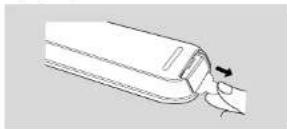
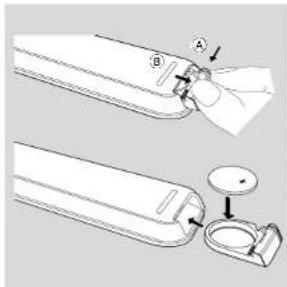
Replacing battery (lithium CR2032) into the remote control
① Pull out the knob Ⓐ slightly to the left.
② Pull out the battery compartment ⑧
3 Replace a new battery and fully insert the battery compartment back to the original position.
CAUTION!
Batteries contain chemical substances, so they should be disposed off properly.
Basic Functions
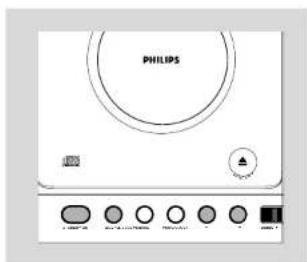
IMPORTANT:
Before you operate the system, complete the preparation procedures.
Switching the system on
- Press STANDBY-ON (b on the remote control).
→ The system will switch to the last selected source. - Press SOURCE (CD, TUNER or AUX on the remote control).
→ The system will switch to the selected source.
To switch the system to standby mode
- Press STANDBY-ON (On the remote control).
→ The clock is displayed.
Power-saving automatic standby
The power-saving feature automatically switches to standby 15 minutes after a CD playback has ended and no control is operated.
Adjusting volume and sound
① Press VOLUME - / + to increase or decrease volume
→ Display shows the volume level and a number from 0-32.
2 Press DSC repeatedly to select the desired sound effect: JAZZ / POP / CLASSIC / ROCK.

3 Press DBB (on the remote control) to switch bass enhancement on or off.
→ Display shows: DBB if the DBB is activated.
4 Press MUTE on the remote control to stop sound play back instantly.
→ Playback will continue without sound and the display shows MUTE.
• To start sound playback you can:
- press MUTE again; - adjust the volume controls; - change source.
CD/MP3 Operation
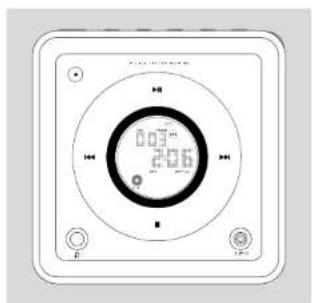
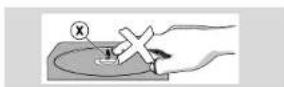
IMPORTANT:
The lens of the CD player should never be touched.
Loading a disc
This CD player plays Audio Discs including CD-Recordables, CD-Rewntables and MP3 CD.
- CD-ROM, CD-I, CDV. VCD, DVD or computer CDs, however, are not possible.
① Select CD source
2 Press OPEN/CLOSE▲ or the top of the system to open the CD compartment. → OPEN is displayed when you open the CD compartment.
3 Insert a disc with the printed side facing up and press down on OPEN/CLOSE▲ to close the CL door.
→ RLH5 is displayed as the CD player scars the contents of a disc, and then the total number of tracks and playing time (or the total number of albums and tracks for MP3 disc) are shown.
Basic playback controls
To play a disc
- Press ▶ to start playback
→ The current track number and elapsed playing time of the track are displayed during disc playback.
To select a different track
- Press ◀◀ ▶▶ once or repeatedly until the desired track number appears in the display.
To find a passage within a track
Press and hold down on ◀◀ ▶▶ → The disc is played at high speed and low volume.
2 When you recognise the passage you want, release ◀◀ ▶▶
→ Normal playback continues.
To interrupt playback
- Press ▶II during playback.
→ The display freezes and the elapsed playing time flashes when playback is interrupted.
→ To resume, press ▶ again.
To stop playback
- Press ■
Notes: CD play will also stop when;
- the CD door is opened.
- the disc has reached the end.
- you select another source: TUNER or AUX.
- you select standby
Playing an MP3 disc
Load an MP3 disc
→ The disc reading time may exceed 10 seconds due to the large number of songs compiled into one disc.
→ "XXXX-UU" is displayed. XXX is the current track number and VH is the current album number.
2 Press ALBUM ▼ ▲ to select a desired album..
CD/MP3 Operation
3 Press ◀◀ ▶▶▶▶▶▶▶▶▶▶▶▶▶▶▶▶▶▶▶▶▶▶▶▶▶▶▶▶▶▶▶▶▶▶▶▶▶▶▶▶▶▶▶▶▶▶▶▶▶▶▶▶▶▶▶▶▶▶▶▶▶▶▶▶▶▶▶▶▶▶▶▶▶▶▶▶▶▶▶▶▶▶▶▶▶▶▶▶▶▶▶▶▶▶▶▶▶▶▶▶▶> The album number will change accordingly as you reach the first track of an album by pressing ◀◀ or the last track of an album by pressing ▶◀.
4 Press ▶II to start playback.
- During playback press once ALBUM ▼ ▲ to show the current album number.
Supported MP3 disc formats: ISO9660, Jolig, UDF 1.5
Maximum title number: 256 (depending on filename length)
- Maximum album number: 99 - Supported sampling frequencies: 32 kHz, 41.1 kHz, 48 kHz - Supported Bit-rates: 32\~256 (kbps), variable bitrates
Different play modes: SHUFFLE and REPEAT
You can select and change the various play modes before or during playback. The REPEAT modes can also be combined with PROGRAMME
SHUFFLE ......tracks of the entire disc are played in random order
REPEAT ALL ... repeats the entire disc/programme REPEAT .......plays the current track continuously
REPEAT ALB ... repeats all tracks in the current (for MP3 only) album
To select your play mode, press the SHUFF or REPEAT on the remote control before or during playback until the display shows the desired function.
2 Press ▶II (on the remote control ▶II) to start playback if in the STOP position. → If you have selected SHUFFIE, playback starts automatically.
3 To return to normal playback, press SHUFF or REPEAT on the remote control until the various SHUFFLE/ REPEAT modes are no longer displayed.
- You can also press ■ to cancel your play mode. 13
Notes:
- The SHUFFLE and REPEAT functions cannot be used simultaneously.
- SHUFFLE play is not available in the programme mode.
Programming track numbers
Programme in the STOP position to select and store your disc tracks in the desired sequence. If you like, store any track more than once. Up to 20 (10 for MP3 disc) tracks can be stored in the memory.
In the stop position, use the ◀◀ ▶▶ to select your desired track number.
- For MP3, you may press ALBUM ▼ ▲ to select a desired album, then press ◀◀ ▶▶ to select your desired track.
② Press PROGRAM (or PROG/CLOCK on the set) to store.
→ Display: PROG flashes, and p_r is displayed briefly, then the selected track number (and the selected album number for MP3).
③ Repeat, steps 1-2 to select and store all desired trades.
→ FULL is displayed if you attempt to programme more than 20 (10 for MP3 disc) tracks.
④ To start playback of your disc programme, press ▶II.
Reviewing the programme
- Stop playback and press PROGRAM (or PROG/CLOCK on the set) repeatedly. → Display first shows a programme sequence, then the stored track number (and the album number for MP3).
• To ext review mode, press ■.
Erasing the programme
You can erase the programme by:
- pressing ■ once in the STOP mode:
- pressing ■ twice during playback;
• opening the CD compartment;
- Select another sound source
→ PROG disappears from the display.
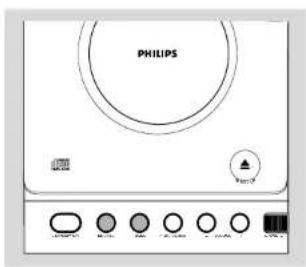
Radio Reception Other Connection
Tuning to radio stations
Select TUNER source. → is displayed.
2 Press BAND (TUNER on the remote control) once or more to select your waveband.
3 Turn TUNING ● to tune to a station. → Display shows: the frequency of the tuned station.
Helpful hints:
To improve radio reception:
- For FM, extend coil antenna at the back of the unit fully for optimum reception.
Listening to an external source
You can listen to the sound of the connected external device through your system's speakers.
1 Select AUX source
Use a line-in cable (not supplied) to connect MCM 108's AUX-IN jack (3.5 mm) to an AUDIO OUT or headphone jack on an external equipment (such as CD player, or VCR).
Maintenance
Cleaning the Cabinet
- Use a soft cloth slightly moistened with a mild detergent solution. Do not use a solution containing alcohol, spirits, ammonia or abrasives.
Cleaning Discs
- When a disc becomes dirty, clean it with a cleaning cloth. Wise the disc from the centre put.
- Do not use solvents such as benzene, thinner, commercially available cleaners, or amstatic spray intended for analogue red
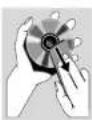
Cleaning the disc lens
- After prolonged use, dir I or dust may accumulate at the disc lens. To ensure good playback quality, clean the disc lens with Philips CD Lens Cleaner or any commercially available cleaner. Follow the instructions supplied with cleaner.
Clock/Timer
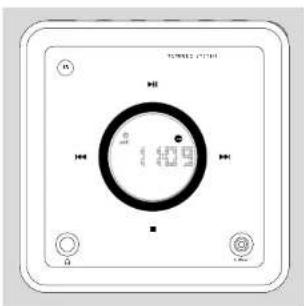
Setting the clock
In Stancby mode, press PROG/CLOCK button. → The clock digits for the hours flash.
2 Press ◀◀ /▶▶ to set the hours.
Press PROG/CLOCK again. → The clock digits for the minutes flash.
4 Press ◀◀ /▶▶ to set the minutes.
5 Press PROG/CLOCK to confirm the time.
Note: - If the clock has not been set, - - : - will be displayed.
Setting the timer
- The system can be used as an alarm clock. CD or TUNER can be set to switch on at a preset time. The clock time needs to be set first before the timer can be used.
- If no button is pressed within 90 seconds during timer setup, the system will exit timer setting mode automatically.
① In any mode, press TIMER on the remote control for more than 2 seconds.
2 Press ◀◀ /▶▶ (or CD / TUNER on the remote control) to select sound source.
3 Press TIMER to confirm your desired source. → The clock digits for the hours flash.
4 Press ◀◀ / ▶▶ to set the hours.
5 Press TIMER again.
→ The clock digits for the minutes flash.
6 Press ◀◀ / ▶▶▶ to set the minutes.
⑦ Press TIMER to confirm the time.
→ The timer is now set and actated.
Notes:
- If source CD is selected and no disc is in the CD tray or the disc has an error, TUNER will be selected automatically.
- At the set time of wake up, the set will turn on at volume level 12.
To activate and deactivate timer
• In standby or during playback, press
TIMER once.
→ Display shows ⊕ if activated, and disappears if deactivated.
Activating and deactivating SLEEP
The sleep timer enables the system to switch off by itself after a set period of time. The clock time needs to be set first before the sleep timer can be used.
- Press SLEEP on the remote control repeatedly to select desired time before system shuts off. → Display shows SLEEP and series of time options for selection 60.45, 30.45, 0.60.
- To deactivate, press SLEEP on the remote control once or more until "☐" is shown, or press STANDBY ON on the system or remote control.
Troubleshooting
WARNING
Under no circumstances should you try to repair the system yourself, as this will invalidate the warranty. Do not open the system as there is a risk of electric shock.
If a fault occurs, first check the points listed below before taking the system for repair. If you are unable to remedy a problem by following these hints, consult your dealer or service centre.
Problem Solution
| CD OPERATION | |
| "DS cd" is displayed. | - Insert a disc.- Check if the disc is inserted upside down.- W at until the moisture condensation at the lens has cleared.- Replace or clean the disc, see "Maintenance".- Use a finalised CD-RW or CD-R or a correct MP3 CD format disc. |
| RADIO RECEPTION | |
| Radio reception is poor. | - If the signal is too weak, adjust the antenna or connect an external antenna for better reception.- Increase the distance between the Micro HFI System and your TV or VCR. |
GENERAL
| The system does not react when buttons are pressed. | - Remove and reconnect the AC power plug and switch on the system again. |
| Sound cannot be heard or is of poor quality. | - Adjust the volume.Disconnect, the headphones.Check that the speakers are connected correctly.- Check if the striped speaker wire is clamped.- Make sure the MP3 CD was recorded within 32-26 kbps bit rate with sampling frequencies at 48kHz,44.1kHz or 32kHz . |
| The left and right sound outputs are reversed. | - Check the speaker connections and location. |
| The remote control does not function properly. | Select the source (CD orTUNER, for example) before pressing the function button (▶, ▶, ▶) .Reduce the distance between the remote control and the system.- Insert the batteries with their polarities (1/- signs) aligned as indicated.- Replace the batteries. Point the remote control directly toward IR sensor on the front of the system. |
| The timer is not working. | - Set the clock correctly.- Press TIMER to switch on the timer. |
| The Clock/Timer setting is erased. | - Power has been interrupted or the power cord has been disconnected. Reset the clocktimer. |
Specifications
AMPLIFIER
Output power 2 x 2W RMS
4W total power
2×1.5W FTC
Signal-to-noise ratio ≥ 62 dBA (IEC)
Frequency response ..... 60 - 16000 Hz, ± 3 dB
Impedance loudspeakers 8 Ω
Impedance headphones .... 32 Ω - 1000 Ω
CD PLAYER
Frequency range 20 - 20000 Hz
Signal-to-noise ratio 75 dBA
TUNER
ΓM wave range 87.5 – 108 MHz
AM wave range 530 - 1700 kHz
Sensitivity at 75 Ω
- mono, 26 dB signal-to-noise ratio ...... 2.8 μV
- stereo, 46 dB signal-to-noise ratio ..... 61.4 μV
Selectivity ≥ 28 dB
Total harmonic distortion .... ≤ 5%
Frequency response .... 63 - 12500 Hz (± 3 dB)
Signal-to-noise-ratio ≥ 50 dB
SPEAKERS
Bass reflex system
Dimensions (w x h x d) . 150 x 150 x 200 (mm)
GENERAL INFORMATION
AC Power 120V / 60 Hz
Dimensions (w x h x d) .. 150 x 150 x 220 (mm)
Weight (with/without, speakers)
approx. 4.9 / 2.3 kg
Standby power consumption .... < 3 W
Subject to modification


- Need help fast?
- IMPORTANT!
- Return your Product Registration Card or register online at www.phillips.com/usasupport today to get the very most from your purchase.
- \*Proof of Purchase
- \*Product Safety Notification
- \*Additional Benefits
- PHILIPS
- Know these
- safety symbols
- IMPORTANT SAFETY INSTRUCTIONS
- PHILIPS LIMITED WARRANTY ONE (I) YEAR
- WARRANTY COVERAGE:
- WHO IS COVERED:
- WHAT IS COVERED:
- WHAT IS NOT COVERED - EXCLUSIONS AND LIMITATIONS:
- This Limited Warranty does not cover:
- TO OBTAIN ASSISTANCE IN THE U.S.A., PUERTO RICO, OR U.S. VIRGIN ISLANDS...
- TO OBTAIN ASSISTANCE IN CANADA...
- English Controls
- Controls on the system and remote control
- ① BAND
- ② SOURCE (CD/ TUNER/ AUX)
- ③ STANDBY-ON /
- ④ PROG/CLOCK
- ⑤ OPEN·CLOSE
- ⑥ VOLUME-1 +
- ⑦ TUNING ●
- ⑧ IR SENSOR
- ⑨
- ⑩ ▶ II
- ⑪ ◀◀/▶▶
- ⑫ STOP ■
- ⑬ AUX IN
- ⑭ MUTE
- ⑮ REPEAT
- ⑯ SHUFF (SHUFFLE)
- ⑰ SLEEP
- ⑱ TIMER
- ALBUM ▼ ▲
- DBB
- ②1 DSC
- Notes for remote control:
- General Information
- This set complies with the FCC rules.
- Supplied accessories
- Environmental Information
- Safety Information
- Preparations
- Rear connections
- A Power
- WARNING!
- ⑧ Antennas Connection
- AM (MW) antenna
- FM Antenna
- © Speakers Connection
- Front Speakers
- Notes:
- Before using the remote control
- Replacing battery (lithium CR2032) into the remote control
- CAUTION!
- Basic Functions
- Switching the system on
- To switch the system to standby mode
- Power-saving automatic standby
- Adjusting volume and sound
- CD/MP3 Operation
- Loading a disc
- Basic playback controls
- To play a disc
- To select a different track
- To find a passage within a track
- To interrupt playback
- To stop playback
- Playing an MP3 disc
- Supported MP3 disc formats: ISO9660, Jolig, UDF 1.5
- Different play modes: SHUFFLE and REPEAT
- Programming track numbers
- Reviewing the programme
- Erasing the programme
- Radio Reception Other Connection
- Tuning to radio stations
- Helpful hints:
- Listening to an external source
- Maintenance
- Cleaning the Cabinet
- Cleaning Discs
- Cleaning the disc lens
- Clock/Timer
- Setting the clock
- Setting the timer
- To activate and deactivate timer
- TIMER once.
- Activating and deactivating SLEEP
- Troubleshooting
- WARNING
- Specifications
- AMPLIFIER
- CD PLAYER
- TUNER
- SPEAKERS
Brand : PHILIPS
Model : MCM108C
Category : Hi-Fi