
MSI FX5500-D256H AGP - Graphic card

FX5500-D256H AGP - Graphic card MSI - Free user manual and instructions

Find the device manual for free FX5500-D256H AGP MSI in PDF.

📄 1 pages English EN Download 💬 AI Question 10 questions ⚙️ Specs
Notice MSI FX5500-D256H AGP - page 1
Pick your language and provide your email: we'll send you a specifically translated version.
Product Type Graphics card
Brand MSI
Model FX5500-D256H
GPU NVIDIA GeForce FX5500
Interface AGP 8X
Memory Size 256 MB DDR
Memory Type DDR SDRAM
Memory Bus 128-bit
Core Clock 250 MHz
Memory Clock 266 MHz
Outputs DVI-I, D-Sub (VGA)
Maximum Resolution 2048 x 1536
DirectX Support DirectX 9.0
OpenGL Support OpenGL 1.5
Cooling Active fan with big heatsink
Form Factor Single slot
Multi-Display Support nView Multi-Display Technology
Operating Systems Windows 98/ME/2000/XP
Maintenance Keep heatsink and fan free of dust
Safety Use anti-static wrist strap; power off before installation

Frequently Asked Questions - FX5500-D256H AGP MSI

How do I install the MSI FX5500-D256H graphics card?
Power off your computer, unplug the power cord, open the case, and locate an available AGP slot. Align the card with the slot and press firmly until it clicks. Secure with screws, connect any necessary power (if required, though this card draws power from the AGP slot), replace the case, and install the drivers.
What are the system requirements for this card?
You need a motherboard with an AGP 8X or 4X slot, at least 256 MB of system RAM, and a minimum 300W power supply. The card is designed for Windows 98/ME/2000/XP.
Does this card support dual monitors?
Yes, it supports nView Multi-Display Technology, allowing you to connect two monitors via DVI-I and D-Sub outputs for extended or mirrored displays.
Where can I download the latest drivers?
Visit the MSI support website or NVIDIA’s driver archive. For Windows 98/ME/2000/XP, use NVIDIA’s ForceWare drivers version 81.98 or later. Note that newer operating systems like Windows 10 are not officially supported.
Is this card compatible with Windows 10?
It is not officially supported, but you may try using the Windows XP compatibility mode or legacy NVIDIA drivers. However, expect limited functionality and no guarantees.
How do I clean the graphics card?
Power off and unplug your computer. Remove the card and use compressed air to blow dust off the heatsink and fan. Avoid touching the delicate components. Reinstall after cleaning.
What is the maximum resolution supported?
The card can output up to 2048 x 1536 pixels via DVI-I, and lower resolutions through D-Sub. Check your monitor’s capabilities.
Does this card require additional power connectors?
No, the FX5500-D256H draws power directly from the AGP slot and does not have a PCIe power connector. Ensure your power supply is adequate.
Can I use this card for gaming?
This card is suitable for older games from the early 2000s. It may struggle with modern 3D games due to its 256 MB memory and DirectX 9.0 support. Expect low settings on older titles.
How do I know if my motherboard has an AGP slot?
Check your motherboard manual. AGP slots are often brown and located near the CPU socket. They are not compatible with PCIe slots. If unsure, look for a slot that says 'AGP' next to it.

User questions about FX5500-D256H AGP MSI

0 question about this device. Answer the ones you know or ask your own.

Ask a new question about this device

The email remains private: it is only used to notify you if someone responds to your question.

No questions yet. Be the first to ask one.

Download the instructions for your Graphic card in PDF format for free! Find your manual FX5500-D256H AGP - MSI and take your electronic device back in hand. On this page are published all the documents necessary for the use of your device. FX5500-D256H AGP by MSI.

USER MANUAL FX5500-D256H AGP MSI
natural_image Product photo of a master-slave FX5500 graphics card and a green PCI card with internal components (no visible text or symbols on the card body)

MSI FX5500-D256H AGP - 1

Graphics Card

FX5500-D256H

256MB DDR
AGP 8X
DVI + D-Sub Output

Specification

Marketing NameFX5500-D256H
Model NameV809
GPUNVIDIA GeForce FX5500
AGP8X
Codename5200 NPB
Core Clock250 MHz
Memory Clock266 MHz
Memory Size256MB DDR
Memory Bus128 bits
OutputDVI-I / D-Sub

Features

nView Multi-Display Technology

➢ Support dual-monitor with ultra-realistic image quality.

One Slot Design and Big Heatsink

One slot thermal design helps users to save more spaces.
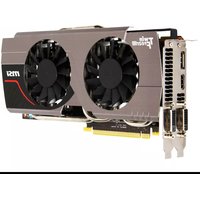
Table of contents Click a title to access it
Manual assistant
Powered by Anthropic
Waiting for your message
Product information

Brand : MSI

Model : FX5500-D256H AGP

Category : Graphic card