
477255 - Radio METRONIC - Free user manual and instructions
Find the device manual for free 477255 METRONIC in PDF.


| Product Type | DAB+ / FM / Bluetooth / USB / AUX Radio |
| Brand | Metronic |
| Model | 477255 |
| Dimensions | 175 x 52 x 105 mm |
| Weight | Approximately 300 g (estimate) |
| Power Supply | USB-C 5V 2A or rechargeable Lithium battery 3.7V 1500 mAh |
| Battery Life | BT: 9 h (max) / 15 h 30 (50% vol.); FM: 6 h 30 / 12 h 30; USB: 3 h 30 / 5 h |
| Main Features | DAB+ radio, FM, Bluetooth 5.3, USB MP3 playback, AUX input, headphone jack, alarm, sleep timer, adjustable backlight |
| Speaker Power | 3 W (1.2 W RMS) |
| Radio Frequencies | FM 87.5-108 MHz; DAB 174.928-239.200 MHz; Bluetooth 2402-2480 MHz |
| Bluetooth Range | 10 m |
| Care and Cleaning | Clean with a soft cloth. Do not use abrasive products or harsh cleaners. Do not put in dishwasher. |
| Safety | Do not open the casing. Use only indoors. Keep away from water, heat and flames. Keep at 20 cm from the body. |
| Spare Parts and Repairability | Stock of parts maintained 2 years after manufacturing (limit 1%). Manufacturer warranty: repair or replacement. |
| General Information | Manufactured outside EU. Technical support: +33 2 47 346 392 / hotline@metronic.com |
Frequently Asked Questions - 477255 METRONIC
User questions about 477255 METRONIC
0 question about this device. Answer the ones you know or ask your own.
Ask a new question about this device
Download the instructions for your Radio in PDF format for free! Find your manual 477255 - METRONIC and take your electronic device back in hand. On this page are published all the documents necessary for the use of your device. 477255 by METRONIC.
USER MANUAL 477255 METRONIC
EN - This manual is in French and English. The full manual is available as a free download via this QR code.
Démarrage
natural_image
Technical line drawing of a device rear panel and front panel (no text or symbols)natural_image
Simple line drawing of a battery with a diagonal line crossing through it (no text or symbols)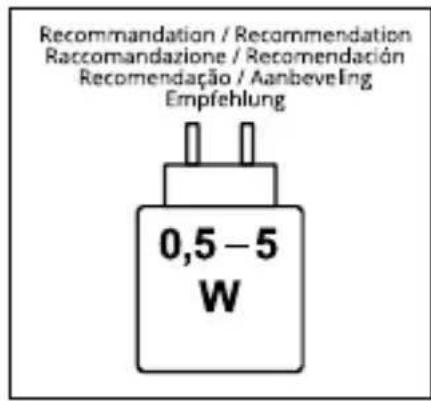
INFORMATIONS SUPPLÉMENTAIRES
• Take the device out of the box.
- Remove all packaging materials from the product.
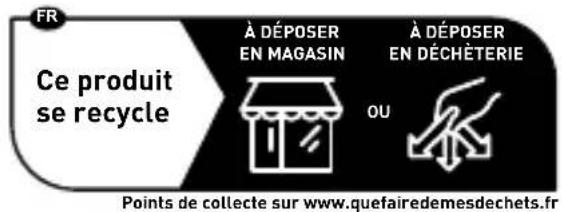
- Place the packaging materials in the box or dispose of them safely in accordance with the selective sorting instructions on the appliance packaging.
Warnings and safety instructions
You must have read and understood all the instructions before using this appliance. In the event of damage caused by failure to follow the instructions, the guarantee will not apply.
- Never remove the casing from this appliance.
- Never place this appliance on top of other electrical equipment.
-
Protect the power cord from being walked on or pinched, particularly at plugs, convenience receptacles and the point where they exit from the appliance. Check that the supply voltage corresponds to the voltage indicated on the plate at the back of the appliance.
When unplugging from the mains, always remove the plug from the socket. Never pull on the cord. Before plugging in the mains plug, make sure you have made all the other connections. -
Only use equipment/accessories recommended by the manufacturer.
-
Refer all repairs to qualified repairers. Repairs are necessary when the appliance has been damaged in any way, including :
-
if the power cord is damaged ;
- if liquid is spilt or objects are inserted into the appliance;
- if the device is exposed to rain or moisture ;
- if the appliance does not operate normally ;
- or if the appliance has been dropped or received a blow.
-
The nameplate is located on the bottom of the appliance.
-
Never block the ventilation holes.
-
Make sure you have enough space for ventilation. Place the product on a stable surface.
-
This equipment should be used in a temperate environment away from direct sunlight, naked flames or heat, heaters, cookers or other apparatus (including amplifiers) that produce heat. Do not install near sources of heat.
-
The batteries (battery pack or installed batteries) must not be exposed to excessive heat, such as direct sunlight, fire, etc.
-
Always unplug the appliance before cleaning. Do not lubricate any part of this appliance. Clean it with a soft cloth. Do not use abrasive products or aggressive cleaners.
-
Make sure that you always have easy access to the power cord, plug or adapter, so that you can disconnect this appliance from the mains if necessary.
-
Do not use this appliance near water. It must not come into contact with drops or splashes. Do not use this appliance in a damp or wet environment.
-
Unplug this appliance during lightning storms or when unused for long periods of time.
-
This appliance may be used by children aged 8 and over, and by persons with reduced physical, sensory or mental capabilities or lack of experience and knowledge, provided that they are supervised or have received instructions on how to use the appliance safely and understand the risks involved. Children must not play with the appliance or the cord (risk of strangulation). Cleaning and maintenance must not be carried out by unsupervised children.
-
This appliance must be supplied only with the safety extra-low voltage corresponding to the marking on the appliance.
-
The battery must be removed from the device before it is disposed of. The appliance must be disconnected from the power supply when the battery is removed.
-
When using the product, it should be placed at least 20 cm away from the human body.
-
Please note that this product is only intended for heating food. Do not use it for purposes other than those for which it was designed.
-
This appliance is for domestic use only. Do not use it outdoors.
-
This appliance is not intended to be operated by an external timer or a separate remote control system.
- Clean all removable accessories before using for the first time.
- Do not put the product or its accessories in the dishwasher.

To avoid possible damage to your hearing, do not listen to high sound levels for long periods of time. Set the player to a low volume level before connecting the headphones to the sound source. High volume can cause lasting damage to hearing.
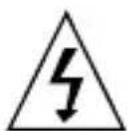
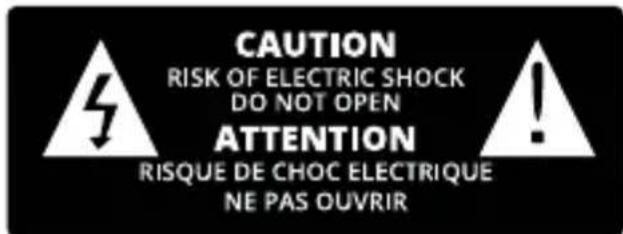
The lightning flash with arrowhead symbol, within an equilateral triangle, is intended to alert the user to the presence of uninsulated dangerous voltage within the product's enclosure that may be of sufficient magnitude to constitute a risk of electric shock.

The exclamation mark within a triangle indicates the presence of important operating and maintenance (repair) instructions in the documentation accompanying the appliance.

Alternating current

For indoor use only
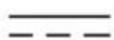
Direct current
Content of the box
Check and identify the content of the packaging:
• DAB radio
- AUX cable
• USB-C / USB-C charging cable
- Instruction manual
Detailed diagrams
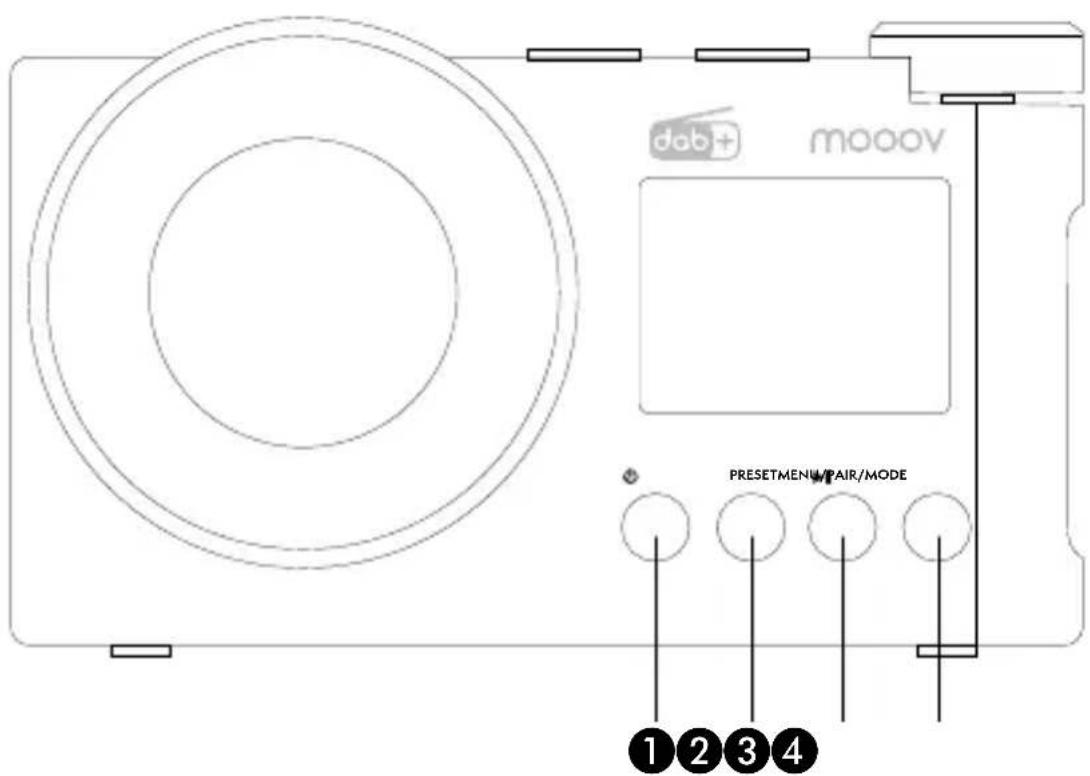
1 Power on/off/mode (RADIO/BLUETOOTH®/USB/AUX)
② Preset radio stations
③ Play/Pause/Search
4 Menu/Informations
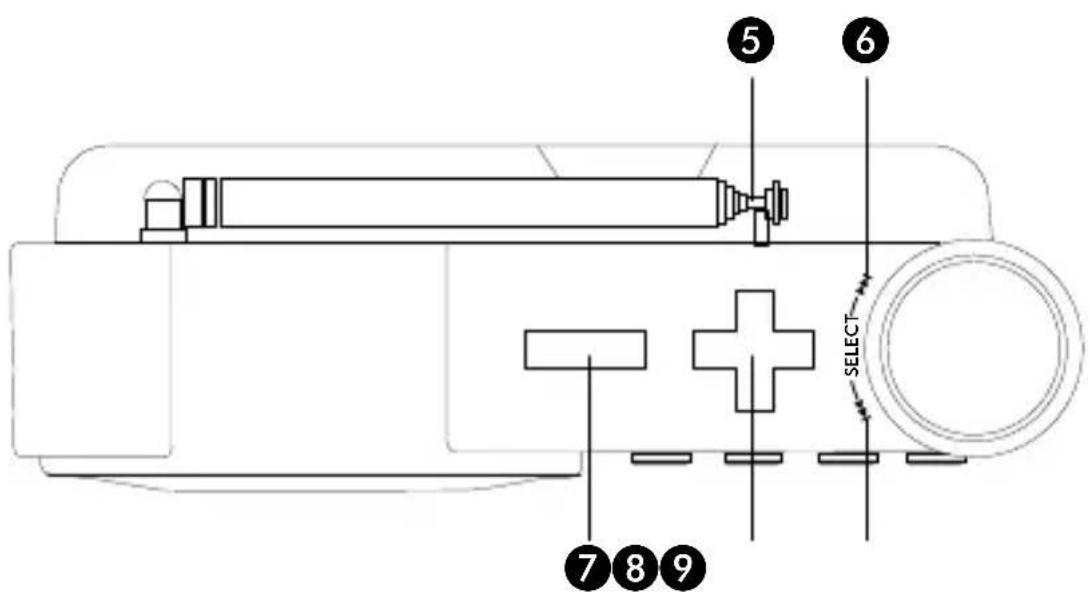
5 Antenna
6 Next song/Syntonisation
7 VOL-
8 VOL+
9 Previous song/Syntonisation
Getting started DEVICE POWER SUPPLY
natural_image
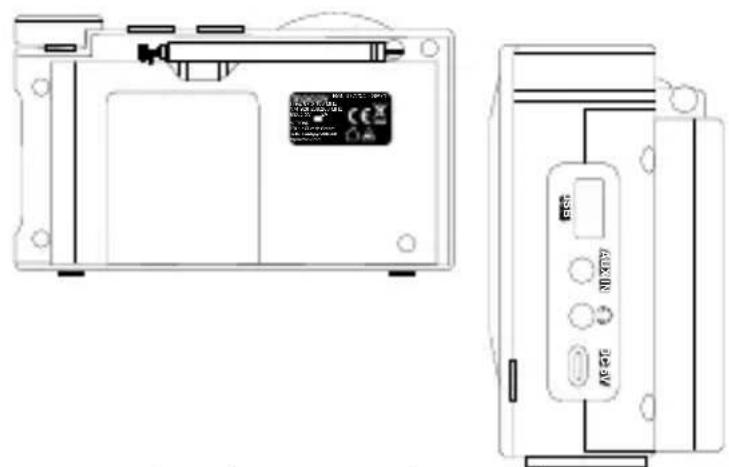
Technical line drawing of a device rear panel and front panel (no text or symbols)This radio can operate on mains or battery power for use on the move.
Connect the USB-C cable supplied to the USB-C DC 5V port, then connect the other end of the cable to an adapter and plug into a mains socket.
Please note: the built-in battery may not be fully charged when you unpack it, so make sure you fully charge it before using it on the move so that you can enjoy all its functions normally.
ON/OFF
Press and hold the « ⏻/MODE » button to switch on the radio. The screen will display the time.
Press and hold again to put off the radio into standby mode, press a second time if you want to switch it off completely.
USE
Time setting
- Power on, long press MENU ④ to enter the settings: if needed, turn « |◀ - SELECT - ▶▶|» button to go down to
Turn « |←→ - SELECT - ▶▶|» to go on
-
-
- <12h/24h setting>: turn « |◀ - SELECT - ▶▶» to select <24hr setting> or <12hr setting>, then press « |◀ - SELECT - ▶▶» to save the settings (the selected parameters are marked with an *).
-
LISTEN TO THE RADIO
Power on, press « ⏻/MODE » until
Full scan
Press « |◀- SELECT - ▶» when on
NOTE: in DAB mode, you can also press and hold the « I » button to perform a full scan. Then turn « I » to select your selection.
Manual search
Turn « I » to go down to Manual tune> then press the « » button to access the manual settings.
Turn « |» to select the tune then press « » to confirm, then press SELECT - ▶
"MENU" to resume.
DRC
Select the
Note: the selected item is marked with an * in the top right-hand corner.
Purge
Enter
Note: Invalid programmes are those that have no stations or weak radio signals on the local reception frequency.
FM SETTING
Power on, press « ⏻/MODE » button to switch to RADIO mode, then press and hold the "MENU" button to access the FM settings.
Press « ▶ on Start setting» line to access the search settings.
to save the settings (the selected option will be marked with an *).
AUTOMATIC SEARCH AND STORED STATIONS
Automatic search
In FM mode, press the « 📊 button for two seconds. The radio will start to search for stations automatically. When the radio receives a station signal, it automatically saves the frequency as a preset station (P01-30).
Memory recall
Briefly press
SETTINGS
Press and hold the MENU button to access the settings.
Fall asleep to music
Turn «▶ to select
Alarm clocks
- Turn « 📋 to go SELECT - Alarm» then press « » to access the alarm - SELECT - >1 clocks setting. Turn « |◀ - SELECT - ▶▶ | » to select alarm 1 or 2 and press « |◀ - SELECT - ▶▶ | » to access the alarm clock settings.
- Turn « 📄 to select the alarm time and press « » to confirm and move on to the next step.
- Turn « I« - SELECT - »» to select the duration (15, 30, 45, 60 or 90 minutes) and press « I« - SELECT to confirm and move on to the next step.
- Turn «◀ - SELECT - ▶▶▶» to select the source of the alarm clock sound:
, , or and press «◀ to confirm and move on to the next step (if you select or , you can select the station of your choice). - Turn « |◀ - SELECT - ▶▶|» to select the frequency:
, , or and press « |◀ to confirm and move on to the next step (if you choose , please turn « |◀ - SELECT - ▶▶|» to select the alarm date and press « |◀ - SELECT - ▶▶|» to confirm and go on to the next step. - Turn «|◀| - SELECT - ▶▶|» to select the volume and press «|◀| - SELECT - ▶▶|» to confirm and move on to the next step.
- Turn « |←→ - SELECT - » to activate or deactivate the alarm clock and press « |←→ - SELECT - » to save the settings.
Note: to take advantage of the clock and alarm functions, we recommend that you power the device on mains.
Backlight
- Select
and press «|◀ - SELECT - ▶▶|» to access the screen brightness settings. Turn «|◀ - SELECT> to select ▶Timer>, or . - Duration ("Time out"): press «|◀ - SELECT - ▶» to set the length of time the time is displayed and turn «|◀ - SELECT - ▶» to select
, <10s>, <20s>, <30s>, <45s>, <60s>, <90s>, <120s> or <180s>. Press «|◀» to save the settings (the selected settings are marked with an *). - Brightness ("On level"): press « SELECT - SELECT » to adjust the screen brightness and turn « SELECT - SELECT >High>,
or . Press « » to save the SELECT - settings (the selected settings are marked with an *).
Language
Go down to "Language" line then press «→» to confirm and save.
NOTE: there are seven languages: Français, English, Deutsch, Italiano, Español, Português and Nederlands.
Factory setting
- Switch on the radio and briefly press « »to switch to Bluetooth ®.
- Switch on your mobile phone or other Bluetooth ^® device and search for the name mooov SP71 to pair up. A beep will sound: this indicates that pairing has been successfully completed.
Hotline : hotline@metronic.com
EN
- Volume control: once the pairing has been successfully completed, you can adjust the volume using the +/- buttons on the top of the radio.
- Press « » to listen to or pause the music: turn « » to move from one song to
the next, or left to move to the previous song. Turn right to skip to the next song. - Press and hold « »If you want to disconnect your mobile device to pair up another one.
USB
Power on, briefly press « ⏻/MODE » until
- SELECT - » to move from one song to the next. Turn left to skip to the previous song. Turn right to skip to the next song.
AUXILIARY
Switch on the radio and briefly press « ⏻/MODE » to switch to AUX. Select the AUX function, then connect an external sound source to the radio using the AUX cable. The radio will start playing music when it detects the source. Radio functions include amplification and output of all external audio sources (e.g. mobile phone, MP3 player, cassette player, CD player, radio, etc.).
HEADPHONE JACK
To meet the multiple listening needs of our customers, our radios are equipped with a headphone socket.
Simply plug the headphones into the radio to avoid being disturbed or disturbing others.
BATTERY WARNING
This product contains a battery.
- Use the battery correctly to avoid injury or fire caused by leakage, overheating, explosion, erosion or other damage.
- Keep the battery out of the reach of children and other vulnerable people.
- If any liquid leaks from the battery, wipe it up with a cloth and stop using the product. In the event of contact with skin and/or eyes, rinse immediately with clean water and seek medical advice.
- Do not swallow the battery. If a battery is swallowed, it can cause serious internal burns in as little as 2 hours and even death. Contact a poison control centre immediately and seek medical advice.
- Batteries (or battery pack or battery) must not be exposed to excessive heat, such as sunlight, fire, etc.
- Do not heat the battery or throw it into a fire or water.
- Do not remove the battery with metal pliers or use metal objects such as the tip of a pen or pliers. Avoid deforming, crushing or puncturing the battery.
- Do not dismantle the battery.
- Cover the battery with tape to avoid explosions and combustion when you have to dispose of it.
- Please dispose of the battery in an environmentally friendly way.
- Do not dispose of the battery with ordinary household waste.
- When disposing of the battery, be sure to comply with the local regulations in force.
Note: the maximum connection distance is approximately 10 metres. Place your Bluetooth speaker as close as possible to the device to avoid disrupting the connection.
In an environment with electrostatic discharges, the device may switch off. The user must then recharge the battery and reset the device.

Risk of fire or explosion if the battery is replaced by an incorrect type. Disposing of a battery in a fire or hot oven or mechanically cutting or crushing a battery may cause an explosion. Leaving a battery in an environment with extremely high temperatures may cause an explosion or the escape of a flammable liquid or gas. Never use the product under excessive heat or leave it exposed to direct sunlight. Please consult the safety and electrical information on the outer packaging before installing or using the device.

natural_image
Simple line drawing of a battery with a diagonal line crossing through it (no text or symbols)
FURTHER INFORMATION
- In order to save energy, when the device does not emit any sound output for a certain period of time, it will automatically go into standby mode. It can be switched back on by pressing the POWER button.
- If there is an incoming call while the radio is connected to your mobile phone to play music, the music will be paused immediately when you answer the call and playback will resume once the call has ended (depending on the type of mobile phone, playback may sometimes remain paused after the call has ended).
- The Bluetooth ^® word mark and logos are registered trademarks owned by Bluetooth SIG, Inc. and any use of such marks by METRONIC is under licence. Other trademarks and trade names are those of their respective owners.
• This product was manufactured and sold under the responsibility of METRONIC.
- METRONIC, and the METRONIC logo are trademarks used under licence by METRONIC - for more information: www.METRONIC-brand.com.
- All other products, services, company names, brands, trade names, product names and logos referenced here are the property of their respective owners.
| Speaker 3W x 1 | |
| Peak power 3W | |
| Total output 1.2W RMS | |
| Power consumption 2W | |
| Stand-by power consumption 0.4W | |
| Speaker impedance | 4 Ω |
| Speaker frequency 60Hz - 20KHz | |
| Signal-to-noise ratio ≥ 20dB | |
| Input USB-C 5V | === 2A |
| Charging cable supplied USB-C / USB-C | |
| Rechargeable battery Lithium 3.7V 1500mAh 27,8g | |
| Charging time Up to 3h | |
| Autonomy on full battery | - In BT mode: 9 hours at maximum volume or 15.5 hours at 50% volume- In FM radio mode: 6.5 hours at maximum volume or 12.5 hours at 50% volume- USB playback: 3.5 hours at maximum volume or 5 hours at 50% volume |
| FM frequency 87.5-108 MHz | |
| DAB frequency 174.928-239.200 MHz | |
| Bluetooth® frequency | 2402-2480 MHz |
| Bluetooth® pairing name | mooov SP71 |
| Bluetooth® version | 5.3 |
| Transmission distance | 10m |
| EIRP | ≤20dbm |
| Distortion | <20% |
| Dimensions | 175 x 52 x 105 mm |
Standard markings
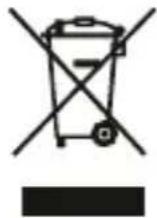
This logo means that end-of-life appliances should not be disposed of with household waste. The hazardous substances they may contain can harm your health and the environment. Have these appliances taken back by your distributor or use the selective collection facilities provided by your local authority.

The undersigned, METRONIC, declares that the DAB radio (477254 and 477255) is in conformity with Directive 2014/53/EU. The declaration of conformity is available at the following internet address.:
https://medias.metronic.com/doc/477254-9F3vkM-doc.pdf

www.metronic.com/a/garantie.php
TECHNICAL SUPPORT
METRONIC : hotline@metronic.com
METRONIC
100 rue Gilles de Gennes - 37310 Tauxigny-Saint-Bauld FRANCE - fr@metronic.com - Made outside EU

mooov®

- Démarrage
- INFORMATIONS SUPPLÉMENTAIRES
- Warnings and safety instructions
- Content of the box
- Detailed diagrams
- Getting started DEVICE POWER SUPPLY
- ON/OFF
- USE
- Time setting
- LISTEN TO THE RADIO
- Full scan
- Manual search
- DRC
- Purge
- FM SETTING
- AUTOMATIC SEARCH AND STORED STATIONS
- Automatic search
- Memory recall
- SETTINGS
- Fall asleep to music
- Alarm clocks
- Backlight
- Language
- Factory setting
- EN
- USB
- AUXILIARY
- HEADPHONE JACK
- BATTERY WARNING
- FURTHER INFORMATION
- Standard markings
- TECHNICAL SUPPORT
- METRONIC
Brand : METRONIC
Model : 477255
Category : Radio