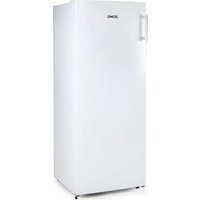
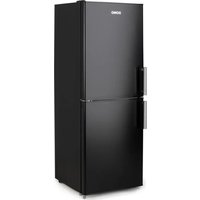
DO91920 - Refrigerator DOMO - Free user manual and instructions
Find the device manual for free DO91920 DOMO in PDF.


| Product type | Refrigerator |
| Brand | DOMO |
| Model | DO91920 |
| Dimensions (approx.) | Height: 85 cm, Width: 55 cm, Depth: 55 cm (estimate) |
| Weight (approx.) | 25 kg (estimate) |
| Power supply | 220-240 V, 50 Hz |
| Climate class | SN, N, ST, T (from 10°C to 43°C) |
| Refrigerant | Isobutane (R600a) |
| Capacity (approx.) | 100 L (estimate) |
| Lighting | LED (not user-replaceable) |
| Temperature setting | Rotary knob (0-7), recommended position: 4 |
| Defrosting | Automatic |
| Reversible door | Yes (door swing direction changeable) |
| Shelves | Glass (variable number) |
| Door bins | Yes (including a bottle compartment) |
| Vegetable drawer | Yes, with cover |
| Adjustable feet | Yes (leveling) |
| Handle | Supplied (to be installed) |
| Cleaning | Soft cloth and warm water, no abrasive products |
| Safety | Child lock not specified; no external timer; use on a flat surface |
| Warranty | 2 years (accessories and consumable parts: 6 months) |
| Customer service | +32 14 21 71 91, info@linea2000.be |
Frequently Asked Questions - DO91920 DOMO
User questions about DO91920 DOMO
0 question about this device. Answer the ones you know or ask your own.
Ask a new question about this device
Download the instructions for your Refrigerator in PDF format for free! Find your manual DO91920 - DOMO and take your electronic device back in hand. On this page are published all the documents necessary for the use of your device. DO91920 by DOMO.
USER MANUAL DO91920 DOMO
natural_image
White refrigerator with 'DOHO' branding on top (no other text or symbols visible)DO91920
| Handleiding Koelkast | |
| Mode d'emploi Réfrigérateur | |
| Gebrauchsanleitung Kühlschrank | |
| Instruction booklet Refrigerator | |
natural_image
Two black-and-white icons: a triangular warning triangle with an exclamation mark and an open book with stacked pages (no text or symbols)Read all instructions carefully - save this instruction manual for future reference.
| NL Nederlands 3 | |
| FR Français 14 | |
| DE Deutsch 25 | |
| EN English 36 |
GARANTIE
Geachte klant,
INSTALLATIE
flowchart
graph LR
    A["Top Cabinet"] --> B["Side View"]
    B --> C["Side Window"]
    C --> D["Side Vertical Panel"]
    D --> E["Side Window with Arrow"]
natural_image
Diagram showing a hand holding a shelf and a magnified view of a device with upward arrows (no text or symbols)VERLICHTING
APPARAAT VERPLAATSEN
natural_image
Simple line drawing of a roof structure with a small bracket and three small figures on top (no text or symbols)natural_image
Diagram of a mechanical assembly with arrows indicating motion or force direction (no text or symbols)natural_image
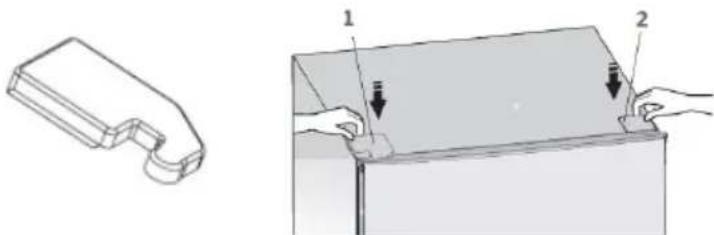
Simple line drawing of a container with a hand holding a light bulb above it, showing no text or symbols.- Plaats de scharnierafdekkap (1) die je in de verpakking kunt terugvinden op de linkerbovenhoek en het andere afdekkapje (2) op de rechterbovenhoek.
natural_image
Technical illustration showing a 3D mechanical part and its 2D view of a rectangular component with two hands adjusting the base (no text or symbols present)natural_image
Two identical white rectangular storage cabinets with directional arrows indicating movement, shown from different angles (no text or symbols)natural_image
Recycling symbol icon with three chasing arrows forming a triangle (no text or labels)AVANT LA PREMIÈRE UTILISATION
natural_image
Diagram showing a hand holding a shelf and a mechanical component with upward arrows (no text or symbols)ÉCLAIRAGE
natural_image
Simple line drawing of a roof structure with three small figures on the edge (no text or symbols)natural_image
Diagram of a door frame with arrows indicating movement or force, no text or symbols presentflowchart
graph TD
    A["Step 1: Internal components"] --> B["Step 2: Internal parts"]
    B --> C["Step 3: Internal components with arrows indicating movement"]
    C --> D["Step 4: Internal components with arrows indicating direction"]
    D --> E["Final Step"]

    style A fill:#f9f,stroke:#333
    style E fill:#bbf,stroke:#333
natural_image
Diagram of a hand holding a small object above a rectangular box, with arrows indicating direction (no text or symbols)natural_image
Technical illustration showing a 3D mechanical part and its cross-section with hands holding a component (no text or symbols present)natural_image
Two identical white rectangular cabinets with directional arrows indicating movement or force, shown from different angles (no text or symbols)natural_image
Recycling symbol icon with three chasing arrows forming a triangle (no text or labels)ANSCHLUSS
natural_image
Diagram showing a hand interacting with a shelf and a mechanical device with upward arrows (no text or symbols)BELEUCHTUNG
natural_image
Simple line drawing of a roof structure with three small figures on the edge (no text or symbols)natural_image
Diagram of a mechanical device with arrows indicating motion or force direction (no text or symbols)natural_image
Illustration of a hand holding a tool above a rectangular box with arrows indicating motion (no text or symbols)natural_image
Illustration of two hands holding a rectangular object with arrows indicating direction (no text or symbols)natural_image
Two identical white rectangular cabinets with directional arrows indicating movement or force, shown from different angles (no text or symbols)natural_image
Recycling symbol icon with three chasing arrows forming a triangle (no text or labels)All of our products are always submitted to a strict quality control before they are sold to you.
Should you nevertheless experience problems with your device, we sincerely regret this.
In that case, we kindly request you to contact our customer service.
Our staff will gladly assist you.

+32 14 21 71 91

info@linea2000.be
Monday – Thursday: 8.30 – 12.00 and 13.00 – 17.00
Friday: 8.30 - 12.00 and 13.00 - 16.30
This appliance has a two year warranty period. During this period the manufacturer is responsible for any failures that are the direct result of construction failure. When these failures occur the appliance will be repaired or replaced if necessary. The warranty will not be valid when the damage to the appliance is caused by wrong use, not following the instructions or repairs executed by a third party. The guarantee is issued with the original till receipt. All parts, which are subject to wear, are excluded from the warranty. If your device breaks down within the 2-year warranty period, you can return the device together with your receipt to the shop where you purchased it.
The guarantee on accessories and components that are liable to wear-and-tear is only 6 months.
The guarantee and responsibility of the supplier and manufacturer lapse automatically in the following cases:
- If the instructions in this manual have not been followed.
· In case of incorrect connection, e.g. electrical voltage that is too high.
· In case of incorrect, rough or abnormal use.
· In case of insufficient or incorrect maintenance.
· In case of repairs or alterations to the device by the consumer or non-authorised third parties. - If the customer used parts or accessories that are not recommended or provided by the supplier / manufacturer.
SAFETY INSTRUCTIONS
When using electrical appliances, basic safety precautions should always be taken, including the following:
- Read all instructions carefully. Keep this manual for future reference.
- Make sure all packaging materials and promotional stickers have been removed before using the appliance for the first time. Make sure children cannot play with the packaging materials.
· This appliance is intended to be used in household and similar applications such as:
· staff kitchen areas in shops, offices and other working environments;
· farm houses; - by clients in hotels, motels and other residential type environments;
- bed and breakfast type environments.
· Children should be supervised to ensure that they do not play with the appliance.
· This appliance can be used by children aged from 16 years and above and persons with reduced physical, sensory or mental capabilities or lack of experience and knowledge if they have been given
supervision or instruction concerning use of the appliance in a safe way and understand the hazards involved. Children shall not play with the appliance. Cleaning and user maintenance shall not be made by children unless they are older than 16 and supervised.
- Keep the appliance and its cord out of reach of children younger than 16 years.
- Close supervision is necessary when the appliance is used near or by children.
· All repairs should be carried out by the manufacturer or its aftersales service. - Make sure that children do not touch the cord or appliance.
- Your appliance uses isobutane (R600a) as a refrigerant. Despite the fact that R600a is an environmentally friendly and natural gas, it is highly flammable. Therefore you should be careful during shipment and installation to prevent your appliance's cooler elements from being damaged. In the event of a leak caused by damage to the cooler elements, move your fridge from open flame or heat sources and ventilate the room where the appliance is located for a few minutes.
▲ELECTRICAL WARNINGS
- Attention: This appliance cannot be used with an external timer or a separate remote control.
- Before use, check if the voltage stated on the appliance corresponds with the voltage of the power net at your home.
- The plug must be plugged into an appropriate outlet that is installed and grounded in accordance with all local standards and requirements.
- Do not let the cord hang on a hot surface or on the edge of a table or counter top.
- Never use the appliance when the cord or plug is damaged, after malfunction or when the appliance itself is damaged. In that case, take the appliance to the nearest qualified service center for check-up and repair.
· If the socket is loose, do not plug in the appliance (risk of electric shock or fire). - It is dangerous to alter or modify the device and its specifications.
- When disposing of the appliance, remove the plug from the power socket, cut the power cord (as closely as possible to the appliance), and remove the door to prevent playing children getting an electrical shock or shutting themselves in the appliance.
- The lamp in the appliance is intended for use in this cooling device only. Do not use the lamp as a household light.
- The lamp must not be replaced by the user. If the lamp is damaged, contact a qualified service centre in your area.
- You must not operate the appliance without the interior lighting lamp cover.
- Unplug the appliance when it is not in use, before assembling or disassembling any parts and before cleaning the appliance. Put all buttons and knobs into the 'off' position and unplug the appliance by grasping the plug. Never unplug by pulling the cord.
⚠️INSTALLATION
- Never place this appliance near a gas stove or electrical stove or in a place where it may come into contact with a warm appliance.
· Always use the appliance on a steady, dry and level surface. - Keep the cord away from sharp edges and hot parts or other heat sources.
- Keep the ventilation openings free of obstructions.
- The appliance may not be used with an extension lead or a multiple socket.
- Avoid long exposure to direct sunlight.
- Make sure that you have access to the plug of the appliance.
- Make sure that the plug does not get squashed or damaged by the back of the appliance. A squashed or damaged power plug may overheat and cause fire.
· This is a heavy appliance. Be careful when moving it.
· This cooling unit is not intended for use as a built-in appliance.
⚠ USE
- Do not use the appliance outdoors.
- Only use the appliance for its intended use.
- Only use the appliance for domestic use. The manufacturer cannot be held responsible for accidents that result from improper use of the appliance or not following the instructions described in this manual.
- Do not use any other electrical appliance inside the fridge, unless they are approved for this purpose by the manufacturer.
- Do not keep any explosive substances inside the appliance, like for instance aerosol cans with a flammable propellant.
-
Do not use the appliance without a lamp.
-
The use of accessories that are not recommended or sold by the manufacturer can cause fire, electrical shock or injuries.
-
Ensure the food in the appliance does not touch the back wall.
· Follow the instructions below to prevent contamination of food: -
Keeping the door open for long periods may cause the temperature in the compartments of the appliance to rise considerably.
- Clean the surfaces that could come into contact with food regularly. Keep the condensation channel and drainage hole at the back of the appliance clean.
- Store raw meat and fish in suitable containers in the refrigerator so that they do not come into contact with or drip onto other food.
- If the appliance is left empty for longer periods, it should be turned off, defrosted and cleaned. Allow it to dry and leave the door ajar to prevent mould from growing in the appliance.
△CLEANING AND MAINTENANCE
· Never immerse the appliance, the cord or the plug in water or any other liquid.
- Do not place warm or hot objects on top of the appliance.
· Do not clean the appliance with anything made of metal.
- Make sure that the refrigerant circuit does not get damaged, for instance during transportation or installation.

WARNING! Never place this appliance on or in the neighbourhood of a gas or electric fire or in a place where it could come into contact with a heat source. There are flammable materials located on the back of the appliance.
Pay attention to the symbol 'Fire risk – flammable materials' located on the back of the appliance.
SAVE THESE INSTRUCTIONS FOR FUTURE REFERENCE
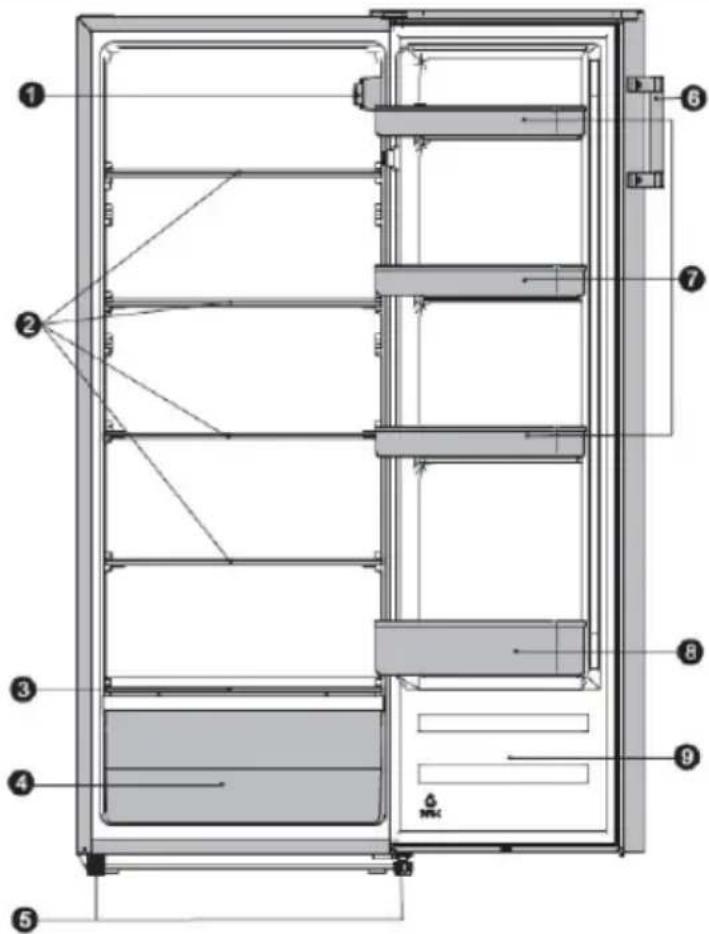
PARTS
- Temperature control knob with LED lighting
- Shelves
- Cover for vegetable container
- Vegetable container
- Levelling feet
- Handle
- Door shelves
- Door bottle shelf
- Door
INSTALLATION
- Remove the exterior and interior packing, wipe the outside thoroughly with a soft dry cloth and the inside with a wet, lukewarm cloth. Dry the appliance off well.
- Let air circulate freely around the cabinet. Allow 10 cm of space between the back, the top side and both sides of the refrigerator and any adjacent wall.
· Make sure there is sufficient space to open the door.
· This cooling unit is not intended for use as a built-in appliance. - Select a place with a strong, level floor.
- Avoid direct sunlight and heat. Direct sunlight may affect the acrylic coating. Heat sources nearby will cause higher electricity consumption.
- Avoid very moist places. Too much moisture in the air will cause frost to from very quickly on the evaporator, and your refrigerator.
- Before connecting your refrigerator to the power supply, check that the voltage stated on the rating label of your appliance corresponds to the voltage in your home. A different voltage could damage the appliance.
- After installation, leave the freezer for 24 hours before turning it on. This way the refrigerant can settle.
- Allow the appliance to run empty for 8 hours so the compartment can cool to the appropriate temperature.
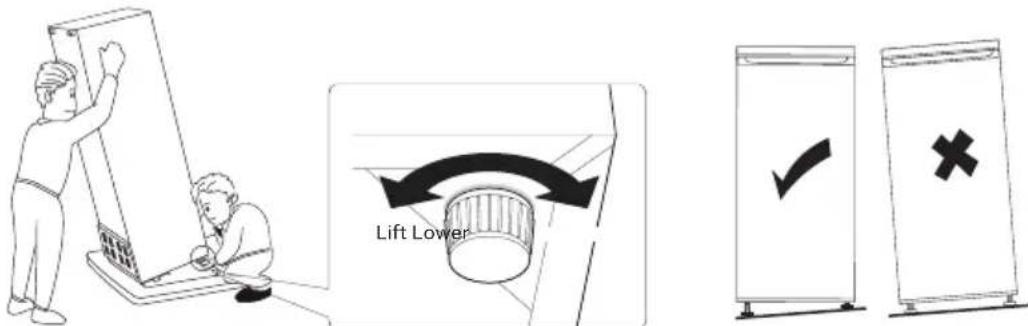
- One can level the appliance using adjustable legs. The adjustable legs can be adjusting by screwing them in or out of the appliance.
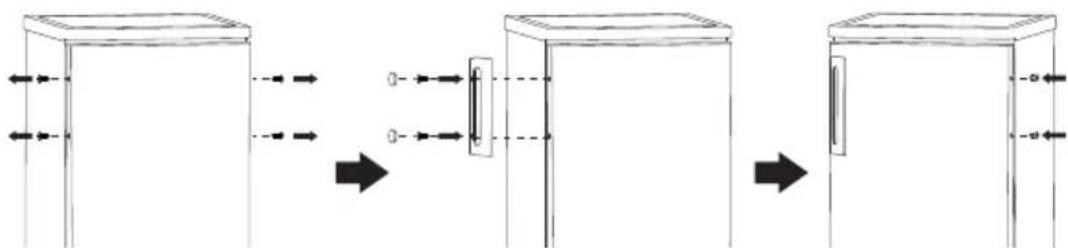
- Install the handle.
- The climate class indicates the minimum and maximum ambient temperature for the proper operation of an appliance. You can find the climate class on the type plate on the back of the appliance.
- SN: Subnormal: ambient temperature between 10^ C and 32^ C
· N: Normal: ambient temperature between 16^ C and 32^ C
- ST: Subtropical: ambient temperature between 16°C and 38°C
· T: Tropical: ambient temperature between 16°C and 43°C
USE
TEMPERATURE CONTROL
The fridge is controlled with a temperature control knob located inside the appliance.
Adjust the control knob as desired to suit your individual preference. The higher the number, the colder the temperature. Position 4 is the recommended position for normal use.
- In the o position the appliance does not operate (the cooling system is switched off), but power supply is not interrupted.
- The running time and temperature are affected by where the fridge is located, how often the door is opened and the temperature of the room the fridge is located in.
STORAGE GUIDE
For the best storage, set up your refrigerating appliance as follows:
| Refrigerator compartment Type of food | |
| Door rack · Food with natural preservatives such as jams, juices, drinks, spices, etc. · Do not store food with a limited shelf life here | |
| Crisper drawer · Fruits, herbs, and vegetables | · Do not refrigerate bananas, onions, potatoes, or garlic |
| Middle shelf Dairy and eggs | |
| Top shelf Food that does not need to be cooked, such as ready-made meals, leftovers, spreads, etc. | |
MOVING THE SHELVES AND DOOR RACK
· Empty the fridge before moving the shelves or the door racks.
· To move a shelf, raise it and pull it towards you.
To move a door rack, grip it firmly with 2 hands. Raise the door rack and pull it towards you.
LIGHTING
The lighting in the fridge is a LED light. These are more ecological and manufactured for a long life. For this reason, these may not be replaced. If there is a problem with the lighting, contact a qualified service centre in your area.
MOVING YOUR APPLIANCE
If the appliance is turned off for any reason, wait for 10 minutes before turning it back on. This will allow the refrigeration system pressures to equalise before restarting.
- Turn off the appliance and unplug it from the mains socket. Remove all food. Also remove all mobile parts (shelves, accessories, etc.) or fix them into the fridge to avoid any shock.
- Relocate and install. If the appliance has been left on its side for any length of time, leave it standing upright for at least 10 minutes before turning on.
STORING FOOD IN THE FRIDGE
The fridge helps to extend the storage times of fresh perishable foods.
Fresh food care for best results:
- Store foods that are very fresh and of good quality.
- Ensure that food is well wrapped or covered before it is stored. This will prevent food from dehydrating, deteriorating in colour or losing taste and will help maintain freshness. It will also prevent odour transfer.
- Make sure that strong smelling foods are wrapped or covered and stored away from foods such as butter, milk and cream which can be tainted by strong odours.
- Cool hot foods down before placing them in the fridge.
DEFROSTING
The refrigerator defrosts fully automatically.
While the cooling is running, beads of condensation or hoarfrost form at the back of the refrigerator. This is normal. It is not necessary to wipe off the condensation or frost. The rear panel defrosts automatically.
The condensation runs into the condensation channel and is conveyed to the cooling from where it evaporates.
Note: Keep the condensation channel and drainage hole clean, so that the condensation can run out.
VACATION TIME
For short vacation periods, leave the control knobs at their usual settings. During longer absences:
- Remove all foods.
- Disconnect from electrical outlet.
- Clean the refrigerator thoroughly, including defrost pan.
- Leave door open to avoid possible formations of condensate, mould or odours.
POWER FAILURE
Most power failures are corrected within an hour or two and will not affect your refrigerator temperatures.
However, you should minimize the number of door openings while the power is off.
During power failures of longer duration, take steps to protect your food by putting dry ice on top of packages.
SOME IMPORTANT RULES FOR THE CORRECT USE OF THE REFRIGERATOR
- Never place hot foods in the refrigerator.
- Beverages should be stored in sealed containers.
- Foods to be stored for a long time should be wrapped in cellophane or polyethylene foil, or kept in glass containers.
- Never place spoiled foods in the cabinet.
- Don't overload the cabinet.
- Don't open the door unless necessary.
- Caution: please keep the products away from fire or similar glowing substances before you dispose the refrigerator.
- Caution: Not for outer camping use (e.g. in a tent).
- Caution: For indoor use only.
- Caution: The appliance cannot be used in public transportation.
- Keep all accessories, such as shelves, door racks, and drawers, in the appliance to minimise energy consumption.
- Please read the storage instructions on the food packaging. Always check the storage date.
CLEANING AND MAINTENANCE
- Do not use abrasive cleaning agents or solvents.
- Turn the appliance off. Disconnect the mains plug from the mains socket.
· Take out the food and store in a cool location. - Clean the appliance with a soft cloth, warm water and detergent.
- Wipe the door seal with clear water only and then wipe dry thoroughly.
· After cleaning, put the plug in the socket and set the desired temperature. - Put the food back into the appliance.
TROUBLE SHOOTING
Frequently, a problem is minor and a service call may not be necessary, use this trouble shooting guide for a possible solution.
Does not work
- Check connection of power cord to power source.
- Plug in unit.
- Use proper voltage.
Cools too frequently
· The temperature setting is too cool.
- Close door securely.
- Be sure that food is cool before inserting.
- Do not keep door open for too long and minimize door openings.
- Use proper voltage.
- Do not place unit close to heat sources or direct sunlight.
Internal temperature not cold enough
- Check connection of power cord to power source.
- Plug in unit.
- Check setting and adjust as needed.
- Close door securely.
- Be sure that food is cool before inserting.
- Do not keep door open for too long and minimize door openings.
- Allow room for air to circulate around unit.
- Use proper voltage.
- Do not place unit close to heat sources or direct sunlight.
Unusual sounds
- The appliance is not level. Readjust the adjusting feet and level the unit.
· The unit it touching a wall or another object. Gently move the appliance.
DOOR CONVERSION
If you need to hinge your door on the opposite side it is recommended that you call your local authorised service agent to make this conversion or ask a technician. Before you reverse the door, you should ensure the appliance is unplugged and empty. After reversing the door, leave the appliance alone for 8 hours before switching it on. This allows the coolant to set.
It is recommended to use a wrench, a socket wrench, a monkey wrench, a crosshead screwdriver and a flathead screwdriver (not supplied).
The fridge is built with the door hinges on the right side. If you want to switch the direction in which the door opens, follow the following instructions:
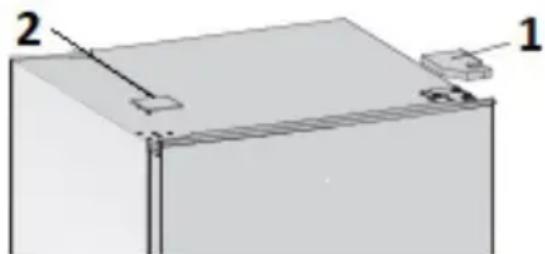
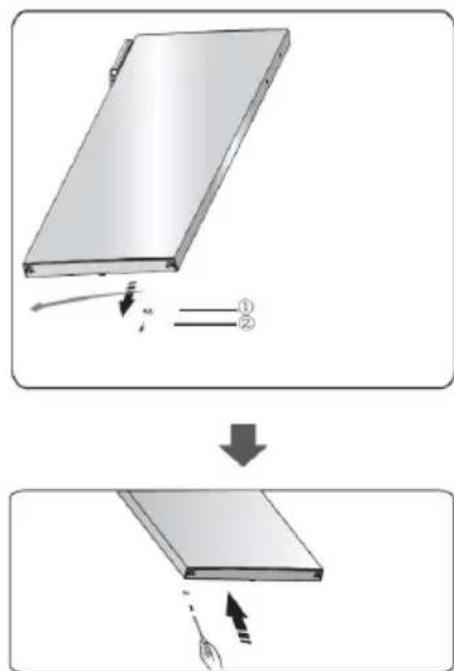
- Use a flathead screwdriver to remove the upper hinge cap (1) at the top right corner and the screw hole cover (2) at the top left corner.
natural_image
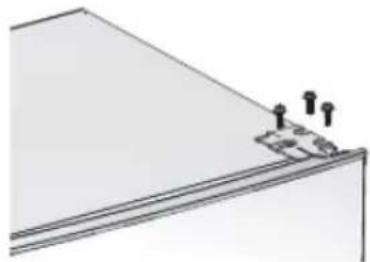
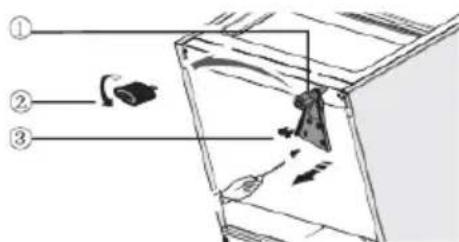
3D diagram of a rectangular block with labeled components (no text or symbols present)- Remove the three screws and then remove the top hinge that holds the door in place. Lift the door and place it on a padded surface to prevent it from being scratched.
natural_image
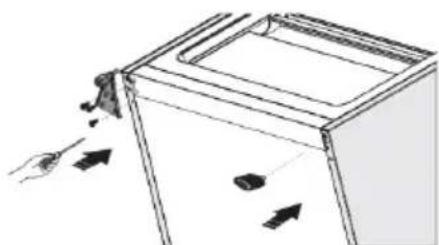
Simple line drawing of a triangular structure with three small protrusions at the base (no text or symbols)- Remove the screw (2) and the small block (1) at the bottom of the door and attach them to the other side.
- Remove the bottom screws (3), hinge bracket and adjustable feet (1 & 2) from the bottom of the appliance.
- Attach the screws and hinge bracket to the opposite side of the bottom. Put the adjustable feet back into place.
natural_image
Diagram of a hand operating a device with arrows indicating motion (no text or symbols)-
Carefully set the door back into place making sure the pin enters the bushing at the lower frame section (hole).
-
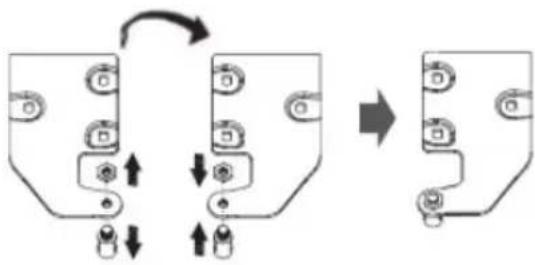
Before placing the upper hinge, remove the bolt and nut and reverse the direction of the upper hinge by turning the hinge bracket around and screwing the bolt and nut back on the opposite side.
flowchart
graph TD
    A["Input"] --> B{Condition}
    B -->|Yes| C["Output"]
    B -->|No| D["Feedback to Input"]
    D --> E["Final Output"]
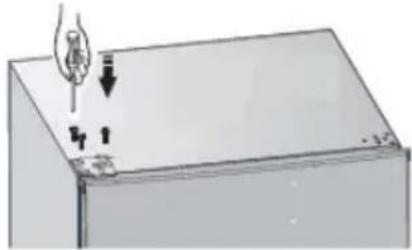
- Insert the top hinge back and screw it to the top left of the appliance. Ensure the door is aligned horizontally and vertically so that the seals are closed on all sides.
natural_image
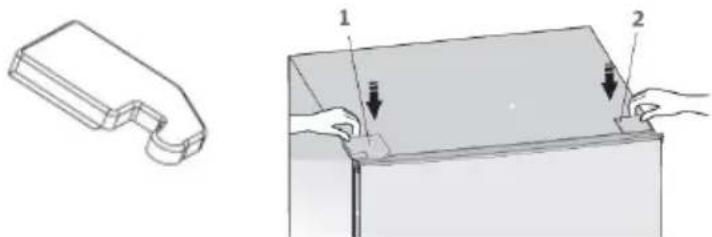
Diagram of a hand holding a light bulb above a rectangular container with arrows indicating motion (no text or symbols)- Put the upper hinge cap (1) which you will find in the packaging on the top left corner and the screw hole cover (2) on the top right corner.
natural_image
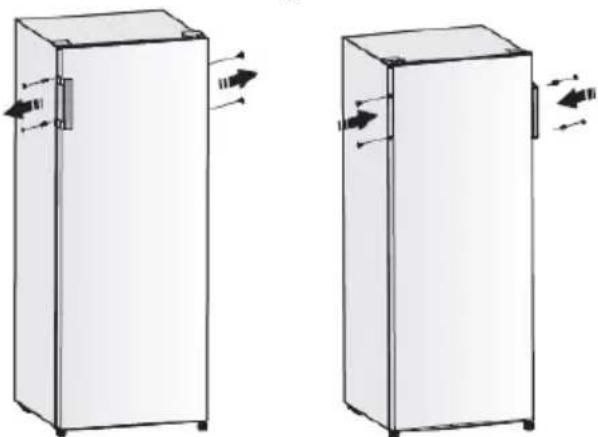
Technical illustration showing a 3D part with a U-shaped cutout and a 2D view of a rectangular container with two hands holding it (no text or symbols present)- Move the handle from the left side to the right side of the door.
natural_image
Two identical white refrigerators with directional arrows indicating movement or flow, shown from left to right (no text or symbols)- With the door closed, check that the door is aligned horizontally and vertically and that the seals are closed on all sides. Readjust the levelling feet as required.
ENVIRONMENTAL GUIDELINES
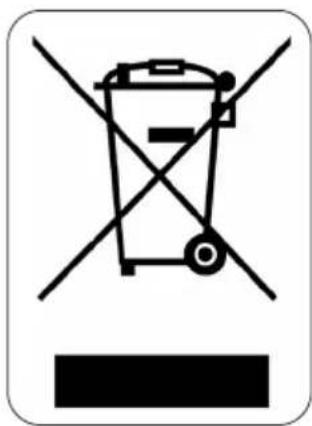
This symbol on the product or on its packaging indicates that this product may not be treated as household waste. Instead it must be brought to the applicable collection point for recycling of electrical and electronic equipment. By ensuring this product is disposed of correctly, you will help prevent potential negative consequences for the environment and human health, which could otherwise be caused by inappropriate waste handling of this product. For more detailed information about recycling of this product, please contact your local city office, your household waste disposal service or the shop where you purchased the product.

natural_image
Recycling symbol icon with three chasing arrows forming a triangle (no text or labels)The packaging is recyclable. Please treat the packaging ecologically.
DOM@Webshop
BESTEL
de originele Domo-accessoires en -onderdelen online via:
COMMANDEZ

- GARANTIE
- INSTALLATIE
- VERLICHTING
- APPARAAT VERPLAATSEN
- AVANT LA PREMIÈRE UTILISATION
- ÉCLAIRAGE
- ANSCHLUSS
- BELEUCHTUNG
- SAFETY INSTRUCTIONS
- ▲ELECTRICAL WARNINGS
- ⚠️INSTALLATION
- ⚠ USE
- △CLEANING AND MAINTENANCE
- PARTS
- INSTALLATION
- USE
- TEMPERATURE CONTROL
- STORAGE GUIDE
- MOVING THE SHELVES AND DOOR RACK
- LIGHTING
- MOVING YOUR APPLIANCE
- STORING FOOD IN THE FRIDGE
- DEFROSTING
- VACATION TIME
- POWER FAILURE
- SOME IMPORTANT RULES FOR THE CORRECT USE OF THE REFRIGERATOR
- CLEANING AND MAINTENANCE
- TROUBLE SHOOTING
- Does not work
- Cools too frequently
- Internal temperature not cold enough
- Unusual sounds
- DOOR CONVERSION
- ENVIRONMENTAL GUIDELINES
- DOM@Webshop
- BESTEL
- COMMANDEZ
Brand : DOMO
Model : DO91920
Category : Refrigerator