
307656 - Pasta machine Arendo - Free user manual and instructions
Find the device manual for free 307656 Arendo in PDF.


| Product type | Manual pasta machine |
| Brand | Arendo |
| Model | 307656 |
| Main functions | Pasta roller (thickness 1-7), tagliatelle and spaghetti cutter |
| Number of rollers | 3 (pasta, tagliatelle, spaghetti) |
| Thickness adjustment | 7 levels, adjustable by pull tab |
| Included accessories | Removable handle, clamp fixer |
| Material | Metal (rollers) and plastic (body) |
| Power supply | None (manual) |
| Dimensions (approx.) | Approx. 20 x 15 x 12 cm (estimate) |
| Weight (approx.) | Approx. 1.2 kg (estimate) |
| Usage | Household use only |
| Maintenance and cleaning | Dry cleaning with a cloth or soft brush; do not wash with water or in the dishwasher |
| Lubrication | Food-grade oil on roller ends if necessary |
| Safety | Do not insert fingers or objects between rollers; supervise children |
| Minimum user age | From 8 years under supervision |
| Spare parts available | Handle, clamp |
| Repairability | Do not open or repair yourself; contact the manufacturer |
| Warranty | Warranty valid subject to proper use |
| Standards | Compliant with WEEE 2012/19/EU |
Frequently Asked Questions - 307656 Arendo
User questions about 307656 Arendo
0 question about this device. Answer the ones you know or ask your own.
Ask a new question about this device
Download the instructions for your Pasta machine in PDF format for free! Find your manual 307656 - Arendo and take your electronic device back in hand. On this page are published all the documents necessary for the use of your device. 307656 by Arendo.
USER MANUAL 307656 Arendo
ENG: Current drivers, user manuals and other relevant documents for this product can be found on our homepage.
natural_image
Diagram of a mechanical device with directional arrows indicating motion or flow, no text or symbols present- Never insert fingers or objects between the rollers of the appliance!
- Children should always be supervised to ensure that they do not play with the appliance.
-
This appliance may be used by children aged from 8 years and above and persons with reduced physical, sensory or mental capabilities or lack of experience and knowledge if they have been given supervision or instruction concerning use of the appliance in a safe way and understand the hazards involved. Cleaning and maintenance work to be carried out by the user must not be carried out by children.
-
The appliance is intended for domestic use only.
- Only use the appliance for the purposes described in these operating instructions.
Thank you for purchasing a product from Arendo. Please read the following brief instructions carefully so that you can enjoy your purchased appliance for a long time. Before using the delivered goods, please check that they are complete, free of defects and undamaged.
1. Scope of delivery
- Pasta machine
- Handle
- Clamp
2. Product details
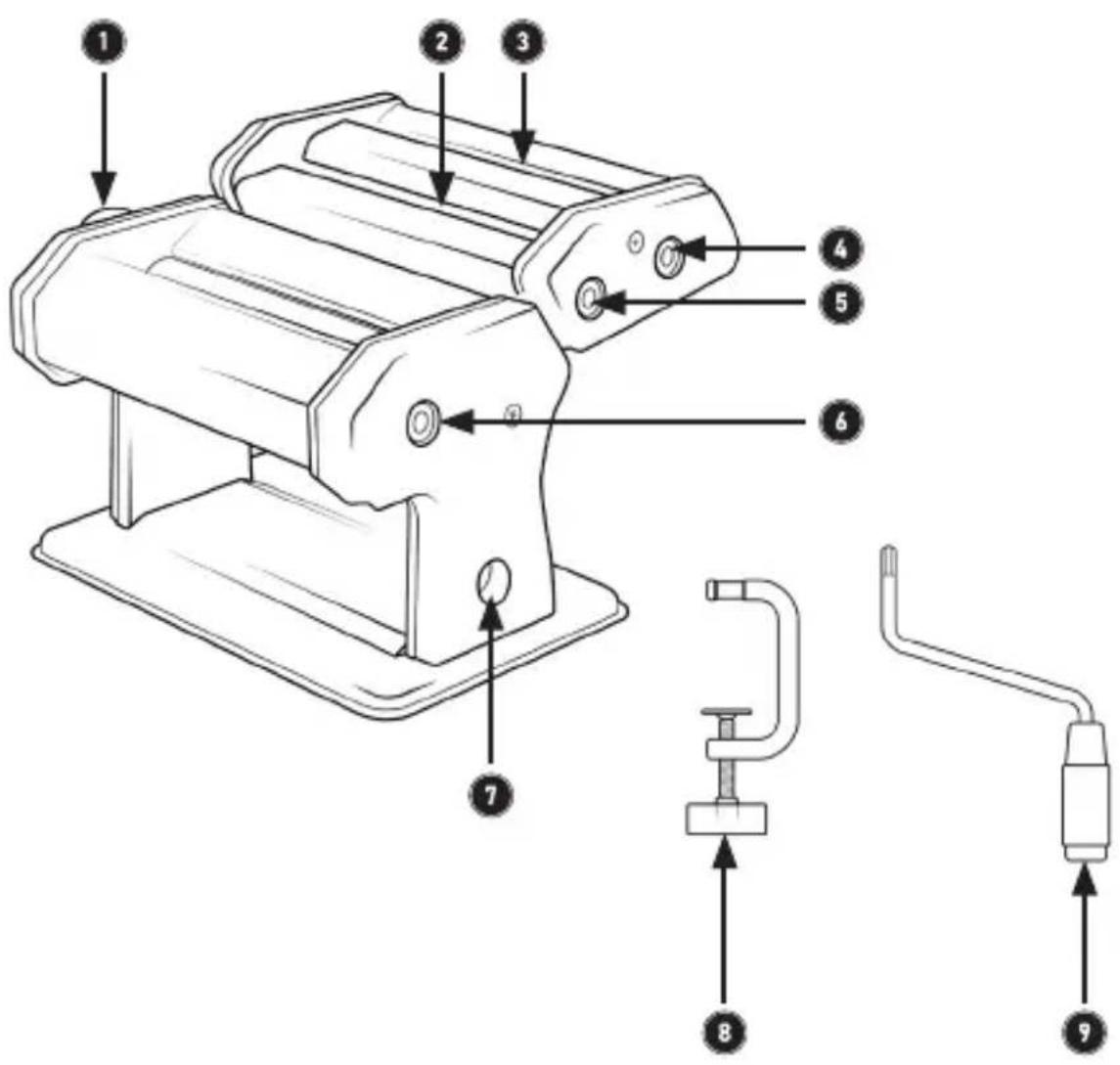
| No. | Description |
| 1 | Dough roller setting (dough thickness) |
| 2 | Ribbon noodle roller |
| 3 | Spaghetti roller |
| 4 | Roller hole for handle (spaghetti) |
| 5 | Roller hole for handle (tagliatelle) |
| 6 | Roller hole for handle (dough roller) |
| 7 | Clamp attachment |
| 8 | Clamp |
| 9 | Handle |
3. Initial commissioning
Remove the appliance and accessories from the packaging and remove all packaging material. Always keep the plastic bags away from children and infants.
Wipe the appliance with a dry cloth to remove any manufacturing residues. Then clean the rollers by taking some dough and running the dough through the various rollers. Then dispose of the dough properly.
4. Operation
- Place the appliance on the desired table or worktop and secure it using the clamp.
• Prepare the desired dough.
[arendo]
- Insert the handle (9) into the roller hole for the dough (6)
- Use the "Dough roller setting" to select the desired thickness of the dough. To do this, pull the control outwards and set it to the desired level (1-7).
- Then feed the dough into the machine and turn the handle (9) so that the dough is pulled through. If necessary, adjust the dough thickness using the "dough roller setting".
![Arendo 307656 - [arendo] - 1](/content/2026/05/753214/images/48d644fde94cc0848bab21c54bb6467f43bcfe84757a80d3277ab2e2b248957b.jpg)
flowchart
graph TD
    A["Motor with textured surface"] --> B["Actuator with rotating arm"]
    B --> C["Control unit with valve"]
    C --> D["Return to motor"]
    D --> E["Actuator with rotating component"]
    E --> F["Return to motor"]
    F --> G["Control unit with valve"]
    G --> H["Return to motor"]
    H --> I["Actuator with rotating component"]
    I --> J["Return to motor"]
- Attach the pasta attachment with the rollers for cutting the pasta to the main part of the pasta machine afterwards to prevent the dough from deforming unintentionally.
- Cut the dough to the length that corresponds to your desired pasta length.
- Remove the handle from the "dough roller setting" and place it in the desired hole (ribbon noodles (5) or spaghetti (4))
- Turn the handle to obtain the desired pasta.
- Then place the finished pasta on a cloth and leave to rest for about 1-2 hours.
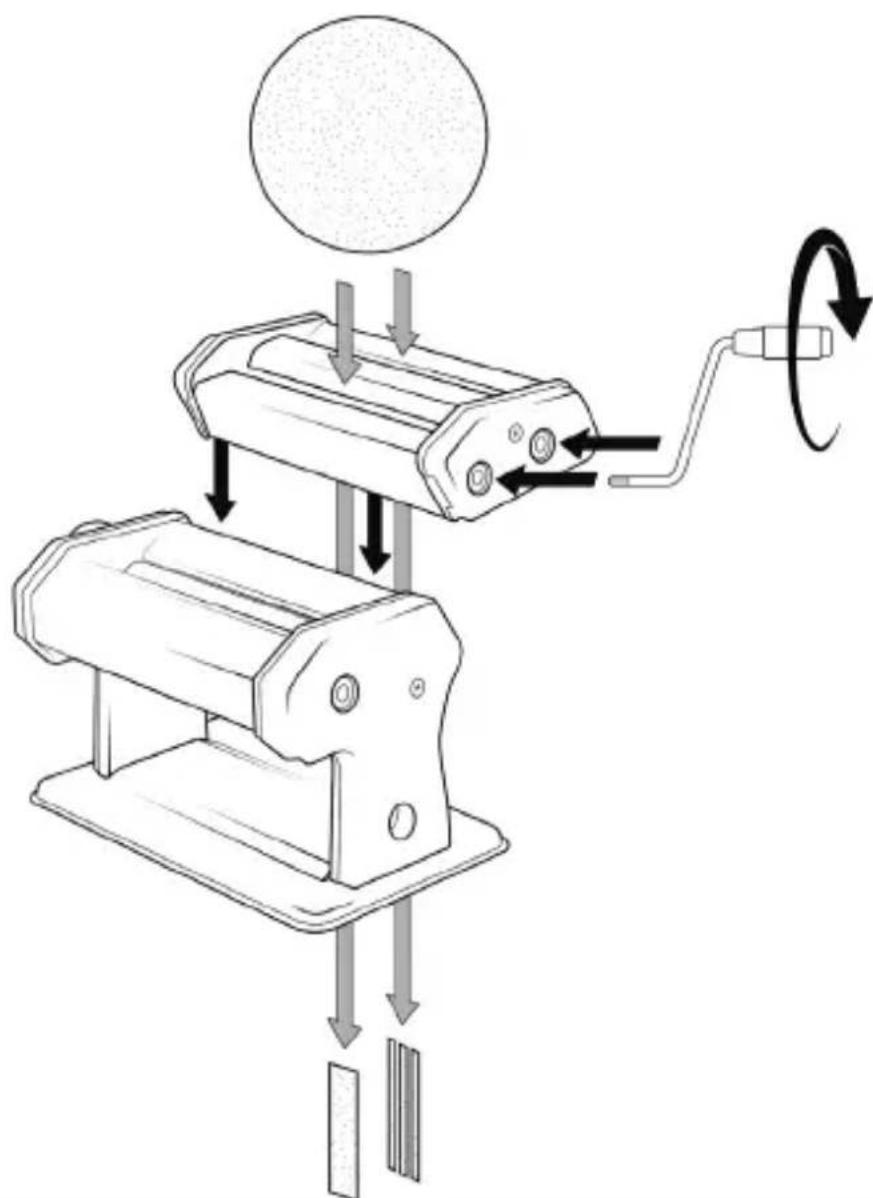
- Finally, you can remove the pasta attachment again by lifting it upwards out of the rail.
5. Cleaning and care
6. Safety instructions and disclaimer
Never attempt to open the appliance to carry out repairs or modifications. Protect the device from high humidity, water and snow. Keep the appliance away from high temperatures.
Check the appliance for damage before use. The appliance should not be used if it has been knocked or damaged in any other way. Please observe the national regulations and restrictions.
Do not use the device for purposes other than those described in the instructions. This product is not a toy. Keep it out of the reach of children or mentally impaired persons. Any repair or modification to the appliance that is not carried out by the original supplier will invalidate the warranty or guarantee.
The appliance may only be used by persons who have read and understood these instructions. The device specifications may change without prior notice.

CE
WEEE Directive 2012/19/EU
WEEE Register No.: DE 67896761
Hereby, WD Plus GmbH declares that the device 306751 / 307656 is in compliance with the essential requirements and other relevant provisions of the directives. You can obtain a complete declaration of conformity from WD Plus GmbH, Wohlenbergstraße 16, 30179 Hanover, Germany
flowchart
graph TD
    A["Motor with textured surface"] --> B["Actuator with rotating arm"]
    B --> C["Return to motor"]
    C --> D["Control panel with rotary arrow"]
    D --> E["Actuator with rotating arm"]
    E --> F["Return to motor"]
    F --> G["Control panel with rotary arrow"]
    G --> H["Actuator with rotating arm"]
    H --> I["Return to motor"]
natural_image
Diagram of a mechanical device with directional arrows indicating motion or operation (no text or symbols present)flowchart
graph TD
    A["Motor with textured surface"] --> B["Actuator with rotating arm"]
    B --> C["Return to motor"]
    C --> D["Control unit with rotating arrow"]
    D --> E["Actuator with rotating arm"]
    E --> F["Return to motor"]
    F --> G["Control unit with rotating arrow"]
    G --> H["Actuator with rotating arm"]
    H --> I["Return to motor"]
    I --> J["Control unit with rotating arrow"]
flowchart
graph TD
    A["Motor with textured surface"] --> B["Actuator with rotating arm"]
    B --> C["Return to motor"]
    C --> D["Control panel with rotary arrow"]
    D --> E["Actuator with rotating arm"]
    E --> F["Return to motor"]
    F --> G["Control panel with rotary arrow"]
    G --> H["Actuator with rotating arm"]
    H --> I["Return to motor"]
MO-FR 9:30am - 18pm CET

www.arendo.de
Brand : Arendo
Model : 307656
Category : Pasta machine