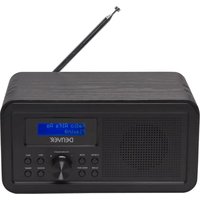
DAB-30B - Radio DENVER - Free user manual and instructions
Find the device manual for free DAB-30B DENVER in PDF.


| Product type | DAB+ / FM radio with alarm |
| Brand | Denver |
| Model | DAB-30B |
| Power supply | 6V DC 1000mA mains adapter (included) or 4 AA batteries (not included) |
| Frequency ranges | DAB: 174 - 240 MHz; FM: 87.5 - 108 MHz |
| Main functions | DAB+ and FM radio, alarm, alarm clock, auxiliary input (LINE IN), headphone output, LCD screen |
| Presets | 10 stations in DAB and 10 in FM |
| Auto scan | Yes, in DAB and FM |
| Manual tuning | Yes, via Previous/Next buttons |
| Alarm / Wake-up | Yes, with snooze function every 9 minutes |
| Auxiliary input | LINE IN socket (3.5 mm jack) |
| Headphone output | Headphone socket (3.5 mm jack) |
| Display | LCD screen |
| Antenna | Integrated telescopic antenna |
| Maintenance and cleaning | Disconnect the adapter and remove batteries before cleaning; use a soft dry cloth |
| Safety | Do not expose to moisture; use only the supplied adapter; do not open the case |
| Spare parts and repairability | Contact Denver after-sales service; no spare parts available for self-service |
| General information | Compliant with directive 2014/53/EU; manufactured by Denver Electronics A/S, Denmark |
Frequently Asked Questions - DAB-30B DENVER
User questions about DAB-30B DENVER
0 question about this device. Answer the ones you know or ask your own.
Ask a new question about this device
Download the instructions for your Radio in PDF format for free! Find your manual DAB-30B - DENVER and take your electronic device back in hand. On this page are published all the documents necessary for the use of your device. DAB-30B by DENVER.
USER MANUAL DAB-30B DENVER
denver-electronics.com
DAB+ FM RADIO
DAB-30
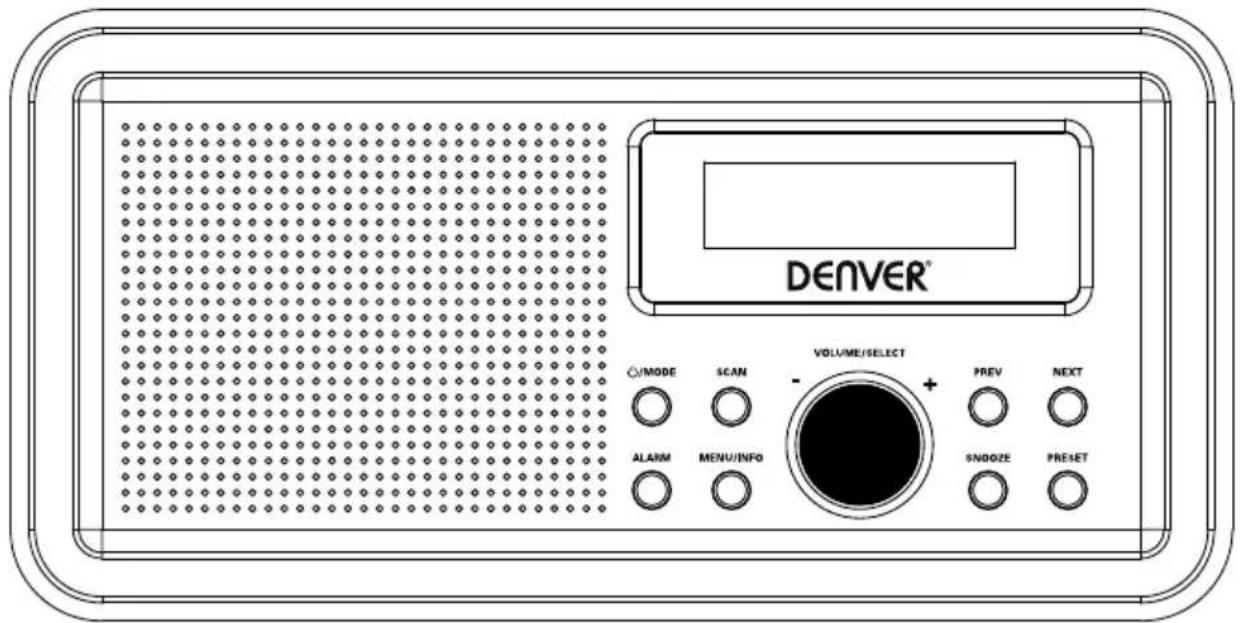
INSTRUCTION MANUAL
Please read this manual carefully before using, and keep it for future reference.
Content
English 2
Deutsche 6
Español 10
Français 14
Italiano 18
Nederlands 22
Portugues 26
Polski 30
Svenska 34
Suomalainen 38
Dansk 42
Norsk 46
Short Operating Instructions
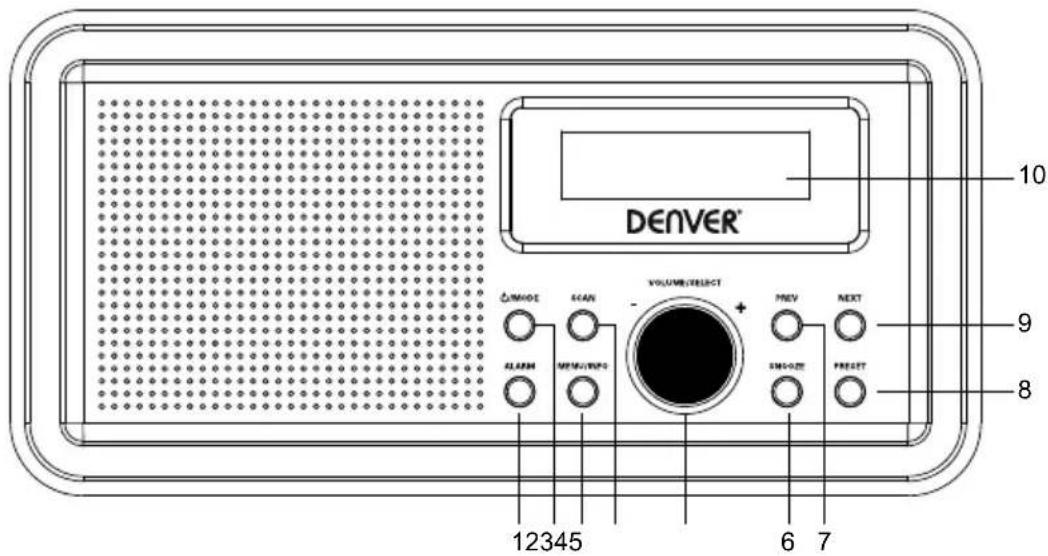
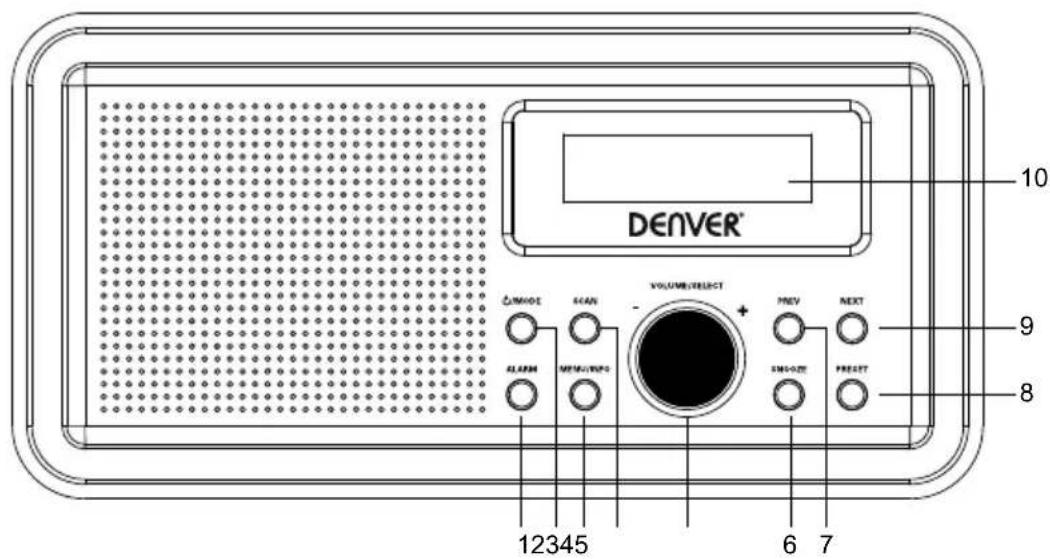
PRODUCT OVERVIEW
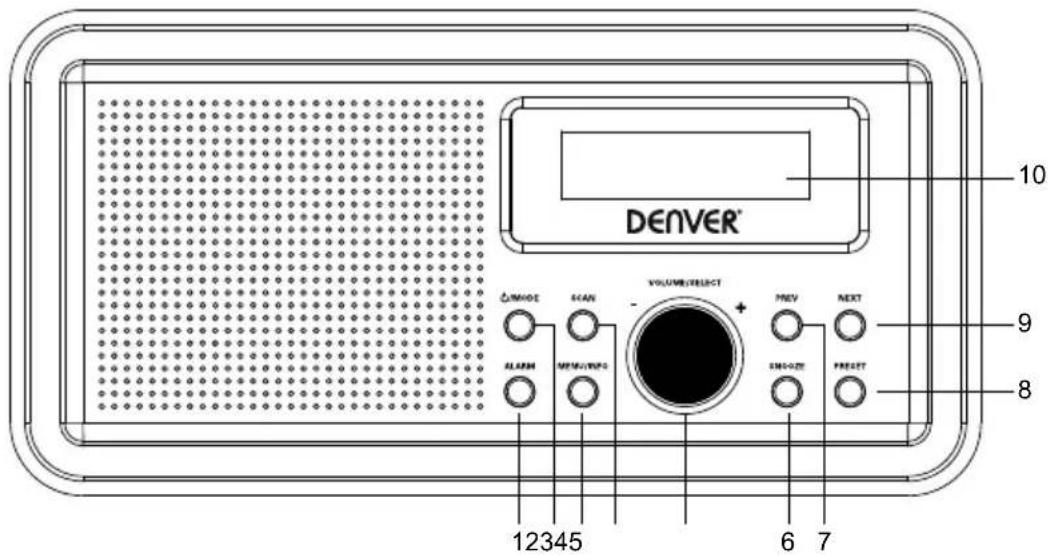
1 ALARM button
2 /MODE button
3 MENU/INFO button
4 SCAN button
5 VOLUME/SELECT button
6 SNOOSE button
7 PREV button
8 PRESET button
9 NEXT button
10 LCD display
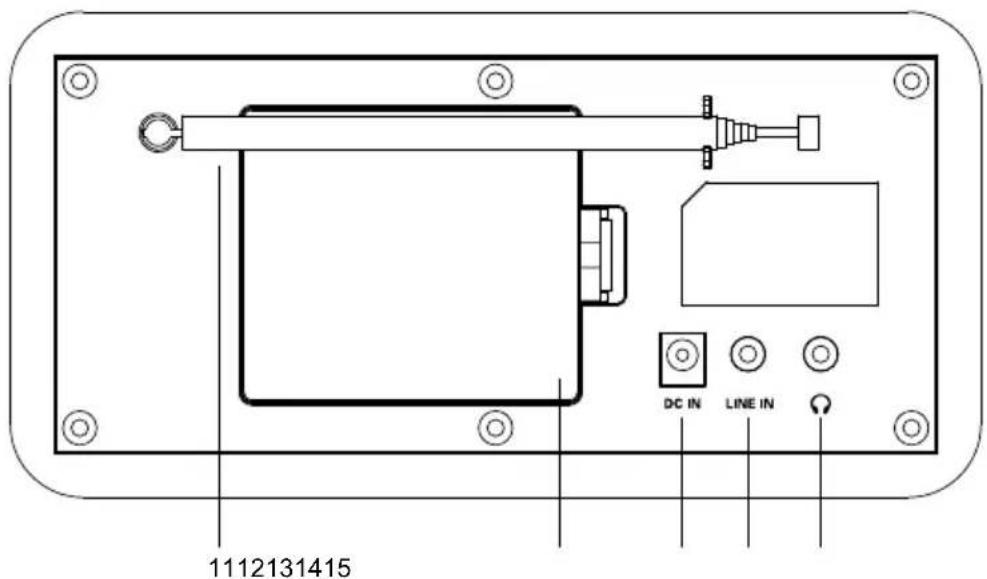
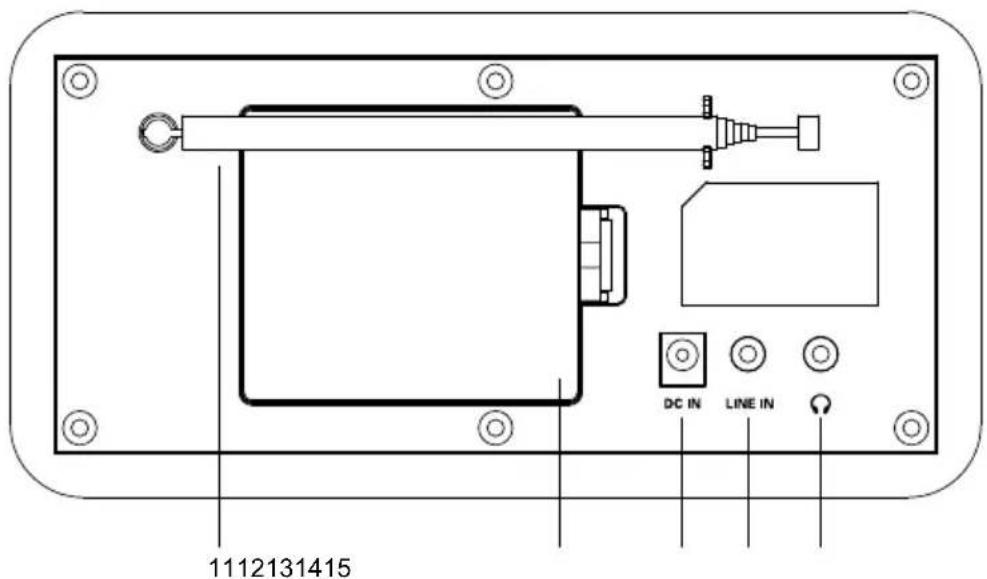
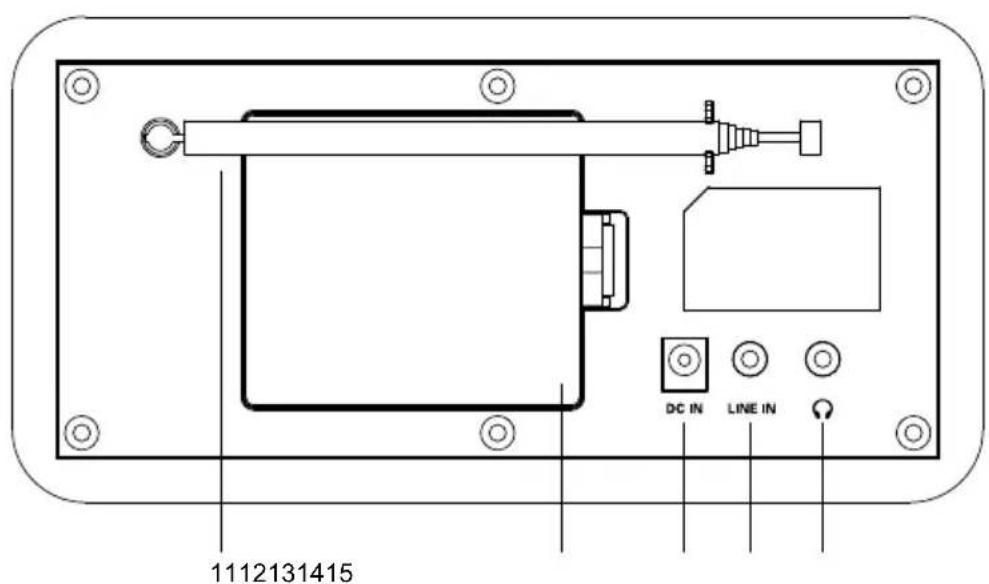
11 Antenna
12 Battery compartment
13 DC input jack
14 LINE IN jack
15 Earphone jack
Power on/off
Press briefly the /MODE button to switch on the product.
Press and hold the /MODE button to switch the product to standby.
Press and hold the /MODE button again to switch off the product.
FM Mode
SCAN button
Press briefly the SCAN button to automatically search and store the available FM stations.
PRESET button
Press the PRESET button to view the stored FM stations.
Press briefly the PREV/NEXT button to select a stored FM station, then press the VOLUME/SELECT button to confirm the selection.
Press and hold the PRESET button to enter the programming mode, then press briefly the PREV/NEXT button to allocate a number from 1 to 10 to the current radio station, then press the VOLUME/SELECT button to confirm.
MENU button
Press briefly the MENU button to display various information of the current FM station.
Press and hold the MENU button to display the following menu options: Scan, Setting, Audio, and Setting System. Press briefly the PREV/NEXT button to select an option, then press the VOLUME/SELECT button to confirm the selection.
PREV/NEXT button
Press and hold the PREV/NEXT button to automatically tune to a FM station. Press briefly and repeatedly the PREV/NEXT button to fine tune FM frequencies.
VOLUME/SELECT button
Adjust the volume, or confirm a selection.
DAB Mode
MODE button
Press the MODE button to switch to the DAB mode. The local DAB stations are searched and stored automatically.
SCAN button
Press briefly the SCAN button to search and store available DAB stations automatically.
PRESET button
Press the PRESET button to view the stored DAB stations.
Press briefly the PREV/NEXT button to select a stored DAB station, then press the VOLUME/SELECT button to confirm the selection.
Press and hold the PRESET button to enter the programming mode, then press the PREV/NEXT button to allocate a number from 1 to 10 to the current DAB station, then press the VOLUME/SELECT button to confirm.
MENU button
Press the MENU button to display various information of the current DAB station.
Press and hold the MENU button to display the following menu options: Full scan, Manual tune, and DRC Prune System. Press briefly the PREV/NEXT button to select an option, then press the VOLUME/SELECT button to confirm the selection.
NEXT button
Press briefly the PREV/NEXT button to select a stored DAB station, then press the VOLUME/SELECT button to confirm the selection.
VOLUME/SELECT button
Adjust the volume, or confirm a selection.
Alarm Mode
ALARM button
Press briefly the ALARM button to select alarm 1, and press again the ALARM button to select alarm 2. Press briefly the PREV/NEXT button to select alarm options, then press the VOLUME/SELECT button to confirm the selection.
SNOOZE button
When the alarm rings, press the SNOOZE button to stop ringing, and the alarm rings at a 9-minute interval.
AUX mode
Press the MODE button to switch to the AUX mode, and connect an external audio device to the LINE IN jack.
MENU button
Press briefly the MENU button to display various information of AUX mode. Press and hold the MENU button to display an option, then press the VOLUME/SELECT button to confirm the selection.
VOLUME/SELECT button
Adjust volume.
SCAN /PRESET /PREV/NEXT buttons are invalid in the AUX mode.
Using earphones
You can connect your earphones with a 3.5mm plug (not included) to the Earphone jack on this product.
SPECIFICATIONS
| Power supply | Output DC6V 1000mAInput: AC 100-240V 50/60Hz |
| Battery type | 4 x AA batteries (not supplied) |
| DAB | 174 MHz to 240 MHz |
| FM | 87.5 MHz to 108 MHz |
Please notice - All products are subject to change without any notice. We take reservations for errors and omissions in the manual.
ALL RIGHTS RESERVED, COPYRIGHT DENVER ELECTRONICS A/S
DENVER®
www.denver-electronics.com


Electric and electronic equipment contains materials, components and substances that can be hazardous to your health and the environment, if the waste material (discarded electric and electronic equipment) is not handled correctly.
Electric and electronic equipment is marked with the crossed out trash can symbol, seen above. This symbol signifies that electric and electronic equipment should not be disposed of with other household waste, but should be disposed of separately.
All cities have established collection points, where electric and electronic equipment can either be submitted free of charge at recycling stations and other collection sites, or be collected from the households. Additional information is available at the technical department of your city.
Hereby, Inter Sales A/S declares that the radio equipment type DAB-30 is in compliance with Directive 2014/53/EU. The full text of the EU declaration of conformity is available at the following internet address: www.denver-electronics.com and then click the search ICON on topline of website. Write modelnumber: DAB-30.Now enter product page, and red directive is found under downloads/other downloads Operating Frequency Range: DAB:174 MHz to 240 MHz / FM: 88 MHz to 108 MHz Max Output Power: DC 6V 1000MHz
DENVER ELECTRONICS A/S
Omega 5A, Soeften
DK-8382 Hinnerup
Denmark
www.facebook.com/denverelectronics
Kurzanleitung
PRODUKTÜBERSICHT
VUE D'ENSEMBLE DU PRODUIT
1 Touche ALARME
2 Touche /MODE
3 Touche MENU/INFOS
4 Touche RECHERCHE
5 Bouton VOLUME/SÉLECTION
7 Touche PRÉCÉDENT
DAB:174 MHz to 240 MHz / FM: 88 MHz to 108 MHz
DAB:174 MHz to 240 MHz / FM: 88 MHz to 108 MHz

- denver-electronics.com
- DAB+ FM RADIO
- INSTRUCTION MANUAL
- Content
- Short Operating Instructions
- PRODUCT OVERVIEW
- Power on/off
- FM Mode
- PRESET button
- MENU button
- PREV/NEXT button
- VOLUME/SELECT button
- DAB Mode
- SCAN button
- NEXT button
- Alarm Mode
- ALARM button
- SNOOZE button
- AUX mode
- Using earphones
- DENVER®
- Kurzanleitung
- PRODUKTÜBERSICHT
Brand : DENVER
Model : DAB-30B
Category : Radio