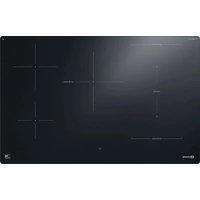
BTX8017DCF - Cooker BAUKNECHT - Free user manual and instructions
Find the device manual for free BTX8017DCF BAUKNECHT in PDF.


| Product Type | Induction Cooktop |
| Brand | Bauknecht |
| Model | BTX8017DCF |
| Number of Cooking Zones | 5 cooking zones (including 1 flexible zone) |
| Table dimensions (W x D) | Approximately 77 x 51 cm (not precisely specified) |
| Weight | Not specified (estimated ~15 kg) |
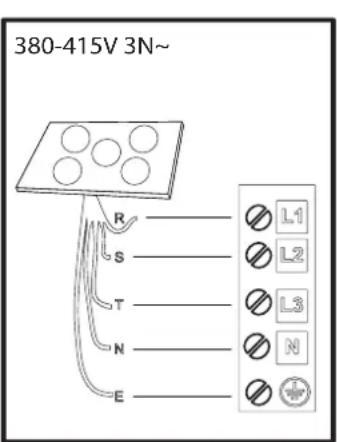
| Power supply | 380-415 V 3N~, 50/60 Hz |
| Maximum total power | Up to 11 kW (adjustable from 2.5 to 11 kW) |
| Booster power | Up to 3.7 kW (depending on zone) |
| Main functions | Booster, Flexi Zone, Heat Control, Assisted Boiling, Timer, Melt, Keep Warm |
| Control | Touch panel with digital slider |
| Residual heat indicator | Yes ("Hot" display) |
| Child lock | Yes (lock key for 3 seconds) |
| Wipe function | Yes (temporary lock for 30 seconds) |
| Automatic safety shut-off | Yes (overheating detection, pan absence, overflow) |
| Surface material | Ceramic glass with CleanProtect technology |
| Cleaning | Soft cloth, water, specific cleaner; scraper for stuck residues |
| Compatible cookware | Flat ferromagnetic bottom (enameled steel, cast iron, sandwich stainless steel) |
| Minimum pan diameter | 10 cm (zone 5) to 16 cm (zone 1-2) |
| Energy class | Not specified (estimated A+ or higher) |
| Annual energy consumption | Not specified |
| Spare parts and repairability | Contact authorized after-sales service: original parts |
| Warranty | According to manufacturer's conditions (registration possible at register10.eu) |
Frequently Asked Questions - BTX8017DCF BAUKNECHT
User questions about BTX8017DCF BAUKNECHT
0 question about this device. Answer the ones you know or ask your own.
Ask a new question about this device
Download the instructions for your Cooker in PDF format for free! Find your manual BTX8017DCF - BAUKNECHT and take your electronic device back in hand. On this page are published all the documents necessary for the use of your device. BTX8017DCF by BAUKNECHT.
USER MANUAL BTX8017DCF BAUKNECHT
Before using the appliance, read these safety instructions. Keep them nearby for future reference.
These instructions and the appliance itself provide important safety warnings to be observed at all times. The manufacturer declines any liability for failure to observe these safety instructions, for inappropriate use of the appliance or incorrect setting of controls.
⚠ WARNING: If the hob surface is cracked, do not use the appliance - risk of electric shock.
⚠ WARNING: Danger of fire: Do not store items on the cooking surfaces.
⚠️ CAUTION: The cooking process has to be supervised. A short cooking process has to be supervised continuously.
⚠ WARNING: Unattended cooking on a hob with fat or oil can be dangerous - risk of fire. NEVER try to extinguish a fire with water: instead, switch off the appliance and then cover flame e.g. with a lid or a fire blanket.
⚠ Do not use the hob as a work surface or support. Keep clothes or other flammable materials away from the appliance, until all the components have cooled down completely - risk of fire.
⚠ Metallic objects such as knives, forks, spoons and lids should not be placed on the hob surface since they can get hot.
⚠️ Very young children (0-3 years) should be kept away from the appliance. Young children (3-8 years) should be kept away from the appliance unless continuously supervised. Children from 8 years old and above and persons with reduced physical, sensory or mental capabilities or lack of experience and knowledge can use this appliance only if they are supervised or have been given instructions on safe use and understand the hazards involved. Children must not play with the appliance. Cleaning and user maintenance must not be carried out by children without supervision.
⚠️ After use, switch off the hob element by its control and do not rely on the pan detector.
⚠ WARNING: The appliance and its accessible parts become hot during use. Care should be taken to avoid touching heating elements. Children less than 8 years of age shall be kept away unless continuously supervised.
⚠ The food must not be left in or on the product for more than one hour before or after cooking.
PERMITTED USE
⚠ CAUTION: the appliance is not intended to be operated by means of an external switching device, such as a timer, or separate remote controlled system.
This appliance is intended to be used in household and similar applications such as: staff kitchen areas in shops, offices and other working environments; farm houses; by clients in hotels, motels, bed & breakfast and other residential environments.
⚠ No other use is permitted (e.g. heating rooms).
⚠ This appliance is not for professional use. Do not use the appliance outdoors.
⚠ WARNING: Induction hob may generate the acoustic sound when something is left on the control panel. Switch off the cooktop through the ON/OFF button.
INSTALLATION
⚠ The appliance must be handled and installed by two or more persons - risk of injury. Use protective gloves to unpack and install - risk of cuts.
⚠ Installation, including water supply (if any), electrical connections and repairs must be carried out by a qualified technician. Do not repair or replace any part of the appliance unless specifically stated in the user manual. Keep children away from the installation site. After unpacking the appliance, make sure that it has not been damaged during transport. In the event of problems, contact the dealer or your nearest After-sales Service. Once installed, packaging waste (plastic, styrofoam parts etc.) must be stored out of reach of children - risk of suffocation. The appliance must be disconnected from the power supply before any installation operation - risk of electric shock. During installation, make sure the appliance does not damage the power cable - risk of fire or electric shock. Only activate the appliance when the installation has been completed.
⚠️ Carry out all cabinet cutting operations before fitting the appliance and remove all wood chips and sawdust.
ELECTRICAL WARNINGS
⚠ It must be possible to disconnect the appliance from the power supply by unplugging it if plug is accessible, or by a multi-pole switch installed upstream of the socket in accordance with the wiring rules and the appliance must be earthed in conformity with national electrical safety standards.
⚠ Do not use extension leads, multiple sockets or adapters. The electrical components must not be accessible to the user after installation. Do not use the appliance when you are wet or barefoot. Do not operate this appliance if it has a damaged power cable or plug, if it is not working properly, or if it has been damaged or dropped.
⚠️ Installation using a power cable plug is not allowed unless the product is already equipped with the one provided by the Manufacturer.
⚠️ If the supply cord is damaged, it must be replaced with an identical one by the manufacturer, its service agent or similarly qualified persons in order to avoid a hazard - risk of electric shock.
CLEANING AND MAINTENANCE
⚠ WARNING: Ensure that the appliance is switched off and disconnected from the power supply before performing any maintenance operation; never use steam cleaning equipment - risk of electric shock.
⚠ Do not use abrasive or corrosive products, chlorine-based cleaners or pan scourers.
DISPOSAL OF PACKAGING MATERIALS
The packaging material is 100% recyclable and is marked with the recycle symbol 📁.
The various parts of the packaging must therefore be disposed of responsibly and in full compliance with local authority regulations governing waste disposal.
DISPOSAL OF HOUSEHOLD APPLIANCES
This appliance is manufactured with recyclable or reusable materials. Dispose of it in accordance with local waste disposal regulations. For further information on the treatment, recovery and recycling of household electrical appliances, contact your local authority, the collection service for household waste or the store where you purchased the appliance. This appliance is marked in compliance with European Directive 2012/19/EU, Waste Electrical and Electronic Equipment (WEEE) and with the Waste Electrical and Electronic Equipment regulations 2013 (as amended).
By ensuring this product is disposed of correctly, you will help prevent negative consequences for the environment and human health.
The symbol ⚪ on the product or on the accompanying documentation indicates that it should not be treated as domestic waste but must be taken to an appropriate collection center for the recycling of electrical and electronic equipment.
ENERGY SAVING TIPS
Make the most of your hot plate's residual heat by switching it off a few minutes before you finish cooking.
The base of your pot or pan should cover the hot plate completely; a container that is smaller than the hot plate will cause energy to be wasted.
Cover your pots and pans with tight-fitting lids while cooking and use as little water as possible. Cooking with the lid off will greatly increase energy consumption.
Use only flat-bottomed pots and pans.
DECLARATION OF CONFORMITY
This appliance meets Ecodesign requirements of European Regulation 66/2014 and The Ecodesign for Energy-Related Products and Energy Information (Amendment) (EU Exit) Regulations 2019 in compliance with the European standard EN 60350-2.
The information related to low power mode of the appliance in accordance with Regulation (EU) 2023/826 can be found in the following link: https://docs.emeaappliance-docs.eu.
NOTE
People with a pacemaker or similar medical device should use care when standing near this induction cooktop while it is on. The electromagnetic field may affect the pacemaker or similar device. Consult your doctor, or the manufacturer of the pacemaker or similar medical device for additional information about its effects with electromagnetic fields of the induction cooktop.
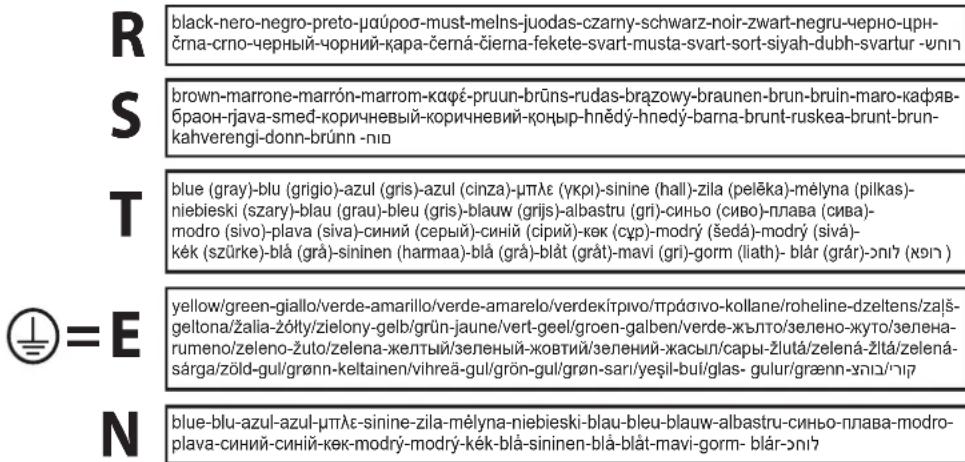
ELECTRICAL CONNECTION
Electrical connection must be made before connecting the appliance to the electricity supply.
Installation must be carried out by qualified personnel familiar with the current safety and installation regulations. Specifically, installation must be carried out in compliance with the regulations of the local electricity supply company.
Make sure the voltage specified on the data plate located on the bottom of the appliance is the same as that of the home.
Regulations require that the appliance be earthed; use conductors (including the earth conductor) of the appropriate size only.

THANK YOU FOR BUYING A BAUKNECHT PRODUCT
In order to receive a more complete assistance, please register your product on www.register10.eu.

Before using the appliance carefully read the Safety Instruction.
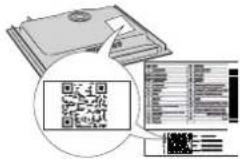
PLEASE SCAN THE QR CODE ON YOUR APPLIANCE IN ORDER TO REACH MORE INFORMATION
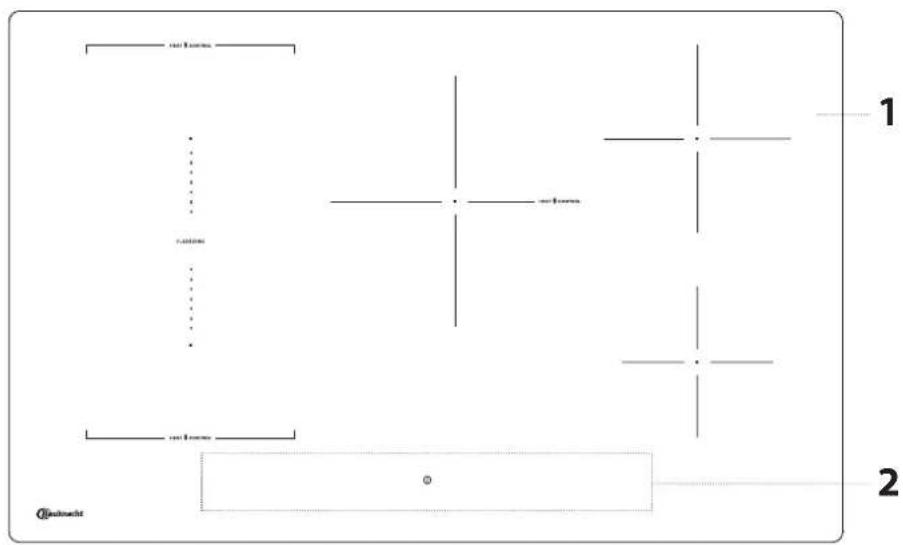
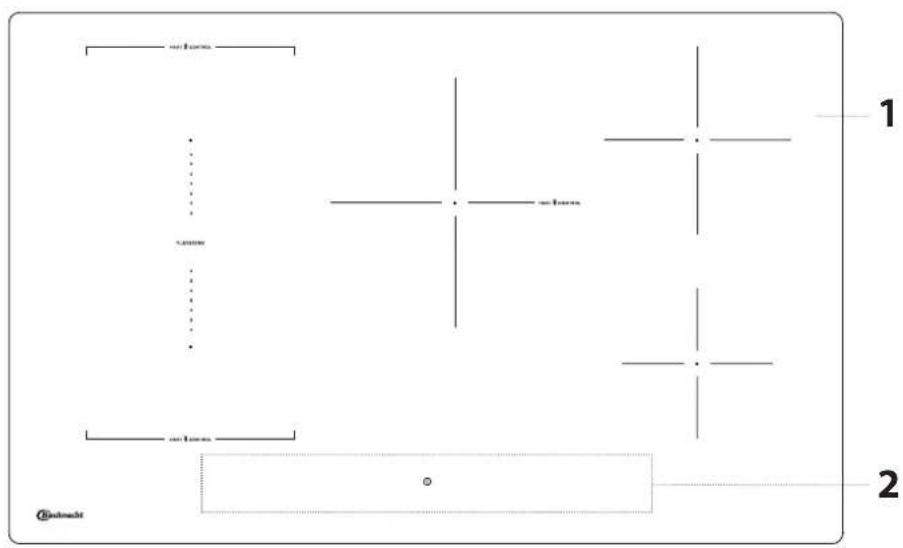
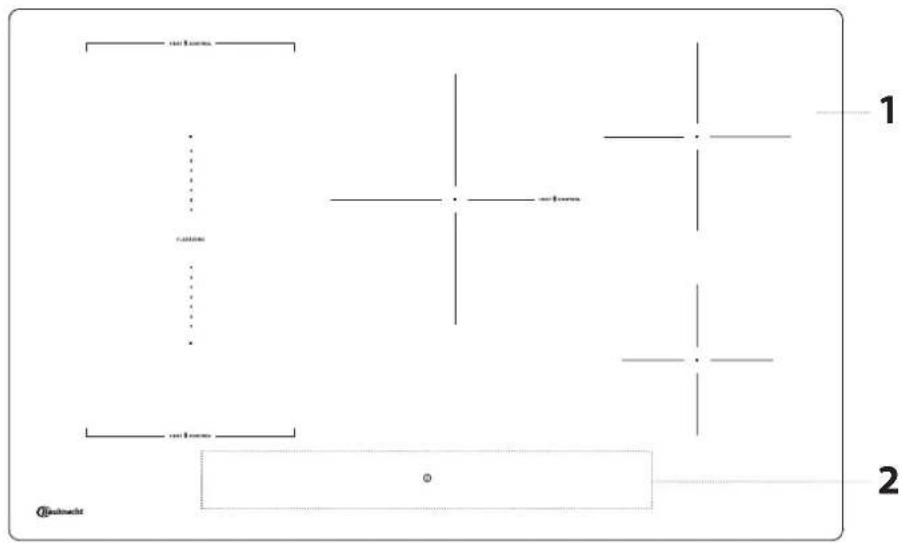
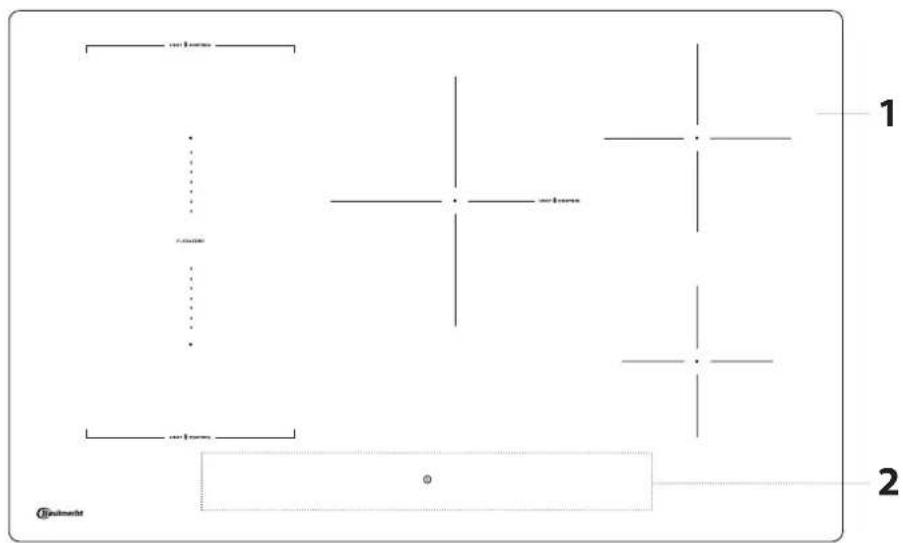
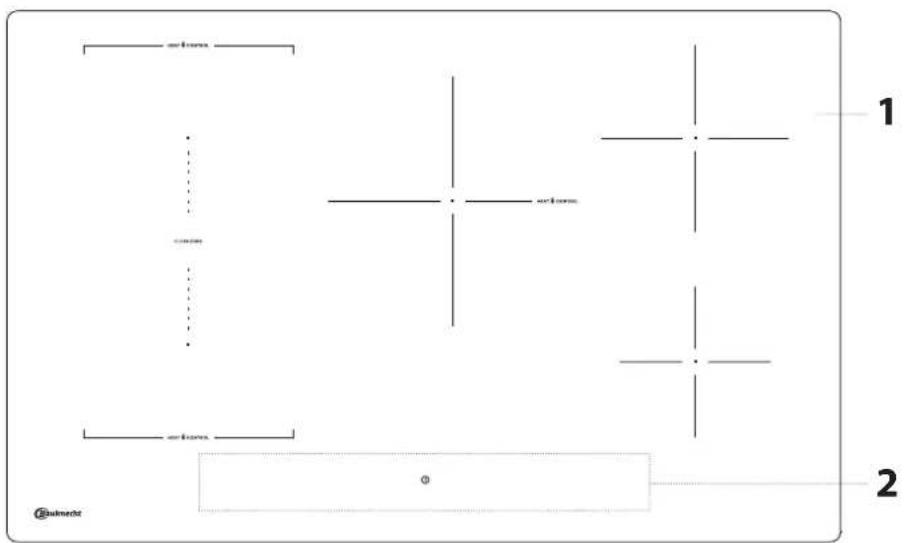
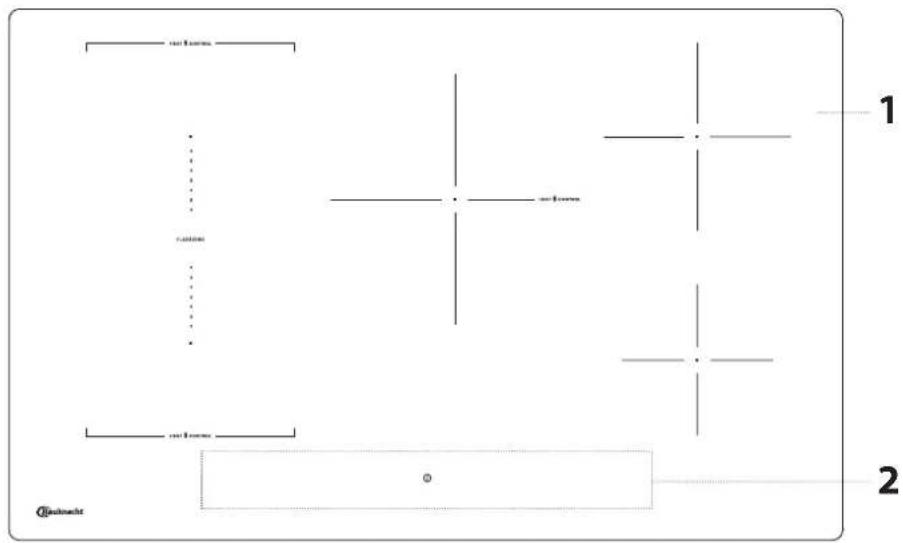
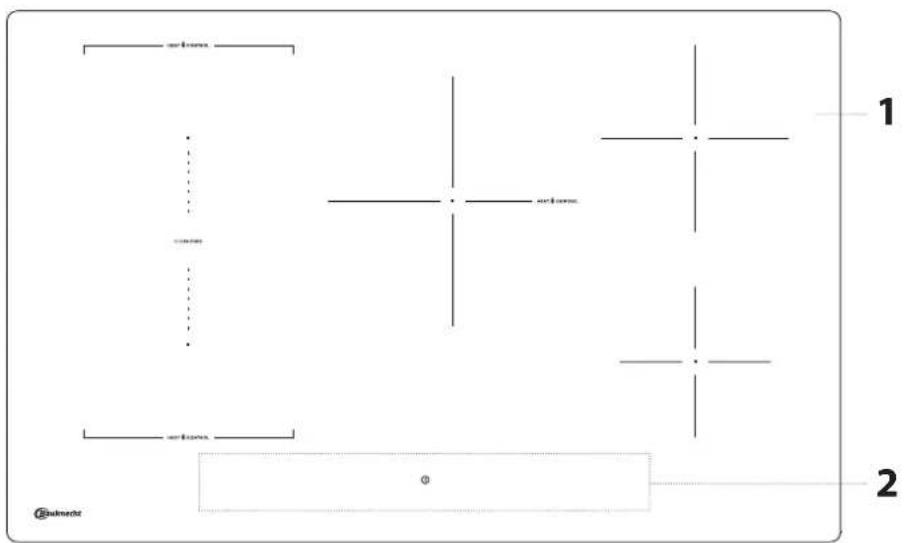
PRODUCT DESCRIPTION
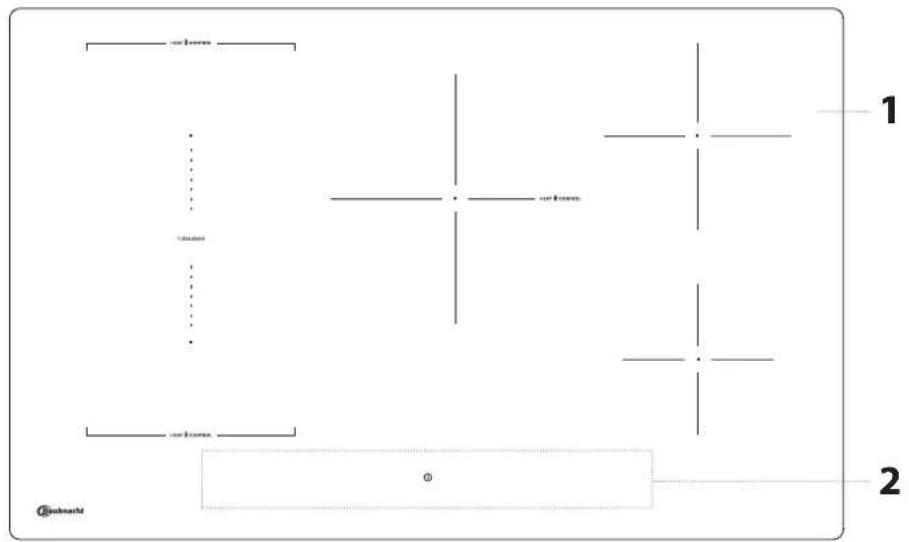
- Cooktop
- Control panel
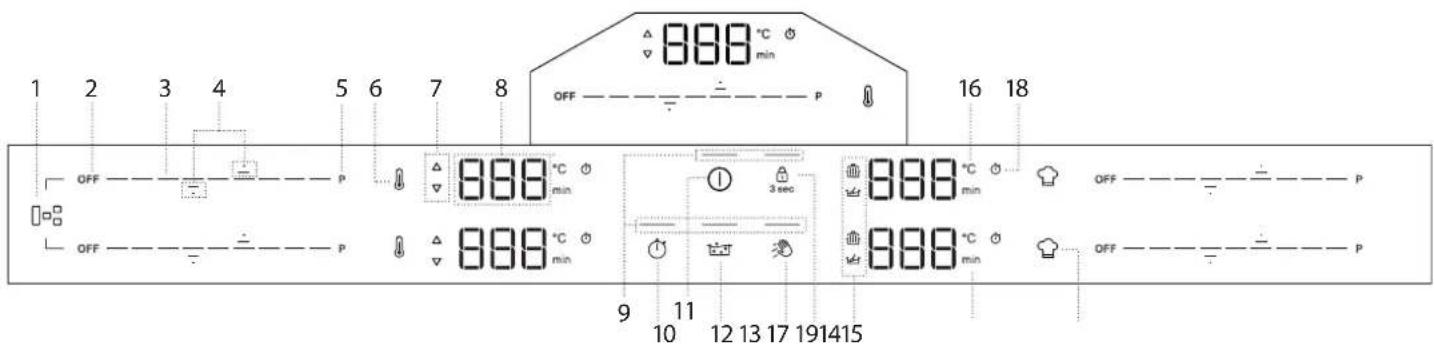
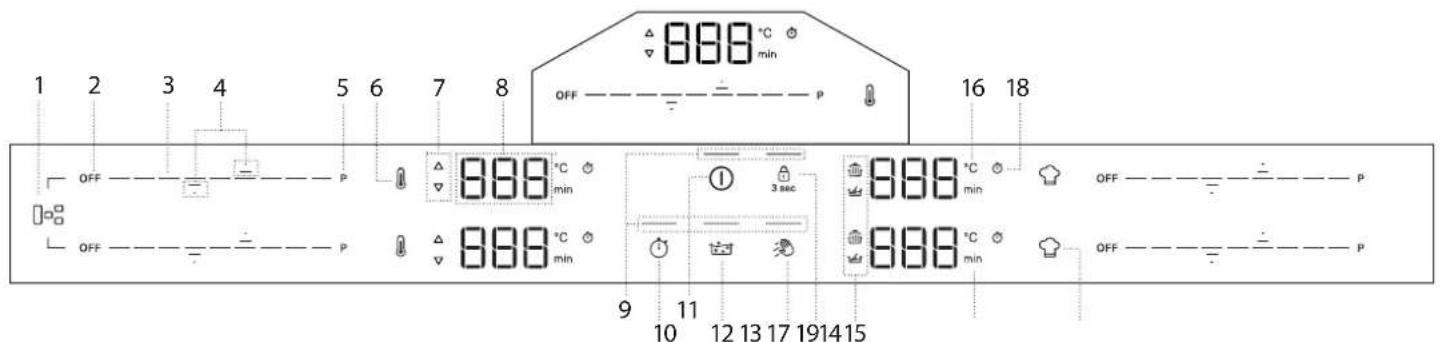
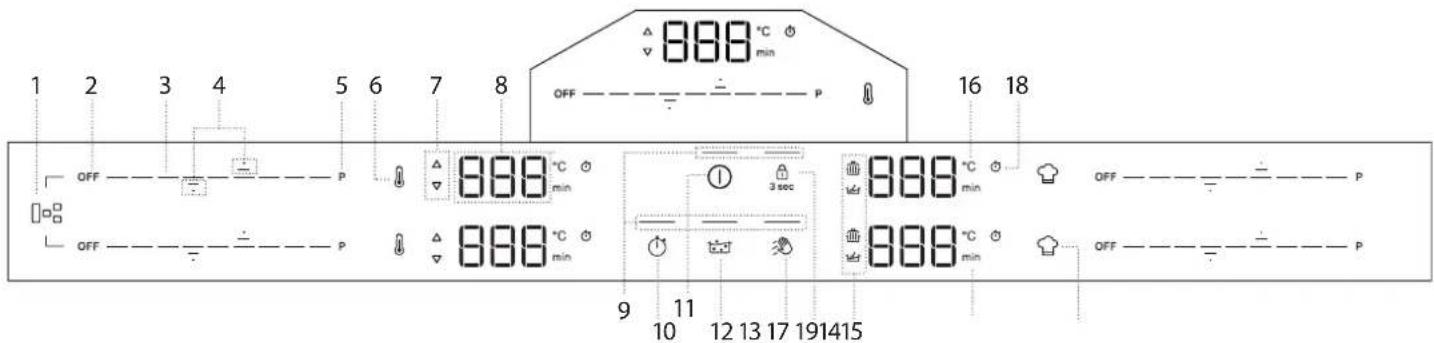
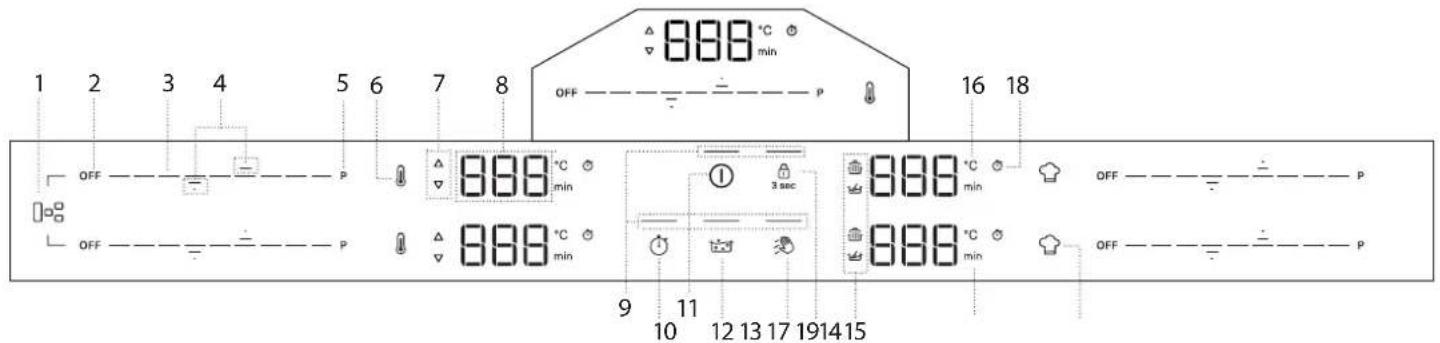
CONTROL PANEL
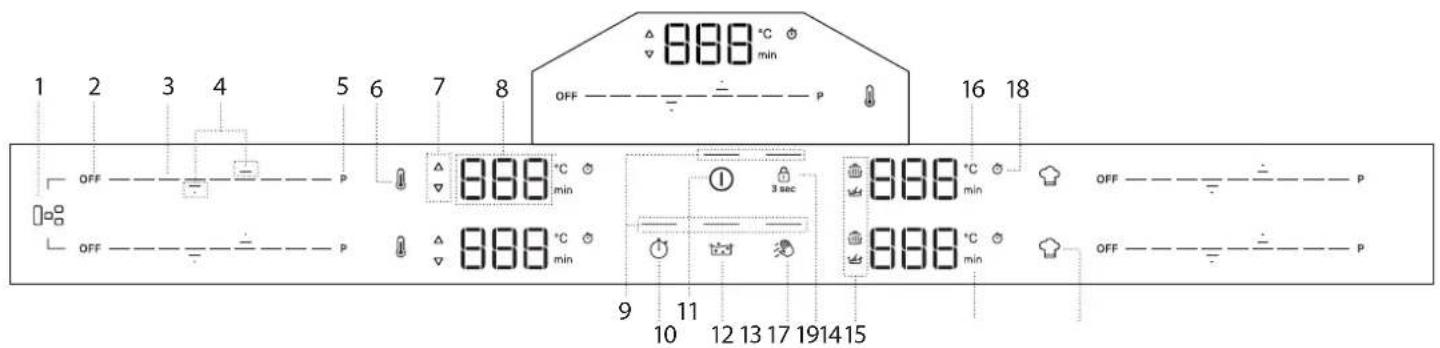
- Flexi Zone button
- Cooking zone OFF button
- Scroll keypad
- Arrows to set Temperature/Timer
- Fast heating button (Booster)
- Heat control button
-
Preheat/Cool down indicator
-
Cooking zone display
- Indicator light – function active
- Timer button
- On/Off button
- Assisted Boil (Boil&Cook) button
- Wipe function button
-
Key lock button - 3 seconds
-
Symbols/Activation of special functions
- Temperature indicator (degrees Celsius)
- Minutes indicator
- Timer indicator symbol
- Special function button
NOTE: Press the ON/OFF button (11); all the available functions will become visible for a few moments, after which only the main ones will remain active. The others can be used, and will be activated, during the subsequent use of the device.
IMPORTANT: All the available functions will be illuminated in dim light intensity, which will become more intense only when they are activated.
ACCESSORIES
Only use pots and pans made from ferromagnetic material suitable for induction hobs. Check for the symbol (generally stamped on the bottom) to determine whether a pot is suitable. A magnet may also be used to check whether the cookware base is magnetic.
| COOKWARE MATERIAL PROPERTIES | ||
Recommended cookware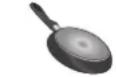 | Base made of stainless steel with a sandwich design, enamelled steel, cast iron. | Ensures optimum efficiency, heats up quickly, and distributes heat evenly. |
Suitable cookware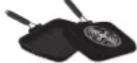 | Base not fully ferromagnetic (magnet sticks only on part of the cookware base). | Only the ferromagnetic area heats up. As a result, may heat up less quickly and heat may be distributed less evenly. |
Suitable cookware | Ferromagnetic base contains areas with aluminium, or has a recessed area in the centre. | The ferromagnetic area is smaller than the actual cookware base area. As a result, less power may be delivered and cookware may not heat sufficiently. Cookware may not be detected. |
| Not suitable Normal | thin steel, glass, clay, copper, aluminium and other non-ferromagnetic materials, cookware with rubber feet. | Cookware is not detected and will not heat up. |
NOTE: All cookware must have a flat base. Periodically check the base for any sign of warping, as some cookware may undergo deformation due to high heat. Using cookware that does not match the recommended sizes and properties may significantly affect cooking performance and cause unsatisfactory results.
ADAPTERS FOR POTS/PANS UNSUITABLE FOR INDUCTION
The use of adapter plates affects efficiency and therefore increases the time required to heat water or food. Make sure the ferromagnetic diameter of the cookware base aligns with both the diameter of the adapter plate and the
FIRST TIME USE
POWER MANAGEMENT
At the time of purchase, the hob is set to the maximum power. Adjust the setting on the basis of the limits of your domestic electrical system, as explained in the following paragraph.
NOTE: Depending on the power selected for the hob, some of the cooking zone power levels and functions (e.g. boil or fast heating) may be automatically limited to prevent the selected limit from being exceeded.
The table below shows the power used by each zone for each function, to help you understand the possible usage limitations based on the chosen power setting.
| ZONE 1 or 2 1 + 2 3 4 5 | |||||
| POWER LEVEL 18 (KW) 2.2 2.2 2.5 2.3 1.5 | |||||
| BOOSTER (KW) | 3.7 | 3.7 | 3.7 | 3.2 | 2.2 |
| HEAT CONTROL (KW) | 1.4 | NA | 1.4 | NA | NA |
| ASSISTED BOIL (BOIL&COOK) (KW) | 3.0 | NA | 3.0 | NA | NA |
| MELTING (KW) | NA | NA | NA | 0.05 | 0.045 |
| KEEP WARM (KW) | NA | NA | NA | 0.15 | 0.145 |
Examples with reference to the values in the table above:
If you set the "Power management setting" at 4 kW and activate multiple cooking zones simultaneously, the hob will automatically adjust the power levels not to exceed the overall power limit (e.g. 4 kW).
For example, with the "Power management setting" set at 4 kW, if you set zone 3 at "Booster" (=3.7 kW) and then try to activate zone 1 at level 18 (2.2 kW), the overall power supplied would exceed the limit of 4 kW (3.7 + 2.2 = 5.9 kW). For this reason, the hob will automatically adjust the power levels as follows: the cooking zone set to "Booster" will be set at level 18 (=2.2 kW), while the second cooking zone at level 15 (=1.6 kW, the maximum power level not to exceed the 4 kW limitation).
diameter of the cooking zone. If these measurements don't match, efficiency and performance may be significantly reduced. If these guidelines are not followed, there may be a heat build-up that is not effectively transferred to the pot or pan, potentially causing blackening of the plate and hob.
EMPTY POTS AND PANS
The hob is equipped with an internal safety system that activates the "Automatic off" function when an over-high temperature is detected. The use of empty pots and pans with a thin base is not recommended but, if they are used, the temperature might rise quicker than the time needed for the "Automatic off" to be triggered promptly, with the risk of damaging the pan or the hob surface. If this happens, do not touch the pan or the hob surface. Wait for all components to cool down. If any error message is displayed, call the Service Centre.
SUITABLE SIZE OF PAN/POT BASE FOR THE DIFFERENT COOKING ZONES
To ensure that the hob works properly, use pots of a suitable base diameter for each zone (refer to the table below). Please note that cookware manufacturers often provide the size of the upper diameter of the cookware, rather than the base diameter.
To ensure that the hob works as expected, always use a cooking zone with a size matching the ferromagnetic size of the cookware base.
Centre the pan/pot correctly on the cooking zone in use. It is recommended not to use pots larger than the size of the cooking zone.
COOKWARE USAGE BY ZONE
| Zone Suitable cookware shape | Suitable ferromagnetic base (cm) | |
| 1 or 2 Round | d or Square 16 - 21 | |
| 3 Round | 16 - 21 | |
| 4 Round | 15 - 18 | |
| 5 Round | 10 - 15 | |
| 1+2(Flexi Zone) | Oval or Rectangular | Short side 16 - 21Long side 24 - 38 |
Setting Menu: Changing the basic settings
Once you have connected the device to the main power supply, you can change the default settings by entering the Setting menu within 60 seconds:
- After connecting the hob to the main power supply, wait until all the LEDs turn on and off consecutively.
- Press and hold the On/Off button (①) to turn on the hob.
- Press the Key-lock button ( ⏻ ) for at least 6 seconds to enter the Setting menu. Ignore the key-lock activation sound that you will hear after 3 seconds of pressing.
- The setting type (eg."PL") will be shown on the top-left cooking zone display, and its default (or current) value (eg."2_5") will appear on the bottom-left cooking zone display.
- You can select the setting type by using up (—) and down (—) arrows of the top-left cooking zone. You can change its value by using up (—) and down (—) arrows of the bottom-left cooking zone. See the table below for the setting types, default values and possible values.
- Press the On/Off button to confirm.
- Without the confirmation, the hob will quit the Setting menu and return to the previous values within 30 seconds.
| ORDER | SETTING TYPE | TOP-LEFT | BOTTOM-LEFT (DEFAULT) | POSSIBLE VALUES |
| 1 | Power Limitation | PL 7_4 | 2_5 kW;4_0 kW;6_0 kW;7_4 kW;9_0 kW;11_0 kW | |
| 2 | Audio tone | Aud | On | On/Off |
| 3 | Demo mode | dE | Off | Off/On |
NOTE: once the demo mode function has been activated, it will remain ON even if the main power supply is interrupted.
DAILY USE
① SWITCHING THE HOB ON/OFF
To turn on the hob, press and hold the power button. The LED above the button will turn on, and you will hear an acoustic signal. After a few seconds, you can interact with the hob. To turn the hob off, press the same button again; all the cooking zones will be deactivated.
POSITIONING
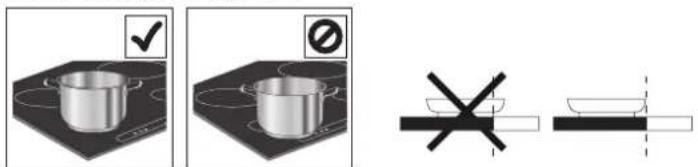
Do not cover the control panel symbols with the cooking pot.
Note: In the cooking zones close to the control panel, it is advisable to keep pots and pans inside the markings (taking into consideration both the bottom of the pan and its upper edge, as this tends to be larger).
This prevents excessive overheating of the keypad. When grilling or frying, use the rear cooking zones if possible.
ACTIVATING/DEACTIVATING COOKING ZONES AND ADJUSTING POWER LEVELS

To activate the cooking zones:
When the hob is turned ON, the scroll keypad (SLIDER) of all available cooking zones will turn ON in low luminosity. Place your finger on the scroll keypad (SLIDER) of the zone you want to activate, and gently slide it to the right if you want to increase the power level or to the left to decrease it. You will notice that the control keypad segments will shift to high luminosity based on the selected power level, and the display digits will show the number corresponding to the power level selected (from 1 to 18).
The "P" button can be used to select the fast heating function (Booster) to quickly boil water.
To deactivate the cooking zones:
Select the "OFF" button at the beginning of the scroll keypad.
NOTE: Water spillage, food overflow and/or an object positioned on the control panel buttons can mimic your finger and accidentally activate or deactivate any of the hob buttons. If such elements are not removed within 8 seconds, the hob makes two short acoustic sounds and switches OFF by itself while showing the "OFF" message.
CONTROL PANEL LOCK
The control panel lock function is designed to lock the hob settings, to prevent accidental changes to the settings or the unintentional activation/deactivation of the functions. You may need to use this function for example in case of possible liquid or food spillage, or for safety reasons (children's accidental interaction with the hob) to prevent any risk of the hob turning on by accident. To use the control panel lock function press and hold the button for 3 seconds. The button switches to high luminosity and a beep and a light above the symbol indicate that this function has been activated. To unlock the controls, repeat the activation procedure.
NOTE: The control panel is locked except for the switching off function. If you turn your hob off with the control panel lock active, press the ON/OFF button and then press the lock button for 3 sec to unlock the hob.
WIPE FUNCTION
The wipe function temporarily locks the buttons of the user interface to prevent accidental changes to the settings during the cleaning process. The function doesn't interrupt the cooking process.
Wipe function helps to prevent any sounds if water spills on the user interface during the cooking process or during your habitual cleaning.
For safety reasons, the ON/OFF button can be activated, even involuntarily, during cleaning.
To activate the Wipe function:
- Press Wipe function button ( 🔒). You will hear an acoustic sound when the function is active.
- The LED above the button will turn on and stay on while the button itself flashes for the entire duration of the function activity.
- The control panel remains locked for 30 seconds.
TIMER
The timer controls all the active cooking zones.
To activate the timer:
- Select the cooking zone and set the required power level.
- The timer button will turn on approximately 5 seconds after the cookware has been recognised. Press it until an indicator light turns on in line with the specific symbol on the chosen cooking zone.
- Use the up ( —) and down ( —) arrows to set the time (don't press and hold them for more than 8 seconds, otherwise the hob shows OFF. For more information, refer to the "Troubleshooting" section). The time will change from 000 seconds to 30 minutes, increasing by 1 minute each time; from 30 to 150 minutes, the time will increase in steps of 5 minutes. If you need to change the time by 10 minutes, use the side dashes. The dash on the left will subtract 10 minutes, while the dash on the right will add 10 minutes (see following image).
OFF
- To confirm the time set, you can press the clock button ( ⏻). Otherwise, the time will be automatically confirmed after 5 seconds without any action.
- You can change the time at any point and activate multiple timers simultaneously.
- During the countdown, tap with your finger on the slider to see the power level. Tap the up (—) or down (—) arrow to see the set temperature. After 3 seconds, the countdown will reappear.
- Once the timer has elapsed, a beep will sound, and the cooking zone will switch off automatically.
To deactivate the timer:
Press the down arrow (—) until it shows 000, and it will be deactivated after 5 seconds.
TIMER INDICATOR
This LED (when ON) indicates that the timer has been set for the cooking zone.
MAXIMUM WORKING TIME OF COOKING ZONES AND FUNCTIONS
| Power level or function | OFF | 1-3 | 4-6 | 7-9 | 10-12 | 13-15 | 16-18 | Booster * | Booster ** | Melting | Keep warm |
| Maximum working time | - | 8 h | 6 h | 4 h | 3 h | 2 h | 1.5 h | 10 min. | 5 min. | 8 h | 8 h |
| Power level after time-out | - | 0 | 0 | 0 | 0 | 0 | 0 | 18 | 18 | 0 | 0 |
* Cooking Zone 1, 2, 3, 4
** Cooking Zone 5
Examples regarding the values in the table above:
If you turn on a cooking zone and set its power to level 14, the cooking zone will continue working for a maximum of 2 hours. After 2 hours, the power level will drop to level 0 and the cooking zone will turn off automatically. If there are no other active cooking zones and there is no interaction with the control panel buttons within 30 seconds, the hob will turn off automatically.
If you activate the Booster function on cooking zone 5, it will automatically drop to power level 18 after 5 minutes. On the other hand, if you activate the Booster function on cooking zone 1, 2, 3 or 4, it will automatically drop to power level 18 after 10 minutes. After 1.5 hours, the power level will drop to level 0 and the cooking zone will turn off automatically. If there are no other active cooking zones, and there is no interaction with the control panel buttons within 30 seconds, the hob will turn off automatically.
FUNCTIONS
P BOOSTER FUNCTION
Booster is a special mode with a power level higher than level 18, for the fastest heating. This mode can have a different duration depending on the zone used (refer to table below). After the Booster time has elapsed, the power will be automatically reduced to level 18.
IMPORTANT: Do not use with an empty pan or oil/butter. This function is ideal for boiling water.
NOTE: Depending on the Power Management setting, the Booster function may not be available for certain cooking zones. Furthermore, if you set one cooking zone to Booster and then activate another zone, the first one will be reduced to the maximum level available (even much lower than level 18) to allow the second one to be used. The second cooking zone will be set or limited based on the remaining power available on that side of the hob.
Please bear in mind as well that the power delivery may vary according to the size and material of the cookware being used.
ZONE DESCRIPTION
| Zone Nominal power (Level 18, kW) | Power Booster (kW) | Booster Duration (min.) | |
| 1 or 2.2.2 | 3.7 10 | ||
| 3 2.5 3.7 10 | |||
| 4 2.3 3.2 10 | |||
| 5 1.5 2.2 5 | |||
| 1+2 (Flexi Zone) | 2.2 3.7 10 | ||
NOTE: the values in the table refer to testing conditions as described in the normative standard for evaluating the performance of cooking appliances.
The power shown may vary depending on the size or material of the cookware used.
0:
FLEXIBLE COOKING ZONE (FLEXI ZONE)
With this function you can combine two cooking zones into a single, longer one to accommodate rectangular, oval or elongated cookware, and use a single setting for the whole combined zone.
To ensure the correct results, use only pots and pans with a ferromagnetic base long enough to cover the two zones at the same time. Place the cookware in the centre of the flexible cooking rectangular area.
Refer to the figure below for examples of correct and incorrect usage.
NOTE: A large round pot used in the middle may heat up less quickly and heat may be distributed less evenly.
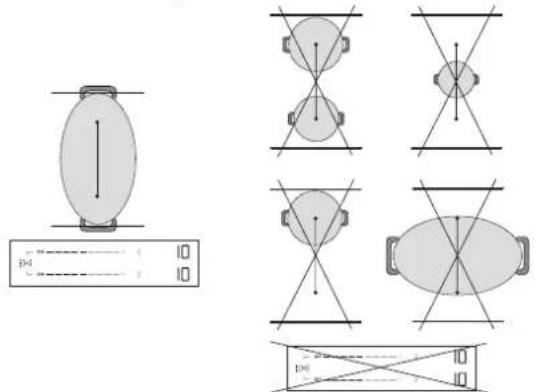
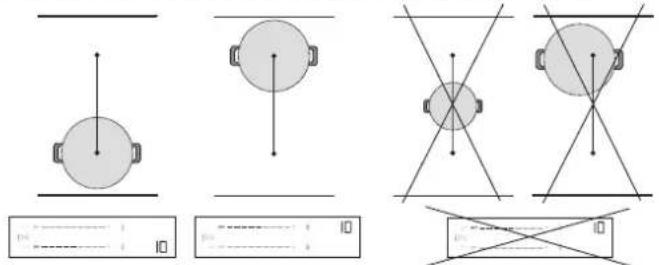
IMPORTANT: With pots and pans with a ferromagnetic base of 21 cm or smaller, it is recommended to use the single cooking zones without activating the flexible cooking mode (Flexi Zone). Place the cookware on either the front or rear zone, then activate that zone.
If the Flexi Zone is active, the Heat Control function will not be available or displayed on the control panel.
Refer to the figure below for examples of correct and incorrect usage.
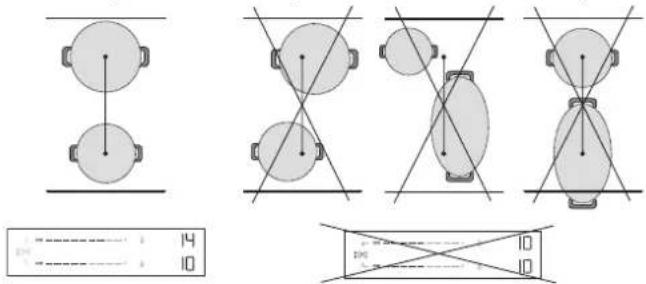
Flexi Zone used as two individual zones
When used with two pots or pans at the same time, it is advisable to place the first one on the rear zone and the second on the front zone (refer to figure below). In this case, the zones should be activated without using the flexible cooking mode (Flexi Zone).
For optimal performance, make sure both pans are centred in their respective zones. Do not move one pot/pan off-centre to make space for the other one. When positioning the cookware, do not go outside the cooking zone area or on top of the control panel.
Refer to the figure below for examples of correct and incorrect usage.
AUTOMATIC FUNCTIONS
This hob provides you with some automatic functions to assist you in the cooking process. Please note that they may not be available, depending on the power management setting (see "Power Management" section). For example, if power management has been set at 2.5 kW and some zones are already being used, the remaining power might not be enough to activate an automatic function. The hob will notify you with an acoustic signal.

MELTING
The function automatically sets the ideal power for melting. It allows you to melt delicate food such as chocolate or butter, and keep it melted without the risk of it burning or sticking to the pot/pan.

KEEP WARM
The function automatically sets the ideal power for keeping food warm after cooking and before serving. Note that liquids are reduced over time when food is kept warm.
These automatic functions are only available on standard cooking zones (zones with the icon ⚙).
How to activate automatic functions:
To activate the automatic functions, press the icon 🔔.
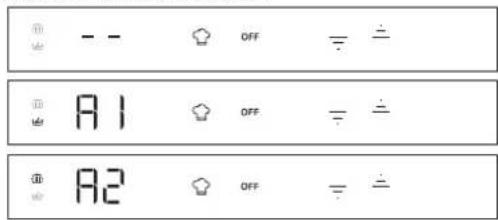
The display will show two dimly lit icons: 📋 (keep warm) on the top and 🔊 (melting) on the bottom.
Use the up ( — ) and down ( ) arrows to select the required function.
The display will show "A1" for melting and "A2" for keep warm and the corresponding icon will become brighter.

HEAT CONTROL - ASSISTED COOKING WITH TEMPERATURE
This function allows you to select and cook at the temperature you want (as you would do with an oven), rather than using standard power levels.
With this feature, the hob will automatically adjust the heat and maintain a stable cookware temperature, eliminating the need for constant adjustments.
This function is available only on cooking zones with the 📁 icon.
NOTE: The displayed temperature refers to the centre of the empty cookware. Depending on the specific cookware you are using, the temperature shown might be different from the actual cookware temperature. For optimal performance, it is advisable to place the cookware in the centre of the cooking zone and to activate the function when there is no 'residual heat' indicator (Holc) active.
IMPORTANT: This function is not meant to be used for boiling water or deep-frying. For this reason, the water won't boil even if a temperature higher than 100°C is selected. Refer to "Assisted Boil" section or use the Booster function for quick boiling.
How to activate Heat Control:
-
Place the cookware on the zone with the 🔒 icon.
-
Press the 🔊 icon.
-
Use the up arrow (—) to select the required temperature. The default setting is 45° C. You can increase the temperature up to 200° C, according to your needs (refer to the table below for cooking tips). Use the down arrow (—) to reduce the temperature.
-
During the heat-up phase, an up arrow ( ) will flash next to the selected temperature.
-
When the cookware has reached the set temperature, the hob will notify you with an acoustic signal and the up arrow (△) will stop flashing. Now you can add food.
-
Once the set point has been reached, you can use the up ( — ) and down ( — ) arrows to adjust the selected temperature in steps of 5°C.
-
If the new selected temperature is lower than current one, a down arrow (▽) will flash next to the selected temperature until the new set point has been reached. If the new selected temperature is higher than the current one, an up arrow (△) will flash next to the selected temperature until the new set point has been reached.
-
If you set a timer on a zone where the Heat Control function is active, the timer will start only after the set point has been reached. The display will show the timer countdown instead of the temperature. During the countdown, tap the up (二) or down (→) arrow to see the set temperature. After 3 seconds, the countdown will reappear.
HEAT CONTROL - COOKING TIPS
The table below gives some suggestions on cooking techniques for each temperature.
| LOW HEAT MEDIUM | M HEAT HIGH HEAT | ||||
| 45°C 80°C | 130°C 150°C 1 | 80°C 200°C | |||
| Melt (chocolate, butter) | Keep Warm | Gentle fry (vegetable base mix) | Scramble (eggs) | Sauté Stir-fry | Grill (beef, vegetables) |
| Defrost (meat, fish) | Thickening, Creaming (risotto) | Confit (vegetables) Deglaze | Caramelise (sugar, vegetables) | Brown (Pancakes, Toast) | Sear (steak, roast) |
| Simmer (120°C) | |||||
Refer to "Assisted Boil" section or use the Booster function for quick boiling.
NOTE:
- The system is able to monitor the cooking temperature, but it is always advisable to stay nearby when the hob is in use.
- Depending on the cooking zone activation sequence, the Heat Control function might not be available. The hob will notify you with an acoustic signal.

Scan the QR code to unlock the secrets of cooking with Heat Control. Discover how easy and rewarding it is to cook with temperature by visiting our website, where you can find guidance on a variety of cooking techniques, everyday meals and exciting new dishes through step-by-step recipes.
INDICATORS

RESIDUAL HEAT
If "Hot" appears on the display, this means that the cooking zone is hot. The indicator lights up even if the zone has not been activated but has been heated (due to the use of adjacent zones or because a hot pot has been placed on it). When the cooking zone has cooled down, the "Hot" message disappears.

ASSISTED BOIL (BOIL&COOK)
This function brings water to the boil and automatically adjusts the power to keep it simmering until you are ready to add your food. This function also helps prevent overboiling and wasted energy when compared to Booster mode. To save energy and speed up the boiling process, we recommend covering the pan with a lid.
Assisted Boil is available only on cooking zones with the 📁icon.
NOTE: When using this function, the pot must have a base diameter of 160 - 210 mm and be filled with water to between 1/2 and d 3/4 of its volume. Consider that the maximum volume that can be used with this function is about 4 lt. Do not add salt to the water before it has reached the boil, as this will prevent the system from working as expected.
For optimal performance, it is advisable to place the cookware in the centre of the cooking zone, use water at room temperature, and activate the function when there is no 'residual heat' indicator present.
IMPORTANT: This function is meant to be used for boiling water only, not for milk or other types of liquid.
Based on the cookware available on the market, the function might not perform as expected.
How to activate Assisted Boil:
-
Fill the pot with water (see the notes above).
-
Place the cookware on a cooking zone with the icon.
-
Select the Assisted Boil button ( ).
-
Press the Assisted Boil button ( ) one time if Heat Control is available on one cooking zone only. If Heat Control is available on more than one cooking zone, press the button several times until you reach the cooking zone where you want to use the Assisted Boil function. A "-b-" indication will appear in the display to guide you through the zones.
-
When the zone is selected, you will see -b-flashing on the zone display for a few seconds and then the function will start automatically.
-
When the Assisted Boil function starts, an animation will appear in the display during the heat-up phase.
-
Within 90 seconds from when the water starts boiling, the function will notify you of the fact with an acoustic signal. The animation will disappear, and the hob automatically sets the power level at 15 to maintain a gentle boil.
-
Depending on the cookware used, the power level may automatically drop to level 15 without reaching the boiling point of the water. In order to reach boiling point, you can increase the power level of the cooking zone in use. Alternatively, you can try using another pan that is compatible with induction cooking. If the conditions described above do not occur, we suggest switching the Boil&Cook function off and setting the power levels manually to continue cooking.
-
Add your food and, if necessary, change the power level to adjust the strength of the boil as required. The power selection will be limited to those levels suitable for boil maintenance (i.e. levels 10 - 18).
NOTE:
- Whether the water is boiling or not, after about 15 minutes from the activation of the function the hob automatically sets the power level to 15 and the animation disappears.
- Depending on the Power Management setting or the cooking zone activation sequence, the Assisted Boil function might not be available. The hob will notify you with an acoustic signal.
- When using this function, you will not be able to set a timer during the water heat-up phase. The timer can only be enabled after receiving the acoustic notification that the water has reached boiling point.
- The system is able to monitor the boiling process, but it is always advisable to stay nearby when the hob is in use.
- If the hob offers the possibility of using Boil&Cook in multiple zones, only one Boil&Cook function can be activated on each side. During the selection process, the animation (snake) will still be displayed on the same side for a few seconds without the function being able to be activated.

POT INCORRECTLY POSITIONED OR MISSING
This symbol appears if the pot is not suitable for induction cooking, is not positioned correctly or is not of an appropriate size for the cooking zone selected. If no pot is detected within 30 seconds of making the selection, the cooking zone switches off.
COOKING TABLE
The cooking table offers cooking tips for each power level. The actual power delivered for each power level depends on the cooking zone dimension and on the cookware used.
| POWER LEVEL COOKING | TIPS |
| Maximum power (P) | Booster* - Bring water to a boil as quickly as possible. Do not use with an empty pan or oil/butter. |
| 17 – 18 Bring water to a boil, deep fry** frozen products. | |
| 15 – 16 | Maintain a lively boil, sear, blister, stir-fry, brown. |
| 10 – 14 | Maintain a gentle boil, preheat, grill (for a long period of time), stir-fry, sauté, caramelise, brown, pancakes. |
| 5 – 9 | Simmer, stew, thicken, slow cook. |
| 3 – 4 Keep warm, defrost. | |
| 1 – 2 Melting, creaming (risotto). | |
| Zero power (OFF) | Hob is in stand-by or off mode (possible end-of-cooking residual heat, indicated by “Hot”). |
*Booster is a special mode that uses a power level higher than 18, to heat up water faster. This mode can be maintained for a maximum time of 10 min. depending on the zone used. After this time, the power will be automatically reduced to level 18.
** For deep frying frozen products such as French fries, it is recommended to use non Flexi Zone cooking zones. If you want to deep fry using Flexi Zone cooking zones, it is recommended to use the front one.
CLEANING AND MAINTENANCE
Important:
- Before cleaning, make sure the cooking zones are switched off and that the residual heat indicator ("Hot") is not displayed.
- Do not use abrasive sponges or scouring pads as they may damage the glass.
• After each use, clean the hob (when it is cool) to remove any food residue deposits or stains. - A surface that is not kept suitably clean may reduce the sensitivity of control panel buttons.
- Only use a scraper if residue is stuck to the hob. Follow the scraper manufacturer's instructions to avoid scratching the glass.
- Sugar or foods with a high sugar content can damage the hob and must be removed immediately.
- Salt, sugar and sand might scratch the glass surface.
- Use a soft cloth, absorbent kitchen paper or a special hob cleaner (follow the manufacturer's instructions).
TROUBLESHOOTING
- Check that the electricity supply has not been shut off.
- If you cannot to turn the hob off after using it, disconnect it from the power supply.
-
If alphanumeric codes appear on the display when the hob is switched on, consult the following table for instructions.
-
Liquid spills in the cooking zones can cause the pots to move or vibrate.
• After cleaning the hob, dry thoroughly.
If there is the CleanProtect logo on the glass, the hob has been treated with CleanProtect technology. This exclusive coating ensures excellent cleaning results and keeps the hob surface shiny for longer.
It is advisable to clean daily, after each use.
To clean CleanProtect hobs, follow these recommendations:
- Thoroughly wet the zones that need to be cleaned with water, making sure the entire stained area is covered. Be careful not to spill water on the control panel.
- Wetting procedure:
• In normal conditions, wait at least 2 minutes.
• In heavy-dirt conditions, wait for at least 5 minutes.
- If the water dries on the hob, wet it again.
- Use a non-abrasive sponge to remove deposits, and dry the hob after cleaning.
| DISPLAY CODE/ISSUE DETECTED | DESCRIPTION POSSIBLE CAUSES SOLUTION | ||
| F9E0 Wrong power cord connection. | The power supply connection is not exactly as indicated in “Electrical connection” section. | Make the power supply connection according to the “Electrical connection” section. | |
| F0EA | The control panel switches off because of excessively high temperatures. | The internal temperature of electronic parts is too high. | Wait for the hob to cool down before using it again. |
| F0E9The power level is automatically decreased.A cooking zone turns OFF automatically.The hob turns OFF automatically. | The cooking zone turns off when the temperatures are too high.The power level is decreased, or the cooking zone turns off or the hob turns off when the temperatures are too high. | The internal temperature of electronic parts is too high.Hob ventilation may not be adequate to ensure the proper functioning of the hob. | Wait for the cooking area to cool down before using it again.To ensure the appliance works properly, the hob must receive adequate ventilation from a sufficient fresh air supply. Check the hob has been installed respecting the indications described in the "Installation" section. Ensure that no object is obstructing the rear and lower rear part of the hob. |
| F0E2, F0E4, F0E6, F0E8, F1E1, F2E1, F6E1, F6E2, F7E5, F7E6, FCE1, FCE2, FCE3 | Disconnect the hob from the power supply.Wait a few seconds (more than 10), then reconnect the hob to the power supply.If the problem persists, call the service centre and specify the error code that appears on the display. | ||
Please note: The presence of water, or liquid spilled from pots or any objects resting on a hob button, can accidentally activate or deactivate the control panel lock function.
| DISPLAY CODE/ISSUE DETECTED | DESCRIPTION POSSIBLE CAUSES SOLUTION | ||
| d E [when the hob is off] | The hob does not heat up.The functions do not come on. | DEMO MODE on. | Follow the instructions in the "First time use" section. |
| A special function does not turn on and the hob produces an acoustic signal. | The hob does not allow a special function to be activated. | The power regulator limits the special function activation in accordance with the power management setting selected for the hob (e.g. 2.5 kW). | See the "Power management" section. |
| When you choose a power level or use the Booster function, the power level automatically decreases. | The hob automatically sets the maximum available power level (even lower than the set one) to ensure that the cooking zone can be used. | The power regulator limits the special function activation in accordance with the power management setting selected for the hob (e.g. 2.5 kW).The Booster function can have a different duration depending on the zone used. After the Booster time has elapsed, the power will be automatically reduced to level 18.Hob ventilation may not be adequate to ensure the proper functioning of the hob. | See the "Power management" or "Booster function" section.To ensure the appliance works properly, the hob must receive adequate ventilation from a sufficient fresh air supply. Check the hob has been installed respecting the indications described in the "Installation" section. Ensure that no object is obstructing the rear and lower rear part of the hob. |
| U U | Cookware is not detected.Cooking zone switches off after 30 seconds. | This symbol appears if the pot is not suitable for induction cooking, is not positioned correctly or is not of an appropriate size for the cooking zone selected. If no pot is detected within 30 seconds of making the selection, the cooking zone switches off. | If your cookware is suitable for induction cooking (see the "Accessories" section) and correctly positioned on the required cooking zone, try using it on a smaller cooking zone. Otherwise, please use appropriate cookware (See the "Accessories" section). |
| The hob makes two short acoustic sounds and then switches OFF by itself. The "OFF" message is subsequently displayed for up to 60 seconds, during which time the hob cannot be turned back on and it repeats the two short acoustic sounds every 5 seconds. | Water spillage, food overflow and/or an object positioned on the control panel buttons can mimic your finger and accidentally activate or deactivate any of the hob buttons:• the ON/OFF button, causing the hob to turn off unintentionally,• the key-lock button, causing the unwanted activation of the key-lock function if pressed continuously for more than 3 seconds. The function remains active even after the hob has switched off, with the key-lock icon and LED on,• the scroll keypad, causing the unwanted change of power levels.The hob switches off by itself (showing the "OFF" message) if it is not cleaned within 8 seconds. | Dry and/or clean and/or remove the object so the hob can be turned back on 60 seconds after the OFF message appeared.If the key lock function has been accidentally activated, press the key-lock button for 3 seconds to disable it.Press the ON/OFF button to switch on the hob. | |
| Water does not boil when Heat Control (B) is used. | Water does not boil when the temperature is set using the Heat Control function. | You are using Heat Control to boil water. | Use Assisted Boil (Boil&Cook) or Booster function. |
| A clicking and/or tick-tack sound is heard when cookware is positioned. | These continuous clicking and/or tick-tack noises occur when the pan is not able to receive the full power delivered for the power level set.The pan diameter may be lower than the minimum indicated in the user manual for specific cooking zones. Even if you use a pan with the correct dimensions, some pan models have a base partially covered by metal inserts (or without an even ferromagnetic distribution), and they do not always perform as expected. | Use a pan with a diameter larger than the minimum indicated in the manual for the specific cooking zones, or use a more high-performing pan (refer to the "Accessories" section). | |
| The hob is turned off. | The hob will automatically turn off in the following situations:• In the event of water spillage, food overflow, or objects positioned on the control panel buttons that could accidentally activate the ON/OFF button. If these items are not removed within 8 seconds, the hob will automatically switch off while producing a sound.• If there is no interaction with the control panel for more than 30 seconds, and no cooking zone is active.• If no cookware has been detected for more than 30 seconds and there has been no interaction with the control panel for the same time.• The maximum working time for a power level or function has elapsed, and there has been no interaction with the hob for more than 30 seconds.• Other cases not specified here. | See the "Daily use" section for further information.Turn on the hob manually. | |
| While using the Assisted Boil (Boil&Cook) function, the water does not reach boiling point.orThe function does not indicate that boiling point has been reached within about 90 seconds from when the water starts to boil. | Depending on the cookware or the amount of water used, boiling point might not be reached.Whether the water is boiling or not, the power level may automatically drop to 15 after about 15 minutes from when the function is activated. | If the water is not boiling, bring it to the boil by increasing the power level of the cooking zone in use. Alternatively, you can try using another pan suitable for induction cooking.If the function does not indicate boiling within about 90 seconds from when the water starts boiling, we suggest you switch off the Boil&Cook function and use power levels to continue cooking. | |
SOUNDS PRODUCED DURING OPERATION
Induction hobs may whistle or creak during normal operation.
These noises actually come from the cookware and are linked to the characteristics of the pan bases (e.g. when the bottoms are made from different layers of material, or are uneven).
They may vary according to the type of cookware used and the amount of food contained, and are not the symptom of something wrong.
Induction hobs may produce continuous clicking and/or tick-tack sounds with a positioned pot/pan. These sounds may occur when the pan is not able to receive the full power delivered for the power level set. Use a pan with a diameter larger than the minimum indicated in the manual for the specific cooking zones, or use a more high-performing pan (refer to the "Accessories" section).
Water spillage, food overflow and/or an object positioned on the control panel buttons can mimic your finger and accidentally activate or deactivate any of the hob buttons, as well as producing acoustic signals due to the contact between the objects and the buttons. If these items are not removed within 8 seconds, the hob will automatically switch off while producing a sound which will then be repeated every 5 seconds until the object or water is removed from the control panel, even after switch-off. To avoid switch-off, remove any spilled liquids from the user interface and thoroughly dry it within 8 seconds, or use the Wipe function which gives you 30 seconds for cleaning and drying. Remember that the ON/OFF button will always be active.
AFTER-SALES SERVICE
BEFORE CALLING THE AFTER-SALES SERVICE:
-
See if you can solve the problem by yourself with the help of the TROUBLESHOOTING suggestions.
-
Switch the appliance off and back on again to see if the fault persists.
IF THE FAULT STILL OCCURS EVEN AFTER THE ABOVE CHECKS, GET IN TOUCH WITH YOUR NEAREST AFTER-SALES SERVICE.
When contacting our customer after-sales service, always give:
- a brief description of the fault;
- the type and exact model of the appliance;
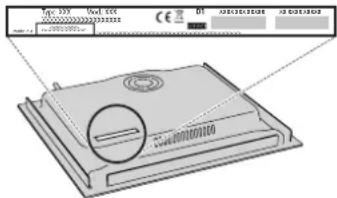
- Ind. C.
- the serial number (number after the letters SN on the rating plate located under the appliance). The serial number is also indicated in the documentation;
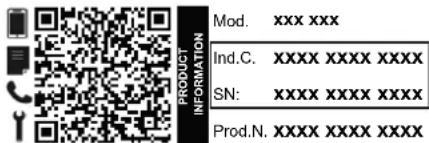
- your full address;
- your telephone number;
If any repairs are required, please contact an authorized after-sales service (to guarantee that original spare parts will be used and repairs carried out correctly).
Policies, standard documentation and additional product information can be found by:
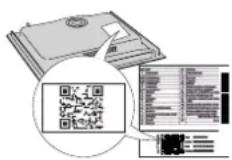
• Using QR code in your appliance;
• Visiting our website docs.bauknecht.eu;
• Alternatively, contact our After-sales Service (See phone number in the warranty booklet). When contacting our After-sales Service, please state the codes provided on your product's identification plate.
PRODUKTBESCHREIBUNG
-
Kochfeld
-
Bedienfeld
BEDIENFELD
FLEXIBLE KOCHZONE (FLEXI ZONE)

HEAT CONTROL - UNTERSTÜTZTES GAREN MIT TEMPERATUR
DÉCLARATION DE CONFORMITÉ
DESCRIPTION DU PRODUIT
FONCTIONS AUTOMATIQUES

HEAT CONTROL - CUISSON ASSISTÉE PAR LA TEMPÉRATURE
Comment activer Heat Control:
PRODUCTBESCHRIJVING
FLEXIBELE KOOKZONE (FLEXI ZONE)
AUTOMATISCHE FUNCTIE

HEAT CONTROL - ONDERSTEUND KOKEN MET TEMPERATUUR

HEAT CONTROL - COTTURA ASSISTITA CON LA TEMPERATURA
FUNCIONES AUTOMÁTICAS

POPIS PRODUKTU
FUNKCE WIPE (SETŘENÍ)
Flexi Zone se používá jako dvě samostatné zóny

HEAT CONTROL - ASISTOVANÉ VAŘENÍ S TEPLOTOU
HUSHOLDNINGSAPPARATER
PRODUKTBESKRIVELSE
- Kogesektion
- Betjeningspanel
BETJENINGSPANEL
AUTOMATISKE FUNKTIONER
ASSISTERET KOGNING (BOIL&COOK)
PRODUKTBESKRIVELSE
-
Kokeoverflate
-
Kontrollpanel
BETJENINGSPANEL

HEAT CONTROL - ASSISTERT MATLAGING MED TEMPERATUR
BESKRIVNING AV PRODUKTEN
- Spishäll
- Kontrollpanel
KONTROLLPANEL
AUTOMATISKA FUNKTIONER

HEAT CONTROL - ASSISTERAD MATLAGNING MED TEMPERATUR
AUTOMAATTISET TOIMINNOT

HEAT CONTROL - AVUSTETTU RUOANVALMISTUS LÄMPÖTILAN JLLA


- PERMITTED USE
- INSTALLATION
- ELECTRICAL WARNINGS
- CLEANING AND MAINTENANCE
- DISPOSAL OF PACKAGING MATERIALS
- DISPOSAL OF HOUSEHOLD APPLIANCES
- ENERGY SAVING TIPS
- DECLARATION OF CONFORMITY
- NOTE
- ELECTRICAL CONNECTION
- THANK YOU FOR BUYING A BAUKNECHT PRODUCT
- PLEASE SCAN THE QR CODE ON YOUR APPLIANCE IN ORDER TO REACH MORE INFORMATION
- PRODUCT DESCRIPTION
- CONTROL PANEL
- ACCESSORIES
- ADAPTERS FOR POTS/PANS UNSUITABLE FOR INDUCTION
- FIRST TIME USE
- POWER MANAGEMENT
- EMPTY POTS AND PANS
- SUITABLE SIZE OF PAN/POT BASE FOR THE DIFFERENT COOKING ZONES
- SETTING MENU: CHANGING THE BASIC SETTINGS
- DAILY USE
- ① SWITCHING THE HOB ON/OFF
- POSITIONING
- TO ACTIVATE THE COOKING ZONES
- TO DEACTIVATE THE COOKING ZONES
- CONTROL PANEL LOCK
- WIPE FUNCTION
- TO ACTIVATE THE WIPE FUNCTION
- TIMER
- TO ACTIVATE THE TIMER
- TO DEACTIVATE THE TIMER
- TIMER INDICATOR
- FUNCTIONS
- P BOOSTER FUNCTION
- FLEXIBLE COOKING ZONE (FLEXI ZONE)
- FLEXI ZONE USED AS TWO INDIVIDUAL ZONES
- AUTOMATIC FUNCTIONS
- MELTING
- KEEP WARM
- THESE AUTOMATIC FUNCTIONS ARE ONLY AVAILABLE ON STANDARD COOKING ZONES (ZONES WITH THE ICON ⚙)
- HOW TO ACTIVATE AUTOMATIC FUNCTIONS
- HEAT CONTROL - ASSISTED COOKING WITH TEMPERATURE
- THIS FUNCTION IS AVAILABLE ONLY ON COOKING ZONES WITH THE 📁 ICON
- HOW TO ACTIVATE HEAT CONTROL
- HEAT CONTROL - COOKING TIPS
- INDICATORS
- RESIDUAL HEAT
- ASSISTED BOIL (BOIL&COOK)
- HOW TO ACTIVATE ASSISTED BOIL
- POT INCORRECTLY POSITIONED OR MISSING
- COOKING TABLE
- IMPORTANT
- TROUBLESHOOTING
- TO CLEAN CLEANPROTECT HOBS, FOLLOW THESE RECOMMENDATIONS
- SOUNDS PRODUCED DURING OPERATION
- AFTER-SALES SERVICE
- BEFORE CALLING THE AFTER-SALES SERVICE
- IF THE FAULT STILL OCCURS EVEN AFTER THE ABOVE CHECKS, GET IN TOUCH WITH YOUR NEAREST AFTER-SALES SERVICE
- PRODUKTBESCHREIBUNG
- BEDIENFELD
- FLEXIBLE KOCHZONE (FLEXI ZONE)
- HEAT CONTROL - UNTERSTÜTZTES GAREN MIT TEMPERATUR
- DÉCLARATION DE CONFORMITÉ
- DESCRIPTION DU PRODUIT
- FONCTIONS AUTOMATIQUES
- HEAT CONTROL - CUISSON ASSISTÉE PAR LA TEMPÉRATURE
- COMMENT ACTIVER HEAT CONTROL
- PRODUCTBESCHRIJVING
- FLEXIBELE KOOKZONE (FLEXI ZONE)
- AUTOMATISCHE FUNCTIE
- HEAT CONTROL - ONDERSTEUND KOKEN MET TEMPERATUUR
- HEAT CONTROL - COTTURA ASSISTITA CON LA TEMPERATURA
- FUNCIONES AUTOMÁTICAS
- POPIS PRODUKTU
- FUNKCE WIPE (SETŘENÍ)
- FLEXI ZONE SE POUŽÍVÁ JAKO DVĚ SAMOSTATNÉ ZÓNY
- HEAT CONTROL - ASISTOVANÉ VAŘENÍ S TEPLOTOU
- HUSHOLDNINGSAPPARATER
- PRODUKTBESKRIVELSE
- BETJENINGSPANEL
- AUTOMATISKE FUNKTIONER
- ASSISTERET KOGNING (BOIL&COOK)
- HEAT CONTROL - ASSISTERT MATLAGING MED TEMPERATUR
- BESKRIVNING AV PRODUKTEN
- KONTROLLPANEL
- AUTOMATISKA FUNKTIONER
- HEAT CONTROL - ASSISTERAD MATLAGNING MED TEMPERATUR
- AUTOMAATTISET TOIMINNOT
- HEAT CONTROL - AVUSTETTU RUOANVALMISTUS LÄMPÖTILAN JLLA
Brand : BAUKNECHT
Model : BTX8017DCF
Category : Cooker