
BILRESA 706.041.72 - Smart Home IKEA - Free user manual and instructions
Find the device manual for free BILRESA 706.041.72 IKEA in PDF.
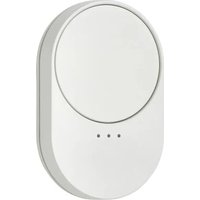


| Product type | Smart home remote control with wheel |
| Power supply | 2 AAA/HR03 batteries (1.5 V) |
| Main functions | Control of lights, speakers, and outlets; dimming, volume, track selection, on/off |
| Connectivity | Thread, Matter, IKEA Home smart |
| Range | 10 m in open field |
| Operating frequency | 2402 - 2480 MHz |
| Output power | 5 dBm (EIRP) |
| Operating temperature | 0 °C to 40 °C |
| Care and cleaning | Clean with a dry cloth |
| Safety | Indoor use only; do not immerse; observe battery polarity; replace with identical batteries |
| Reset | Press and hold the System button for 10 seconds |
| Compatibility | IKEA connected products, Matter systems, IKEA Home smart |
| Number of groups | Up to 3 product groups |
| Recommended battery type | LADDA AAA HR03 (rechargeable) or alkaline AAA |
| Estimated battery life | Approx. 24 months with new batteries |
Frequently Asked Questions - BILRESA 706.041.72 IKEA
User questions about BILRESA 706.041.72 IKEA
0 question about this device. Answer the ones you know or ask your own.
Ask a new question about this device
Download the instructions for your Smart Home in PDF format for free! Find your manual BILRESA 706.041.72 - IKEA and take your electronic device back in hand. On this page are published all the documents necessary for the use of your device. BILRESA 706.041.72 by IKEA.
USER MANUAL BILRESA 706.041.72 IKEA
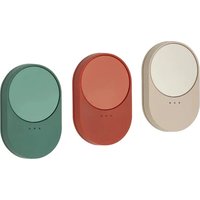
BILRESA remote control with scroll wheel is designed to control up to 3 groups of products. It's a Matter-certified smart product that works with the IKEA Home smart system or any other system that uses the Matter standard. Pair it directly with a smart product from IKEA to use it without a smart system.
Getting started
With IKEA Home smart system
To connect to an IKEA Home smart system, a hub from IKEA and the IKEA Home smart app are needed.
- Turn the remote control on by inserting 2 x AAA HR03 batteries. It will automatically power on and go into pairing mode for 15 minutes to allow connection to an IKEA Home smart system.
- Scan the QR Code from the yellow cover in the packaging and follow the instructions in the IKEA Home smart app to connect the remote control to the system. Each product has a unique QR code.
To put the remote control back into pairing mode, open the battery compartment and press the system button.
With a Matter-certified smart system
To connect to a smart system that uses the Matter standard, a hub and app from the same manufacturer are needed.
- Turn the remote control on by inserting 2 x AAA HR03 batteries. It will automatically power on and go into pairing mode for 15 minutes to allow connection to a Matter-certified smart system.
- Scan the Matter QR Code from the front cover of the Advice & Care Instructions and follow the instructions in the smart home manufacturer's app. The Matter QR Code is also printed on the remote control.
To put the remote control back into pairing mode, open the battery compartment and press the system button.
Without a smart system
Smart products from IKEA can be paired directly to each other without a smart system.
Pair one or more smart products to each of the 3 groups on the remote control. Switch between product groups by pressing beneath the LED lights. Each light controls a different group of products.
Turn the remote control on by inserting 2 x AAA HR03 batteries. Quick-press the system button 4 times and hold the remote within 5 cm of the smart product it should be paired with. Pairing mode will be open for 30 seconds and default to product group 1.
When at least one smart product is connected to group 1, group 2 will be available for pairing. Press under the LED lights until group 2 is illuminated and follow the pairing instructions above to connect products to that group. Once group 2 is connected to at least one product, group 3 can be connected.
Note, a maximum of 10 smart products from IKEA can be controlled with each group on the remote control by direct pairing. If the products intended for pairing are close together, turn off and disconnect the ones already connected while adding the next product.
Using the product
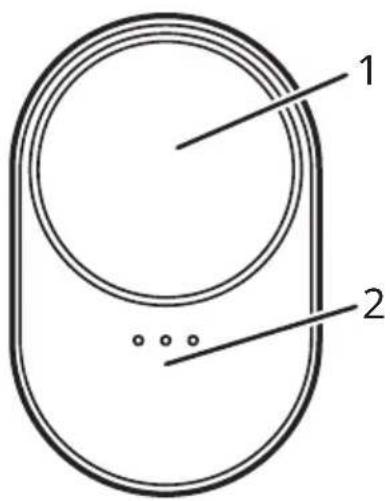
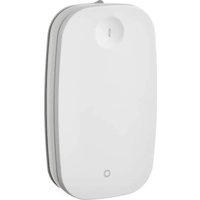
Wheel (1)
Scroll the wheel, single-press, multi-press and long-press to control all products in the group.
Note, wheel functions depend on the product type connected to the remote control and the system it is connected to.
Control under the LED lights (2)
Press to switch between product groups.
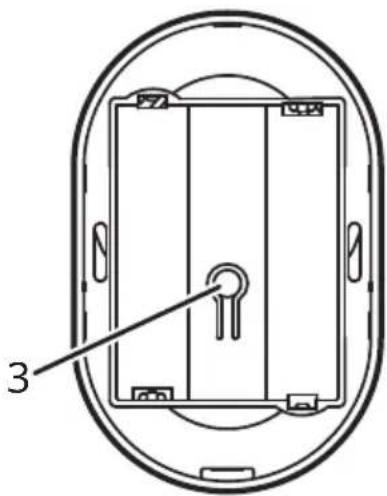
System button (3)
Press to put the remote control into pairing mode or to reset.
Buttons and controls for smart products from IKEA
| Scroll wheel (press) | Scroll wheel (scroll) | Control under the LED light | System button | |
| Lights• Single-press: ON/OFF• Double-press: next colour• Triple-press: previous colour | • Scroll left and right: dim the lights | • Single-press: next product group | • Single-press: pairing mode with a smart system;• Quick-press 4 times: pairing directly with smart product from IKEA | |
| Speakers• Single-press: PLAY/PAUSE• Double-press: next track• Triple-press: previous track | • Scroll left and right: volume up/down | • Single-press: next product group | • Single-press: pairing mode with a smart system | |
| Plugs• Single-press: ON/OFF N/A • Single-press: next | product group | • Single-press: pairing mode with a smart system• Quick-press 4 times: pairing directly with a smart product from IKEA |
Pairing mode
The remote control needs to be in pairing mode to connect to an IKEA Home smart system, any system that uses the Matter standard, or to pair directly with a smart product from IKEA.
To connect to an IKEA Home smart system or any other system that uses the Matter standard, press the system button to put the remote control into pairing mode. The pairing will be open for 15 minutes. All 3 LEDs will pulse while pairing and then blink twice once connected.
To pair directly with a smart product from IKEA, quick-press the system button 4 times. Select a group by pressing the control under the LED lights and hold the remote within 5 cm of the smart product it should be paired with. Pairing mode will be open for 30 seconds. The LED assigned to the selected group will blink fast while pairing and then blink twice once connected.
Please note, each group needs at least one smart product before other products can be paired to the next group.
Factory reset
To reset the remote control, open the battery compartment and press and hold the system button for 10 seconds or until the red LED light stops blinking. It will automatically restart and be available for pairing with a smart system for 15 minutes.
Battery care
When the battery is low, a red LED light will blink twice when any button or control is pressed. If the remote control is connected to an IKEA Home smart system, the battery status will also be shown in the IKEA Home smart app. 2 x new LADDA AAA HR03 batteries will usually power the remote control for 24 months before they need to be changed.
Care instructions
To clean the product, wipe with a dry cloth.
Good to know
- If the product is connected to an IKEA Home smart system, additional features are available in the IKEA Home smart app.
- If the product is connected to another smart system that uses the Matter standard, check with the manufacturer for available features.
- This product uses Thread technology to communicate with other smart products. A Thread border router is needed to connect to Matter systems. Many smart products or hubs have a Thread border router built in.
- Different building materials and placement of the product can affect the wireless connectivity range.
Safety and compliance
WARNING
- Use only indoors.
- Discard the product if damaged.
- Never submerge in water or other liquids.
- The product is only suitable for mounting at heights up to 2m.
- Children should be supervised to ensure they do not play with the product.
- Do not use batteries which are low in charge or empty.
- Always insert the batteries according to the polarity indications (+/-).
- Risk of explosion if either battery is replaced by an incorrect type. Dispose of used batteries according to the instructions.
- Do not mix batteries of different capacities, types or date stamps.
- Batteries should be handed in for recycling in accordance with local environmental regulations for waste disposal.
- Operating temperature: 0°C to 40°C (32°F to 104°F).
Technical data
Model: BILRESA
Type: E2490, E2704
Input: 2 x AAA/HR03
Range: 10 m in open air.
Operating frequency: 2402 - 2480 MHz
Output power: 5 dBm (EIRP)
Recommended batteries:
LADDA AAA HR03 rechargeable batteries.
Manufacturer: IKEA of Sweden AB
Address: Box 702 SE-343 81 Älmhult SWEDEN
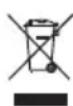
The crossed-out wheeled bin symbol indicates that the item should be disposed of separately from household waste. The item should be handed in for recycling in accordance with local environmental regulations for waste disposal. By separating a marked item from
household waste, you will help reduce the volume of waste sent to incinerators or land-fill and minimize any potential negative impact on human health and the environment. For more information, please contact your IKEA store.
Only applicable for US and Canada
This device complies with Part 15 of the FCC Rules/Innovation Science and Economic Development Canada's licence-exempt RSS standard(s). Operation is subject to the following two conditions:
(1) This device may not cause harmful interference, and (2) this device must accept any interference received, including interference that may cause undesired operation.
WARNING:
Any changes or modifications to this unit not expressly approved by the party responsible for compliance could void the user's authority to operate the equipment.
NOTE:
This equipment has been tested and found to comply with the limits for a Class B digital device, pursuant to part 15 of the FCC Rules.
These limits are designed to provide reasonable protection against harmful interference in a residential installation.
This equipment generates, uses and can radiate radio frequency energy and, if not installed and used in accordance with the instructions, may cause harmful interference to radio communications. However, there is no guarantee that interference will not occur in a particular installation. If this equipment does cause harmful interference to radio or television reception, which can be determined by turning the equipment off and on, the user is encouraged to try to correct the interference by one or more of the following measures:
- Reorient or relocate the receiving antenna.
- Increase the separation between the equipment and receiver.
- Connect the equipment into an outlet on a circuit different from that to which the receiver is connected.
- Consult the dealer or an experienced radio/TV technician for help.
German
Product description
Power supply: 2 x AAA/HR03
Rechargeable batteries LADDA AAA HR03.
Manufacturer: IKEA of Sweden AB
Address: Box 702, SE-343 81 Älmhult, SWEDEN
Manufacturer: IKEA of Sweden AB
Manufacturer: IKEA of Sweden AB
Address: Box 702 SE-343 81 Älmhult SWEDEN

Manufacturer: IKEA of Sweden AB
Address: Box 702, SE-343 81 Älmhult, SWEDEN
Manufacturer: IKEA of Sweden AB
Address: Box 702 SE-343 81 Älmhult SWEDEN

Input: 2 x AAA/HR03
Range: 10 m in open space.
Operating frequency: 2402 - 2480 MHz
Manufacturer: IKEA of Sweden AB
Address: Box 702 SE-343 81 Älmhult SWEDEN
With the IKEA Home smart system
Manufacturer: IKEA of Sweden AB
Address: Box 702 SE-343 81 Älmhult SWEDEN
Attention!
Manufacturer: IKEA of Sweden AB
Address: Box 702 SE-343 81 Älmhult SWEDEN

Manufacturer: IKEA of Sweden AB
Address: Box 702 SE-343 81 Älmhult SWEDEN

- GETTING STARTED
- WITH IKEA HOME SMART SYSTEM
- WITH A MATTER-CERTIFIED SMART SYSTEM
- WITHOUT A SMART SYSTEM
- USING THE PRODUCT
- WHEEL (1)
- CONTROL UNDER THE LED LIGHTS (2)
- SYSTEM BUTTON (3)
- PAIRING MODE
- FACTORY RESET
- BATTERY CARE
- CARE INSTRUCTIONS
- GOOD TO KNOW
- SAFETY AND COMPLIANCE
- WARNING
- TECHNICAL DATA
- RECOMMENDED BATTERIES
- MANUFACTURER: IKEA OF SWEDEN AB
- ONLY APPLICABLE FOR US AND CANADA
- NOTE
- GERMAN
- PRODUCT DESCRIPTION
- ADDRESS: BOX 702 SE-343 81 ÄLMHULT SWEDEN
- WITH THE IKEA HOME SMART SYSTEM
- ATTENTION
Brand : IKEA
Model : BILRESA 706.041.72
Category : Smart Home