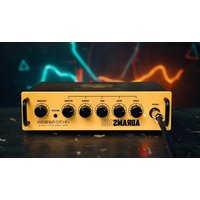
Abrams 100 - Guitar amp Electro Harmonix - Free user manual and instructions
Find the device manual for free Abrams 100 Electro Harmonix in PDF.


| Product Type | Guitar Amplifier |
| Brand | Electro Harmonix |
| Model | Abrams 100 |
| Rated Power | 100 watts |
| Speaker Configuration | 1 built-in speaker (type not specified) |
| Dimensions (approx.) | 50 x 45 x 25 cm |
| Weight (approx.) | 18 kg |
| Power Supply | Mains 230 V / 50 Hz (adaptable 110-240 V) |
| Power Consumption | Approximately 200 W |
| Inputs | 1 x 6.35 mm jack input (Input) |
| Controls | Gain, Bass, Mid, Treble, Reverb, Volume, Bright |
| Functions | Built-in reverb, Bright switch (treble) |
| Ventilation | Do not block - at least 15 cm clearance around |
| Maximum Sound Level | Very high - risk of hearing damage |
| Safety | Grounding mandatory; do not expose to moisture or flames |
| Maintenance | Clean with a dry cloth only |
| Repairs | Refer to qualified personnel - no user-serviceable parts |
| Included Accessories | Mains power cable |
| Country of Manufacture | United States (New York City) |
| Warranty | Manufacturer warranty - unauthorized modifications void it |
Frequently Asked Questions - Abrams 100 Electro Harmonix
User questions about Abrams 100 Electro Harmonix
0 question about this device. Answer the ones you know or ask your own.
Ask a new question about this device
Download the instructions for your Guitar amp in PDF format for free! Find your manual Abrams 100 - Electro Harmonix and take your electronic device back in hand. On this page are published all the documents necessary for the use of your device. Abrams 100 by Electro Harmonix.
USER MANUAL Abrams 100 Electro Harmonix
Congratulations on your purchase of the Electro-Harmonix ABRAMS100, 100-Watt amplifier. The ABRAMS100 is a guitar and musical instrument amplifier with three bands of EQ, digital spring reverb, and an effects loop. It sports a high headroom instrument preamplifier but also allows for connecting an external preamp directly to the Abram's power amp through the Effects Loop Return input. A built-in universal power supply means the ABRAMS100 is ready to be powered anywhere in the world.
Important Safety Instructions
- Read and keep these instructions.
- Heed all warnings.
- Follow all instructions.
- Clean only with a dry cloth.
- Connect the amplifier to a mains socket outlet with a protective earthing connection.
- Do not defeat the safety purpose of the polarized or grounding type plug. If the provided plug does not fit into your outlet, consult an electrician for replacement of the obsolete outlet.
- Protect the power cord from being walked on or pinched.
- Unplug this amplifier during lightning storms or when unused for long periods of time.
- Where the mains plug or appliance coupler is used as the disconnect device, the disconnect device shall remain readily operable.
- Apparatus is not for use in tropical climates.
- Do not install near any heat sources such as radiators, heat registers, stoves, or other apparatus (including amplifiers) that produce heat.
- No naked flame sources, such as lighted candles, should be placed on the apparatus.
- WARNING: To reduce the risk of fire or electric shock, do not expose this apparatus to rain or moisture.
- Do not expose this apparatus to dripping or splashing and ensure that no object filled with liquids is placed on the equipment. Do not use this apparatus near water.
- Maintain at least 6 in. of unobstructed air space on either side of the unit to allow for proper ventilation and cooling. Air must be capable of freely moving around the device.
- The ventilation should not be impeded by covering the ventilation openings with items such as newspapers, tablecloths, curtains, etc.
- This amplifier is capable of producing very high sound pressure levels which may cause temporary or permanent hearing damage. Use care when adjusting volume levels during use.
- Do not operate the amplifier without a connected loudspeaker load.
- Refer all servicing and maintenance to qualified service personnel. Changes and modifications not expressly approved by EHX can void the warranty.
- Servicing is required when the apparatus has been damaged in any way, such as power-supply cord or plug is damaged, liquid has been spilled or objects have fallen into the apparatus, the apparatus has been exposed to rain or moisture, does not operate normally, or has been dropped.
- DO NOT attempt to open the chassis. There are no user serviceable parts.
TO REDUCE THE RISK OF FIRE OR ELECTRIC SHOCK DO NOT EXPOSE THIS PRODUCT TO RAIN OR MOISTURE.
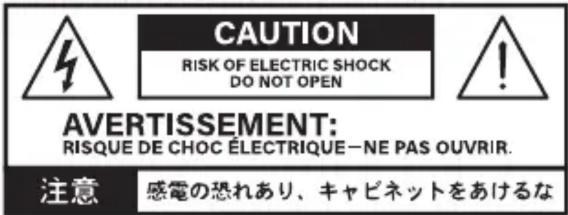
The lightning flash with arrowhead symbol within an equilateral triangle, is intended to alert the user to the presence of uninsulated “dangerous voltage” within the product’s enclosure that may be of sufficient magnitude to constitute a risk of electric shock to persons.
The exclamation point within an equilateral triangle is intended to alert the user to the presence of important operation and maintenance (servicing) instructions in the literature accompanying the product.
- INPUT Jack This 14 " jack is the main audio input for the amplifier and is directly connected to the preamp. The input impedance is 100MΩ.
- Indicator Light – lights up red when ABRAMS100 is properly powered. The light turns on a few seconds after engaging power. Once lit, another few seconds are needed before the amplifier's speaker output is enabled.
- GAIN Knob Controls the input gain of the amplifier. Turning this control clockwise will increase the volume and gain of the preamp circuit making the sound louder. The GAIN knob has a very wide range in order to accommodate many different types of guitar pickups, pedals, and other devices. The input gain stage has high headroom but can still clip at higher settings of the GAIN knob or if the input signal is very hot.
- BASS Knob Controls the amplifier's frequency response. Turning this control clockwise increases bass.
- MID Knob Controls the amplifier's frequency response. Turning this control clockwise increases the middle frequency.
- TREBLE Knob Controls the amplifier's frequency response. Turning this control clockwise increases the treble frequency.
- REVERB Knob Adjusts the level of the reverb effect. Turning the knob clockwise will increase the amount of reverb.
- BRIGHT Switch Pushing the BRIGHT switch in will increase the treble frequency and presence. Useful while using dark speaker cabinets or while playing at lower volume levels.
- VOLUME Knob Controls the overall loudness of the amplifier. It is recommended to turn down the VOLUME prior to applying or removing power.
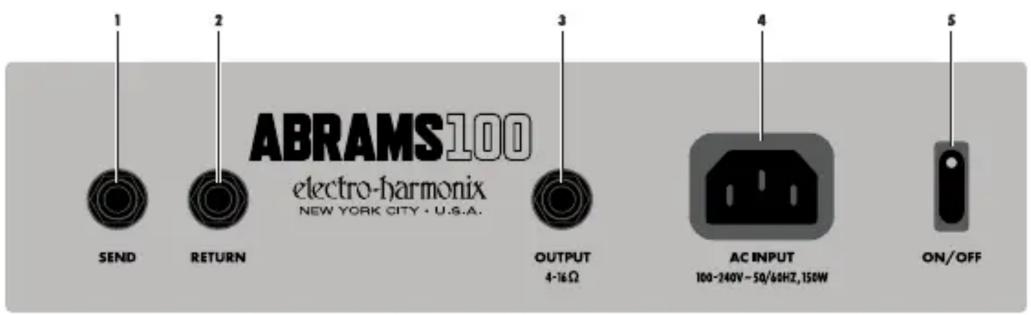
REAR PANEL:
- SEND Jack The SEND jack outputs the amplifier's preamp section. Connect the SEND jack to the beginning of your FX loop. Within the ABRAMS100, the Send jack is connected to the output of the EQ section: INPUT > GAIN > EQ > SEND.
- RETURN Jack The RETURN jack connects directly to the power amp section. Connect the output of your FX loop or external preamp into the RETURN jack. The return signal is routed to the ABRAMS100 REVERB knob followed by the VOLUME knob.
- OUTPUT 4-16Ω Jack The Output jack is a powered audio output for 4Ω to 16Ω loudspeaker connections only. WARNING: Connecting the amplifier to a speaker cabinet that does not have the appropriate impedance, or to no cabinet at all, could severely damage the ABRAMS100 and void your warranty. Be sure to select a cabinet that can handle the full rated power of 100W RMS.
Output Power 1% THD+N: 100W into 4Ω, 50W into 8Ω
- AC INPUT Plug a standard IEC power cable into this jack. The AC Input accepts 100V to 240V at 50/60Hz. Maximum power is approximately 150W.
- ON/OFF Switch Flip the power switch to the ON position to apply power to the amplifier. ABRAMS100 requires 12-15 seconds to warm up after applying power. It takes several seconds for the indicator light to turn on and then more time for sound to come through. This is normal. Turn the amplifier OFF when not in use. Set the VOLUME knob to minimum before flipping the power switch on or off.
Brand : Electro Harmonix
Model : Abrams 100
Category : Guitar amp