
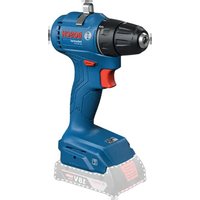
GDS 18V-1180 Professional - Screwdriver BOSCH - Free user manual and instructions
Find the device manual for free GDS 18V-1180 Professional BOSCH in PDF.
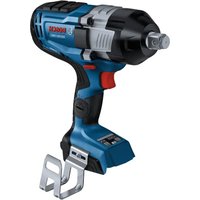


| Product Type | Cordless Impact Wrench |
| Brand | Bosch |
| Model | GDS 18V-1180 Professional (GDS18V-1180C) |
| Rated Voltage | 18 V |
| No-Load Speed | 0-800 / 0-1300 / 0-1750 rpm (depending on setting) |
| Impact Rate | 0-1550 / 0-2200 / 0-2350 IPM |
| Maximum Torque | 440 / 810 / 1180 Ft-lbs (depending on setting) |
| Maximum Breakaway Torque | 1620 Ft-lbs |
| Output Connection | 3/4 in. square with friction ring and through hole |
| Weight (without battery) | 7.1 lb (≈3.22 kg) |
| Operating Temperature Range | -20...+50 °C |
| Recommended Charging Temperature | 0...+35 °C |
| Connectivity | Bluetooth® 4.1 (low energy) via GCY42 module |
| Integrated Lighting | LED worklight with brightness adjustment and afterglow |
| Operating Modes | 3 preset speeds + modes A (bolts) and B (wood screws) customizable via app |
| Status Indicator | Tri-color LED (green/yellow/red) for temperature and charge status |
| Safety | Brake, trigger lock, overload and overheat protection |
| Included Accessories | Attach for joist (optional), connectivity module GCY42 sold separately |
| Maintenance and Cleaning | Clean with a dry cloth; no user-serviceable parts; have service performed by an authorized center |
| Warranty | Limited warranty according to Bosch terms (see site rb-pt.io) |
Frequently Asked Questions - GDS 18V-1180 Professional BOSCH
User questions about GDS 18V-1180 Professional BOSCH
0 question about this device. Answer the ones you know or ask your own.
Ask a new question about this device
Download the instructions for your Screwdriver in PDF format for free! Find your manual GDS 18V-1180 Professional - BOSCH and take your electronic device back in hand. On this page are published all the documents necessary for the use of your device. GDS 18V-1180 Professional by BOSCH.
USER MANUAL GDS 18V-1180 Professional BOSCH
| Safety SymbolsThe definitions below describe the level of severity for each signal word.Please read the manual and pay attention to these symbols. | |
 | This is the safety alert symbol. It is used to alert you to potential personal injury hazards. Obey all safety messages that follow this symbol to avoid possible injury or death. |
 | DANGER indicates a hazardous situation which, if not avoided, will result in death or serious injury. |
 | WARNING indicates a hazardous situation which, if not avoided, could result in death or serious injury. |
 | CAUTION indicates a hazardous situation which, if not avoided, could result in minor or moderate injury. |
Table of Contents
General Power Tool Safety Warnings.....3
Additional Safety Warnings .... 5
FCC Caution 6
Industry Canada 6
Intended Use 6
Symbols....8
Getting to Know Your Product....10
Assembly 12
Inserting and Removing the Battery Pack .... 12
Inserting and Removing Accessories 12
GCY42 Connectivity Module Installation....13
Connectivity....14
Bluetooth ® 14
Think Safety....14
Using "Bosch Toolbox" App....14
Operating Instructions....16
Variable Speed Controlled Trigger Switch .... 16
Brake 16
Forward/Reversing Lever and Trigger Lock 16
Built-In Work Light....16
Operating tips....16
User Interface 18
Joist Hanger....18
Maintenance 19
Service....19
Batteries 19
Tool Lubrication....19
Motors 19
Cleaning....19
Accessories 19
General Power Tool Safety Warnings
WARNING
Read all safety warnings, instructions, illustrations and specifications provided with this power tool. Failure to follow all instructions listed below may result in electric shock, fire and/or serious injury.
low may result in electric shock, fire and/or serious injury.
SAVE ALL WARNINGS AND INSTRUCTIONS FOR FUTURE REFERENCE
The term “power tool” in the warnings refers to your mains-operated (corded) power tool or battery-operated (cordless) power tool.
a. Keep work area clean and well lit. Cluttered or dark areas invite accidents. b. Do not operate power tools in explosive atmospheres, such as in the presence of flammable liquids, gases or dust. Power tools create sparks which may ignite the dust or fumes. c. Keep children and bystanders away while operating a power tool. Distractions can cause you to lose control.
a. Keep work area clean and well lit. Cluttered or dark areas invite accidents. b. Do not operate power tools in explosive atmospheres, such as in the presence of flammable liquids, gases or dust. Power tools create sparks which may ignite the dust or fumes. c. Keep children and bystanders away while operating a power tool. Distractions can cause you to lose control.
a. Power tool plugs must match the outlet. Never modify the plug in any way. Do not use any adapter plugs with earthed (grounded) power tools. Unmodified plugs and matching outlets will reduce risk of electric shock. b. Avoid body contact with earthed or grounded surfaces, such as pipes, radiators, ranges and refrigerators. There is an increased risk of electric shock if your body is earthed or grounded. c. Do not expose power tools to rain or wet conditions. Water entering a power tool will increase the risk of electric shock. d. Do not abuse the cord. Never use the cord for carrying, pulling or unplugging the power tool. Keep cord away from heat, oil, sharp edges or moving parts. Damaged or entangled cords increase the risk of electric shock. e. When operating a power tool outdoors, use an extension cord suitable for outdoor use. Use of a cord suitable for outdoor use reduces the risk of electric shock. f. If operating a power tool in a damp location is unavoidable, use a Ground Fault Circuit Interrupter (GFCI) protected supply. Use of an GFCI reduces the risk of electric shock.
a. Power tool plugs must match the outlet. Never modify the plug in any way. Do not use any adapter plugs with earthed (grounded) power tools. Unmodified plugs and matching outlets will reduce risk of electric shock. b. Avoid body contact with earthed or grounded surfaces, such as pipes, radiators, ranges and refrigerators. There is an increased risk of electric shock if your body is earthed or grounded. c. Do not expose power tools to rain or wet conditions. Water entering a power tool will increase the risk of electric shock. d. Do not abuse the cord. Never use the cord for carrying, pulling or unplugging the power tool. Keep cord away from heat, oil, sharp edges or moving parts. Damaged or entangled cords increase the risk of electric shock. e. When operating a power tool outdoors, use an extension cord suitable for outdoor use. Use of a cord suitable for outdoor use reduces the risk of electric shock. f. If operating a power tool in a damp location is unavoidable, use a Ground Fault Circuit Interrupter (GFCI) protected supply. Use of an GFCI reduces the risk of electric shock.
3. Personal safety
a. Stay alert, watch what you are doing and use common sense when operating a power tool. Do not use a power tool while you are tired or under the influence of drugs, alcohol or medication. A moment of inattention while operating power tools may result in serious personal injury. b. Use personal protective equipment. Always wear eye protection. Protective equipment such as a dust mask, non-skid safety shoes, hard hat, or hearing protection used for appropriate conditions will reduce personal injuries. c. Prevent unintentional starting. Ensure the switch is in the off-position before connecting to power source and/or battery pack, picking up or carrying the tool. Carrying power tools with your finger on the switch or energizing power tools that have the switch on invites accidents. d. Remove any adjusting key or wrench before turning the power tool on. A wrench or a key left attached to a rotating part of the power tool may result in personal injury. e. Do not overreach. Keep proper footing and balance at all times. This enables better control of the power tool in unexpected situations. f. Dress properly. Do not wear loose clothing or jewelry. Keep your hair and clothing away from moving parts. Loose clothes, jewelry or long hair can be caught in moving parts. g. If devices are provided for the connection of dust extraction and collection facilities, ensure these are connected and properly used. Use of dust collection can reduce dust-related hazards. h. Do not let familiarity gained from frequent use of tools allow you to become complacent and ignore tool safety principles.
General Power Tool Safety Warnings
A careless action can cause severe injury within a fraction of a second.
4. Power tool use and care
a. Do not force the power tool. Use the correct power tool for your application. The correct power tool will do the job better and safer at the rate for which it was designed. b. Do not use the power tool if the switch does not turn it on and off. Any power tool that cannot be controlled with the switch is dangerous and must be repaired. c. Disconnect the plug from the power source and/or remove the battery pack, if detachable, from the power tool before making any adjustments, changing accessories, or storing power tools. Such preventive safety measures reduce the risk of starting the power tool accidentally. d. Store idle power tools out of the reach of children and do not allow persons unfamiliar with the power tool or these instructions to operate the power tool. Power tools are dangerous in the hands of untrained users. e. Maintain power tools and accessories. Check for misalignment or binding of moving parts, breakage of parts and any other condition that may affect the power tool's operation. If damaged, have the power tool repaired before use. Many accidents are caused by poorly maintained power tools. f. Keep cutting tools sharp and clean. Properly maintained cutting tools with sharp cutting edges are less likely to bind and are easier to control. g. Use the power tool, accessories and tool bits etc. in accordance with these instructions, taking into account the working conditions and the work to be performed. Use of the power tool for operations different from those intended could result in a hazardous situation. h. Keep handles and grasping surfaces dry, clean and free from oil and grease. Slippery handles and grasping surfaces do not allow for safe handling and control of the tool in unexpected situations.
5. Battery tool use and care
a. Recharge only with the charger specified by the manufacturer. A charger that is suitable for one type of battery pack may create a risk of fire when used with another battery pack. b. Use power tools only with specifically designated battery packs. Use of any other battery packs may create a risk of injury and fire. c. When battery pack is not in use, keep it away from other metal objects like paper clips, coins, keys, nails, screws, or other small metal objects that can make a connection from one terminal to another. Shorting the battery terminals together may cause burns or a fire. d. Under abusive conditions, liquid may be ejected from the battery; avoid contact. If contact accidentally occurs, flush with water. If liquid contacts eyes, additionally seek medical help. Liquid ejected from the battery may cause irritation or burns. e. Do not use a battery pack or tool that is damaged or modified. Damaged or modified batteries may exhibit unpredictable behavior resulting in fire, explosion or risk of injury. f. Do not expose a battery pack or tool to fire or excessive temperature. Exposure to fire or temperature above 265 °F may cause explosion. g. Follow all charging instructions and do not charge the battery pack or tool outside the temperature range specified in the instructions. Charging improperly or at temperatures outside the specified range may damage the battery and increase the risk of fire.
6. Service
a. Have your power tool serviced by a qualified repair person using only identical replacement parts. This will ensure that the safety of the power tool is maintained. b. Never service damaged battery packs. Service of battery packs should only be performed by the manufacturer or authorized service providers.
Safety Rules for Cordless Impact Wrenches
a. Hold the power tool by insulated gripping surfaces, when performing an operation where the fastener may contact hidden wiring. Fasteners contacting a "live" wire may make exposed metal parts of the power tool "live" and could give the operator an electric shock. b. Use clamps or another practical way to secure and support the workpiece to a stable platform. Holding the work by hand or against your body leaves it unstable and may lead to loss of control. c. Do not drive fasteners into existing walls or other blind areas where electrical wiring may exist. If this situation is unavoidable, disconnect all fuses or circuit breakers feeding this worksite. d. Use only sockets designed for power impact wrenches. Sockets designed for hand use may break under the load this tool generates. e. Be certain to seat the socket completely and securely on the output drive.
f. Do not use worn or damaged sockets. g. Select the correct size sockets and keep the inside of the socket clean. h. Do not allow a loose fastener to spin freely within the socket. The fastener may be thrown out of the socket. i. Use thick cushioned gloves and limit the exposure time by taking frequent rest periods. Vibration caused by impact driver action may be harmful to your hands and arms. j. Remove battery pack before changing accessories. Accidental starting may occur because battery appliances with a battery inserted are in the operative condition. k. Do not run the tool while carrying it at your side. The rotating drive could become entangled with clothing and injury may result. l. Place the tool onto the fastener only when the tool is switched off. Rotating driver tools can slide off the fastener.
Additional Safety Warnings
GFCI and personal protection devices like electrician's rubber gloves and footwear will further enhance your personal safety.
Keep handles dry, clean and free from oil and grease. Slippery hands cannot safely control the power tool.
Develop a periodic maintenance schedule for your tool. When cleaning a tool be careful not to disassemble any portion of the tool since internal wires may be misplaced or pinched or safety guard return springs may be improperly mounted. Certain cleaning agents such as gasoline, carbon tetrachloride, ammonia, etc. may damage plastic parts.
Ensure trigger lock is engaged before inserting battery pack. Inserting the battery pack into power tools that have the switch on invites accidents.
WARNING Some dust created by power sanding, sawing, grinding, drilling, and other construction activities contains chemicals known to cause cancer, birth defects or other reproductive harm. Some examples of these chemicals are:
- Lead from lead-based paints,
- Crystalline silica from bricks and cement and other masonry products, and
- Arsenic and chromium from chemically-treated lumber.
Your risk from these exposures varies, depending on how often you do this type of work. To reduce your exposure to these chemicals: work in a well ventilated area, and work with approved safety equipment, such as those dust masks that are specially designed to filter out microscopic particles.
FCC Caution
The manufacturer is not responsible for radio interference caused by unauthorized modifications to this equipment. Such modifications could void the user's authority to operate the equipment.
This device complies with Part 15 of the FCC Rules. Operation is subject to the following two conditions:
1) This device may not cause harmful interference, and 2) This device must accept any interference received, including interference that may cause undesired operation.
NOTE: This equipment has been tested and found to comply with the limits for a Class B digital device, pursuant to Part 15 of the FCC rules. These limits are designed to provide reasonable protection against harmful interference in a residential installation. This equipment generates, uses, and can radiate radio frequency energy and, if not installed and used in accordance with the instructions, may cause harmful interference to radio communications. However, there is no guarantee that interference will not occur in a particular installation. If this equipment does cause harmful interference to radio or television reception, which can be determined by turning the equipment off and on, the user is encouraged to try to correct the interference by one or more of the following measures:
- Reorient or relocate the receiving antenna.
- Increase the separation between the equipment and receiver.
- Connect the equipment into an outlet on a circuit different from that to which the receiver is connected.
- Consult the dealer or an experienced radio/TV technician for help.
Exposure to Radio Frequency (RF) Signals: The wireless device is a radio transmitter and receiver. It is designed and manufactured not to exceed the emission limit for exposure to radio frequency (RF) energy set by the Ministry of Health (Canada), Safety Code 6. These limits are part of comprehensive guidelines and establish permitted levels of RF energy for the general population.
These guidelines are based on the safety standards previously set by international standard bodies. These standards include a substantial safety margin designed to assure the safety of all persons, regardless of age and health.
This device and its antenna must not be co-located or operating in conjunction with any other antenna or transmitter.
Industry Canada
This device complies with Industry Canada licence-exempt RSS standard(s). Operation is subject to the following two conditions:
(1) this device may not cause interference, and
(2) this device must accept any interference, including interference that may cause undesired operation of the device.
Intended Use
CAUTION
This tool is intended for the tightening and loosening of bolts, nuts, and various threaded fasteners. This tool is not intended for use as a drill.
Specifications
| Model Number GDS18V-1180C | |
| Voltage rating 18 V | |
| No load speed | |
| - Setting 1 | 0-800 RPM |
| - Setting 2 | 0-1300 RPM |
| - Setting 3 | 0-1750 RPM |
| Impact rate | |
| - Setting 1 | 0-1550 IPM |
| - Setting 2 | 0-2200 IPM |
| - Setting 3 | 0-2350 IPM |
| Maximum torque | |
| - Setting 1 | 440 Ft-lbs |
| - Setting 2 | 810 Ft-lbs |
| - Setting 3 | 1180 Ft-lbs |
| Breakaway torque 1620 Ft-lbs | |
| Output drive 3/4" Square drive with Friction Ring and Through Hole | |
| Weight tool only 7.1 lbs | |
| Permitted battery temperature during charging | +32...+113°F (0...+45°C) |
| Permitted ambient temperature during operation and storage | -4...+122°F (-20...+50°C) |
| Recommended ambient temperature during charging | +32...+95°F (0...+35°C) |
| Data Transmission (GCY42 installed) | |
| Bluetooth® Bluetooth® 4.1 (Low Energy) | A |
| Signal interval, approx. 8 s | |
| Signal range maximum 98ft | B |
Optimized for CORE18V with Max performance from ≥ 8 Ah
A The mobile terminal devices must be compatible with Bluetooth® Low Energy devices (version 4.1) and support the Generic Access Profile (GAP). B The signal range may vary greatly depending on external conditions. The Bluetooth® range may be significantly weaker inside closed rooms and through metallic barriers (e.g. walls, shelving units, cases, etc.).
Battery Packs / Chargers:
Please refer to the battery/charger list, included with your tool.
NOTE: For tool specifications refer to the nameplate on your tool.
Symbols
Important: Some of the following symbols may be used on your tool. Please study them and learn their meaning. Proper interpretation of these symbols will allow you to operate the tool better and safer.
| Symbol Designation/Explanation | |
| V Volts (voltage) | |
| A Amperes (current) | |
| Hz Hertz (frequency, cycles per second) | |
| W Watt (power) | |
| kg Kilograms (weight) | |
| min Minutes (time) | |
| s Seconds (time) | |
| ∅ | Diameter (size of drill bits, grinding wheels, etc.) |
| n0 | No load speed (rotational speed, at no load) |
| n Rated speed (Maximum attainable speed) | |
| .../min | Revolutions or reciprocation per minute (revolutions, strokes, surface speed, orbits etc. per minute) |
| 0 Off position (zero speed, zero torque...) | |
| 1, 2, 3, ...I, II, III, | Selector settings (speed, torque or position settings. Higher number means greater speed) |
| 0 | Infinitely variable selector with off (speed is increasing from 0 setting) |
| → | Arrow (action in the direction of arrow) |
| ~ | Type or a characteristic of current |
| --- | Type or a characteristic of current |
| ~ | Type or a characteristic of current |
| ☐ | Designates Double Insulated Construction tools |
| ⊕ | Grounding terminal |
Symbols
Important: Some of the following symbols may be used on your tool. Please study them and learn their meaning. Proper interpretation of these symbols will allow you to operate the tool better and safer.
| Symbol Designation/Explanation | |
 | Alerts user to read manual. |
 | Alerts user to wear eye protection. |
 | Alerts user to wear respiratory protection. |
 | Alerts user to wear hearing protection. |
 | Alerts user to wear eye, respiratory, and hearing protection. |
 | This symbol designates that this tool is listed by the Canadian Standards Association, to United States and Canadian Standards. |
 | Designates Li-ion battery recycling program. |
Getting to Know Your Product
Fig. 1 Cordless Impact Wrench GDS18V-1180C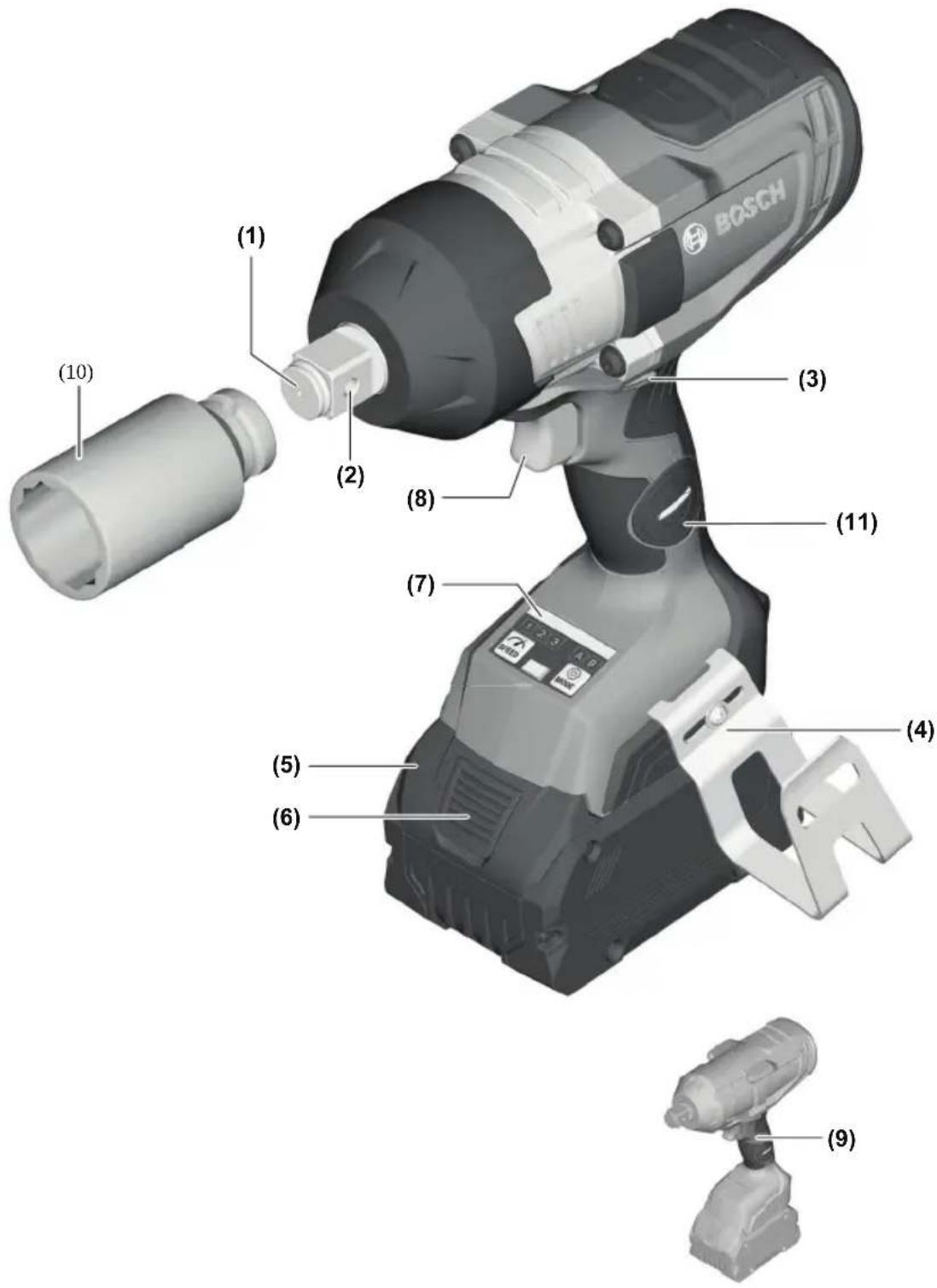
Getting to Know Your Product
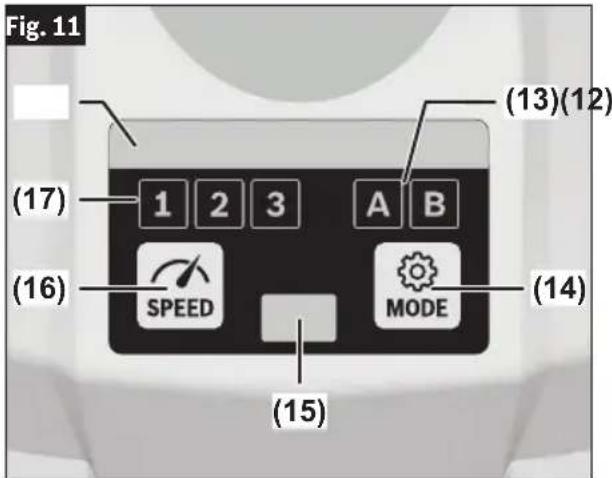
1 Output Drive 2 Through Hole 3 Forward/Reversing Lever and Trigger Lock 4 Joist Hanger 5 Battery Pack* 6 Battery Pack Release Button* 7 User Interface 8 Variable Speed Trigger Switch 9 Handle (insulated gripping surface) 10 Socket* 11 Connectivity Module Compartment
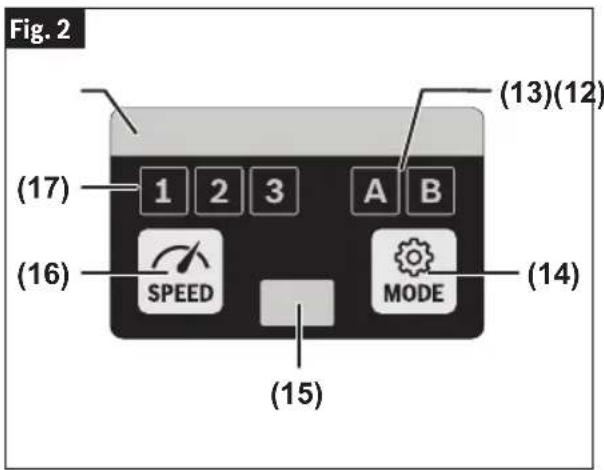
User Interface
12 Status Indicator LED 13 Mode Selection Indicator 14 Mode Button 15 Worklight 16 Speed Preselection Button 17 Speed Preselection Level Indicator
*Accessories shown or described are not included with the product as standard. You can find the complete selection of accessories in our accessories range.
Assembly
WARNING
Disconnect battery pack from tool before making any assembly, adjustments or changing accessories. Such preventive safety measures reduce
the risk of starting the tool accidentally.
Inserting and Removing the Battery Pack
WARNING
Use only Bosch or AMP-Share batteries recom-
mended in the battery/charger list, included with your tool. Use of any other types of batteries may result in personal injury or property damage.
WARNING
Ensure trigger lock is engaged before inserting
battery pack. Inserting the battery pack into power tools that have the switch on invites accidents.
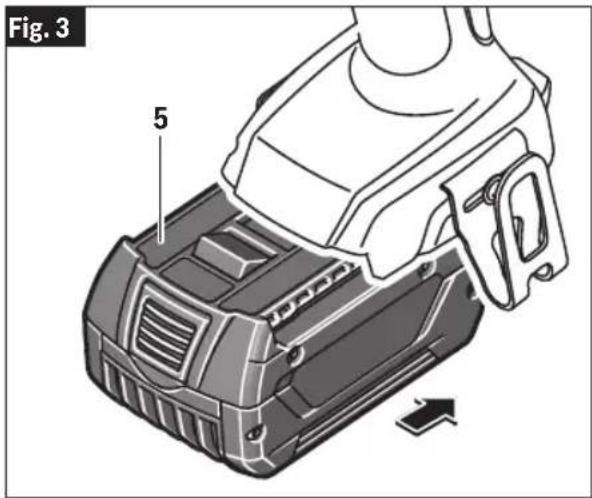
To Insert the Battery Pack
(Fig. 3)
- Slide Trigger Lock 3 to center to the locked position.
- Slide charged Battery Pack 5 into the housing until the battery pack locks into position.
Your tool is equipped with a secondary locking latch to prevent the battery pack from completely falling out of the handle, should it become loose due to vibration.
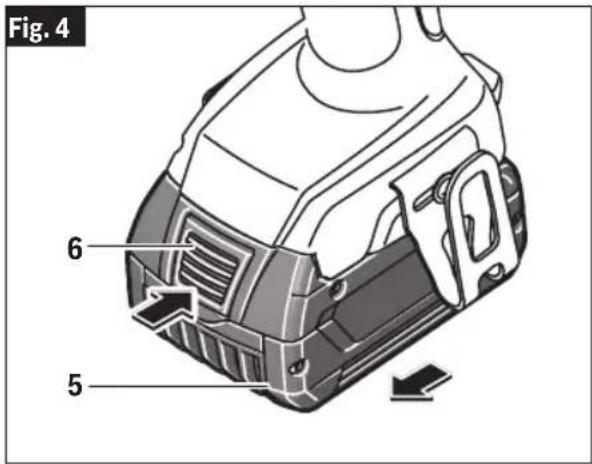
To Remove the Battery Pack
(Fig. 4)
- Press the Battery Pack Release Button 6 and slide the Battery Pack 5 completely out of tool housing.
Inserting and Removing Accessories
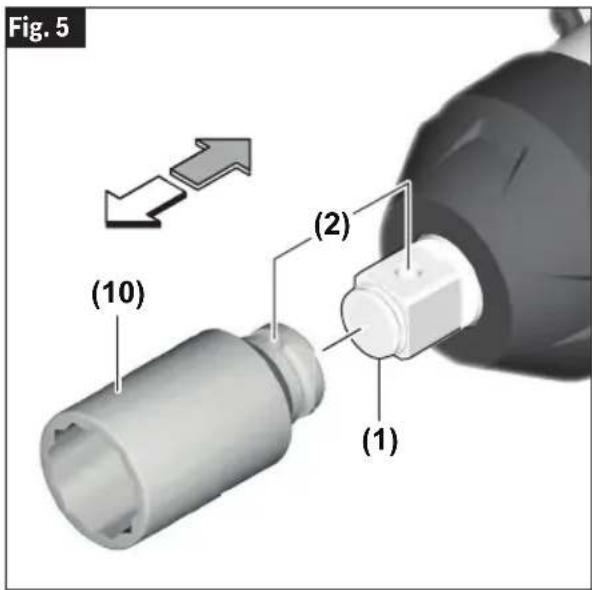
(Fig. 5)
Attach only high quality impact ready accessories with the proper size square drive designed for use with impact wrenches. To install a socket 10, simply push completely onto output drive 1.
Through hole 2 allows for more secure socket retention via compatible socket and use of accessory pin and ring or one-piece retainer. Follow accessory retention device manufacturer's recommendations for use of through hole.
Assembly
GCY42 Connectivity Module Installation
WARNING
To reduce the risk of injury, read the operating instructions included with Bosch GCY42 connectivity module. Operating instructions for GCY42 connectivity module include important information not covered in this manual.
WARNING
Only use Button/coin cell 3V lithium CR2032 battery. Do not use any other button/coin cells or other forms of electrical power supply.
WARNING
Ensure that battery replacement is carried out properly. There is a risk of explosion.
WARNING
Chemical Burn Hazard. Keep batteries away from children. This product contains a lithium button/coin cell battery. If a new or used lithium button/coin cell battery is swallowed or enters the body, it can cause severe internal burns and can lead to death in as little as 2 hours. If you think a battery might have been swallowed or placed inside any part of the body, seek immediate medical attention.
WARNING
Always completely secure the connectivity module compartment. If the connectivity module compartment does not close securely, stop using the product, remove the battery, and keep it away from children.
WARNING
When discarding batteries, insulate the '+' and '-' terminals with insulating tape. When disposed of improperly, lithium batteries may short, causing them to become hot, burst or ignite.
WARNING
Never dispose of the batteries in a fire or expose to high heat. The batteries may explode.
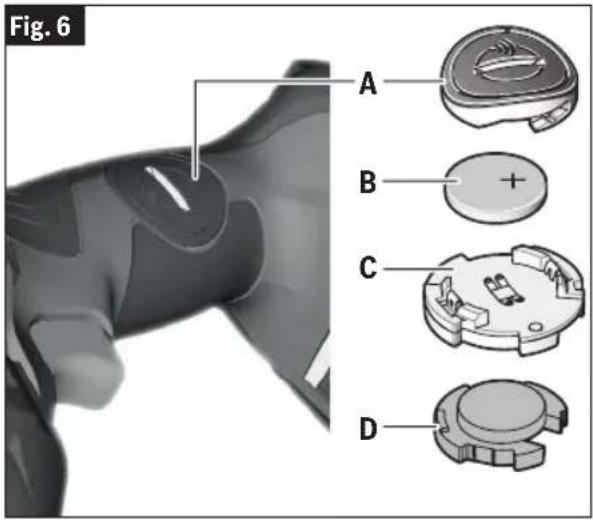
If GCY42 connectivity module is not purchased with the tool, or if the replacement of the module or the battery becomes necessary, please follow this procedure (See Fig. 6):
- Using a flat screwdriver or a coin, remove the cover (A) from the side of the handle, by turning it 1/4 turn counter-clockwise.
- If the tool is already equipped with the connectivity module, remove the battery (B), but do not remove the connectivity module (C).
- If the connectivity module is installed for the first time, remove the plastic placeholder (D) from the connectivity module compartment, and place the connectivity module (C) in the compartment observing correct orientation. Note: Store the placeholder (D) in a safe place. Reinsert the placeholder again if the communications module is removed.
- Next place new battery (B) on the top of the connectivity module with the “+” polarity facing up.
— Place the cover (A) over the battery and turn it 1/4-turn clockwise to lock using a flat screwdriver or a coin.
Connectivity
WARNING
To reduce the risk of injury read the operating instructions included with Bosch GCY42 connectivity module. Operating instructions for GCY42 connectivity module include important information not covered in this manual.
The connectivity module includes important information not covered in this manual.
WARNING
Do not use the power tool with Bluetooth® in the vicinity of gas stations, chemical plants, areas where there is danger of explosion and areas subject to blasting. Do not use the power tool with Bluetooth® in airplanes. Do not use the power tool with Bluetooth® in the vicinity of medical devices. Avoid operation in the direct vicinity of the human body over longer periods of time. When using the power tool with Bluetooth®, interference with other devices and systems, airplanes and medical devices (e.g., cardiac pacemakers, hearing aids) may occur. The Bluetooth® word mark and logos are registered trademarks owned by Bluetooth SIG, Inc. and any use of such marks by Robert Bosch Tool Corporation is under license.
Do not use the power tool with Bluetooth® in the vicinity of gas stations, chemical plants, areas where there is danger of explosion, and areas subject to blasting. Do not use the power tool with Bluetooth® in airplanes. Do not use the power tool with Bluetooth® in the vicinity of medical devices. Avoid operation in the direct vicinity of the human body over longer periods of time. When using the power tool with Bluetooth®, interference with other devices and systems, airplanes, and medical devices (e.g., cardiac pacemakers, hearing aids) may occur. The Bluetooth® word mark and logos are registered trademarks owned by Bluetooth SIG, Inc. and any use of such marks by Robert Bosch Tool Corporation is under license.
Follow all instructions and warnings provided by your Bluetooth® device manufacturer.
Follow all instructions and warnings provided
WARNING
Failure to follow recommended procedures could result in personal injury or property damage.
WARNING
Exercise extreme caution when using Bluetooth®
Devices to control or change power tool functions. Operation of the device may be in a different area than the paired power tool. Paired devices may have functionality which allows timed event programming, including automatically powering on (e.g., flood light). Depending upon the power tool, these unattended operations or function changes without direct line of sight to the paired tool could result in personal injury or property damage.
CAUTION
Always check tool settings before use. Settings may be different than when the tool was last used. The connectivity module enables transfer of data and settings based on Bluetooth® wireless technology. With module installed, select tool settings may be changed remotely by a paired Bluetooth® device and user installed app.
CAUTION
The connectivity module GCY42 is equipped with a radio interface. Local operating restrictions, e.g., in military sites or hospitals, are to be observed. Transmitters have demonstrated an ability to unintentionally interfere with other devices.
Think Safety
SAFETY IS A COMBINATION OF OPERATOR COMMON SENSE AND ALERTNESS AT ALL TIMES WHEN THE TOOL IS BEING USED.
Using "Bosch Toolbox" App
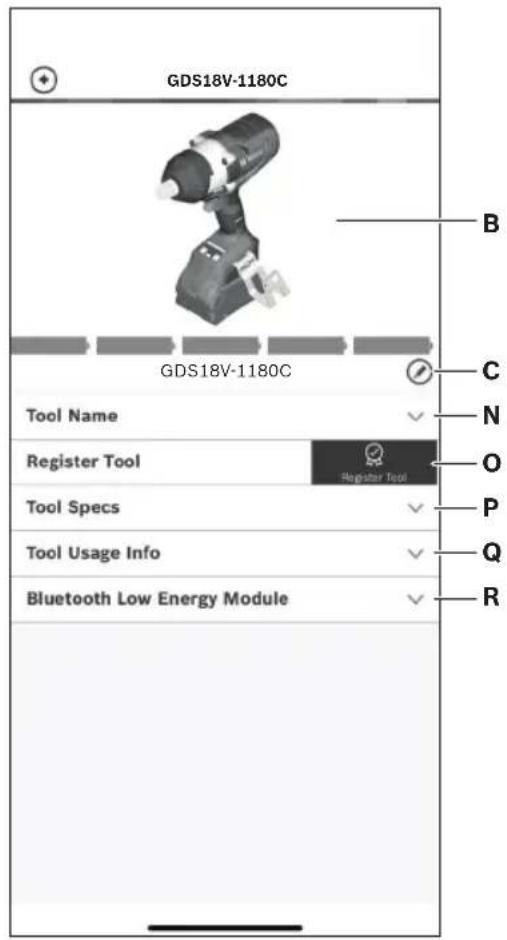
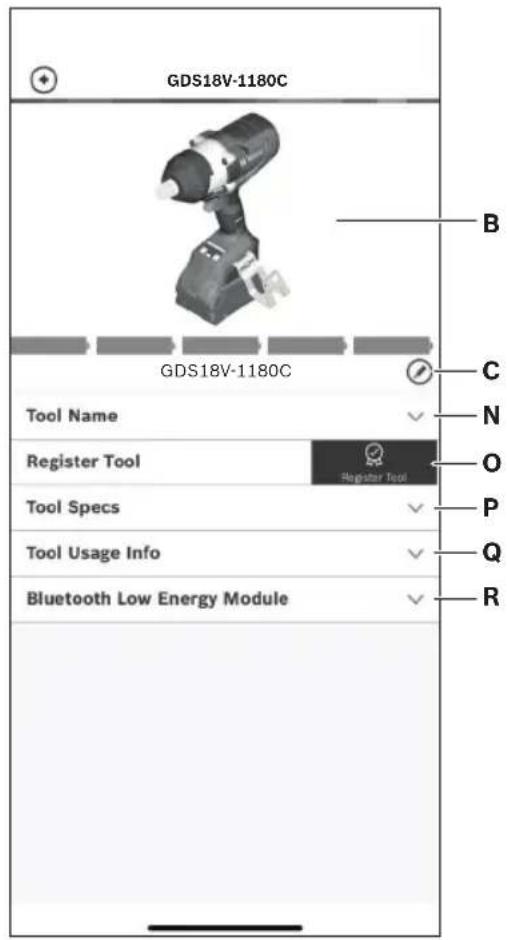
After pairing your tool with a mobile device you can adjust certain functions or check the status of the power tool using Bosch Toolbox app (Fig. 7 and Fig. 8).
Every time you change any setting, the tool will confirm the changes by flashing the Status indicator LED 12 blue.
A. Help button – Tapping this button will bring up help screen.
B. Tool photo – Tapping the photo will let you customize the photograph of the tool.
C. Power tool battery charge status – The number of battery icons in green indicates the estimated charge level of the battery pack. Note: Number of battery icons may not be equal to the number of LEDs on the battery fuel gauge.
D. Power tool nickname – Tapping the “pencil” icon will let you customize the tool nickname. You can also do it when changing the tool photo.
E. Connection status bar – The connection (signal) strength is indicated by vertical bars. You can use the toggle switch to disconnect the tool from your mobile device.
F. Assigned modes – Allows you to define two modes of operation (A and B), specifying options such as Auto Shut Off, Auto Slow Down, and the direction of rotation for each mode.
G. RPM Adjustment – Allows you to select the rotation speed.
Connectivity
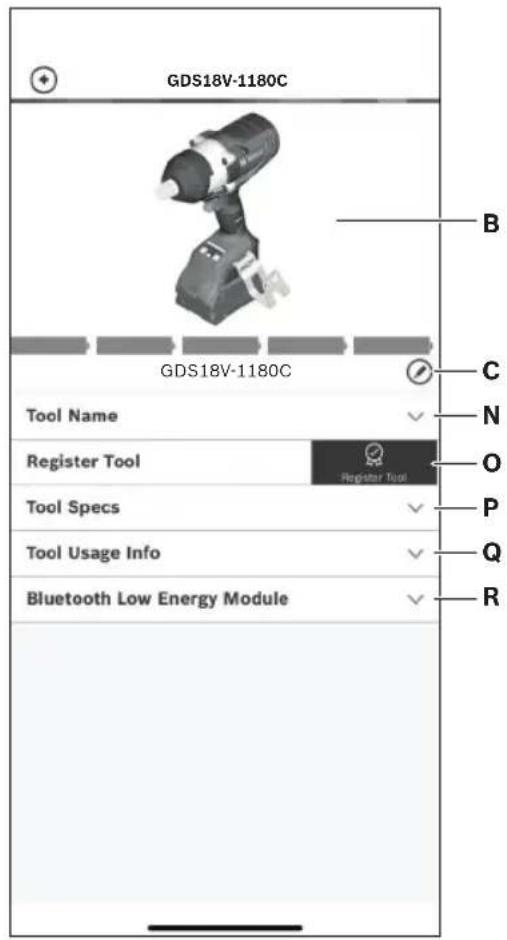
H. Soft Start – Allows speed ramp-up of the tool. I. Work Light – Allows you to set the work light's brightness and afterglow. J. User Interface – Allows you to set the brightness and afterglow of the user interface. K. Reset to Factory Default – Returns the tool to its original settings. L. Tool alerts – Tapping the alerts triangle will display any alerts received from the tool. M. Info button – Displays tool information and specifications. N. Tool Name - Tapping this displays the tool's model, serial number, manufacturing date, and baretool number.
O. Register Tool – Tapping this registers the tool. P. Tool Specs - Tapping this displays the tool's voltage, maximum torque, no load speed, impact rate, drive/bit holder type, head length, and weight (excluding battery). Q. Tool Usage Info - Tapping this displays the tool's run time. R. Bluetooth Low Energy Module – Tapping this displays the Bluetooth module's name, firmware version, and whether the firmware is up to date.
Note: Refer to the in-app Help screen (A) for more information on connectivity features, modes, and settings.
Fig. 7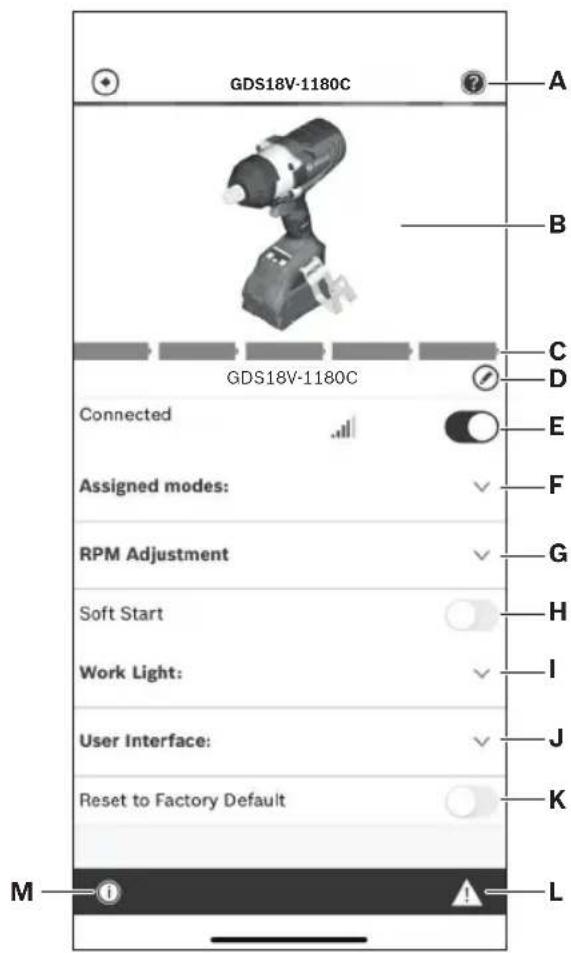

Operating Instructions
Variable Speed Controlled Trigger Switch
(Fig. 1)
Your tool is equipped with a variable speed trigger switch. The tool can be turned "ON" or "OFF" by squeezing or releasing the trigger. The speed can be adjusted from the minimum to maximum nameplate RPM by the pressure you apply to the trigger. Apply more pressure to increase the speed and release pressure to decrease speed.
Brake
When the trigger switch is released it activates the brake to stop the chuck quickly. This is especially useful in the repetitive driving and removal of screws.
Forward/Reversing Lever and Trigger Lock
WARNING
After tool use, engage trigger lock in center position to help prevent accidental starts and accidental discharge.
CAUTION
Do not change direction of rotation until the tool comes to a complete stop. Shifting during rotation of the chuck can cause damage to the tool.
(Fig. 9)
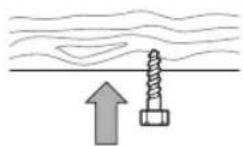
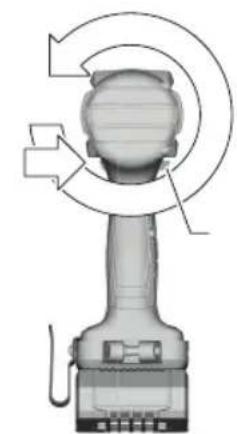
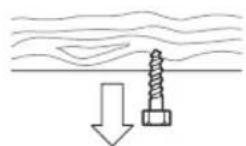
Your tool is equipped with a Forward/Reversing Lever and Trigger Lock 3 located above the trigger. This lever was designed for changing rotation of the socket, and for locking the trigger in an "OFF" position.
To lock the trigger, move the lever to the center.
For forward rotation, (with chuck pointed away from you) move the lever to the far left.
For reverse rotation move the lever to the far right. To activate trigger lock move lever to the center off position.
Fig. 9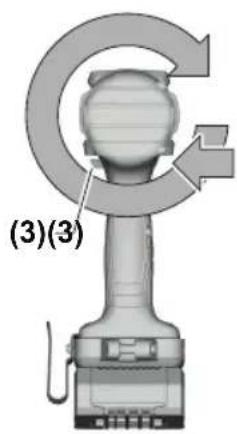
Built-In Work Light
Your tool is equipped with an LED light 15 for better visibility when using the tool.
After the trigger 8 is activated, the LED will then stay on for 10 seconds. The length of time for afterglow can be changed in 'Bosch ToolBox' app setting (if connected).
Operating tips
You will extend the life of your sockets and do neater work if you always put the socket in contact with the work before pulling the trigger. During the operation, hold the tool firmly and exert light, steady pressure. Too much pressure at low speed will stall the tool. This can be damaging to both tool and socket.
Driving with Variable Speed
The technique is to start slowly, increasing the speed as the screw runs down. Set the screw snugly by slowing to a stop. Prior to driving screws, pilot and clearance holes should be drilled.
Operating Instructions
Always hold the tool straight on the bolt to be tightened.
The best method to determine the right impacting/tightening duration is by means of a trial. For small screws, the right impacting/tightening duration can be reached in less than 0.5 Sec. Therefore, work with low RPM and switch the tool off immediately when the screw is tight and the impacting sound can be heard.
For screwing larger, longer wood screws into hard material, pre-drilling is the best method.
Tightening Torque
The tightening torque depends on the duration of the impacting/tightening action.
The largest tightening torque is achieved after approx. 6 to 10 Sec. impacting/tightening action.
The torque build-up depends on the following factors:
• Hardness of the bolts/nuts. - Type of washer (disk washer, spring washer, seal). • Hardness of the material to be joined. - Lubricating effect at the surfaces of the junction.
This leads to the following application cases:
Hard joining application: The joining of metal to metal with a disk washer. The maximum torque is reached after a relative short impacting/tightening action.
Medium joining application: The joining of metal to metal when using spring ring washer, disk spring washer, stud bolts or bolts/nuts with conical seats.
Soft joining application: The joining of e.g. metal to wood or insulation material.
For middle or soft joining cases, the maximum tightening torque is less than for hard cases. Therefore, a longer impacting/tightening action is necessary to arrive at the maximum tightening torque.
Fastening with Screws
The procedure shown in (Fig. 10) will help to fasten materials together with your tool and will reduce the possibility of stripping, splitting or separating the material.
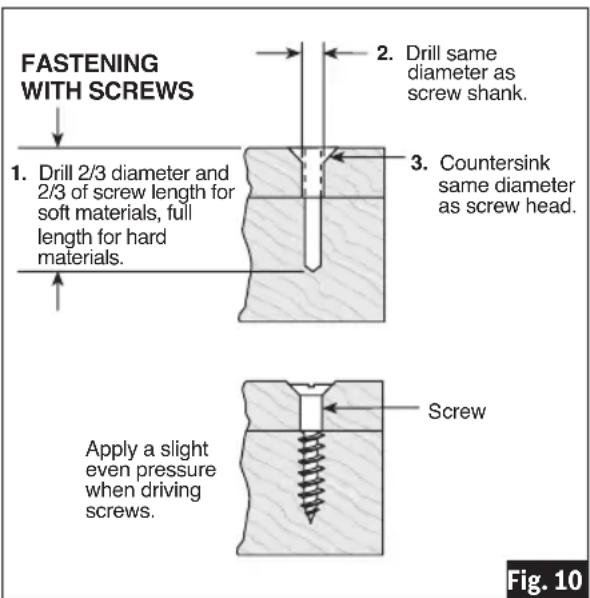
First, clamp the pieces together and drill the first hole 2/3 the diameter of the screw. If the material is soft, drill only 2/3 the proper length. If it is hard, drill the entire length.
Second, unclamp the pieces and drill the second hole the same diameter as the screw shank in the first or top piece of wood.
Third, if flat head screw is used, countersink the hole to make the screw flush with the surface. Then, simply apply even pressure when driving the screw. The screw shank clearance hole in the first piece allows the screw head to pull the pieces tightly together.
Driving Nuts and Bolts
Use variable speed control with caution for driving nuts and bolts with socket attachments. The technique is to start slowly, increasing speed as the nut or bolt runs down. The nut or bolt is set when the socket comes to a stop.
Note: Ensure that no metal particles enter the power tool.
Operating Instructions
Cold Weather Use (32°F)
Due to the lubrication used in the impacting mechanism, the tool should be ran for three minutes at no load prior to actual usage. This will warm the lubricant and provide better performance.
User Interface
Status Indicator LED
(Fig. 11)
The LED bar at the top of the user interface illuminates in various colors to help the user identify the status of the tool. When the Status Indicator LED 12 is green, the tool and battery pack are operating normally and temperatures are ok. If the indicator changes to yellow, it means that the tool or battery temperatures have risen to a high level, and the use of the tool must stop to allow the tool to cool off. It is best to back off the load and give the tool chance to cool down. If the indicator turns red, the tool will shut off to protect itself and/or the battery pack from an overheating situation.
The Status Indicator LED 12 will also blink blue when the Speed 16 or Mode 14 buttons are held for 7 seconds. This will reset the tool settings to factory default.
Selecting the Speed
The power tool has three preset speed levels. Press the Speed Preselection Button 14 to select the desired speed. The selected speed will be displayed on the Preselection Level Indicator 15. For speed and impact ratings for each preset level, see section "Functional Description and Specifications".
Selecting the Working Mode
The power tool has two preset working modes: A and B. You can adjust settings within the existing A and B modes or program custom working modes for specific applications via the Bosch Toolbox app.
Press the Mode button 16 to switch between working modes A and B. The selected mode will be displayed on the Mode Selection Indicator 17.
- Default mode A has two features that are designed for metal bolts: Shut-off After Time in the forward direction and Auto-Bolt Release in the reverse direction. Shut-
off After Time will stop the power tool after 1 second of fastening. Auto-Bolt Release will stop the power tool once a sudden decrease in resistance is detected while loosening.
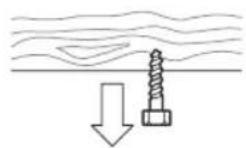
- Default mode B is designed for wood screws: the feature Auto Shutoff is activated in the forward direction. Auto Shutoff will stop the power tool once added resistance is detected while fastening.
Note: only one speed setting or mode can be active on the tool at a time: 1, 2, 3, A, or B. The Bosch Toolbox app can be used to combine specific working mode features and speeds.
Joist Hanger
WARNING When using the joist hanger always be aware that the accessory is exposed. Always hang the tool in an area where yourself and bystanders cannot accidentally make contact with the accessory.
WARNING To reduce the risk of injury, do not use the joist hanger if it appears damaged or deformed. This could result in unstable hanging and the tool unexpectedly falling.
WARNING To reduce the risk of injury, use care in selecting the location for hanging the tool.
The optional Joist Hanger 4 accessory will allow you to conveniently attach your tool to a joist, or other convenient support when not in use.
The Joist Hanger 4 can be attached to either side of the tool by securing it with a mounting screw. Always make sure you securely tighten the mounting screw before use (Fig.1).
Operating Instructions
- Select a suitably sized and shaped object that will provide adequate hanging stability. An unstable hanging surface could result in the tool unexpectedly falling.
- Ensure that the tool is hung out of the way of walkways and working areas with bystanders. The tool could be bumped or a bystander could become entangled causing the tool to unexpectedly fall.
Maintenance
WARNING
To avoid accidents, always disconnect the battery pack from tool before servicing or cleaning.
Service
WARNING
NO USER SERVICEABLE PARTS INSIDE. Preventive maintenance performed by unauthorized personnel may result in misplacing of internal wires and components which could cause serious hazard. We recommend that all tool service be performed by a Bosch Factory Service Center or Authorized Bosch Service Station.
Batteries
Be alert for battery packs that are nearing their end of life. If you notice decreased tool performance or significantly shorter running time between charges then it is time to replace the battery pack. Failure to do so can cause the tool to operate improperly or damage the charger.
Tool Lubrication
Your Bosch tool has been properly lubricated and is ready for use.
Motors
The motor in your tool has been engineered for many hours of dependable service. To maintain peak efficiency of the motor, we recommend it be examined every six months. Only a genuine Bosch replacement motor specially designed for your tool should be used.
Cleaning
CAUTION
Certain cleaning agents and solvents damage plastic parts. Some of these are: gasoline, carbon tetrachloride, chlorinated cleaning solvents, ammonia and household detergents that contain ammonia.
plastic parts. Some of these are: gasoline, carbon tetrachloride, chlorinated cleaning solvents, ammonia and household detergents that contain ammonia.
Ventilation openings and switch levers must be kept clean and free of foreign matter. Do not attempt to clean by inserting pointed objects through openings.
WARNING
Store accessories in a dry and temperate environment to avoid corrosion and deterioration.


Copyright © 2009-2020 ARM LIMITED
All rights reserved.
Redistribution and use in source and binary forms, with or without modification, are permitted provided that the following conditions are met:
Redistributions of source code must retain the above copyright notice, this list of conditions and the following disclaimer. Redistributions in binary form must reproduce the above copyright notice, this list of conditions and the following disclaimer in the documentation and/or other materials provided with the distribution. Neither the name of ARM nor the names of its contributors may be used to endorse or promote products derived from this software without specific prior written permission.
THIS SOFTWARE IS PROVIDED BY THE COPYRIGHT HOLDERS AND CONTRIBUTORS "AS IS" AND ANY EXPRESS OR IMPLIED WARRANTIES, INCLUDING, BUT NOT LIMITED TO, THE IMPLIED WARRANTIES OF MERCHANTABILITY AND FITNESS FOR A PARTICULAR PURPOSE ARE DISCLAIMED. IN NO EVENT SHALL THE COPYRIGHT OWNER OR CONTRIBUTORS BE LIABLE FOR ANY DIRECT, INDIRECT, INCIDENTAL, SPECIAL, EXEMPLARY, OR CONSEQUENTIAL DAMAGES (INCLUDING, BUT NOT LIMITED TO, PROCUREMENT OF SUBSTITUTE GOODS OR SERVICES; LOSS OF USE, DATA, OR PROFITS; OR BUSINESS INTERRUPTION) HOWEVER CAUSED AND ON ANY THEORY OF LIABILITY, WHETHER IN CONTRACT, STRICT LIABILITY, OR TORT (INCLUDING NEGLIGENCE OR OTHERWISE) ARISING IN ANY WAY OUT OF THE USE OF THIS SOFTWARE, EVEN IF ADVISED OF THE POSSIBILITY OF SUCH DAMAGE.
Licenses
Copyright © 2011 Petteri Aimonen
This software is provided 'as-is', without any express or implied warranty. In no event will the authors be held liable for any damages arising from the use of this software.
Permission is granted to anyone to use this software for any purpose, including commercial applications, and to alter it and redistribute it freely, subject to the following restrictions:
- The origin of this software must not be misrepresented; you must not claim that you wrote the original software. If you use this software in a product, an acknowledgment in the product documentation would be appreciated but is not required.
- Altered source versions must be plainly marked as such, and must not be misrepresented as being the original software.
- This notice may not be removed or altered from any source distribution.
Notes / Remarks / Notes
This page was intentionally left blank.
Notes / Remarks / Notes
For details on the terms of the limited warranty for this product, go to https://rb-pt.io/PowerToolWarranty or call 1-877-BOSCH99.
LIMITED WARRANTY
© Robert Bosch Tool Corporation
1800 W. Central Road
Mt. Prospect, IL 60056-2230
1605A002AD 02/2024

1605A002AD




- TABLE OF CONTENTS
- GENERAL POWER TOOL SAFETY WARNINGS
- WARNING
- SAVE ALL WARNINGS AND INSTRUCTIONS FOR FUTURE REFERENCE
- KEEP WORK AREA CLEAN AND WELL LIT. CLUTTERED OR DARK AREAS INVITE ACCIDENTS. B. DO NOT OPERATE POWER TOOLS IN EXPLOSIVE ATMOSPHERES, SUCH AS IN THE PRESENCE OF FLAMMABLE LIQUIDS, GASES OR DUST. POWER TOOLS CREATE SPARKS WHICH MAY IGNITE THE DUST OR FUMES. C. KEEP CHILDREN AND BYSTANDERS AWAY WHILE OPERATING A POWER TOOL. DISTRACTIONS CAN CAUSE YOU TO LOSE CONTROL
- POWER TOOL PLUGS MUST MATCH THE OUTLET. NEVER MODIFY THE PLUG IN ANY WAY. DO NOT USE ANY ADAPTER PLUGS WITH EARTHED (GROUNDED) POWER TOOLS. UNMODIFIED PLUGS AND MATCHING OUTLETS WILL REDUCE RISK OF ELECTRIC SHOCK. B. AVOID BODY CONTACT WITH EARTHED OR GROUNDED SURFACES, SUCH AS PIPES, RADIATORS, RANGES AND REFRIGERATORS. THERE IS AN INCREASED RISK OF ELECTRIC SHOCK IF YOUR BODY IS EARTHED OR GROUNDED. C. DO NOT EXPOSE POWER TOOLS TO RAIN OR WET CONDITIONS. WATER ENTERING A POWER TOOL WILL INCREASE THE RISK OF ELECTRIC SHOCK. D. DO NOT ABUSE THE CORD. NEVER USE THE CORD FOR CARRYING, PULLING OR UNPLUGGING THE POWER TOOL. KEEP CORD AWAY FROM HEAT, OIL, SHARP EDGES OR MOVING PARTS. DAMAGED OR ENTANGLED CORDS INCREASE THE RISK OF ELECTRIC SHOCK. E. WHEN OPERATING A POWER TOOL OUTDOORS, USE AN EXTENSION CORD SUITABLE FOR OUTDOOR USE. USE OF A CORD SUITABLE FOR OUTDOOR USE REDUCES THE RISK OF ELECTRIC SHOCK. F. IF OPERATING A POWER TOOL IN A DAMP LOCATION IS UNAVOIDABLE, USE A GROUND FAULT CIRCUIT INTERRUPTER (GFCI) PROTECTED SUPPLY. USE OF AN GFCI REDUCES THE RISK OF ELECTRIC SHOCK
- PERSONAL SAFETY
- POWER TOOL USE AND CARE
- BATTERY TOOL USE AND CARE
- SERVICE
- SAFETY RULES FOR CORDLESS IMPACT WRENCHES
- ADDITIONAL SAFETY WARNINGS
- FCC CAUTION
- INDUSTRY CANADA
- INTENDED USE
- CAUTION
- BATTERY PACKS / CHARGERS
- SYMBOLS
- GETTING TO KNOW YOUR PRODUCT
- USER INTERFACE
- ASSEMBLY
- INSERTING AND REMOVING THE BATTERY PACK
- TO INSERT THE BATTERY PACK
- (FIG. 3)
- TO REMOVE THE BATTERY PACK
- (FIG. 4)
- INSERTING AND REMOVING ACCESSORIES
- (FIG. 5)
- GCY42 CONNECTIVITY MODULE INSTALLATION
- CONNECTIVITY
- DO NOT USE THE POWER TOOL WITH BLUETOOTH® IN THE VICINITY OF GAS STATIONS, CHEMICAL PLANTS, AREAS WHERE THERE IS DANGER OF EXPLOSION AND AREAS SUBJECT TO BLASTING. DO NOT USE THE POWER TOOL WITH BLUETOOTH® IN AIRPLANES. DO NOT USE THE POWER TOOL WITH BLUETOOTH® IN THE VICINITY OF MEDICAL DEVICES. AVOID OPERATION IN THE DIRECT VICINITY OF THE HUMAN BODY OVER LONGER PERIODS OF TIME. WHEN USING THE POWER TOOL WITH BLUETOOTH®, INTERFERENCE WITH OTHER DEVICES AND SYSTEMS, AIRPLANES AND MEDICAL DEVICES (E.G., CARDIAC PACEMAKERS, HEARING AIDS) MAY OCCUR. THE BLUETOOTH® WORD MARK AND LOGOS ARE REGISTERED TRADEMARKS OWNED BY BLUETOOTH SIG, INC. AND ANY USE OF SUCH MARKS BY ROBERT BOSCH TOOL CORPORATION IS UNDER LICENSE
- FOLLOW ALL INSTRUCTIONS AND WARNINGS PROVIDED BY YOUR BLUETOOTH® DEVICE MANUFACTURER
- THINK SAFETY
- USING "BOSCH TOOLBOX" APP
- OPERATING INSTRUCTIONS
- VARIABLE SPEED CONTROLLED TRIGGER SWITCH
- (FIG. 1)
- BRAKE
- FORWARD/REVERSING LEVER AND TRIGGER LOCK
- (FIG. 9)
- BUILT-IN WORK LIGHT
- OPERATING TIPS
- DRIVING WITH VARIABLE SPEED
- TIGHTENING TORQUE
- FASTENING WITH SCREWS
- DRIVING NUTS AND BOLTS
- COLD WEATHER USE (32°F)
- STATUS INDICATOR LED
- (FIG. 11)
- SELECTING THE SPEED
- SELECTING THE WORKING MODE
- JOIST HANGER
- MAINTENANCE
- BATTERIES
- TOOL LUBRICATION
- MOTORS
- CLEANING
- STORE ACCESSORIES IN A DRY AND TEMPERATE ENVIRONMENT TO AVOID CORROSION AND DETERIORATION
- COPYRIGHT © 2009-2020 ARM LIMITED
- LICENSES
- COPYRIGHT © 2011 PETTERI AIMONEN
- NOTES / REMARKS / NOTES
- LIMITED WARRANTY
Brand : BOSCH
Model : GDS 18V-1180 Professional
Category : Screwdriver