
LX-36575D - Scale Vevor - Free user manual and instructions
Find the device manual for free LX-36575D Vevor in PDF.
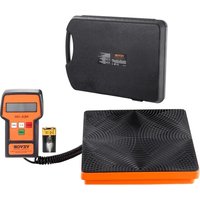


| Product Type | Electronic Scale |
| Brand | Vevor |
| Model | LX-36575D |
| Maximum Capacity | 100 kg (220 lb) |
| Accuracy | 5 g |
| Power Supply | 9V DC battery (not included) |
| Dimensions (L x W x H) | 425 x 310 x 66 mm |
| Net Weight | 3.25 kg |
| Measurement Units | kg / lb |
| Tare Function | Yes |
| Display | LCD Screen |
| Auto-off | Yes |
| Package Contents | Scale, 9V battery, manual, box |
| Certifications | FCC |
| Recommended Use | Indoor, domestic use |
| Maintenance | Clean with a soft, dry cloth |
| Safety | Do not use in humid environments or with strong electromagnetic interference |
| Warranty | Technical support at www.vevor.com/support |
| Manufacturer | Vevor |
Frequently Asked Questions - LX-36575D Vevor
User questions about LX-36575D Vevor
0 question about this device. Answer the ones you know or ask your own.
Ask a new question about this device
Download the instructions for your Scale in PDF format for free! Find your manual LX-36575D - Vevor and take your electronic device back in hand. On this page are published all the documents necessary for the use of your device. LX-36575D by Vevor.
USER MANUAL LX-36575D Vevor
Technical Support and E-Warranty Certificate www.vevor.com/support
ELECTRONIC SCALE
MODEL: LX-36575A/LX-36575D
We continue to be committed to provide you with tools at competitive prices. "Save Half", "Half Price" or any other similar expressions used by us only represent savings you might benefit from buying certain tools with us compared to top brands and does not necessarily mean to cover all categories of tools offered. We kindly remind you to verify carefully when placing an order with us that you are actually saving half in comparison with the top major brands.
MODEL: LX-36575A/LX-36575D
NEED HELP? CONTACT US!
Have product questions? Need technical support? Please feel free to contact us:
Technical Support and E-Warranty Certificate www.vevor.com/support
This is the original instruction. Please read all manual instructions carefully before operating. VEVOR reserves a clear interpretation of the user manual. The appearance of the product shall be subject to the product you received. Please forgive us that we won't inform you of any technology or software updates on our product.
PARAMETER LIST
| Model | LX-36575A | LX-36575D |
| Power | DC9V | DC9V |
| ??A 或??W | ??A 或??W | |
| Max weight (lbs) | 110 | 220 |
| Precision | 2g | 5g |
| Product size | 425*310*66 mm | 425*310*66 mm |
| Net weight | 3.25kg | 3.25kg |
PART LIST
| Model | Picture | LX-36575A | LX-36575D | |
| battery | 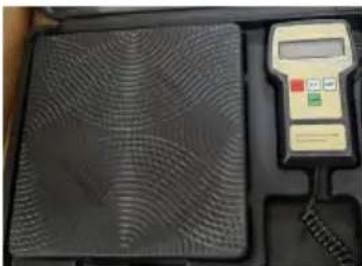 | 1 | 1 | |
| electronic scale |  | 1 | 1 | |
| box | 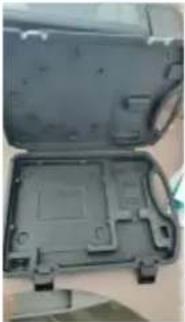 | 1 | 1 | |
SECURITY & WARNINGS

Study, understand, and follow all instructions provided with this product. Read these instructions carefully before installing, operating, servicing, or repairing this tool. Keep these instructions in a safe and accessible place.
Warning
Don't use the product on the following occasions:
- The occasions of vibration and swing;
- The occasions of air conditioning and fan blowing straight;
- Dusty and wet places;
- Inflammable and explosive occasions;
Matters needing attention
- Check the cause in time when you find that the weight value is in the process of using the Electronic Scale, where there is electromagnetic interference, such as mobile phones, televisions, freezer or other strong magnetic interference.
- Avoid damaging the surface of the product
FCC Information:
CAUTION: Changes or modifications not expressly approved by the party responsible for compliance could void the user's authority to operate the equipment!
This device complies with Part 15 of the FCC Rules. Operation is subject to the following two conditions:
1) This product may cause harmful interference. 2) This product must accept any interference received, including interference that may cause undesired operation.
WARNING: Changes or modifications to this product not expressly approved by the party responsible for compliance could void the user's authority to operate the product.
Note: This product has been tested and found to comply with the limits for
a Class B digital device pursuant to Part 15 of the FCC Rules. These limits are designed to provide reasonable protection against harmful interference in a residential installation.
This product generates, uses, and can radiate radio frequency energy, and if not installed and used in accordance with the instructions, may cause harmful interference to radio communications. However, there is no guarantee that interference will not occur in a particular installation. If this product does cause harmful interference to radio or television reception, which can be determined by turning the product off and on, the user is encouraged to try to correct the interference by one or more of the following measures.
- Reorient or relocate the receiving antenna.
- Increase the distance between the product and the receiver.
- Connect the product to an outlet on a circuit different from that to which the receiver is connected.
- Consult the dealer or an experienced radio/TV technician for assistance.
CORRECT DISPOSAL
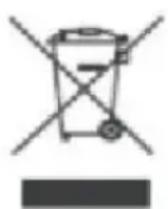
This product is subject to the provisions of European Directive 2012/19/EU. The symbol showing a wheelie bin crossed through indicates that the product requires separate refuse collection in the European Union. This applies to the product and all accessories marked with this symbol. Products marked as such may not be discarded with normal domestic waste, but must be taken to a collection point for recycling electrical and electronic devices.
Introduction
Digital Refrigerant Scales utilize the most technologically advanced refrigerant meters today and are ideal for HVAC and refrigeration systems. The weight can be measured in standard or metric units. The units have a built-in alarm to indicate the measurement has been exceeded.
Features
- High visibility LCD display
- Three units of measure options (kg/oz/lbs).
- Backlight for the display
- Automatic Shut-off after 10 minutes of non-use; backlight will shut off after 3 minutes of non-use or use.
- Compact, portable, battery operated design
- "FULL" display when the weight exceeds the specified range
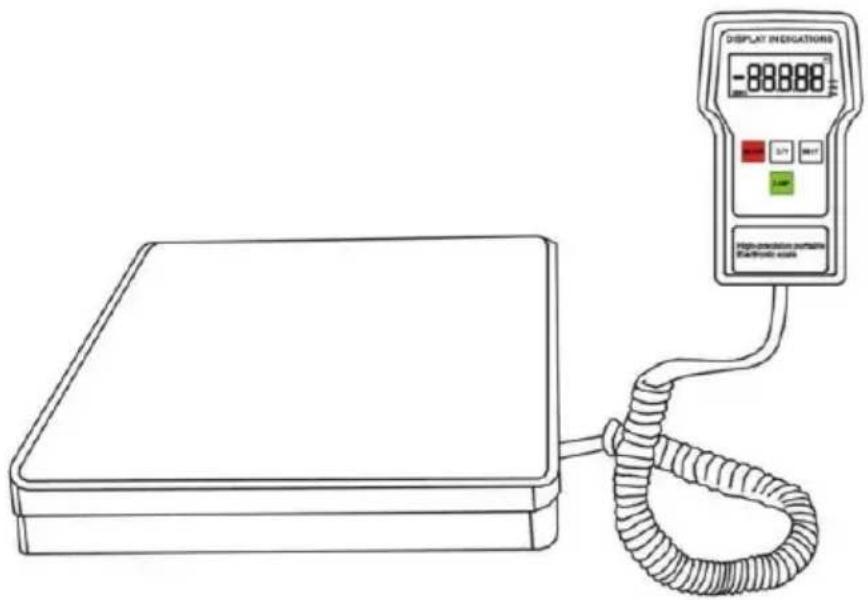
Unit Diagram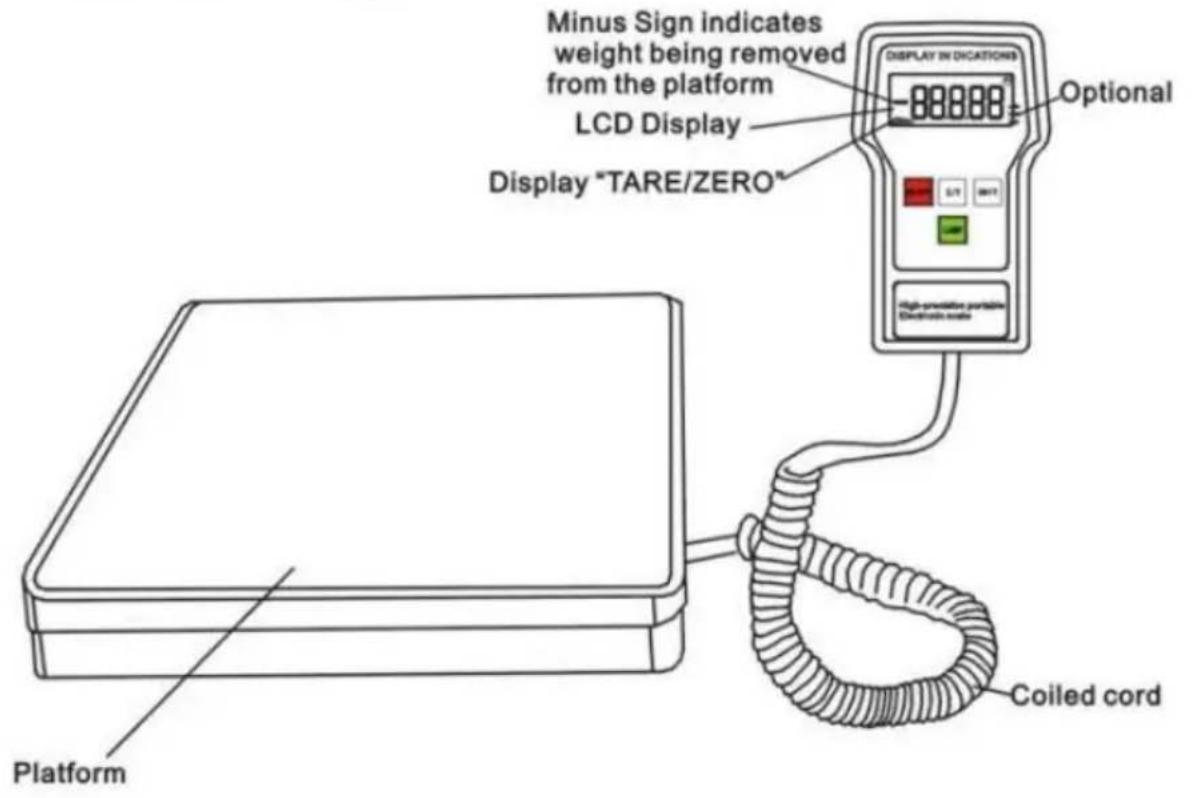
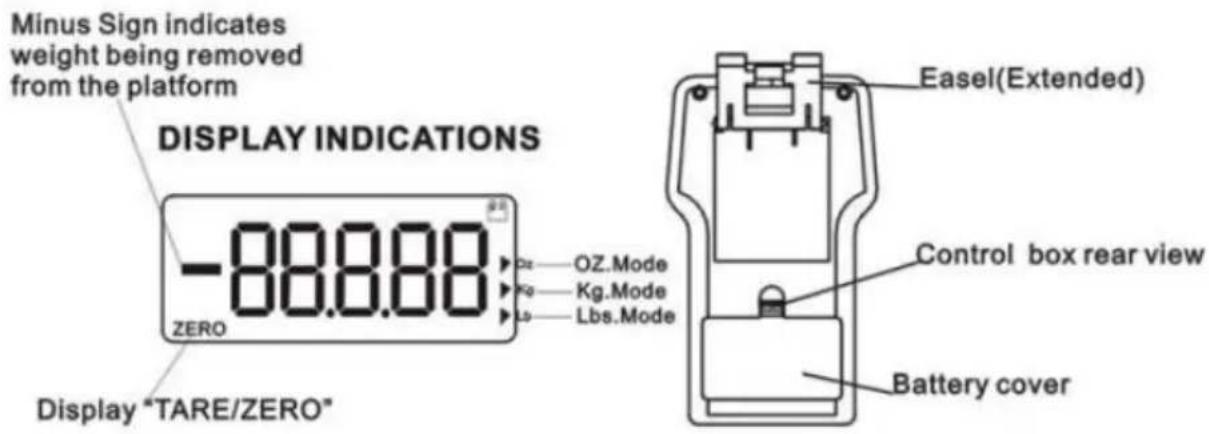
Set Up
- Place the unit on a firm and level surface. The platform and control box can be used in the case or they can be used outside of the case.
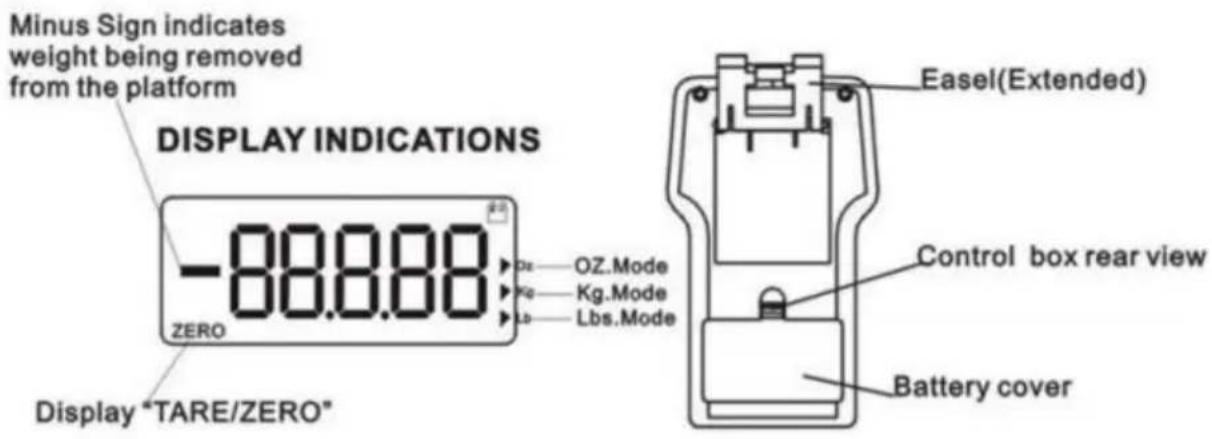
- Remove the battery cover from the rear of the control box by compressing the tab at the base of the battery cover.
- Insert 9V battery. Replace the battery cover by aligning tabs and snap back into place.
- Turn the unit power on by pressing the ON/OFF button.
- Select the unit of measure by pressing the UNIT (Kg/Lbs/Oz) button.
- Press the LAMP button to activate the backlight. Press the LAMP button again to deactivate the backlight.
NOTE: To prevent damage to the unit do not leave dead batteries in the control box. Remove the batteries if the units will not be used for an extended period of time.
CAUTION: If the platform is used in the case, make certain nothing touches the case, control box or platform as false readings may occur.
Keypad
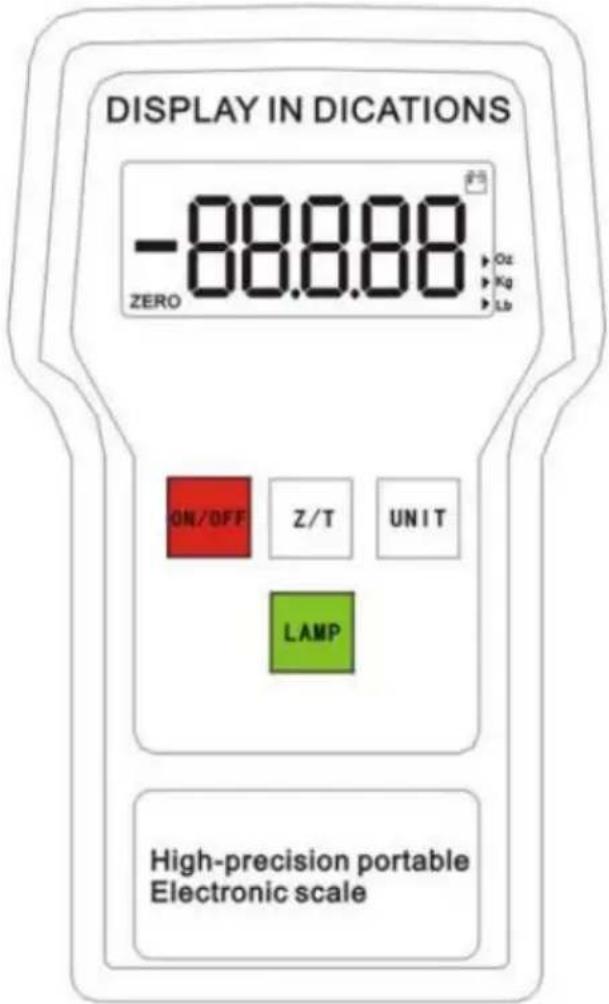

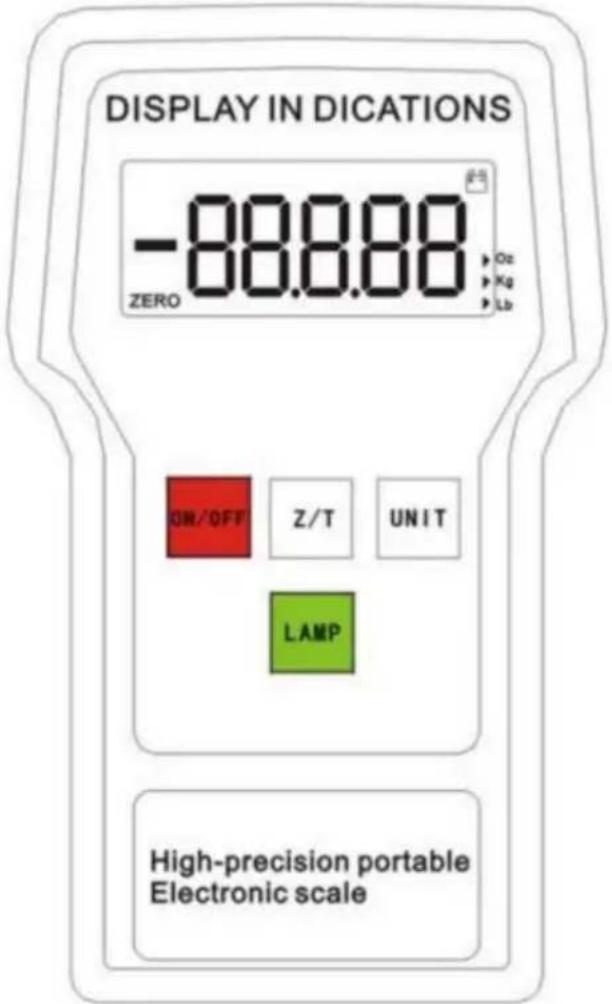
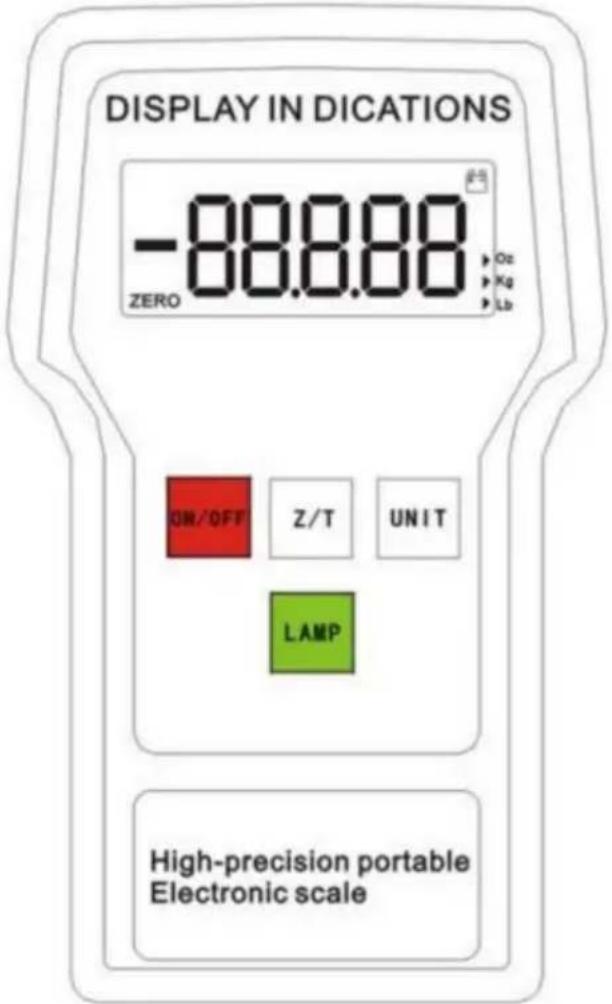
ON/OFF: Press to power on. Press to power off.

UNIT: Select unit of measure: LBS/KG/OZ.

ZERO: Zero display.

LAMP: Backlight.
Operation
- Set up the unit as described in steps 1 - 5 under the Set Up heading.
- Press the Z/T button to clear the unit. Ensure to start the unit at 0.
- Place the cylinder in the center of the platform.
- Start the charging or recovery operation by opening the cylinder and manifold and gauge set valves.
- When operation is completed, close the cylinder and manifold and gauge set valves.
NOTE: The unit has an Over Range Indicator which displays "FULL" when the weight of the cylinder exceeds the maximum capacity of the unit. To prevent damage to the unit, immediately remove the cylinder from the platform if the display states "FULL".
- Remove the cylinder from the platform and press the button to deactivate the unit.
Weight Measurements
- Turn the unit on by pressing the ON/OFF button.
- Press the UNIT button to choose the type of unit of measure. (KG/LBS/OZ)
- Press the Z/T button to zero out the display.
- Place the weighing object in the center of the platform and the gross weight will display.
- Remove weighing object from scale and press to turn off the unit. ON/OFF button
Maintenance
- Immediately remove the weighing object from the platform if the display states "FULL". This is the over range indicator which means the weight has exceeded the maximum capacity of the platform.
- Replace the battery of the unit if the battery indicator flashes in the top right hand corner of the control box.
Specifications
Capacity:
110lbs/50kg
154lbs/70kg
200lbs/90kg
220lbs/100kg
Resolution: _OZ/_lbs/_g Operating temperature range: 32° to 122°F (0~50°C) Storage temperature range: -4 to 158°F (-20~70°C) Accuracy: +/-_g of reading whichever is greater Platform size: 23cm*23cm, removable Total unit weight: 3.3kg
NOTE: To prevent damage, never exceed the rated capacity of the unit.
Made In China
VEVOR®
TOUGH TOOLS, HALF PRICE
Technical Support and E-Warranty Certificate
www.vevor.com/support
VEVOR®
TOUGH TOOLS, HALF PRICE
NEED HELP? CONTACT US!
Digital Refrigerant Scales utilize the most technologically advanced refrigerant meters today and are ideal for HVAC and refrigeration systems. The weight can be measured in standard or metric units. The units have a built-in alarm to indicate the measurement has been exceeded.
Features
- High visibility LCD display
- Three units of measure options (kg/oz/lbs).
- Backlight for the display
- Automatic Shut-off after 10 minutes of non-use; backlight will shut off after 3 minutes of non-use or use.
- Compact, portable, battery operated design
- "FULL" display when the weight exceeds the specified range
Unit Diagram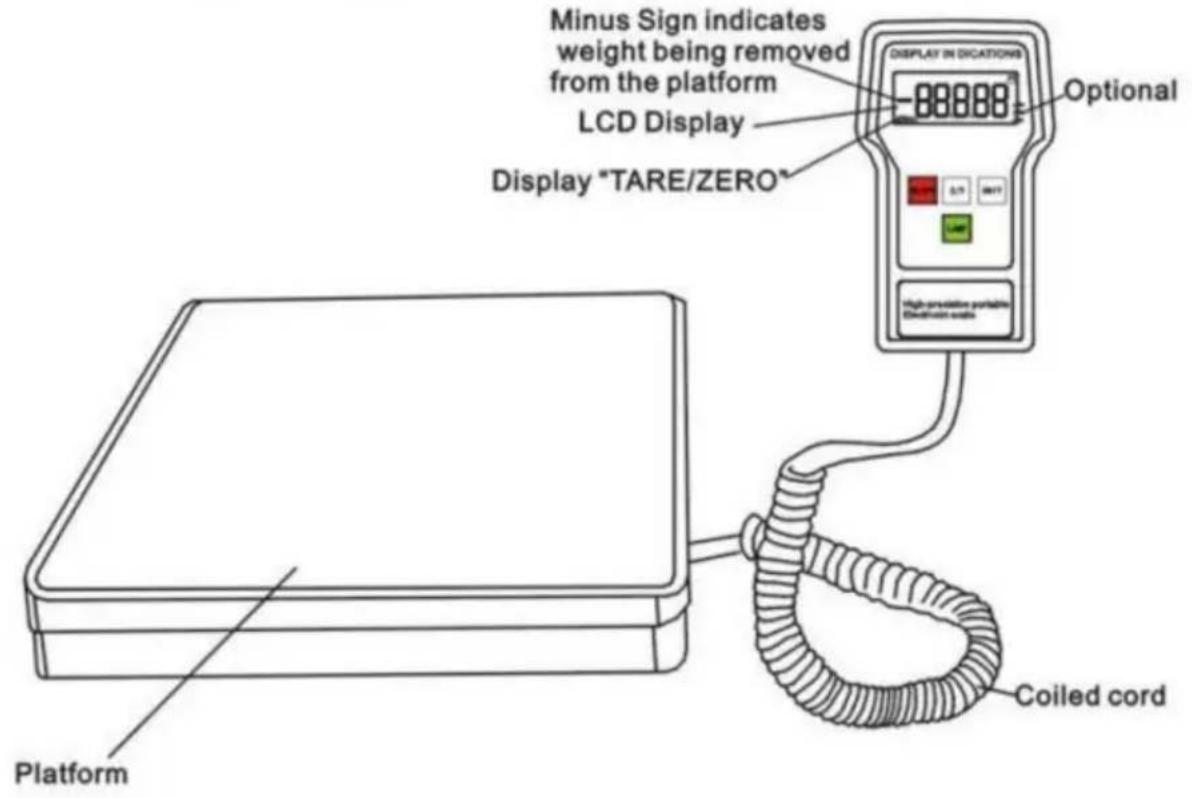
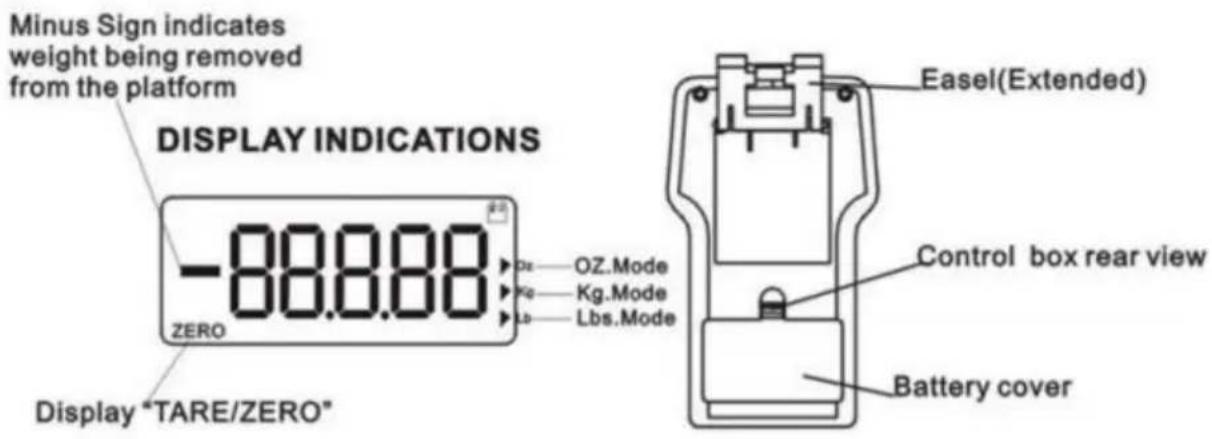
Set Up
- Place the unit on a firm and level surface. The platform and control box can be used in the case or they can be used outside of the case.
- Remove the battery cover from the rear of the control box by compressing the tab at the base of the battery cover.
- Insert 9V battery. Replace the battery cover by aligning tabs and snap back into place.
- Turn the unit power on by pressing the button.
- Select the unit of measure by pressing the UNIT (Kg/Lbs/Oz) button.
- Press the LAMP button to activate the backlight. Press the LAMP button again to deactivate the backlight.
NOTE: To prevent damage to the unit do not leave dead batteries in the control box. Remove the batteries if the units will not be used for an extended period of time.
CAUTION: If the platform is used in the case, make certain nothing touches the case, control box or platform as false readings may occur.
Keypad
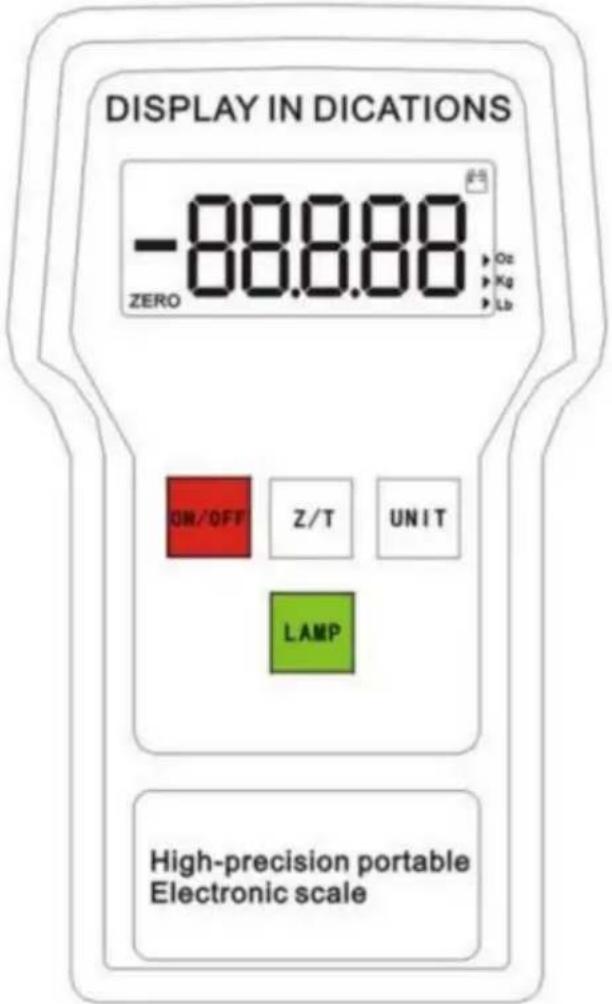

ON/OFF: Press to power on. Press to power off.

UNIT: Select unit of measure: LBS/KG/OZ.

ZERO: Zero display.

LAMP: Backlight.
Operation
- Set up the unit as described in steps 1 - 5 under the Set Up heading.
- Press the Z/T button to clear the unit. Ensure to start the unit at 0.
- Place the cylinder in the center of the platform.
- Start the charging or recovery operation by opening the cylinder and manifold and gauge set valves.
- When operation is completed, close the cylinder and manifold and gauge set valves.
NOTE: The unit has an Over Range Indicator which displays "FULL" when the weight of the cylinder exceeds the maximum capacity of the unit. To prevent damage to the unit, immediately remove the cylinder from the platform if the display states "FULL".
- Remove the cylinder from the platform and press the button to deactivate the unit.
Weight Measurements
- Turn the unit on by pressing the ON/OFF button.
- Press the UNIT button to choose the type of unit of measure. (KG/LBS/OZ)
- Press the Z/T button to zero out the display.
- Place the weighing object in the center of the platform and the gross weight will display.
- Remove weighing object from scale and press to turn off the unit. ON/OFF button
Maintenance
- Immediately remove the weighing object from the platform if the display states "FULL". This is the over range indicator, which means the weight has exceeded the maximum capacity of the platform.
- Replace the battery of the unit if the battery indicator flashes in the top right hand corner of the control box.
Specifications
Capacity:
110lbs/50kg
154lbs/70kg
200lbs/90kg
220lbs/100kg
Resolution: _OZ/_lbs/_g Operating temperature range: 32° to 122°F (0~50°C) Storage temperature range: -4 to 158°F (-20~70°C) Accuracy: +/-_g of reading, whichever is greater Platform size: 23cm*23cm, removable Total unit weight: 3.3kg
NOTE: To prevent damage, never exceed the rated capacity of the unit.
Made in China
VEVOR®
TOUGH TOOLS, HALF PRICE
NEED HELP? CONTACT US!
Digital Refrigerant Scales utilize the most technologically advanced refrigerant meters today and are ideal for HVAC and refrigeration systems. The weight can be measured in standard or metric units. The units have a built-in alarm to indicate that the measurement has been exceeded.
Features
- High visibility LCD display
- Three units of measure options (kg/oz/lbs).
- Backlight for the display
- Automatic Shut-off after 10 minutes of non-use; backlight will shut off after 3 minutes of non-use or use.
- Compact, portable, battery operated design
- "FULL" display when the weight exceeds the specified range
Unit Diagram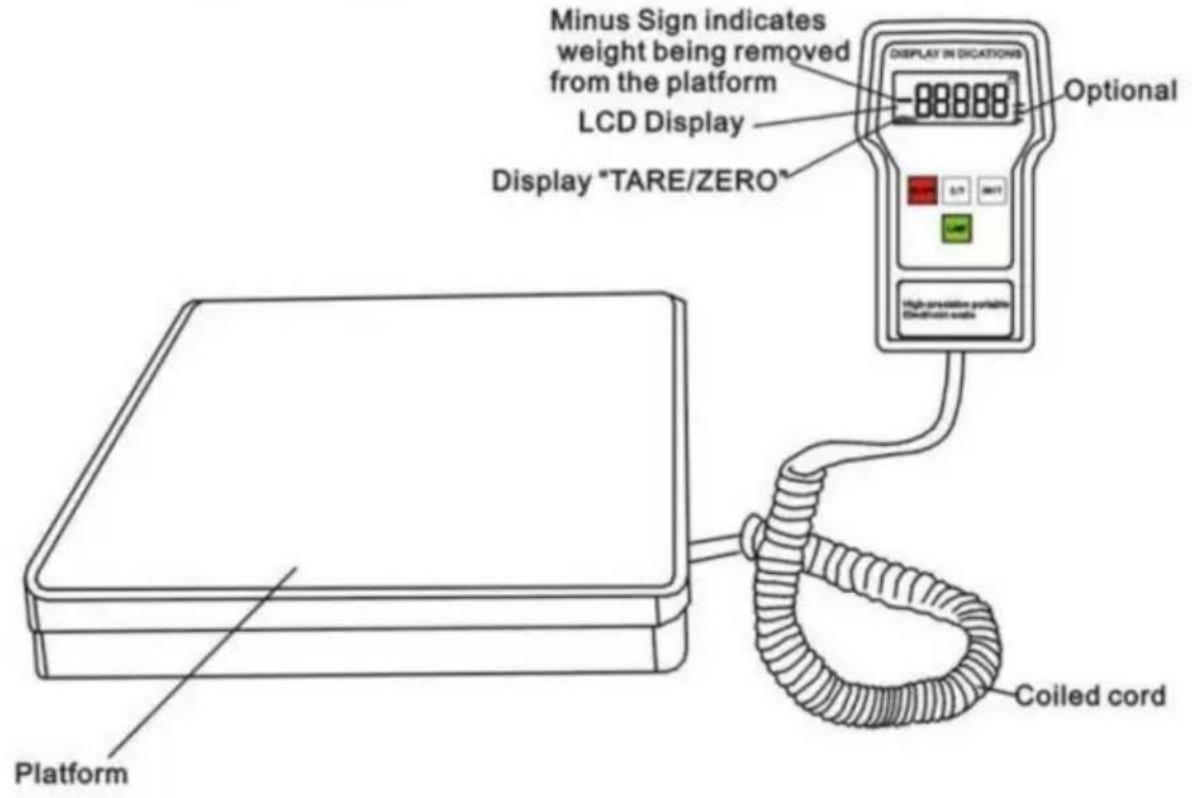
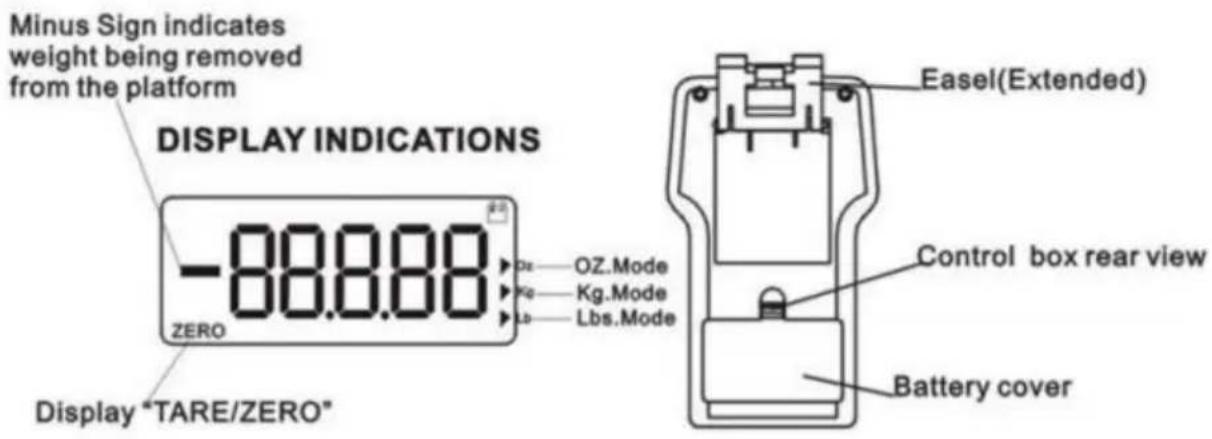
Set Up
- Place the unit on a firm and level surface. The platform and control box can be used in the case or they can be used outside of the case.
- Remove the battery cover from the rear of the control box by compressing the tab at the base of the battery cover.
- Insert 9V battery. Replace the battery cover by aligning tabs and snap back into place.
- Turn the unit power on by pressing the button.
- Select the unit of measure by pressing the UNIT (Kg/Lbs/Oz) button.
- Press the LAMP button to activate the backlight. Press the LAMP button again to deactivate the backlight.
NOTE: To prevent damage to the unit, do not leave dead batteries in the control box. Remove the batteries if the unit will not be used for an extended period of time.
CAUTION: If the platform is used in the case, make certain nothing touches the case, control box, or platform as false readings may occur.
Keypad
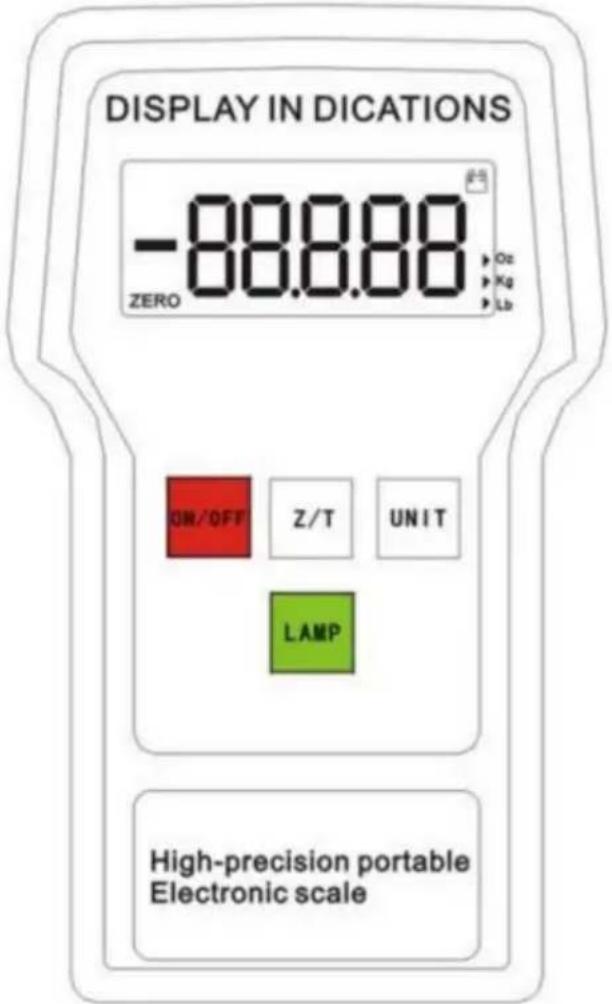

ON/OFF: Press to power on. Press to power off.

UNIT: Select unit of measure: LBS/KG/OZ.

ZERO: Zero display.

LAMP: Backlight.
Operation
- Set up the unit as described in steps 1 - 5 under the Set Up heading.
- Press the Z/T button to clear the unit. Ensure to start the unit at 0.
- Place the cylinder in the center of the platform.
- Start the charging or recovery operation by opening the cylinder and manifold and gauge set valves.
- When operation is completed, close the cylinder and manifold and gauge set valves.
NOTE: The unit has an Over Range Indicator which displays "FULL" when the weight of the cylinder exceeds the maximum capacity of the unit. To prevent damage to the unit, immediately remove the cylinder from the platform if the display states "FULL".
- Remove the cylinder from the platform and press the button to deactivate the unit.
Weight Measurements
- Turn the unit on by pressing the ON/OFF button.
- Press the UNIT button to choose the type of unit of measure. (KG/LBS/OZ)
- Press the Z/T button to zero out the display.
- Place the weighing object in the center of the platform and the gross weight will display.
- Remove weighing object from scale and press to turn off the unit. ON/OFF button
Maintenance
- Immediately remove the weighing object from the platform if the display states "FULL". This is the over range indicator which means the weight has exceeded the maximum capacity of the platform.
- Replace the battery of the unit if the battery indicator flashes in the top right hand corner of the control box.
Specifications
Capacity:
110lbs/50kg
154lbs/70kg
200lbs/90kg
220lbs/100kg
Resolution: _OZ/_lbs/_g Operating temperature range: 32° to 122°F (0~50°C) Storage temperature range: -4 to 158°F (-20~70°C) Accuracy: +/-_g of reading whichever is greater Platform size: 23cm*23cm, removable Total unit weight: 3.3kg
NOTE: To prevent damage, never exceed the rated capacity of the unit
www.vevor.com/support
VEVOR®
TOUGH TOOLS, HALF PRICE
NEED HELP? CONTACT US!
Digital Refrigerant Scales utilize the most technologically advanced refrigerant meters today and are ideal for HVAC and refrigeration systems. The weight can be measured in standard or metric units. The units have a built-in alarm to indicate the measurement has been exceeded.
Features
- High visibility LCD display
- Three units of measure options (kg/oz/lbs).
- Backlight for the display
- Automatic shut-off after 10 minutes of non-use; backlight will shut off after 3 minutes of non-use or use.
- Compact, portable, battery operated design
- "FULL" display when the weight exceeds the specified range
Unit Diagram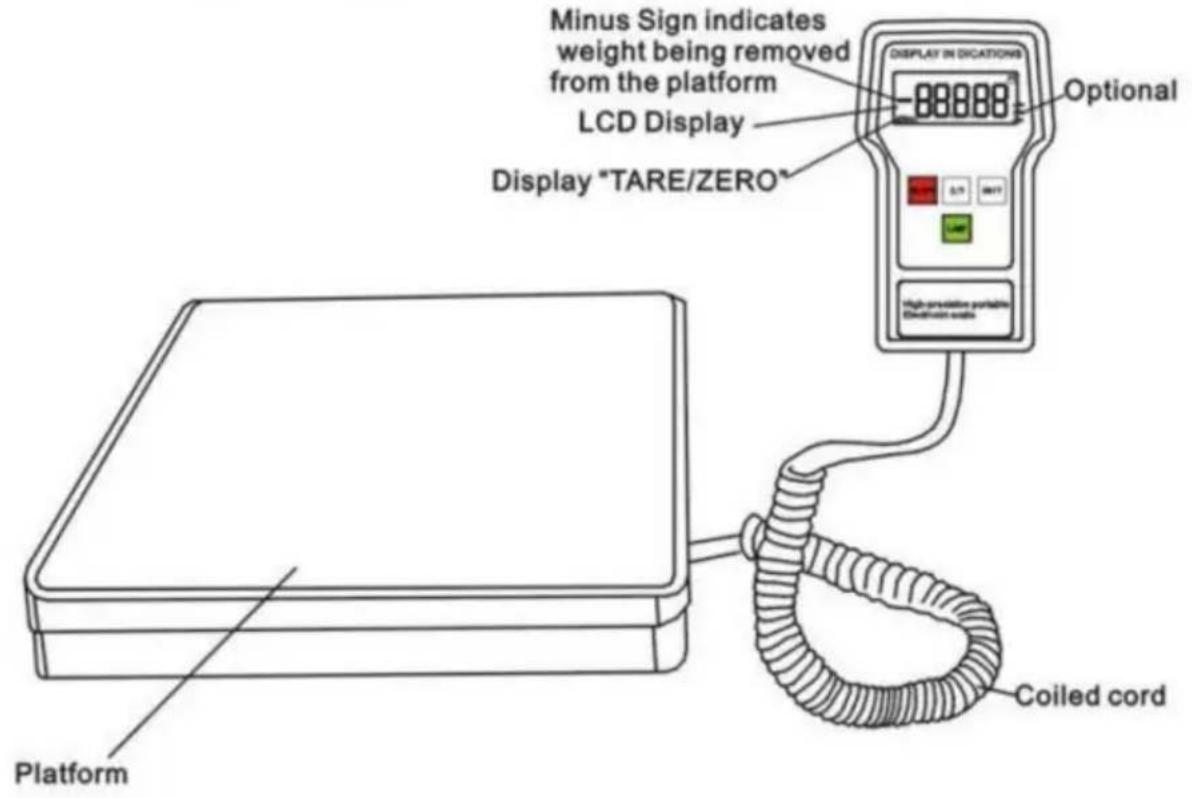
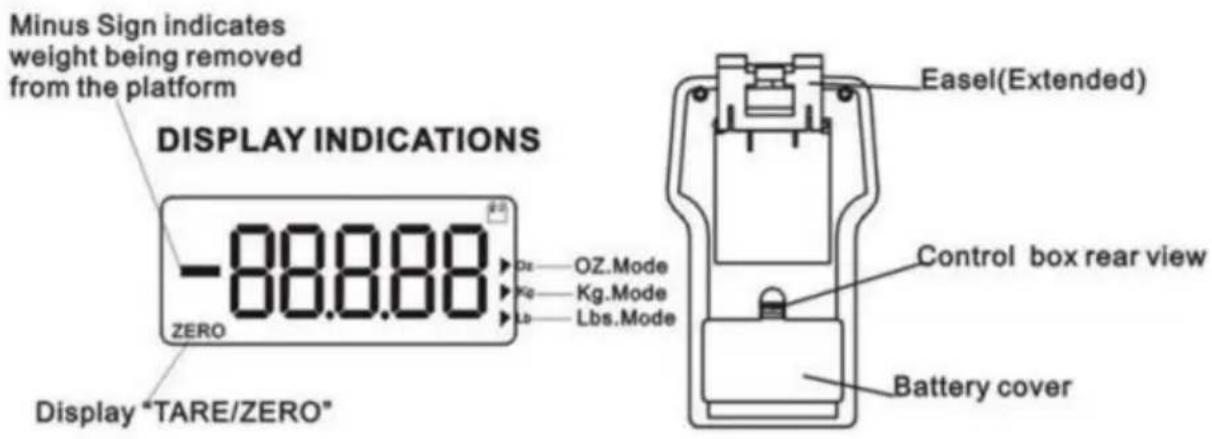
Set Up
- Place the unit on a firm and level surface. The platform and control box can be used in the case or they can be used outside of the case.
- Remove the battery cover from the rear of the control box by compressing the tab at the base of the battery cover.
- Insert 9V battery. Replace the battery cover by aligning tabs and snap back into place.
- Turn the unit power on by pressing the button.
- Select the unit of measure by pressing the UNIT (Kg/Lbs/Oz) button.
- Press the LAMP button to activate the backlight. Press the LAMP button again to deactivate the backlight.
NOTE: To prevent damage to the unit do not leave dead batteries in the control box. Remove the batteries if the unit will not be used for an extended period of time.
CAUTION: If the platform is used in the case, make certain nothing touches the case, control box or platform as false readings may occur.
Keypad
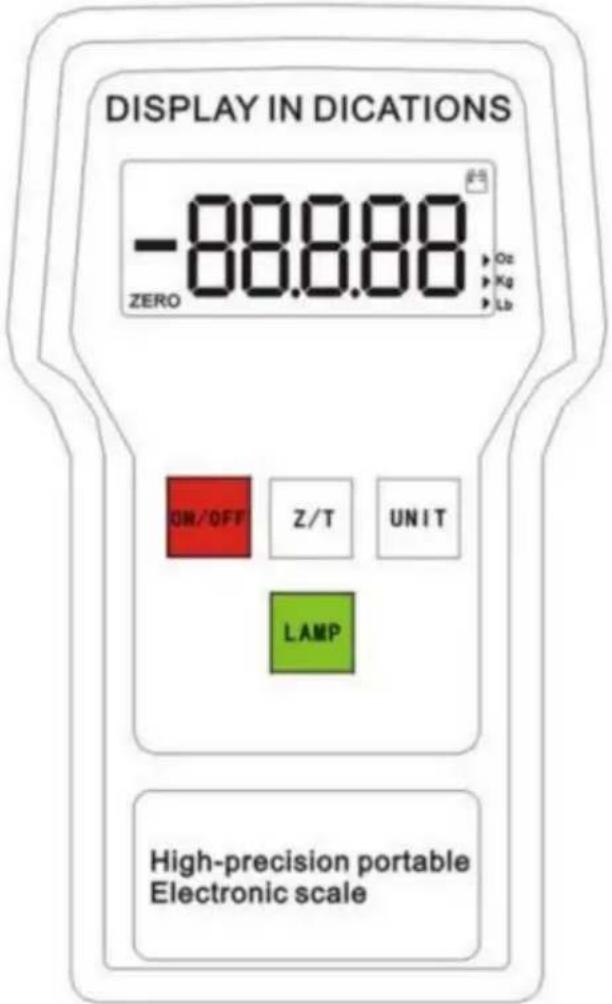

ON/OFF: Press to power on. Press to power off.

UNIT: Select unit of measure: LBS/KG/OZ.

ZERO: Zero display.

LAMP:Backlight
Operation
- Set up the unit as described in steps 1 - 5 under the Set Up heading.
- Press the Z/T button to clear the unit. Ensure to start the unit at 0.
- Place the cylinder in the center of the platform.
- Start the charging or recovery operation by opening the cylinder and manifold and gauge set valves.
- When operation is completed, close the cylinder and manifold and gauge set valves.
NOTE: The unit has an Over Range Indicator which displays "FULL" when the weight of the cylinder exceeds the maximum capacity of the unit. To prevent damage to the unit, immediately remove the cylinder from the platform if the display states "FULL".
- Remove the cylinder from the platform and press the button to deactivate the unit.
Weight Measurements
- Turn the unit on by pressing the ON/OFF button.
- Press the UNIT button to choose the type of unit of measure. (KG/LBS/OZ)
- Press the Z/T button to zero out the display.
- Place the weighing object in the center of the platform and the gross weight will display.
- Remove weighing object from scale and press ON/OFF button to turn off the unit.
Maintenance
- Immediately remove the weighing object from the platform if the display states "FULL". This is the over range indicator which means the weight has exceeded the maximum capacity of the platform.
- Replace the battery of the unit if the battery indicator flashes in the top right hand corner of the control box.
Specifications
Capacity:
110lbs/50kg
154lbs/70kg
200lbs/90kg
220lbs/100kg
Resolution: _OZ/_lbs/_g Operating temperature range: 32° to 122°F (0~50°C) Storage temperature range: -4 to 158°F (-20~70°C) Accuracy: +/-_g of reading whichever is greater Platform size: 23cm*23cm, removable Total unit weight: 3.3kg
NOTE: To prevent damage, never exceed the rated capacity of the unit.
Made in China
VEVOR®
TOUGH TOOLS, HALF PRICE
electronics www.vevor.com/support
VEVOR®
TOUGH TOOLS, HALF PRICE
Digital Refrigerant Scales utilize the most technologically advanced refrigerant meters today and are ideal for HVAC and refrigeration systems. The weight can be measured in standard or metric units. The units have a built-in alarm to indicate the measurement has been exceeded.
Features
- High visibility LCD display
- Three units of measure options (kg/oz/lbs).
- Backlight for the display
- Automatic shut-off after 10 minutes of non-use; backlight will shut off after 3 minutes of non-use or use.
- Compact, portable, battery operated design
- "FULL" display when the weight exceeds the specified range
Unit Diagram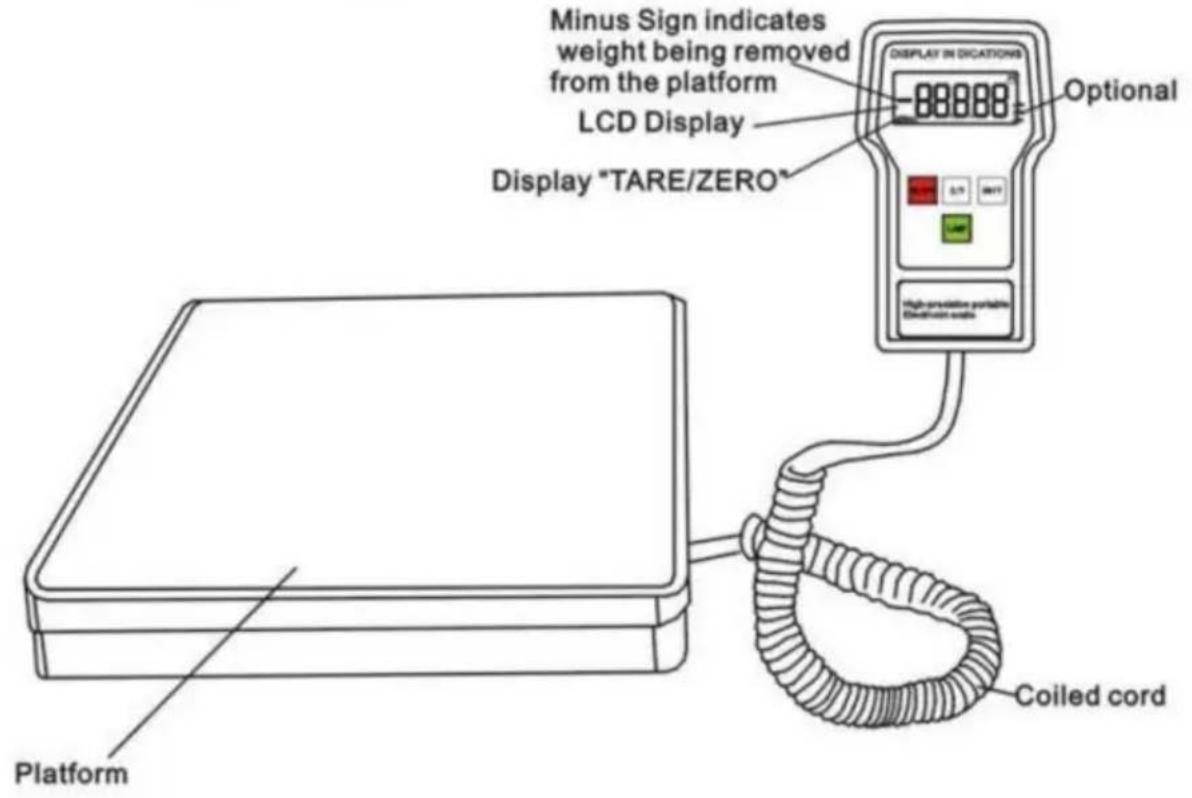
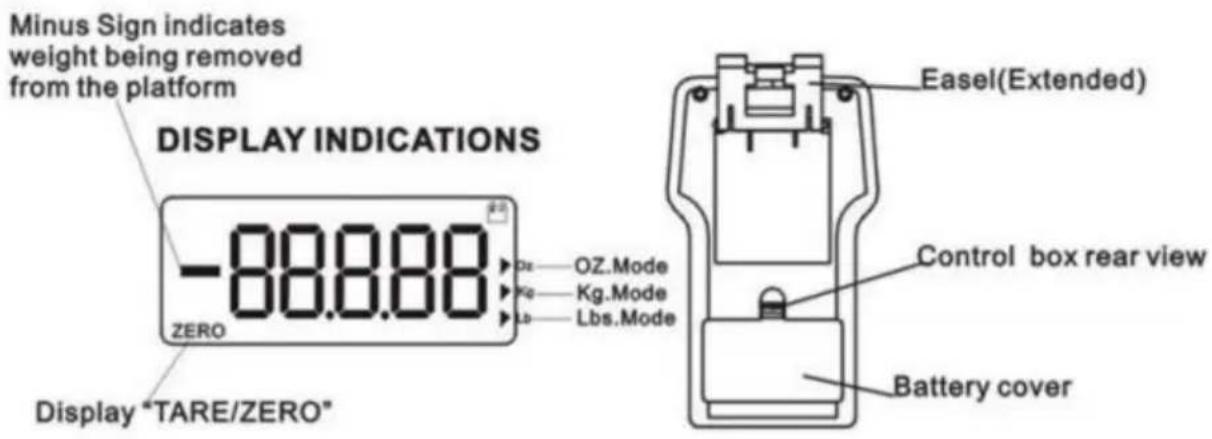
Set Up
- Place the unit on a firm and level surface. The platform and control box can be used in the case or they can be used outside of the case.
- Remove the battery cover from the rear of the control box by compressing the tab at the base of the battery cover.
- Insert a 9V battery. Replace the battery cover by aligning the tabs and snapping it back into place.
- Turn the unit power on by pressing the button.
- Select the unit of measure by pressing the UNIT (Kg/Lbs/Oz) button.
- Press the LAMP button to activate the backlight. Press the LAMP button again to deactivate the backlight.
NOTE: To prevent damage to the unit, do not leave dead batteries in the control box. Remove the batteries if the unit will not be used for an extended period of time.
CAUTION: If the platform is used in the case, make certain nothing touches the case, control box, or platform as false readings may occur.
Keypad

ON/OFF: Press to power on. Press to power off.

UNIT: Select unit of measure: LBS/KG/OZ.

ZERO: Zero display.

LAMP: Backlight.
Operation
- Set up the unit as described in steps 1 - 5 under the Set Up heading.
- Press the Z/T button to clear the unit. Ensure to start the unit at 0.
- Place the cylinder in the center of the platform.
- Start the charging or recovery operation by opening the cylinder and manifold and gauge set valves.
- When operation is completed, close the cylinder and manifold and gauge set valves.
NOTE: The unit has an Over Range Indicator which displays "FULL" when the weight of the cylinder exceeds the maximum capacity of the unit. To prevent damage to the unit, immediately remove the cylinder from the platform if the display states "FULL".
- Remove the cylinder from the platform and press the button to deactivate the unit.
Weight Measurements
- Turn the unit on by pressing the ON/OFF button.
- Press the UNIT button to choose the type of unit of measure. (KG/LBS/OZ)
- Press the Z/T button to zero out the display.
- Place the weighing object in the center of the platform and the gross weight will display.
- Remove weighing object from scale and press to turn off the unit. ON/OFF button
Maintenance
- Immediately remove the weighing object from the platform if the display states "FULL". This is the over range indicator which means the weight has exceeded the maximum capacity of the platform.
- Replace the battery of the unit if the battery indicator flashes in the top right hand corner of the control box.
Specifications
Capacity:
110lbs/50kg
154lbs/70kg
200lbs/90kg
220lbs/100kg
Resolution: _OZ/_lbs/_g Operating temperature range: 32° to 122°F (0~50°C) Storage temperature range: -4 to 158°F (-20~70°C) Accuracy: +/-_g of reading whichever is greater Platform size: 23cm*23cm, removable Total unit weight: 3.3kg
NOTE: To prevent damage, never exceed the rated capacity of the unit
Made in China
VEVOR®
TOUGH TOOLS, HALF PRICE
NEED HELP? CONTACT US!
Digital Refrigerant Scales utilize the most technologically advanced refrigerant meters today and are ideal for HVAC and refrigeration systems. The weight can be measured in standard or metric units. The units have a built in alarm to indicate the measurement has been exceeded.
Features
- High visibility LCD display
- Three units of measure options (kg/oz/lbs).
- Backlight for the display
- Automatic shut-off after 10 minutes of non-use; backlight will shut off after 3 minutes of non-use or use.
- Compact, portable, battery operated design
- "FULL" display when the weight exceeds the specified range
Unit Diagram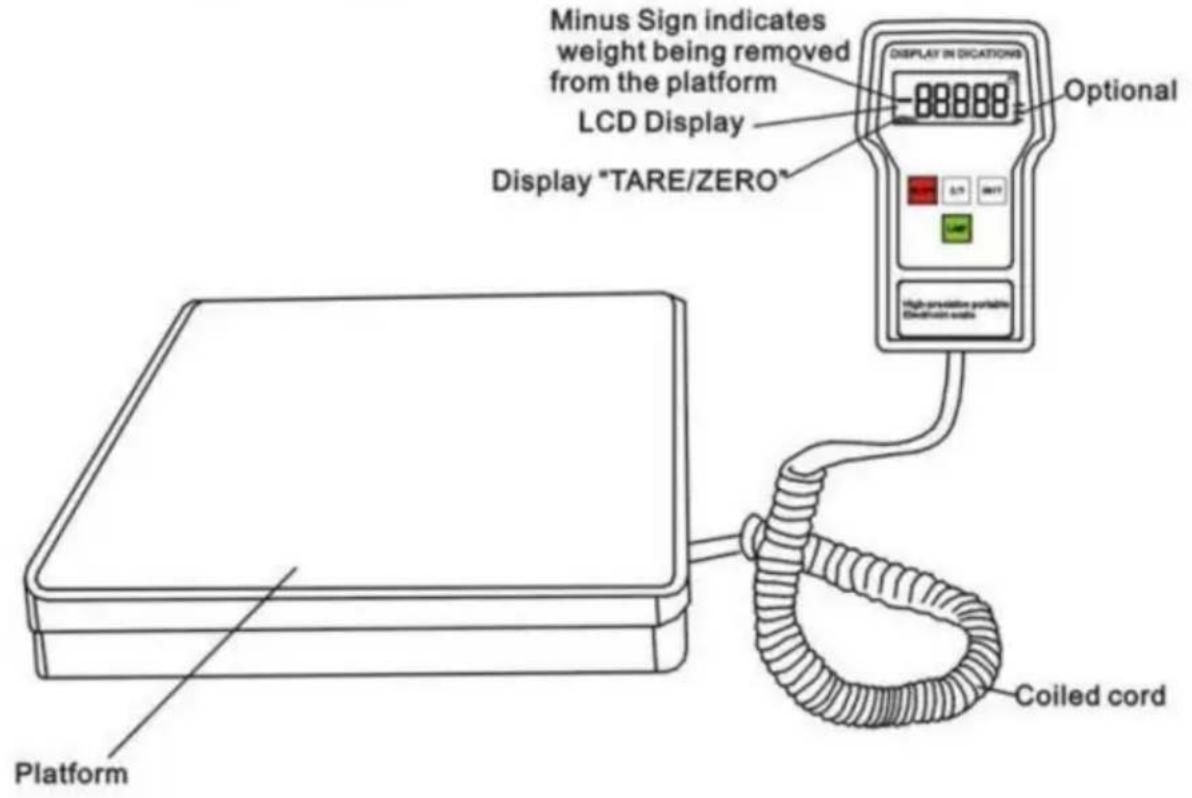
Set Up
- Place the unit on a firm and level surface. The platform and control box can be used in the case or they can be used outside of the case.
- Remove the battery cover from the rear of the control box by compressing the tab at the base of the battery cover.
- Insert 9V battery. Replace the battery cover by aligning tabs and snap back into place.
- Turn the unit power on by pressing the button.
- Select the unit of measure by pressing the UNIT (Kg/Lbs/Oz) button.
- Press the LAMP button to activate the backlight. Press the LAMP button again to deactivate the backlight.
NOTE: To prevent damage to the unit do not leave dead batteries in the control box. Remove the batteries if the unit will not be used for an extended period of time.
CAUTION: If the platform is used in the case, make certain nothing touches the case, control box or platform as false readings may occur.
Keypad

ON/OFF: Press to power on. Press to power off.

UNIT: Select unit of measure: LBS/KG/OZ.

ZERO: Zero display.

LAMP: Backlight.
Operation
- Set up the unit as described in steps 1 - 5 under the Set Up heading.
- Press the Z/T button to clear the unit. Ensure to start the unit at 0.
- Place the cylinder in the center of the platform.
- Start the charging or recovery operation by opening the cylinder and manifold and gauge set valves.
- When operation is completed, close the cylinder and manifold and gauge set valves.
NOTE: The unit has an Over Range Indicator which displays "FULL" when the weight of the cylinder exceeds the maximum capacity of the unit. To prevent damage to the unit, immediately remove the cylinder from the platform if the display states "FULL".
- Remove the cylinder from the platform and press the button to deactivate the unit.
Weight Measurements
- Turn the unit on by pressing the ON/OFF button.
- Press the UNIT button to choose the type of unit of measure. (KG/LBS/OZ)
- Press the Z/T button to zero out the display.
- Place the weighing object in the center of the platform and the gross weight will display.
- Remove weighing object from scale and press to turn off the unit. ON/OFF button
Maintenance
- Immediately remove the weighing object from the platform if the display states "FULL". This is the over range indicator which means the weight has exceeded the maximum capacity of the platform.
- Replace the battery of the unit if the battery indicator flashes in the top right hand corner of the control box.
Specifications
Capacity:
110lbs/50kg
154lbs/70kg
200lbs/90kg
220lbs/100kg
Resolution: OZ/____lbs/____g Operating temperature range: 32° to 122°F (0~50°C) Storage temperature range: -4 to 158°F (-20~70°C) Accuracy: +/-__g of reading whichever is greater Platform size: 23cm*23cm, removable Total unit weight: 3.3kg
NOTE: To prevent damage, never exceed the rated capacity of the unit
VEVOR®
TOUGH TOOLS, HALF PRICE
www.vevor.com/support
VEVOR®
TOUGH TOOLS, HALF PRICE
Technical support and e-warranty certificate www.vevor.com/support
ELECTRONIC SCALE
MODEL: LX-36575A/LX-36575D
NEED HELP? CONTACT US!
Digital Refrigerant Scales utilize the most technologically advanced refrigerant meters today and are ideal for HVAC and refrigeration systems. The weight can be measured in standard or metric units. The units have a built-in alarm to indicate the measurement has been exceeded.
Features
- High visibility LCD display
- Three units of measure options (kg/oz/lbs).
- Backlight for the display
- Automatic shut-off after 10 minutes of non-use; backlight will shut off after 3 minutes of non-use or use.
- Compact, portable, battery-operated design
- "FULL" display when the weight exceeds the specified range
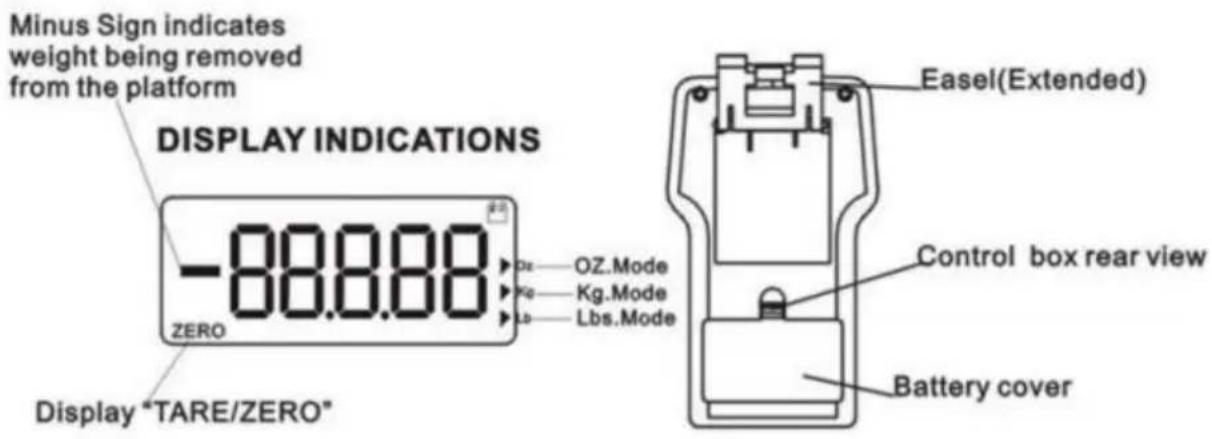
Unit Diagram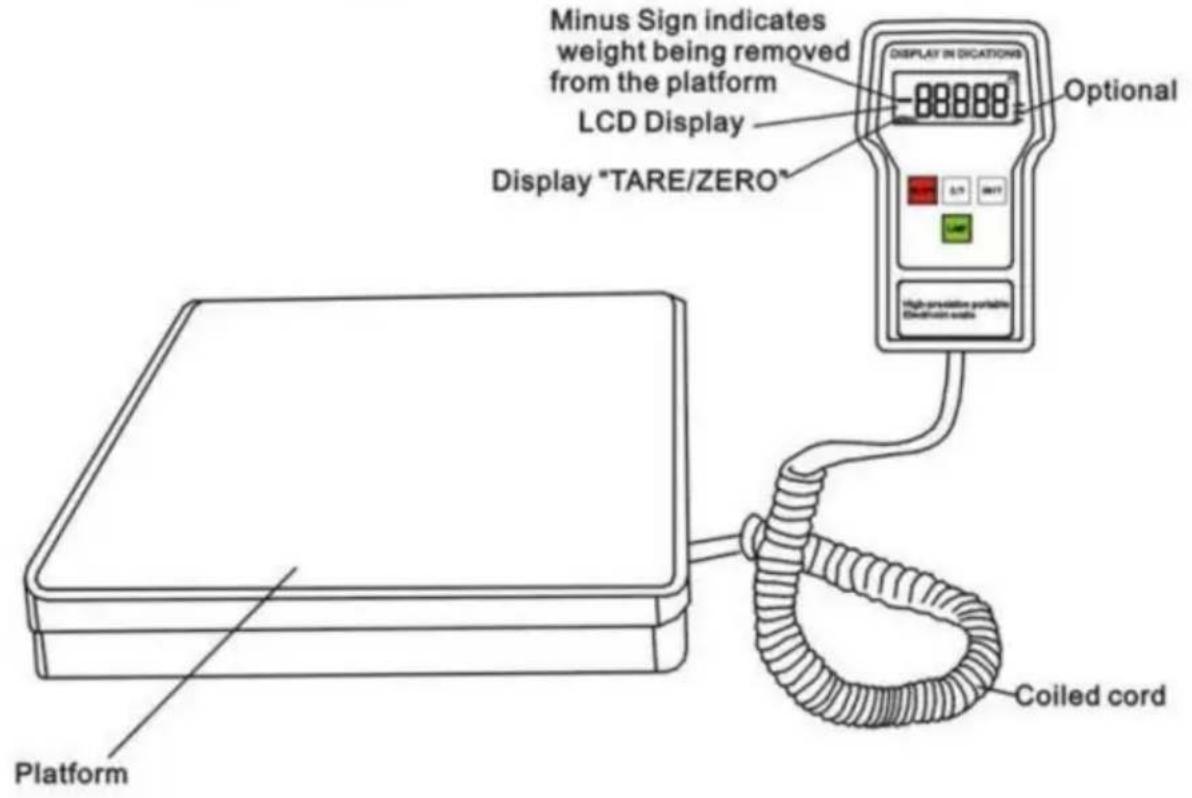
Set Up
- Place the unit on a firm and level surface. The platform and control box can be used in the case or they can be used outside of the case.
- Remove the battery cover from the rear of the control box by compressing the tab at the base of the battery cover.
- Insert 9V battery. Replace the battery cover by aligning tabs and snap back into place.
- Turn the unit power on by pressing the button.
- Select the unit of measure by pressing the UNIT (Kg/Lbs/Oz) button.
- Press the LAMP button to activate the backlight. Press the LAMP button again to deactivate the backlight.
NOTE: To prevent damage to the unit, do not leave dead batteries in the control box. Remove the batteries if the unit will not be used for an extended period of time.
CAUTION: If the platform is used in the case, make certain nothing touches the case, control box, or platform as false readings may occur.
Keypad


ON/OFF: Press to power on. Press to power off.

UNIT: Select unit of measure: LBS/KG/OZ.

ZERO: Zero display.

LAMP: Backlight.
Operation
- Set up the unit as described in steps 1 - 5 under the Set Up heading.
- Press the Z/T button to clear the unit. Ensure to start the unit at 0.
- Place the cylinder in the center of the platform.
- Start the charging or recovery operation by opening the cylinder and manifold and gauge set valves.
- When operation is completed, close the cylinder and manifold and gauge set valves.
NOTE: The unit has an Over Range Indicator which displays "FULL" when the weight of the cylinder exceeds the maximum capacity of the unit. To prevent damage to the unit, immediately remove the cylinder from the platform if the display states "FULL".
- Remove the cylinder from the platform and press the button to deactivate the unit.
Weight Measurements
- Turn the unit on by pressing the ON/OFF button.
- Press the UNIT button to choose the type of unit of measure. (KG/LBS/OZ)
- Press the Z/T button to zero out the display.
- Place the weighing object in the center of the platform and the gross weight will display.
- Remove weighing object from scale and press to turn off the unit. ON/OFF button
Maintenance
- Immediately remove the weighing object from the platform if the display states "FULL". This is the over range indicator which means the weight has exceeded the maximum capacity of the platform.
- Replace the battery of the unit if the battery indicator flashes in the top right hand corner of the control box.
Specifications
Capacity:
110lbs/50kg
154lbs/70kg
200lbs/90kg
220lbs/100kg
Resolution: _OZ/_lbs/_g Operating temperature range: 32° to 122°F (0~50°C) Storage temperature range: -4 to 158°F (-20~70°C) Accuracy: +/-_g of reading whichever is greater Platform size: 23cm*23cm, removable Total unit weight: 3.3kg
NOTE: To prevent damage, never exceed the rated capacity of the unit
Made in China
VEVOR®
TOUGH TOOLS, HALF PRICE
Technical support and e-warranty certificate www.vevor.com/support
VEVOR®
TOUGH TOOLS, HALF PRICE
NEED HELP? CONTACT US!
Digital Refrigerant Scales utilize the most technologically advanced refrigerant meters today and are ideal for HVAC and refrigeration systems. The weight can be measured in standard or metric units. The units have a built-in alarm to indicate the measurement has been exceeded.
Features
- High visibility LCD display
- Three units of measure options (kg/oz/lbs).
- Backlight for the display
- Automatic Shut-off after 10 minutes of non-use; backlight will shut off after 3 minutes of non-use or use.
- Compact, portable, battery operated design
- "FULL" display when the weight exceeds the specified range
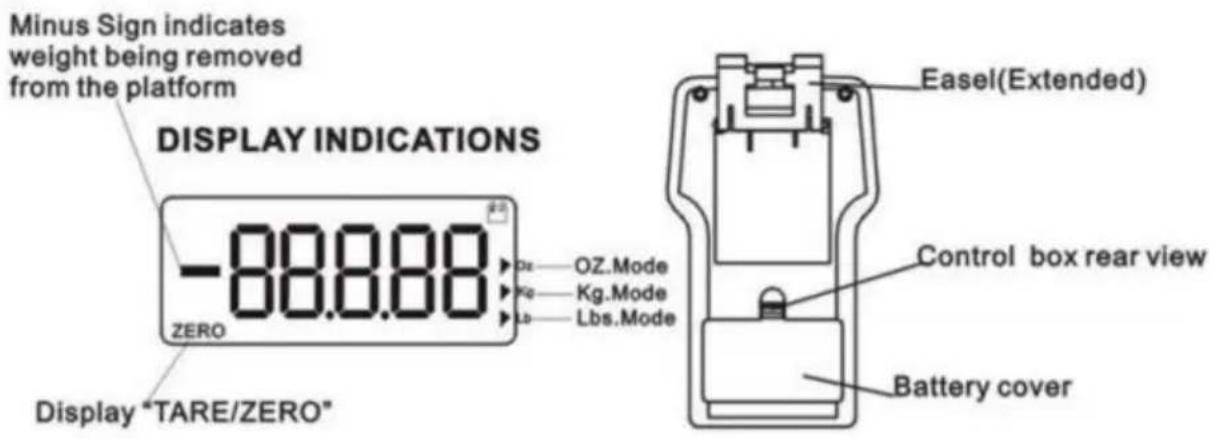
Unit Diagram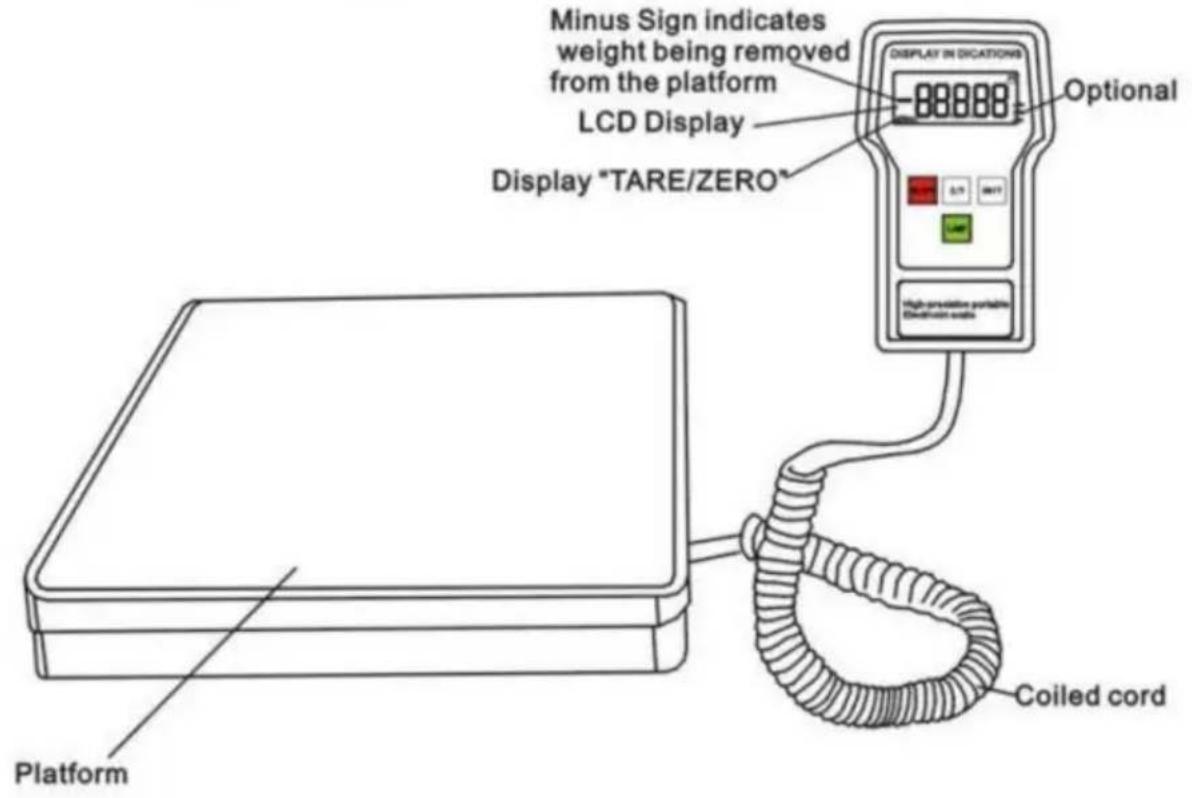
Set Up
- Place the unit on a firm and level surface. The platform and control box can be used in the case or they can be used outside of the case.
- Remove the battery cover from the rear of the control box by compressing the tab at the base of the battery cover.
- Insert 9V battery. Replace the battery cover by aligning tabs and snap back into place.
- Turn the unit power on by pressing the button.
- Select the unit of measure by pressing the UNIT (Kg/Lbs/Oz) button.
- Press the LAMP button to activate the backlight. Press the LAMP button again to deactivate the backlight.
NOTE: To prevent damage to the unit do not leave dead batteries in the control box. Remove the batteries if the units will not be used for an extended period of time.
CAUTION: If the platform is used in the case, make certain nothing touches the case, control box or platform as false readings may occur.
Keypad
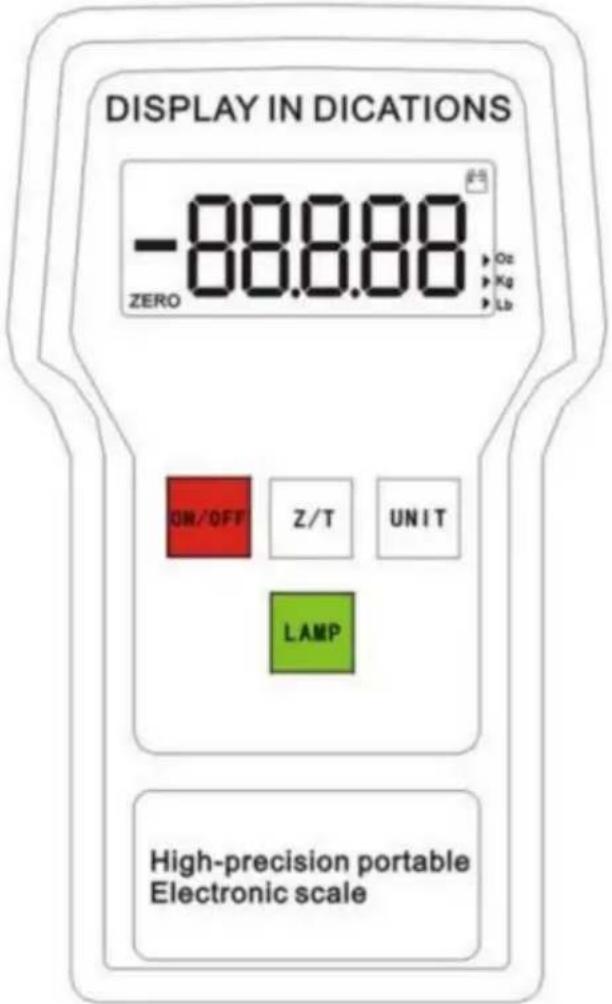

ON/OFF: Press to power on. Press to power off.

UNIT: Select unit of measure: LBS/KG/OZ

ZERO:ZERO display

LAMP:Backlight
Operation
- Set up the unit as described in steps 1 - 5 under the Set Up heading.
- Press the Z/T button to clear the unit. Ensure to start the unit at 0.
- Place the cylinder in the center of the platform.
- Start the charging or recovery operation by opening the cylinder and manifold and gauge set valves.
- When operation is completed, close the cylinder and manifold and gauge set valves.
NOTE: The unit has an Over Range Indicator which displays "FULL" when the weight of the cylinder exceeds the maximum capacity of the unit. To prevent damage to the unit, immediately remove the cylinder from the platform if the display states "FULL".
- Remove the cylinder from the platform and press the button to deactivate the unit.
Weight Measurements
- Turn the unit on by pressing the ON/OFF button.
- Press the UNIT button to choose the type of unit of measure. (KG/LBS/OZ)
- Press the Z/T button to zero out the display.
- Place the weighing object in the center of the platform and the gross weight will display.
- Remove weighing object from scale and press to turn off the unit. ON/OFF button
Maintenance
- Immediately remove the weighing object from the platform if the display states "FULL". This is the over range indicator which means the weight has exceeded the maximum capacity of the platform.
- Replace the battery of the unit if the battery indicator flashes in the top right hand corner of the control box.
Specifications
Capacity:
110lbs/50kg
154lbs/70kg
200lbs/90kg
220lbs/100kg
Resolution: _OZ/_lbs/_g Operating temperature range: 32° to 122°F(0\~50°C) Storage temperature range: -4 to 158°F(-20\~70°C) Accuracy: +/-_gof reading whichever is greater Platform size: 23cm*23cm, removable Total unit weight: 3.3kg
NOTE: To prevent damage, never exceed the rated capacity of the unit
Made in China
VEVOR®
TOUGH TOOLS, HALF PRICE
- ELECTRONIC SCALE
- NEED HELP? CONTACT US
- SECURITY & WARNINGS
- WARNING
- DON'T USE THE PRODUCT ON THE FOLLOWING OCCASIONS
- MATTERS NEEDING ATTENTION
- FCC INFORMATION
- CORRECT DISPOSAL
- INTRODUCTION
- FEATURES
- SET UP
- KEYPAD
- OPERATION
- WEIGHT MEASUREMENTS
- MAINTENANCE
- SPECIFICATIONS
- VEVOR®
- TOUGH TOOLS, HALF PRICE
- MODEL: LX-36575A/LX-36575D
Brand : Vevor
Model : LX-36575D
Category : Scale