
HS-30-ACA - Fan Vevor - Free user manual and instructions
Find the device manual for free HS-30-ACA Vevor in PDF.
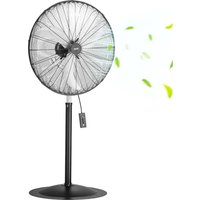


| Brand | Vevor |
| Model | HS-30-ACA |
| Product Type | Industrial Standard Fan |
| Power Supply | 220-240 V ~ 50 Hz |
| Power | 180 W |
| Net Weight | 18.5 kg |
| Adjustable Speeds | Yes (rotary switch) |
| Adjustable Tilt | Yes (via included wrench) |
| Safety Protection | Protective grid, grounded plug, disconnect before maintenance |
| Intended Use | Industrial and commercial applications, indoor use only |
| Maintenance and Cleaning | Clean the grid with a damp cloth, do not immerse, store in original packaging |
| Included Accessories | Rubber pads (2), thumbscrews (2), support tubes (2), rubber feet (2), casters (2), wrench |
| Warranty | Electronic warranty certificate available at www.vevor.com/support |
| Extension Cord Compatibility | Minimum 14 AWG, power rating of at least 1875 W |
| Housing Material | Metal (steel) with metal grid |
Frequently Asked Questions - HS-30-ACA Vevor
User questions about HS-30-ACA Vevor
0 question about this device. Answer the ones you know or ask your own.
Ask a new question about this device
Download the instructions for your Fan in PDF format for free! Find your manual HS-30-ACA - Vevor and take your electronic device back in hand. On this page are published all the documents necessary for the use of your device. HS-30-ACA by Vevor.
USER MANUAL HS-30-ACA Vevor
Technical Support and E-Warranty Certificate www.vevor.com/support
STANDARD FAN
MODEL: BT-HIF18B/BT-HIF20B/HS-20-ACA/BT-HIF24B/HS-24-ACA/HS-24-ACA/HS-30-ACA
We continue to be committed to providing you with tools at competitive prices. "Save Half", "Half Price", or any other similar expressions used by us only represent an estimate of savings you might benefit from buying certain tools with us compared to the major top brands and do not necessarily mean to cover all categories of tools offered by us. You are kindly reminded to verify carefully when placing an order with us if you are actually saving half in comparison with the top major brands.
VEVOR®
TOUGH TOOLS, HALF PRICE
STANDARD FAN
MODEL: BT-HIF18B/BT-HIF20B/HS-20-ACA/BT-HIF24B/HS-24-ACA/HS-24-ACA/HS-30-ACA
NEED HELP? CONTACT US!
Have product questions? Need technical support? Please feel free to contact us:
Technical Support and E-Warranty Certificate www.vevor.com/support
This is the original instruction. Please read all manual instructions carefully before operating. VEVOR reserves a clear interpretation of the user manual. The appearance of the product shall be subject to the product you received. Please forgive us that we won't inform you again if there are any technology or software updates on our product.
PARAMETER LIST
| Model | Voltage | Power (W) ) | net weight(kg) |
| BT-HIF18B | 120V~ 60Hz | 120 | 8.5 |
| BT-HIF20B | 120V~ 60Hz | 130 | 9 |
| HS-20-ACA | 220-240V ~ 50Hz | 120 | 9 |
| BT-HIF24B | 120V~ 60Hz | 170 | 14.8 |
| HS-24-ACA | 220-240V ~ 50Hz | 145 | 14.8 |
| BT-HIF30B | 120V~ 60Hz | 230 | 18.5 |
| HS-30-ACA | 220-240V ~ 50Hz | 180 | 18.5 |
INTENDED USE
This product is intended for industrial or other commercial applications. Use with electrical wiring that is in good working order and that meets applicable codes and ordinances. If you have any questions whether your wiring is adequate, consult a qualified electrician.
While using your fan, you should follow the IMPORTANT
INSTRUCTIONS listed below. As part of those instructions, we have used the word "WARNING" to indicate the level of hazard: WARNING indicates a hazard which if not avoided could result in injury or death.
IMPORTANT INSTRUCTIONS
As with all electrical appliances, basic safety precautions should always be followed to reduce the risk of electric shock, fire, or injury to persons, including the following precautions:
Read all the instructions before using this fan.
Use this fan only as described in this manual. Any other use not recommended by the manufacturer may cause electrical shock, fire or injury to persons.
Do not operate the fan with a damaged power cord or after the fan malfunctions or has been dropped in any manner.
Use of extreme caution is necessary when any fan is used by or near children, disabled persons or pets and whenever the fan is left operating unattended.
Do not place the fan on a small, unlevel, uneven or any surface which may allow the fan to tip or fall.
For proper operation, the fan should be placed on a smooth, non-combustible surface.
Always unplug the fan when not in use, when moving from place to place, when assembling or disassembling parts, and before cleaning.
The use of attachments not recommended or sold by the manufacturer may cause hazards.
Do not use outdoors.
Do not use the fan in a window. Rain may cause electrical hazard (for non-window models).
Do not operate the fan with blade guards or any safety device removed. Avoid the use of extension cords due to risk of fire. If an extension cord must be used, the cord must be minimum 14 AWG and rated not less than 1875 watts.
Do not run power cord under carpeting.
Do not cover cord with throw rugs, runners or the like. Arrange cord away from traffic area where it will not be tripped over.
Do not insert or allow any object to enter any openings on the fan. Doing so may cause electric shock and/or fire hazard. Avoid contact with moving parts.
This appliance is not intended for use by persons (including children) with reduced physical, sensory or mental capabilities or lack of experience and knowledge, unless they have been given supervision or instruction concerning use of the appliance by a person responsible for their safety. Children should be supervised to ensure they do not play with the appliance.
READ AND SAVE THESE INSTRUCTIONS
WARNING: Shock Hazard
Use your fan only in dry environments. This fan is not intended for use in bathroom, laundry area, or similar locations, or near sinks, washing machines, swimming pools or other sources of water. Never locate fan where it may fall into a bathtub or other water receptacle. Do not use in environments such as flooded basements.
WARNING: Hot Surfaces
Do not touch fan motor when in use. This motor is hot when in use. To avoid burns, do not let bare skin touch hot surfaces.
WARNING: Fire Hazard
Fans have arcing or sparking parts inside. Do not use near combustible materials or flammable gases or sources of heat.
DO NOT USE in areas where gasoline, paint or flammable materials are used or stored. To prevent a possible fire, do not block air intakes or exhaust in any manner. Do not insert or allow foreign objects to enter any ventilation or exhaust opening as this may cause an electric shock, fire, or damage to the fan.
WARNING: Electrical Shock Hazard
Do not use with damaged cord or plug. Use with adequate electrical system that is up to code.
CAUTION: To Prevent Electric Shock, this product has a three prong grounded plug that must be inserted into a matching properly grounded outlet to reduce the risk of electrical shock. Do not attempt to defeat this safety feature.
WARNING: To reduce the risk of fire or electric shock, do not use this product with any solid-state speed control device.
Usage:
Fan Operation:
Always operate the fan in the upright position, following all instructions and recommendations listed in this manual.
Fan Location: Place the fan in the area of the room that will provide proper cooling.
Fan Connection: Be sure the plug fits tightly in the outlet. A loose connection may cause overheating and damage to the plug or fan.
NOTE: To prevent overloading a circuit, do not plug the fan into a circuit that is servicing other electrical needs.
Turning Fan On: Place the fan on a stable, level surface. Plug the fan into a properly grounded outlet. To start the fan, turn the switch from the OFF position to the desired fan speed.
Turning Fan Off: To turn the fan off, turn the switch from the current fan speed setting to the OFF position. Remove the plug from the outlet.
Adjusting Fan Tilt: To adjust the tilt angle, use the supplied knob wrench to loosen the adjustment screw. After adjustment, retighten the adjustment screw. Save the knob wrench for future use.
PACKING LIST
| NO. | Name & Specification | Quantity |
| 1 | Rubber pads | 2 |
| 2 | Plum hand screws | 2 |
| 3 | Back support tubes | 1 |
| 4 | Front support tubes | 1 |
| 5 | Screw | 2 |
| 6 | Square tube | 1 |
| 7 | Rubber feet | 2 |
| 8 | Casters | 2 |
| 9 | Round tube | 1 |
| 10 | Open latches | 4 |
THE PARTS
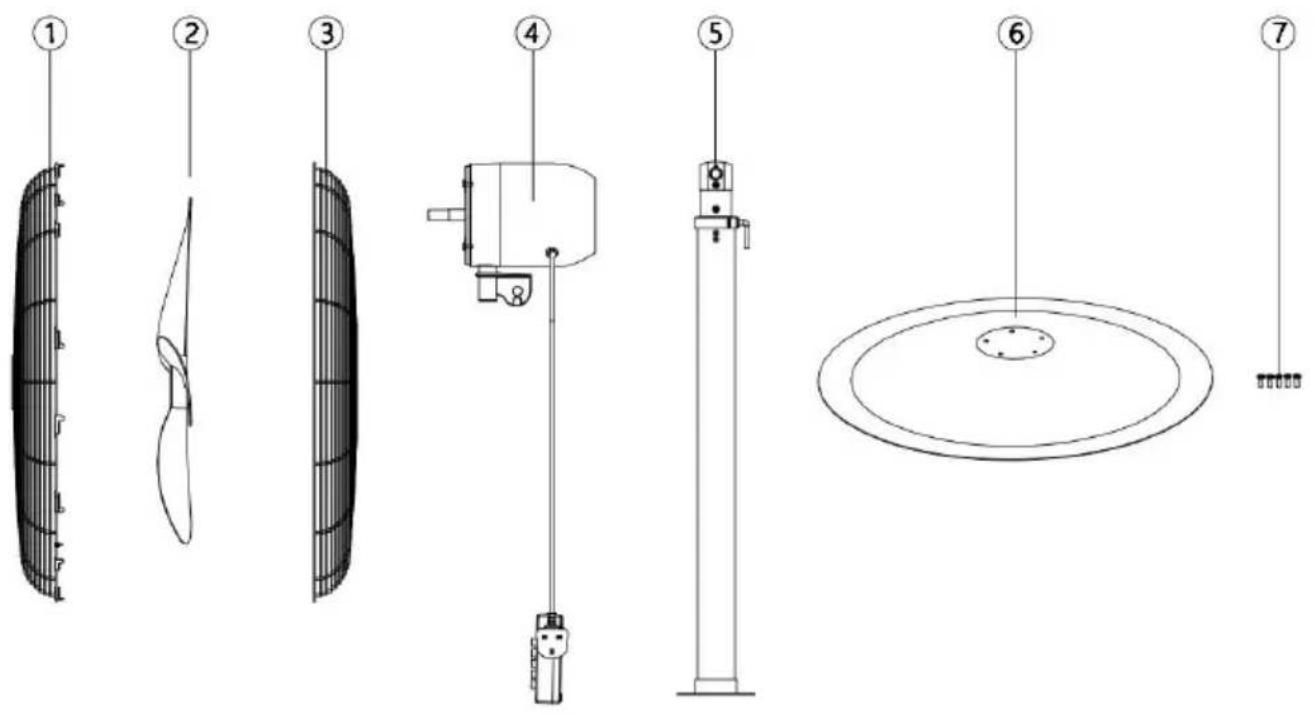
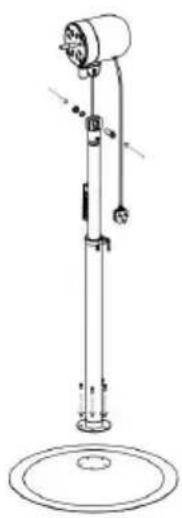
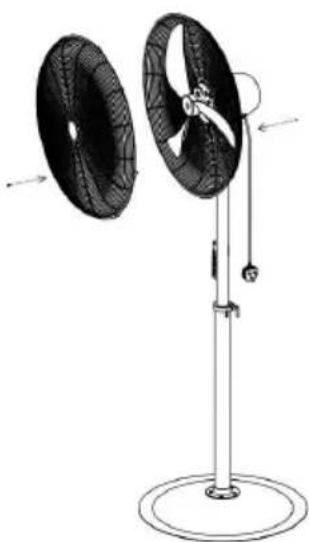
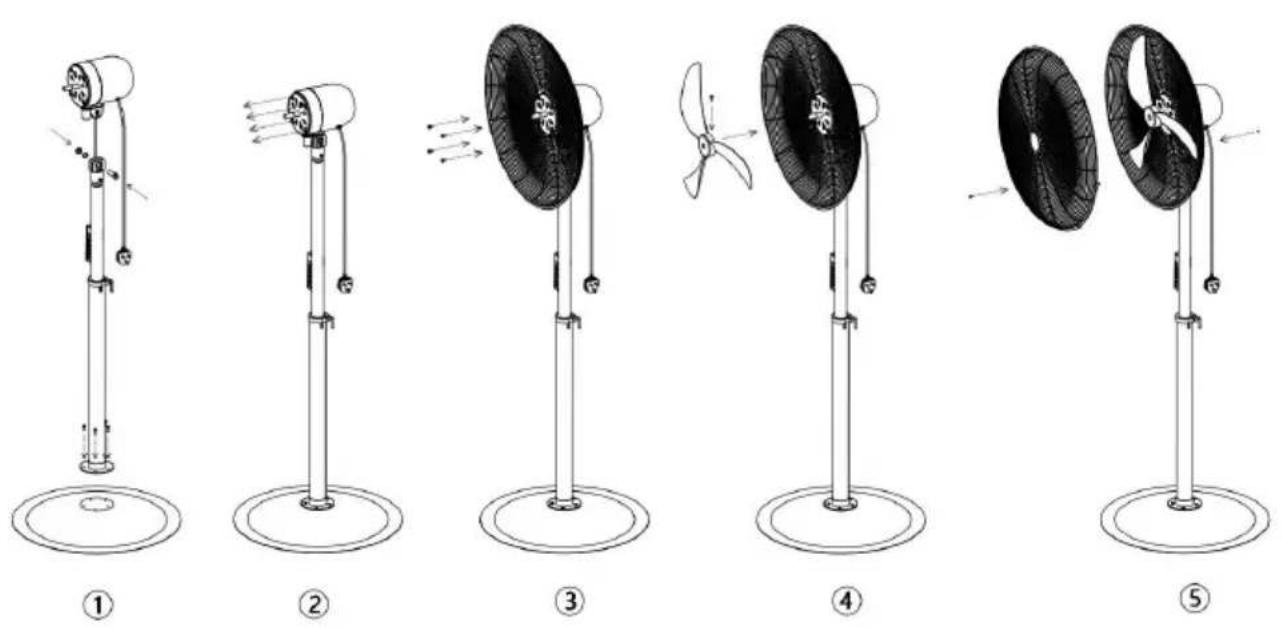
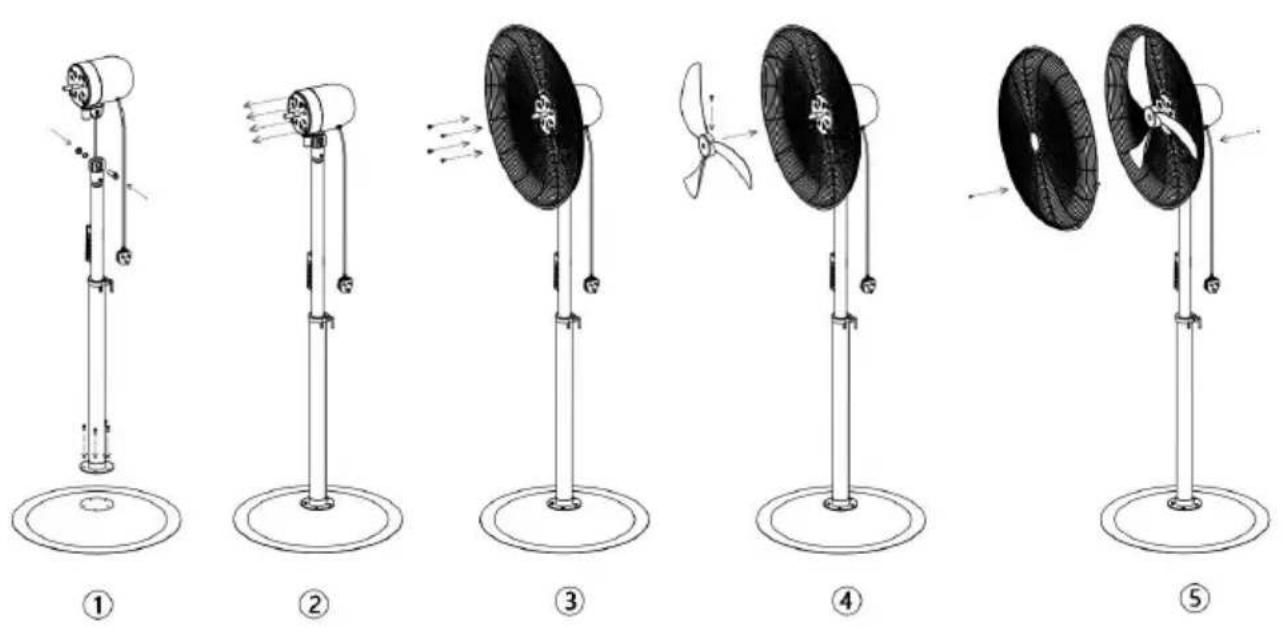
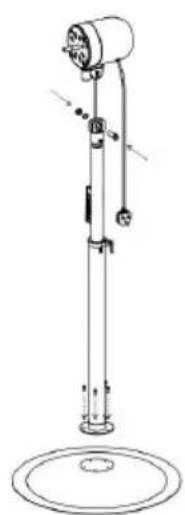
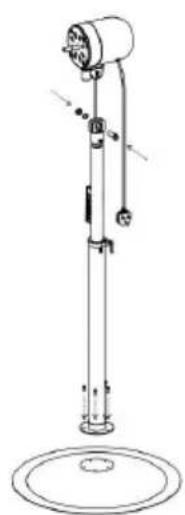
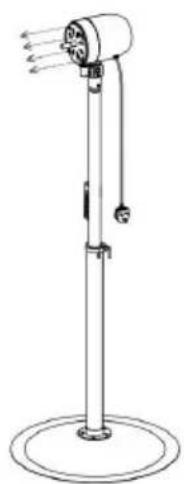
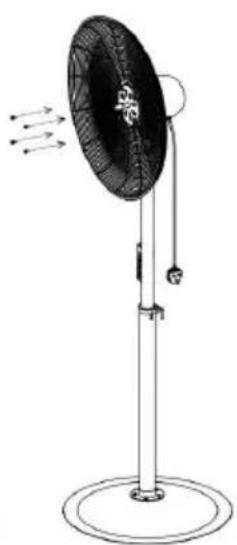
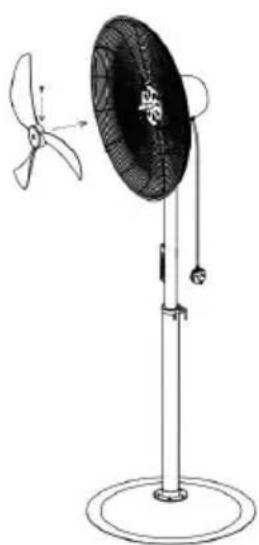
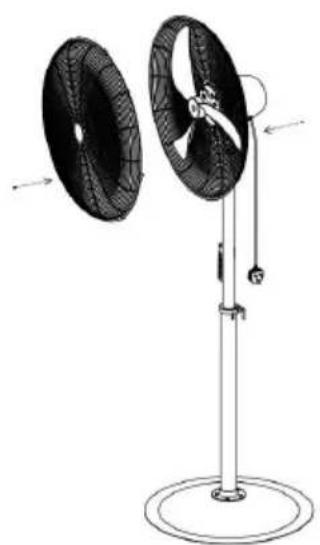
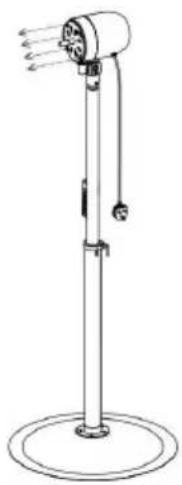
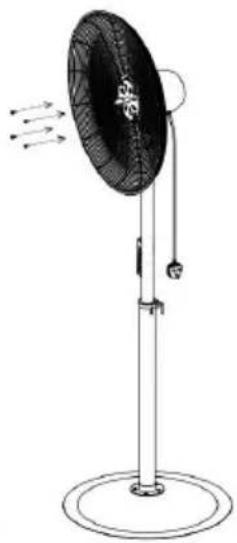
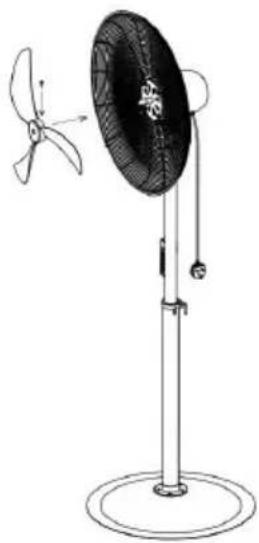
FAN ASSEMBLY
①
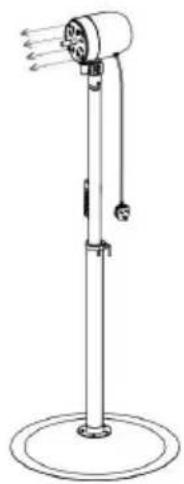
②
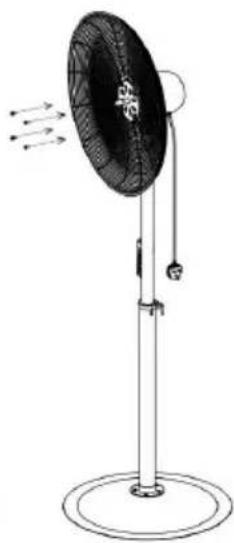
③
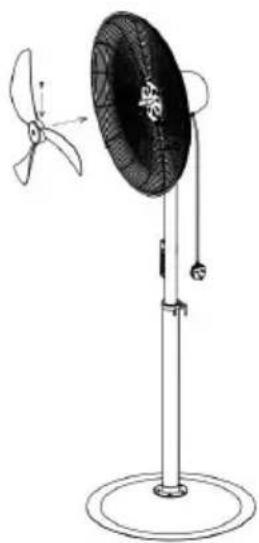
④
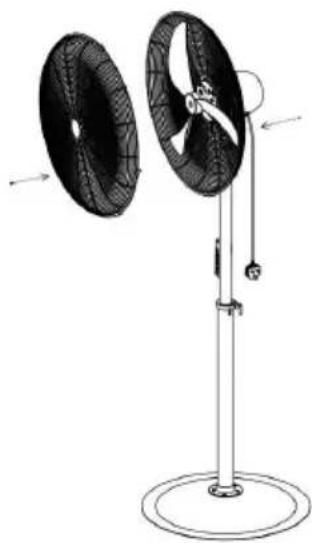
5
WARNING: There is one small hole on each side of the two cradle bases. The two small holes should be kept inner side and at the same directions.
WARNING: Castors must be installed before use.
Care and Maintenance
Cleaning: CAUTION-BEFORE cleaning the fan be sure to disconnect power cord from the plug. Clean the grille surface with a clean damp cloth not use harsh chemical or abrasive cleaners. DO NOT IMMERSE THE FAN ANY WIRES INWATER. Replace front grille before fan use Allow fan to dry completely before use. Periodic grille cleaning with a vacuum will prevent dust build up. The motor is sealed and does not require any interior maintenance cleaning or lubrication.
Maintenance: The Internal motor bearings are permanently lubricated at the factory and do not require any additional lubrication.
Repair: DO NOT OPERATE THE FAN WITHOUT THE GRILLE IN PLACE . DO NOT USE THE FAN IF IT HAS MALFUNCTIONED OR BECOME DAMAGED IN ANY WAY.
Storage: Keep original carton for storage of the fan. Coil and tie the power to avoid damage during storage.
VEVOR®
TOUGH TOOLS, HALF PRICE
Technical Support and E-Warranty Certificate
www.vevor.com/support
VEVOR®
NEED HELP? CONTACT US!
READ AND SAVE THESE INSTRUCTIONS
FAN ASSEMBLY
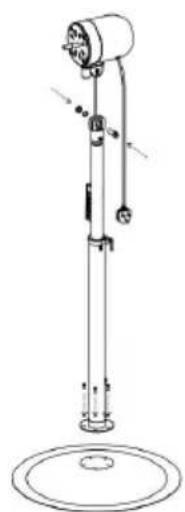
①
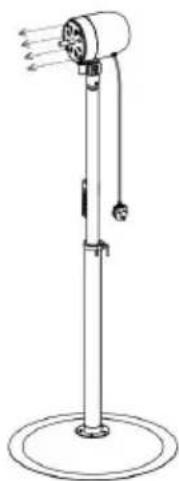
②
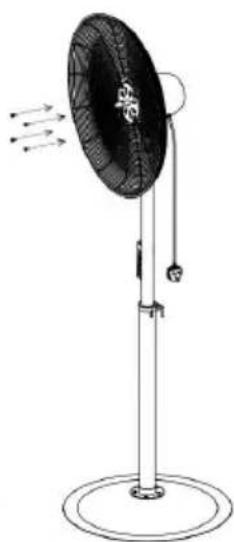
③
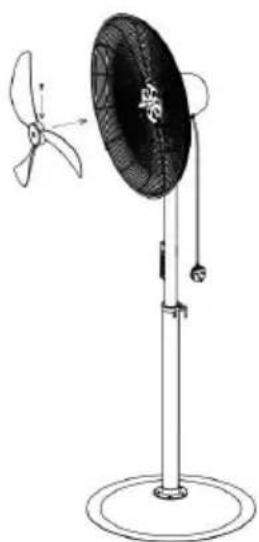
④
5
READ AND SAVE THESE INSTRUCTIONS
FAN ASSEMBLY
NEED HELP? CONTACT US!
READ AND SAVE THESE INSTRUCTIONS
WARNING: Electric Shock Hazard
FAN ASSEMBLY
NEED HELP? CONTACT US!
WARNING: Shock Hazard
WARNING: Hot Surfaces
WARNING: Fire Hazard
FAN ASSEMBLY
①
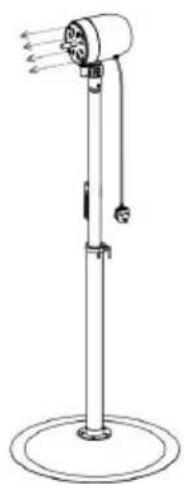
②
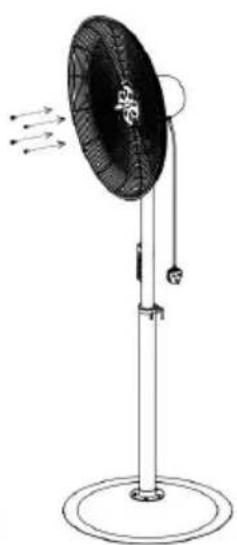
③
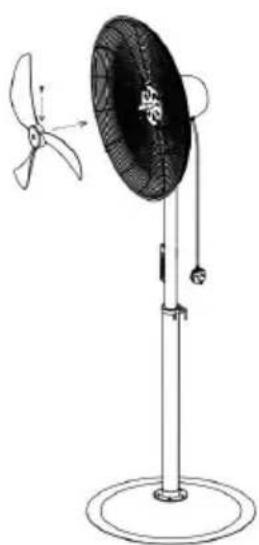
④
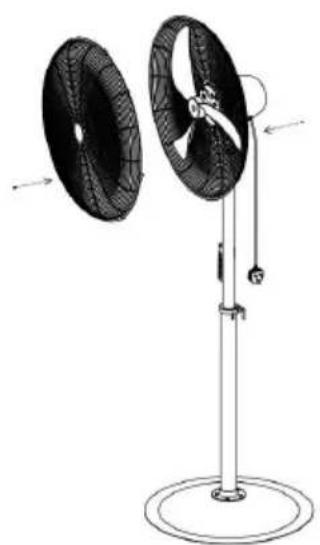
5
NEED HELP? CONTACT US!
READ AND SAVE THESE INSTRUCTIONS
WARNING: Shock Hazard
FAN ASSEMBLY
①
②
③
④
5
①
②
③
④
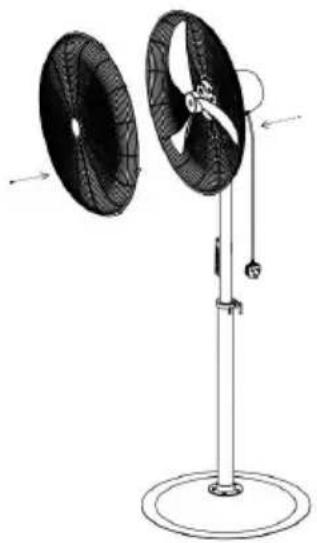
5
READ & SAVE THESE INSTRUCTIONS
FAN ASSEMBLY
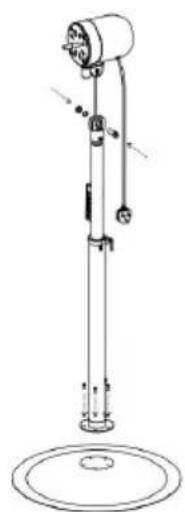
①
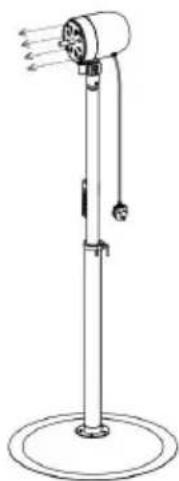
②
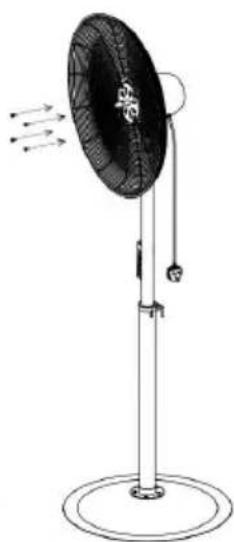
③
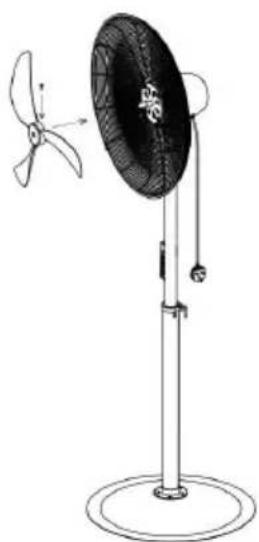
④
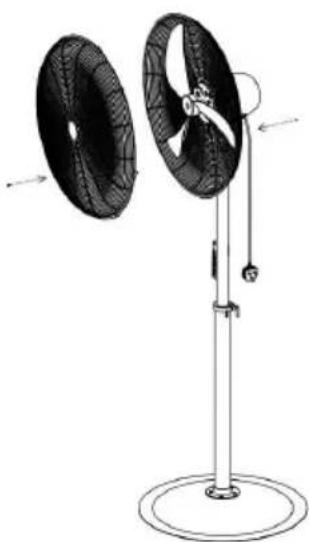
5
- STANDARD FAN
- VEVOR®
- NEED HELP? CONTACT US
- TECHNICAL SUPPORT AND E-WARRANTY CERTIFICATE WWW.VEVOR.COM/SUPPORT
- PARAMETER LIST
- INTENDED USE
- IMPORTANT INSTRUCTIONS
- READ AND SAVE THESE INSTRUCTIONS
- WARNING: SHOCK HAZARD
- WARNING: HOT SURFACES
- WARNING: FIRE HAZARD
- WARNING: ELECTRICAL SHOCK HAZARD
- USAGE
- FAN OPERATION
- PACKING LIST
- THE PARTS
- FAN ASSEMBLY
- CARE AND MAINTENANCE
- WARNING: ELECTRIC SHOCK HAZARD
- READ & SAVE THESE INSTRUCTIONS
Brand : Vevor
Model : HS-30-ACA
Category : Fan