
D12 - Fan Vevor - Free user manual and instructions
Find the device manual for free D12 Vevor in PDF.
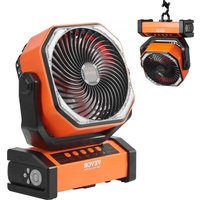


| Product Type | Portable Floor Fan |
| Brand | Vevor |
| Model | D12 |
| Dimensions (L x W x H) | 210 x 100 x 268 mm |
| Battery Capacity | 20000 mAh |
| Rated Power | 15 W |
| Charge Input (Type-C) | 5 V-3 A |
| Charge Output (Type-C) | 5 V-3 A |
| USB Output | 5 V-2 A |
| Run Time (Speed 1, Without Oscillation) | Approximately 60 hours |
| Run Time (Speed 1, With Oscillation) | Approximately 32 hours |
| Run Time (LED Light Level 1) | Approximately 200 hours |
| Number of Speeds | 4 |
| Oscillation | 90° / 45° / Off |
| LED Light | 3 levels + off |
| Timer | 1H / 2H / 4H / 8H |
| Remote Control | Yes, 5 m range |
| Power Bank Function | Yes |
| Charging Time | 9-10 hours (with 5V-3A charger) |
| Material | ABS Plastic |
Frequently Asked Questions - D12 Vevor
User questions about D12 Vevor
0 question about this device. Answer the ones you know or ask your own.
Ask a new question about this device
Download the instructions for your Fan in PDF format for free! Find your manual D12 - Vevor and take your electronic device back in hand. On this page are published all the documents necessary for the use of your device. D12 by Vevor.
USER MANUAL D12 Vevor
Technical Support and E-Warranty Certificate www.vevor.com/support
POWERFUL FLOOR FAN
MODEL: D12
We continue to be committed to providing you with tools at competitive prices. "Save Half", "Half Price", or any other similar expressions used by us only represent an estimate of savings you might benefit from buying certain tools with us compared to top brands and does not necessarily mean to cover all categories of tools offered. We kindly remind you to verify carefully when placing an order with us that you are actually saving half in comparison with the top major brands.
VEVOR®
TOUGH TOOLS, HALF PRICE
POWERFUL FLOOR FAN
MODEL: D12
NEED HELP? CONTACT US!
Have product questions? Need technical support? Please feel free to contact us:
Technical Support and E-Warranty Certificate www.vevor.com/support
This is the original instruction. Please read all manual instructions carefully before operating. VEVOR reserves a clear interpretation of the user manual. The appearance of the product shall be subject to the product you received. Please forgive us that we won't inform you of any technology or software updates on our product.
 | Warning-To reduce the risk of injury, user must re instructions manual carefully. |
 | This device complies with Part 15 of the FCC Rules. is subject to the following two conditions:(1)This device not cause harmful interference, and (2)this device must any interference received, including interference that m cause undesired operation. |
 | This product is subject to the provision of European D 2012/19/EC. The symbol showing a wheelie bin cros through indicates that the product requires separate re collection in the European Union. This applies to the and all accessories marked with this symbol. Products as such may not be discarded with normal domestic w must be taken to a collection point for recycling electi electronic devices. |
SPECIFICATION
| Product Model | D12 |
| Product Size | 210*100*268mm |
| Battery Capacity | 20000mAh |
| Rated Power | 15W |
| TYPE-C Input | 5V-3A |
| TYPE-C Output | 5V-3A |
| USB Output | 5V-2A |
| Battery Life | Fan: speed 1≈60H, speed 2≈35H, speed 3≈25Hspeed 4≈16H Fan + Oscillation: speed 1≈32H,2≈23H speed 3≈18H, speed 4≈13HLED Lighting: level 1≈200H, level 2≈50H, level 3≈28HFan + LED: about 10H at the highest levelFan + LED + Oscillation: about 8.5H at the level |
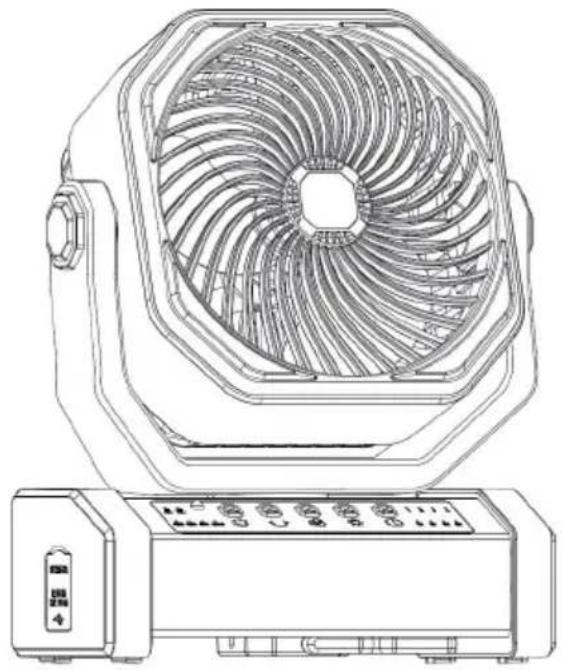
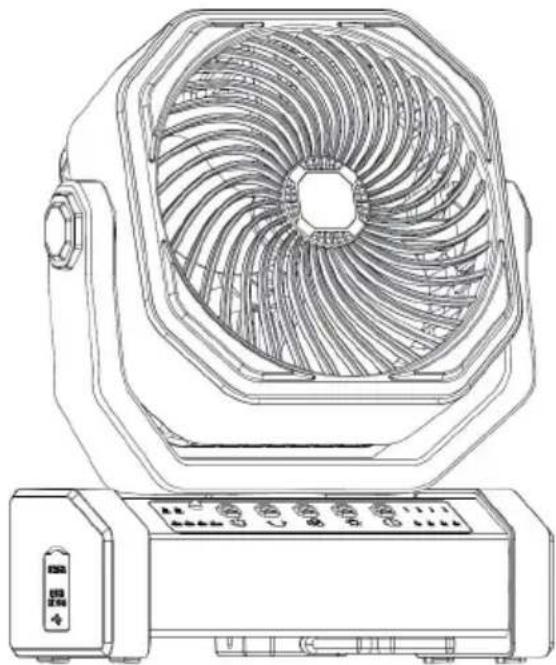
PRODUCT STRUCTURE

SECURITY & WARNINGS
(1) Do not expose the product to high temperature, fire, or under the (2) Do not put the product in a humid place; (3) Do not throw the product into a fire or approach a fire to avoid disaster; (4) Do not disassemble, cut, or pierce the product; (5) Please stop using if abnormal conditions happen during the use of the product; (6) Please charge the product every 2-3 months if not used for a long time to avoid damage to the battery.
USING INSTRUCTIONS
Control Panel:
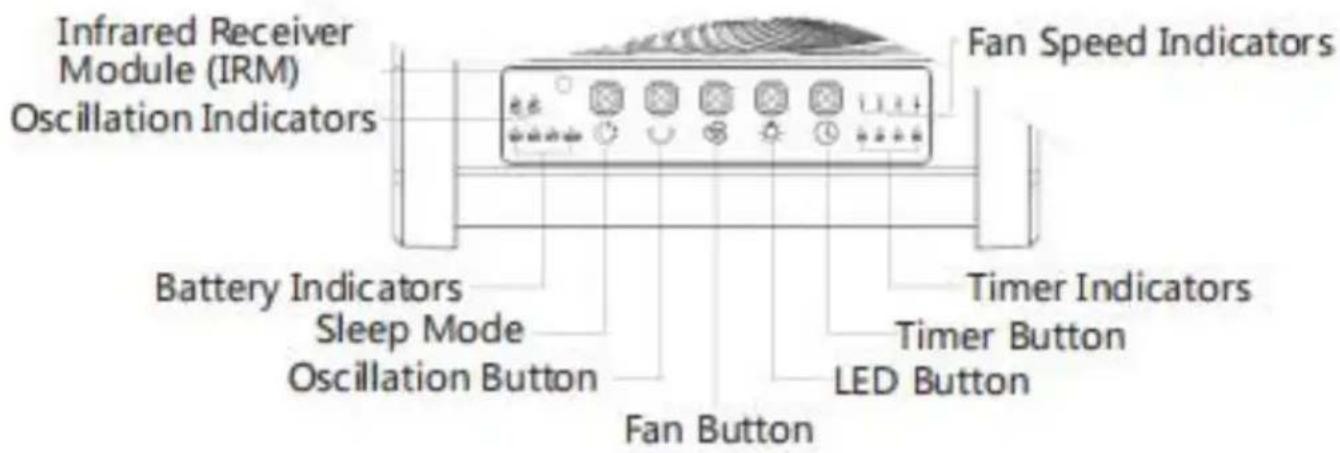
(1) Short press the "button," the fan will switch among speed 1/2/3/4/OFF, long press this button to turn it off at any speed;
(2) When the fan is enabled, short press the " " button, the fan will oscillate within 90° /45° /off in turns, long press this button to turn oscillation; (3) Short press the "button," the LED lights will switch among 1/2/3/OFF; long press this button to turn the LED lights off at any level. (4) Sleep mode: short press the "button" to turn ON/OFF all the indicators (5) Timer: short press the "button" to switch among timer at 1H/2H/4H/8H/off, long press this button to cancel timer; (6) Low power consumption mode: simultaneously press the "" button on the panel and the "Cancel" button on the remote for 3 seconds in case, the fan will turn off and enter low power consumption mode.
Meanwhile, the remote is disabled. Press the "" button again to restore the standard mode and enable the remote at the same time. (When not used for a long time, it’s better to be stored in low power consumption mode, to avoid the battery running out and causing damage to the battery.)
Note: Sleep mode is to turn off the indicators; when the indicators are off, restart or output/input will turn on the indicators again.
How to Use the Remote:
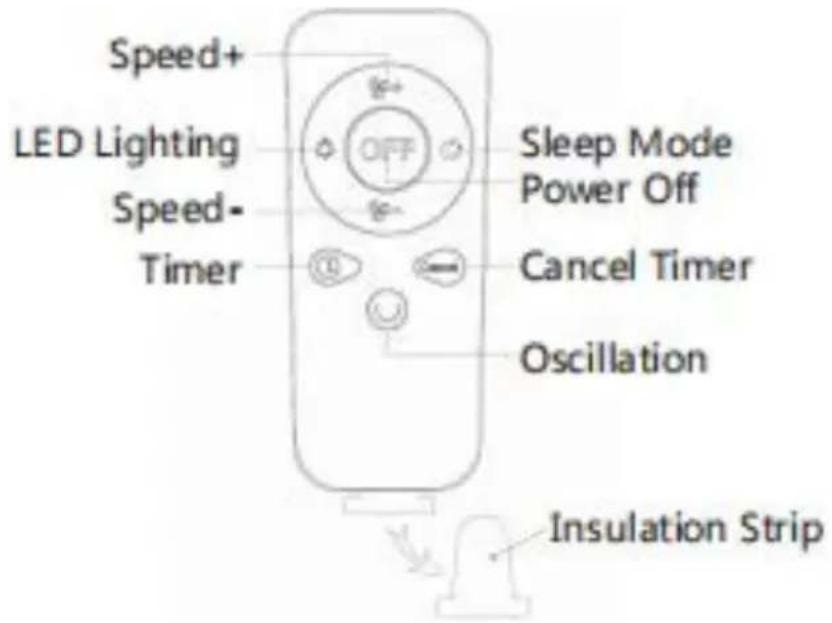
(1) Please remove the insulation strip before using the remote (see the picture above); (2) Activate the remote: The product is at low power consumption mode when out of factory, press the "" button to turn it on and restore the standard mode as well as activate the remote;
(3) Remote distance: 16.4 feet;
(4) The fan will make a Beep sound when receiving the remote command.
4. Charging / Power Bank Feature Input / Output Ports:
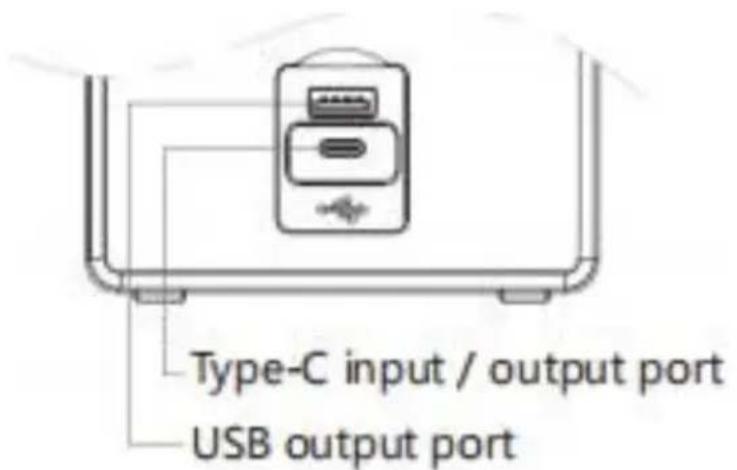
(1) Open the silicone cover before charging. (2) Charging time: 9-10 hours (test with 5V-3A charger; the charging time may be a bit longer when power supply is lower than 5V-3A) (3) Plug in with DC-5V power supply, it will be charged automatically; battery indicators will flash during charging, and be steady on when fully charged. (4) Power bank feature: it can charge other devices via the charging port. When connecting with other devices, please choose the power within the parameter range, or it may cause damage to the device.
Some mobile phones cannot activate the power bank feature automatically after connecting, press the "" button to manually activate the power bank feature.
Note: Type-C output port is not compatible with some mobile phones
Address: Baoshanqu Shuangchenglu 803long 11hao 1602A-1609shi Shanghai
Imported to AUS: SIHAO PTY LTD. 1 ROKEVA STREETEASTWOOD NSW 2122 Australia
Imported to USA: Sanven Technology Ltd. Suite 250, 9166 Anaheim Place, Rancho Cucamonga, CA 91730
| UK | REP |
| EC | REP |
Pooledas Group Ltd
Unit 5 Albert Edward House, The Pavilion Preston, United Kingdom
SHUNSHUN GmbH
Römeräcker 9 Z2021, 76351
Technical Support and E-Warranty Certificate
www.vevor.com/support
VEVOR®
TOUGH TOOLS, HALF PRICE
We continue to be committed to provide you tools with competitive price. "Save Half", "Half Price" or any other similar expressions used by us only repeat of savings you might benefit from buying certain tools with us compared top brands and does not necessarily mean to cover all categories of tools offered are kindly reminded to verify carefully when you are placing an order with us actually saving half in comparison with the top major brands.
VEVOR®
TOUGH TOOLS, HALF PRICE
POWERFUL FLOOR FAN
MODEL: D12

NEED HELP? CONTACT US!
Have product questions? Need technical support? Please feel free to contact us:
Technical Support and E-Warranty Certificate www.vevor.com/support
This is the original instruction. Please read all manual instructions carefully before operating. VEVOR reserves a clear interpretation of the user manual. The appearance of the product shall be subject to the product you received. Please forgive us that we won't inform you if there are any technology or software updates on our product.
SECURITY & WARNINGS
Unit 5 Albert Edward House, The Pavilion
Preston, United Kingdom
SHUNSHUN GmbH
Römeräcker 9 Z2021, 76351
www.vevor.com/support
VEVOR®
TOUGH TOOLS, HALF PRICE
We continue to be committed to providing you tools with competitive prices. "Save Half", "Half Price" or any other similar expressions used by us only represent the savings you might benefit from buying certain tools with us compared to top brands and does not necessarily mean to cover all categories of tools offered. We are kindly reminded to verify carefully when you are placing an order with us that you are actually saving half in comparison with the top major brands.
VEVOR®
TOUGH TOOLS, HALF PRICE
POWERFUL FLOOR FAN
MODEL: D12
NEED HELP? CONTACT US!
Have product questions? Need technical support? Please feel free to contact us:
Technical Support and E-Warranty Certificate www.vevor.com/support
This is the original instruction. Please read all manual instructions carefully before operating. VEVOR reserves a clear interpretation of the user manual. The appearance of the product shall be subject to the product you received. Please forgive us that we won't inform you if there are any technology or software updates on our product.
SECURITY & WARNINGS
Unit 5 Albert Edward House, The Pavilion Preston, United Kingdom
SHUNSHUN GmbH
Römeräcker 9 Z2021, 76351
www.vevor.com/support
VEVOR®
TOUGH TOOLS, HALF PRICE
We continue to be committed to providing you with tools at competitive prices. "Save Half", "Half Price" or any other similar expressions used by us only represent an estimate of savings you might benefit from buying certain tools with us compared to top brands and does not necessarily mean to cover all categories of tools offered. We kindly remind you to verify carefully when placing an order with us that you are actually saving half in comparison with the top major brands.
VEVOR®
TOUGH TOOLS, HALF PRICE
POWERFUL FLOOR FAN
MODEL: D12
NEED HELP? CONTACT US!
Have product questions? Need technical support? Please feel free to contact us:
Technical Support and E-Warranty Certificate www.vevor.com/support
This is the original instruction. Please read all manual instructions carefully before operating. VEVOR reserves a clear interpretation of the user manual. The appearance of the product shall be subject to the product you received. Please forgive us that we won't inform you if there are any technology or software updates on our product.
SECURITY & WARNINGS
STREETEASTWOOD NSW 2122 Australia
Unit 5 Albert Edward House, The Pavilion
Preston, United Kingdom
| EC | REP |
SHUNSHUN GmbH
Römeräcker 9 Z2021, 76351
www.vevor.com/support
VEVOR®
TOUGH TOOLS, HALF PRICE
We continue to be committed to providing you tools with competitive prices. "Save Half", "Half Price" or any other similar expressions used by us only represent an estimate of savings you might benefit from buying certain tools with us compared to top brands and does not necessarily mean to cover all categories of tools offered. We kindly remind you to verify carefully when placing an order with us that you are actually saving half in comparison with the top major brands.
VEVOR®
TOUGH TOOLS, HALF PRICE
POWERFUL FLOOR FAN
MODEL: D12
NEED HELP? CONTACT US!
Have product questions? Need technical support? Please feel free to contact us:
Technical Support and E-Warranty Certificate www.vevor.com/support
This is the original instruction. Please read all manual instructions carefully before operating. VEVOR reserves a clear interpretation of the user manual. The appearance of the product shall be subject to the product you received. Please forgive us that we won't inform you of any technology or software updates on our product.
SECURITY & WARNINGS
Unit 5 Albert Edward House, The Pavilion Preston, United Kingdom
SHUNSHUN GmbH
Römeräcker 9 Z2021, 76351
www.vevor.com/support
VEVOR®
TOUGH TOOLS, HALF PRICE
We continue to be committed to providing you with tools at competitive prices. "Save Half", "Half Price", or any other similar expressions used by us only represent an estimate of savings you might benefit from buying certain tools with us compared to top brands, and does not necessarily mean to cover all categories of tools offered. We kindly remind you to verify carefully when placing an order with us that you are actually saving half in comparison with the top major brands.
VEVOR®
TOUGH TOOLS, HALF PRICE
POWERFUL FLOOR FAN
MODEL: D12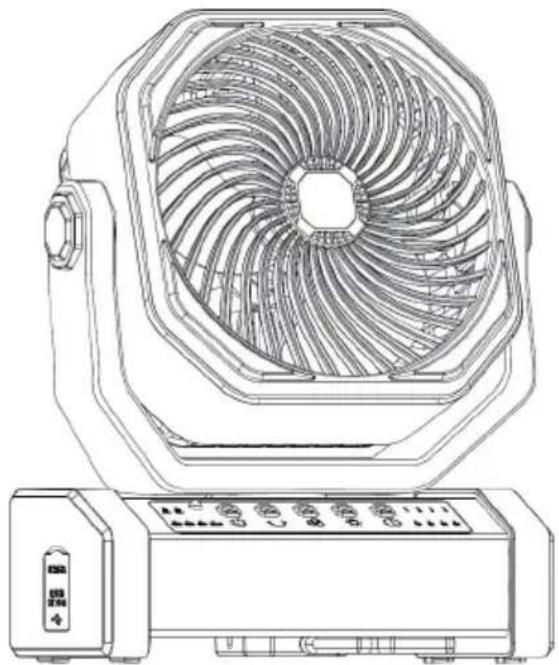
NEED HELP? CONTACT US!
Have product questions? Need technical support? Please feel free to contact us:
Technical Support and E-Warranty Certificate www.vevor.com/support
This is the original instruction. Please read all manual instructions carefully before operating. VEVOR reserves a clear interpretation of the user manual. The appearance of the product shall be subject to the product you received. Please forgive us that we won't inform you of any technology or software updates on our product.
SECURITY & WARNINGS
Unit 5 Albert Edward House, The Pavilion Preston, United Kingdom
| EC | REP |
SHUNSHUN GmbH
Römeräcker 9 Z2021, 76351
www.vevor.com/support
VEVOR®
TOUGH TOOLS, HALF PRICE
Technical support and e-warranty certificate www.vevor.com/support
POWERFUL FLOOR FAN
MODEL: D12
We continue to be committed to provide you tools with competitive price. "Save Half", "Half Price" or any other similar expressions used by us only represent estimate of savings you might benefit from buying certain tools with us compared to top brands and does not necessarily mean to cover all categories of tools offered. We kindly remind you to verify carefully when you are placing an order with us if you are actually saving half in comparison with the top major brands.
VEVOR®
TOUGH TOOLS, HALF PRICE
POWERFUL FLOOR FAN
MODEL: D12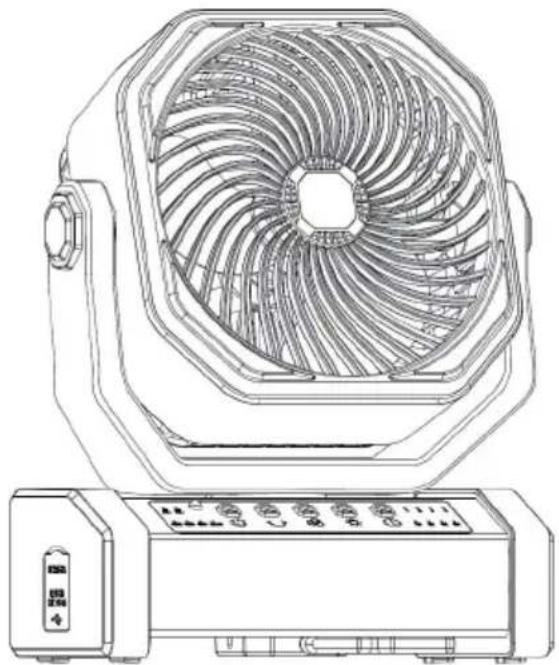
NEED HELP? CONTACT US!
Have product questions? Need technical support? Please feel free to contact us:
Technical Support and E-Warranty Certificate www.vevor.com/support
This is the original instruction, please read all manual instructions carefully before operating. VEVOR reserves a clear interpretation of the user manual. The appearance of the product shall be subject to the product you received. Please forgive us that we won't inform you of any technology or software updates on our product.
SECURITY & WARNINGS
Anaheim Place, Rancho Cucamonga, CA 91730
| UK | REP |
| EC | REP |
Pooledas Group Ltd
Unit 5 Albert Edward House, The Pavilion
Preston, United Kingdom
SHUNSHUN GmbH
Römeräcker 9 Z2021, 76351
www.vevor.com/support
VEVOR®
TOUGH TOOLS, HALF PRICE
We continue to be committed to providing you with tools at competitive prices. "Save Half", "Half Price" or any other similar expressions used by us only represent an estimate of savings you might benefit from buying certain tools with us compared to top brands and does not necessarily mean to cover all categories of tools offered. We kindly remind you to verify carefully when placing an order with us that you are actually saving half in comparison with the top major brands.
VEVOR®
TOUGH TOOLS, HALF PRICE
POWERFUL FLOOR FAN
MODEL: D12
NEED HELP? CONTACT US!
Have product questions? Need technical support? Please feel free to contact us:
Technical Support and E-Warranty Certificate www.vevor.com/support
This is the original instruction. Please read all manual instructions carefully before operating. VEVOR reserves the right to interpret the user manual. The appearance of the product shall be subject to the product you received. Please forgive us that we won't inform you in advance if there are any technology or software updates on our product.
SECURITY & WARNINGS
Unit 5 Albert Edward House, The Pavilion Preston, United Kingdom
| EC | REP |
SHUNSHUN GmbH
Römeräcker 9 Z2021, 76351
www.vevor.com/support
Brand : Vevor
Model : D12
Category : Fan