THRUSTMASTER AVA Offset Adapter - Controller

AVA Offset Adapter - Controller THRUSTMASTER - Free user manual and instructions

Find the device manual for free AVA Offset Adapter THRUSTMASTER in PDF.
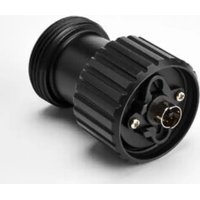
📄 232 pages English EN Download 💬 AI Question
Notice THRUSTMASTER AVA Offset Adapter - page 6
Pick your language and provide your email: we'll send you a specifically translated version.

User questions about AVA Offset Adapter THRUSTMASTER

0 question about this device. Answer the ones you know or ask your own.

Ask a new question about this device

The email remains private: it is only used to notify you if someone responds to your question.

No questions yet. Be the first to ask one.

Download the instructions for your Controller in PDF format for free! Find your manual AVA Offset Adapter - THRUSTMASTER and take your electronic device back in hand. On this page are published all the documents necessary for the use of your device. AVA Offset Adapter by THRUSTMASTER.

USER MANUAL AVA Offset Adapter THRUSTMASTER

Carefully read the instructions provided in this manual before installing the product, before any use of the product and before any maintenance. Be sure to follow the safety instructions. Failure to follow these instructions may result in accidents and/or damage. Keep this manual so that you can refer to the instructions in the future.

TABLE OF CONTENTS

  1. BOX CONTENTS......4
  2. INSTALLATION......5
  3. INFORMATION REGARDING USE OF THE
    PRODUCT....10
  4. FAQ AND TECHNICAL SUPPORT......11

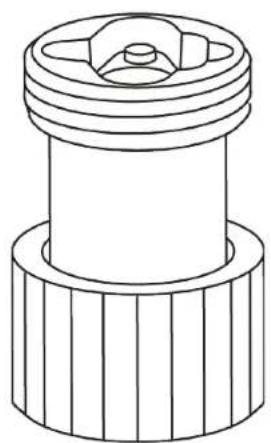
With AVA Offset Adapter, you can easily adjust the orientation of the flight stick grip on the AVA base to your preferred position, for enhanced realism and comfort during your flight sessions.

This manual will help you install and use your AVA Offset Adapter in the best possible conditions. Before taking off, be sure to read the instructions and warnings carefully: they will help you get the maximum amount of enjoyment out of your product.

1. Box contents
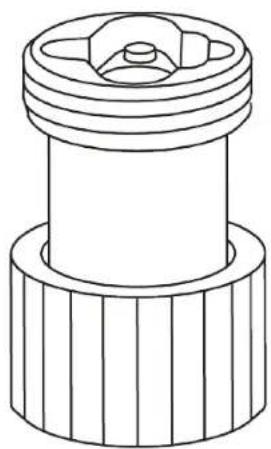
THRUSTMASTER AVA Offset Adapter - Box contents - 1

natural_image Technical line drawing of a mechanical component with ribbed base and central hub (no text or symbols)

THRUSTMASTER AVA Offset Adapter - Box contents - 2

2. Installation

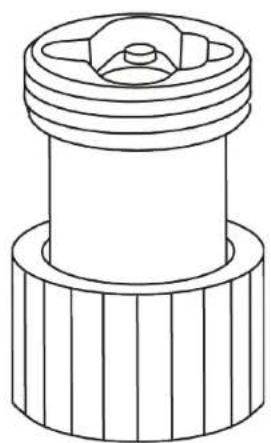
AVA Offset Adapter can be used to install the Thrustmaster F/A-18C Hornet™ HOTAS Add-On Grip* and Viper Grip – HOTAS Add-On Grip* (formerly F16-C Viper HOTAS Add-On Grip) flight stick grips on the AVA base*.
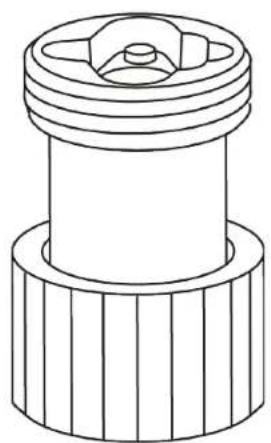
THRUSTMASTER AVA Offset Adapter - Installation - 1

natural_image Technical line drawing of a mechanical component with threaded top and flanged base (no text or symbols)

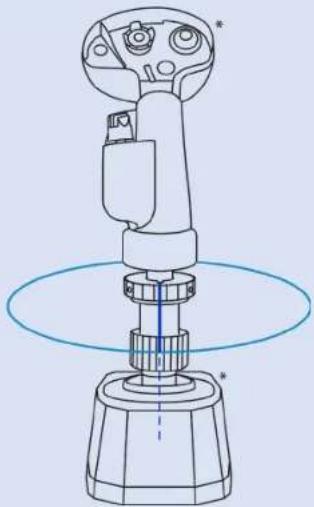
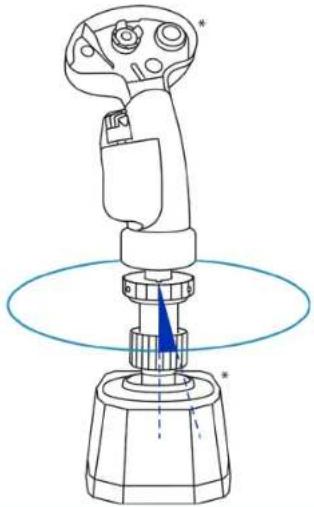
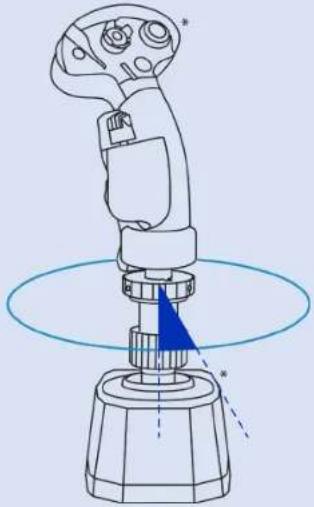
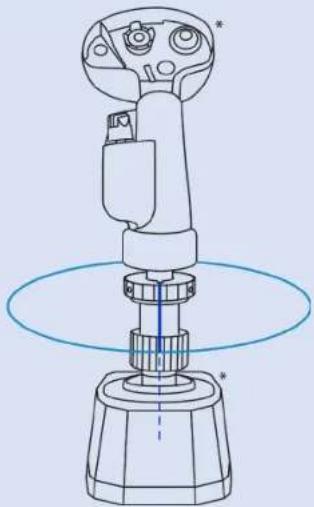
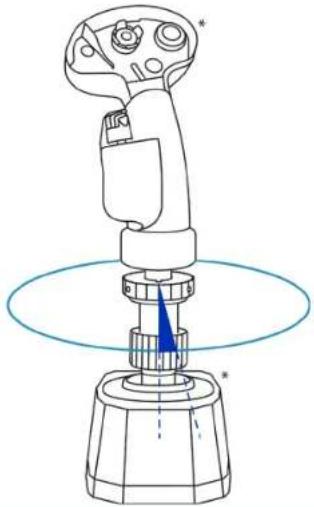
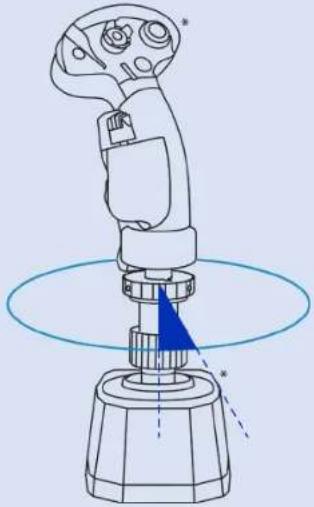
Possible configurations:

THRUSTMASTER AVA Offset Adapter - Possible configurations: - 1
15°THRUSTMASTER AVA Offset Adapter - Possible configurations: - 2
30°THRUSTMASTER AVA Offset Adapter - Possible configurations: - 3
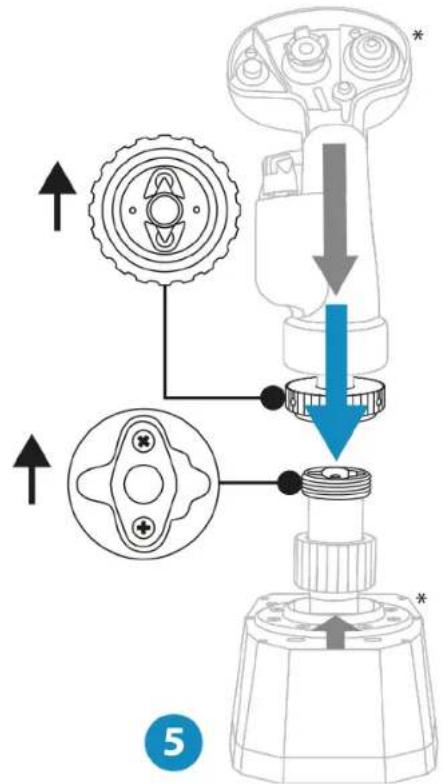
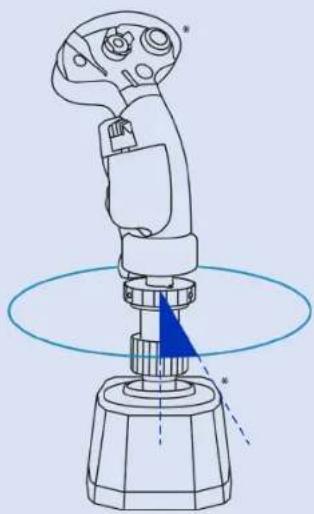
  1. Place AVA Offset Adapter on the AVA base*. Make sure that the keyed connection is properly positioned, as shown in the diagram below.
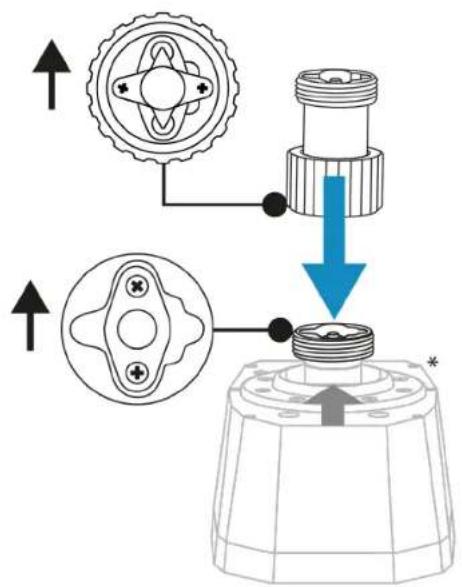
THRUSTMASTER AVA Offset Adapter - Possible configurations: - 4

text_image Technical diagram showing mechanical assembly with gear, shaft, and housing components, annotated with directional arrows and symbols.
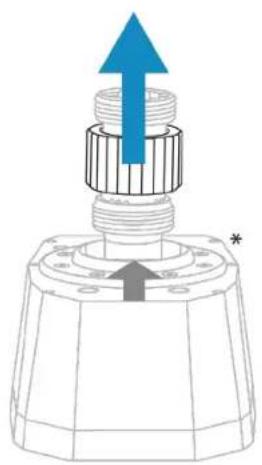
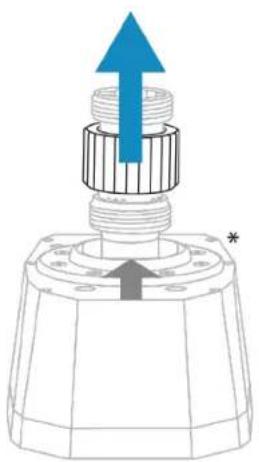
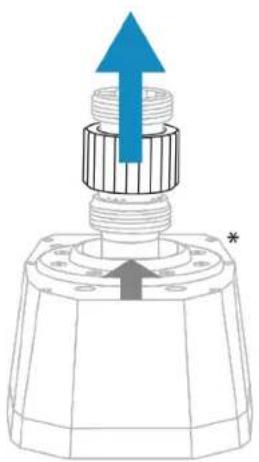
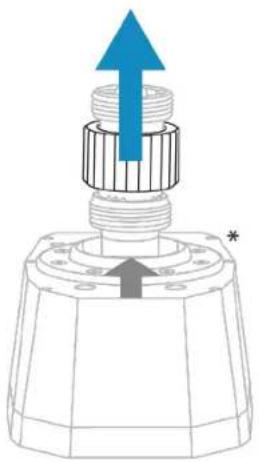
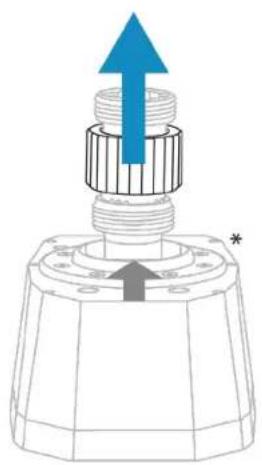
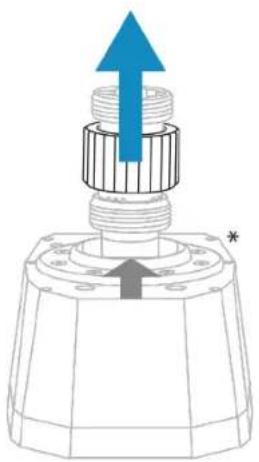
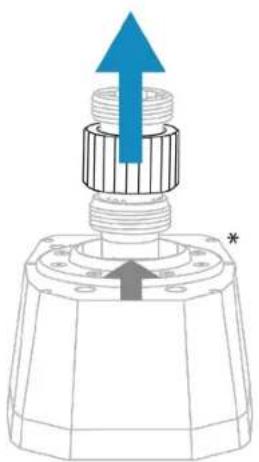
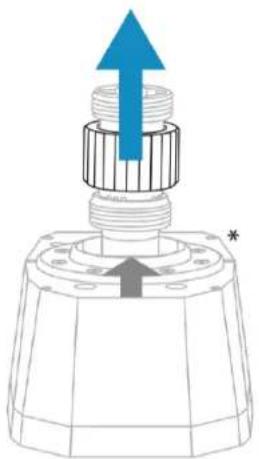
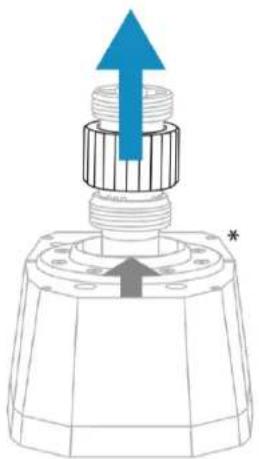
  1. Lift the clamping ring.

THRUSTMASTER AVA Offset Adapter - Possible configurations: - 5

natural_image Technical diagram of a mechanical component with an upward arrow and star symbol (no text or labels)
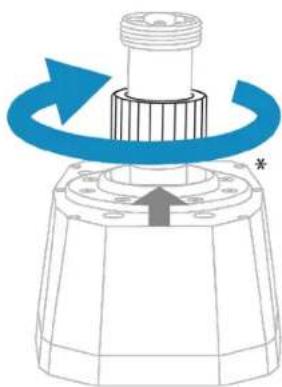
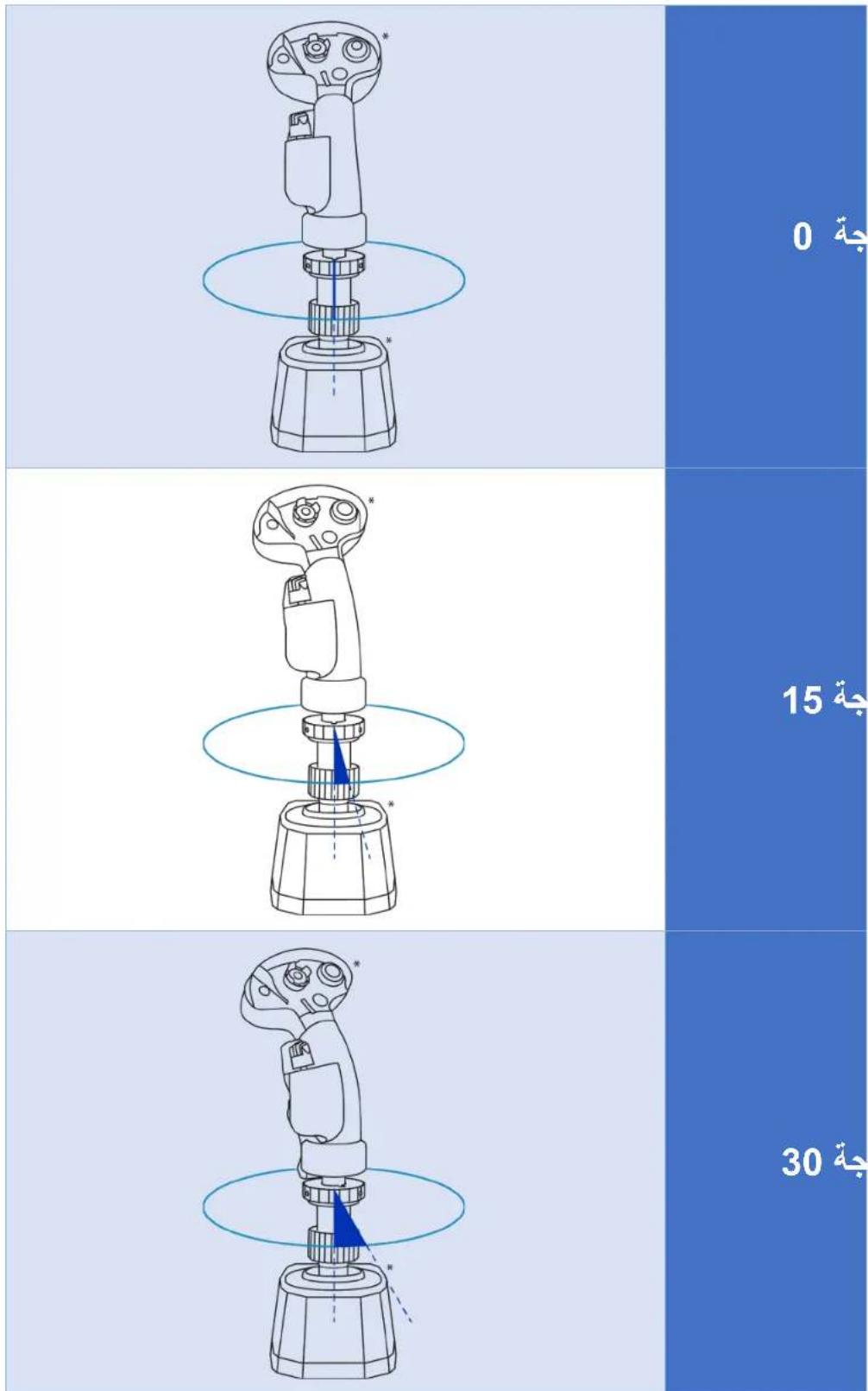
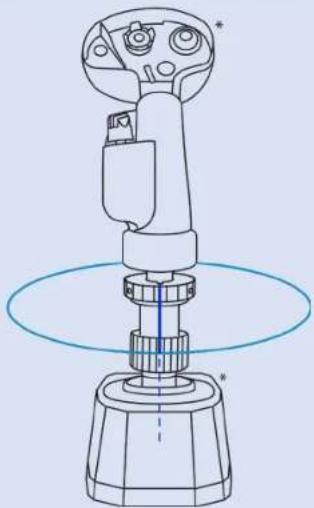
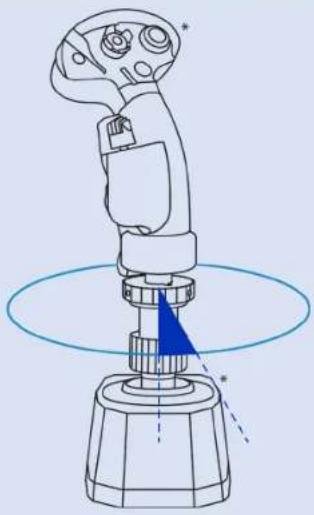
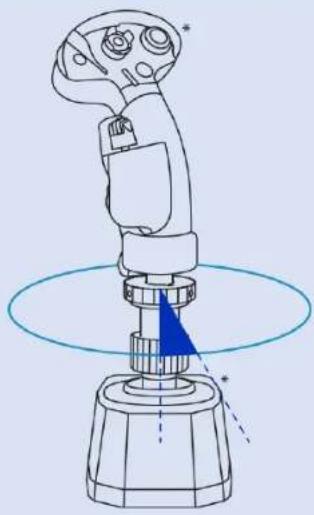
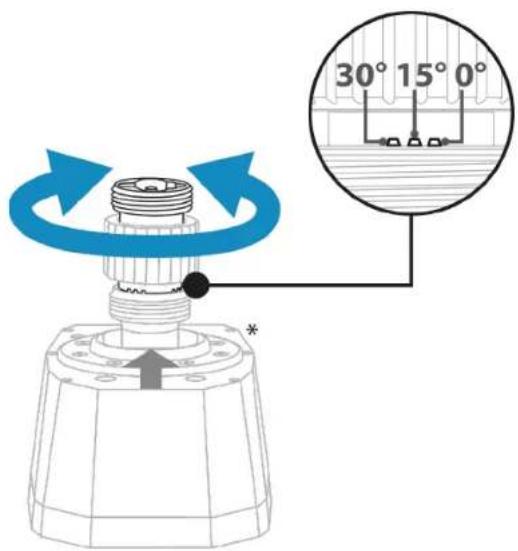
  1. Rotate the main part of the adapter to select the amount of offset for the flight stick grip ( 0^ , 15^ or 30^ — please see the table showing the different possible configurations). Once you have selected the amount of offset, lower the clamping ring.
THRUSTMASTER AVA Offset Adapter - Possible configurations: - 6

text_image 30° 15° 0° *
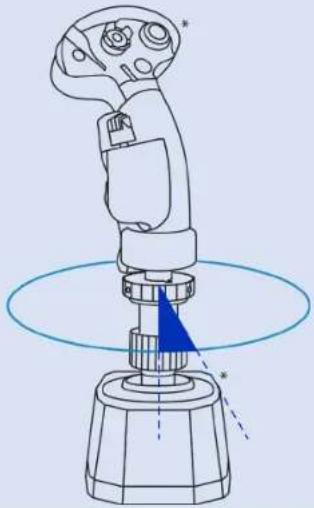
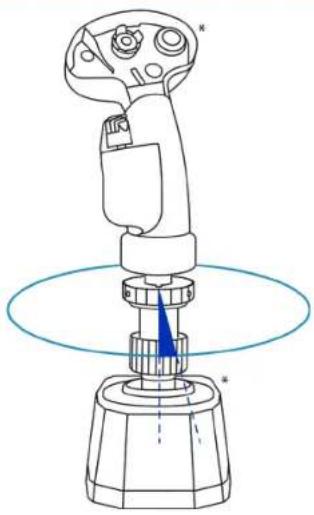
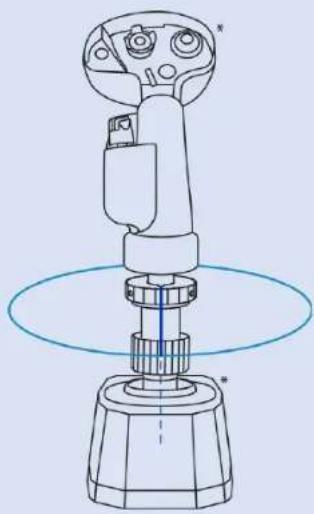
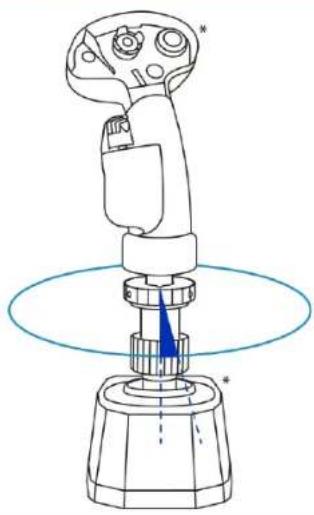
  1. Tighten the clamping ring.

THRUSTMASTER AVA Offset Adapter - Possible configurations: - 7

natural_image Mechanical component diagram showing a rotating shaft and housing with blue arrows indicating rotation (no text or symbols)
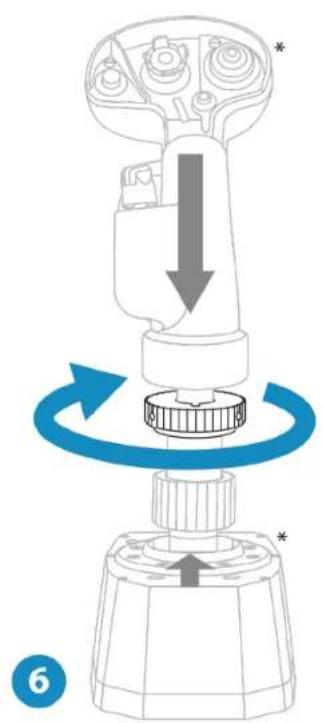
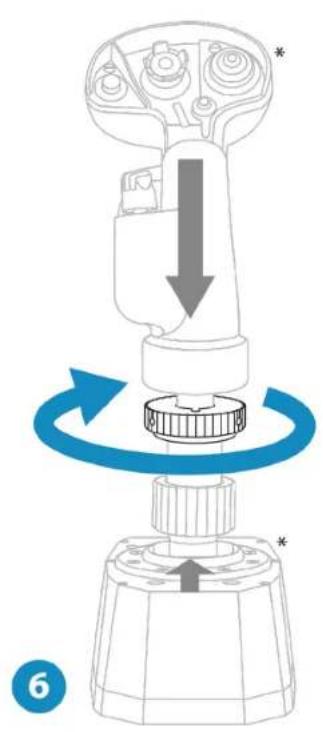
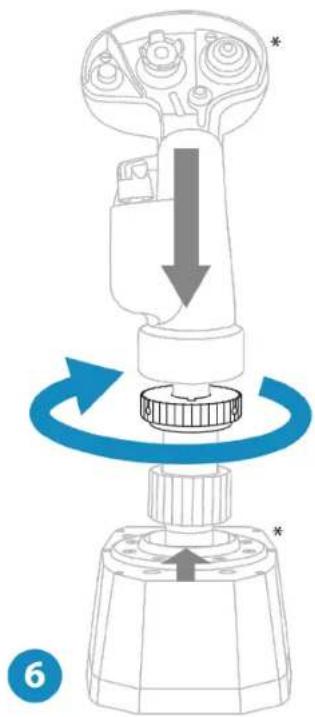
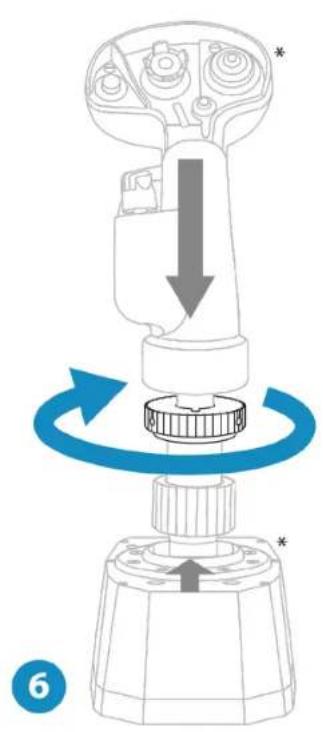
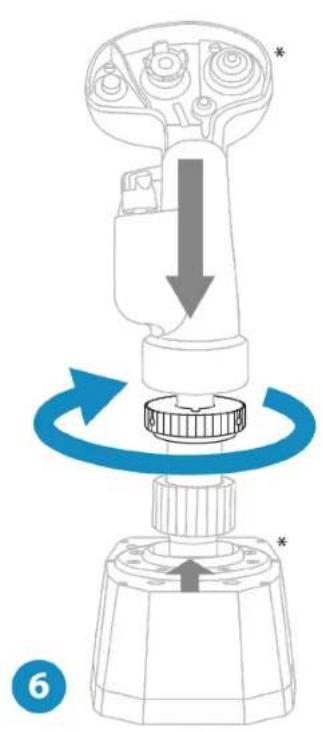
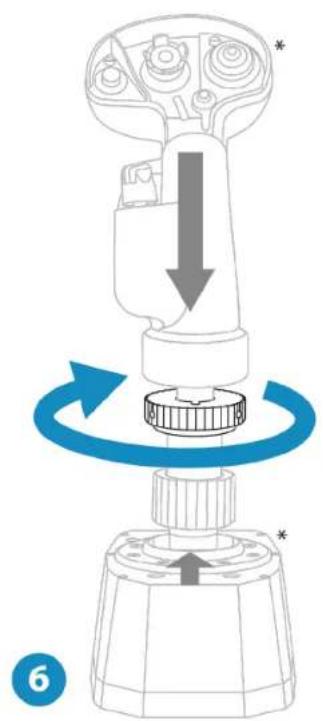
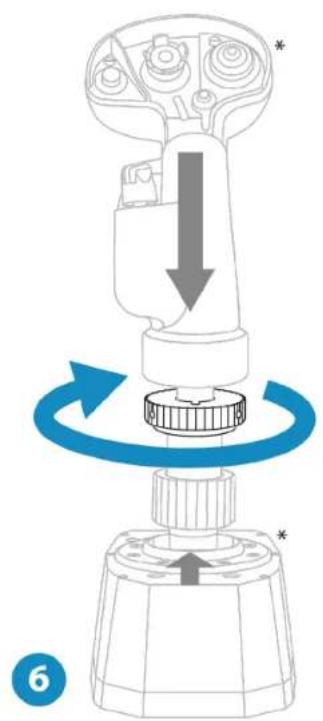
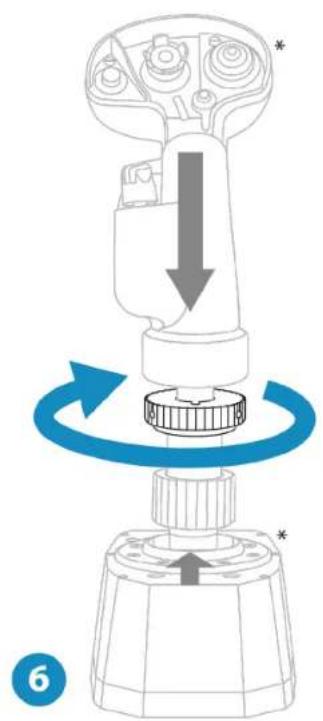
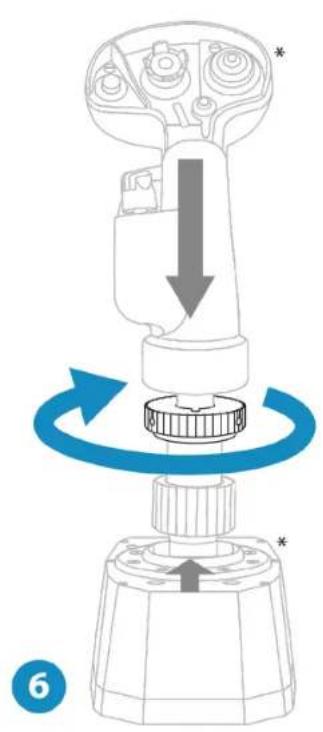
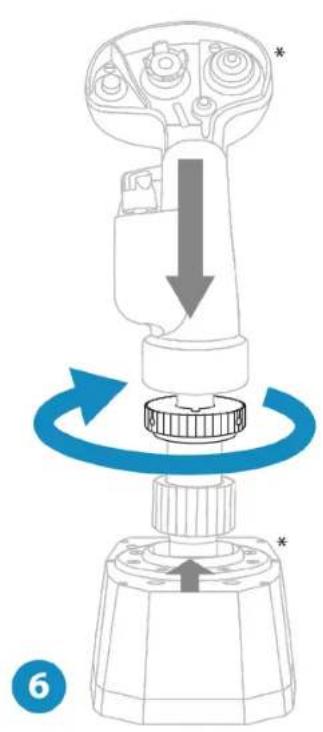
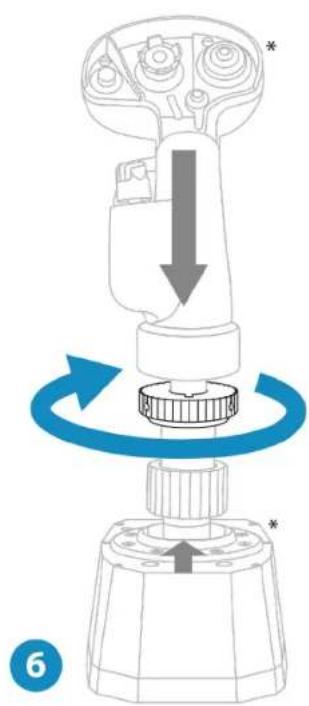
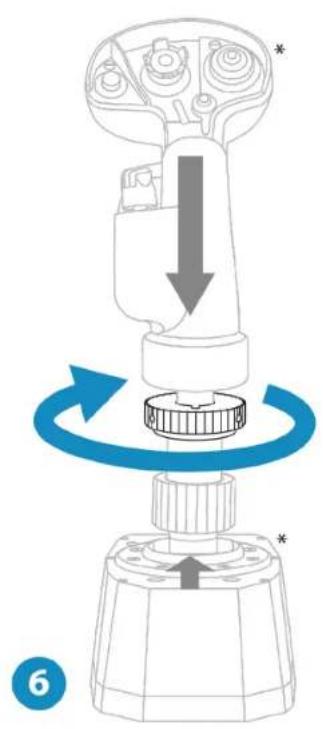
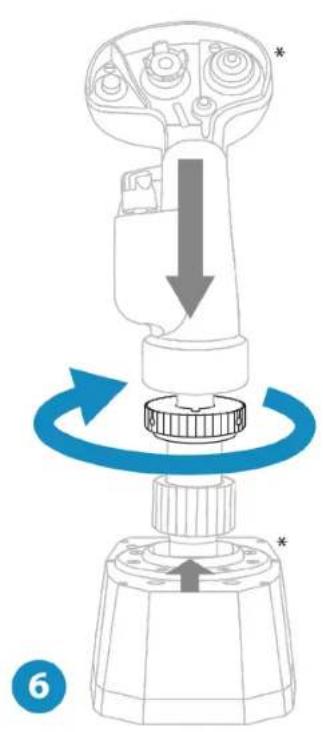
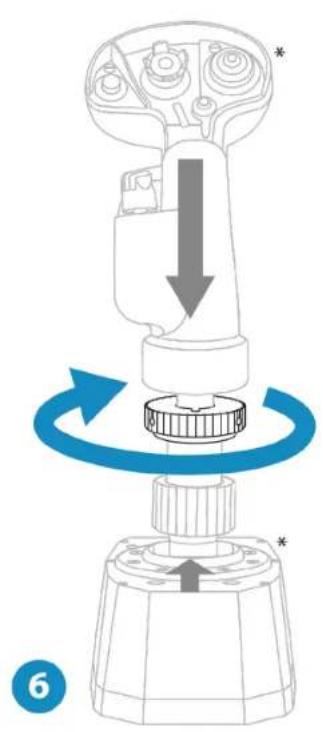
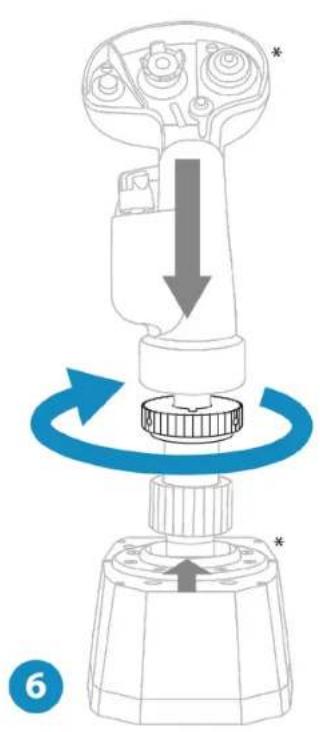
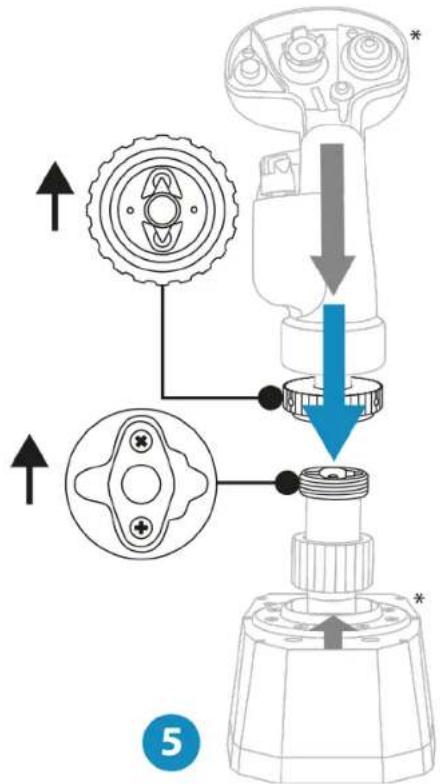
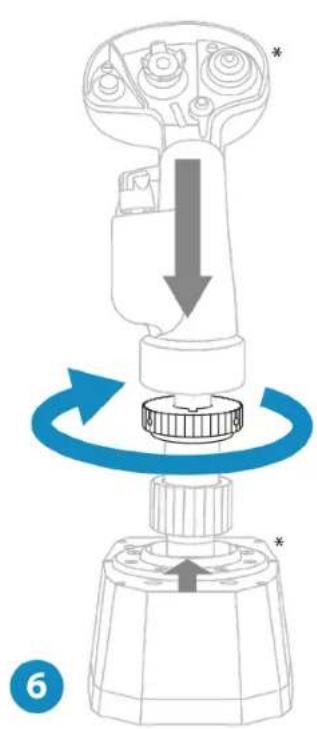
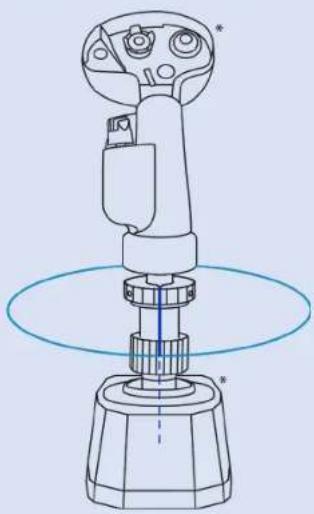
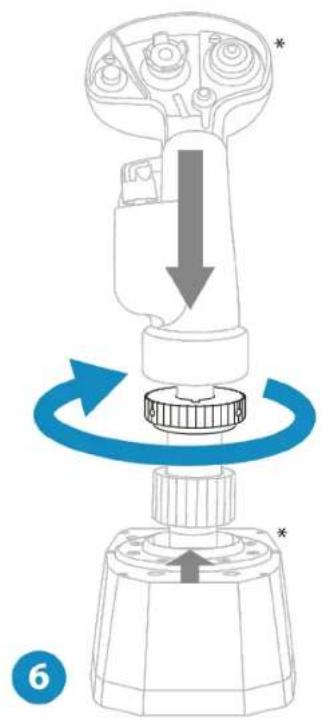
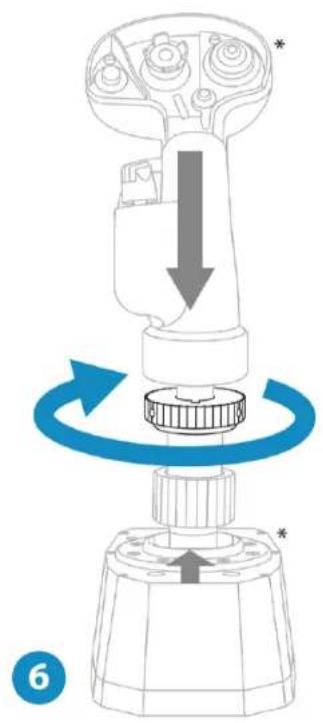
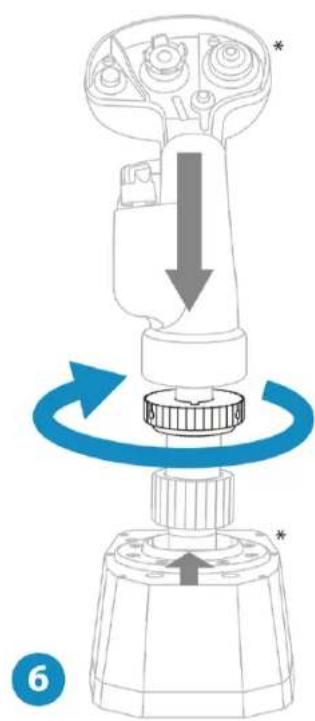
  1. Place the flight stick grip on AVA Offset Adapter. Make sure that the flight stick grip is properly positioned, as shown in the diagram below.

  2. Tighten the clamping ring.

THRUSTMASTER AVA Offset Adapter - Possible configurations: - 8

text_image Diagram illustrating the mechanical assembly process of a device, showing gear, shaft, and housing with directional arrows and component labels.

THRUSTMASTER AVA Offset Adapter - Possible configurations: - 9

natural_image Diagram of a mechanical device with a rotating shaft and housing, showing directional arrows indicating motion (no text or symbols)

THRUSTMASTER AVA Offset Adapter - Possible configurations: - 10

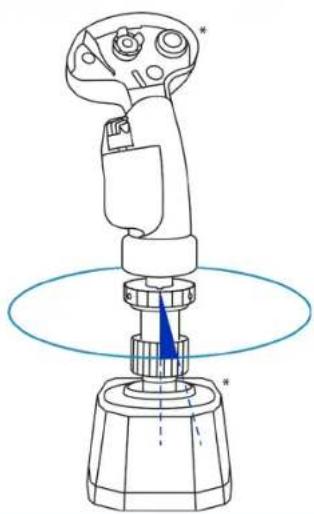
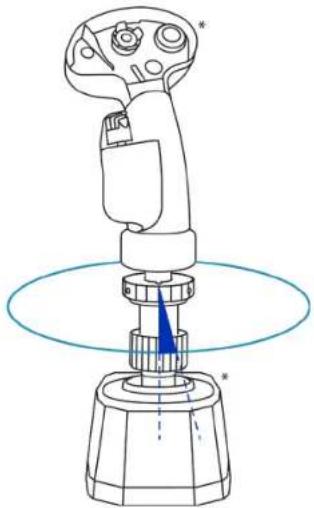
If you feel any resistance, do not force it. Make sure that the connectors for the base and the flight stick grip are properly aligned, as shown above. Failure to comply with this instruction may result in damage to the products.

3. Information regarding use of the product

THRUSTMASTER AVA Offset Adapter - Information regarding use of the product - 1
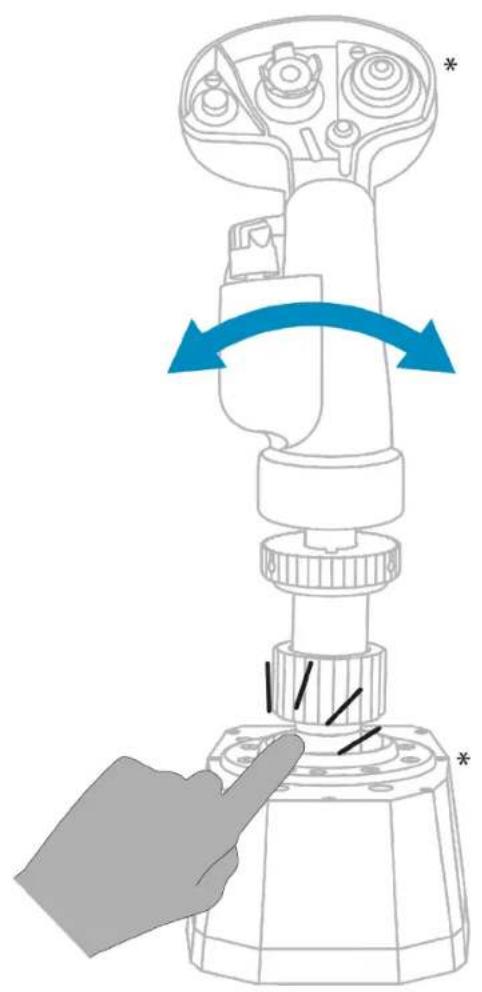
Pinch hazard

When using AVA Offset Adapter, never place your fingers in the space between the base and the adapter.
THRUSTMASTER AVA Offset Adapter - Information regarding use of the product - 2

natural_image Diagram of a mechanical device with a hand pointing to a base component, showing a blue rotation arrow (no text or symbols)

4. FAQ and technical support

Do you have questions regarding AVA Offset Adapter, or are you experiencing technical problems? If so, visit the Thrustmaster technical support website:

https://support.thrustmaster.com/product/ava-offset-adapter.

THRUSTMASTER AVA Offset Adapter - FAQ and technical support - 1

text_image QR code image containing encoded data, no visible human-readable text

THRUSTMASTER®

THRUSTMASTER AVA Offset Adapter - THRUSTMASTER® - 1

text_image AVA OFFSET ADAPTER

Pour PC (Windows 10/11)

natural_image Technical line drawing of a mechanical component with ribbed base and central hub (no text or symbols)

2. Installation

natural_image Technical line drawing of a mechanical component with threaded top and flanged base (no text or symbols)

Configurations possibles :

THRUSTMASTER AVA Offset Adapter - Configurations possibles : - 1
15°THRUSTMASTER AVA Offset Adapter - Configurations possibles : - 2
30°THRUSTMASTER AVA Offset Adapter - Configurations possibles : - 3
text_image Technical diagram showing mechanical assembly with gear, shaft, and housing components, annotated with directional arrows and component symbols.
natural_image Technical diagram of a mechanical component with an upward arrow and base, no text or symbols present

*vendue séparément

natural_image Mechanical component diagram showing a rotating shaft and housing with blue arrows indicating rotation (no text or symbols)
text_image Diagram illustrating the mechanical assembly of a device with labeled parts and directional arrows indicating motion or assembly.

THRUSTMASTER AVA Offset Adapter - Configurations possibles : - 4

natural_image Diagram of a mechanical device with a rotating shaft and housing, showing directional arrows indicating motion (no text or symbols)

THRUSTMASTER AVA Offset Adapter - Configurations possibles : - 5

natural_image Diagram of a hand pressing a button on a mechanical device with blue arrows indicating rotation (no text or symbols)

4. FAQ et support technique

https://support.thrustmaster.com/product/ava-offset-adapter.

THRUSTMASTER AVA Offset Adapter - FAQ et support technique - 1

text_image QR code image containing encoded data, no visible human-readable text

THRUSTMASTER®

THRUSTMASTER AVA Offset Adapter - THRUSTMASTER® - 1

text_image AVA OFFSET ADAPTER
natural_image Technical line drawing of a mechanical component with ribbed base and central hub (no text or symbols)

THRUSTMASTER AVA Offset Adapter - THRUSTMASTER® - 2

2. Einrichtung

natural_image Technical line drawing of a mechanical component with threaded top and flanged base (no text or symbols)
text_image Technical diagram showing mechanical assembly with gear and shaft components, annotated with directional arrows and component symbols
natural_image Technical diagram of a mechanical component with a blue upward arrow and a gray arrowhead, no visible text or symbols.

*Separat erhältlich

natural_image Mechanical component diagram showing a rotating shaft and housing with blue arrows indicating rotation (no text or symbols)
text_image Diagram illustrating mechanical assembly steps with labeled components and directional arrows

THRUSTMASTER AVA Offset Adapter - Einrichtung - 1

natural_image Diagram of a mechanical device with a rotating shaft and housing, showing directional arrows indicating motion (no text or symbols)

THRUSTMASTER AVA Offset Adapter - Einrichtung - 2

natural_image Diagram of a hand pressing a button on a device with blue arrows indicating rotation (no text or symbols)

https://support.thrustmaster.com/product/ava-offset-adapter.

THRUSTMASTER AVA Offset Adapter - Einrichtung - 3

text_image QR code image containing encoded data, no visible human-readable text

THRUSTMASTER®

THRUSTMASTER AVA Offset Adapter - THRUSTMASTER® - 1

text_image AVA OFFSET ADAPTER
natural_image Technical line drawing of a mechanical component with ribbed base and central hub (no text or symbols)

2. Installatie

De AVA Offset Adapter kan gebruikt worden om de Thrustmaster F/A-18C Hornet™ HOTAS Add-On Grip* en Viper Grip – HOTAS Add-On Grip* (voorheen F16-C Viper HOTAS Add-On Grip) flightstick-grepen op de AVA-basis* te installeren.

THRUSTMASTER AVA Offset Adapter - Installatie - 1

natural_image Technical line drawing of a mechanical component with threaded top and flanged base (no text or symbols)
text_image Technical diagram showing mechanical assembly with gear and shaft components, annotated with directional arrows and component symbols
  1. Til de klemring op.

THRUSTMASTER AVA Offset Adapter - Installatie - 2

natural_image Technical diagram of a mechanical component with a blue upward arrow and a gray arrowhead, no visible text or symbols.

*Apart verkocht

natural_image Mechanical component diagram showing a rotating shaft and housing with blue arrows indicating rotation (no text or symbols)
text_image Diagram illustrating the mechanical assembly process with labeled parts and directional arrows indicating motion or movement.

THRUSTMASTER AVA Offset Adapter - Installatie - 3

natural_image Diagram of a mechanical device with a rotating shaft and housing, showing directional arrows indicating motion (no text or symbols)

THRUSTMASTER AVA Offset Adapter - Installatie - 4

natural_image Diagram of a hand pressing a button on a mechanical device with blue arrows indicating rotation (no text or symbols)

4. FAQ en technische ondersteuning

https://support.thrustmaster.com/product/ava-offset-adapter.

THRUSTMASTER AVA Offset Adapter - FAQ en technische ondersteuning - 1

text_image QR code image containing encoded data, no visible human-readable text

THRUSTMASTER®

THRUSTMASTER AVA Offset Adapter - THRUSTMASTER® - 1

text_image AVA OFFSET ADAPTER

Per PC (Windows 10/11)

Manuale d'uso

THRUSTMASTER AVA Offset Adapter - THRUSTMASTER® - 2

natural_image Technical line drawing of a mechanical component with ribbed base and central hub (no text or symbols)

2. Installazione

natural_image Technical line drawing of a mechanical component with threaded top and flanged base (no text or symbols)
text_image Technical diagram showing mechanical assembly with gear, shaft, and housing components, annotated with directional arrows and symbols.
natural_image Technical diagram of a mechanical component with an upward arrow and a cross-section view (no text or symbols)

*Venduta separatamente

natural_image Mechanical component diagram showing a rotating shaft and housing with blue arrows indicating rotation (no text or symbols)
text_image Diagram illustrating the mechanical assembly process of a device, showing gear, shaft, and housing with directional arrows and component labels.

THRUSTMASTER AVA Offset Adapter - Installazione - 1

natural_image Diagram of a mechanical device with a rotating shaft and housing, showing directional arrows indicating motion (no text or symbols)

THRUSTMASTER AVA Offset Adapter - Installazione - 2

natural_image Diagram of a hand pressing a button on a device with blue arrows indicating rotation (no text or symbols)

https://support.thrustmaster.com/product/ava-offset-adapter.

THRUSTMASTER AVA Offset Adapter - Installazione - 3

text_image QR code image containing encoded data, no visible human-readable text

THRUSTMASTER®

THRUSTMASTER AVA Offset Adapter - THRUSTMASTER® - 1

text_image AVA OFFSET ADAPTER

Para PC (Windows 10/11)

Manual del usuario

THRUSTMASTER AVA Offset Adapter - THRUSTMASTER® - 2

natural_image Technical line drawing of a mechanical component with ribbed base and central hub (no text or symbols)

2. Instalación

natural_image Technical line drawing of a mechanical component with threaded top and flanged base (no text or symbols)
text_image Technical diagram showing mechanical assembly with gear and nut components, including directional arrows and component details.
natural_image Technical diagram of a mechanical component with an upward arrow and a cross-section view (no text or symbols)
natural_image Mechanical component diagram showing a rotating shaft and housing with blue arrows indicating rotation (no text or symbols)
text_image Diagram illustrating the step-by-step assembly of a mechanical device with labeled parts and directional arrows indicating motion.

THRUSTMASTER AVA Offset Adapter - Instalación - 1

natural_image Diagram of a mechanical device with a rotating shaft and base, showing directional arrows indicating motion (no text or symbols)

THRUSTMASTER AVA Offset Adapter - Instalación - 2

natural_image Diagram of a mechanical device with a hand pointing to a base component, showing a blue rotation arrow (no text or symbols)

https://support.thrustmaster.com/product/ava-offset-adapter.

THRUSTMASTER AVA Offset Adapter - Instalación - 3

text_image QR code image containing encoded data, no visible human-readable text

THRUSTMASTER®

THRUSTMASTER AVA Offset Adapter - THRUSTMASTER® - 1

text_image AVA OFFSET ADAPTER

Para PC (Windows 10/11)

Manual do Utilizador

THRUSTMASTER AVA Offset Adapter - THRUSTMASTER® - 2

natural_image Technical line drawing of a mechanical component with ribbed base and central hub (no text or symbols)

2. Instalação

natural_image Technical line drawing of a mechanical component with threaded top and flanged base (no text or symbols)
text_image Technical diagram showing mechanical assembly with gear, shaft, and housing components, annotated with directional arrows and symbols.
natural_image Technical diagram of a mechanical component with an upward arrow and a cross-section view (no text or symbols)

* Vendido à parte

natural_image Mechanical component diagram showing a rotating shaft and housing with blue arrows indicating rotation (no text or symbols)
text_image Diagram illustrating the step-by-step assembly of a mechanical device with labeled parts and directional arrows indicating motion.

THRUSTMASTER AVA Offset Adapter - Instalação - 1

natural_image Diagram of a mechanical device with a rotating shaft and base, showing directional arrows indicating motion (no text or symbols)

THRUSTMASTER AVA Offset Adapter - Instalação - 2

natural_image Diagram of a mechanical device with a hand pointing to a base component, showing a blue rotation arrow (no text or symbols)

https://support.thrustmaster.com/product/ava-offset-adapter.

THRUSTMASTER AVA Offset Adapter - Instalação - 3

text_image QR code image containing encoded data, no visible human-readable text

THRUSTMASTER®

THRUSTMASTER AVA Offset Adapter - THRUSTMASTER® - 1

text_image AVA OFFSET ADAPTER
natural_image Technical line drawing of a mechanical component with ribbed base and central hub (no text or symbols)

2. Установка

natural_image Technical line drawing of a mechanical component with threaded top and flanged base (no text or symbols)
text_image Technical diagram showing mechanical assembly with gear and nut components, including directional arrows and component details.
natural_image Technical diagram of a mechanical component with an upward arrow and a star symbol (no text or labels)
natural_image Mechanical component diagram showing a rotating shaft and housing with blue arrows indicating rotation (no text or symbols)
text_image Diagram illustrating the step-by-step assembly of a mechanical component with labeled parts and directional arrows.

THRUSTMASTER AVA Offset Adapter - Установка - 1

natural_image Diagram of a mechanical device with a rotating shaft and base, showing directional arrows indicating motion (no text or symbols)

THRUSTMASTER AVA Offset Adapter - Установка - 2

natural_image Diagram of a hand pressing down on a mechanical device with blue arrows indicating rotation (no text or symbols)

https://support.thrustmaster.com/product/ava-offset-adapter.

THRUSTMASTER AVA Offset Adapter - Установка - 3

text_image QR code image containing encoded data, no visible human-readable text

THRUSTMASTER®

THRUSTMASTER AVA Offset Adapter - THRUSTMASTER® - 1

text_image AVA OFFSET ADAPTER

Pro PC (Windows 10/11)

Uživatelský manuál

THRUSTMASTER AVA Offset Adapter - THRUSTMASTER® - 2

natural_image Technical line drawing of a mechanical component with ribbed base and central hub (no text or symbols)

THRUSTMASTER AVA Offset Adapter - THRUSTMASTER® - 3

2. Instalace

natural_image Technical line drawing of a mechanical component with threaded top and flanged base (no text or symbols)
text_image Technical diagram showing mechanical assembly with gear and shaft components, annotated with directional arrows and component symbols
natural_image Technical diagram of a mechanical component with a blue upward arrow and a gray arrowhead, no visible text or symbols.
natural_image Mechanical component diagram showing a rotating shaft and housing with blue arrows indicating rotation (no text or symbols)
text_image Diagram illustrating the mechanical assembly process with labeled parts and directional arrows indicating movement or force.

THRUSTMASTER AVA Offset Adapter - Instalace - 1

natural_image Diagram of a mechanical device with a rotating shaft and housing, showing directional arrows indicating motion (no text or symbols)

THRUSTMASTER AVA Offset Adapter - Instalace - 2

natural_image Diagram of a hand pressing a button on a mechanical device with blue arrows indicating rotation (no text or symbols)

https://support.thrustmaster.com/product/ava-offset-adapter.

THRUSTMASTER AVA Offset Adapter - Instalace - 3

text_image QR code image containing encoded data, no visible human-readable text

THRUSTMASTER®

THRUSTMASTER AVA Offset Adapter - THRUSTMASTER® - 1

text_image AVA OFFSET ADAPTER
natural_image Technical line drawing of a mechanical component with ribbed base and central hub (no text or symbols)

THRUSTMASTER AVA Offset Adapter - THRUSTMASTER® - 2

2. Kurulum

natural_image Technical line drawing of a mechanical component with threaded top and flanged base (no text or symbols)
text_image Technical diagram showing mechanical assembly with gear and shaft components, annotated with directional arrows and component symbols
natural_image Technical diagram of a mechanical component with a blue upward arrow and a gray arrowhead, no visible text or symbols.
natural_image Mechanical component diagram showing a rotating shaft and housing with blue arrows indicating rotation (no text or symbols)
text_image Diagram illustrating the mechanical assembly process with labeled parts and directional arrows indicating movement or force.

THRUSTMASTER AVA Offset Adapter - Kurulum - 1

natural_image Diagram of a mechanical device with a rotating shaft and housing, showing directional arrows indicating motion (no text or symbols)

THRUSTMASTER AVA Offset Adapter - Kurulum - 2

natural_image Diagram of a hand pressing a button on a mechanical device with blue arrows indicating rotation (no text or symbols)

https://support.thrustmaster.com/product/ava-offset-adapter.

THRUSTMASTER AVA Offset Adapter - Kurulum - 3

text_image QR code image containing encoded data, no visible human-readable text

THRUSTMASTER®

THRUSTMASTER AVA Offset Adapter - THRUSTMASTER® - 1

text_image AVA OFFSET ADAPTER
natural_image Technical line drawing of a mechanical component with ribbed base and central hub (no text or symbols)

2. Instalacja

natural_image Technical line drawing of a mechanical component with threaded top and flanged base (no text or symbols)
text_image Technical diagram showing mechanical assembly with gear and nut components, including directional arrows and component details.
natural_image Technical diagram of a mechanical component with an upward arrow and base, no visible text or symbols

* Do nabycia osobno

natural_image Mechanical component diagram showing a rotating shaft and housing with blue arrows indicating rotation (no text or symbols)
text_image Diagram illustrating the mechanical assembly process of a pump or valve, showing directional arrows and component labels.

THRUSTMASTER AVA Offset Adapter - Instalacja - 1

natural_image Diagram of a mechanical device with a rotating shaft and housing, showing directional arrows (no text or symbols)

THRUSTMASTER AVA Offset Adapter - Instalacja - 2

natural_image Diagram of a mechanical device with a hand pointing to a base component, showing a blue rotation arrow (no text or symbols)

https://support.thrustmaster.com/product/ava-offset-adapter.

THRUSTMASTER AVA Offset Adapter - Instalacja - 3

text_image QR code image containing encoded data, no visible human-readable text

THRUSTMASTER®

THRUSTMASTER AVA Offset Adapter - THRUSTMASTER® - 1

text_image AVA OFFSET ADAPTER

INNEHÅLLSFÖRTECKNING

  1. INNEHÅLL I FÖRPACKNINGEN ......4
  2. INSTALLATION ....5
  3. INFORMATION RÖRANDE
    ANVÄNDNINGEN AV PRODUKTEN......10
  4. VANLIGA FRÅGOR OCH TEKNISK
    SUPPORT....11
natural_image Technical line drawing of a mechanical component with ribbed base and central hub (no text or symbols)

2. Installation

natural_image Technical line drawing of a mechanical component with threaded body and flanged base (no text or symbols)
text_image Technical diagram showing mechanical assembly with gear and shaft components, annotated with directional arrows and component symbols.
  1. Lyft klämringen.

THRUSTMASTER AVA Offset Adapter - Installation - 1

natural_image Technical diagram of a mechanical component with a blue upward arrow and a gray arrowhead, no visible text or symbols.
natural_image Mechanical component diagram showing a rotating shaft and housing with blue arrows indicating rotation (no text or symbols)
  1. Placera

flygspakshandtaget

text_image Diagram illustrating the mechanical assembly process of a device, showing gear, shaft, and housing with directional arrows and component labels.

THRUSTMASTER AVA Offset Adapter - Installation - 2

natural_image Diagram of a mechanical device with a rotating shaft and housing, showing directional arrows indicating motion (no text or symbols)

THRUSTMASTER AVA Offset Adapter - Installation - 3

natural_image Diagram of a mechanical device with a hand pointing to a base component, showing a blue rotation arrow (no text or symbols)

https://support.thrustmaster.com/product/ava-offset-adapter.

THRUSTMASTER AVA Offset Adapter - Installation - 4

text_image QR code image containing encoded data, no visible human-readable text

THRUSTMASTER®

THRUSTMASTER AVA Offset Adapter - THRUSTMASTER® - 1

text_image AVA OFFSET ADAPTER

PC (Windows 10/11)

Käyttöohje

THRUSTMASTER AVA Offset Adapter - THRUSTMASTER® - 2

natural_image Technical line drawing of a mechanical component with ribbed base and central hub (no text or symbols)

THRUSTMASTER AVA Offset Adapter - THRUSTMASTER® - 3

2. Asennus

AVA Offset Adapter -kompensaatiosovittimen voi asentaa Thrustmaster F/A-18C Hornet™ HOTAS Add-On Grip*- ja Viper Grip – HOTAS Add-On Grip* (aiemmin F16-C Viper HOTAS Add-On Grip) - lentosauvakahvoihin AVA-jalustalla*.

THRUSTMASTER AVA Offset Adapter - Asennus - 1

natural_image Technical line drawing of a mechanical component with threaded top and flanged base (no text or symbols)
text_image Technical diagram showing mechanical assembly with gear and nut components, including directional arrows and component details.
natural_image Technical diagram of a mechanical component with a blue upward arrow and a gray arrowhead, no visible text or symbols.

* Myydään erikseen.

natural_image Mechanical component diagram showing a rotating shaft and housing with blue arrows indicating rotation (no text or symbols)

* Myydään erikseen.

text_image Diagram illustrating the mechanical assembly process of a device, showing gear, shaft, and housing with directional arrows and component labels.

THRUSTMASTER AVA Offset Adapter - Asennus - 2

natural_image Diagram of a mechanical device with a rotating shaft and housing, showing directional arrows indicating motion (no text or symbols)

THRUSTMASTER AVA Offset Adapter - Asennus - 3

natural_image Diagram of a hand pressing a button on a mechanical device with blue arrows indicating rotation (no text or symbols)

https://support.thrustmaster.com/product/ava-offset-adapter.

THRUSTMASTER AVA Offset Adapter - Asennus - 4

text_image QR code image containing encoded data, no visible human-readable text

THRUSTMASTER®

THRUSTMASTER AVA Offset Adapter - THRUSTMASTER® - 1

text_image AVA OFFSET ADAPTER

Pre PC (Windows 10/11)

Návod na použitie

THRUSTMASTER AVA Offset Adapter - THRUSTMASTER® - 2

natural_image Technical line drawing of a mechanical component with ribbed base and central hub (no text or symbols)

THRUSTMASTER AVA Offset Adapter - THRUSTMASTER® - 3

2. Inštalácia

natural_image Technical line drawing of a mechanical component with threaded top and flanged base (no text or symbols)

Možné konfigurácie:

THRUSTMASTER AVA Offset Adapter - Možné konfigurácie: - 1
15°THRUSTMASTER AVA Offset Adapter - Možné konfigurácie: - 2
30°THRUSTMASTER AVA Offset Adapter - Možné konfigurácie: - 3
text_image Technical diagram showing mechanical assembly with gear and shaft components, annotated with directional arrows and component symbols
natural_image Technical diagram of a mechanical component with a blue upward arrow and a gray arrowhead, no visible text or symbols.
natural_image Mechanical component diagram showing a rotating shaft and housing with blue arrows indicating rotation (no text or symbols)
text_image Diagram illustrating the mechanical assembly process with labeled parts and directional arrows indicating movement or force.

THRUSTMASTER AVA Offset Adapter - Možné konfigurácie: - 4

natural_image Diagram of a mechanical device with a rotating shaft and housing, showing directional arrows indicating motion (no text or symbols)

THRUSTMASTER AVA Offset Adapter - Možné konfigurácie: - 5

natural_image Diagram of a hand pressing a button on a mechanical device with blue arrows indicating rotation (no text or symbols)

https://support.thrustmaster.com/product/ava-offset-adapter.

THRUSTMASTER AVA Offset Adapter - Možné konfigurácie: - 6

text_image QR code image containing encoded data, no visible human-readable text

THRUSTMASTER®

THRUSTMASTER AVA Offset Adapter - THRUSTMASTER® - 1

text_image AVA OFFSET ADAPTER

PC-hez (Windows 10/11)

Használati útmutató

THRUSTMASTER AVA Offset Adapter - THRUSTMASTER® - 2

natural_image Technical line drawing of a mechanical component with ribbed base and central hub (no text or symbols)

THRUSTMASTER AVA Offset Adapter - THRUSTMASTER® - 3

2. Felszerelés

natural_image Technical line drawing of a mechanical component with ribbed base and central hub (no text or symbols)
text_image Technical diagram showing mechanical assembly with gear and shaft components, annotated with directional arrows and component symbols
natural_image Technical diagram of a mechanical component with a blue upward arrow and a gray arrowhead, no visible text or symbols.
natural_image Mechanical component diagram showing a rotating shaft and housing with blue arrows indicating rotation (no text or symbols)
text_image Diagram illustrating the mechanical assembly process with labeled parts and directional arrows indicating movement or force.

THRUSTMASTER AVA Offset Adapter - Felszerelés - 1

natural_image Diagram of a mechanical device with a rotating shaft and housing, showing directional arrows indicating motion (no text or symbols)

THRUSTMASTER AVA Offset Adapter - Felszerelés - 2

natural_image Diagram of a mechanical device with a hand pointing to a base component, showing a blue rotation arrow (no text or symbols)

https://support.thrustmaster.com/product/ava-offset-adapter.

THRUSTMASTER AVA Offset Adapter - Felszerelés - 3

text_image QR code image containing encoded data, no visible human-readable text

THRUSTMASTER®

AVA OFFSET ADAPTER

natural_image Line drawing of a mechanical component with ribbed base and central hub (no text or symbols)
natural_image Technical line drawing of a mechanical component with threaded top and flanged base (no text or symbols)
15°
30°

*

AVA Offset Adapter 1.

ת 0'02-AVA 77'

text_image Technical diagram showing mechanical assembly with gear, shaft, and housing components, annotated with directional arrows and symbols.

.הכלההוּרָהוּרָהוּרָהוּרָהוּרָהוּרָהוּרָהוּרָהוּרָהוּרָהוּרָהוּרָהוּרָהוּרָהוּרָה:2

THRUSTMASTER AVA Offset Adapter - AVA OFFSET ADAPTER - 1

natural_image Technical diagram of a mechanical component with an upward arrow and base, no text or symbols present
natural_image Mechanical component diagram showing a rotating shaft and housing with blue arrows indicating rotation (no text or symbols)

*

text_image Diagram illustrating the step-by-step assembly of a device with labeled parts and directional arrows indicating motion.

THRUSTMASTER AVA Offset Adapter - AVA OFFSET ADAPTER - 2

natural_image Diagram of a hand pressing a button on a mechanical device with blue arrows indicating rotation (no text or symbols)

*

הכלהה.4

https://support.thrustmaster.com/product/ava-offset-

.adapter

THRUSTMASTER AVA Offset Adapter - הכלהה.4 - 1

text_image QR code image containing encoded data, no visible human-readable text

THRUSTMASTER®

AVA OFFSET ADAPTER

natural_image Line drawing of a mechanical component with ribbed base and central hub (no text or symbols)
natural_image Technical line drawing of a mechanical component with threaded top and flanged base (no text or symbols)

THRUSTMASTER AVA Offset Adapter - AVA OFFSET ADAPTER - 1

text_image 0 15 30

* تُباع منفصلة

THRUSTMASTER AVA Offset Adapter - AVA OFFSET ADAPTER - 2

text_image Technical diagram showing mechanical assembly with gear and nut components, including directional arrows and component labels
  1. ارفع حلقة التثبيت.

THRUSTMASTER AVA Offset Adapter - AVA OFFSET ADAPTER - 3

natural_image Technical diagram of a mechanical component with an upward arrow and base, no text or symbols present

*تُباع منفصلة

natural_image Mechanical component diagram showing a rotating shaft and housing with blue arrows indicating rotation (no text or symbols)

*تُباع منفصلة

natural_image Diagram of a mechanical device with a rotating shaft and housing, showing directional arrows indicating motion (no text or symbols)

THRUSTMASTER AVA Offset Adapter - AVA OFFSET ADAPTER - 4

text_image Diagram illustrating the step-by-step assembly of a mechanical component with labeled parts and directional arrows.

THRUSTMASTER AVA Offset Adapter - AVA OFFSET ADAPTER - 5

natural_image Diagram of a hand pressing a button on a mechanical device with blue arrows indicating rotation (no text or symbols)

https://support.thrustmaster.com/product/ava-offsetadapter

THRUSTMASTER AVA Offset Adapter - AVA OFFSET ADAPTER - 6

text_image QR code image containing encoded data, no visible human-readable text

THRUSTMASTER®

THRUSTMASTER AVA Offset Adapter - THRUSTMASTER® - 1

text_image AVA OFFSET ADAPTER

PC 用 (Windows 10/11)

ユーザーズマニュアル

THRUSTMASTER AVA Offset Adapter - THRUSTMASTER® - 2

natural_image Technical line drawing of a mechanical component with threaded top and flanged base (no text or symbols)

THRUSTMASTER AVA Offset Adapter - THRUSTMASTER® - 3

2. 設置

natural_image Technical line drawing of a mechanical component with threaded top and flanged base (no text or symbols)

* 別壳

可能なセッティング:

THRUSTMASTER AVA Offset Adapter - 可能なセッティング: - 1
15°THRUSTMASTER AVA Offset Adapter - 可能なセッティング: - 2
30°THRUSTMASTER AVA Offset Adapter - 可能なセッティング: - 3

* 别壳

text_image Technical diagram showing mechanical assembly with gear and shaft components, including directional arrows and component details.
  1. クランプリングを持ち上げます。

THRUSTMASTER AVA Offset Adapter - 可能なセッティング: - 4

natural_image Technical diagram of a mechanical component with an upward arrow and base, no visible text or symbols

* 别壳

natural_image Mechanical assembly diagram showing a rotating shaft and housing with blue arrows indicating rotation (no text or symbols)
text_image Diagram illustrating the step-by-step assembly of a mechanical component with labeled parts and directional arrows.

THRUSTMASTER AVA Offset Adapter - 可能なセッティング: - 5

natural_image Diagram of a mechanical device with a rotating shaft and housing, showing directional arrows (no text or symbols)

THRUSTMASTER AVA Offset Adapter - 可能なセッティング: - 6

natural_image Diagram of a hand pressing a button on a mechanical device with blue arrows indicating rotation (no text or symbols)

* 別壳

4. FAQ とテクニカルサポート

https://support.thrustmaster.com/product/ava-offset- adapter

THRUSTMASTER AVA Offset Adapter - FAQ とテクニカルサポート - 1

text_image QR code image containing encoded data, no visible human-readable text

THRUSTMASTER®

THRUSTMASTER AVA Offset Adapter - THRUSTMASTER® - 1

text_image AVA OFFSET ADAPTER

适用于 PC (Windows 10/11)

用户手册

THRUSTMASTER AVA Offset Adapter - THRUSTMASTER® - 2

natural_image Technical line drawing of a mechanical component with threaded top and flanged base (no text or symbols)

THRUSTMASTER AVA Offset Adapter - THRUSTMASTER® - 3

2. 安装

natural_image Technical line drawing of a mechanical component with threaded top and flanged base (no text or symbols)

可能的配置:

THRUSTMASTER AVA Offset Adapter - 安装 - 1
15°THRUSTMASTER AVA Offset Adapter - 安装 - 2
30°THRUSTMASTER AVA Offset Adapter - 安装 - 3

*另售

text_image Technical diagram showing mechanical assembly with gear and shaft components, including directional arrows and component labels
  1. 抬起夹环。

THRUSTMASTER AVA Offset Adapter - 安装 - 4

natural_image Technical diagram of a mechanical component with an upward arrow and a cross symbol (no text or labels)

*另售

natural_image Mechanical component diagram showing a rotating shaft and housing with blue arrows indicating rotation (no text or symbols)

*另售

text_image Diagram illustrating the mechanical assembly of a pump or valve, showing key components and directional arrows with labels.

THRUSTMASTER AVA Offset Adapter - 安装 - 5

natural_image Diagram of a mechanical device with a rotating shaft and base, showing directional arrows indicating motion (no text or symbols)

THRUSTMASTER AVA Offset Adapter - 安装 - 6

natural_image Diagram of a hand pressing a button on a mechanical device with blue arrows indicating rotation (no text or symbols)

4. 常见问题解答和技术支持

https://support.thrustmaster.com/product/ava-offset-adapter.

THRUSTMASTER AVA Offset Adapter - 常见问题解答和技术支持 - 1

text_image QR code image containing encoded data, no visible human-readable text

THRUSTMASTER®

THRUSTMASTER AVA Offset Adapter - THRUSTMASTER® - 1

text_image AVA OFFSET ADAPTER

適用於 PC (Windows 10/11)

使用者手册

THRUSTMASTER AVA Offset Adapter - THRUSTMASTER® - 2

natural_image Technical line drawing of a mechanical component with threaded top and flanged base (no text or symbols)

THRUSTMASTER AVA Offset Adapter - THRUSTMASTER® - 3

2. 安装

natural_image Technical line drawing of a mechanical component with threaded top and flanged base (no text or symbols)

可能的設定:

THRUSTMASTER AVA Offset Adapter - 可能的設定: - 1
15°THRUSTMASTER AVA Offset Adapter - 可能的設定: - 2
30°THRUSTMASTER AVA Offset Adapter - 可能的設定: - 3

*另售

text_image Technical diagram showing mechanical assembly with gear and nut components, including directional arrows and component details.
  1. 抬起夾環。

THRUSTMASTER AVA Offset Adapter - 可能的設定: - 4

natural_image Technical diagram of a mechanical component with a blue upward arrow and a gray arrowhead, no visible text or symbols.

*另售

natural_image Mechanical component diagram showing a rotating shaft and housing with blue arrows indicating rotation (no text or symbols)

*另售

text_image Diagram illustrating mechanical assembly steps with labeled components and directional arrows

THRUSTMASTER AVA Offset Adapter - 可能的設定: - 5

natural_image Diagram of a mechanical device with rotating components and directional arrows indicating motion (no text or symbols)

THRUSTMASTER AVA Offset Adapter - 可能的設定: - 6

natural_image Illustration of a hand pressing down on a mechanical device with blue arrows indicating motion (no text or symbols)

*另售

4. 常見問題解答和技術支援

https://support.thrustmaster.com/product/ava-offset-adapter.

THRUSTMASTER AVA Offset Adapter - 常見問題解答和技術支援 - 1

text_image QR code image containing encoded data, no visible human-readable text

THRUSTMASTER®

THRUSTMASTER AVA Offset Adapter - THRUSTMASTER® - 1

text_image AVA OFFSET ADAPTER

PC 용 (Windows 10/11)

사용설명서

THRUSTMASTER AVA Offset Adapter - THRUSTMASTER® - 2

natural_image Technical line drawing of a mechanical component with threaded top and flanged base (no text or symbols)

THRUSTMASTER AVA Offset Adapter - THRUSTMASTER® - 3

2.설치

natural_image Technical line drawing of a mechanical component with threaded top and flanged base (no text or symbols)

가능한 구성:

15°
30°

*별도 판매

text_image Technical diagram showing mechanical assembly with gear and nut components, including directional arrows and component details.
  1. 콜램핑 링을 들어 올립니다.

THRUSTMASTER AVA Offset Adapter - 2.설치 - 1

natural_image Technical diagram of a mechanical component with a blue upward arrow and a gray arrowhead, no visible text or symbols.
natural_image Diagram of a mechanical component with a rotating shaft and base, showing rotational motion (no text or symbols)

*별도 판매

text_image Diagram illustrating mechanical assembly steps with labeled components and directional arrows

THRUSTMASTER AVA Offset Adapter - 2.설치 - 2

natural_image Diagram of a mechanical device with a rotating shaft and housing, showing directional arrows (no text or symbols)

THRUSTMASTER AVA Offset Adapter - 2.설치 - 3

natural_image Diagram of a hand pressing a button on a mechanical device with blue arrows indicating rotation (no text or symbols)

4. 자주 묻는 질문 및 기술 지원

https://support.thrustmaster.com/product/ava-offset-adapter.

THRUSTMASTER AVA Offset Adapter - 자주 묻는 질문 및 기술 지원 - 1

text_image QR code image containing encoded data, no visible human-readable text
Manual assistant
Powered by Anthropic
Waiting for your message
Product information

Brand : THRUSTMASTER

Model : AVA Offset Adapter

Category : Controller